Recommended INFINITI Q60 2020 Owner's Guide
[x] Cancel search | Manufacturer: INFINITI, Model Year: 2020, Model line: Q60, Model: INFINITI Q60 2020Pages: 476, PDF Size: 2.05 MB
Page 111 of 476

5. Confirm that the security indicator lightcomes on. The security indicator light
stays on for about 30 seconds. The
vehicle security system is now pre-
armed. After about 30 seconds the
vehicle security system automatically
shifts into the armed phase. The security
light begins to flash once every approxi-
mately 3 seconds. If, during this 30-
second pre-arm time period, the door is
unlocked, or the ignition switch is pushed
to ACC or ON, the system will not arm.
Even when the driver and/or passengers
are in the vehicle, the system will activate
with all doors, hood, and trunk lid locked
with the ignition switch in the LOCK
position. When pushing the ignition switch
to the ACC or ON position, the system will
be released.
Vehicle security system activation
The vehicle security system will give the
following alarm:
. The headlights blink and the horn sounds
intermittently.
. The alarm automatically turns off after
approximately 1 minute. However, the
alarm reactivates if the vehicle is tam-
pered with again. The alarm is activated by:
.
Unlocking the door or opening the trunk
lid without using the UNLOCK button on
the Intelligent Key, the door handle
request switch or one touch unlock
sensor. (Even if the door is opened by
releasing the door inside lock knob or
using the mechanical key, the alarm will
activate.)
. Opening the hood.
How to stop an activated alarm
The alarm will stop by unlocking a door by
pushing the UNLOCK button on the Intelli-
gent Key, the door handle request switch or
touching the one touch unlock sensor. The
alarm will not stop if the ignition switch is
placed in the ACC or ON position.
If the Intelligent Key battery is discharged:
If the Intelligent Key battery is discharged,
the alarm will not stop by pushing the
UNLOCK button on the Intelligent Key, the
door handle request switch or one touch
unlock sensor. In such a case, unlock the
driver’s door using the mechanical key and
touch the ignition switch with the Intelligent
Key to stop the alarm. See “Intelligent Key
battery discharge” (P.5-14) for details.
If the system does not operate as described
above, it is recommended you have it
checked by an INFINITI retailer.
INFINITI VEHICLE IMMOBILIZER
SYSTEM
The INFINITI Vehicle Immobilizer System
will not allow the engine to start without
the use of the registered Intelligent Key.
Never leave these keys in the vehicle.
FCC Notice:
For USA:
This device complies with Part 15 of the
FCC Rules. Operation is subject to the
following two conditions: (1) This device
may not cause harmful interference, and (2)
this device must accept any interference
received, including interference that may
cause undesired operation.
NOTE:
Changes or modifications not expressly
approved by the party responsible for
compliance could void the user’s authority
to operate the equipment.
For Canada:
This device complies with Industry Canada
licence-exempt RSS standard(s). Operation
is subject to the following two conditions:
(1) this device may not cause interference,
and (2) this device must accept any inter-
ference, including interference that may
cause undesired operation of the device.
Instruments and controls2-33
Page 112 of 476

2-34Instruments and controls
SIC2045
Security indicator light
The security indicator light is located on the
meter panel. It indicates the status of the
INFINITI Vehicle Immobilizer System.
The light blinks after the ignition switch was
in the LOCK, ACC or OFF position. This
function indicates the security systems
equipped on the vehicle are operational.
If the INFINITI Vehicle Immobilizer System is
malfunctioning, this light will remain on
while the ignition switch is in the ON
position.
If the light still remains on and/or the
engine will not start, seek service for the
INFINITI Vehicle Immobilizer System assoon as possible. Please bring all registered
keys that you have. It is recommended you
visit an INFINITI retailer for this service.
WARNING
In freezing temperatures the washer
solution may freeze on the windshield
and obscure your vision which may lead
to an accident. Warm windshield with
the defroster before you wash the wind-
shield.
CAUTION
.
Do not operate the washer continu-
ously for more than 30 seconds.
. Do not operate the washer if the
reservoir tank is empty.
. Do not fill the window washer re-
servoir tank with washer fluid con-
centrates at full strength. Some
methyl alcohol based washer fluid
concentrates may permanently stain
the grille if spilled while filling the
window washer reservoir tank.
. Pre-mix washer fluid concentrates
with water to the manufacturer’s
recommended levels before pouring
the fluid into the window washer
reservoir tank. Do not use the win-
dow washer reservoir tank to mix the
WIPER AND WASHER SWITCH
Page 118 of 476

2-40Instruments and controls
when the light beam is out of
position.
— When there is a sudden, contin- uous change in brightness.
— When driving on a road that passes over rolling hills, or a road
that has level differences.
— When driving on a road with many curves.
— When a sign or mirror-like sur- face is reflecting intense light
towards the front of the vehicle.
— When the container, etc. being towed by a leading vehicle is
reflecting intense light.
— When a headlight on your vehicle is damaged or dirty.
— When the vehicle is leaning at an angle due to a punctured tire,
being towed, etc.
. The timing of switching the low beam
and high beam may change under the
following situations.
— The brightness of the headlights of the oncoming vehicle or leading
vehicle.
— The movement and direction of the oncoming vehicle and the leading vehicle.
— When only one light on the on- coming vehicle or the leading
vehicle is illuminated.
— When the oncoming vehicle or the leading vehicle is a two-wheeled
vehicle.
— Road conditions (incline, curve, the road surface, etc.).
— The number of passengers and the amount of luggage.
JVI1488X
High beam assist operations:
To activate the high beam assist system,
turn the headlight switch to the AUTO
position
and push the lever forward(high beam position). The high beam assist
indicator light in the meter will illuminate
while the headlights are turned on.
If the high beam assist indicator light does
not illuminate in the above condition, it may
indicate that the system is not functioning
properly. It is recommended you have the
system checked by an INFINITI retailer.
When the vehicle speed lowers to less than
approximately 12 MPH (20 km/h), the
headlight remains the low beam.
Page 119 of 476

To turn off the high beam assist system, turn
the headlight switch to theposition or
select the low beam position by placing the
lever in the neutral position.
JVS0823X
Ambient image sensor maintenance:
The ambient image sensor
for the high
beam assist system is located above the
inside mirror. To keep the proper operation
of the high beam assist system and prevent a
system malfunction, be sure to observe the
following:
. Always keep the windshield clean.
. Do not attach a sticker (including trans-
parent material) or install an accessory
near the ambient image sensor.
. Do not strike or damage the areas around
the ambient image sensor.
If the ambient image sensor is damaged due
to an accident, it is recommended you
contact an INFINITI retailer.
Battery saver system
A chime will sound and the light reminder
warning will appear in the vehicle informa-
tion display when the driver side door is
opened with the light switch in the
orposition and the ignition switch in the
ACC, OFF or LOCK position.
When the headlight switch is in the
orposition while the ignition switch is in
the ON position, the lights will automatically
turn off after a period of time when the
ignition switch has been pushed to the OFF
position.
When the headlight switch remains in the
orposition after the lights auto-
matically turn off, the lights will turn on
when the ignition switch is pushed to the ON
position.
CAUTION
. When you turn on the headlight
switch again after the lights auto-
matically turn off, the lights will not
turn off automatically. Be sure to
turn the light switch to the OFF
position when you leave the vehicle
for extended periods of time, other-
wise the battery will be discharged.
Instruments and controls2-41
Page 120 of 476

2-42Instruments and controls
.Never leave the light switch on when
the engine is not running for a period
of time even if the headlights turn off
automatically.
Daytime running light system
The daytime running lights automatically
illuminate when the engine is started with
the parking brake released. The daytime
running lights operate with the headlight
switch in the OFF, AUTO or
position.
Turn the headlight switch to theposition
for full illumination when driving at night.
If the parking brake is applied before the
engine is started, the daytime running lights
do not illuminate. The daytime running lights
illuminate once the parking brake is released.
The daytime running lights will remain on
until the ignition switch is pushed to the OFF
position.
WARNING
When the daytime running light system
is active, tail lights on your vehicle are
not on. It is necessary at dusk to turn on
your headlights. Failure to do so could
cause an accident injuring yourself and
others.
Adaptive Front lighting System
(AFS) (if so equipped)
The Adaptive Front lighting System (AFS)
will automatically adjust the headlights (low
beam) toward the turning direction to
improve the driver’s view. When the head-
light switch is ON and the driver operates
the steering wheel in a turn, the AFS system
will be activated.
The AFS will operate:
. when the headlight switch is ON.
. when the shift lever is in any position
other than P (Park) or R (Reverse).
. when the vehicle is driven at above 3
MPH (5 km/h) for the left-side head-
light. Note that the right-side low beam
headlight will swivel but the left-side
headlight will not swivel when the vehicle
is below 3 MPH (5 km/h) and the
steering wheel is turned.
AFS will also adjust the headlight to a proper
axis automatically, depending on the number
of occupants in the vehicle, the load the
vehicle is carrying and the road conditions.
If the AFS warning appears in the vehicle
information display after the ignition switch
has been pushed to the ON position, this
may indicate that the AFS is not functioning
properly. Have the system checked. It is
recommended you visit an INFINITI retailer for this service. When the engine is started,
the headlights will vibrate to check the
system condition. This is not a malfunction.
Page 124 of 476

2-46Instruments and controls
.Any liquid spilled on the heated seat
should be removed immediately with
a dry cloth.
. When cleaning the seat, never use
gasoline, thinner, or any similar ma-
terials.
. If any malfunctions are found or the
heated seat does not operate, turn
the switch off and have the system
checked. It is recommended you visit
an INFINITI retailer for this service.
JVR0505X
The front seats can be warmed by built-in
heaters. The heating system of driver’s seat
and front passenger seat can be operated
independently.
OPERATION WITH SWITCH
1. Start the engine.
2. Push the switch on the instrument panel.
.Each time the switch is pushed, the
seat heating mode will change in the
following order.
AUTO ?High ?Mid ?Low ?OFF
.The indicator lighton the switch will
illuminate when the heater is on.
When the vehicle’s interior is warmed, or
before you leave the vehicle, be sure to turn off the seat heater.
OPERATION WITH TOUCH
SCREEN
Push the CLIMATE button and touch []
or [] on the lower display. Select an item
from [AUTO], [High], [Mid], [Low] or [OFF].
AUTO MODE SETTING
When in the AUTO mode, the heater will
turn on or off automatically according to the
conditions such as the temperature inside
the vehicle compartment. Depending on the
conditions, the heater will not turn on even if
AUTO is selected. The settings for the AUTO
mode can be changed. For details, see
“Climate settings” (P.4-40).
Page 125 of 476
WARNING
Do not use or allow occupants to come
into contact with the heated steering
wheel if you or the occupants cannot
monitor elevated steering wheel tem-
peratures or have an inability to feel pain
in those body parts in contact. Use of the
heated steering wheel by such people
could result in serious injuries.
CAUTION
.The battery could run down if the
steering wheel heater is operated
while the engine is not running.
. Do not use the steering wheel heater
for extended periods of time as it may
cause burns and overheating.
. Any liquid spilled on the steering
wheel should be removed immedi-
ately with a dry cloth.
. When cleaning the steering wheel,
never use gasoline, thinner, or any
similar materials.
. If any malfunctions are found or the
steering wheel heater does not oper-
ate, turn the heater off and have the system checked. It is recommended
that you visit an INFINITI retailer for
this service.
Push the CLIMATE button and touch
[Steering Heater] on the lower display to
turn on or off the steering wheel heating
manually. The steering wheel heating will
turn off automatically 30 minutes after it
has been turned on. When the steering
wheel heating is turned on, the indicator
above [Steering Heater] will turn on.
If the surface temperature of the steering
wheel is above the temperature within which
the system is designed to operate, the
system will not heat the steering wheel. This
is not a malfunction.
Automatic steering wheel heating can be
turned on or off from the climate control
settings screen. For details, see “Climate
settings” (P.4-40).
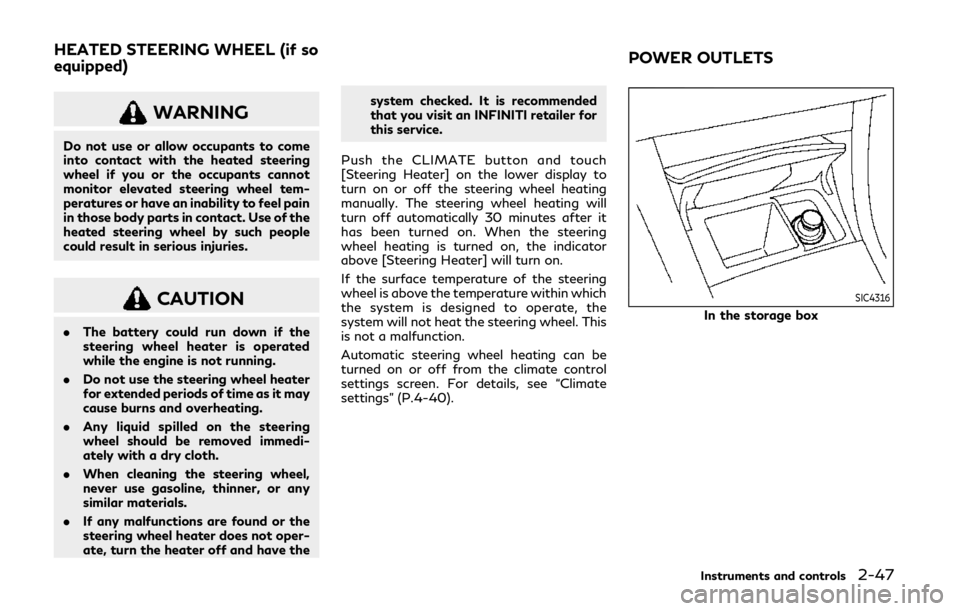
SIC4316
In the storage box
Instruments and controls2-47
HEATED STEERING WHEEL (if so
equipped) POWER OUTLETS
Page 132 of 476

2-54Instruments and controls
Auto reverse function
WARNING
There are some small distances immedi-
ately before the closed position which
cannot be detected. Make sure that all
passengers have their hands, etc., inside
the vehicle before closing the window.
If the control unit detects something caught
in the window as it is closing, the window
will be immediately lowered.
The auto reverse function can be activated
when the window is closed by automatic
operation when the ignition switch is in the
ON position or for 45 seconds after the
ignition switch is pushed to the OFF posi-
tion.
Depending on the environment or driving
conditions, the auto reverse function may
be activated if an impact or load similar to
something being caught in the window
occurs.
Automatic adjusting function
CAUTION
When the battery cable is removed from
the battery terminal, do not close either
of the front doors. The automatic win-
dow adjusting function will not work and
the side roof panel may be damaged.
The power window has an automatic ad-
justing function. When the door is being
opened, the window is automatically low-
ered slightly to avoid contact between the
window and the side roof panel. When the
door is closed, the window is automatically
raised slightly.
While the automatic adjusting function does
not work, the window will be controlled as
follows:
. When the door is opened, the window
lowers for approximately 2 seconds.
. While the door is open, the window
cannot be raised.
If the windows do not close auto-
matically
If the power window automatic function
(closing only) does not operate properly,
perform the following procedure to initialize the power window system.
1. Push the ignition switch to start the
engine.
2. Close the door.
3. After starting the engine, open the window completely by operating the
power window switch.
4. Pull the power window switch and hold it to close the window, and then hold the
switch more than 3 seconds after the
window is closed completely.
5. Release the power window switch. Op- erate the window by the automatic
function to confirm the initialization is
complete.
6. Perform steps 2 through 5 above for other windows.
If the power window automatic function
does not operate properly after performing
the procedure above, it is recommended you
have your vehicle checked by an INFINITI
retailer.
Page 134 of 476

2-56Instruments and controls
will automatically open or close all the way.
To stop the roof, push the switch once more
while it is opening or closing.
Operating moonroof with Intelli-
gent Key (if so equipped)
The moonroof can be opened by pushing the
UNLOCK button on the Intelligent Key. This
function will not operate while the moonroof
timer is activated or when the moonroof
need to be initialized. For details about the
Intelligent Key button usage, see “How to
use remote keyless entry system” (P.3-16).
Opening:
To open the sunroof, push the UNLOCK
button on the Intelligent Key for about 3
seconds after the door is unlocked.
To stop opening, release the
button.
Auto reverse function
WARNING
There are some small distances immedi-
ately before the closed position which
cannot be detected. Make sure that all
passengers have their hands, etc., inside
the vehicle before closing the moonroof.If the control unit detects something caught
in the moonroof when it is closing, the
moonroof will be immediately opened.
The auto reverse function can be activated
when the moonroof is closed by automatic
operation when the ignition switch is in the
ON position or for about 45 seconds after
the ignition switch is pushed to the OFF
position.
If the moonroof cannot be closed automa-
tically when the auto reverse function
activates due to a malfunction, push and
hold the moonroof switch to the close
position
.
Depending on the environment or driving
conditions, the auto reverse function may
be activated if an impact or load similar to
something being caught in the moonroof
occurs.
If the moonroof does not operate
If the moonroof does not operate properly,
perform the following procedure to initialize
the moonroof operation system.
1. If the moonroof is open, close it fully by repeatedly pushing the moonroof switch
to the close position
to tilt the moon-
roof up.
2. Push and hold the switch to the close position
. 3. Release the moonroof switch after the
moonroof moves slightly up and down.
4. Push and hold the switch to the open position
to fully tilt the moonroof
down.
5. Check if the moonroof switch operates normally.
If the moonroof does not operate properly
after performing the procedure above, have
your moonroof checked and repaired. It is
recommended you visit an INFINITI retailer
for this service.
Page 138 of 476

2-60Instruments and controls
dards became effective for opener
models manufactured after April 1,
1982). A garage door opener which
cannot detect an object in the path of
a closing garage door and then auto-
matically stop and reverse, does not
meet current federal safety stan-
dards. Using a garage door opener
without these features increases the
risk of serious injury or death.
. During the programming procedure
your garage door or security gate will
open and close (if the transmitter is
within range). Make sure that people
or objects are clear of the garage
door, gate, etc. that you are pro-
gramming.
. Your vehicle’s engine should be
turned off while programming the
HomeLink
®Universal Transceiver.
Do not breathe exhaust gases; they
contain colorless and odorless carbon
monoxide. Carbon monoxide is dan-
gerous. It can cause unconsciousness
or death.
PROGRAMMING HomeLink®
If you have any questions or are having
difficulty programming your HomeLink®
buttons, refer to the HomeLink®web site
at: www.homelink.com or call 1-800-355-
3515.
NOTE:
It is also recommended that a new battery
be placed in the hand-held transmitter of
the device being programmed to
HomeLink
®for quicker programming and
accurate transmission of the radio-fre-
quency.
1. Position the end of your hand-held transmitter 1-3 in (26-76 mm) away
from the HomeLink
®surface, keeping
the HomeLink®indicator lightin view.
JVI0428X
2. Using both hands, simultaneously press
and hold the desired HomeLink®button
and handheld transmitter button. DO
NOT release until the HomeLink
®indi-
cator lightflashes slowly and then
rapidly. When the indicator light flashes
rapidly, both buttons may be released.
(The rapid flashing indicates successful
programming.)
NOTE:
Some devices to be programmed may
require you to replace Step 2 with the
cycling procedure noted in the “Pro-
gramming HomeLink
®for Canadian cus-
tomers and gate openers” (P.2-61).