lock INFINITI Q60 2020 Repair Manual
[x] Cancel search | Manufacturer: INFINITI, Model Year: 2020, Model line: Q60, Model: INFINITI Q60 2020Pages: 476, PDF Size: 2.05 MB
Page 166 of 476

3-24Pre-driving checks and adjustments
JVP0203X
TRUNK RELEASE POWER CAN-
CEL SWITCH
When the switch located inside the glove
box is in the OFF position, the power to
the trunk lid will be canceled and the trunk lid
cannot be opened by the trunk lid release
switch, the trunk open request switch or the
TRUNK button on the Intelligent Key.
When you have to leave the vehicle with a
valet and want to keep your belongings safe
in the glove box and the trunk, push this
switch to OFF and lock the glove box with
the mechanical key. Then leave the vehicle
and the Intelligent Key with the valet and
keep the mechanical key with you. (See “Keys” (P.3-2).)
To connect the power to the trunk lid, push
the switch to the ON
position.
JVP0460X
INTERIOR TRUNK LID RELEASE
WARNING
Closely supervise children when they are
around cars to prevent them from play-
ing and becoming locked in the trunk
where they could be seriously injured.
Keep the car locked, with the trunk lid
securely latched, when not in use, and
prevent children’s access to Intelligent
Keys.
The interior trunk lid release mechanism
allows opening of the trunk lid in the event
Page 167 of 476

that people become locked inside the trunk.
Releasing inside the trunk
To open the trunk lid from the inside, pull the
release handleuntil the lock releases and
push up on the trunk lid. The release lever is
made of a material that glows in the dark
after a brief exposure to ambient light.
The handle is located on the back of the
trunk lid as illustrated.
JVP0461X
OPENING THE FUEL-FILLER
DOOR
To open the fuel-filler door, unlock the fuel-
filler door by using one of the following
operations, then push the upper left side of
the door
.
. Touch the one touch unlock sensor on
one of the door handles and then push
the door handle request switch while
carrying the Intelligent Key.
. Push the UNLOCK button on the Intel-
ligent Key twice.
. Push the power door lock switch to the
UNLOCK position. To lock, close the fuel-filler door securely
and lock all doors by operating the door
handle request switch, the LOCK button on
the Intelligent Key or the power door lock
switch.
FUEL-FILLER CAP
WARNING
.
Gasoline is extremely flammable and
highly explosive under certain condi-
tions. You could be burned or ser-
iously injured if it is misused or
mishandled. Always stop engine and
do not smoke or allow open flames or
sparks near the vehicle when refuel-
ing.
. Do not attempt to top off the fuel
tank after the fuel pump nozzle shuts
off automatically. Continued refuel-
ing may cause fuel overflow, resulting
in fuel spray and possibly a fire.
. Use only an original equipment type
fuel-filler cap as a replacement. It has
a built-in safety valve needed for
proper operation of the fuel system
and emission control system. An in-
correct cap can result in a serious
malfunction and possible injury. It
could also cause the Malfunction
Pre-driving checks and adjustments3-25
FUEL-FILLER DOOR
Page 168 of 476
3-26Pre-driving checks and adjustments
Indicator Light (MIL) to come on.
. Never pour fuel into the throttle body
to attempt to start your vehicle.
. Do not fill a portable fuel container in
the vehicle or trailer. Static electricity
can cause an explosion of flammable
liquid, vapor or gas in any vehicle or
trailer. To reduce the risk of serious
injury or death when filling portable
fuel containers:
— Always place the container on the ground when filling.
— Do not use electronic devices when filling.
— Keep the pump nozzle in contact with the container while you are
filling it.
— Use only approved portable fuel containers for flammable liquid.
CAUTION
. If fuel is spilled on the vehicle body,
flush it away with water to avoid
paint damage.
. Insert the cap straight into the fuel-
filler tube, then tighten the fuel-filler
cap until a single click is heard. Failure to tighten the fuel-filler cap properly
may cause the
Malfunction In-
dicator Light (MIL) to illuminate. If
the
light illuminates because the
fuel-filler cap is loose or missing,
tighten or install the cap and con-
tinue to drive the vehicle. The
light should turn off after a few
driving trips. If thelight does
not turn off after a few driving trips,
have the vehicle inspected. It is
recommended you visit an INFINITI
retailer for this service.
. The Loose Fuel Cap warning will
appear if the fuel-filler cap is not
properly tightened. It may take a few
driving trips for the warning to be
displayed. Failure to tighten the fuel-
filler cap properly after the Loose
Fuel Cap warning appears may cause
the
Malfunction Indicator Light
(MIL) to illuminate.
. For additional information, see “Mal-
function Indicator Light (MIL)” (P.2-
18).
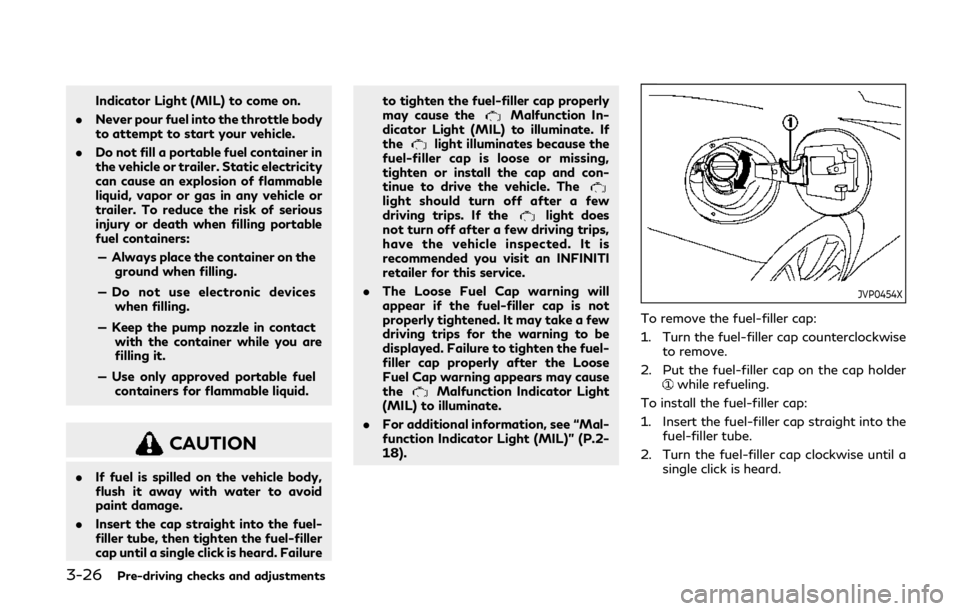
JVP0454X
To remove the fuel-filler cap:
1. Turn the fuel-filler cap counterclockwise
to remove.
2. Put the fuel-filler cap on the cap holder
while refueling.
To install the fuel-filler cap:
1. Insert the fuel-filler cap straight into the fuel-filler tube.
2. Turn the fuel-filler cap clockwise until a single click is heard.
Page 170 of 476

3-28Pre-driving checks and adjustments
SPA2328
MANUAL OPERATION (if so
equipped)
Tilt or telescopic operation
Pull the lock leverdown and adjust the
steering wheel up, down, forward or rear-
ward to the desired position.
Push the lock lever up securely to lock the
steering wheel in place.
JVP0205X
ELECTRIC OPERATION (if so
equipped)
Tilt or telescopic operation
Move the switch to adjust the steering
wheel up or down, forward or rearward to
the desired position.
Entry/Exit function operation:
The automatic drive positioner system will
make the steering wheel move up automa-
tically when the driver’s door is opened with
the ignition switch in the LOCK position.
This lets the driver get into and out of the
seat more easily. For more information, see “Automatic drive
positioner” (P.3-33).
Page 171 of 476

SPA2471
1. To block glare from the front, swingdown the sun visor. 2. To block glare from the side, remove the
sun visor from the center mount and
swing the visor to the side
.
3. Slide the sun visor
in or out as needed
(for driver’s side only).
SPA2447
INSIDE MIRROR
Adjust the height and the angle of the inside
mirror to the desired position.
Pre-driving checks and adjustments3-29
SUN VISORS MIRRORS
Page 175 of 476

The automatic drive positioner system has
the following features:
.Entry/exit function
. Memory storage
ENTRY/EXIT FUNCTION
This system is designed so that the steering
column will automatically move when the
shift lever is in the P (Park) position. This
allows the driver to get into and out of the
driver’s seat more easily.
The steering wheel will move up when the
driver’s door is opened with the ignition
switch in the LOCK position.
The steering wheel will return to the pre-
vious position when the ignition switch is
placed in the ACC position.
Cancel or activate entry/exit func-
tion
All the following conditions must be met
before cancelling or activating the entry/exit
function.
.The ignition switch is placed in the LOCK
position.
. The entry/exit function is not in opera-
tion.
. The following switches are not operated.
— Seat memory switches — Power seat switches
— Electric tilting/telescopic steering
wheel switch
The entry/exit function can be activated or
canceled by pushing and holding the SET
switch for more than 10 seconds.
The entry/exit function can also be acti-
vated or canceled if the [Lift Steering Wheel
on Exit] key is turned to ON or OFF in the
[Settings] menu on the lower display. (See
the INFINITI InTouch
TMOwner’s Manual.
The displayed keys on the lower display may
vary depending on models, specifications
and software versions.)
Initialize entry/exit function
If the battery cable is disconnected, or if the
fuse opens, the entry/exit function will not
work though this function was set on before.
In such a case, after connecting the battery
or replacing with a new fuse, open and close
the driver’s door more than two times after
the ignition switch is switched from the ON
position to the LOCK position. The entry/
exit function will be activated.
JVP0462X
MEMORY STORAGE
Two positions for the driver’s seat, steering
column and outside mirrors can be stored in
the automatic drive positioner memory.
Follow these procedures to use the memory
system.
1. Adjust the driver’s seat, steering column and outside mirrors to the desired posi-
tions by manually operating each adjust-
ing switch. For additional information,
see “Seats” (P.1-2), “Tilt/telescopic
steering” (P.3-27) and “Outside mirrors”
(P.3-31).
2. Push the SET switch and, within 5 seconds, push the memory switch (1 or
Pre-driving checks and adjustments3-33
AUTOMATIC DRIVE POSITIONER
(if so equipped)
Page 182 of 476

4-6Monitor, climate, audio, phone and voice recognition systems
SAA1923
Backing up near a projecting object
The predictive course linesdo not touch
the object in the display. However, the
vehicle may hit the object if it projects over
the actual backing up course.
SAA2244
Backing up behind a projecting
object
The positionis shown farther than the
positionin the display. However, the
positionis actually at the same distance
as the position. The vehicle may hit the
object when backing up to the positionif how to park with the object projects over
the actual backing up course.
HOW TO PARK WITH PREDIC-
TIVE COURSE LINES
WARNING
.
If the tires are replaced with different
sized tires, the predictive course lines
may not be displayed correctly.
. On a snow-covered or slippery road,
there may be a difference between
the predictive course lines and the
actual course line.
. The displayed lines will appear
slightly off to the right because the
rearview camera is not installed in the
rear center of the vehicle.
. If the battery is disconnected or
becomes discharged, the predictive
course lines may be displayed incor-
rectly. If this occurs, please perform
the following procedures:
— Turn the steering wheel from lock to lock while the engine is running.
— Drive the vehicle on a straight road for more than 5 minutes.
Page 194 of 476

4-18Monitor, climate, audio, phone and voice recognition systems
up course.
How to park with predictive course
lines
WARNING
.If the tires are replaced with different
sized tires, the predictive course lines
may not be displayed correctly.
. On a snow-covered or slippery road,
there may be a difference between
the predictive course lines and the
actual course line.
. The displayed lines will appear
slightly off to the right because the
rearview camera is not installed in the
rear center of the vehicle.
. If the battery is disconnected or
becomes discharged, the predictive
course lines may be displayed incor-
rectly. If this occurs, please perform
the following procedures:
— Turn the steering wheel from lock to lock while the engine is running.
— Drive the vehicle on a straight road for more than 5 minutes.
SAA1897
1. Visually check that the parking space is
safe before parking your vehicle.
2. The rear view of the vehicle is displayed on the screen
when the shift lever is
moved to the “R” (Reverse) position.
SAA1898
3. Slowly back up the vehicle adjusting the steering wheel so that the predictive
course lines
enter the parking space.
4. Maneuver the steering wheel to make the vehicle width guide lines
parallel to
the parking spacewhile referring to
the predictive course lines.
Page 223 of 476

Fuel Efficient Driving Tips .......................................... 5-119
Increasing fuel economy ............................................ 5-120
Intelligent All-Wheel Drive (AWD) (if
so equipped) ................................................................... 5-121
Parking/parking on hills .............................................. 5-123
Power steering ............................................................. 5-124Electric power steering type ............................... 5-124
Direct Adaptive Steering type ............................ 5-124
Brake system .................................................................. 5-126 Braking precautions ................................................ 5-126
Parking brake break-in .......................................... 5-127
Brake assist .................................................................... 5-127 Brake assist ............................................................... 5-127
Anti-lock Braking System (ABS) ......................... 5-127
Vehicle Dynamic Control (VDC) system ................. 5-129 Brake force distribution ......................................... 5-129
Active trace control ..................................................... 5-130
Hill Start Assist system ............................................... 5-132 Chassis control .............................................................. 5-132
Sonar system (if so equipped) .................................. 5-133
Sonar system settings ........................................ 5-134
Sonar indicator ....................................................... 5-135
Cold weather driving ................................................... 5-135 Freeing a frozen door lock ................................. 5-135
Antifreeze ................................................................ 5-135
Battery ..................................................................... 5-135
Draining of coolant water .................................. 5-135
Tire equipment ....................................................... 5-135
Special winter equipment .................................. 5-136
Driving on snow or ice ........................................ 5-136
Engine block heater (if so equipped) .............. 5-136
Active noise cancellation/Active
sound enhancement .................................................... 5-137 Active noise cancellation .................................... 5-138
Active sound enhancement ............................... 5-138
Page 224 of 476

5-4Starting and driving
WARNING
.Do not leave children or adults who
would normally require the support
of others alone in your vehicle. Pets
should not be left alone either. They
could accidentally injure themselves
or others through inadvertent opera-
tion of the vehicle. Also, on hot,
sunny days, temperatures in a closed
vehicle could quickly become high
enough to cause severe or possibly
fatal injuries to people or animals.
. Closely supervise children when they
are around cars to prevent them from
playing and becoming locked in the
trunk where they could be seriously
injured. Keep the car locked, with the
rear seatback and trunk lid securely
latched when not in use, and prevent
children’s access to car keys.
EXHAUST GAS (carbon monoxide)
WARNING
.Do not breathe exhaust gases; they
contain colorless and odorless carbon
monoxide. Carbon monoxide is dan-
gerous. It can cause unconsciousness
or death.
. If you suspect that exhaust fumes are
entering the vehicle, drive with all
windows fully open, and have the
vehicle inspected immediately.
. Do not run the engine in closed spaces
such as a garage.
. Do not park the vehicle with the
engine running for any extended
length of time.
. Keep the trunk lid closed while driv-
ing, otherwise exhaust gases could be
drawn into the passenger compart-
ment. If you must drive with the
trunk lid open, follow these precau-
tions:
1) Open all the windows.
2) Set the air recirculation to off and the fan control to high to circulate
the air. .
If electrical wiring or other cable
connections must pass to a trailer
through the seal on the trunk lid or
the body, follow the manufacturer’s
recommendation to prevent carbon
monoxide entry into the vehicle.
. The exhaust system and body should
be inspected by a qualified mechanic
whenever:
— The vehicle is raised for service.
— You suspect that exhaust fumes are entering into the passenger
compartment.
— You notice a change in the sound of the exhaust system.
— You have had an accident invol- ving damage to the exhaust sys-
tem, underbody, or rear of the
vehicle.
PRECAUTIONS WHEN STARTING
AND DRIVING