check oil INFINITI Q60 COUPE 2014 Owner's Manual
[x] Cancel search | Manufacturer: INFINITI, Model Year: 2014, Model line: Q60 COUPE, Model: INFINITI Q60 COUPE 2014Pages: 458, PDF Size: 4.27 MB
Page 19 of 458
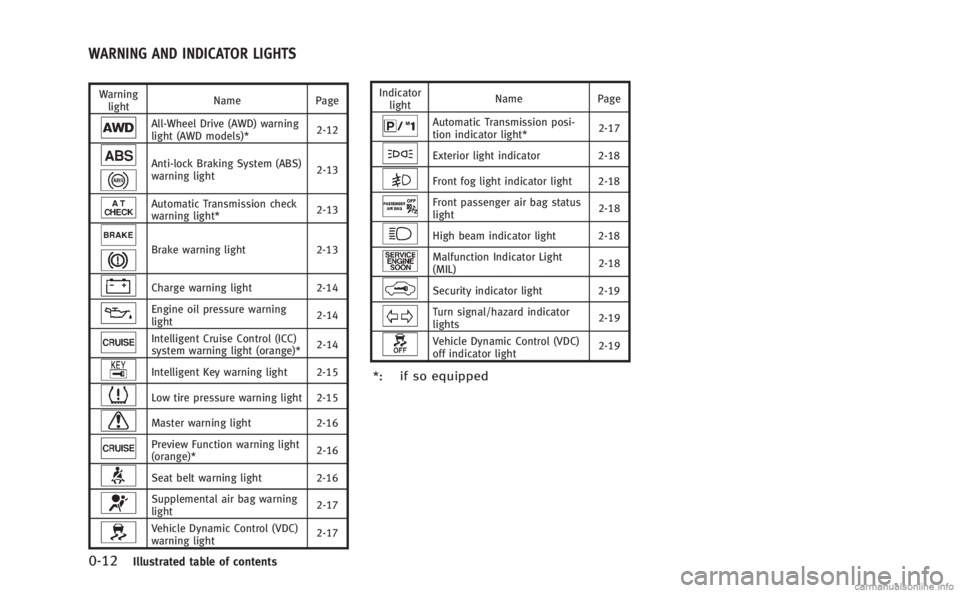
0-12Illustrated table of contents
Warninglight Name
Page
All-Wheel Drive (AWD) warning
light (AWD models)* 2-12
Anti-lock Braking System (ABS)
warning light2-13
Automatic Transmission check
warning light*
2-13
Brake warning light
2-13
Charge warning light2-14
Engine oil pressure warning
light 2-14
Intelligent Cruise Control (ICC)
system warning light (orange)*
2-14
Intelligent Key warning light 2-15
Low tire pressure warning light 2-15
Master warning light
2-16
Preview Function warning light
(orange)* 2-16
Seat belt warning light 2-16
Supplemental air bag warning
light2-17
Vehicle Dynamic Control (VDC)
warning light2-17Indicator
light Name
Page
Automatic Transmission posi-
tion indicator light* 2-17
Exterior light indicator
2-18
Front fog light indicator light 2-18
Front passenger air bag status
light 2-18
High beam indicator light 2-18
Malfunction Indicator Light
(MIL)2-18
Security indicator light 2-19
Turn signal/hazard indicator
lights2-19
Vehicle Dynamic Control (VDC)
off indicator light2-19
*: if so equipped
WARNING AND INDICATOR LIGHTS
Page 83 of 458
2-12Instruments and controls
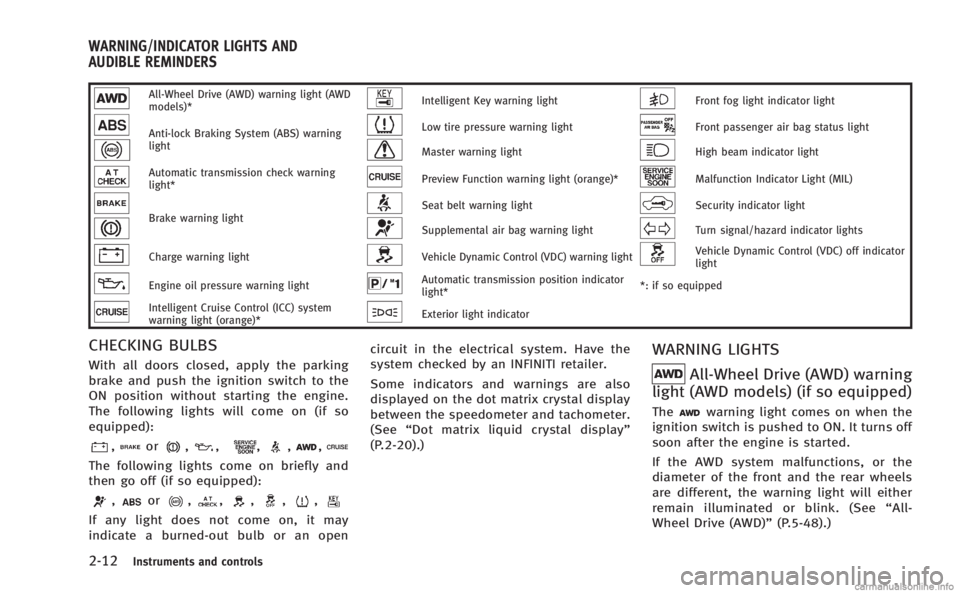
All-Wheel Drive (AWD) warning light (AWD
models)*Intelligent Key warning lightFront fog light indicator light
Anti-lock Braking System (ABS) warning
lightLow tire pressure warning lightFront passenger air bag status light
Master warning lightHigh beam indicator light
Automatic transmission check warning
light*Preview Function warning light (orange)*Malfunction Indicator Light (MIL)
Brake warning lightSeat belt warning lightSecurity indicator light
Supplemental air bag warning lightTurn signal/hazard indicator lights
Charge warning lightVehicle Dynamic Control (VDC) warning lightVehicle Dynamic Control (VDC) off indicator
light
Engine oil pressure warning lightAutomatic transmission position indicator
light**: if so equipped
Intelligent Cruise Control (ICC) system
warning light (orange)*Exterior light indicator
CHECKING BULBS
With all doors closed, apply the parking
brake and push the ignition switch to the
ON position without starting the engine.
The following lights will come on (if so
equipped):
,or,,,,,
The following lights come on briefly and
then go off (if so equipped):
,or,,,,,
If any light does not come on, it may
indicate a burned-out bulb or an open circuit in the electrical system. Have the
system checked by an INFINITI retailer.
Some indicators and warnings are also
displayed on the dot matrix crystal display
between the speedometer and tachometer.
(See
“Dot matrix liquid crystal display”
(P.2-20).)
WARNING LIGHTS
All-Wheel Drive (AWD) warning
light (AWD models) (if so equipped)
Thewarning light comes on when the
ignition switch is pushed to ON. It turns off
soon after the engine is started.
If the AWD system malfunctions, or the
diameter of the front and the rear wheels
are different, the warning light will either
remain illuminated or blink. (See “All-
Wheel Drive (AWD)” (P.5-48).)
WARNING/INDICATOR LIGHTS AND
AUDIBLE REMINDERS
Page 85 of 458
2-14Instruments and controls
Braking System (ABS) warning light illumi-
nate, it may indicate the ABS is not
functioning properly. Have the brake sys-
tem checked, and if necessary repaired, by
an INFINITI retailer promptly. (See“Anti-
lock Braking System (ABS) warning light”
(P.2-13).)
WARNING
. Your brake system may not be working
properly if the warning light is on.
Driving could be dangerous. If you judge
it to be safe, drive carefully to the
nearest service station for repairs.
Otherwise, have your vehicle towed
because driving it could be dangerous.
. Pressing the brake pedal with the
engine stopped and/or low brake fluid
level may increase your stopping dis-
tance and braking will require greater
pedal effort as well as pedal travel.
. If the brake fluid level is below the
minimum or MIN mark on the brake fluid
reservoir, do not drive until the brake
system has been checked at an INFINITI
retailer.
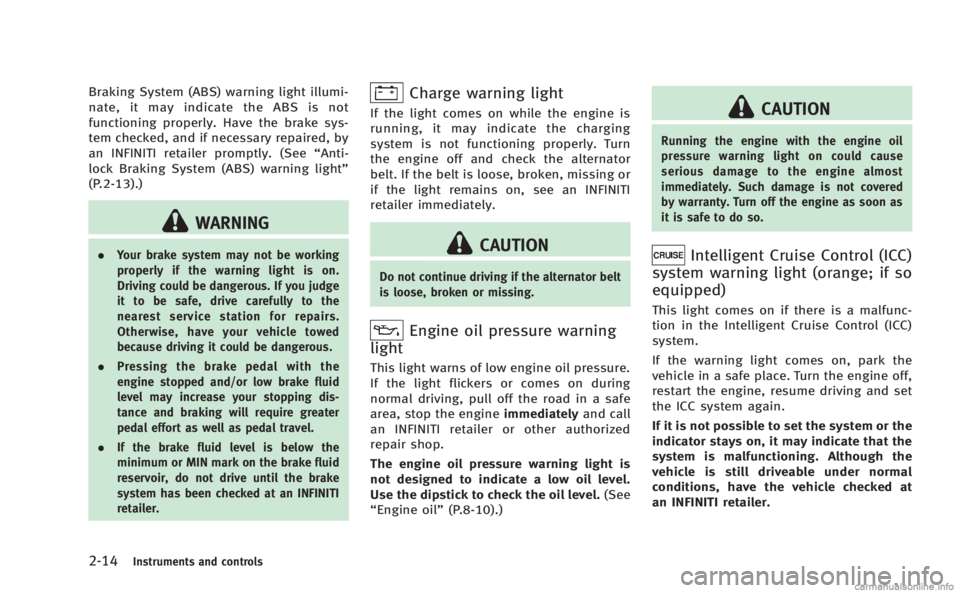
Charge warning light
If the light comes on while the engine is
running, it may indicate the charging
system is not functioning properly. Turn
the engine off and check the alternator
belt. If the belt is loose, broken, missing or
if the light remains on, see an INFINITI
retailer immediately.
CAUTION
Do not continue driving if the alternator belt
is loose, broken or missing.
Engine oil pressure warning
light
This light warns of low engine oil pressure.
If the light flickers or comes on during
normal driving, pull off the road in a safe
area, stop the engine immediatelyand call
an INFINITI retailer or other authorized
repair shop.
The engine oil pressure warning light is
not designed to indicate a low oil level.
Use the dipstick to check the oil level. (See
“Engine oil” (P.8-10).)
CAUTION
Running the engine with the engine oil
pressure warning light on could cause
serious damage to the engine almost
immediately. Such damage is not covered
by warranty. Turn off the engine as soon as
it is safe to do so.
Intelligent Cruise Control (ICC)
system warning light (orange; if so
equipped)
This light comes on if there is a malfunc-
tion in the Intelligent Cruise Control (ICC)
system.
If the warning light comes on, park the
vehicle in a safe place. Turn the engine off,
restart the engine, resume driving and set
the ICC system again.
If it is not possible to set the system or the
indicator stays on, it may indicate that the
system is malfunctioning. Although the
vehicle is still driveable under normal
conditions, have the vehicle checked at
an INFINITI retailer.
Page 95 of 458
2-24Instruments and controls
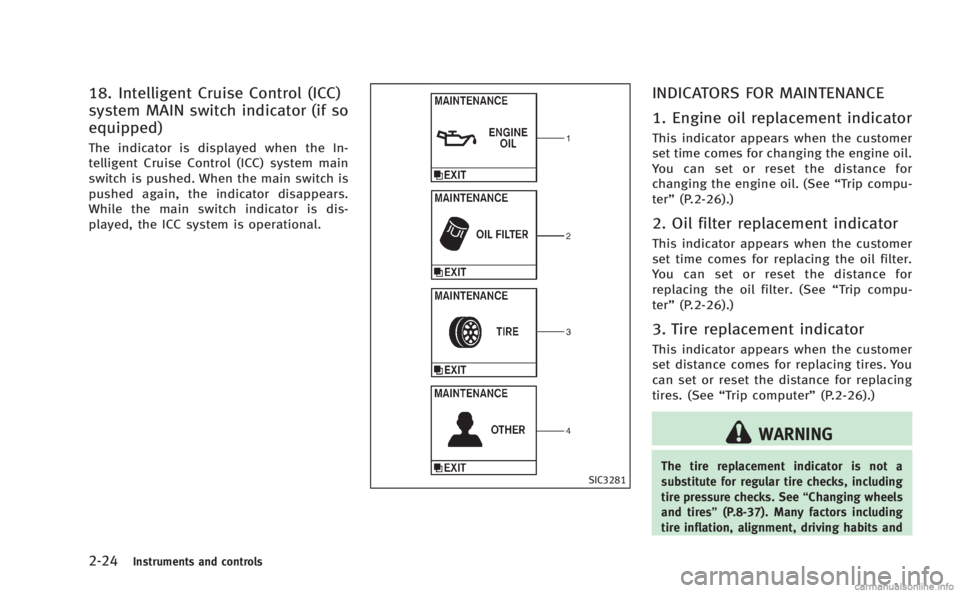
18. Intelligent Cruise Control (ICC)
system MAIN switch indicator (if so
equipped)
The indicator is displayed when the In-
telligent Cruise Control (ICC) system main
switch is pushed. When the main switch is
pushed again, the indicator disappears.
While the main switch indicator is dis-
played, the ICC system is operational.
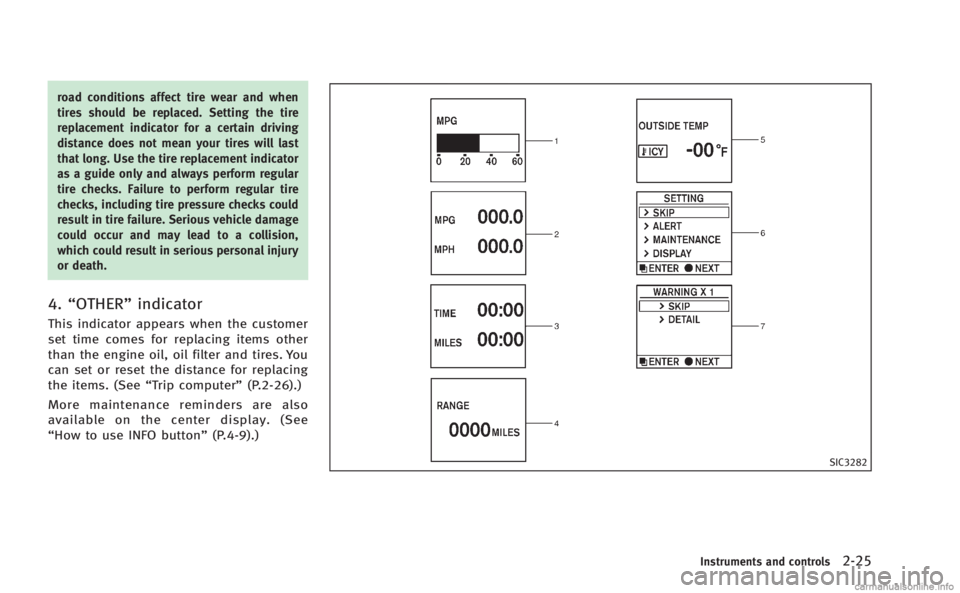
SIC3281
INDICATORS FOR MAINTENANCE
1. Engine oil replacement indicator
This indicator appears when the customer
set time comes for changing the engine oil.
You can set or reset the distance for
changing the engine oil. (See“Trip compu-
ter” (P.2-26).)
2. Oil filter replacement indicator
This indicator appears when the customer
set time comes for replacing the oil filter.
You can set or reset the distance for
replacing the oil filter. (See “Trip compu-
ter” (P.2-26).)
3. Tire replacement indicator
This indicator appears when the customer
set distance comes for replacing tires. You
can set or reset the distance for replacing
tires. (See “Trip computer” (P.2-26).)
WARNING
The tire replacement indicator is not a
substitute for regular tire checks, including
tire pressure checks. See “Changing wheels
and tires” (P.8-37). Many factors including
tire inflation, alignment, driving habits and
Page 96 of 458
road conditions affect tire wear and when
tires should be replaced. Setting the tire
replacement indicator for a certain driving
distance does not mean your tires will last
that long. Use the tire replacement indicator
as a guide only and always perform regular
tire checks. Failure to perform regular tire
checks, including tire pressure checks could
result in tire failure. Serious vehicle damage
could occur and may lead to a collision,
which could result in serious personal injury
or death.
4.“OTHER” indicator
This indicator appears when the customer
set time comes for replacing items other
than the engine oil, oil filter and tires. You
can set or reset the distance for replacing
the items. (See “Trip computer” (P.2-26).)
More maintenance reminders are also
available on the center display. (See
“How to use INFO button” (P.4-9).)
SIC3282
Instruments and controls2-25
Page 98 of 458

amount of fuel in the fuel tank and the
actual fuel consumption.
The display is updated every 30 seconds.
The dte mode includes a low range warning
feature. If the fuel level is low, the warning
is displayed on the screen.
When the fuel level drops even lower, the
dte display will change to“——”.
. If the amount of fuel added is small, the
display just before the ignition switch
is pushed to the OFF position may
continue to be displayed.
. When driving uphill or rounding curves,
the fuel in the tank shifts, which may
momentarily change the display.
5. Outside air temperature (ICY —8F
or 8C)
The outside air temperature is displayed in
8For 8C in the range of −22 to 1318F(−30
to 558C).
The outside air temperature mode includes
a low temperature warning feature. If the
outside air temperature is below 378 F
(38C), the warning is displayed on the
screen.
The outside temperature sensor is located
in front of the radiator. The sensor may be affected by road or engine heat, wind
directions and other driving conditions.
The display may differ from the actual
outside temperature or the temperature
displayed on various signs or billboards.
6. Setting
Setting cannot be made while driving. A
message
“Setting can only be operated
when stopped” is also displayed on the
dot matrix crystal display.
The
switch*Aandswitch*Bare
used in the setting mode to select and
decide a menu.
SKIP:
Push the
switch*Ato move to the
warning check mode.
Push the
switch*Bto select other
menus.
ALERT:
There are 3 submenus under the alert
menu.
. BACK
Select this submenu to return to the top
page of the setting mode.
. TIME TO REST
Select this submenu to specify when the
“time to rest” indicator activates.
. ICY
Select this submenu to display the low
outside temperature warning.
MAINTENANCE: There are 5 submenus under the main-
tenance menu.
. BACK
Select this submenu to return to the top
page of the setting mode.
. ENGINE OIL
Select this submenu to set or reset the
distance for changing the engine oil.
. OIL FILTER
Select this submenu to set or reset the
distance for replacing the oil filter.
. TIRE
Select this submenu to set or reset the
distance for replacing tires.
. OTHER
Select this submenu and set or reset
the distance for replacing items other
than the engine oil, oil filter and tires.
DISPLAY:
There are 3 submenus under the display
menu.
Instruments and controls2-27
Page 305 of 458
5-12Starting and driving
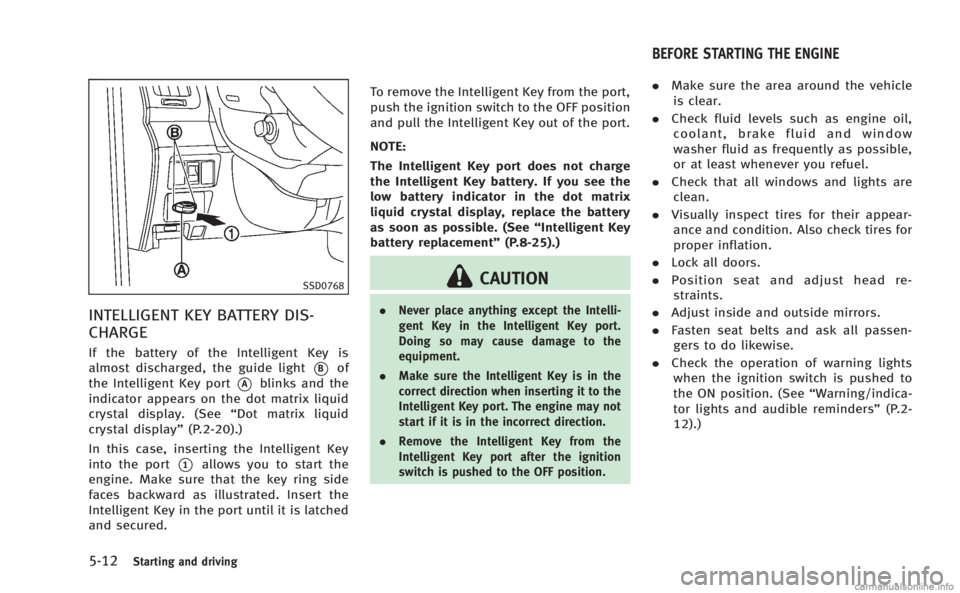
SSD0768
INTELLIGENT KEY BATTERY DIS-
CHARGE
If the battery of the Intelligent Key is
almost discharged, the guide light
*Bof
the Intelligent Key port
*Ablinks and the
indicator appears on the dot matrix liquid
crystal display. (See “Dot matrix liquid
crystal display” (P.2-20).)
In this case, inserting the Intelligent Key
into the port
*1allows you to start the
engine. Make sure that the key ring side
faces backward as illustrated. Insert the
Intelligent Key in the port until it is latched
and secured. To remove the Intelligent Key from the port,
push the ignition switch to the OFF position
and pull the Intelligent Key out of the port.
NOTE:
The Intelligent Key port does not charge
the Intelligent Key battery. If you see the
low battery indicator in the dot matrix
liquid crystal display, replace the battery
as soon as possible. (See
“Intelligent Key
battery replacement” (P.8-25).)
CAUTION
.Never place anything except the Intelli-
gent Key in the Intelligent Key port.
Doing so may cause damage to the
equipment.
. Make sure the Intelligent Key is in the
correct direction when inserting it to the
Intelligent Key port. The engine may not
start if it is in the incorrect direction.
. Remove the Intelligent Key from the
Intelligent Key port after the ignition
switch is pushed to the OFF position.
.Make sure the area around the vehicle
is clear.
. Check fluid levels such as engine oil,
coolant, brake fluid and window
washer fluid as frequently as possible,
or at least whenever you refuel.
. Check that all windows and lights are
clean.
. Visually inspect tires for their appear-
ance and condition. Also check tires for
proper inflation.
. Lock all doors.
. Position seat and adjust head re-
straints.
. Adjust inside and outside mirrors.
. Fasten seat belts and ask all passen-
gers to do likewise.
. Check the operation of warning lights
when the ignition switch is pushed to
the ON position. (See “Warning/indica-
tor lights and audible reminders” (P.2-
12).)
BEFORE STARTING THE ENGINE
Page 341 of 458
5-48Starting and driving
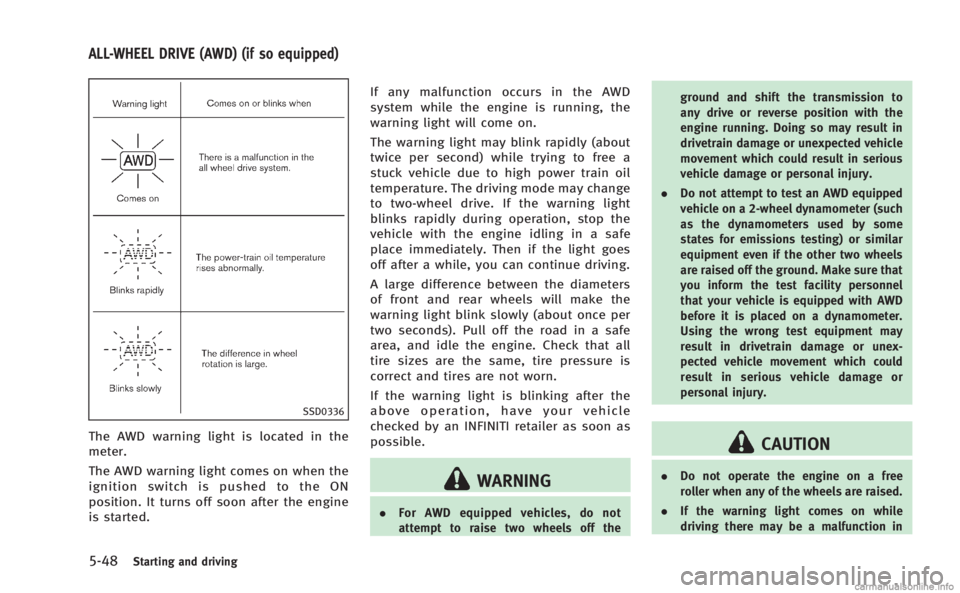
SSD0336
The AWD warning light is located in the
meter.
The AWD warning light comes on when the
ignition switch is pushed to the ON
position. It turns off soon after the engine
is started.If any malfunction occurs in the AWD
system while the engine is running, the
warning light will come on.
The warning light may blink rapidly (about
twice per second) while trying to free a
stuck vehicle due to high power train oil
temperature. The driving mode may change
to two-wheel drive. If the warning light
blinks rapidly during operation, stop the
vehicle with the engine idling in a safe
place immediately. Then if the light goes
off after a while, you can continue driving.
A large difference between the diameters
of front and rear wheels will make the
warning light blink slowly (about once per
two seconds). Pull off the road in a safe
area, and idle the engine. Check that all
tire sizes are the same, tire pressure is
correct and tires are not worn.
If the warning light is blinking after the
above operation, have your vehicle
checked by an INFINITI retailer as soon as
possible.
WARNING
.
For AWD equipped vehicles, do not
attempt to raise two wheels off the ground and shift the transmission to
any drive or reverse position with the
engine running. Doing so may result in
drivetrain damage or unexpected vehicle
movement which could result in serious
vehicle damage or personal injury.
. Do not attempt to test an AWD equipped
vehicle on a 2-wheel dynamometer (such
as the dynamometers used by some
states for emissions testing) or similar
equipment even if the other two wheels
are raised off the ground. Make sure that
you inform the test facility personnel
that your vehicle is equipped with AWD
before it is placed on a dynamometer.
Using the wrong test equipment may
result in drivetrain damage or unex-
pected vehicle movement which could
result in serious vehicle damage or
personal injury.
CAUTION
.Do not operate the engine on a free
roller when any of the wheels are raised.
. If the warning light comes on while
driving there may be a malfunction in
ALL-WHEEL DRIVE (AWD) (if so equipped)
Page 376 of 458
.Wax your vehicle only after a thorough
washing. Follow the instructions sup-
plied with the wax.
. Do not use a wax containing any
abrasives, cutting compounds or clea-
ners that may damage the vehicle
finish.
Machine compound or aggressive polish-
ing on a base coat/clear coat paint finish
may dull the finish or leave swirl marks.
REMOVING SPOTS
Remove tar and oil spots, industrial dust,
insects, and tree sap as quickly as possible
from the paint surface to avoid lasting
damage or staining. Special cleaning
products are available at an INFINITI
retailer or any automotive accessory
stores.
UNDERBODY
In areas where road salt is used in winter,
the underbody must be cleaned regularly.
This will prevent dirt and salt from building
up and causing the acceleration of corro-
sion on the underbody and suspension.
Before the winter period and again in the
spring, the underseal must be checked
and, if necessary, re-treated.
GLASS
Use glass cleaner to remove smoke and
dust film from the glass surfaces. It is
normal for glass to become coated with a
film after the vehicle is parked in the hot
sun. Glass cleaner and a soft cloth will
easily remove this film.
CAUTION
When cleaning the inside of the windows,
do not use sharp-edged tools, abrasive
cleaners or chlorine-based disinfectant clea-
ners. They could damage the electrical
conductors, radio antenna elements or rear
window defroster elements.
WHEELS
Wash the wheels when washing the vehicle
to maintain their appearance.
. Clean the inner side of the wheels when
the wheel is changed or the underside
of the vehicle is washed.
. Inspect wheel rims regularly for dents
or corrosion. Such damage may cause
loss of pressure or poor seal at the tire
bead. .
INFINITI recommends that the road
wheels be waxed to protect against
road salt in areas where it is used
during winter.
CAUTION
Do not use abrasive cleaners when washing
the wheels.
Aluminum alloy wheels
Wash regularly with a sponge dampened in
a mild soap solution, especially during
winter months in areas where road salt is
used. Salt could discolor the wheels if not
removed.
CAUTION
Follow the directions below to avoid stain-
ing or discoloring the wheels:
. Do not use a cleaner that uses strong
acid or alkali contents to clean the
wheels.
. Do not apply wheel cleaners to the
wheels when they are hot. The wheel
temperature should be the same as
Appearance and care7-3
Page 382 of 458
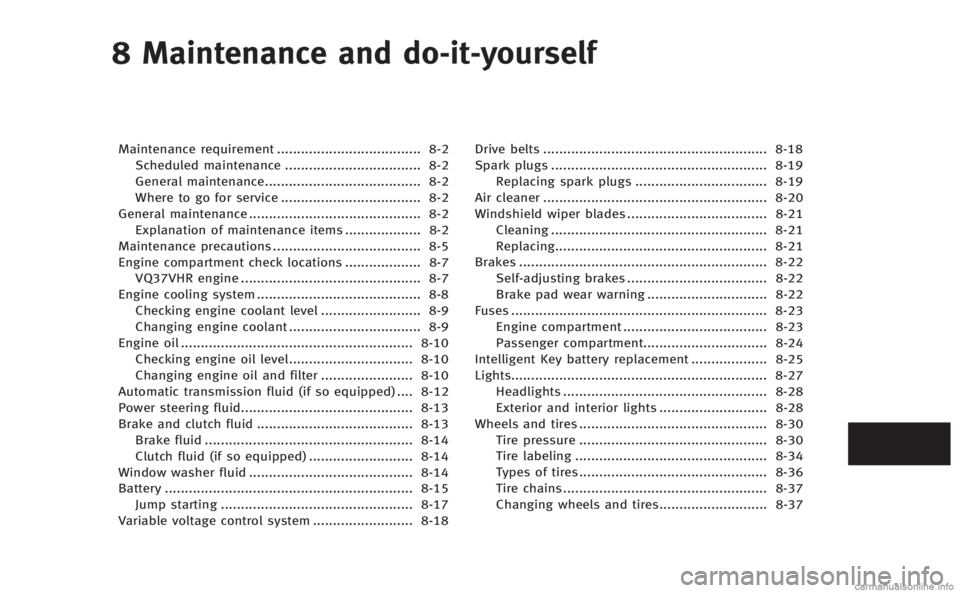
8 Maintenance and do-it-yourself
Maintenance requirement.................................... 8-2
Scheduled maintenance .................................. 8-2
General maintenance....................................... 8-2
Where to go for service ................................... 8-2
General maintenance ........................................... 8-2 Explanation of maintenance items ................... 8-2
Maintenance precautions ..................................... 8-5
Engine compartment check locations ................... 8-7 VQ37VHR engine ............................................. 8-7
Engine cooling system ......................................... 8-8
Checking engine coolant level ......................... 8-9
Changing engine coolant ................................. 8-9
Engine oil .......................................................... 8-10
Checking engine oil level............................... 8-10
Changing engine oil and filter ....................... 8-10
Automatic transmission fluid (if so equipped) .... 8-12
Power steering fluid........................................... 8-13
Brake and clutch fluid ....................................... 8-13 Brake fluid .................................................... 8-14
Clutch fluid (if so equipped) .......................... 8-14
Window washer fluid ......................................... 8-14
Battery .............................................................. 8-15 Jump starting ................................................ 8-17
Variable voltage control system ......................... 8-18 Drive belts ........................................................ 8-18
Spark plugs ...................................................... 8-19 Replacing spark plugs ................................. 8-19
Air cleaner ........................................................ 8-20
Windshield wiper blades ................................... 8-21 Cleaning ...................................................... 8-21
Replacing..................................................... 8-21
Brakes .............................................................. 8-22 Self-adjusting brakes ................................... 8-22
Brake pad wear warning .............................. 8-22
Fuses ................................................................ 8-23 Engine compartment .................................... 8-23
Passenger compartment............................... 8-24
Intelligent Key battery replacement ................... 8-25
Lights................................................................ 8-27 Headlights ................................................... 8-28
Exterior and interior lights ........................... 8-28
Wheels and tires ............................................... 8-30 Tire pressure ............................................... 8-30
Tire labeling ................................................ 8-34
Types of tires............................................... 8-36
Tire chains ................................................... 8-37
Changing wheels and tires........................... 8-37