instrument panel INFINITI Q60 COUPE 2020 User Guide
[x] Cancel search | Manufacturer: INFINITI, Model Year: 2020, Model line: Q60 COUPE, Model: INFINITI Q60 COUPE 2020Pages: 476, PDF Size: 1.95 MB
Page 83 of 476
JVC0969X
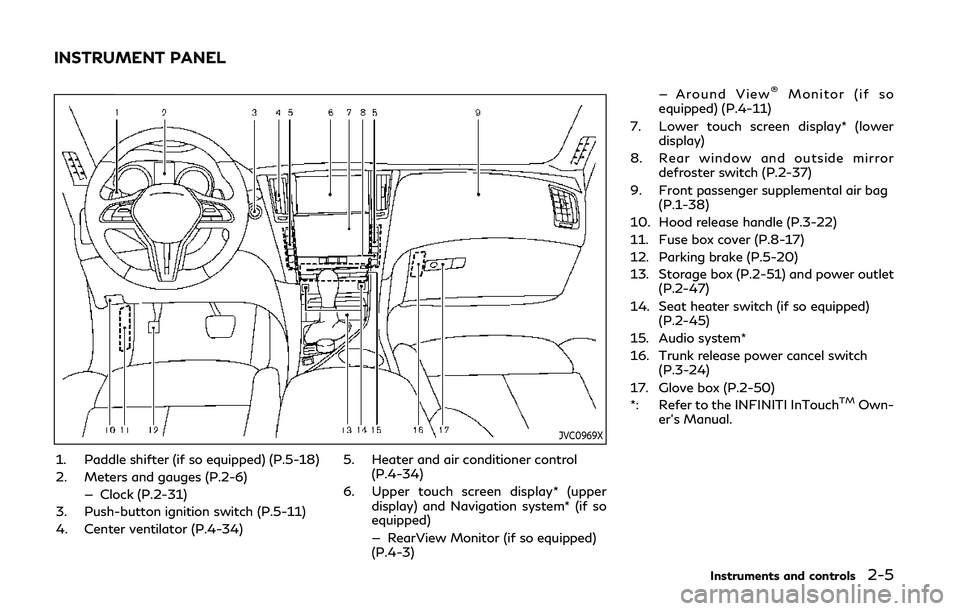
1. Paddle shifter (if so equipped) (P.5-18)
2. Meters and gauges (P.2-6)— Clock (P.2-31)
3. Push-button ignition switch (P.5-11)
4. Center ventilator (P.4-34) 5. Heater and air conditioner control
(P.4-34)
6. Upper touch screen display* (upper display) and Navigation system* (if so
equipped)
— RearView Monitor (if so equipped)
(P.4-3) — Around View
®Monitor (if so
equipped) (P.4-11)
7. Lower touch screen display* (lower display)
8. Rear window and outside mirror defroster switch (P.2-37)
9. Front passenger supplemental air bag (P.1-38)
10. Hood release handle (P.3-22)
11. Fuse box cover (P.8-17)
12. Parking brake (P.5-20)
13. Storage box (P.2-51) and power outlet (P.2-47)
14. Seat heater switch (if so equipped) (P.2-45)
15. Audio system*
16. Trunk release power cancel switch (P.3-24)
17. Glove box (P.2-50)
*: Refer to the INFINITI InTouch
TMOwn-
er’s Manual.
Instruments and controls2-5
INSTRUMENT PANEL
Page 85 of 476
JVI0636X
Speedometer
SPEEDOMETER AND OD-
OMETER
Speedometer
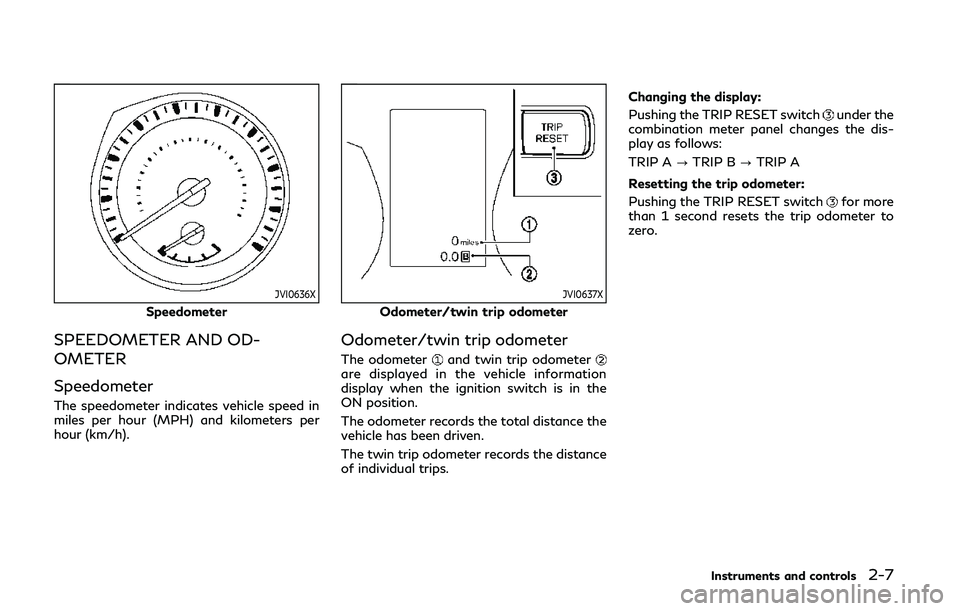
The speedometer indicates vehicle speed in
miles per hour (MPH) and kilometers per
hour (km/h).
JVI0637X
Odometer/twin trip odometer
Odometer/twin trip odometer
The odometerand twin trip odometerare displayed in the vehicle information
display when the ignition switch is in the
ON position.
The odometer records the total distance the
vehicle has been driven.
The twin trip odometer records the distance
of individual trips.Changing the display:
Pushing the TRIP RESET switch
under the
combination meter panel changes the dis-
play as follows:
TRIP A ?TRIP B ?TRIP A
Resetting the trip odometer:
Pushing the TRIP RESET switch
for more
than 1 second resets the trip odometer to
zero.
Instruments and controls2-7
Page 96 of 476
2-18Instruments and controls
INDICATOR LIGHTS
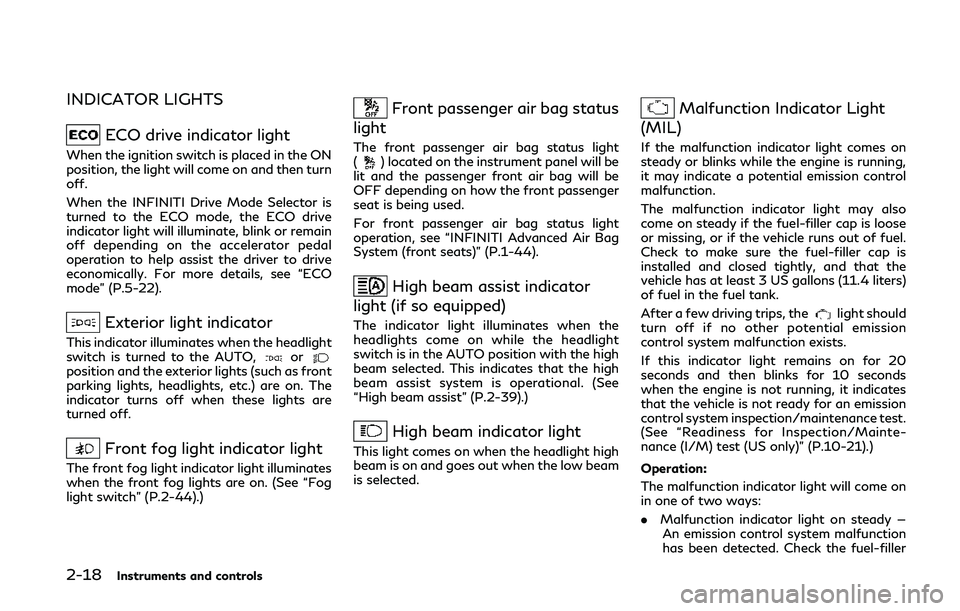
ECO drive indicator light
When the ignition switch is placed in the ON
position, the light will come on and then turn
off.
When the INFINITI Drive Mode Selector is
turned to the ECO mode, the ECO drive
indicator light will illuminate, blink or remain
off depending on the accelerator pedal
operation to help assist the driver to drive
economically. For more details, see “ECO
mode” (P.5-22).
Exterior light indicator
This indicator illuminates when the headlight
switch is turned to the AUTO,orposition and the exterior lights (such as front
parking lights, headlights, etc.) are on. The
indicator turns off when these lights are
turned off.
Front fog light indicator light
The front fog light indicator light illuminates
when the front fog lights are on. (See “Fog
light switch” (P.2-44).)
Front passenger air bag status
light
The front passenger air bag status light
() located on the instrument panel will be
lit and the passenger front air bag will be
OFF depending on how the front passenger
seat is being used.
For front passenger air bag status light
operation, see “INFINITI Advanced Air Bag
System (front seats)” (P.1-44).
High beam assist indicator
light (if so equipped)
The indicator light illuminates when the
headlights come on while the headlight
switch is in the AUTO position with the high
beam selected. This indicates that the high
beam assist system is operational. (See
“High beam assist” (P.2-39).)
High beam indicator light
This light comes on when the headlight high
beam is on and goes out when the low beam
is selected.
Malfunction Indicator Light
(MIL)
If the malfunction indicator light comes on
steady or blinks while the engine is running,
it may indicate a potential emission control
malfunction.
The malfunction indicator light may also
come on steady if the fuel-filler cap is loose
or missing, or if the vehicle runs out of fuel.
Check to make sure the fuel-filler cap is
installed and closed tightly, and that the
vehicle has at least 3 US gallons (11.4 liters)
of fuel in the fuel tank.
After a few driving trips, the
light should
turn off if no other potential emission
control system malfunction exists.
If this indicator light remains on for 20
seconds and then blinks for 10 seconds
when the engine is not running, it indicates
that the vehicle is not ready for an emission
control system inspection/maintenance test.
(See “Readiness for Inspection/Mainte-
nance (I/M) test (US only)” (P.10-21).)
Operation:
The malfunction indicator light will come on
in one of two ways:
. Malfunction indicator light on steady —
An emission control system malfunction
has been detected. Check the fuel-filler
Page 112 of 476
2-34Instruments and controls
SIC2045
Security indicator light
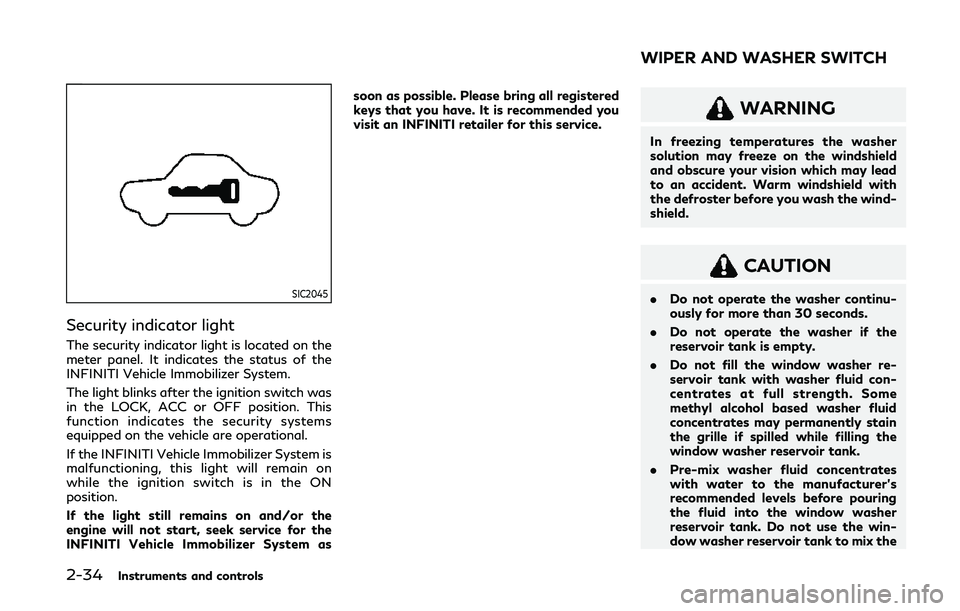
The security indicator light is located on the
meter panel. It indicates the status of the
INFINITI Vehicle Immobilizer System.
The light blinks after the ignition switch was
in the LOCK, ACC or OFF position. This
function indicates the security systems
equipped on the vehicle are operational.
If the INFINITI Vehicle Immobilizer System is
malfunctioning, this light will remain on
while the ignition switch is in the ON
position.
If the light still remains on and/or the
engine will not start, seek service for the
INFINITI Vehicle Immobilizer System assoon as possible. Please bring all registered
keys that you have. It is recommended you
visit an INFINITI retailer for this service.
WARNING
In freezing temperatures the washer
solution may freeze on the windshield
and obscure your vision which may lead
to an accident. Warm windshield with
the defroster before you wash the wind-
shield.
CAUTION
.
Do not operate the washer continu-
ously for more than 30 seconds.
. Do not operate the washer if the
reservoir tank is empty.
. Do not fill the window washer re-
servoir tank with washer fluid con-
centrates at full strength. Some
methyl alcohol based washer fluid
concentrates may permanently stain
the grille if spilled while filling the
window washer reservoir tank.
. Pre-mix washer fluid concentrates
with water to the manufacturer’s
recommended levels before pouring
the fluid into the window washer
reservoir tank. Do not use the win-
dow washer reservoir tank to mix the
WIPER AND WASHER SWITCH
Page 117 of 476

SIC3784
Be sure not to put anything on top of the
photo sensorlocated on the top of the
instrument panel. The photo sensor controls
the autolight; if it is covered, the photo
sensor reacts as if it is dark and the head-
lights will illuminate.
JVI1487X
To select the low beam, put the lever in
the neutral position as shown.
To select the high beam, push the lever
forward while the switch is in the
position. Pull it back to select the low
beam.
Pulling the lever toward you will flash
the headlight high beam even when the
headlight switch is in the OFF position.
Headlight beam select
High beam assist (if so equipped)
The high beam assist system will operate
when the vehicle is driven at speeds of
approximately 19 MPH (30 km/h) and above. If an oncoming vehicle or leading
vehicle appears in front of your vehicle when
the headlight high beam is on, the headlight
will be switched to the low beam automa-
tically.
Precautions on high beam assist:
WARNING
.
The high beam assist system is a
convenience but it is not a substitute
for safe driving operation. The driver
should remain alert at all times,
ensure safe driving practices and
switch the high beams and low beam
manually when necessary.
. The high beam or low beam may not
switch automatically under the fol-
lowing conditions. Switch the high
beam and low beam manually.
— During bad weather (rain, fog, snow, wind, etc.).
— When a light source similar to a headlight or tail light is in the
vicinity of the vehicle.
— When the headlights of the on- coming vehicle or the leading
vehicle are turned off, when the
color of the light is affected due to
foreign materials on the lights, or
Instruments and controls2-39
Page 121 of 476

JVI0644X
JVI0937X
Instrument brightness control
The instrument brightness control switch
can be operated when the ignition switch is
in the ON position. When the switch is
operated, the vehicle information display
switches to the brightness adjustment
mode.
Push the + side of the switch
to brighten
the instrument panel lights. The barmoves
to the + side.
Push the - side of the switch
to dim the
instrument panel lights. The barmoves to
the − side. When the brightness level reaches
the minimum, the instrument panel lights will
turn off during the nighttime.
When the brightness level reaches the max-
imum or minimum, a beep will sound.
The vehicle information display returns to
the normal display when the instrument
brightness control switch is not operated
for more than 5 seconds.
JVI1489X
TURN SIGNAL SWITCH
Turn signal
Move the lever up or down to signal the
turning direction. When the turn is com-
pleted, the turn signals cancel automatically.
Lane change signal
. Move the lever up or down until the turn
signal begins to flash, but the lever does
not latch, to signal a lane change. Hold
the lever until the lane change is com-
pleted.
. Move the lever up or down until the turn
signal begins to flash, but the lever does
not latch, and release the lever. The turn
Instruments and controls2-43
Page 124 of 476

2-46Instruments and controls
.Any liquid spilled on the heated seat
should be removed immediately with
a dry cloth.
. When cleaning the seat, never use
gasoline, thinner, or any similar ma-
terials.
. If any malfunctions are found or the
heated seat does not operate, turn
the switch off and have the system
checked. It is recommended you visit
an INFINITI retailer for this service.
JVR0505X
The front seats can be warmed by built-in
heaters. The heating system of driver’s seat
and front passenger seat can be operated
independently.
OPERATION WITH SWITCH
1. Start the engine.
2. Push the switch on the instrument panel.
.Each time the switch is pushed, the
seat heating mode will change in the
following order.
AUTO ?High ?Mid ?Low ?OFF
.The indicator lighton the switch will
illuminate when the heater is on.
When the vehicle’s interior is warmed, or
before you leave the vehicle, be sure to turn off the seat heater.
OPERATION WITH TOUCH
SCREEN
Push the CLIMATE button and touch []
or [] on the lower display. Select an item
from [AUTO], [High], [Mid], [Low] or [OFF].
AUTO MODE SETTING
When in the AUTO mode, the heater will
turn on or off automatically according to the
conditions such as the temperature inside
the vehicle compartment. Depending on the
conditions, the heater will not turn on even if
AUTO is selected. The settings for the AUTO
mode can be changed. For details, see
“Climate settings” (P.4-40).
Page 132 of 476

2-54Instruments and controls
Auto reverse function
WARNING
There are some small distances immedi-
ately before the closed position which
cannot be detected. Make sure that all
passengers have their hands, etc., inside
the vehicle before closing the window.
If the control unit detects something caught
in the window as it is closing, the window
will be immediately lowered.
The auto reverse function can be activated
when the window is closed by automatic
operation when the ignition switch is in the
ON position or for 45 seconds after the
ignition switch is pushed to the OFF posi-
tion.
Depending on the environment or driving
conditions, the auto reverse function may
be activated if an impact or load similar to
something being caught in the window
occurs.
Automatic adjusting function
CAUTION
When the battery cable is removed from
the battery terminal, do not close either
of the front doors. The automatic win-
dow adjusting function will not work and
the side roof panel may be damaged.
The power window has an automatic ad-
justing function. When the door is being
opened, the window is automatically low-
ered slightly to avoid contact between the
window and the side roof panel. When the
door is closed, the window is automatically
raised slightly.
While the automatic adjusting function does
not work, the window will be controlled as
follows:
. When the door is opened, the window
lowers for approximately 2 seconds.
. While the door is open, the window
cannot be raised.
If the windows do not close auto-
matically
If the power window automatic function
(closing only) does not operate properly,
perform the following procedure to initialize the power window system.
1. Push the ignition switch to start the
engine.
2. Close the door.
3. After starting the engine, open the window completely by operating the
power window switch.
4. Pull the power window switch and hold it to close the window, and then hold the
switch more than 3 seconds after the
window is closed completely.
5. Release the power window switch. Op- erate the window by the automatic
function to confirm the initialization is
complete.
6. Perform steps 2 through 5 above for other windows.
If the power window automatic function
does not operate properly after performing
the procedure above, it is recommended you
have your vehicle checked by an INFINITI
retailer.
Page 152 of 476
3-10Pre-driving checks and adjustments
JVP0449X
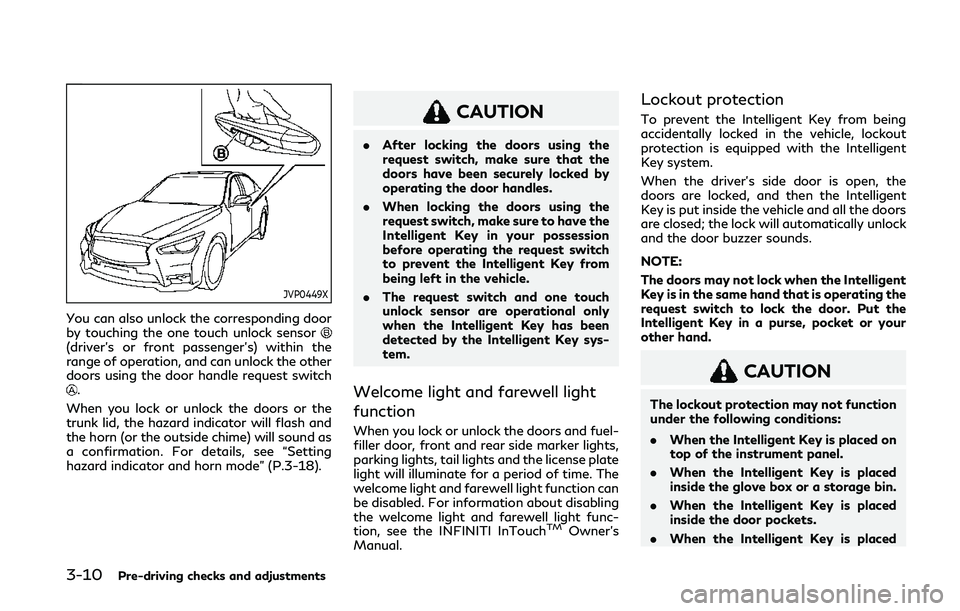
You can also unlock the corresponding door
by touching the one touch unlock sensor
(driver’s or front passenger’s) within the
range of operation, and can unlock the other
doors using the door handle request switch
.
When you lock or unlock the doors or the
trunk lid, the hazard indicator will flash and
the horn (or the outside chime) will sound as
a confirmation. For details, see “Setting
hazard indicator and horn mode” (P.3-18).
CAUTION
. After locking the doors using the
request switch, make sure that the
doors have been securely locked by
operating the door handles.
. When locking the doors using the
request switch, make sure to have the
Intelligent Key in your possession
before operating the request switch
to prevent the Intelligent Key from
being left in the vehicle.
. The request switch and one touch
unlock sensor are operational only
when the Intelligent Key has been
detected by the Intelligent Key sys-
tem.
Welcome light and farewell light
function
When you lock or unlock the doors and fuel-
filler door, front and rear side marker lights,
parking lights, tail lights and the license plate
light will illuminate for a period of time. The
welcome light and farewell light function can
be disabled. For information about disabling
the welcome light and farewell light func-
tion, see the INFINITI InTouch
TMOwner’s
Manual.
Lockout protection
To prevent the Intelligent Key from being
accidentally locked in the vehicle, lockout
protection is equipped with the Intelligent
Key system.
When the driver’s side door is open, the
doors are locked, and then the Intelligent
Key is put inside the vehicle and all the doors
are closed; the lock will automatically unlock
and the door buzzer sounds.
NOTE:
The doors may not lock when the Intelligent
Key is in the same hand that is operating the
request switch to lock the door. Put the
Intelligent Key in a purse, pocket or your
other hand.
CAUTION
The lockout protection may not function
under the following conditions:
. When the Intelligent Key is placed on
top of the instrument panel.
. When the Intelligent Key is placed
inside the glove box or a storage bin.
. When the Intelligent Key is placed
inside the door pockets.
. When the Intelligent Key is placed
Page 164 of 476

3-22Pre-driving checks and adjustments
JVP0452X
1. Pull the hood lock release handlelocated below the instrument panel; the
hood will then spring up slightly.
2. Pull the lever
up at the front of the
hood with your fingertips and raise the
hood.
3. When closing the hood, slowly close the hood down to latch both the right and
left locks. Push the hood down to lock
the hood securely into place.
WARNING
.Make sure the hood is completely
closed and latched before driving.
Failure to do so could cause the hood
to fly open and result in an accident.
. If you see steam or smoke coming
from the engine compartment, to
avoid injury do not open the hood.
WARNING
.Do not drive with the trunk lid open.
This could allow dangerous exhaust
gases to be drawn into the vehicle.
See “Exhaust gas (carbon monoxide)”
(P.5-4) of this manual.
. Closely supervise children when they
are around cars to prevent them from
playing and becoming locked in the
trunk where they could be seriously
injured. Keep the car locked, with the
trunk closed, when not in use, and
prevent children’s access to Intelli-
gent Keys.
HOOD TRUNK LID