fog light INFINITI Q60 COUPE 2021 Owner's Manual
[x] Cancel search | Manufacturer: INFINITI, Model Year: 2021, Model line: Q60 COUPE, Model: INFINITI Q60 COUPE 2021Pages: 492, PDF Size: 2.44 MB
Page 11 of 492

JVC0939X
1. Hood (P.3-22)
2. Windshield wiper and washer
— Switch operation (P.2-34)
— Window washer fluid (P.8-10)
3. Headlights and turn signal lights
(P.2-37)— Adaptive Front lighting System
(AFS) (if so equipped) (P.2-42)
4. Moonroof (if so equipped) (P.2-56)
5. Power windows (P.2-54)
6. Outside mirrors (P.3-31)
— Side turn signal lights (P.2-43)— Side view camera (if so equipped)
(P.4-11)
7. Front view camera (if so equipped)
(P.4-11)
8. Sonar sensors (if so equipped)
— Camera aiding sonar function
(P.4-24)
— Sonar system (P.5-136)
9. Fog lights (P.2-44)
10. Tires
— Wheels and tires (P.8-25, P.10-9)
— Flat tire (P.6-3)
— Tire Pressure Monitoring System
(TPMS) (P.2-15, P.5-5)
11. Doors
— Keys (P.3-2)
— Door locks (P.3-4)
— Intelligent Key system (P.3-6)
— Remote keyless entry system
(P.3-15)
— Remote engine start (if so equipped)
(P.3-19)
— Courtesy light (P.2-60)
Illustrated table of contents0-3
EXTERIOR FRONT
Page 14 of 492

0-6Illustrated table of contents
WAA0093X
1. Side ventilator (P.4-34)
2. Headlight, fog light and turn signal
switch (P.2-37)
3. Steering wheel
— Horn (P.2-44)
— Driver supplemental air bag (P.1-38)— Heated steering wheel (if so
equipped) (P.2-46)
— Power steering (P.5-127)
4. Windshield wiper and washer switch
(P.2-34)
5. Hazard warning flasher switch (P.6-2)6. Shift lever (P.5-16)
7. INFINITI controller*
8. Vehicle Dynamic Control (VDC) OFF
switch (P.2-44, P.5-132)
9. Trunk lid release switch (P.3-23)
10. Instrument brightness control switch
(P.2-43)
11. TRIP/RESET switch for twin trip od-
ometer (P.2-7)
12. Electric tilting/telescopic steering
wheel switch (if so equipped) (P.3-27)
13. Manual tilting/telescopic steering
wheel lever (if so equipped) (P.3-27)
14. Steering-wheel-mounted controls (left
side)
— Audio control steering switch*
— Hands-Free Phone System switch*
— Voice recognition system switch*
15. Steering-wheel-mounted controls
(right side)
— Trip computer switches (P.2-29)
— Cruise control switches (if so
equipped) (P.5-70)
— Intelligent Cruise Control (ICC)
switches (if so equipped) (P.5-72)
— Dynamic driver assistance switch (if
so equipped) (P. 5-25, P.5-33, P.5-48,
P.5-92)
COCKPIT
Page 19 of 492

Red light Name Page
Brake warning light 2-13
Charge warning light 2-13
Master warning light 2-14
Seat belt warning light and
chime2-14
Security indicator light 2-14
Supplemental air bag warn-
ing light2-14Yellow
lightName Page
Anti-lock Braking System
(ABS) warning light2-15
Forward Emergency Braking
(FEB) system warning light (if
so equipped)2-15
Front passenger air bag sta-
tus light2-15
Low fuel warning light 2-15
Low tire pressure warning
light2-15
Malfunction Indicator Light
(MIL)2-17
Master warning light 2-18
Power steering warning light 2-18
Vehicle Dynamic Control
(VDC) off indicator light2-19
Vehicle Dynamic Control
(VDC) warning light2-19Other
lightName Page
ECO drive indicator light 2-19
Exterior light indicator 2-19
Front fog light indicator light 2-19
High beam assist indicator
light (if so equipped)2-19
High beam indicator light 2-19
Turn signal/hazard indicator
lights2-19
Illustrated table of contents0-11
WARNING AND INDICATOR LIGHTS
Page 79 of 492

2 Instruments and controls
Cockpit ................................................................................. 2-3
Instrument panel ............................................................... 2-5
Meters and gauges .......................................................... 2-6
Speedometer and odometer ..................................... 2-7
Tachometer ................................................................... 2-8
Engine coolant temperature gauge ....................... 2-8
Fuel gauge ..................................................................... 2-9
Compass (if so equipped) ............................................... 2-9
Zone variation change procedure ......................... 2-11
Warning lights, indicator lights and
audible reminders ............................................................ 2-12
Checking lights ........................................................... 2-13
Warning/indicator lights (red) ............................... 2-13
Warning/indicator lights (yellow) ......................... 2-15
Warning/indicator lights (other) ........................... 2-19
Audible reminders ..................................................... 2-20
Vehicle information display .......................................... 2-20
Indicators for operation .......................................... 2-23
Indicators for maintenance .................................... 2-26
Trip computer ............................................................. 2-29
Clock and outside air temperature ....................... 2-31
Security systems ............................................................. 2-32
Vehicle Security System .......................................... 2-32
INFINITI Vehicle Immobilizer System .................. 2-33Wiper and washer switch ............................................ 2-34
Rain-sensing auto wiper system ........................ 2-36
Rear window and outside mirror
defroster switch ............................................................. 2-37
Headlight and turn signal switch ............................... 2-37
Headlight switch ..................................................... 2-37
Turn signal switch ................................................... 2-43
Fog light switch ...................................................... 2-44
Horn .................................................................................. 2-44
Vehicle Dynamic Control (VDC) OFF switch ........ 2-44
Heated seats (if so equipped) ..................................... 2-45
Operation with switch ........................................... 2-46
Operation with touch screen ............................... 2-46
AUTO mode setting ............................................... 2-46
Heated steering wheel (if so equipped) ................... 2-46
Power outlets .................................................................. 2-47
Emergency Call (SOS) button (if so equipped) ..... 2-48
Emergency support ............................................... 2-48
Storage ............................................................................ 2-50
Cup holders .............................................................. 2-50
Soft bottle holder ................................................... 2-50
Sunglasses holder .................................................... 2-51
Glove box ................................................................... 2-51
Console box .............................................................. 2-52
Page 81 of 492

WAA0093X
1. Side ventilator (P.4-34)
2. Headlight, fog light and turn signal
switch (P.2-37)
3. Steering wheel
— Horn (P.2-44)
— Driver supplemental air bag (P.1-38)— Heated steering wheel (if so
equipped) (P.2-46)
— Power steering (P.5-127)
4. Windshield wiper and washer switch
(P.2-34)
5. Hazard warning flasher switch (P.6-2)6. Shift lever (P.5-16)
7. INFINITI controller*
8. Vehicle Dynamic Control (VDC) OFF
switch (P.2-44, P.5-132)
9. Trunk lid release switch (P.3-23)
10. Instrument brightness control switch
(P.2-43)
11. TRIP/RESET switch for twin trip od-
ometer (P.2-7)
12. Electric tilting/telescopic steering
wheel switch (P.3-27)
13. Manual tilting/telescopic steering
wheel lever (P.3-27)
14. Steering-wheel-mounted controls (left
side)
— Audio control steering switch*
— Hands-Free Phone System switch*
— Voice recognition system switch*
15. Steering-wheel-mounted controls
(right side)
— Trip computer switch (P.2-29)
— Cruise control switches (if so
equipped) (P.5-70)
— Intelligent Cruise Control (ICC)
switches (if so equipped) (P.5-72)
— Dynamic driver assistance switch (if
so equipped) (P. 5-25, P.5-33, P.5-48,
P.5-92)
Instruments and controls2-3
COCKPIT
Page 90 of 492

2-12Instruments and controls
Warning/indicator lights (red) Warning/indicator lights (yellow) Warning/indicator lights (other)
Brake warning lightAnti-lock Braking System (ABS) warning
lightECO drive indicator light
Charge warning lightForward Emergency Braking (FEB) sys-
tem warning light (if so equipped)Exterior light indicator
Master warning lightFront passenger air bag status lightFront fog light indicator light
Seat belt warning light and chimeLow fuel warning lightHigh beam assist indicator light (if so
equipped)
Security indicator lightLow tire pressure warning lightHigh beam indicator light
Supplemental air bag warning lightMalfunction Indicator Light (MIL)Turn signal/hazard indicator lights
Master warning light
Power steering warning light
Vehicle Dynamic Control (VDC) off in-
dicator light
Vehicle Dynamic Control (VDC) warning
light
WARNING LIGHTS, INDICATOR
LIGHTS AND AUDIBLE REMINDERS
Page 97 of 492

Vehicle Dynamic Control
(VDC) off indicator light
When the ignition switch is placed in the ON
position, the light will come on and then turn
off.
The light comes on when the VDC off switch
is pushed to OFF. This indicates that the
VDC system and traction control system are
not operating.
Vehicle Dynamic Control
(VDC) warning light
When the ignition switch is in the ON
position, the Vehicle Dynamic Control
(VDC) warning light illuminates and then
turns off.
The light will blink when the VDC system or
the traction control system is operating, thus
alerting the driver that the vehicle is nearing
its traction limits. The road surface may be
slippery.
When the VDC warning light illuminates
when the VDC system is turned on, this light
alerts the driver to the fact that the VDC
system’s fail-safe mode is operating, for
example the VDC, active trace control func-
tion, Brake Force Distribution or hill start
assist system may not be functioning prop-
erly. Have the system checked. It is recom-mended you visit an INFINITI retailer for this
service. If a malfunction occurs in the
system, the VDC system function will be
canceled but the vehicle is still driveable. For
additional information, see “Vehicle Dynamic
Control (VDC) system” (P.5-132).
WARNING/INDICATOR LIGHTS
(other)
See “Vehicle information display” (P.2-20).
ECO drive indicator light
When the ignition switch is placed in the ON
position, the light will come on and then turn
off.
When the INFINITI Drive Mode Selector is
turned to the ECO mode, the ECO drive
indicator light will illuminate, blink or remain
off depending on the accelerator pedal
operation to help assist the driver to drive
economically. For more details, see “ECO
mode” (P.5-22).
Exterior light indicator
This indicator illuminates when the headlight
switch is turned to the AUTO,orposition and the exterior lights (such as front
parking lights, headlights, etc.) are on. The
indicator turns off when these lights are
turned off.
Front fog light indicator light
The front fog light indicator light illuminates
when the front fog lights are on. (See “Fog
light switch” (P.2-44).)
High beam assist indicator
light (if so equipped)
The indicator light illuminates when the
headlights come on while the headlight
switch is in the AUTO position with the high
beam selected. This indicates that the high
beam assist system is operational. (See
“High beam assist” (P.2-39).)
High beam indicator light
This light comes on when the headlight high
beam is on and goes out when the low beam
is selected.
Turn signal/hazard indicator
lights
The light flashes when the turn signal switch
lever or hazard switch is turned on.
Instruments and controls2-19
Page 115 of 492
JVI1441X
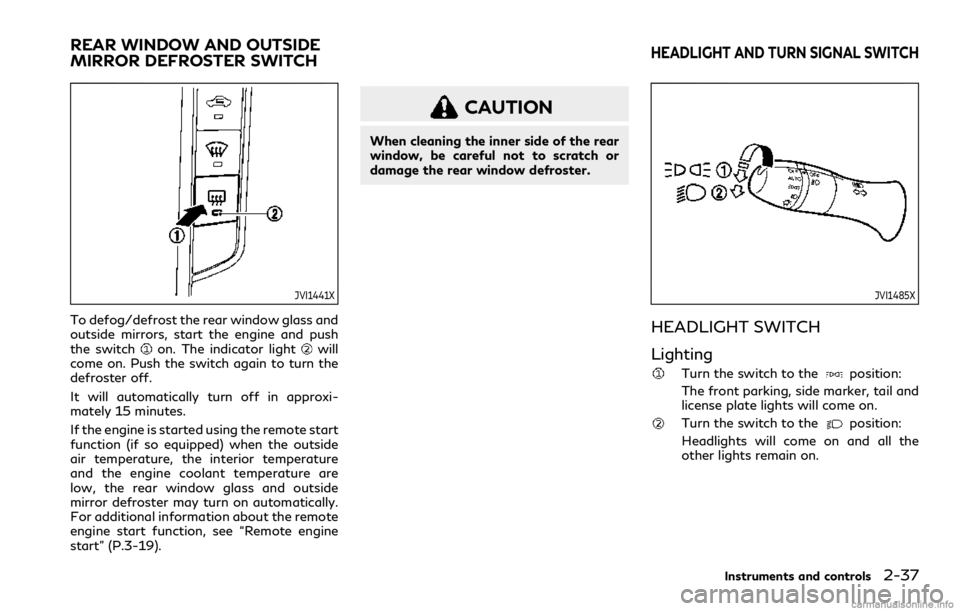
To defog/defrost the rear window glass and
outside mirrors, start the engine and push
the switch
on. The indicator lightwill
come on. Push the switch again to turn the
defroster off.
It will automatically turn off in approxi-
mately 15 minutes.
If the engine is started using the remote start
function (if so equipped) when the outside
air temperature, the interior temperature
and the engine coolant temperature are
low, the rear window glass and outside
mirror defroster may turn on automatically.
For additional information about the remote
engine start function, see “Remote engine
start” (P.3-19).
CAUTION
When cleaning the inner side of the rear
window, be careful not to scratch or
damage the rear window defroster.
JVI1485X
HEADLIGHT SWITCH
Lighting
Turn the switch to theposition:
The front parking, side marker, tail and
license plate lights will come on.
Turn the switch to theposition:
Headlights will come on and all the
other lights remain on.
Instruments and controls2-37
REAR WINDOW AND OUTSIDE
MIRROR DEFROSTER SWITCHHEADLIGHT AND TURN SIGNAL SWITCH
Page 117 of 492
JVI1487X
Headlight beam select
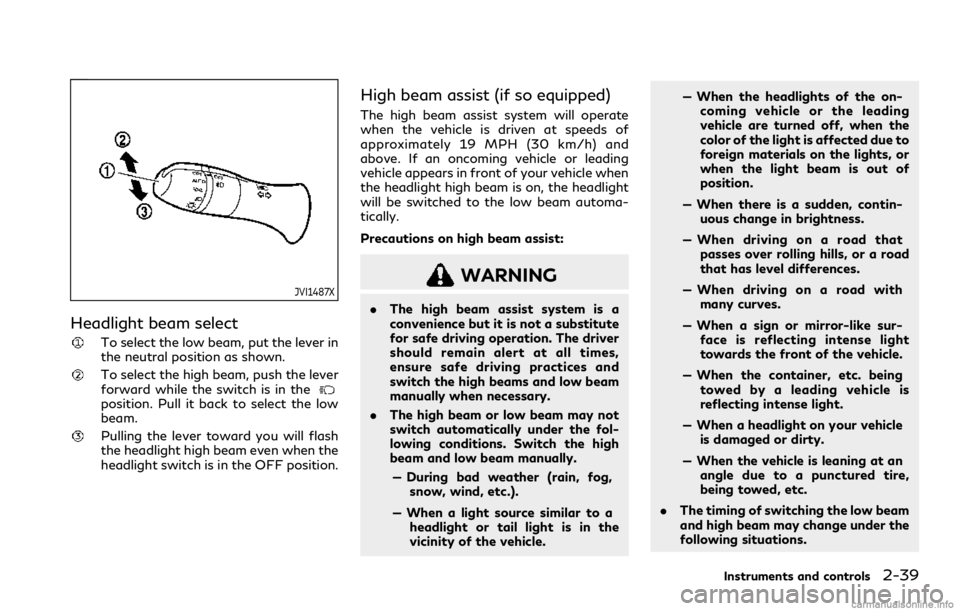
To select the low beam, put the lever in
the neutral position as shown.
To select the high beam, push the lever
forward while the switch is in the
position. Pull it back to select the low
beam.
Pulling the lever toward you will flash
the headlight high beam even when the
headlight switch is in the OFF position.
High beam assist (if so equipped)
The high beam assist system will operate
when the vehicle is driven at speeds of
approximately 19 MPH (30 km/h) and
above. If an oncoming vehicle or leading
vehicle appears in front of your vehicle when
the headlight high beam is on, the headlight
will be switched to the low beam automa-
tically.
Precautions on high beam assist:
WARNING
.The high beam assist system is a
convenience but it is not a substitute
for safe driving operation. The driver
should remain alert at all times,
ensure safe driving practices and
switch the high beams and low beam
manually when necessary.
.The high beam or low beam may not
switch automatically under the fol-
lowing conditions. Switch the high
beam and low beam manually.
— During bad weather (rain, fog,
snow, wind, etc.).
— When a light source similar to a
headlight or tail light is in the
vicinity of the vehicle.— When the headlights of the on-
coming vehicle or the leading
vehicle are turned off, when the
color of the light is affected due to
foreign materials on the lights, or
when the light beam is out of
position.
— When there is a sudden, contin-
uous change in brightness.
— When driving on a road that
passes over rolling hills, or a road
that has level differences.
— When driving on a road with
many curves.
— When a sign or mirror-like sur-
face is reflecting intense light
towards the front of the vehicle.
— When the container, etc. being
towed by a leading vehicle is
reflecting intense light.
— When a headlight on your vehicle
is damaged or dirty.
— When the vehicle is leaning at an
angle due to a punctured tire,
being towed, etc.
.The timing of switching the low beam
and high beam may change under the
following situations.
Instruments and controls2-39
Page 122 of 492
2-44Instruments and controls
JVI1490X
FOG LIGHT SWITCH
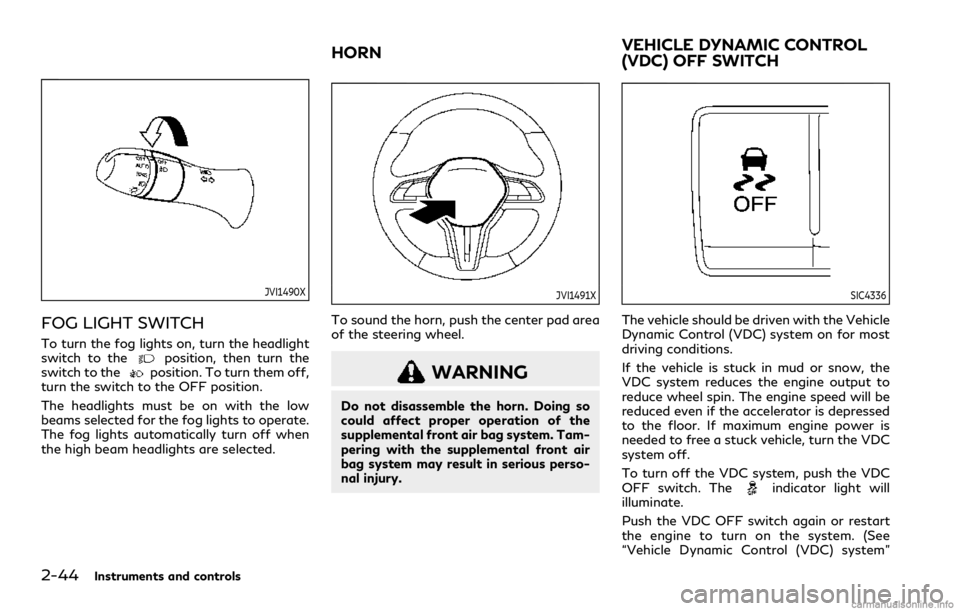
To turn the fog lights on, turn the headlight
switch to theposition, then turn the
switch to theposition. To turn them off,
turn the switch to the OFF position.
The headlights must be on with the low
beams selected for the fog lights to operate.
The fog lights automatically turn off when
the high beam headlights are selected.
JVI1491X
To sound the horn, push the center pad area
of the steering wheel.
WARNING
Do not disassemble the horn. Doing so
could affect proper operation of the
supplemental front air bag system. Tam-
pering with the supplemental front air
bag system may result in serious perso-
nal injury.
SIC4336
The vehicle should be driven with the Vehicle
Dynamic Control (VDC) system on for most
driving conditions.
If the vehicle is stuck in mud or snow, the
VDC system reduces the engine output to
reduce wheel spin. The engine speed will be
reduced even if the accelerator is depressed
to the floor. If maximum engine power is
needed to free a stuck vehicle, turn the VDC
system off.
To turn off the VDC system, push the VDC
OFF switch. The
indicator light will
illuminate.
Push the VDC OFF switch again or restart
the engine to turn on the system. (See
“Vehicle Dynamic Control (VDC) system”
HORNVEHICLE DYNAMIC CONTROL
(VDC) OFF SWITCH