transmission INFINITI Q70 2018 User Guide
[x] Cancel search | Manufacturer: INFINITI, Model Year: 2018, Model line: Q70, Model: INFINITI Q70 2018Pages: 458, PDF Size: 2.21 MB
Page 225 of 458

5-16Starting and driving
SSD0973
Shift lever
To move the shift lever,
: Push the button while depressing the brake pedal,
: Push the button,
: Just move the shift lever.
Shifting
After starting the engine, fully depress the
brake pedal and shift the shift lever from P
(Park) to R (Reverse), N (Neutral), D (Drive)
or Manual shift mode position.
Push the button to shift into P (Park) or R
(Reverse). All other positions can be selected
without pushing the button.
WARNING
Apply the parking brake if the shift lever
is in any position while the engine is not
running. Failure to do so could cause the
vehicle to move unexpectedly or roll
away and result in serious personal
injury or property damage.
CAUTION
Make sure the vehicle is completely
stopped and the transmission is in the
P (Park) position.
P (Park) position:
Use this position when the vehicle is parked
or when starting the engine. Make sure the
vehicle is completely stopped. The brake
pedal must be depressed and the shift lever
button pushed in to move the shift lever
from the N (Neutral) position or any drive
position to the P (Park) position. Apply the
parking brake. When parking on a hill, apply
the parking brake first, then move the shift
lever to the P (Park) position.
CAUTION
Use this position only when the vehicle is
completely stopped.
R (Reverse):
Use this position to back up. Always be sure
the vehicle is completely stopped before
selecting the R (Reverse) position. The brake
pedal must be depressed and the shift lever
button pushed in to move the shift lever
from the P (Park) position, the N (Neutral)
position or any drive position to the R
(Reverse) position.
N (Neutral):
Neither forward nor reverse gear is engaged.
The engine can be started in this position.
You may shift to the N (Neutral) position and
restart a stalled engine while the vehicle is
moving.
D (Drive):
Use this position for all normal forward
driving.
Page 226 of 458

SSD1099
Paddle shifters (if so equipped)
Manual shift mode
When the shift lever is in the manual shift
gate, the transmission is ready for the
manual shift mode. Shift ranges can be
selected manually by moving the shift lever
up or down, or pulling the right-side or left-
side paddle shifter (if so equipped).
When shifting up, move the shift lever to the
+ (up) side or pull the right-side paddle
shifter (+)
(if so equipped). The transmis-
sion shifts to the higher range.
When shifting down, move the shift lever to
the − (down) side or pull the left-side paddle
shifter (−)
(if so equipped). The transmis- sion shifts to the lower range.
When canceling the manual shift mode,
return the shift lever to the D (Drive)
position. The transmission returns to the
normal driving mode.
When you pull the paddle shifter while in the
D (Drive) position, the transmission will shift
to the upper or lower range temporarily. The
transmission will automatically return to the
D (Drive) position after a short period of
time. If you want to return to the D (Drive)
position manually, pull and hold the paddle
shifter for about 1.5 seconds.
In the manual shift mode, the shift range is
displayed on the position indicator in the
meter.
Shift ranges up or down one by one as
follows:
M1
?
/M2 ?
/M3?
/M4 ?
/M5?
/M6?
/M7
M7 (7th):
Use this position for all normal forward
driving at highway speeds.
M6 (6th) andM5 (5th):
Use these positions when driving up long
slopes, or for engine braking when driving
down long slopes.
M4 (4th),M3 (3rd) andM2 (2nd):
Use these positions for hill climbing or engine
braking on downhill grades.
M1 (1st):
Use this position when climbing steep hills
slowly or driving slowly through deep snow,
or for maximum engine braking on steep
downhill grades.
. Remember not to drive at high speeds for
extended periods of time in lower than
7th gear. This reduces fuel economy.
. Moving the shift lever rapidly to the same
side twice will shift the ranges in succes-
sion.
. In the manual shift mode, the transmis-
sion may not shift to the selected gear
or may automatically shift to the other
gear. This helps maintain driving per-
formance and reduces the chance of
vehicle damage or loss of control.
. When the transmission does not shift to
the selected gear, the Automatic Trans-
mission (AT) position indicator light (on
the vehicle information display) will
blink and the buzzer will sound.
. In the manual shift mode, the transmis-
sion automatically shifts down to 1st
gear before the vehicle comes to a stop.
When accelerating again, it is necessary
to shift up to the desired range.
Starting and driving5-17
Page 227 of 458
5-18Starting and driving
Accelerator downshift — In D (Drive)
position —
For passing or hill climbing, fully depress the
accelerator pedal to the floor. This shifts the
transmission down into the lower gear,
depending on the vehicle speed.
Fail-safe
When the fail-safe operation occurs, note
that the transmission will be locked in any of
the forward gears according to the condi-
tion.
If the vehicle is driven under extreme
conditions, such as excessive wheel spinning
and subsequent hard braking, the fail-safe
system may be activated. This will occur
even if all electrical circuits are functioning
properly. In this case, push the ignition
switch to the OFF position and wait for 3
seconds. Then push the ignition switch back
to the ON position. The vehicle should
return to its normal operating condition. If
it does not return to its normal operating
condition, have the transmission checked
and repaired, if necessary. It is recom-
mended you visit a an INFINITI retailer for
this service.
SSD0974
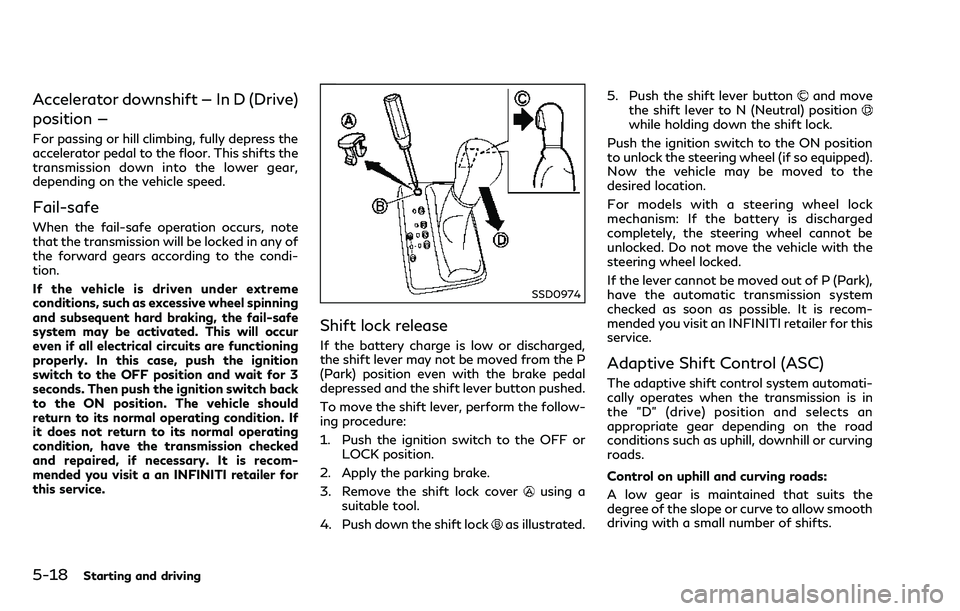
Shift lock release
If the battery charge is low or discharged,
the shift lever may not be moved from the P
(Park) position even with the brake pedal
depressed and the shift lever button pushed.
To move the shift lever, perform the follow-
ing procedure:
1. Push the ignition switch to the OFF orLOCK position.
2. Apply the parking brake.
3. Remove the shift lock cover
using a
suitable tool.
4. Push down the shift lock
as illustrated. 5. Push the shift lever button
and move
the shift lever to N (Neutral) position
while holding down the shift lock.
Push the ignition switch to the ON position
to unlock the steering wheel (if so equipped).
Now the vehicle may be moved to the
desired location.
For models with a steering wheel lock
mechanism: If the battery is discharged
completely, the steering wheel cannot be
unlocked. Do not move the vehicle with the
steering wheel locked.
If the lever cannot be moved out of P (Park),
have the automatic transmission system
checked as soon as possible. It is recom-
mended you visit an INFINITI retailer for this
service.
Adaptive Shift Control (ASC)
The adaptive shift control system automati-
cally operates when the transmission is in
the "D" (drive) position and selects an
appropriate gear depending on the road
conditions such as uphill, downhill or curving
roads.
Control on uphill and curving roads:
A low gear is maintained that suits the
degree of the slope or curve to allow smooth
driving with a small number of shifts.
Page 228 of 458

Control on downhill roads:
The adaptive shift control system shifts to a
low gear that suits the degree of the slope,
and uses the engine braking to reduce the
number of times that the brake must be
used.
Control on winding roads:
A low gear is maintained on continuous
curves that involve repeated acceleration
and deceleration, so that smooth accelera-
tion is available instantly when the accel-
erator pedal is depressed.
NOTE:
.Adaptive shift control may not operate
when the transmission oil temperature
is low immediately after the start of
driving or when it is very hot.
. During some driving situations, hard
braking for example, the adaptive shift
control may automatically operate. The
transmission may automatically shift to
a lower gear for engine braking. This
increases engine speed but not vehicle
speed. Vehicle speed is controlled by the
accelerator pedal when the vehicle is in
the Adaptive shift control mode.
. When the adaptive shift control oper-
ates, the transmission sometimes main-
tains a lower gear for a longer period of
time than when adaptive shift control is not operating. Engine speed will be
higher for a specific vehicle speed while
ASC system is operating than when ASC
is not operating.
WARNING
.
Be sure the parking brake is fully
released before driving. Failure to do
so can cause brake failure and lead to
an accident.
. Do not release the parking brake
from outside the vehicle.
. Do not use the shift lever in place of
the parking brake. When parking, be
sure the parking brake is fully en-
gaged.
. To help avoid risk of injury or death
through unintended operation of the
vehicle and/or its systems, do not
leave children, people who require the
assistance of others or pets unat-
tended in your vehicle. Additionally,
the temperature inside a closed ve-
hicle on a warm day can quickly
become high enough to cause a sig-
nificant risk of injury or death to
people and pets.
Starting and driving5-19
PARKING BRAKE
Page 229 of 458

5-20Starting and driving
SPA2331
To apply:Fully depress the parking brake
pedal.
To release:
1. Firmly apply the foot brake
.
2. Depress the parking brake pedal
and
the parking brake will be released.
3. Before driving, be sure the brake warning light goes out.
SSD1024
INFINITI Drive Mode Selector
Four driving modes can be selected by using
the INFINITI Drive Mode Selector, STAN-
DARD, SPORT, ECO and SNOW.
NOTE:
. When the INFINITI Drive Mode Selector
selects a mode, the mode may not
switch quickly. This is not a malfunction.
. Select the STANDARD mode for normal
driving.
STANDARD MODE
Recommended for normal driving. Turn the
INFINITI Drive Mode Selector to the
position. “STANDARD” appears in the vehi-
cle information display for 2 seconds.
SPORT MODE
Adjusts the engine and transmission points
to enhance performance. If the vehicle is
equipped with the active trace control
system, the amount of brake control pro-
vided by active trace control is reduced. (See
“Vehicle Dynamic Control (VDC) system”
(P.5-123).) Turn the INFINITI Drive Mode
Selector to the SPORT position. “SPORT”
appears in the vehicle information display for
2 seconds.
NOTE:
In the SPORT mode, fuel economy may be
reduced.
SNOW MODE
Used on snowy roads or slippery areas.
When the SNOW mode is activated, engine
output is controlled to avoid wheel spin.
Turn the SNOW mode off for normal driving.
Turn the INFINITI Drive Mode Selector to
the SNOW position. “SNOW” appears in the
vehicle information display for 2 seconds.
INFINITI DRIVE MODE SELECTOR
Page 230 of 458

ECO MODE
Adjusts engine and transmission points to
enhance fuel economy.
NOTE:
Selecting this drive mode will not necessa-
rily improve fuel economy as many driving
factors influence its effectiveness.
Operation
Turn the INFINITI Drive Mode Selector to
the ECO position. “ECO” appears in the
vehicle information display for 2 seconds
and the ECO drive indicator light illuminates
on the instrument panel.
When the accelerator pedal is depressed
within the range of economy drive, the ECO
drive indicator light illuminates in green.
When the accelerator pedal is depressed
above the range of economy drive, the color
of the ECO drive indicator light changes to
orange. For ECO pedal system equipped
models see “ECO pedal system” (P.5-21).
The ECO drive indicator light will not
illuminate in the following cases:
.When the shift lever is in the R (Reverse)
position.
. When the vehicle speed is below 3 MPH
(4.8 km/h) or over 90 MPH (144 km/h).
. When the Intelligent Cruise Control (ICC)
system (if so equipped) is operated.
ECO pedal system (if so equipped)
Helps assist the driver to improve fuel
economy by increasing the reaction force
of the accelerator pedal. When the ECO
drive indicator light is blinking or turns
orange, the ECO pedal system increases
the reaction force of the accelerator pedal.
JVS1080X
When the ECO drive indicator illuminates in
green, the accelerator reaction force is
normal. When the ECO drive indicator light
is blinking or turns orange, the ECO pedal
system increases the reaction force of the
accelerator pedal.
The ECO pedal system may not vary accel-
erator reaction force under the following
conditions:
. When the shift lever is in the N (Neutral)
or R (Reverse) position.
. When Intelligent Cruise Control (ICC) is
being operated.
If the ECO pedal system malfunctions, it will
cancel automatically. The ECO pedal system
will not vary the reaction force of the
Starting and driving5-21
Page 327 of 458
5-118Starting and driving
SSD0336
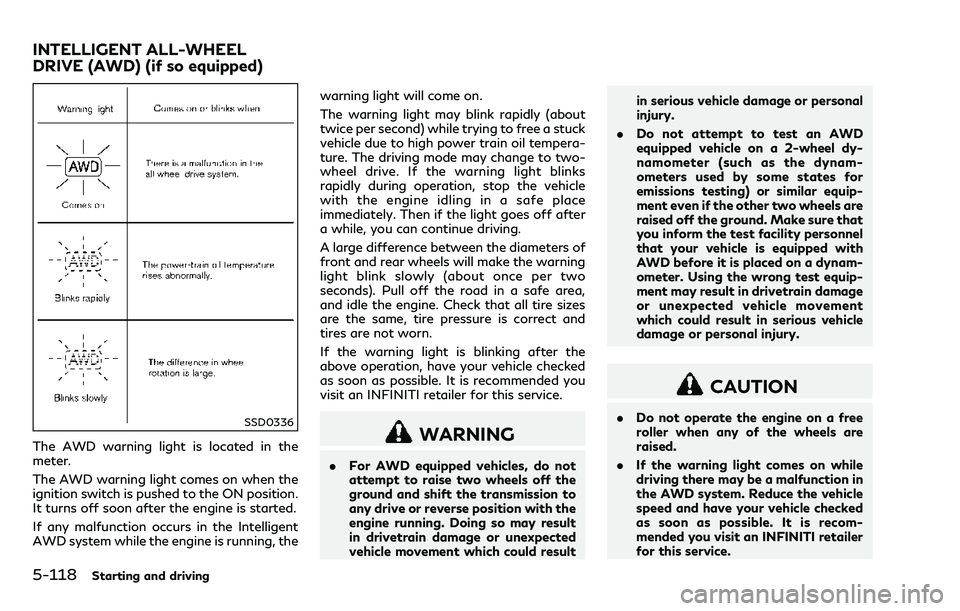
The AWD warning light is located in the
meter.
The AWD warning light comes on when the
ignition switch is pushed to the ON position.
It turns off soon after the engine is started.
If any malfunction occurs in the Intelligent
AWD system while the engine is running, thewarning light will come on.
The warning light may blink rapidly (about
twice per second) while trying to free a stuck
vehicle due to high power train oil tempera-
ture. The driving mode may change to two-
wheel drive. If the warning light blinks
rapidly during operation, stop the vehicle
with the engine idling in a safe place
immediately. Then if the light goes off after
a while, you can continue driving.
A large difference between the diameters of
front and rear wheels will make the warning
light blink slowly (about once per two
seconds). Pull off the road in a safe area,
and idle the engine. Check that all tire sizes
are the same, tire pressure is correct and
tires are not worn.
If the warning light is blinking after the
above operation, have your vehicle checked
as soon as possible. It is recommended you
visit an INFINITI retailer for this service.WARNING
.
For AWD equipped vehicles, do not
attempt to raise two wheels off the
ground and shift the transmission to
any drive or reverse position with the
engine running. Doing so may result
in drivetrain damage or unexpected
vehicle movement which could result in serious vehicle damage or personal
injury.
. Do not attempt to test an AWD
equipped vehicle on a 2-wheel dy-
namometer (such as the dynam-
ometers used by some states for
emissions testing) or similar equip-
ment even if the other two wheels are
raised off the ground. Make sure that
you inform the test facility personnel
that your vehicle is equipped with
AWD before it is placed on a dynam-
ometer. Using the wrong test equip-
ment may result in drivetrain damage
or unexpected vehicle movement
which could result in serious vehicle
damage or personal injury.
CAUTION
.Do not operate the engine on a free
roller when any of the wheels are
raised.
. If the warning light comes on while
driving there may be a malfunction in
the AWD system. Reduce the vehicle
speed and have your vehicle checked
as soon as possible. It is recom-
mended you visit an INFINITI retailer
for this service.
INTELLIGENT ALL-WHEEL
DRIVE (AWD) (if so equipped)
Page 328 of 458

.If the warning light remains on after
the above operation, have your ve-
hicle checked as soon as possible. It is
recommended you visit an INFINITI
retailer for this service.
. The power train may be damaged if
you continue driving with the warn-
ing light blinking.
SD1006MA
WARNING
.Do not stop or park the vehicle over
flammable materials such as dry
grass, waste paper or rags. They
may ignite and cause a fire.
. Never leave the engine running while
the vehicle is unattended.
. Do not leave children unattended
inside the vehicle. They could un-
knowingly activate switches or con-
trols. Unattended children could
become involved in serious accidents. .
To help avoid risk of injury or death
through unintended operation of the
vehicle and/or its systems, do not
leave children, people who require the
assistance of others or pets unat-
tended in your vehicle. Additionally,
the temperature inside a closed ve-
hicle on a warm day can quickly
become high enough to cause a sig-
nificant risk of injury or death to
people and pets.
. Safe parking procedures require that
both the parking brake be applied
and the transmission placed into P
(Park). Failure to do so could cause
Starting and driving5-119
PARKING/PARKING ON HILLS
Page 334 of 458

a stable surface.
. If wheels or tires other than the
INFINITI recommended ones are
used, the VDC system may not oper-
ate properly and the VDC warning
light
may illuminate.
. The VDC system is not a substitute
for winter tires or tire chains on a
snow covered road.
WARNING
.Never rely solely on the hill start
assist system to prevent the vehicle
from moving backward on a hill.
Always drive carefully and atten-
tively. Depress the brake pedal when
the vehicle is stopped on a steep hill.
Be especially careful when stopped
on a hill on frozen or muddy roads.
Failure to prevent the vehicle from
rolling backwards may result in a loss
of control of the vehicle and possible
serious injury or death.
. The hill start assist system is not
designed to hold the vehicle at a
standstill on a hill. Depress the brake
pedal when the vehicle is stopped on
a steep hill. Failure to do so may
cause the vehicle to roll backwards
and may result in a collision or serious
personal injury.
. The hill start assist system may not
prevent the vehicle from rolling back-
wards on a hill under all load or road
conditions. Always be prepared to
depress the brake pedal to prevent
the vehicle from rolling backwards.
Failure to do so may result in a
collision or serious personal injury. The hill start assist system automatically
keeps the brakes applied to help prevent the
vehicle from rolling backwards in the time it
takes the driver to release the brake pedal
and apply the accelerator when the vehicle is
stopped on a hill.
The hill start assist system will operate
automatically under the following condi-
tions:
.
The transmission is shifted to a forward
or reverse gear.
. The vehicle is stopped completely on a hill
by applying the brake.
The maximum holding time is 2 seconds.
After 2 seconds the vehicle will begin to roll
back and the hill start assist system will stop
operating completely.
The hill start assist system will not operate
when the transmission is shifted to the N
(Neutral) or P (Park) position or on a flat and
level road.
Starting and driving5-125
HILL START ASSIST SYSTEM
Page 341 of 458

6-4In case of emergency
cause a malfunction of the tire pres-
sure sensors.
CHANGING A FLAT TIRE
If you have a flat tire, follow the instructions
below.
Stopping the vehicle
1. Safely move the vehicle off the road andaway from traffic.
2. Turn on the hazard warning flashers.
3. Park on a level surface and apply the parking brake. Move the shift lever to the
P (Park) position.
4. Turn off the engine.
5. Raise the hood to warn other traffic, and to signal professional road assistance
personnel that you need assistance.
6. Have all passengers get out of the vehicle and stand in a safe place, away
from traffic and clear of the vehicle.
WARNING
.Make sure the parking brake is
securely applied and the automatic
transmission into P (Park). .
Never change tires when the vehicle
is on a slope, ice or slippery areas.
This is hazardous.
. Never change tires if oncoming traf-
fic is close to your vehicle. Wait for
professional road assistance.
MCE0001A
Blocking wheels
Place suitable blocksat both the front and
back of the wheel diagonally opposite the
flat tire to prevent the vehicle from moving
when it is jacked up.
WARNING
Be sure to block the wheel as the vehicle
may move and result in personal injury.