phone INFINITI Q70 2018 Service Manual
[x] Cancel search | Manufacturer: INFINITI, Model Year: 2018, Model line: Q70, Model: INFINITI Q70 2018Pages: 458, PDF Size: 2.21 MB
Page 205 of 458

4-34Monitor, climate, audio, phone and voice recognition systems
SAA2952
1. “” front defroster button
2. “
” rear window defroster button
(See “Rear window and outside mirror
defroster switch” (P.2-34).)
3. “OFF” button for climate control sys- tem
4. “
” fan speed decrease button 5. “
” fan speed increase button
6. “AUTO” automatic climate control ON button
7. “
” air intake control button
8. “
” air recirculation button
9. “CLIMATE” button 10, 11.
Temperature control button (driver
side)
12. “
” manual air flow control button
(driver side)
13. “
” manual air flow control button
(passenger side)
14, 15. Temperature control button (passenger
side)
AUTOMATIC CLIMATE CON-
TROL
Automatic operation
Cooling and/or dehumidified heating
(AUTO):
This mode may be used all year round. The
system works automatically to control the
inside temperature, air flow distribution and
fan speed after the preferred temperature is
set manually.
1. Push the “AUTO” button on. (The in-dicator on the button will illuminate and
AUTO will be displayed.)
2. Push the temperature control button (driver side) to set the desired tempera-
ture.
The temperature of the passenger com-
partment will be maintained automati-
Page 206 of 458

cally. Air flow distribution and fan speed
will also be controlled automatically.
3. To turn off the climate control system, push the “OFF” button.
A visible mist may be seen coming from the
ventilators in hot, humid conditions as the air
is cooled rapidly. This does not indicate a
malfunction.
Dehumidified defrosting or defogging:
1. Push the front defroster “
” button.
(The indicator light on the button will
come on.)
2. Push the temperature control button (driver side) to set the desired tempera-
ture.
The temperature of the passenger com-
partment will be maintained automati-
cally. Air flow distribution and fan speed
will also be controlled automatically.
3. To turn off the climate control system, push the “OFF” button.
. To quickly remove ice from the outside of
the windows, push the fan speed in-
crease “
” button and set it to the
maximum position.
. As soon as possible after the windshield
is clean, push the “AUTO” button to
return to the auto mode.
. When the front defroster “
” button is
pushed, the air conditioner will automa- tically be turned on at outside tempera-
tures above 23°F (−5°C) to defog the
windshield, and the air recirculate mode
will automatically be turned off.
Outside air is drawn into the passenger
compartment to improve the defogging
performance.
Manual operation
Fan speed control:
Push the fan speed increase “
”or
decrease “” button to manually control
the fan speed.
Push the “AUTO” button to return to auto-
matic control of the fan speed.
Temperature control:
Push the temperature control button to set
the desired temperature.
Air intake control:
. Push the air recirculation “
” button to
change the air circulation mode. When
the indicator light illuminates, the flow-
ing air is recirculated inside the vehicle.
The air recirculation mode cannot be
activated when the air conditioner is in
the front defrosting mode “
”.
. Push the outside air circulation “
”
button to change the air circulation
mode. When the indicator light illumi-
nates, the flowing air is drawn from outside the vehicle.
. To control the air intake automatically,
push and hold either the “
” air
recirculation button or the “” outside
air circulation button (whichever indica-
tor light is illuminated). The indicator
lights (both air recirculation and outside
air circulation buttons) will flash twice,
and then the air intake will switch to
automatic control.
Air flow control:
Pushing the “
” button selects the air
outlet to:
: Air flows from center and side ventilators.
: Air flows from center and side ventilators and foot outlets.
: Air flows mainly from foot outlets.
: Air flows from defroster and foot outlets.
Monitor, climate, audio, phone and voice recognition systems4-35
Page 207 of 458
4-36Monitor, climate, audio, phone and voice recognition systems
JVH1747X
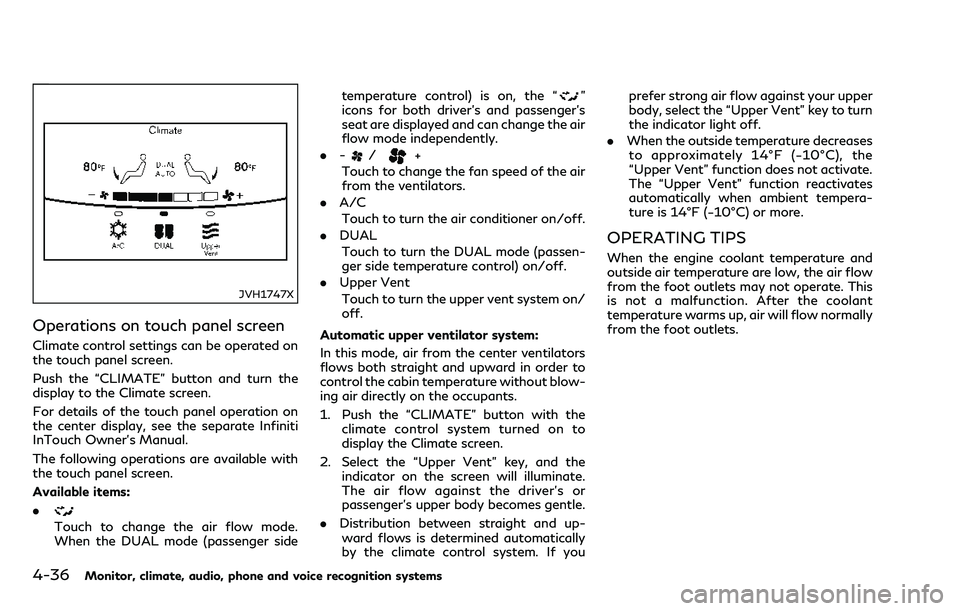
Operations on touch panel screen
Climate control settings can be operated on
the touch panel screen.
Push the “CLIMATE” button and turn the
display to the Climate screen.
For details of the touch panel operation on
the center display, see the separate Infiniti
InTouch Owner’s Manual.
The following operations are available with
the touch panel screen.
Available items:
.
Touch to change the air flow mode.
When the DUAL mode (passenger sidetemperature control) is on, the “
”
icons for both driver’s and passenger’s
seat are displayed and can change the air
flow mode independently.
. -
/+
Touch to change the fan speed of the air
from the ventilators.
. A/C
Touch to turn the air conditioner on/off.
. DUAL
Touch to turn the DUAL mode (passen-
ger side temperature control) on/off.
. Upper Vent
Touch to turn the upper vent system on/
off.
Automatic upper ventilator system:
In this mode, air from the center ventilators
flows both straight and upward in order to
control the cabin temperature without blow-
ing air directly on the occupants.
1. Push the “CLIMATE” button with the climate control system turned on to
display the Climate screen.
2. Select the “Upper Vent” key, and the indicator on the screen will illuminate.
The air flow against the driver’s or
passenger’s upper body becomes gentle.
. Distribution between straight and up-
ward flows is determined automatically
by the climate control system. If you prefer strong air flow against your upper
body, select the “Upper Vent” key to turn
the indicator light off.
. When the outside temperature decreases
to approximately 14°F (−10°C), the
“Upper Vent” function does not activate.
The “Upper Vent” function reactivates
automatically when ambient tempera-
ture is 14°F (−10°C) or more.
OPERATING TIPS
When the engine coolant temperature and
outside air temperature are low, the air flow
from the foot outlets may not operate. This
is not a malfunction. After the coolant
temperature warms up, air will flow normally
from the foot outlets.
Page 208 of 458

SIC2768
JVH0039X
The sensorsandon the instrument
panel helps maintain a constant tempera-
ture. Do not put anything on or around the
sensors.
LINKING INTELLIGENT KEY
The Climate control system settings can be
memorized for each Intelligent Key. For
more details, see “Setting memory function”
(P.3-30).
SERVICING CLIMATE CONTROL
The climate control system in your vehicle is
charged with a refrigerant designed with the
environment in mind. This refrigerant will
not harm the earth’s ozone layer. However,
special charging equipment and lubricant are
required when servicing your INFINITI air
conditioner. Using improper refrigerants or
lubricants will cause severe damage to your
climate control system. (See “Capacities and
recommended fluids/lubricants” (P.10-2)
for climate control system refrigerant and
lubricant recommendations.)
Your INFINITI retailer will be able to service
your environmentally friendly climate control
system.
WARNING
The system contains refrigerant under
high pressure. To avoid personal injury,
any air conditioner service should be
done only by an experienced technician
with the proper equipment.
In-cabin microfilter
The climate control system is equipped with
a natural grape seed polyphenol filter which
collects and neutralizes dirt, pollen, dust,
allergens (such as cedar pollen, tick shells)
etc. To make sure that the air conditioner
heats, defogs and ventilates efficiently, re-
place the filter in accordance with the
specified maintenance intervals listed in the
“9. Maintenance and schedules” section. It is
recommended to see an INFINITI retailer to
replace the filter.
The filter should be replaced if the air flow
decreases significantly or if windows fog up
easily when operating the heater or air
conditioner.
Monitor, climate, audio, phone and voice recognition systems4-37
Page 209 of 458
4-38Monitor, climate, audio, phone and voice recognition systems
WINDOW ANTENNA
The antenna pattern is printed inside the
rear window.
CAUTION
.Do not place metalized film near the
rear window glass or attach any
metal parts to it. This may cause poor
reception or noise.
. When cleaning the inside of the rear
window, be careful not to scratch or
damage the rear window antenna.
Lightly wipe along the antenna with
a dampened soft cloth.
SATELLITE ANTENNA
There is a satellite antenna on the rear part
of the vehicle roof.
A buildup of ice on the satellite radio
antenna can affect satellite radio perfor-
mance. Remove the ice to restore satellite
radio reception. When installing a car phone or a CB radio in
your vehicle, be sure to observe the follow-
ing cautions, otherwise the new equipment
may adversely affect the electronic control
modules and electronic control system har-
ness.
WARNING
.
A cellular phone should not be used
for any purpose while driving so full
attention may be given to vehicle
operation. Some jurisdictions prohibit
the use of cellular phones while
driving.
. If you must make a call while your
vehicle is in motion, the hands-free
cellular phone operational mode (if so
equipped) is highly recommended.
Exercise extreme caution at all times
so full attention may be given to
vehicle operation.
. If a conversation in a moving vehicle
requires you to take notes, pull off
the road to a safe location and stop
your vehicle before doing so.
CAUTION
.Keep the antenna as far away as
possible from the electronic control
modules.
. Keep the antenna wire more than 8 in
(20 cm) away from the electronic
control system harness. Do not route
the antenna wire next to any harness.
. Adjust the antenna standing-wave
ratio as recommended by the manu-
facturer.
. Connect the ground wire from the CB
radio chassis to the body.
. For details, it is recommended you
visit an INFINITI retailer.
ANTENNA CAR PHONE OR CB RADIO
Page 223 of 458

5-14Starting and driving
1. Apply the parking brake.
2. Move the shift lever to the P (Park) or N(Neutral) position. (P is recommended.)
The starter is designed not to operate
unless the shift lever is in either of the
above positions.
3. Push the ignition switch to the ON position. Depress the brake pedal and
push the ignition switch to start the
engine.
To start the engine immediately, push
and release the ignition switch while
depressing the brake pedal with the
ignition switch in any position.
.If the engine is very hard to start inextremely cold weather or when re-
starting, depress the accelerator ped-
al a little (approximately 1/3 to the
floor) and while holding, crank the
engine. Release the accelerator pedal
when the engine starts.
.If the engine is very hard to start
because it is flooded, depress the
accelerator pedal all the way to the
floor and hold it. Push the ignition
switch to the ON position to start
cranking the engine. After 5 or 6
seconds, stop cranking by pushing
the ignition switch to OFF. After
cranking the engine, release the accel-
erator pedal. Crank the engine withyour foot off the accelerator pedal
by
depressing the brake pedal and push-
ing the push-button ignition switch to
start the engine. If the engine starts,
but fails to run, repeat the above
procedure.
CAUTION
Do not operate the starter for more than
15 seconds at a time. If the engine does
not start, push the ignition switch to
OFF and wait 10 seconds before crank-
ing again, otherwise the starter could be
damaged.
4. Warm-up
Allow the engine to idle for at least 30
seconds after starting. Do not race the
engine while warming it up. Drive at
moderate speed for a short distance
first, especially in cold weather. In cold
weather, keep the engine running for a
minimum of 2 - 3 minutes before shut-
ting it off. Starting and stopping the
engine over a short period of time may
make the vehicle more difficult to start.
When racing the engine up to 4,000 rpm
(VK56VD engine) or 4,500 rpm
(VQ37VHR engine) or more under no
load condition, the engine will enter the fuel cut mode.
5. To stop the engine, shift the shift lever to the P (Park) position and push the
ignition switch to the OFF position.
In preparation for the next engine start,
the engine may have a slightly delayed
shutoff after pushing the ignition switch
to the OFF position, depending on the
driving conditions (VK56VD engine mod-
els).
NOTE:
Care should be taken to avoid situations
that can lead to potential battery discharge
and potential no-start conditions such as:
1. Installation or extended use of electro-
nic accessories that consume battery
power when the engine is not running
(Phone chargers, GPS, DVD players,
etc.)
2. Vehicle is not driven regularly and/or
only driven short distances.
In these cases, the battery may need to be
charged to maintain battery health.
STARTING THE ENGINE
Page 337 of 458

5-128Starting and driving
JVS1082X
This system uses microphoneslocated
inside the vehicle to detect engine booming
sound. The system then automatically pro-
duces a muted engine booming sound
through the speakers
and woofer(if
so equipped) to reduce engine booming
sound. NOTE:
To operate the active noise cancellation
system properly:
.
Do not cover the speakers or woofer.
. Do not cover the microphones.
. Do not change or modify speakers in-
cluding the woofer and any audio related
parts such as the amplifier.
. Do not make any modification including
sound deadening or modifications
around the microphones or speakers.
ACTIVE NOISE CANCELLATION
Page 377 of 458

8-16Do-it-yourself
washer fluid concentrate and water..
Keep the battery surface clean and dry.
Clean the battery with a solution of
baking soda and water.
. Make certain the terminal connections
are clean and securely tightened.
. If the vehicle is not to be used for 30 days
or longer, disconnect the negative (−)
battery terminal cable to prevent dis-
charging it.
NOTE:
Care should be taken to avoid situations
that can lead to potential battery discharge
and potential no-start conditions such as:
1. Installation or extended use of electro-
nic accessories that consume battery
power when the engine is not running
(Phone chargers, GPS, DVD players,
etc.)
2. Vehicle is not driven regularly and/or
only driven short distances.
In these cases, the battery may need to be
charged to maintain battery health.
WARNING
. Do not expose the battery to flames
or electrical sparks. Hydrogen gas
generated by the battery is explosive.
Do not allow battery fluid to contact
your skin, eyes, fabrics, or painted surfaces. After touching a battery or
battery cap, do not touch or rub your
eyes. Thoroughly wash your hands. If
the acid contacts your eyes, skin or
clothing, immediately flush with
water for at least 15 minutes and
seek medical attention.
. Do not operate the vehicle if the fluid
in the battery is low. Low battery
fluid can cause a higher load on the
battery which can generate heat,
reduce battery life, and in some cases
lead to an explosion.
. When working on or near a battery,
always wear suitable eye protection
and remove all jewelry.
. Battery posts, terminals and related
accessories contain lead and lead
compounds. Wash hands after hand-
ling.
. Keep the battery out of the reach of
children.
BATTERY
Page 405 of 458
9-4Maintenance and schedules
properly.
Windshield defroster:Check that the air
comes out of the defroster outlets properly
and in sufficient quantity when operating
the heater or air conditioner.
Windshield wiper and washer*: Check that
the wipers and washer operate properly and
that the wipers do not streak.
Under the hood and vehicle
The maintenance items listed here should be
checked periodically (for example, each time
you check the engine oil or refuel).
Battery*: Check the fluid level in each cell. It
should be between the MAX and MIN lines.
Vehicles operated in high temperatures or
under severe condition require frequent
checks of the battery fluid level.
NOTE:
Care should be taken to avoid situations
that can lead to potential battery discharge
and potential no-start conditions such as:
1. Installation or extended use of electro-
nic accessories that consume battery
power when the engine is not running
(Phone chargers, GPS, DVD players,
etc.)
2. Vehicle is not driven regularly and/or
only driven short distances. In these cases, the battery may need to be
charged to maintain battery health.
Brake fluid level*:
Make sure that the brake
fluid level is between the MAX and MIN lines
on the reservoir.
Engine coolant level*: Check the coolant
level when the engine is cold.
Engine drive belts*: Make sure that no belt is
frayed, worn, cracked or oily.
Engine oil level*: Check the level after
parking the vehicle on a level spot and
turning off the engine. Wait more than 15
minutes for the oil to drain back into the oil
pan.
Exhaust system: Make sure there are no
loose supports, cracks or holes. If the sound
of the exhaust seems unusual or there is a
smell of exhaust fumes, immediately have
the exhaust system inspected. It is recom-
mended you visit an INFINITI retailer for this
service. (See “Precautions when starting and
driving” (P.5-4) for exhaust gas (Carbon
monoxide).)
Fluid leaks: Check under the vehicle for fuel,
oil, water or other fluid leaks after the
vehicle has been parked for a while. Water
dripping from the air conditioner after use is
normal. If you should notice any leaks or if
gasoline fumes are evident, check for the
cause and have it corrected immediately. Power steering fluid level* and lines:
Check
the level when the fluid is cold, with the
engine off. Check the lines for proper
attachment, leaks, cracks, etc.
Radiator and hoses: Check the front of the
radiator and clean off any dirt, insects,
leaves, etc., that may have accumulated.
Make sure the hoses have no cracks, defor-
mation, rot or loose connections.
Underbody: The underbody is frequently
exposed to corrosive substances such as
those used on icy roads or to control dust. It
is very important to remove these sub-
stances, otherwise rust will form on the
floor pan, frame, fuel lines and around the
exhaust system. At the end of winter, the
underbody should be thoroughly flushed
with plain water, being careful to clean
those areas where mud and dirt may accu-
mulate. For additional information, see
“Cleaning exterior” (P.7-2).
Windshield washer fluid*: Check that there
is adequate fluid in the reservoir.
Page 443 of 458

10-26Technical and consumer information
personally identifying data routinely ac-
quired during a crash investigation.
To read data recorded by an EDR, special
equipment is required and access to the
vehicle or the EDR is needed. In addition to
the vehicle manufacturer and INFINITI re-
tailer, other parties, such as law enforce-
ment, that have the special equipment, can
read the information if they have access to
the vehicle or the EDR. EDR data will only be
accessed with the consent of the vehicle
owner or lessee or as otherwise required or
permitted by law.Genuine INFINITI Service Manual for this
model year and prior can be purchased. A
genuine INFINITI Service Manual is the best
source of service and repair information for
your vehicle. This manual is the same one
used by the factory-trained technicians
working at an INFINITI retailer. Genuine
INFINITI Owner’s Manuals can also be
purchased.
For USA:
For current pricing and availability of genu-
ine
INFINITI Service Manuals, contact:
www.infiniti-techinfo.com
For current pricing and availability of genu-
ineINFINITI Owner’s Manuals, contact:
1-800-247-5321
For Canada:
To purchase a copy of a genuine INFINITI
Service Manual or Owner’s Manual for this
model year and prior, contact an INFINITI
retailer. For the phone number and location
of an INFINITI retailer in your area call the
INFINITI Satisfaction Center at 1-800-361-
4792 and a bilingual INFINITI representative
will assist you.
OWNER’S MANUAL/SERVICE
MANUAL ORDER INFORMATION