trunk INFINITI Q70-HYBRID 2014 Owner's Guide
[x] Cancel search | Manufacturer: INFINITI, Model Year: 2014, Model line: Q70-HYBRID, Model: INFINITI Q70-HYBRID 2014Pages: 522, PDF Size: 4.01 MB
Page 326 of 522

WARNING
Do not operate the push-button ignition
switch while driving the vehicle except in an
emergency. (The INFINITI Direct Response
Hybrid
®System will turn off when the
ignition switch is pushed 3 consecutive
times or the ignition switch is pushed and
held for more than 2 seconds.) If the hybrid
system turns off while the vehicle is being
driven, this could lead to a crash and
serious injury.
Before operating the push-button ignition
switch, be sure to move the shift lever to
the P (Park) position.
SSD0659
OPERATING RANGE FOR HYBRID
SYSTEM START FUNCTION
The Intelligent Key can only be used for
starting the hybrid system when the
Intelligent Key is within the specified
operating range.
When the Intelligent Key battery is almost
discharged or strong radio waves are
present near the operating location, the
Intelligent Key system’s operating range
becomes narrower and may not function
properly.
If the Intelligent Key is within the operating
range, it is possible for anyone, even someone who does not carry the Intelligent
Key, to push the ignition switch to start the
hybrid system.
.
The trunk area is not included in the
operating range but the Intelligent Key
may function.
. If the Intelligent Key is placed on the
instrument panel, rear parcel shelf,
inside the glove box or door pocket,
the Intelligent Key may not function.
. If the Intelligent Key is placed near the
door or window outside the vehicle, the
Intelligent Key may function.
CAUTION
When pressing the ignition to the OFF
position, make sure the button is not
pressed twice. This may unintentionally
leave the vehicle in ACC or ON mode. This
may discharge the 12-volt battery.
Starting and driving5-9
PUSH-BUTTON IGNITION SWITCH
Page 369 of 522

5-52Starting and driving
traveling ahead. The sensor generally
detects the signals returned from the
reflectors on a vehicle ahead. Therefore, if
the sensor cannot detect the reflector on
the vehicle ahead, the ICC system may not
maintain the selected distance.
The following are some conditions in which
the sensor cannot detect the signals:
.When the reflector of the vehicle ahead
is positioned high on the vehicle
(trailer, etc.)
. When the reflector on the vehicle ahead
is missing, damaged or covered
. When the reflector of the vehicle ahead
is covered with dirt, snow and road
spray
. When the snow or road spray from
traveling vehicles reduces the sensor’s
visibility
. When dense exhaust or other smoke
(black smoke) from vehicles reduces
the sensor’s visibility
. When excessively heavy baggage is
loaded in the rear seat or the trunk of
your vehicle
The ICC system is designed to automati-
cally check the sensor’s operation within
the limitations of the system. When the sensor is covered with dirt or obstructs, the
system will automatically be canceled. If
the sensor is covered with ice, a transpar-
ent or translucent vinyl bag, etc., the ICC
system may not detect them. In these
instances, the vehicle-to-vehicle distance
control mode may not cancel and may not
be able to maintain the selected following
distance from the vehicle ahead. Be sure to
check and clean the sensor regularly.
The vehicle-to-vehicle distance control
mode is designed to maintain a selected
distance and reduce the speed to match
the slower vehicle ahead; the system will
decelerate the vehicle as necessary and if
the vehicle ahead comes to a stop, the
vehicle decelerates to a standstill. How-
ever, the ICC system can only apply up to
25% of the vehicles total braking power.
This system should only be used when
traffic conditions allow vehicle speeds to
remain fairly constant or when vehicle
speeds change gradually. If a vehicle
moves into the traveling lane ahead or if
a vehicle traveling ahead rapidly decele-
rates, the distance between vehicles may
become closer because the ICC system
cannot decelerate the vehicle quickly en-
ough. If this occurs, the ICC system will
sound a warning chime and blink the
system display to notify the driver to take
necessary action.
The system will cancel and a warning
chime will sound if the speed is below
approximately 15 MPH (24 km/h) and a
vehicle is not detected ahead. The system
will also disengage when the vehicle goes
above the maximum set speed.
See
“Approach warning” (P.5-62).
The following items are controlled in the
vehicle-to-vehicle distance control mode:
. When there are no vehicles traveling
ahead, the vehicle-to-vehicle distance
control mode maintains the speed set
by the driver. The set speed range is
between approximately 20 and 90 MPH
(32 and 144 km/h).
. When there is a vehicle traveling ahead,
the vehicle-to-vehicle distance control
mode adjusts the speed to maintain the
distance, selected by driver, from the
vehicle ahead. The adjusting speed
range is up to the set speed. If the
vehicle ahead comes to a stop, the
vehicle decelerates to a standstill with-
in the limitations of the system. The
system will cancel once it judges a
standstill with a warning chime.
Page 428 of 522

SCE0881
SCE0882
Getting the spare tire and tools
Raise the trunk floor cover*1using the
tab
*A.
Remove jacking tools located inside the
trunk as illustrated.
The spare tire is located under the trunk
room. Remove the cap
*2holding the
spare tire.
Jacking up the vehicle and remov-
ing the damaged tire
WARNING
. Never get under the vehicle while it is
supported only by the jack. If it is
necessary to work under the vehicle,
support it with safety stands.
. Use only the jack provided with your
vehicle to lift the vehicle. Do not use the
jack provided with your vehicle on other
vehicles. The jack is designed for lifting
only your vehicle during a tire change.
. Use the correct jack-up points. Never use
any other part of the vehicle for jack
support.
. Never jack up the vehicle more than
necessary.
. Never use blocks on or under the jack.
. Do not start or run the hybrid system
while vehicle is on the jack, as it may
cause the vehicle to move. This is
especially true for vehicles with limited
slip differentials.
. Do not allow passengers to stay in the
vehicle while it is on the jack.
In case of emergency6-5
Page 432 of 522

JVE0012X
6. Put trunk floor cover*1against in the
trunk room and store the damaged tire.
7. Close the trunk.
WARNING
. Always make sure that the spare tire and
jacking equipment are properly secured
after use. Such items can become
dangerous projectiles in an accident or
sudden stop.
. The T-type spare tire and small size
spare tire are designed for emergency
use. See specific instructions under the heading
“Wheels and tires” (P.8-32).
Before attempting to jump start the vehi-
cle, make sure the fuel tank is not empty
and the correct starting procedure is
followed. See“Starting the INFINITI Direct
Response Hybrid
®System” (P.5-12). Do
not drive the vehicle on battery power only
if the fuel tank is empty. The Lithium ion
(Li-ion) battery will become discharged and
the INFINITI Direct Response Hybrid
®Sys-
tem will turn off.
CONFIRM BATTERY IS DISCHARGED
If any of the following conditions occurs,
the 12-volt battery might discharged:
. The instrument cluster and/or head-
lights are not normal brightness.
. Audio accessories cannot be turned on.
. The hybrid system does not become
READY to drive mode.
. The ignition switch cannot be placed in
the ON position.
Check the following if you notice above
conditions.
1. Check that the 12-volt battery terminals are tight and clean. See “12-volt
battery” (P.8-18). The battery is located
on the left hand side of the trunk
behind an access panel. If the 12-volt
battery terminals are loose, contact
In case of emergency6-9
IF THE VEHICLE DOES NOT START
Page 444 of 522
CAUTION
.Never use benzine, thinner, or any
similar material.
. For cleaning, use a soft cloth, dampened
with water. Never use a rough cloth,
alcohol, benzine, thinner or any kind of
solvent or paper towel with a chemical
cleaning agent. They will scratch or
cause discoloration to the lens.
. Do not spray any liquid such as water on
the meter lens. Spraying liquid may
cause the system to malfunction.
. Small dirt particles can be abrasive and
damaging to the leather surfaces and
should be removed promptly. Do not use
saddle soap, car waxes, polishes, oils,
cleaning fluids, solvents, detergents or
ammonia-based cleaners as they may
damage the leather’s natural finish.
. Do not clean the interior or trunk using
water. If water contacts the Lithium-ion
(Li-ion) battery, it may cause a short
circuit and damage the battery.
. Only use fabric protectors approved by
INFINITI. .
Do not use glass or plastic cleaner on
meter or gauge lens covers. It may
damage the lens cover.
JVO0019X
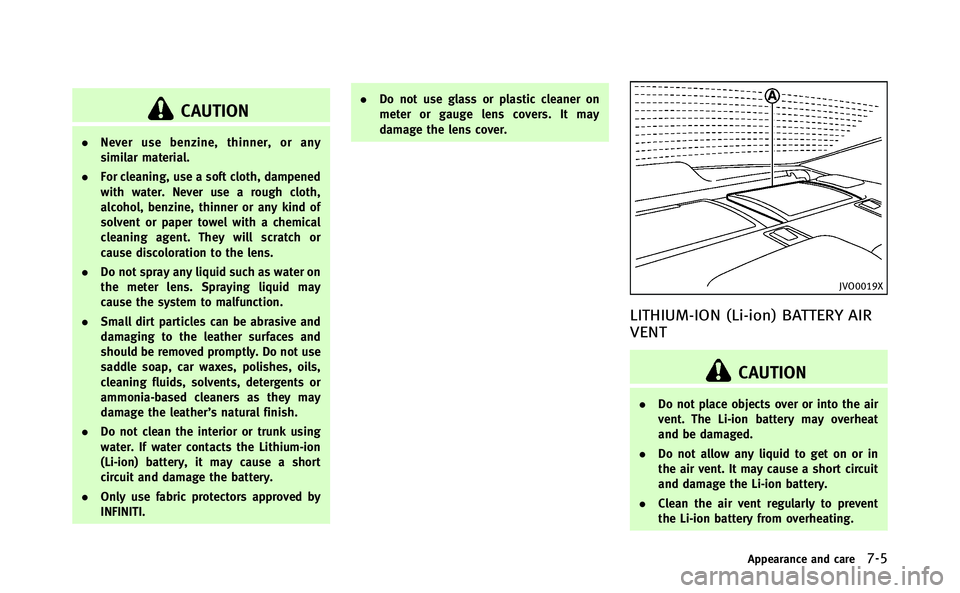
LITHIUM-ION (Li-ion) BATTERY AIR
VENT
CAUTION
.Do not place objects over or into the air
vent. The Li-ion battery may overheat
and be damaged.
. Do not allow any liquid to get on or in
the air vent. It may cause a short circuit
and damage the Li-ion battery.
. Clean the air vent regularly to prevent
the Li-ion battery from overheating.
Appearance and care7-5
Page 448 of 522
8 Maintenance and do-it-yourself
Maintenance requirement.................................... 8-2
Scheduled maintenance .................................. 8-2
General maintenance....................................... 8-2
Where to go for service ................................... 8-2
General maintenance ........................................... 8-2 Explanation of maintenance items ................... 8-2
Maintenance precautions ..................................... 8-5
Engine compartment check locations ................... 8-7 VQ35HR engine ............................................... 8-7
Engine cooling system ......................................... 8-9
Checking engine coolant level ....................... 8-10
Changing engine coolant ............................... 8-10
Inverter cooling system...................................... 8-11
Checking inverter coolant level ...................... 8-12
Changing inverter coolant.............................. 8-12
Engine oil .......................................................... 8-12
Checking engine oil level............................... 8-12
Changing engine oil and filter ....................... 8-13
Automatic transmission fluid ............................. 8-15
Power steering fluid........................................... 8-15
Brake fluid......................................................... 8-16 Brake fluid .................................................... 8-16
Window washer fluid ......................................... 8-17 12-volt battery .................................................. 8-18
Checking battery fluid level.......................... 8-19
Jump starting ............................................... 8-19
Spark plugs ...................................................... 8-19 Replacing spark plugs ................................. 8-20
Air cleaner ........................................................ 8-20
Windshield wiper blades ................................... 8-21 Cleaning ...................................................... 8-21
Replacing..................................................... 8-22
Brakes .............................................................. 8-23
Self-adjusting brakes ................................... 8-23
Brake pad wear warning .............................. 8-23
Fuses ................................................................ 8-24
Engine compartment or trunk room.............. 8-24
Passenger compartment............................... 8-25
Intelligent Key battery replacement ................... 8-26
Lights................................................................ 8-29 Headlights ................................................... 8-29
Exterior and interior lights ........................... 8-30
Wheels and tires ............................................... 8-32
Tire pressure ............................................... 8-32
Tire labeling ................................................ 8-36
Types of tires............................................... 8-38
Tire chains ................................................... 8-39
Changing wheels and tires........................... 8-39
Page 452 of 522

radiator and clean off any dirt, insects,
leaves, etc., that may have accumulated.
Make sure the hoses have no cracks,
deformation, rot or loose connections.
Underbody:The underbody is frequently
exposed to corrosive substances such as
those used on icy roads or to control dust.
It is very important to remove these
substances, otherwise rust will form on
the floor pan, frame, fuel lines and around
the exhaust system. At the end of winter,
the underbody should be thoroughly
flushed with plain water, being careful to
clean those areas where mud and dirt may
accumulate. For additional information,
see “Cleaning exterior” (P.7-2).
Windshield washer fluid*: Check that there
is adequate fluid in the reservoir. When performing any inspection or main-
tenance work on your vehicle, always take
care to prevent serious accidental injury to
yourself or damage to the vehicle. The
following are general precautions which
should be closely observed.
WARNING
.
This vehicle has high voltage DC and AC
systems as well as a 12-volt system. DC
and AC high voltage is very dangerous
and can cause severe burns and electric
shock that may result in serious injury or
death.
. Never touch, disassemble, remove or
replace the high voltage parts, har-
nesses and their connectors. High vol-
tage cables are orange. Touching,
disassembling, removing or replacing
those parts and harnesses can cause
severe burns or electric shock that may
result in serious injury or death.
. Never try to remove the service plug
located in the trunk room. The service
plug is used only when the vehicle is
serviced by trained technicians wearing
personal protection equipment and is
part of the high voltage system. Touch- ing the service plug can cause severe
burns or electric shock that may result in
serious injury or death.
. The hybrid system uses high voltage up
to 408V. The system can be hot while
and after starting. Be careful of both the
high voltage and the high temperature.
Obey the caution labels attached to the
vehicle.
. Park the vehicle on a level surface, apply
the parking brake securely and block the
wheels to prevent the vehicle from
moving. Move the shift lever to P (Park).
. Be sure the ignition switch is in the OFF
or LOCK position when performing any
parts replacement or repairs.
. The engine can start at any time without
warning when the INFINITI Direct Re-
sponse Hybrid
®System is in the READY
to drive mode. If you must work with the
Hybrid System in the READY to drive
mode, keep your hands, clothing, hair
and tools away from fans, belts and any
other parts that can move.
. It is advisable to secure or remove any
loose clothing and remove any jewelry,
such as rings, watches, etc. before
working on your vehicle.
Maintenance and do-it-yourself8-5
MAINTENANCE PRECAUTIONS
Page 465 of 522

8-18Maintenance and do-it-yourself
JVM0039X
The 12-volt battery*Ais located on the
left hand side of the trunk behind an
access panel.
. Keep the battery surface clean and dry.
Clean the battery with a solution of
baking soda and water.
. Make certain the terminal connections
are clean and securely tightened.
. If the vehicle is not to be used for 30
days or longer, disconnect the negative
(-) battery terminal cable to prevent
discharge.
NOTE:
Care should be taken to avoid situations that can lead to potential 12-volt battery
discharge and potential no-start condi-
tions such as:
1.
Installation or extended use of electro-
nic accessories that consume 12-volt
battery power when the engine is not
running (Phone chargers, GPS, DVD
players, etc.)
2. Vehicle is not driven regularly and/or
only driven short distances.
In these cases, the 12-volt battery may
need to be charged to maintain 12-volt
battery health.WARNING
. Do not expose the battery to flames or
electrical sparks. Hydrogen gas gener-
ated by the battery is explosive. Do not
allow battery fluid to contact your skin,
eyes, fabrics or painted surfaces. After
touching a battery, do not touch or rub
your eyes. Thoroughly wash your hands.
If the acid contacts your eyes, skin or
clothing, immediately flush with water
for at least 15 minutes and seek medical
attention. .
The Hybrid vehicle uses a special bat-
tery. If the battery needs to be replaced,
use a battery of the same design. Using
the wrong battery can cause hydrogen
gas to build up in the vehicle, which
could lead to an explosion and personal
injury.
. When working on or near a battery,
always wear suitable eye protection and
remove all jewelry.
. Battery posts, terminals and related
accessories contain lead and lead com-
pounds. Wash hands after handling.
. Keep battery out of the reach of children.
12-VOLT BATTERY
Page 471 of 522

8-24Maintenance and do-it-yourself
JVM0055X
JVM0056X
ENGINE COMPARTMENT OR TRUNK
ROOM
CAUTION
Never use a fuse of a higher or lower
amperage rating than that specified on the
fuse box cover. This could damage the
electrical system or cause a fire.
If any electrical equipment does not
operate, check for an open fuse.
1. Be sure the ignition switch is pushed tothe OFF or LOCK position and the
headlight switch is turned to OFF.
2. Open the engine hood or trunk lid and to access the cover on the fuse/fusible
link holder.
3. Remove the fuse/fusible link holder cover.
4. Remove the fuse with the fuse puller.
SDI1754
5. If the fuse is open*A, replace it with a
new fuse
*B. Spare fuses are stored in
the passenger compartment fuse box.
6. If a new fuse also opens, have the electrical system checked and repaired
by an INFINITI retailer.
The holder also contains the fuses. For
checking and/or replacing, see an INFINITI
retailer.
Fusible links
If any electrical equipment does not
operate and fuses are in good condition,
check the fusible links. If any of these
fusible links are melted, replace only with
FUSES
Page 476 of 522

SDI2552
1. Front turn signal light
2. Parking light
3. Headlight (high- and low-beam)
4. Map light
5. Rear personal light
6. Fog light
7. Side marker light
8. Step light
9. Courtesy light
10. High-mounted stop light
11. Trunk light
12. License plate light
13. Back-up light
14. Rear combination light (rear turnsignal/tail/stop/side marker light)
HEADLIGHTS
Replacing
Xenon headlight bulb:
WARNING
HIGH VOLTAGE
When xenon headlights are on, they pro-
duce a high voltage. To prevent an electric
shock, never attempt to modify or disas-
semble. Always have your xenon headlights
Maintenance and do-it-yourself8-29
LIGHTS