radio INFINITI Q70 HYBRID 2018 User Guide
[x] Cancel search | Manufacturer: INFINITI, Model Year: 2018, Model line: Q70 HYBRID, Model: INFINITI Q70 HYBRID 2018Pages: 458, PDF Size: 2.23 MB
Page 228 of 458

.Since the spare tire is not equipped
with the TPMS, when a spare tire is
mounted or a wheel is replaced, the
TPMS will not function and the low
tire pressure warning light will flash
for approximately 1 minute. The light
will remain on after 1 minute. Have
your tires replaced and/or TPMS
system reset as soon as possible. It
is recommended you visit an INFINITI
retailer for these services.
. Replacing tires with those not origin-
ally specified by INFINITI could affect
the proper operation of the TPMS.
. Do not inject any tire liquid or aerosol
tire sealant into the tires, as this may
cause a malfunction of the tire pres-
sure sensors.
CAUTION
.The TPMS may not function properly
when the wheels are equipped with
tire chains or the wheels are buried in
snow.
. Do not place metalized film or any
metal parts (antenna, etc.) on the
windows. This may cause poor recep-
tion of the signals from the tire pressure sensors, and the TPMS will
not function properly.
Some devices and transmitters may tem-
porarily interfere with the operation of the
TPMS and cause the low tire pressure
warning light to illuminate. Some examples
are:
. Facilities or electric devices using similar
radio frequencies are near the vehicle.
. If a transmitter set to similar frequencies
is being used in or near the vehicle.
. If a computer (or similar equipment) or a
DC/AC converter is being used in or near
the vehicle.
Low tire pressure warning light may illumi-
nate in the following cases.
. If the vehicle is equipped with a wheel
and tire without TPMS.
. If the TPMS has been replaced and the ID
has not been registered.
. If the wheel is not originally specified by
INFINITI.
FCC Notice:
For USA:
This device complies with Part 15 of the
FCC Rules. Operation is subject to the
following two conditions: (1) This device
may not cause harmful interference, and (2)
this device must accept any interference received, including interference that may
cause undesired operation.
NOTE:
Changes or modifications not expressly
approved by the party responsible for
compliance could void the user’s authority
to operate the equipment.
For Canada:
This device complies with Industry Canada
licence-exempt RSS standard(s). Operation
is subject to the following two conditions:
(1) this device may not cause interference,
and (2) this device must accept any inter-
ference, including interference that may
cause undesired operation of the device.
AVOIDING COLLISION AND
ROLLOVER
WARNING
Failure to operate this vehicle in a safe
and prudent manner may result in loss of
control or an accident.
Be alert and drive defensively at all times.
Obey all traffic regulations. Avoid excessive
speed, high speed cornering, or sudden
steering maneuvers, because these driving
practices could cause you to lose control of
Starting and driving5-7
Page 231 of 458
5-10Starting and driving
SSD0659
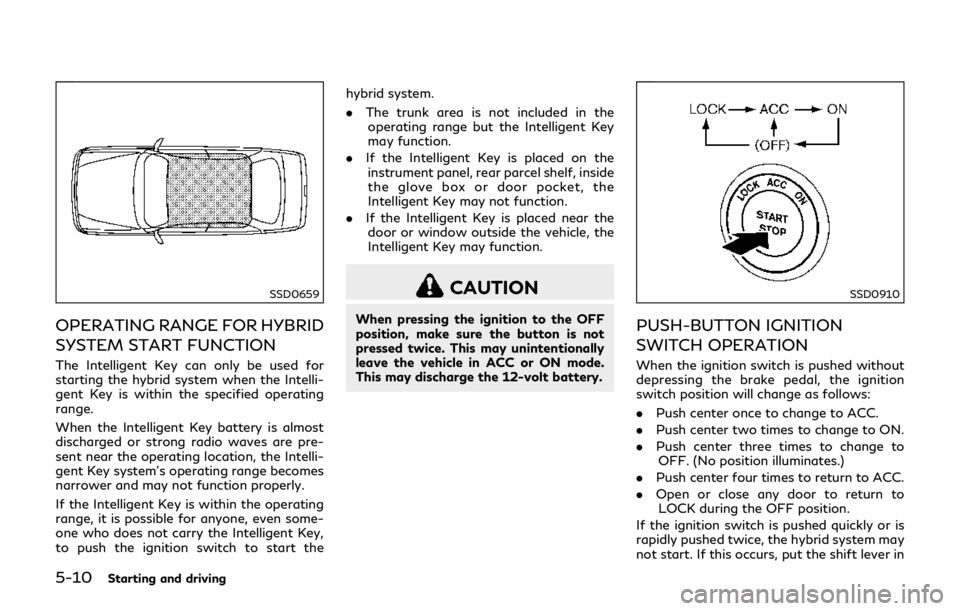
OPERATING RANGE FOR HYBRID
SYSTEM START FUNCTION
The Intelligent Key can only be used for
starting the hybrid system when the Intelli-
gent Key is within the specified operating
range.
When the Intelligent Key battery is almost
discharged or strong radio waves are pre-
sent near the operating location, the Intelli-
gent Key system’s operating range becomes
narrower and may not function properly.
If the Intelligent Key is within the operating
range, it is possible for anyone, even some-
one who does not carry the Intelligent Key,
to push the ignition switch to start thehybrid system.
.
The trunk area is not included in the
operating range but the Intelligent Key
may function.
. If the Intelligent Key is placed on the
instrument panel, rear parcel shelf, inside
the glove box or door pocket, the
Intelligent Key may not function.
. If the Intelligent Key is placed near the
door or window outside the vehicle, the
Intelligent Key may function.
CAUTION
When pressing the ignition to the OFF
position, make sure the button is not
pressed twice. This may unintentionally
leave the vehicle in ACC or ON mode.
This may discharge the 12-volt battery.
SSD0910
PUSH-BUTTON IGNITION
SWITCH OPERATION
When the ignition switch is pushed without
depressing the brake pedal, the ignition
switch position will change as follows:
. Push center once to change to ACC.
. Push center two times to change to ON.
. Push center three times to change to
OFF. (No position illuminates.)
. Push center four times to return to ACC.
. Open or close any door to return to
LOCK during the OFF position.
If the ignition switch is pushed quickly or is
rapidly pushed twice, the hybrid system may
not start. If this occurs, put the shift lever in
Page 232 of 458

the “P” (Park) position, and leave the ignition
switch in the “OFF” position for one minute.
Then depress the brake pedal and push the
ignition switch to “ON”. When the READY to
drive indicator light
illuminates, the
vehicle can be driven.
The ignition lock is designed so that the
ignition switch position cannot be switched
to LOCK until the shift lever is moved to the
P (Park) positon.
When the ignition switch cannot be
switched toward the LOCK position, pro-
ceed as follows:
Move the shift lever into the P (Park)
position.
Steering lock (if so equipped)
In order for the steering wheel to be locked,
it must be turned about 1/8 of a right or left
turn from the straight up position.
To lock the steering wheel, push the ignition
switch to the OFF position.
To unlock the steering wheel, push the
ignition switch.
If the steering lock release malfunction
indicator appears on the vehicle information
display, push the push-button ignition
switch again while lightly turning the steer-
ing wheel right and left. (See “Vehicle
information display” (P.2-21).) If the battery of the vehicle is discharged, the
push-button ignition switch cannot be
turned from the LOCK position.
Some indicators and warnings for operation
are displayed on the vehicle information
display between the speedometer and tach-
ometer. (See “Vehicle information display”
(P.2-21).)
PUSH-BUTTON IGNITION
SWITCH POSITIONS
LOCK (Normal parking position)
The ignition switch can only be locked in this
position.
The ignition switch will be unlocked when it
is pushed to the ACC position while carrying
the Intelligent Key or with the Intelligent Key
inserted in the port.
ACC (Accessories)
This position activates electrical accessories
such as the radio, when the engine is not
running.
ACC has a battery saver feature that will
turn the ignition switch to the OFF position
after a period of time under the following
conditions:
.
all doors are closed. .
shift lever is in P (Park).
The battery saver feature will be cancelled if
any of the following occur:
. any door is opened.
. shift lever is moved out of P (Park).
. ignition switch changes position.
ON (Normal operating position)
This position turns on the ignition system
and electrical accessories.
ON has a battery saver feature that will turn
the ignition switch to the OFF position, if the
vehicle is not running, after some time under
the following conditions:
.all doors are closed.
. shift lever is in P (Park).
The battery saver feature will be cancelled if
any of the following occur:
. any door is opened.
. shift lever is moved out of the P (Park)
position.
. ignition switch changes position.
OFF
The hybrid system can be turned off in this
position.
The ignition lock is designed so that the
ignition switch cannot be switched to the
LOCK position until the shift lever is moved
to the P (Park) position.
Starting and driving5-11
Page 260 of 458

Action to take:
Stop the vehicle in a safe location, place the
vehicle in the P (Park) position, turn the
hybrid system off and restart the hybrid
system.
If the BSW system warning light continues
to illuminate, have the system checked. It is
recommended you visit an INFINITI retailer
for this service.
JVS0480X
SYSTEM MAINTENANCE
The two radar sensorsfor the BSW
system are located near the rear bumper.
Always keep the area near the radar sensors
clean.
The radar sensors may be blocked by
temporary ambient conditions such as
splashing water, mist or fog.
The blocked condition may also be caused by
objects such as ice, frost or dirt obstructing
the radar sensors.
Check for and remove objects obstructing
the area around the radar sensors.
Do not attach stickers (including transparent
material), install accessories or apply addi- tional paint near the radar sensors.
Do not strike or damage the area around the
radar sensors.
It is recommended you visit an INFINITI
retailer if the area around the radar sensors
is damaged due to a collision.
Radio frequency statement
This device complies with part 15 of the FCC
Rules and RSS-310 of Industry Canada.
Operation is subject to the following two
conditions:
1. This device may not cause harmful
interference.
2. This device must accept any interference received, including interference that may
cause undesired operation.
Frequency of operation: 24.05GHz —
24.25GHz
Field Strength: Not greater than 2.5V/m
peak (0.25V/m average) at a distance of 3 m
The manufacturer is not responsible for any
radio or TV interference caused by un-
authorized modifications to this equipment.
Such modifications could void the user’s
authority to operate the equipment.
Starting and driving5-39
Page 274 of 458

Do not strike or damage the area around the
radar sensors.
It is recommended you visit an INFINITI
retailer if the area around the radar sensors
is damaged due to a collision.
The lane camera unit
for BSI system is
located above the inside mirror. To keep the
proper operation of BSI and prevent a
system malfunction, be sure to observe the
following:
. Always keep the windshield clean.
. Do not attach a sticker (including trans-
parent material) or install an accessory
near the camera unit.
. Do not place reflective materials, such as
white paper or a mirror, on the instru-
ment panel. The reflection of sunlight
may adversely affect the camera unit’s
capability of detecting the lane markers.
. Do not strike or damage the areas around
the camera unit. Do not touch the
camera lens or remove the screw located
on the camera unit. It is recommended
you contact an INFINITI retailer if the
camera unit is damaged due to an
accident.
Radio frequency statement
This device complies with part 15 of the FCC
Rules and RSS-310 of Industry Canada.
Operation is subject to the following two
conditions:
1. This device may not cause harmful interference.
2. This device must accept any interference received, including interference that may
cause undesired operation.
Frequency of operation: 24.05GHz —
24.25GHz
Field Strength: Not greater than 2.5V/m
peak (0.25V/m average) at a distance of 3 m
The manufacturer is not responsible for any
radio or TV interference caused by un-
authorized modifications to this equipment.
Such modifications could void the user’s
authority to operate the equipment.WARNING
Failure to follow the warnings and
instructions for proper use of the BCI
system could result in serious injury or
death.
. The BCI system is not a replacement
for proper driving procedure, is not
designed to prevent contact with
vehicles or objects and does not
provide full brake power. When back-
ing out of parking spaces, always use
the inside and rear mirrors and turn
and look in the direction you will
move. Never rely solely on the BCI
system.
. There is a limitation to the detection
capability of the radar or the sonar.
Using the BCI system under some
road, ground, traffic or weather con-
ditions could lead to improper system
operation. Always rely on your own
operation to avoid accidents.
The BCI system can help alert the driver of
an approaching vehicle or objects behind the
vehicle when the driver is backing out of a
parking space.
Starting and driving5-53
BACK-UP COLLISION
INTERVENTION (BCI) (if so equipped)
Page 284 of 458

SYSTEM MALFUNCTION
If the BCI system malfunctions, it will turn
off automatically, a chime will sound and
“BCI MALFUNCTION” warning will appear
in the vehicle information display
.
Action to take
Stop the vehicle in a safe location and place
the shift lever in the P (Park) position. Turn
the hybrid system off and restart the hybrid
system. If the warning message continues to
appear, have the system checked. It is
recommended you visit an INFINITI retailer
for this service.
JVS0480X
SYSTEM MAINTENANCE
The two radar sensorsfor the BCI system
are located near the rear bumper. Always
keep the area near the radar sensors clean.
The radar sensors may be blocked by
temporary ambient conditions such as
splashing water, mist or fog.
The blocked condition may also be caused by
objects such as ice, frost or dirt obstructing
the radar sensors.
Check for and remove objects obstructing
the area around the radar sensors.
Do not attach stickers (including transparent
material), install accessories or apply addi-
tional paint near the radar sensors. Do not strike or damage the area around the
radar sensors.
It is recommended you visit an INFINITI
retailer if the area around the radar sensors
is damaged due to a collision.
Radio frequency statement
This device complies with part 15 of the FCC
Rules and RSS-310 of Industry Canada.
Operation is subject to the following two
conditions:
1. This device may not cause harmful
interference.
2. This device must accept any interference received, including interference that may
cause undesired operation.
Frequency of operation: 24.05GHz —
24.25GHz
Field Strength: Not greater than 2.5V/m
peak (0.25V/m average) at a distance of 3 m
The manufacturer is not responsible for any
radio or TV interference caused by un-
authorized modifications to this equipment.
Such modifications could void the user’s
authority to operate the equipment.
Starting and driving5-63
Page 368 of 458
.Do not use a wax containing any abra-
sives, cutting compounds or cleaners
that may damage the vehicle finish.
Machine compounding or aggressive polish-
ing on a base coat/clear coat paint finish
may dull the finish or leave swirl marks.
REMOVING SPOTS
Remove tar and oil spots, industrial dust,
insects, and tree sap as quickly as possible
from the paint surface to avoid lasting
damage or staining. Special cleaning pro-
ducts are available at an INFINITI retailer or
any automotive accessory stores.
UNDERBODY
In areas where road salt is used in winter, the
underbody must be cleaned regularly. This
will prevent dirt and salt from building up
and causing the acceleration of corrosion on
the underbody and suspension. Before the
winter period and again in the spring, the
underseal must be checked and, if necessary,
re-treated.
GLASS
Use glass cleaner to remove smoke and dust
film from the glass surfaces. It is normal for
glass to become coated with a film after the
vehicle is parked in the hot sun. Glass cleaner
and a soft cloth will easily remove this film.
CAUTION
When cleaning the inside of the win-
dows, do not use sharp-edged tools,
abrasive cleaners or chlorine-based dis-
infectant cleaners. They could damage
the electrical conductors, radio antenna
elements or rear window defroster ele-
ments.
WHEELS
Wash the wheels when washing the vehicle
to maintain their appearance.
. Clean the inner side of the wheels when
the wheel is changed or the underside of
the vehicle is washed.
. Inspect wheel rims regularly for dents or
corrosion. Such damage may cause loss
of pressure or poor seal at the tire bead.
. INFINITI recommends that the road
wheels be waxed to protect against road
salt in areas where it is used during winter.
CAUTION
Do not use abrasive cleaners when
washing the wheels.
Aluminum alloy wheels
Wash regularly with a sponge dampened in a
mild soap solution, especially during winter
months in areas where road salt is used. Salt
could discolor the wheels if not removed.
CAUTION
Follow the directions below to avoid
staining or discoloring the wheels:
.
Do not use a cleaner that uses strong
acid or alkali contents to clean the
wheels.
. Do not apply wheel cleaners to the
wheels when they are hot. The wheel
temperature should be the same as
ambient temperature.
. Rinse the wheel to completely re-
move the cleaner within 15 minutes
after the cleaner is applied.
Appearance and care7-3
Page 449 of 458

11-2
Parking brake operation .............................. 5-18
Brake assist ......................................................... 5-121
Break-in schedule .............................................. 5-116
Brightness control Instrument panel ............................................ 2-42
Bulb check/instrument panel ............................ 2-11
Bulb replacement ................................................. 8-23
C
Cabin air filter ....................................................... 4-37
Camera aiding sonar function ......................... 4-23
Capacities and
recommended fluids/lubricants ....................... 10-2
Car phone or CB radio ....................................... 4-38
Card holder ............................................................ 2-52
Catalytic converter Three way catalyst .......................................... 5-5
Changing inverter coolant .................................. 8-8
Chassis and body maintenance ....................... 9-10
Check tire pressure warning ............................. 2-24
Checking battery fluid level .............................. 8-14
Checking inverter coolant level ......................... 8-8
Child restraints ...................................................... 1-19 Booster seats .................................................. 1-34
LATCH system ............................................... 1-21
Precautions on child restraints .................. 1-19
Child safety ............................................................ 1-16
Child safety rear door lock .................................. 3-6
Chimes Audible reminders .......................................... 2-20
Seat belt warning light and chime ............ 2-17 Circuit breaker
Fusible link ....................................................... 8-19
Cleaning exterior and interior ................... 7-2, 7-4
Clock ........................................................................\
2-48
Coat hooks ............................................................ 2-53
Cockpit ...................................................................... 2-3
Cold weather driving ........................................ 5-125
Compact spare tire ............................................. 8-35
Console box ........................................................... 2-51
Coolant
Capacities and recommended
fluids/ lubricants ............................................ 10-2
Changing engine coolant ............................... 8-6
Checking engine coolant level ...................... 8-6
Corrosion protection ............................................. 7-8
Cruise control ....................................................... 5-64
Fixed speed cruise control (on
ICC system) .................................................... 5-84
Intelligent Cruise Control (ICC) ................. 5-66
Cruise indicator .................................................... 2-25
Cup holders ........................................................... 2-49
Current fuel consumption ................................. 2-30
D
Daytime running light system .......................... 2-40
Defroster switch Rear window and outside mirror
defroster switch ............................................. 2-37
Dimensions ............................................................ 10-8
Direct Response Hybrid
®System warning
light ........................................................................\
2-13 Distance Control Assist (DCA) ........................ 5-88
Distance Control Assist (DCA) system
switch indicator .................................................... 2-26
Distance Control Assist (DCA) system
warning light ......................................................... 2-13
Distance to empty ............................................... 2-31
Drive positioner .................................................... 3-28
Driving
Cold weather driving .................................. 5-125
Driving with automatic transmission ....... 5-14
Precautions when starting and driving ..... 5-4
Driving the vehicle ............................................... 5-14
E
ECO drive indicator light ................................... 2-18
ECO mode ............................................................. 5-19
ECO pedal system ............................................... 5-20
Economy
Fuel .................................................................. 5-117
Efficient use of your vehicle ...... Hybrid System-8
Elapsed time ......................................................... 2-30
Elapsed time and trip odometer ..................... 2-30
Emergency hybrid system shut off ................... 6-3
Emergency shut-off system ...... Hybrid System-4
Emission control information label .............. 10-10
Emission control system maintenance ............ 9-8
Emission control system warranty ............... 10-17
Energy flow .................................... Hybrid System-6
Energy monitor .................................................... 2-29
Energy monitors ........................... Hybrid System-5
Page 453 of 458

11-6
N
New vehicle break-in ........................................ 5-116
Noise and vibration .................... Hybrid System-12
O
Odometer .................................................................. 2-7
Off-road recovery ................................................. 5-8
OilCapacities and
recommended fluids/lubricants ................. 10-2
Changing engine oil and filter ...................... 8-9
Checking engine oil level ............................... 8-8
Engine oil ........................................................... 8-8
Engine oil viscosity ........................................ 10-6
Oil filter replacement indicator .................. 2-27
Operation
Indicators for operation (vehicle
information display) ...................................... 2-23
Operation of the
hybrid system ................................. Hybrid System-4
“OTHER” indicator .............................................. 2-27
Outside air temperature .................................... 2-31
Outside mirrors .................................................... 3-26
Overheat, If your vehicle overheats ............... 6-12
Owner’s Manual/Service Manual
order information ............................................. 10-20
P
Panic alarm ............................................................ 3-15
Parking Brake break-in ............................................. 5-120
Parking brake operation .............................. 5-18
Parking on hills ............................................. 5-118
Parking brake break-in ................................... 5-120
Personal lights ...................................................... 2-60
Phone Car phone or CB radio ................................ 4-38
Power
Front seat adjustment .................................... 1-3
Power door lock ............................................... 3-4
Power outlet .................................................. 2-48
Power steering ............................................. 5-119
Power steering fluid ..................................... 8-11
Power windows ............................................. 2-54
Power moonroof ................................................. 2-57
Precautions Braking precautions ................................... 5-120
Child restraints ............................................... 1-19
Cruise control ................................................. 5-64
Maintenance ..................................................... 8-2
Seat belt usage ................................................. 1-9
Supplemental restraint system .................. 1-37
When starting and driving ............................ 5-4
Pre-crash seat belts with
comfort function ................................................... 1-12
Predictive Forward Collision Warning
(PFCW) system ................................................. 5-108 Push starting ......................................................... 6-12
Push-button ignition switch .................... 5-9, 5-10
Push-button ignition switch positions ........... 5-11
R
Radio
Car phone or CB radio ................................ 4-38
Rain-sensing auto wiper system ..................... 2-36
Rapid air pressure loss ......................................... 5-8
Readiness for inspection/maintenance
(I/M) test (US only) ........................................... 10-19
Rear door lock
Child safety rear door lock ........................... 3-6
Rear pocket ........................................................... 2-53
Rear sunshade ...................................................... 2-58
Rear window and outside mirror
defroster switch ................................................... 2-37
RearView Monitor ................................................. 4-3
Recorders Event data .................................................... 10-19
Regenerative brake ...................... Hybrid System-8
Registering your vehicle in
another country ................................................... 10-8
Remote keyless entry system .......................... 3-14
Reporting safety defects ................................ 10-18
Rise-up and build-up ........................................ 5-123
Road accident cautions .............. Hybrid System-3
Roadside assistance program ............................. 6-2
Rollover ..................................................................... 5-7
Roof
Moonroof ......................................................... 2-57