brake light INFINITI Q70-HYBRID 2018 Owner's Manual
[x] Cancel search | Manufacturer: INFINITI, Model Year: 2018, Model line: Q70-HYBRID, Model: INFINITI Q70-HYBRID 2018Pages: 458, PDF Size: 2.22 MB
Page 239 of 458
5-18Starting and driving
higher for a specific vehicle speed while
ASC system is operating than when ASC
is not operating.
WARNING
.Be sure the parking brake is fully
released before driving. Failure to do
so can cause brake failure and lead to
an accident.
. Do not release the parking brake
from outside the vehicle.
. Do not use the shift lever in place of
the parking brake. When parking, be
sure the parking brake is fully en-
gaged.
. To help avoid risk of injury or death
through unintended operation of the
vehicle and/or its systems, do not
leave children, people who require the
assistance of others or pets unat-
tended in your vehicle. Additionally,
the temperature inside a closed ve-
hicle on a warm day can quickly
become high enough to cause a sig-
nificant risk of injury or death to
people and pets.
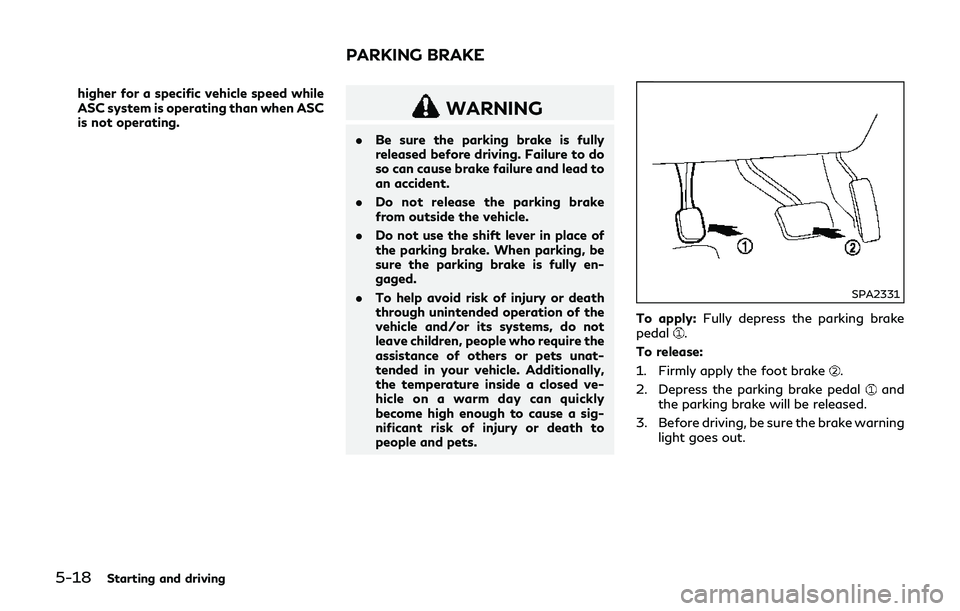
SPA2331
To apply: Fully depress the parking brake
pedal.
To release:
1. Firmly apply the foot brake
.
2. Depress the parking brake pedal
and
the parking brake will be released.
3. Before driving, be sure the brake warning light goes out.
PARKING BRAKE
Page 240 of 458

SSD1024
INFINITI Drive Mode Selector
Four driving modes can be selected by using
the INFINITI Drive Mode Selector, STAN-
DARD, SPORT, ECO and SNOW. Select the
STANDARD mode for normal driving.
NOTE:
When the INFINITI Drive Mode Selector
selects a mode, the mode may not switch
quickly. This is not a malfunction.
STANDARD MODE
Recommended for normal driving. Turn the
INFINITI Drive Mode Selector to the
position. “STANDARD” appears on the ve-
hicle information display for 2 seconds.
SPORT MODE
Adjusts the engine and transmission points
to enhance performance. If the vehicle is
equipped with the active trace control
system, the amount of brake control pro-
vided by active trace control is reduced. (See
“Vehicle Dynamic Control (VDC) system”
(P.5-122).) Turn the INFINITI Drive Mode
Selector to the SPORT position. “SPORT”
appears on the vehicle information display
for 2 seconds.
NOTE:
In the SPORT mode, fuel economy may be
reduced.
SNOW MODE
Used on snowy roads or slippery areas.
When the SNOW mode is activated, engine
output is controlled to avoid wheel spin.
Turn the SNOW mode off for normal driving.
Turn the INFINITI Drive Mode Selector to
the SNOW position. “SNOW” appears on
the vehicle information display for 2 sec-
onds.
ECO MODE
Adjusts engine and transmission points to
enhance fuel economy.
NOTE:
Selecting this drive mode will not necessa-
rily improve fuel economy as many driving
factors influence its effectiveness.
Operation
Turn the INFINITI Drive Mode Selector to
the ECO position. “ECO” appears on the
vehicle information display for 2 seconds
and the ECO drive indicator light illuminates
on the instrument panel.
When the accelerator pedal is depressed
within the range of economy drive, the ECO
drive indicator light illuminates in green.
When the accelerator pedal is depressed
above the range of economy drive, the color
of the ECO drive indicator light changes to
orange. For ECO pedal system equipped
models see “ECO pedal system” (P.5-20).
The ECO drive indicator light will not
illuminate in the following cases:
. When the shift lever is in the R (Reverse)
position.
. When the vehicle speed is below 3 MPH
(4.8 km/h) or over 90 MPH (144 km/h).
. When the Intelligent Cruise Control (ICC)
system is operated.
Starting and driving5-19
INFINITI DRIVE MODE SELECTOR
Page 242 of 458
![INFINITI Q70-HYBRID 2018 Owners Manual JVS1081X
Setting ECO pedal reaction force:
1. Push the SETTING button
.
2. Touch [Drive Mode Enhancement].
3. Touch [ECO Pedal].
4. To set the reaction force of the ECO pedal system, touch [Standard]](/img/42/41108/w960_41108-241.png "INFINITI Q70-HYBRID 2018 Owners Manual JVS1081X
Setting ECO pedal reaction force:
1. Push the SETTING button
.
2. Touch [Drive Mode Enhancement].
3. Touch [ECO Pedal].
4. To set the reaction force of the ECO pedal system, touch [Standard]")
JVS1081X
Setting ECO pedal reaction force:
1. Push the SETTING button
.
2. Touch [Drive Mode Enhancement].
3. Touch [ECO Pedal].
4. To set the reaction force of the ECO pedal system, touch [Standard] or [Soft].
5. To turn off the ECO pedal system, touch [OFF].
When the ECO pedal system is turned off,
the accelerator will operate normally.
WARNING
Failure to follow the warnings and
instructions for proper use of the LDW
and LDP systems could result in serious
personal injury or death.
. The LDW and LDP systems will not
steer the vehicle or prevent loss of
control. It is the driver’s responsibility
to stay alert, drive safely, keep the
vehicle in the traveling lane, and be in
control of the vehicle at all times.
. The LDP system may activate if you
change lanes without first activating
your turn signal or, for example, if a
construction zone directs traffic to
cross an existing lane marker. If this
occurs, you may need to apply cor-
rective steering to complete your lane
change.
. Because the LDP system may not
activate under the road, weather,
and lane marker conditions described
in this section, it may not activate
every time your vehicle begins to
leave its lane and you will need to
apply corrective steering. .
Lane Departure Warning (LDW) system
— warns the driver with a warning light and chime that the vehicle is begin-
ning to leave the driving lane.
. Lane Departure Prevention (LDP) system
— warns the driver with a warning light and chime, and helps assist the driver
to return the vehicle to the center of
the traveling lane by applying the
brakes to the left or right wheels
individually (for a short period of
time).
Starting and driving5-21
LANE DEPARTURE WARNING
(LDW)/LANE DEPARTURE
PREVENTION (LDP) (if so equipped)
Page 246 of 458
![INFINITI Q70-HYBRID 2018 Owners Manual JVS1081X
HOW TO ENABLE/DISABLE THE
LDW SYSTEM
Perform the following steps to enable or
disable the LDW system.
1. Push the SETTING button
.
2. Touch [Driver Assistance].
3. Touch [Lane Assist].
4. Tou](/img/42/41108/w960_41108-245.png "INFINITI Q70-HYBRID 2018 Owners Manual JVS1081X
HOW TO ENABLE/DISABLE THE
LDW SYSTEM
Perform the following steps to enable or
disable the LDW system.
1. Push the SETTING button
.
2. Touch [Driver Assistance].
3. Touch [Lane Assist].
4. Tou")
JVS1081X
HOW TO ENABLE/DISABLE THE
LDW SYSTEM
Perform the following steps to enable or
disable the LDW system.
1. Push the SETTING button
.
2. Touch [Driver Assistance].
3. Touch [Lane Assist].
4. Touch [Lane Departure Warning] to turn the system ON/OFF.
LDP SYSTEM OPERATION
The LDP system operates above approxi-
mately 45 MPH (70 km/h) and when the
lane markings are clear.
If the vehicle approaches either the left or
right side of the traveling lane, the LDW
indicator light (orange) on the instrument
panel will flash and a warning chime will
sound. Then, the LDP system will automa-
tically apply the brakes for a short period of
time to help assist the driver to return the
vehicle to the center of the traveling lane.
NOTE:
.The LDP system is not designed to work
when you operate the lane change signal
and change traveling lanes in the direc-
tion of the signal. (The LDP system will
become operable again approximately 2
seconds after the lane change signal is
turned off.)
. The LDP braking assist will not operate
or will stop operating and only a warn-
ing chime will sound under the following
conditions.
— When the brake pedal is depressed.
— When the steering wheel is turned as
far as necessary for the vehicle to
change lanes.
— When the accelerator pedal is de-
pressed while brake control assist is provided.
— When the ICC, DCA, BSI, BSW,
PFCW or FEB warnings sound.
— When the hazard warning flashers
are operated.
— When driving on a curve at a high
speed.
. While the LDP system is operating, you
may hear a sound of brake operation.
This is normal and indicates that the
LDP system is operating properly.
Starting and driving5-25
Page 262 of 458
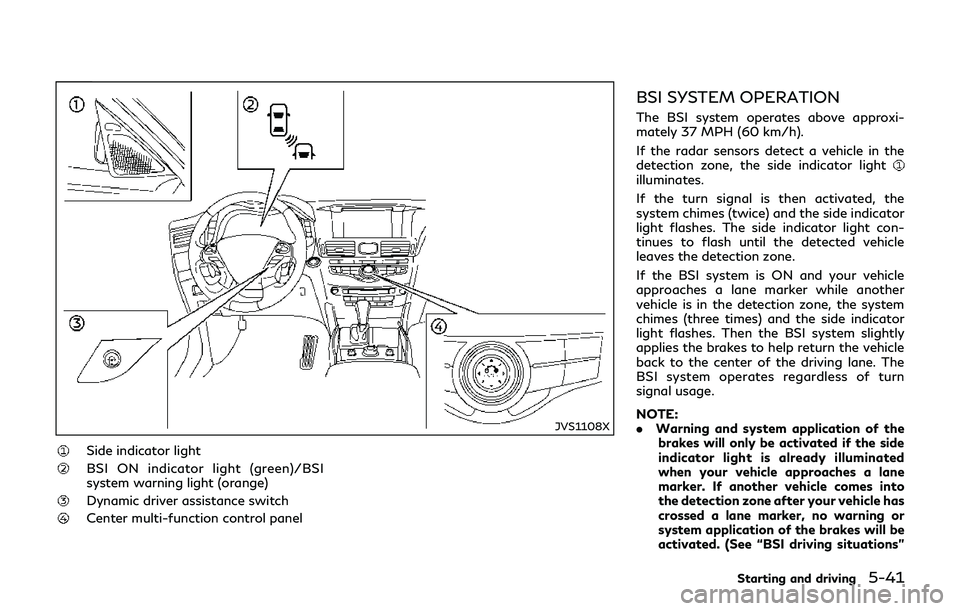
JVS1108X
Side indicator light
BSI ON indicator light (green)/BSI
system warning light (orange)
Dynamic driver assistance switch
Center multi-function control panel
BSI SYSTEM OPERATION
The BSI system operates above approxi-
mately 37 MPH (60 km/h).
If the radar sensors detect a vehicle in the
detection zone, the side indicator light
illuminates.
If the turn signal is then activated, the
system chimes (twice) and the side indicator
light flashes. The side indicator light con-
tinues to flash until the detected vehicle
leaves the detection zone.
If the BSI system is ON and your vehicle
approaches a lane marker while another
vehicle is in the detection zone, the system
chimes (three times) and the side indicator
light flashes. Then the BSI system slightly
applies the brakes to help return the vehicle
back to the center of the driving lane. The
BSI system operates regardless of turn
signal usage.
NOTE:
.Warning and system application of the
brakes will only be activated if the side
indicator light is already illuminated
when your vehicle approaches a lane
marker. If another vehicle comes into
the detection zone after your vehicle has
crossed a lane marker, no warning or
system application of the brakes will be
activated. (See “BSI driving situations”
Starting and driving5-41
Page 266 of 458

and the BSI system may not operate
properly.— On roads where there are multi- ple parallel lane markers; lane
markers that are faded or not
painted clearly; yellow painted
lane markers; non-standard lane
markers; lane markers covered
with water, dirt, snow, etc.
— On roads where discontinued lane markers are still detectable.
— On roads where there are sharp curves.
— On roads where there are sharply contrasting objects, such as sha-
dows, snow, water, wheel ruts,
seams or lines remaining after
road repairs.
— On roads where the traveling lane merges or separates.
— When the vehicle’s traveling di- rection does not align with the
lane markers.
— When traveling close to the ve- hicle in front of you, which ob-
structs the lane camera unit
detection range.
— When rain, snow or dirt adheres to the windshield in front of a lane camera unit.
— When the headlights are not bright due to dirt on the lens or
if aiming is not adjusted properly.
— When strong light enters a lane camera unit. (For example: light
directly shines on the front of the
vehicle at sunrise or sunset.)
— When a sudden change in bright- ness occurs. (For example: when
the vehicle enters or exits a tunnel
or under a bridge.)
. Do not use the BSI system under the
following conditions because the sys-
tem may not function properly.
— During bad weather. (For exam- ple: rain, fog, snow, etc.)
— When driving on slippery roads, such as on ice or snow, etc.
— When driving on winding or un- even roads.
— When there is a lane closure due to road repairs.
— When driving in a makeshift or temporary lane.
— When driving on roads where the lane width is too narrow. — When driving with a tire that is
not within normal tire conditions
(for example, tire wear, low tire
pressure, installation of spare tire,
tire chains, non-standard wheels).
— When the vehicle is equipped with non-original brake parts or sus-
pension parts.
. Excessive noise (for example, audio
system volume, open vehicle window)
will interfere with the chime sound,
and it may not be heard.
BSI DRIVING SITUATIONS
Indicator on
Indicator off
Indicator flashing
Starting and driving5-45
Page 267 of 458

5-46Starting and driving
JVS0737X
Illustration 1 – Approaching from behind
Another vehicle approaching from
behind
Illustration 1: The side indicator light illumi-
nates if a vehicle enters the detection zone
from behind in an adjacent lane.
JVS0738X
Illustration 2 – Approaching from behind
Illustration 2: If the driver activates the turn
signal, then the system chimes (twice) and
the side indicator light flashes.
JVS0760X
Illustration 3 – Approaching from behind
Illustration 3: If the BSI system is on and your
vehicle approaches a lane marker while
another vehicle is in the detection zone, the
system chimes (three times) and the side
indicator light flashes. Then the BSI system
slightly applies the brakes to help return the
vehicle back to the center of the driving lane.
NOTE:
. The radar sensors may not detect vehi-
cles which are approaching rapidly from
behind.
. If the driver activates the turn signal
before a vehicle enters the detection
zone, the side indicator light will flash
but no chime will sound when the other
Page 269 of 458

5-48Starting and driving
JVS0761X
Illustration 6 – Overtaking another vehicle
Illustration 6: If the BSI system is on and your
vehicle approaches a lane marker while
another vehicle is in the detection zone, the
system chimes (three times) and the side
indicator light flashes. Then, the BSI system
slightly applies the brakes on the appropriate
side to help return the vehicle back to the
center of the driving lane.
NOTE:
. When overtaking several vehicles in a
row, the vehicles after the first vehicle
may not be detected if they are travel-
ing close together.
. The radar sensors may not detect slower
moving vehicles if they are passed quickly.
. If the driver activates the turn signal
before a vehicle enters the detection
zone, the side indicator light will flash
but no chime will sound when the other
vehicle is detected.
JVS0741X
Illustration 7 – Entering from the side
Entering from the side
Illustration 7: The side indicator light illumi-
nates if a vehicle enters the detection zone
from either side.
NOTE:
The radar sensors may not detect a vehicle
which is traveling at about the same speed
as your vehicle when it enters the detection
zone.
Page 270 of 458

JVS0742X
Illustration 8 – Entering from the side
Illustration 8: If the driver activates the turn
signal while another vehicle is in the detec-
tion zone, then the side indicator light
flashes and a chime will sound twice.
NOTE:
If the driver activates the turn signal before
a vehicle enters the detection zone, the side
indicator light will flash but no chime will
sound when another vehicle is detected.
JVS0761X
Illustration 9 – Entering from the side
Illustration 9: If the BSI system is on and your
vehicle approaches the lane marker while
another vehicle is in the detection zone, the
system chimes (three times) and the side
indicator light flashes. Then, the BSI system
slightly applies the brakes on the appropriate
side to help return the vehicle back to the
center of the driving lane.
JVS0742X
Illustration 10 – Entering from the side
Illustration 10: The BSI system will not
operate if your vehicle is on a lane marker
when another vehicle enters the detection
zone. In this case only the BSW system
operates.
NOTE:
. The radar sensors may not detect a
vehicle which is traveling at about the
same speed as your vehicle when it
enters the detection zone.
. If the driver activates the turn signal
before a vehicle enters the detection
zone, the side indicator light will flash
but no chime will sound when the other
vehicle is detected.
Starting and driving5-49
Page 274 of 458

Do not strike or damage the area around the
radar sensors.
It is recommended you visit an INFINITI
retailer if the area around the radar sensors
is damaged due to a collision.
The lane camera unit
for BSI system is
located above the inside mirror. To keep the
proper operation of BSI and prevent a
system malfunction, be sure to observe the
following:
. Always keep the windshield clean.
. Do not attach a sticker (including trans-
parent material) or install an accessory
near the camera unit.
. Do not place reflective materials, such as
white paper or a mirror, on the instru-
ment panel. The reflection of sunlight
may adversely affect the camera unit’s
capability of detecting the lane markers.
. Do not strike or damage the areas around
the camera unit. Do not touch the
camera lens or remove the screw located
on the camera unit. It is recommended
you contact an INFINITI retailer if the
camera unit is damaged due to an
accident.
Radio frequency statement
This device complies with part 15 of the FCC
Rules and RSS-310 of Industry Canada.
Operation is subject to the following two
conditions:
1. This device may not cause harmful interference.
2. This device must accept any interference received, including interference that may
cause undesired operation.
Frequency of operation: 24.05GHz —
24.25GHz
Field Strength: Not greater than 2.5V/m
peak (0.25V/m average) at a distance of 3 m
The manufacturer is not responsible for any
radio or TV interference caused by un-
authorized modifications to this equipment.
Such modifications could void the user’s
authority to operate the equipment.WARNING
Failure to follow the warnings and
instructions for proper use of the BCI
system could result in serious injury or
death.
. The BCI system is not a replacement
for proper driving procedure, is not
designed to prevent contact with
vehicles or objects and does not
provide full brake power. When back-
ing out of parking spaces, always use
the inside and rear mirrors and turn
and look in the direction you will
move. Never rely solely on the BCI
system.
. There is a limitation to the detection
capability of the radar or the sonar.
Using the BCI system under some
road, ground, traffic or weather con-
ditions could lead to improper system
operation. Always rely on your own
operation to avoid accidents.
The BCI system can help alert the driver of
an approaching vehicle or objects behind the
vehicle when the driver is backing out of a
parking space.
Starting and driving5-53
BACK-UP COLLISION
INTERVENTION (BCI) (if so equipped)