door lock INFINITI Q70-HYBRID 2018 Owner's Manual
[x] Cancel search | Manufacturer: INFINITI, Model Year: 2018, Model line: Q70-HYBRID, Model: INFINITI Q70-HYBRID 2018Pages: 458, PDF Size: 2.22 MB
Page 162 of 458
When the Intelligent Key battery is dis-
charged or strong radio waves are present
near the operating location, the Intelligent
Key system’s operating range becomes nar-
rower, and the Intelligent Key may not
function properly.
The operating range is within 31.50 in (80
cm) from each request switch
.
If the Intelligent Key is too close to the door
glass, handle or rear bumper the request
switches may not function.
When the Intelligent Key is within the
operating range, it is possible for anyone
who does not carry the Intelligent Key to
push the request switch to lock/unlock the
doors and open the trunk lid.
SPA2407
DOOR LOCKS/UNLOCKS PRE-
CAUTION
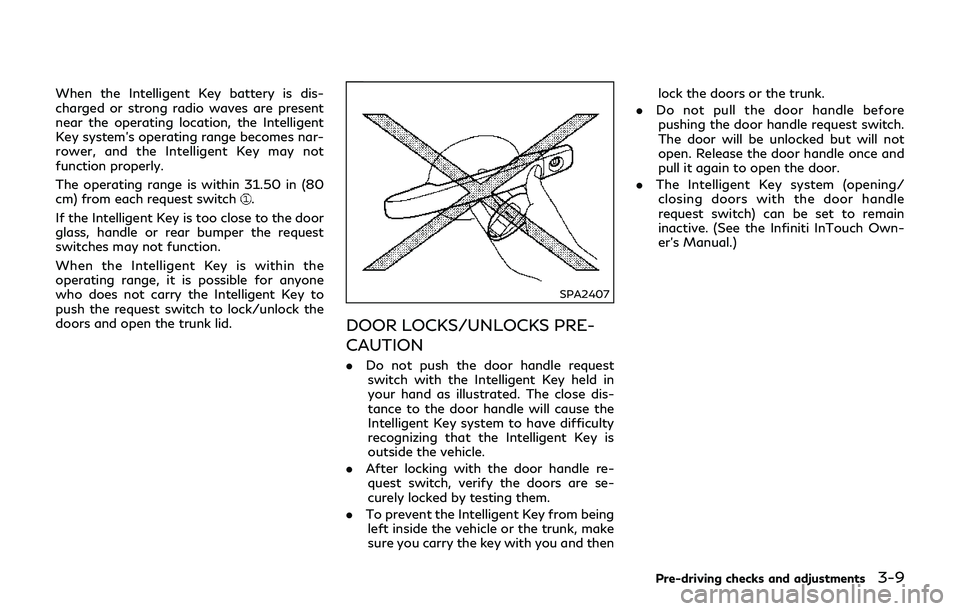
. Do not push the door handle request
switch with the Intelligent Key held in
your hand as illustrated. The close dis-
tance to the door handle will cause the
Intelligent Key system to have difficulty
recognizing that the Intelligent Key is
outside the vehicle.
. After locking with the door handle re-
quest switch, verify the doors are se-
curely locked by testing them.
. To prevent the Intelligent Key from being
left inside the vehicle or the trunk, make
sure you carry the key with you and then lock the doors or the trunk.
. Do not pull the door handle before
pushing the door handle request switch.
The door will be unlocked but will not
open. Release the door handle once and
pull it again to open the door.
. The Intelligent Key system (opening/
closing doors with the door handle
request switch) can be set to remain
inactive. (See the Infiniti InTouch Own-
er’s Manual.)
Pre-driving checks and adjustments3-9
Page 163 of 458
3-10Pre-driving checks and adjustments
JVP0330X
INTELLIGENT KEY OPERATION
You can lock or unlock the doors without
taking the key out from your pocket or bag.
JVP0331X
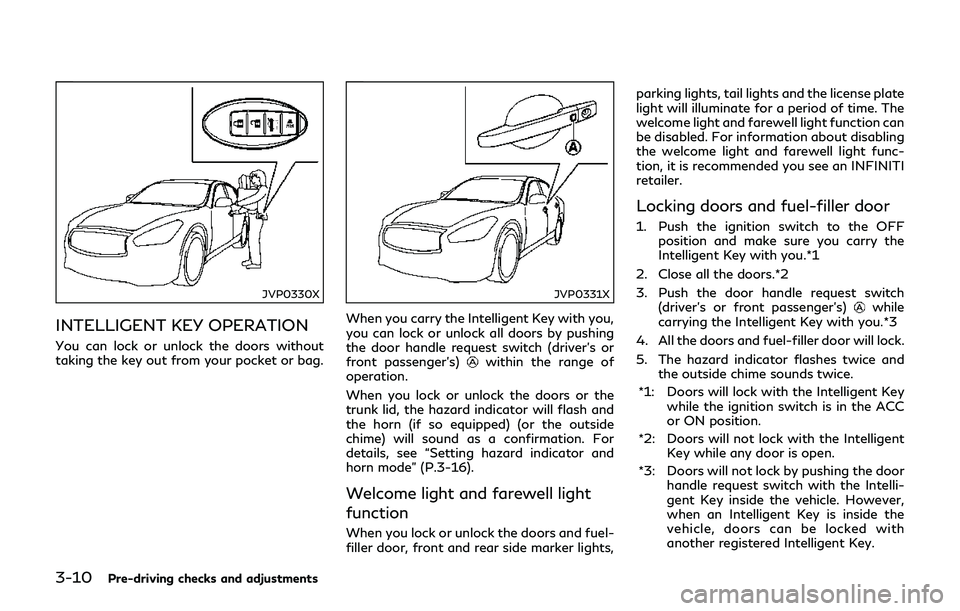
When you carry the Intelligent Key with you,
you can lock or unlock all doors by pushing
the door handle request switch (driver’s or
front passenger’s)
within the range of
operation.
When you lock or unlock the doors or the
trunk lid, the hazard indicator will flash and
the horn (if so equipped) (or the outside
chime) will sound as a confirmation. For
details, see “Setting hazard indicator and
horn mode” (P.3-16).
Welcome light and farewell light
function
When you lock or unlock the doors and fuel-
filler door, front and rear side marker lights, parking lights, tail lights and the license plate
light will illuminate for a period of time. The
welcome light and farewell light function can
be disabled. For information about disabling
the welcome light and farewell light func-
tion, it is recommended you see an INFINITI
retailer.
Locking doors and fuel-filler door
1. Push the ignition switch to the OFF
position and make sure you carry the
Intelligent Key with you.*1
2. Close all the doors.*2
3. Push the door handle request switch (driver’s or front passenger’s)
while
carrying the Intelligent Key with you.*3
4. All the doors and fuel-filler door will lock.
5. The hazard indicator flashes twice and the outside chime sounds twice.
*1: Doors will lock with the Intelligent Key while the ignition switch is in the ACC
or ON position.
*2: Doors will not lock with the Intelligent Key while any door is open.
*3: Doors will not lock by pushing the door handle request switch with the Intelli-
gent Key inside the vehicle. However,
when an Intelligent Key is inside the
vehicle, doors can be locked with
another registered Intelligent Key.
Page 164 of 458
Unlocking doors and fuel-filler door
1. Push the door handle request switch(driver’s or front passenger’s)once
while carrying the Intelligent Key with
you.
2. The hazard indicator flashes once and outside chime sounds once. The corre-
sponding door will unlock.
The fuel-filler door will also unlock when
the driver’s door handle request switch is
pushed.
3. Push the door handle request switch again within 1 minute.
4. The hazard indicator flashes once and outside chime sounds once again. All the
doors will unlock.
All doors and the fuel-filler door will be
locked automatically unless one of the
following operations is performed within 1
minute after pushing the request switch
while the doors are locked.
. Opening any door
. Pushing the ignition switch
During this 1-minute time period, if the
UNLOCK
button on the Intelligent Key
is pushed, all doors will be locked automa-
tically after another 1 minute.
JVP0332X
JVP0333X
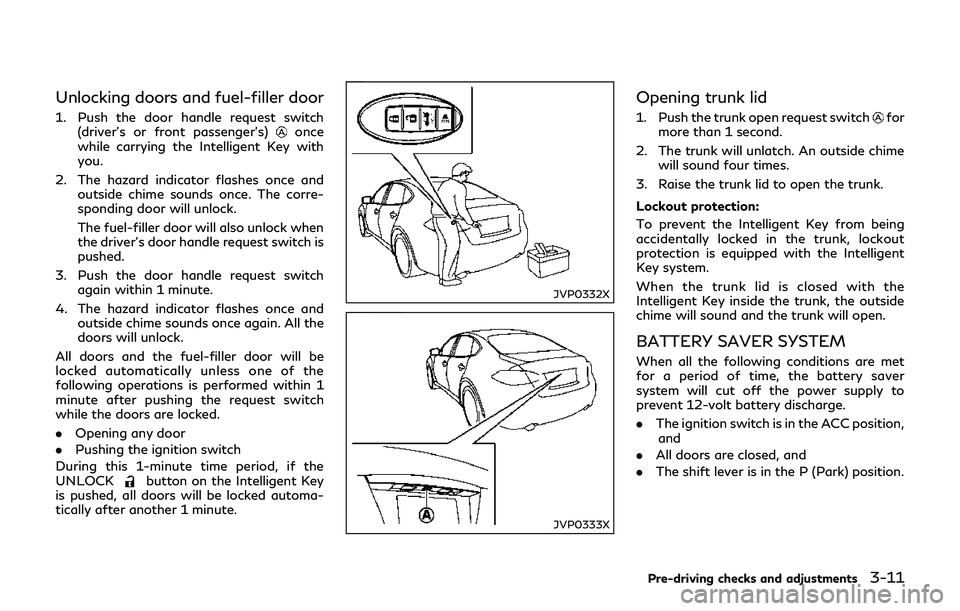
Opening trunk lid
1. Push the trunk open request switchfor
more than 1 second.
2. The trunk will unlatch. An outside chime will sound four times.
3. Raise the trunk lid to open the trunk.
Lockout protection:
To prevent the Intelligent Key from being
accidentally locked in the trunk, lockout
protection is equipped with the Intelligent
Key system.
When the trunk lid is closed with the
Intelligent Key inside the trunk, the outside
chime will sound and the trunk will open.
BATTERY SAVER SYSTEM
When all the following conditions are met
for a period of time, the battery saver
system will cut off the power supply to
prevent 12-volt battery discharge.
. The ignition switch is in the ACC position,
and
. All doors are closed, and
. The shift lever is in the P (Park) position.
Pre-driving checks and adjustments3-11
Page 166 of 458

TROUBLESHOOTING GUIDE
SymptomPossible causeAction to take
When pushing the ignition
switch to stop the INFINITI
Direct Response Hybrid
®Sys-
tem The SHIFT P warning appears on the
display and the inside warning chime
sounds continuously.
The shift lever is not in the P (Park)
position.
Shift the shift lever to the P (Park)
position.
When opening the driver’s door
to get out of the vehicle The inside warning chime sounds continu-
ously. The ignition switch is in the ACC
position.Push the ignition switch to the OFF
position.
When closing the door after
getting out of the vehicle The NO KEY warning appears on the
display, the outside chime sounds 3 times
and the inside warning chime sounds for a
few seconds.
The ignition switch is in the ACC or
ON position.
Push the ignition switch to the OFF
position.
The SHIFT P warning appears on the
display and the outside chime sounds
continuously. The ignition switch is in the ACC or
OFF position and the shift lever is not
in the P (Park) position.Move the shift lever to the P (Park)
position and push the ignition switch to
the OFF position.
When closing the door with the
inside lock knob turned to
LOCK The outside chime sounds for a few
seconds and all the doors unlock.
The Intelligent Key is inside the
vehicle or trunk.
Carry the Intelligent Key with you.
When pushing the request
switch or LOCK button on the
Intelligent Key to lock the door The outside chime sounds for a few
seconds. The Intelligent Key is inside the
vehicle or trunk.
Carry the Intelligent Key with you.
A door is not closed securely. Close the door securely.
When closing the trunk lid The outside chime sounds for approxi-
mately 10 seconds and the trunk lid opens.
The Intelligent Key is inside the trunk. Carry the Intelligent Key with you.
Pre-driving checks and adjustments3-13
Page 167 of 458

3-14Pre-driving checks and adjustments
WARNING
The Intelligent Key transmits radio
waves when the buttons are pushed.
The FAA advises that the radio waves
may affect aircraft navigation and com-
munication systems. Do not operate the
Intelligent Key while on an airplane.
Make sure the buttons are not operated
unintentionally when the unit is stored
during a flight.
It is possible to lock/unlock all doors, fuel-
filler door, activate the panic alarm and open
the windows by pushing the buttons on the
Intelligent Key from outside the vehicle.
Before locking the doors, make sure the
Intelligent Key is not left in the vehicle.
The LOCK/UNLOCK button on the Intelli-
gent Key can operate at a distance of
approximately 33 ft (10 m) from the vehicle.
(The effective distance depends upon the
conditions around the vehicle.)
As many as 4 Intelligent Keys can be used
with one vehicle. For information concerning
the purchase and use of additional Intelli-
gent Keys, contact an INFINITI retailer.
The lock and unlock buttons on the Intelli-
gent Key will not operate when: .
the distance between the Intelligent Key
and the vehicle is over 33 ft (10 m).
. the Intelligent Key battery is discharged.
After locking with the remote keyless entry
function, pull the door handle to make sure
the doors are securely locked.
The LOCK/UNLOCK operating range varies
depending on the environment. To securely
operate the lock and unlock buttons, ap-
proach the vehicle to about 3 ft (1 m) from
the door.
SPA2100
LOCK button
UNLOCK button
TRUNK button
PANIC button
HOW TO USE REMOTE KEYLESS
ENTRY SYSTEM
When you lock or unlock the doors or the
trunk lid, the hazard indicator will flash and
the horn (or the outside chime) will sound as
a confirmation. For details, see “Setting
hazard indicator and horn mode” (P.3-16).
REMOTE KEYLESS ENTRY SYSTEM
Page 168 of 458

Locking doors and fuel-filler door
1. Push the ignition switch to the OFFposition and make sure you carry the
Intelligent Key with you.*
2. Close all the doors.
3. Push the LOCK
buttonon the
Intelligent Key.
4. All the doors and fuel-filler door will lock.
5. The hazard indicator flashes twice and the horn chirps once.
*: Doors will lock with the Intelligent Key while the ignition switch is in the ACC
or ON position.
Unlocking doors and fuel-filler door
1. Push the UNLOCKbuttonon the
Intelligent Key once.
2. The hazard indicator flashes once. The driver’s door and fuel-filler door will
unlock.
3. Push the UNLOCK
button on the
Intelligent Key again within 1 minute.
4. The hazard indicator flashes once again. All the doors will unlock.
All doors will be locked automatically unless
one of the following operations is performed
within 1 minute after pushing the UNLOCK
button on the Intelligent Key while the doors
are locked. If during this 1-minute time period, the UNLOCK button on the Intelli-
gent Key is pushed, all doors will be locked
automatically after another 1 minute.
.
Opening any door
. Pushing the ignition switch
Opening windows
The UNLOCKbuttonoperation also
allows you to open the window that is
equipped with the automatic open/close
function. (See “Power windows” (P.2-54).)
To open the window, push the door UN-
LOCK
button on the Intelligent Key for
about 3 seconds after the door is unlocked.
To stop opening, release the UNLOCK
button.
If the window open operation is stopped in
mid-operation while pushing the UNLOCK
button, release and push the UNLOCKbutton again until the window opens
completely.
Window cannot be closed using the Intelli-
gent Key.
The door window can also be operated by
turning the mechanical key in a door lock.
(See “Doors” (P.3-4).)
Opening trunk lid
1. Push the TRUNKbuttonon the
Intelligent Key for more than 1 second. 2. The trunk will unlatch.
3. Raise the trunk lid to open the trunk.
If the trunk lid does not unlock, push the
trunk open request switch and manually lift
the trunk lid if:
.
there is snow on the trunk lid.
. a heavy object such as rear spoiler is
attached to the trunk lid.
. the trunk lid is frozen.
Using panic alarm
If you are near your vehicle and feel
threatened, you may activate the alarm to
call attention as follows:
1. Push the PANIC
buttonon the key
for more than 1 second.
2. The theft warning alarm and headlights will stay on for 25 seconds.
3. The panic alarm stops when:
.It has run for 25 seconds, or.Any of the buttons on the Intelligent Key are pushed. (Note: Panic button
should be pushed for more than 1
second.)
Pre-driving checks and adjustments3-15
Page 169 of 458

3-16Pre-driving checks and adjustments
Setting hazard indicator and horn
mode
This vehicle is set in hazard indicator and
horn mode when you first receive the vehicle.
In hazard indicator and horn mode, when the
LOCK
buttonis pushed, the hazard
indicator flashes twice and the horn chirps
once. When the UNLOCK
buttonis
pushed, the hazard indicator flashes once.
If horns are not necessary, the system can be
switched to the hazard indicator mode.
In hazard indicator mode, when the LOCK
button is pushed, the hazard indicator
flashes twice. When the UNLOCK
button is pushed, neither the hazard indica-
tor nor the horn operates. Hazard indicator and horn mode:
DOOR LOCK DOOR UNLOCK TRUNK UNLOCK
Intelligent Key system
(Using door handle or trunk request switch) HAZARD -
twice
OUTSIDE CHIME -
twice HAZARD -
once
OUTSIDE CHIME -
once HAZARD - none
OUTSIDE CHIME -
4
times
Remote keyless entry system
(Using
,orbutton) HAZARD -
twice
HORN - once HAZARD -
once
HORN - none HAZARD - none
HORN - none
Hazard indicator mode:
DOOR LOCK DOOR UNLOCK TRUNK UNLOCK
Intelligent Key system
(Using door handle or trunk request switch) HAZARD -
twice
OUTSIDE CHIME -
none HAZARD - none
OUTSIDE CHIME -
noneHAZARD - none
OUTSIDE CHIME -
none
Remote keyless entry system
(Using
,orbutton) HAZARD -
twice
HORN - none HAZARD - none
HORN - noneHAZARD - none
HORN - none
Page 172 of 458
JVP0335X
TRUNK OPEN REQUEST SWITCH
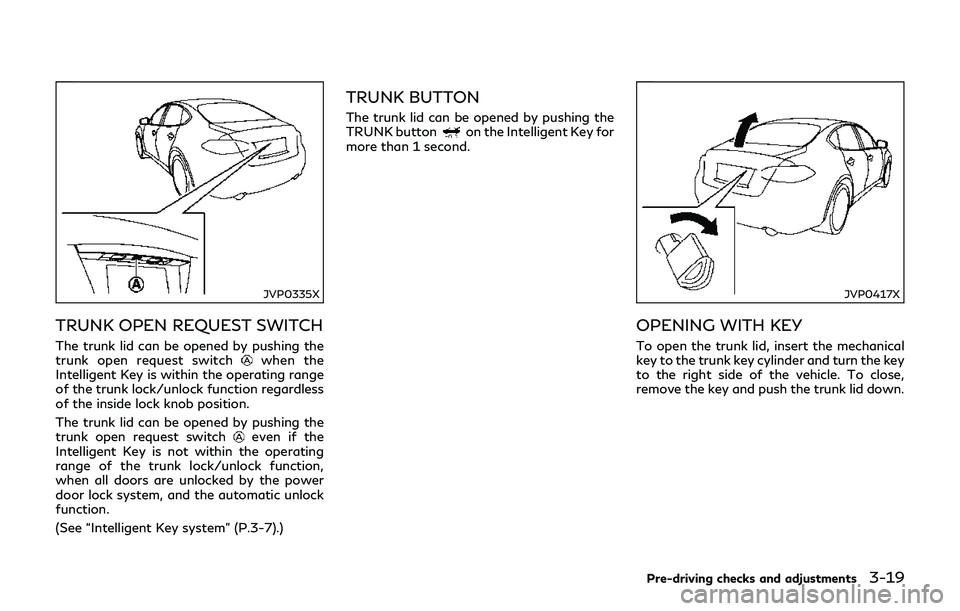
The trunk lid can be opened by pushing the
trunk open request switchwhen the
Intelligent Key is within the operating range
of the trunk lock/unlock function regardless
of the inside lock knob position.
The trunk lid can be opened by pushing the
trunk open request switch
even if the
Intelligent Key is not within the operating
range of the trunk lock/unlock function,
when all doors are unlocked by the power
door lock system, and the automatic unlock
function.
(See “Intelligent Key system” (P.3-7).)
TRUNK BUTTON
The trunk lid can be opened by pushing the
TRUNK buttonon the Intelligent Key for
more than 1 second.
JVP0417X
OPENING WITH KEY
To open the trunk lid, insert the mechanical
key to the trunk key cylinder and turn the key
to the right side of the vehicle. To close,
remove the key and push the trunk lid down.
Pre-driving checks and adjustments3-19
Page 174 of 458
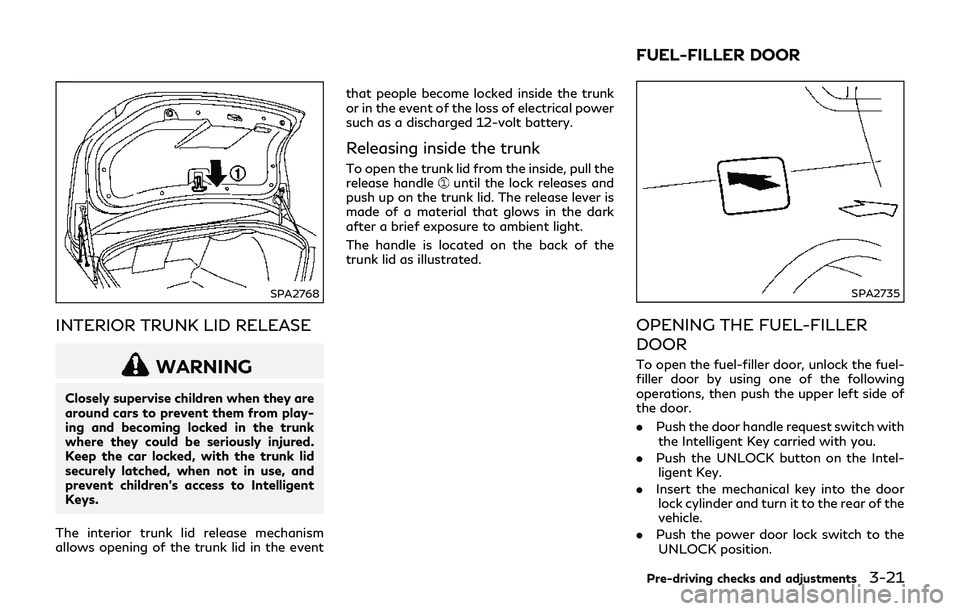
SPA2768
INTERIOR TRUNK LID RELEASE
WARNING
Closely supervise children when they are
around cars to prevent them from play-
ing and becoming locked in the trunk
where they could be seriously injured.
Keep the car locked, with the trunk lid
securely latched, when not in use, and
prevent children’s access to Intelligent
Keys.
The interior trunk lid release mechanism
allows opening of the trunk lid in the event that people become locked inside the trunk
or in the event of the loss of electrical power
such as a discharged 12-volt battery.
Releasing inside the trunk
To open the trunk lid from the inside, pull the
release handleuntil the lock releases and
push up on the trunk lid. The release lever is
made of a material that glows in the dark
after a brief exposure to ambient light.
The handle is located on the back of the
trunk lid as illustrated.
SPA2735
OPENING THE FUEL-FILLER
DOOR
To open the fuel-filler door, unlock the fuel-
filler door by using one of the following
operations, then push the upper left side of
the door.
. Push the door handle request switch with
the Intelligent Key carried with you.
. Push the UNLOCK button on the Intel-
ligent Key.
. Insert the mechanical key into the door
lock cylinder and turn it to the rear of the
vehicle.
. Push the power door lock switch to the
UNLOCK position.
Pre-driving checks and adjustments3-21
FUEL-FILLER DOOR
Page 175 of 458

3-22Pre-driving checks and adjustments
To lock, close the fuel-filler door securely
and lock all doors by operating the door
handle request switch, the LOCK button on
the Intelligent Key, the mechanical key or the
power door lock switch.
FUEL-FILLER CAP
WARNING
.Gasoline is extremely flammable and
highly explosive under certain condi-
tions. You could be burned or ser-
iously injured if it is misused or
mishandled. Always stop the
INFINITI Direct Response Hybrid
®
System and do not smoke or allow
open flames or sparks near the ve-
hicle when refueling.
. Do not attempt to top off the fuel
tank after the fuel pump nozzle shuts
off automatically. Continued refuel-
ing may cause fuel overflow, resulting
in fuel spray and possibly a fire.
. Use only an original equipment type
fuel-filler cap as a replacement. It has
a built-in safety valve needed for
proper operation of the fuel system
and emission control system. An in-
correct cap can result in a serious
malfunction and possible injury. It could also cause the malfunction
indicator light to come on.
. Never pour fuel into the throttle body
to attempt to start your vehicle.
. Do not fill a portable fuel container in
the vehicle or trailer. Static electricity
can cause an explosion of flammable
liquid, vapor or gas in any vehicle or
trailer. To reduce the risk of serious
injury or death when filling portable
fuel containers:
— Always place the container on the ground when filling.
— Do not use electronic devices when filling.
— Keep the pump nozzle in contact with the container while you are
filling it.
— Use only approved portable fuel containers for flammable liquid.
CAUTION
. If fuel is spilled on the vehicle body,
flush it away with water to avoid
paint damage.
. Insert the cap straight into the fuel-
filler tube, then tighten until the fuel- filler cap a single click is heard. Failure
to tighten the fuel-filler cap properly
may cause the
malfunction in-
dicator light (MIL) to illuminate. If
the
light illuminates because the
fuel-filler cap is loose or missing,
tighten or install the cap and con-
tinue to drive the vehicle. The
light should turn off after a few
driving trips. If thelight does
not turn off after a few driving trips,
have the vehicle inspected. It is
recommended you visit an INFINITI
retailer for this service.
. The LOOSE FUEL CAP warning will
appear if the fuel-filler cap is not
properly tightened. It may take a few
driving trips for the message to be
displayed. Failure to tighten the fuel-
filler cap properly after the LOOSE
FUEL CAP warning appears may
cause the
Malfunction Indicator
Light (MIL) to illuminate.