AUX INFINITI QX50 2014 User Guide
[x] Cancel search | Manufacturer: INFINITI, Model Year: 2014, Model line: QX50, Model: INFINITI QX50 2014Pages: 498, PDF Size: 2.47 MB
Page 245 of 498
4-82Monitor, climate, audio, phone and voice recognition systems
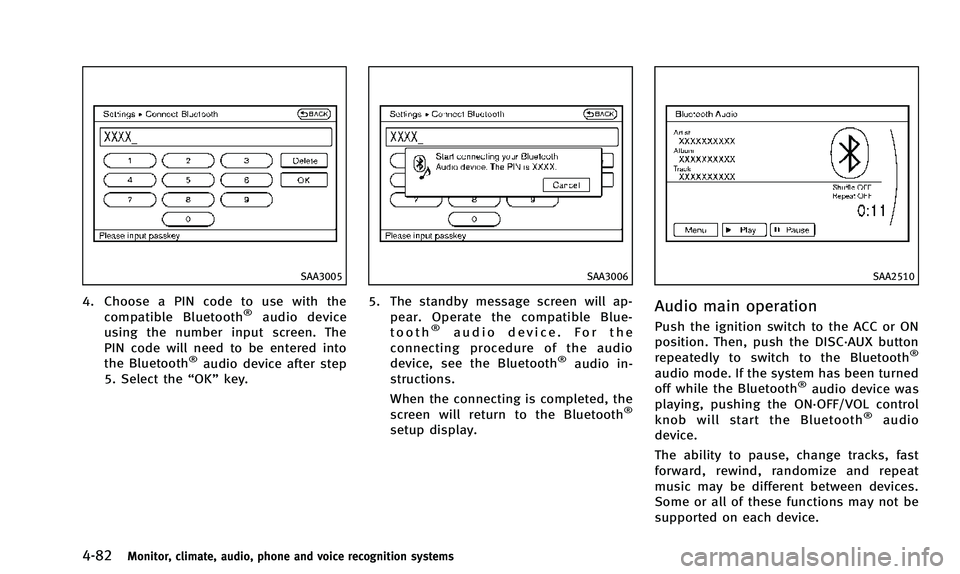
SAA3005
4. Choose a PIN code to use with thecompatible Bluetooth®audio device
using the number input screen. The
PIN code will need to be entered into
the Bluetooth
®audio device after step
5. Select the “OK”key.
SAA3006
5. The standby message screen will ap-
pear. Operate the compatible Blue-
tooth
®audio device. For the
connecting procedure of the audio
device, see the Bluetooth
®audio in-
structions.
When the connecting is completed, the
screen will return to the Bluetooth
®
setup display.
SAA2510
Audio main operation
Push the ignition switch to the ACC or ON
position. Then, push the DISC·AUX button
repeatedly to switch to the Bluetooth
®
audio mode. If the system has been turned
off while the Bluetooth®audio device was
playing, pushing the ON·OFF/VOL control
knob will start the Bluetooth
®audio
device.
The ability to pause, change tracks, fast
forward, rewind, randomize and repeat
music may be different between devices.
Some or all of these functions may not be
supported on each device.
Page 246 of 498
DISC·AUX button:
When the DISC·AUX button is pushed with
the system off and the Bluetooth
®audio
device connected, the system will turn on.
If another audio source is playing and the
Bluetooth
®audio device is connected,
push the DISC·AUX button repeatedly until
the display changes to the Bluetooth
®
audio mode.
Next/Previous Track and Fast
Forward/Rewind:
When the FF or REW button is pushed for
more than 1.5 seconds while a Bluetooth
®
audio file is being played, the Bluetooth®
audio device will play while forwarding or
rewinding. When the button is released,
the Bluetooth
®audio device will return to
normal play speed.
When the FF or REW button is pushed for
less than 1.5 seconds while a Bluetooth
®
audio file is being played, the next track or
the beginning of the current track on the
Bluetooth
®audio device will be played.
When the REW button is pushed for less
than 1.5 seconds within 3 seconds after
the current track started playing, the
previous track will be played. When the REW button is pushed for less
than 1.5 seconds after 3 seconds from
when the current track started playing, the
beginning of the current track will be
played.
The INFINITI controller can also be used to
select tracks when the Bluetooth
®audio
play mode screen is shown on the display.
(“Bluetooth audio” will be indicated on the
header of the screen.)
REPEAT (RPT), RANDOM (RDM):
To change the play mode, push the
button repeatedly and the mode changes
as follows.
Normal ?Shuffle All Tracks ?Shuffle
Group ?Repeat 1 Track ?Repeat All
Tracks ?Repeat Group ?Normal
Operation keys: To operate a Bluetooth
®audio device,
select a key displayed on the operation
screen using the INFINITI controller.
Play
Select the “
”key to start playing when
pausing. Select this key again to pause the
audio play.
Pause
Select the “
”key to pause the Blue-
tooth®audio device. Select this key again
to resume playing.
Play Mode:
The play mode setting display will appear
when the “Menu”key is selected.
Choose the preferred play mode from the
following items.
. Shuffle
Choose “Shuffle OFF” ,“Shuffle All
Tracks” and“Shuffle Group”.
. Repeat
Choose from “Repeat OFF”, “Repeat 1
Track”, “Repeat All Tracks” and“Repeat
Group”.
Monitor, climate, audio, phone and voice recognition systems4-83
Page 249 of 498

4-86Monitor, climate, audio, phone and voice recognition systems
ware version 1.1.3)
. Third generation iPod nano®(firmware
version 1.1 PC)
. Third generation iPhone
®(firmware
version 2.1)
Make sure that the iPod
®version is
updated.
Audio main operation
Push the ignition switch to the ACC or ON
position. Then, push the DISC·AUX or AUX
button repeatedly to switch to the iPod
®
mode.
If the system has been turned off while the
iPod
®was playing, pushing the ON·OFF
button will start the iPod®.
orPLAY:
When the DISC·AUX or AUX button is
pushed with the system off and the iPod
®
connected, the system will turn on. If
another audio source is playing and the
iPod
®is connected, push the DISC·AUX or
AUX button repeatedly until the center
display changes to the iPod
®mode.
Interface:
The interface for iPod
®operation shown on
the vehicle center display is similar to the iPod
®interface. Use the INFINITI controller
and the ENTER or BACK button to play the
iPod
®with your favorite settings.
The following items can be chosen from the
menu list screen. For further information
about each item, see the iPod
®Owner’s
Manual.
. Now Playing
. Playlists
. Artists
. Albums
. Songs
. Podcasts
. Genres
. Composers
. Audiobooks
. Shuffle Songs
. Play Mode
The following touch-panel buttons shown
on the screen are also available:
.
: returns to the previous screen.
.
: plays/pauses the music selected.
Next/Previous Track and Fast
Forward/Rewind:
When the FF or REW button is pushed for
more than 1.5 seconds while the iPod
®is playing, the iPod
®will play while fast
forwarding or rewinding. When the button
is released, the iPod
®will return to the
normal play speed.
When the FF or REW button is pushed for
less than 1.5 seconds while the iPod
®is
playing, the next track or the beginning of
the current track on the iPod
®will be
played.
When the REW button is pushed for less
than 1.5 seconds within 3 seconds after
the current track started playing, the
previous track will be played.
When the REW button is pushed for less
than 1.5 seconds after 3 seconds from
when the current track started playing, the
beginning of the current track will be
played.
The INFINITI controller can also be used to
select tracks when the iPod
®is playing.
REPEAT (RPT), RANDOM (RDM):
When the RPT button is pushed while a
track is being played, the play pattern can
be changed as follows: