climate control INFINITI QX50 2014 Owner's Manual
[x] Cancel search | Manufacturer: INFINITI, Model Year: 2014, Model line: QX50, Model: INFINITI QX50 2014Pages: 498, PDF Size: 2.47 MB
Page 186 of 498

images, stop the vehicle in a safe location
and apply the parking brake.
SAA2492
Full Screen Display:
The full screen display will appear when
selecting the“Full Screen Display” key.
To operate the Image Viewer or to change
the settings, select the desired key using
the INFINITI controller.
.
(Start)
Select the “
”key to start playing
the slideshow.
.
(Stop)
Select the “
”key to stop the
slideshow.
.
(Next)
Select the “
”key to display the next file.
.
(Previous)
Select the “
”key to display the
previous file.
Setting the Image Viewer:
The Image Viewer setting display will
appear when selecting the “Settings”key
on the full screen display. The following
settings are available for the full screen
display.
. Slideshow Speed
Select the “Slideshow Speed” key.
From the following display, select the
changing time from 5, 10, 30, 60
seconds or “No Auto Change”.
. Slideshow Order
Select the “Slideshow Order” key. From
the following display, select “Random”
or “Order List”. For “Order List”, the
image order is the order of the files as
stored on the USB memory.
Operating tips:
. Only files that meet the following
conditions will be displayed.
— Image type: JPEG
— File Extensions: *.jpg, *jpeg
Monitor, climate, audio, phone and voice recognition systems4-23
Page 193 of 498
4-30Monitor, climate, audio, phone and voice recognition systems
HOW TO ADJUST SCREEN
To adjust the Display ON/OFF, Brightness,
Tint, Color, Contrast and Black Level of the
rearview monitor, push theSETTINGbutton
with the rearview monitor on, select the
“Display” key on the screen and select the
item key and adjust the level using the
INFINITI controller.
Do not adjust the Brightness, Tint, Color,
Contrast and Black Level of the rearview
monitor while the vehicle is moving. Make
sure the parking brake is firmly applied.
OPERATING TIPS
. When the shift lever is shifted to the R
(Reverse) position, the monitor screen
automatically changes to the rearview
monitor mode. However, the radio can
be heard.
. When the view is switched, the display
images on the screen may be displayed
with some delay.
. When the temperature is extremely high
or low, the screen may not clearly
display objects. This is not a malfunc-
tion.
. When strong light is directly coming on
the camera, objects may not be dis-
played clearly. This is not a malfunc- tion.
. Vertical lines may be seen in objects on
the screen. This is due to strong
reflected light from the bumper. This
is not a malfunction.
. The screen may flicker under fluores-
cent light. This is not a malfunction.
. The colors of objects on the RearView
monitor may differ somewhat from the
actual color of objects. This is not a
malfunction.
. Objects on the monitor may not be clear
in a dark environment. This is not a
malfunction.
. If dirt, rain or snow accumulates on the
camera, the RearView monitor may not
display object clearly. Clean the cam-
era.
. Do not use alcohol, benzine or thinner
to clean the camera. This will cause
discoloration. To clean the camera,
wipe with a cloth dampened with
diluted mild cleaning agent and then
wipe with a dry cloth.
. Do not damage the camera as the
monitor screen may be adversely af-
fected.
. Do not use wax on the camera window.
Wipe off any wax with a clean cloth dampened with mild detergent diluted
with water.
Page 197 of 498

4-34Monitor, climate, audio, phone and voice recognition systems
.The view on the screen on the passen-
ger’s side switches to the front-side
view
*Cwhen the CAMERAbutton is
pushed
*3. When the CAMERAbutton
is pushed again
*5, the rear-wide view
*Dis displayed. When the CAMERA
button is pushed again
*7, the view on
the screen on the passenger’s side
switches to the bird-eye view
*B.
The passenger’s side screen returns to
another by operating the same proce-
dures again.
When selecting the “Wide”,“Side”or
“Top ”key on the screen using the
INFINITI controller and pushing the
ENTER button, the view on the screen
will change to the one previously
selected
*4,*6,*8.
. Once you have changed the view on the
screen on the passenger’s side, the
view on the driver’s side will change to
the front view by shifting the shift lever
out of the R (Reverse) position
*12,*14.
When the shift lever is moved to any
other position than the R (Reverse)
position while the rear-wide view
*D
is displayed, another view that is set to
a higher priority will be displayed
*16.
Starting with the CAMERA button
operation
. When the CAMERAbutton is pushed*9
while another screen*Ais displayed,
Around View Monitor operates and the
front view and bird-eye view
*Eare
displayed.
. The view on the screen on the passen-
ger’s side switches to the front-side
view
*Fwhen the CAMERAbutton is
pushed
*10. When the CAMERAbutton
is pushed again
*17, the screen*Ais
displayed.
. When selecting the “Side”or“Top ”key
on the screen using the INFINITI con-
troller and pushing the ENTER button,
the view on the screen will change to
the one previously selected
*11.
. The left screen switches to the rearview
*B,*Cwhen the shift lever is shifted
into the R (Reverse) position
*13,*15
and returns to the front view*E,*F
when the shift lever is shifted out of the
R (Reverse) position
*12,*14.
. Push another button on the control
panel to quit the Around View Monitor.
HOW TO SEE EACH VIEW
WARNING
. The distance guide line and the vehicle
width line should be used as a reference
only when the vehicle is on a paved,
level surface. The distance viewed on the
monitor is for reference only and may be
different than the actual distance be-
tween the vehicle and displayed objects.
. Use the displayed lines and the bird-eye
view as a reference. The lines and the
bird-eye view are greatly affected by the
number of occupants, fuel level, vehicle
position, road condition and road grade.
. If the tires are replaced with different
sized tires, the predictive course line
and the bird-eye view may be displayed
incorrectly.
. When driving the vehicle up a hill,
objects viewed in the monitor are further
than they appear. When driving the
vehicle down a hill, objects viewed in
the monitor are closer than they appear.
Use the mirrors or actually look to
properly judge distances to other ob-
jects.
Page 204 of 498

actual moving course.
CAMERA AIDING CORNER SONAR
FUNCTION
When the corner of the vehicle moves
closer to the object while the Around View
Monitor is displayed, an indicator is
displayed and a tone is sounded by the
corner sonar function to warn the driver.
The color of the corner sonar indicator and
the pattern of the tone vary according to
the distance to the object.
When the object is detected, the indicator
(green) appears and blinks and the tone
sounds intermittently. When the vehicle
moves closer to the object, the color of the
indicator turns yellow and the rate of the
blinking and the volume of the tone
increase. When the corner of the vehicle
is very close to the object, the indicator
stops blinking and turns red, and the tone
sounds continuously.
Keep the corner sonars (located on the
front and rear bumper fascia) free from
snow, ice and large accumulations of dirt.
Do not clean the sensors with sharp
objects. If the sensors are covered, the
accuracy of the corner sonar function will
be diminished.
WARNING
.The system is not designed to prevent
contact with small or moving objects.
. The colors of the corner sonar indicator
and the distance guide lines in the front/
rearview indicate different distances to
the object.
. Inclement weather may affect the func-
tion of the corner sonar system; this
may include reduced performance or a
false activation.
. This function is designed as an aid to
the driver in detecting large stationary
objects to help avoid damaging the
vehicle. The system will not detect small
objects below the bumper, and may not
detect objects close to the bumper or on
the ground.
. If your vehicle sustains damage to the
bumper fascia, leaving it misaligned or
bent, the sensing zone may be altered
causing inaccurate measurement of ob-
stacles or false alarms.
CAUTION
Keep the interior of the vehicle as quiet as
possible to hear the tone clearly.
HOW TO ADJUST THE SCREEN VIEW
To adjust the Display ON/OFF, Brightness,
Tint, Color, Contrast and Black Level of the
Around View Monitor, push the SETTING
button with the Around View Monitor on,
select the item key and adjust the level
using the INFINITI controller.
Do not adjust the Brightness, Tint, Color,
Contrast and Black Level of the Around
View Monitor while the vehicle is moving.
Make sure the parking brake is firmly
applied.
Monitor, climate, audio, phone and voice recognition systems4-41
Page 207 of 498

4-44Monitor, climate, audio, phone and voice recognition systems
SAA0564B
Rear
Open or close, and adjust the air flow
direction of ventilators.
: This symbol indicates that the vents are closed.
: This symbol indicates that the vents are open.
WARNING
. The air conditioner cooling function
operates only when the engine is run-
ning.
. Do not leave children or adults who
would normally require the support of
others alone in your vehicle. Pets should
not be left alone either. On hot, sunny
days, temperatures in a closed vehicle
could quickly become high enough to
cause severe or possibly fatal injuries to
people or animals.
. Do not use the recirculation mode for
long periods as it may cause the interior
air to become stale and the windows to
fog up.
Start the engine and operate the automatic
climate control system.
NOTE:
.Odors from inside and outside the
vehicle can build up in the air condi-
tioner unit. Odor can enter the passen-
ger compartment through the vents.
. When parking, set the heater and air
conditioner controls to turn off air
recirculation to allow fresh air into the passenger compartment. This
should help reduce odors inside the
vehicle.
When the “STATUS”button is pushed, the
automatic climate control status screen
will appear. (See “How to use STATUS
button” (P.4-10).)
AUTOMATIC CLIMATE CONTROL
Page 208 of 498
SAA2723
Models with navigation system
SAA1520
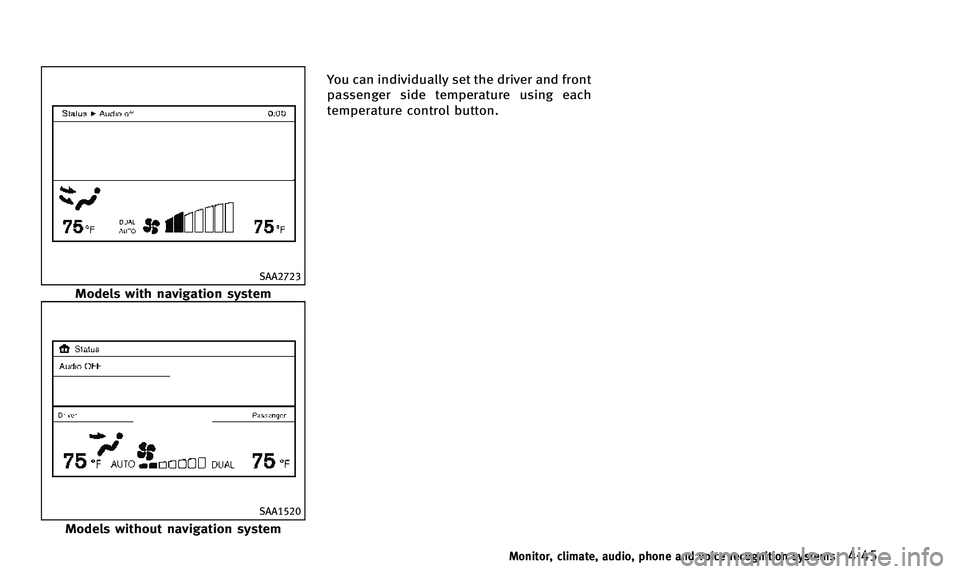
Models without navigation systemYou can individually set the driver and front
passenger side temperature using each
temperature control button.
Monitor, climate, audio, phone and voice recognition systems4-45
Page 209 of 498
4-46Monitor, climate, audio, phone and voice recognition systems
SAA1527
Type A
AUTOMATIC CLIMATE CONTROL
(Type A)
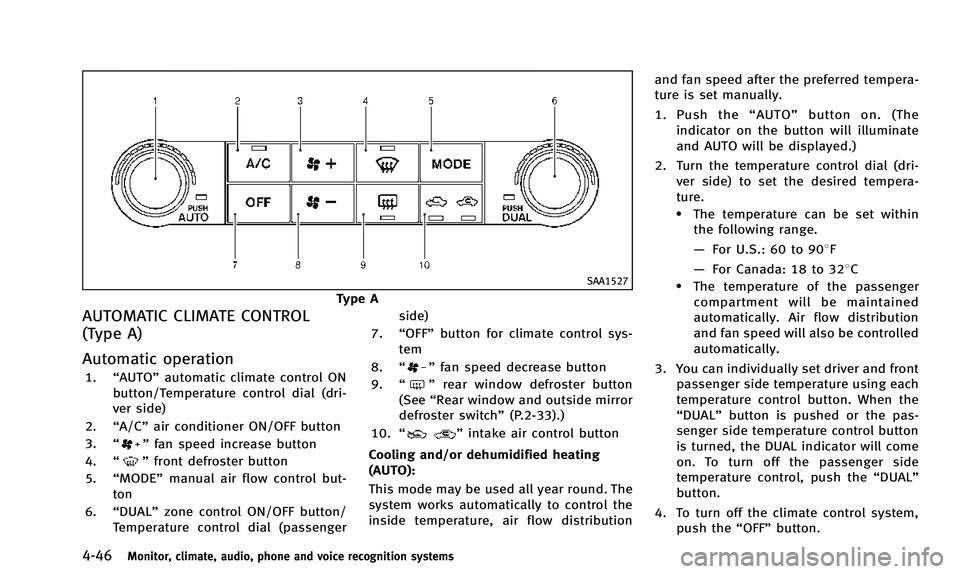
Automatic operation
1.“AUTO” automatic climate control ON
button/Temperature control dial (dri-
ver side)
2. “A/C” air conditioner ON/OFF button
3. “
”fan speed increase button
4. “
”front defroster button
5. “MODE” manual air flow control but-
ton
6. “DUAL” zone control ON/OFF button/
Temperature control dial (passenger side)
7. “OFF” button for climate control sys-
tem
8. “
”fan speed decrease button
9. “
”rear window defroster button
(See “Rear window and outside mirror
defroster switch” (P.2-33).)
10. “
”intake air control button
Cooling and/or dehumidified heating
(AUTO):
This mode may be used all year round. The
system works automatically to control the
inside temperature, air flow distribution and fan speed after the preferred tempera-
ture is set manually.
1. Push the
“AUTO” button on. (The
indicator on the button will illuminate
and AUTO will be displayed.)
2. Turn the temperature control dial (dri- ver side) to set the desired tempera-
ture.
.The temperature can be set withinthe following range.
— For U.S.: 60 to 908F
— For Canada: 18 to 328C
.The temperature of the passenger
compartment will be maintained
automatically. Air flow distribution
and fan speed will also be controlled
automatically.
3. You can individually set driver and front passenger side temperature using each
temperature control button. When the
“DUAL” button is pushed or the pas-
senger side temperature control button
is turned, the DUAL indicator will come
on. To turn off the passenger side
temperature control, push the “DUAL”
button.
4. To turn off the climate control system, push the “OFF”button.
Page 210 of 498

A visible mist may be seen coming from the
ventilators in hot, humid conditions as the
air is cooled rapidly. This does not indicate
a malfunction.
Heating (A/C OFF):
The air conditioner does not activate in this
mode. When you need to heat only, use
this mode.
1. Push the“AUTO”button on.
2. Push the “A/C” button. (The A/C
indicator will turn off.)
3. Turn the temperature control dial to set the desired temperature.
. The temperature of the passenger
compartment will be maintained auto-
matically. Air flow distribution and fan
speed are also controlled automati-
cally.
. Do not set the temperature lower than
the outside air temperature. Otherwise
the system may not work properly.
. If the windows fog up, use dehumidified
heating instead of the A/C off heating.
Dehumidified defrosting or defogging:
1. Push the “
”front defroster button.
(The indicator light on the button will
come on.) 2. Turn the temperature control dial to set
the desired temperature.
. To quickly remove ice from the outside
of the windows, push the fan speed
increase button “
”and set it to the
maximum position.
. As soon as possible after the wind-
shield is clean, push the “AUTO”button
to return to the auto mode.
. When the “
”front defroster button
is pushed, the air conditioner will
automatically be turned on at outside
temperatures above 238 F(−58C) to
defog the windshield, and the air
recirculate mode will automatically be
turned off. Outside air is drawn into the
passenger compartment to improve the
defogging performance.
Manual operation
Fan speed control:
Push the fan speed increase “
”or
decrease “”buttons to manually con-
trol the fan speed.
Push the “AUTO” button to return to
automatic control of the fan speed. Air flow control:
Push the “MODE”button to change the air
flow mode.
: Air flows from center and side ventilators.
: Air flows from center and side ventilators and foot outlets.
: Air flows mainly from foot outlets.
: Air flows from defroster and foot outlets.
Temperature control:
Turn the temperature control dial to set the
desired temperature.
. The temperature can be set within the
following range.
— For U.S.: 60 to 908F
— For Canada: 18 to 328C
Air recirculation:
Push the intake air control button “
”to recirculate interior air inside the
vehicle. The indicator light on the “”
side will come on.
The air recirculation mode cannot be
activated when the air conditioner is in
the front defrosting mode “
”.
Outside air circulation:
Push the intake air control button “
”to draw outside air into the passen-
Monitor, climate, audio, phone and voice recognition systems4-47
Page 211 of 498

4-48Monitor, climate, audio, phone and voice recognition systems
ger compartment. The indicator light on the
“”side will come on.
Automatic intake air control:
In the AUTO mode, the intake air will be
controlled automatically. To manually con-
trol the intake air, push the intake air
control button “
”. To return to the
automatic control mode, push the intake
air control button “
”for about 2
seconds. The indicator lights (both air
recirculation and outside air circulation
sides) will flash twice, and then the intake
air will be controlled automatically.
To turn system off
Push the OFF button.
SAA3568
Type B
AUTOMATIC CLIMATE CONTROL (Type B)
Automatic operation (AUTO)
1. “AUTO” automatic climate control ON
button/Temperature control dial (dri-
ver side)
2. “A/C” air conditioner ON/OFF button
3. “
”fan speed increase button
4. “
”front defroster button
5. “MODE” manual air flow control but-
ton
6. “DUAL” zone control ON/OFF button/
Temperature control dial (passenger
side) 7.
“OFF” button for climate control sys-
tem*
8. “
”fan speed decrease button
9. “
”rear window defroster button
(See “Rear window and outside mirror
defroster switch” (P.2-33).)
10. “
”auto-recirculation button/
intake air control button
The AUTO mode may be used year-round
as the system automatically controls con-
stant temperature, air flow distribution and
fan speed after the desired temperature is
set manually.
Page 212 of 498

To turn off the heater and air conditioner,
push the“OFF”button.
Cooling and dehumidified heating:
1. Push the “AUTO”button.
(The AUTO indicator light will illuminate
and “AUTO” will appear on the display.)
2. If the A/C indicator light does not illuminate, push the “A/C”button.
(The A/C indicator light will illuminate.)
3. Turn the temperature control dial (dri- ver’s side) to set the desired tempera-
ture.
.The temperature can be set withinthe following range.
— For U.S.: 60 to 908F
— For Canada: 18 to 328C
.When the DUAL indicator light is
turned off:
— Pushing the driver’s side “AUTO”
button changes both the driver’s
and front passenger’s side tem-
perature.
— Pushing the passenger’ s side
“DUAL” button changes only the
front passenger’s side tempera-
ture. (The DUAL indicator light
will illuminate and “DUAL”will appear on the display.)
.To set separate desired tempera-
tures for the driver and front pas-
senger, push the “DUAL”button, the
indicator light illuminates, and then
turn the corresponding temperature
control dial.
.To cancel the separate temperature setting, push the “DUAL”button, the
indicator light turns off, and the
driver’s side temperature setting will
be applied to both the driver’s and
front passenger’s sides.
A visible mist may be seen coming from the
ventilators in hot, humid conditions as the
air is cooled rapidly. This does not indicate
a malfunction.
Heating (A/C off):
1. Push the “AUTO”button.
(The AUTO indicator light will illuminate
and “AUTO” will appear on the display.)
2. If the A/C indicator light illuminates, push the “A/C”button.
(The A/C indicator light will turn off.)
3. Turn the temperature control dial to set the desired temperature.
.When the DUAL indicator light isturned off:
— Pushing the driver’s side “AUTO”
button changes both the driver’s
and front passenger’s side tem-
perature.
— Pushing the passenger’ s side
“DUAL” button changes only the
front passenger’s side tempera-
ture. (The DUAL indicator light
will illuminate and “DUAL”will
appear on the display.)
.To set separate desired tempera- tures for the driver and front pas-
senger, push the “DUAL”button, the
indicator light illuminates, and then
turn the corresponding temperature
control dial.
.To cancel the separate temperature setting, push the “DUAL”button, the
indicator light turns off, and the
driver’s side temperature setting will
be applied to both the driver’s and
front passenger’s sides.
.Do not set the temperature lower than the outside air temperature.
Doing so may cause the temperature
not to be controlled properly.
Monitor, climate, audio, phone and voice recognition systems4-49