automatic transmission INFINITI QX50 2014 Owners Manual
[x] Cancel search | Manufacturer: INFINITI, Model Year: 2014, Model line: QX50, Model: INFINITI QX50 2014Pages: 498, PDF Size: 2.47 MB
Page 18 of 498
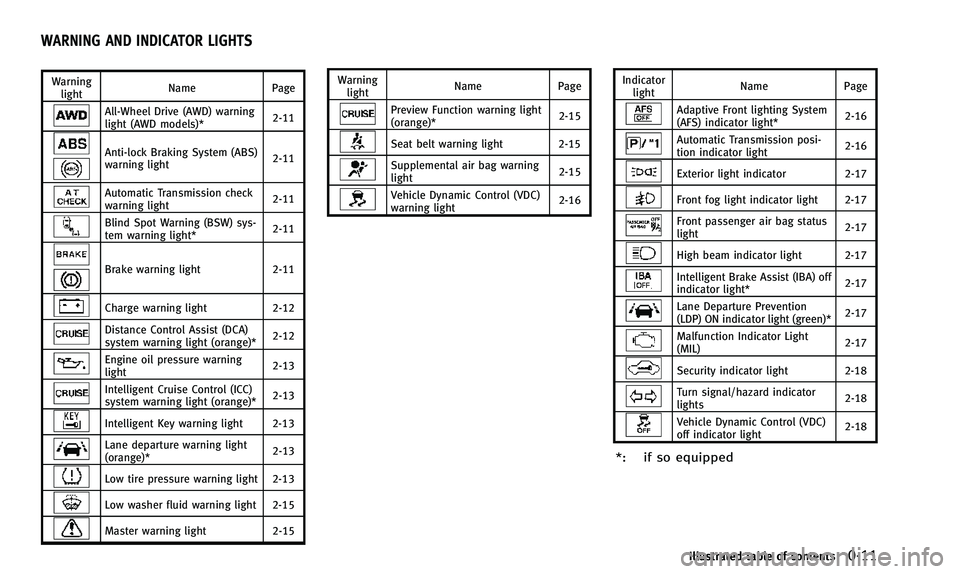
Warninglight Name
Page
All-Wheel Drive (AWD) warning
light (AWD models)* 2-11
Anti-lock Braking System (ABS)
warning light2-11
Automatic Transmission check
warning light
2-11
Blind Spot Warning (BSW) sys-
tem warning light*2-11
Brake warning light
2-11
Charge warning light2-12
Distance Control Assist (DCA)
system warning light (orange)* 2-12
Engine oil pressure warning
light2-13
Intelligent Cruise Control (ICC)
system warning light (orange)*2-13
Intelligent Key warning light 2-13
Lane departure warning light
(orange)*2-13
Low tire pressure warning light 2-13
Low washer fluid warning light 2-15
Master warning light
2-15Warning
light Name
Page
Preview Function warning light
(orange)* 2-15
Seat belt warning light 2-15
Supplemental air bag warning
light2-15
Vehicle Dynamic Control (VDC)
warning light2-16Indicator
light Name
Page
Adaptive Front lighting System
(AFS) indicator light* 2-16
Automatic Transmission posi-
tion indicator light
2-16
Exterior light indicator
2-17
Front fog light indicator light 2-17
Front passenger air bag status
light 2-17
High beam indicator light 2-17
Intelligent Brake Assist (IBA) off
indicator light*
2-17
Lane Departure Prevention
(LDP) ON indicator light (green)*2-17
Malfunction Indicator Light
(MIL)
2-17
Security indicator light 2-18
Turn signal/hazard indicator
lights2-18
Vehicle Dynamic Control (VDC)
off indicator light2-18
*: if so equipped
Illustrated table of contents0-11
WARNING AND INDICATOR LIGHTS
Page 22 of 498
FRONT SEATS
Front power seat adjustment
Operating tips:
.The power seat motor has an auto-reset
overload protection circuit. If the motor
stops during operation, wait 30 sec-
onds, then reactivate the switch.
. Do not operate the power seat switch
for a long period of time when the
engine is off. This will discharge the
battery.
See “Automatic drive positioner” (P.3-26)
for the seat position memory function (if so
equipped).
CAUTION
When adjusting the seat positions, be sure
not to contact any moving parts to avoid
possible injuries and/or damages.
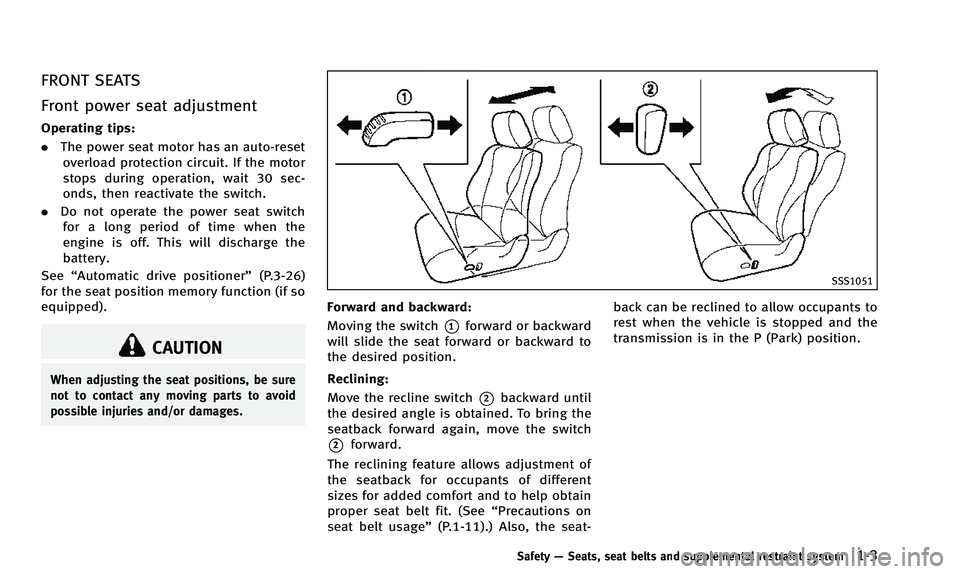
SSS1051
Forward and backward:
Moving the switch
*1forward or backward
will slide the seat forward or backward to
the desired position.
Reclining:
Move the recline switch
*2backward until
the desired angle is obtained. To bring the
seatback forward again, move the switch
*2forward.
The reclining feature allows adjustment of
the seatback for occupants of different
sizes for added comfort and to help obtain
proper seat belt fit. (See “Precautions on
seat belt usage” (P.1-11).) Also, the seat- back can be reclined to allow occupants to
rest when the vehicle is stopped and the
transmission is in the P (Park) position.
Safety
—Seats, seat belts and supplemental restraint system1-3
Page 24 of 498
.When operating the rear power seatback
return, make sure that the vehicle is
stopped and the transmission is in the P
(Park) position.
. Make sure the lid of the rear seat cup
holders is closed before folding the rear
seatback.
WARNING
.Never allow anyone to ride in the cargo
area or on the rear seat when it is in the
fold-down position. Use of these areas
by passengers without proper restraints
could result in serious injury in an
accident or sudden stop.
. When returning the seatbacks to the
upright position, be certain they are
completely secured in the latched posi-
tion. If they are not completely secured,
passengers may be injured in an acci-
dent or sudden stop.
. Properly secure all cargo to help prevent
it from sliding or shifting. Do not place
cargo higher than the seatbacks. In a
sudden stop or collision, unsecured
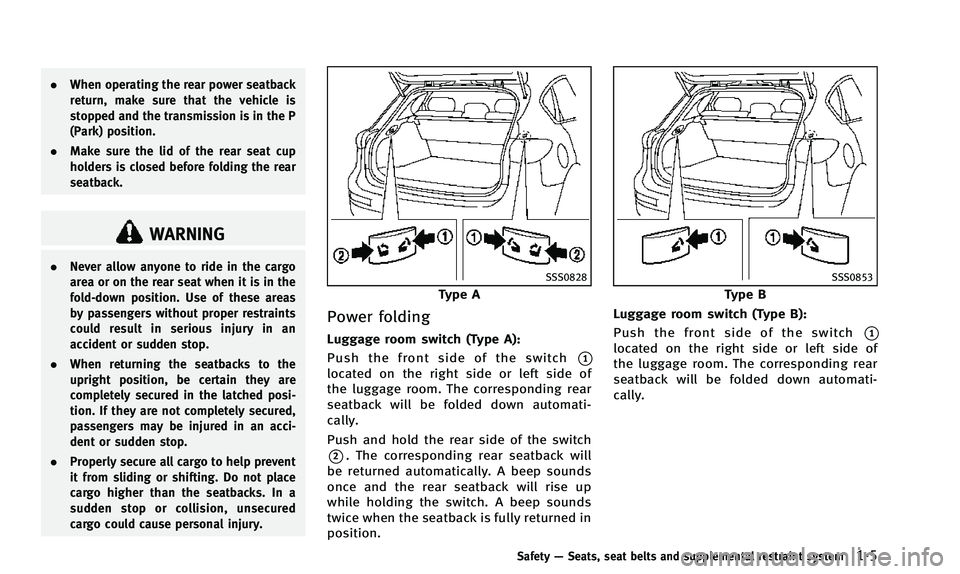
cargo could cause personal injury.SSS0828
Type A
Power folding
Luggage room switch (Type A):
Push the front side of the switch
*1
located on the right side or left side of
the luggage room. The corresponding rear
seatback will be folded down automati-
cally.
Push and hold the rear side of the switch
*2. The corresponding rear seatback will
be returned automatically. A beep sounds
once and the rear seatback will rise up
while holding the switch. A beep sounds
twice when the seatback is fully returned in
position.
SSS0853
Type B
Luggage room switch (Type B):
Push the front side of the switch
*1
located on the right side or left side of
the luggage room. The corresponding rear
seatback will be folded down automati-
cally.
Safety —Seats, seat belts and supplemental restraint system1-5
Page 81 of 498
2-10Instruments and controls
All-Wheel Drive (AWD) warning light (AWD
models)*Intelligent Key warning lightExterior light indicator
Anti-lock Braking System (ABS) warning
lightLane departure warning light (orange)*Front fog light indicator light
Low tire pressure warning lightFront passenger air bag status light
Automatic transmission check warning lightLow washer fluid warning lightHigh beam indicator light
Blind Spot Warning (BSW) system warning
light*Master warning lightIntelligent Brake Assist (IBA) off indicator
light*
Preview Function warning light (orange)*Lane Departure Prevention (LDP) ON indica-
tor light (green)*
Brake warning lightSeat belt warning lightMalfunction Indicator Light (MIL)
Charge warning lightSupplemental air bag warning lightSecurity indicator light
Distance Control Assist (DCA) system warn-
ing light (orange)*Vehicle Dynamic Control (VDC) warning lightTurn signal/hazard indicator lights
Engine oil pressure warning lightAdaptive Front lighting System (AFS) indi-
cator light*Vehicle Dynamic Control (VDC) off indicator
light
Intelligent Cruise Control (ICC) system
warning light (orange)*Automatic transmission position indicator
light*: if so equipped
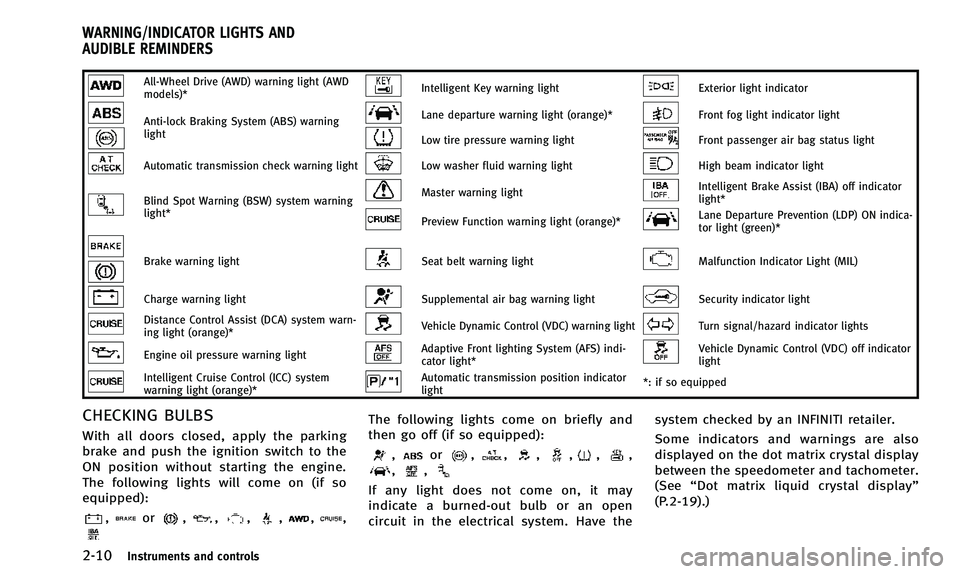
CHECKING BULBS
With all doors closed, apply the parking
brake and push the ignition switch to the
ON position without starting the engine.
The following lights will come on (if so
equipped):
,or,,,,,,
The following lights come on briefly and
then go off (if so equipped):
,or,,,,,,,,
If any light does not come on, it may
indicate a burned-out bulb or an open
circuit in the electrical system. Have the system checked by an INFINITI retailer.
Some indicators and warnings are also
displayed on the dot matrix crystal display
between the speedometer and tachometer.
(See
“Dot matrix liquid crystal display”
(P.2-19).)
WARNING/INDICATOR LIGHTS AND
AUDIBLE REMINDERS
Page 82 of 498
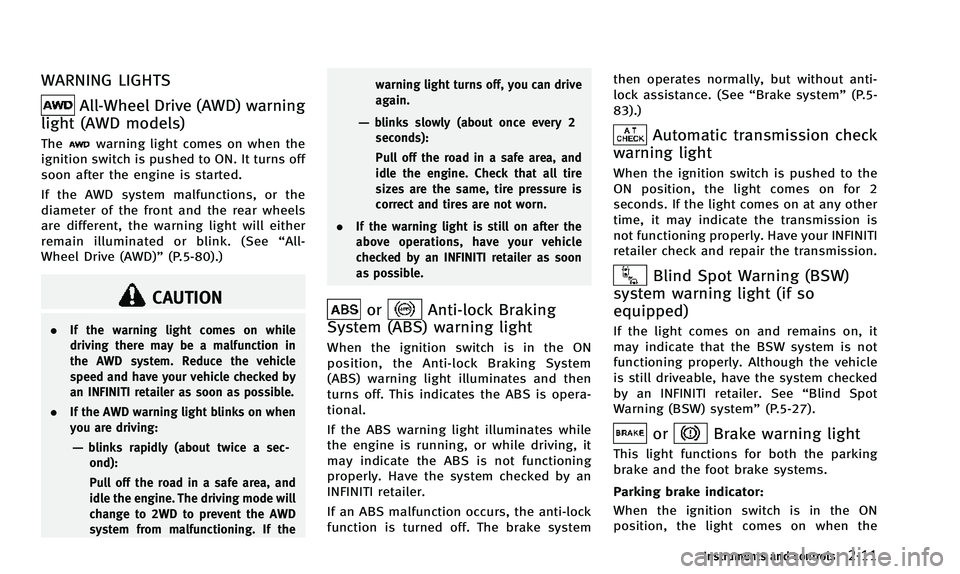
WARNING LIGHTS
All-Wheel Drive (AWD) warning
light (AWD models)
Thewarning light comes on when the
ignition switch is pushed to ON. It turns off
soon after the engine is started.
If the AWD system malfunctions, or the
diameter of the front and the rear wheels
are different, the warning light will either
remain illuminated or blink. (See “All-
Wheel Drive (AWD)” (P.5-80).)
CAUTION
.If the warning light comes on while
driving there may be a malfunction in
the AWD system. Reduce the vehicle
speed and have your vehicle checked by
an INFINITI retailer as soon as possible.
. If the AWD warning light blinks on when
you are driving:
—blinks rapidly (about twice a sec-
ond):
Pull off the road in a safe area, and
idle the engine. The driving mode will
change to 2WD to prevent the AWD
system from malfunctioning. If the warning light turns off, you can drive
again.
—blinks slowly (about once every 2
seconds):
Pull off the road in a safe area, and
idle the engine. Check that all tire
sizes are the same, tire pressure is
correct and tires are not worn.
. If the warning light is still on after the
above operations, have your vehicle
checked by an INFINITI retailer as soon
as possible.
orAnti-lock Braking
System (ABS) warning light
When the ignition switch is in the ON
position, the Anti-lock Braking System
(ABS) warning light illuminates and then
turns off. This indicates the ABS is opera-
tional.
If the ABS warning light illuminates while
the engine is running, or while driving, it
may indicate the ABS is not functioning
properly. Have the system checked by an
INFINITI retailer.
If an ABS malfunction occurs, the anti-lock
function is turned off. The brake system then operates normally, but without anti-
lock assistance. (See
“Brake system”(P.5-
83).)
Automatic transmission check
warning light
When the ignition switch is pushed to the
ON position, the light comes on for 2
seconds. If the light comes on at any other
time, it may indicate the transmission is
not functioning properly. Have your INFINITI
retailer check and repair the transmission.
Blind Spot Warning (BSW)
system warning light (if so
equipped)
If the light comes on and remains on, it
may indicate that the BSW system is not
functioning properly. Although the vehicle
is still driveable, have the system checked
by an INFINITI retailer. See “Blind Spot
Warning (BSW) system” (P.5-27).
orBrake warning light
This light functions for both the parking
brake and the foot brake systems.
Parking brake indicator:
When the ignition switch is in the ON
position, the light comes on when the
Instruments and controls2-11
Page 87 of 498
2-16Instruments and controls
and pretensioner systems needs servicing
and your vehicle must be taken to your
nearest INFINITI retailer.
.The supplemental air bag warning light
remains on after approximately 7 sec-
onds.
. The supplemental air bag warning light
flashes intermittently.
. The supplemental air bag warning light
does not come on at all.
Unless checked and repaired, the supple-
mental restraint systems and/or the pre-
tensioners seat belt (air bag system) may
not function properly.
For additional information, see “Supple-
mental restraint system” (P.1-37).
WARNING
If the supplemental air bag warning light is
on, it could mean that the front air bag, side
air bag, curtain air bag systems and/or
pretensioner systems will not operate in an
accident. To help avoid injury to yourself or
others, have your vehicle checked by an
INFINITI retailer as soon as possible.
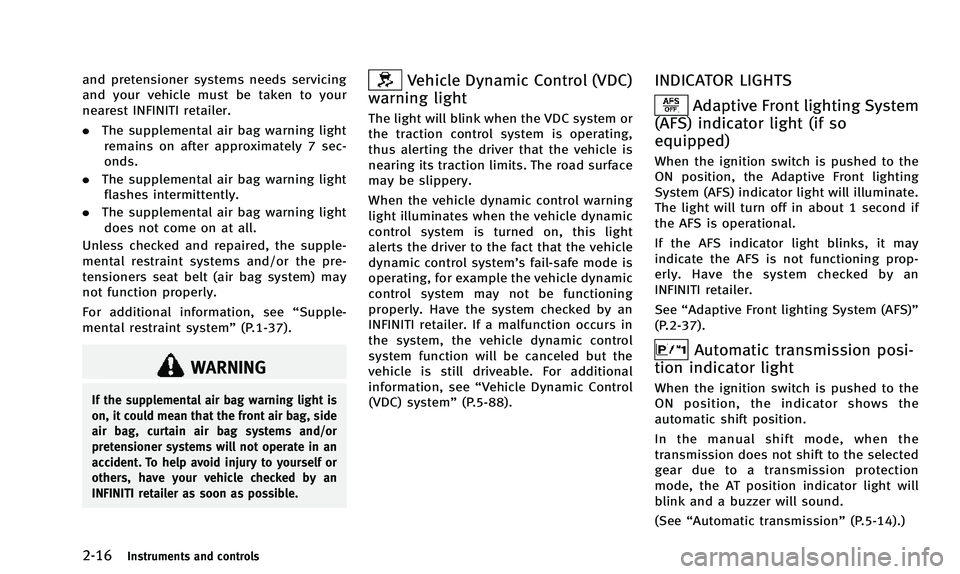
Vehicle Dynamic Control (VDC)
warning light
The light will blink when the VDC system or
the traction control system is operating,
thus alerting the driver that the vehicle is
nearing its traction limits. The road surface
may be slippery.
When the vehicle dynamic control warning
light illuminates when the vehicle dynamic
control system is turned on, this light
alerts the driver to the fact that the vehicle
dynamic control system’s fail-safe mode is
operating, for example the vehicle dynamic
control system may not be functioning
properly. Have the system checked by an
INFINITI retailer. If a malfunction occurs in
the system, the vehicle dynamic control
system function will be canceled but the
vehicle is still driveable. For additional
information, see “Vehicle Dynamic Control
(VDC) system” (P.5-88).
INDICATOR LIGHTS
Adaptive Front lighting System
(AFS) indicator light (if so
equipped)
When the ignition switch is pushed to the
ON position, the Adaptive Front lighting
System (AFS) indicator light will illuminate.
The light will turn off in about 1 second if
the AFS is operational.
If the AFS indicator light blinks, it may
indicate the AFS is not functioning prop-
erly. Have the system checked by an
INFINITI retailer.
See “Adaptive Front lighting System (AFS)”
(P.2-37).
Automatic transmission posi-
tion indicator light
When the ignition switch is pushed to the
ON position, the indicator shows the
automatic shift position.
In the manual shift mode, when the
transmission does not shift to the selected
gear due to a transmission protection
mode, the AT position indicator light will
blink and a buzzer will sound.
(See “Automatic transmission” (P.5-14).)
Page 90 of 498
AUDIBLE REMINDERS
Key reminder chime
A chime will sound if the driver side door is
opened while the ignition switch is pushed
to the ACC position or pushed to the OFF or
LOCK position with the Intelligent Key left
in the Intelligent Key port. Make sure the
ignition switch is pushed to the OFF
position, and take the Intelligent Key with
you when leaving the vehicle.
Light reminder chime
A chime will sound when the driver side
door is opened with the light switch in the
orposition and the ignition switch
in the ACC, OFF or LOCK position.
Turn the light switch off when you leave the
vehicle.
Parking brake reminder chime
The parking brake reminder chime will
sound if the vehicle is driven at more than
4 MPH (7 km/h) with the parking brake
applied. Stop the vehicle and release the
parking brake.
Brake pad wear warning
The disc brake pads have audible wear
warnings. When a brake pad requires
replacement, it will make a high pitched
scraping sound when the vehicle is in
motion. This scraping sound will first occur
only when the brake pedal is depressed.
After more wear of the brake pad, the
sound will always be heard even if the
brake pedal is not depressed. Have the
brakes checked as soon as possible if the
warning sound is heard.
Lane departure warning chime (if
so equipped)
When the Lane Departure Warning (LDW) or
Lane Departure Prevention (LDP) system is
on, the chime sounds if the vehicle is
traveling close to either the left or the right
of a traveling lane with detectable lane
markers.
See “Lane Departure Warning (LDW) sys-
tem/Lane Departure Prevention (LDP) sys-
tem” (P.5-19) for more details.
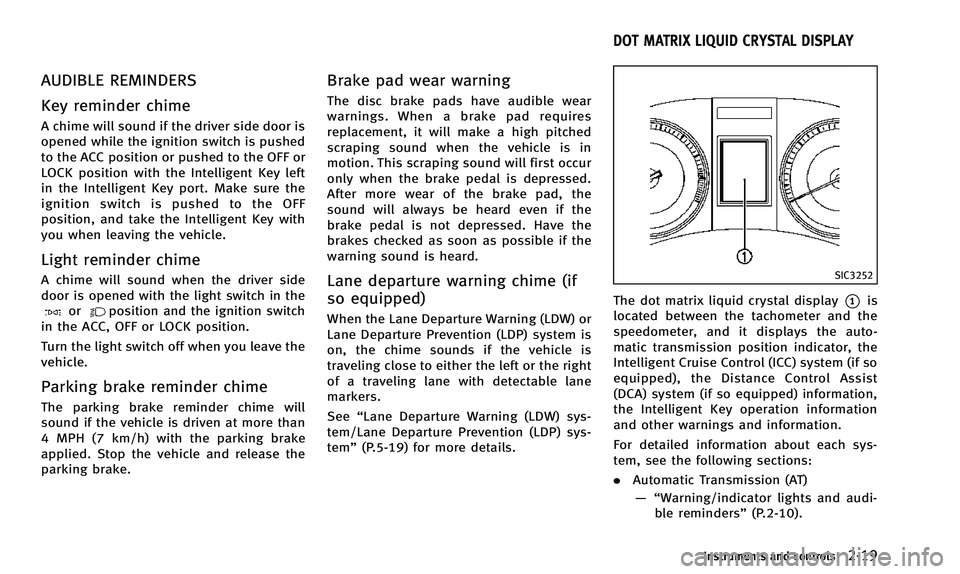
SIC3252
The dot matrix liquid crystal display*1is
located between the tachometer and the
speedometer, and it displays the auto-
matic transmission position indicator, the
Intelligent Cruise Control (ICC) system (if so
equipped), the Distance Control Assist
(DCA) system (if so equipped) information,
the Intelligent Key operation information
and other warnings and information.
For detailed information about each sys-
tem, see the following sections:
. Automatic Transmission (AT)
—“ Warning/indicator lights and audi-
ble reminders” (P.2-10).
Instruments and controls2-19
DOT MATRIX LIQUID CRYSTAL DISPLAY
Page 129 of 498
2-58Instruments and controls
The HomeLink®Universal Transceiver pro-
vides a convenient way to consolidate the
functions of up to three individual hand-
held transmitters into one built-in device.
HomeLink
®Universal Transceiver:
. Will operate most Radio Frequency (RF)
devices such as garage doors, gates,
home and office lighting, entry door
locks and security systems.
. Is powered by your vehicle’s battery. No
separate batteries are required. If the
vehicle’s battery is discharged or is
disconnected, HomeLink
®will retain all
programming.
When the HomeLink
®Universal Transcei-
ver is programmed, retain the original
transmitter for future programming proce-
dures (Example: new vehicle purchases).
Upon sale of the vehicle, the programmed
HomeLink
®Universal Transceiver buttons
should be erased for security purposes.
For additional information, refer to “Pro-
gramming HomeLink
®” (P.2-58).
WARNING
. Do not use the HomeLink®Universal
Transceiver with any garage door opener
that lacks safety stop and reverse features as required by federal safety
standards. (These standards became
effective for opener models manufac-
tured after April 1, 1982). A garage door
opener which cannot detect an object in
the path of a closing garage door and
then automatically stop and reverse,
does not meet current federal safety
standards. Using a garage door opener
without these features increases the risk
of serious injury or death.
. During the programming procedure your
garage door or security gate will open
and close (if the transmitter is within
range). Make sure that people or objects
are clear of the garage door, gate, etc.
that you are programming.
. Your vehicle’s engine should be turned
off while programming the HomeLink
®
Universal Transceiver. Do not breathe
exhaust gases; they contain colorless
and odorless carbon monoxide. Carbon
monoxide is dangerous. It can cause
unconsciousness or death.
PROGRAMMING HomeLink®
If you have any questions or are having
difficulty programming your HomeLink®
buttons, refer to the HomeLink®web site
at: www.homelink.com or call 1-800-355-
3515.
NOTE:
It is also recommended that a new battery
be placed in the hand-held transmitter of
the device being programmed to
HomeLink
®for quicker programming and
accurate transmission of the radio-fre-
quency.
1. Position the end of your hand-held transmitter 1-3 in (26-76 mm) away
from the HomeLink
®surface, keeping
the HomeLink®indicator light*1in
view.
HomeLink®UNIVERSAL TRANSCEIVER (if so
equipped)
Page 131 of 498

2-60Instruments and controls
stand on your vehicle to perform the
next steps.
4. At the receiver located on the garage door opener motor in the garage, locate
the “learn” or“smart” button (the
name and color of the button may vary
by manufacturer but it is usually
located near where the hanging anten-
na wire is attached to the unit). If there
is difficulty locating the button, refer-
ence the garage door opener’s manual.
5. Press and release the “learn” or
“smart” button.
NOTE:
Once the button is pressed, you have
approximately 30 seconds to initiate
the next step.
6. Return to the vehicle and firmly press and hold the programmed HomeLink
®
button for two seconds and release.
Repeat the “press/hold/release” se-
quence up to 3 times to complete the
programming process. HomeLink
®
should now activate your rolling code
equipped device.
7. If you have any questions or are having difficulty programming your
HomeLink
®buttons, refer to the HomeLink
®web site at: www.
homelink.com or call 1-800-355-3515.
PROGRAMMING HomeLink®FOR
CANADIAN CUSTOMERS AND GATE
OPENERS
Canadian radio-frequency laws require
transmitter signals to “time-out”(or quit)
after several seconds of transmission –
which may not be long enough for
HomeLink
®to pick up the signal during
programming. Similar to this Canadian
law, some U.S. gate operators are de-
signed to “time-out” in the same manner.
If you live in Canada or you are having
difficulties programming a gate operator or
garage door opener by using the “Pro-
gramming HomeLink
®” procedures, re-
place “Programming HomeLink®”Step 2
with the following:
NOTE:
When programming a garage door opener,
etc., unplug the device during the “cy-
cling” process to prevent possible damage
to the garage door opener components.
Step 2: Using both hands, simultaneously
press and hold the desired HomeLink
®
button and the hand-held transmitter button. During programming, your hand-
held transmitter may automatically stop
transmitting. Continue to press and hold
the desired HomeLink
®button while you
press and re-press (“cycle”) your hand-
held transmitter every two seconds until
the frequency signal has been learned. The
HomeLink
®indicator light will flash slowly
and then rapidly after several seconds
upon successful programming. DO NOT
release until the HomeLink
®indicator light
flashes slowly and then rapidly. When the
indicator light flashes rapidly, both buttons
may be released. The rapid flashing
indicates successful programming.
Proceed with “Programming HomeLink
®”
step 3 to complete.
Remember to plug the device back in when
programming is completed.
OPERATING THE HomeLink®UNI-
VERSAL TRANSCEIVER
The HomeLink®Universal Transceiver, after
it is programmed, can be used to activate
the programmed device. To operate, simply
press and release the appropriate pro-
grammed HomeLink
®Universal Transceiver
button. The amber indicator light will
illuminate while the signal is being trans-
Page 279 of 498

4-116Monitor, climate, audio, phone and voice recognition systems
2. Sit in the driver’s seat with the enginerunning, the parking brake on, and the
transmission in Park.
3. Press the
button.
4. Speak: “Help”. The system acknowl-
edges the command and announces
the next set of available commands.
5. Speak: "Voice Adaptation". The system acknowledges the command and dis-
plays the voice adaptation mode
screen.
6. Voice memory A or memory B is selected automatically. If both memory
locations are already in use, the system
will prompt you to overwrite one.
Follow the instructions provided by
the system.
7. When preparation is complete and you are ready to begin, press the
button.
8. The voice adaptation mode will be explained. Follow the instructions pro-
vided by the system.
9. When training is finished, the system will tell you an adequate number of
phrases have been recorded.
10. The system will ask you to say your name. Follow the instructions to regis- ter your name.
11. The system will announce that voice adaptation has been completed and
the system is ready.
The voice adaptation mode will stop if:
. The
button is pressed in voice
adaptation mode.
. The vehicle is driven during voice
adaptation mode.
. The ignition switch is turned to the OFF
or LOCK position. INFINITI Voice Recognition allows hands-
free operation of the Phone, Navigation,
Information and Audio systems in one of
two modes, Standard Mode or Alternate
Command Mode.
In Standard Mode, commands that are
available are always shown on the display
and announced by the system. You can
complete your desired operation by simply
following the prompts given by the system.
(See
“INFINITI Voice Recognition Standard
Mode” (P.4-117) for details.)
For advanced operation, you can use the
Alternate Command Mode. (See “INFINITI
Voice Recognition Alternate Command
Mode” (P.4-129) for details.) When this
mode is active, an expanded list of
commands can be spoken after pushing
the TALK
switch, and the voice
command menu prompts are turned off.
Review the expanded command list, which
is available when this mode is active. Note
that in this mode the recognition success
rate may be affected as the number of
available commands and the ways of
speaking each command are increased.
To switch one mode to another, see each
mode description later in this section.
To improve the recognition success rate
INFINITI VOICE RECOGNITION SYSTEM
(models with navigation system)