oil INFINITI QX50 2014 Owners Manual
[x] Cancel search | Manufacturer: INFINITI, Model Year: 2014, Model line: QX50, Model: INFINITI QX50 2014Pages: 498, PDF Size: 2.47 MB
Page 17 of 498
0-10Illustrated table of contents
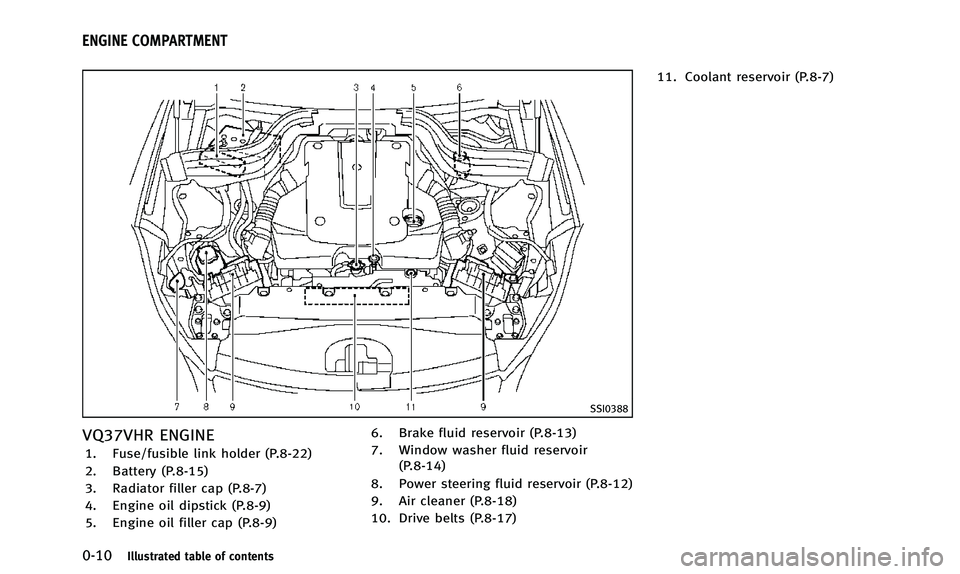
SSI0388
VQ37VHR ENGINE
1. Fuse/fusible link holder (P.8-22)
2. Battery (P.8-15)
3. Radiator filler cap (P.8-7)
4. Engine oil dipstick (P.8-9)
5. Engine oil filler cap (P.8-9)6. Brake fluid reservoir (P.8-13)
7. Window washer fluid reservoir
(P.8-14)
8. Power steering fluid reservoir (P.8-12)
9. Air cleaner (P.8-18)
10. Drive belts (P.8-17) 11. Coolant reservoir (P.8-7)
ENGINE COMPARTMENT
Page 18 of 498
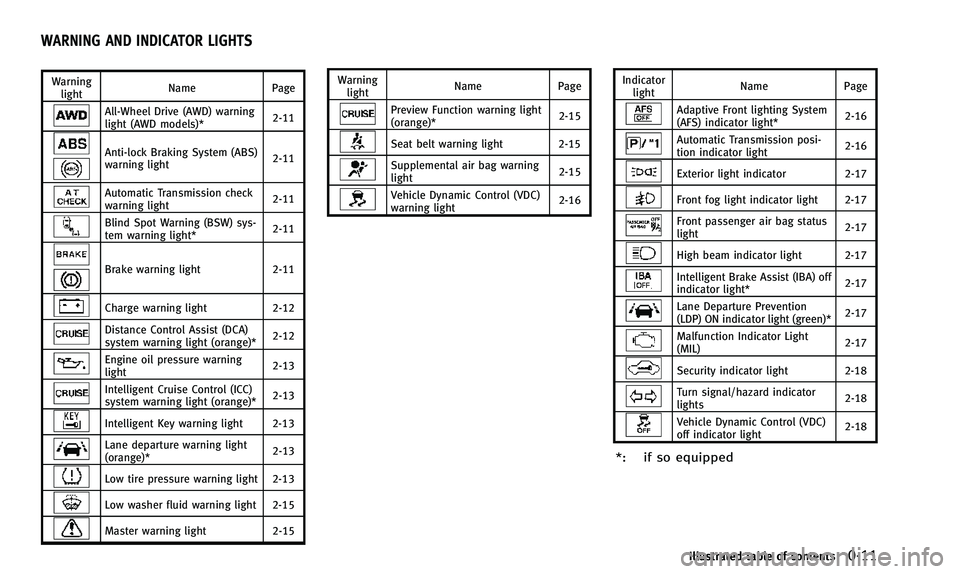
Warninglight Name
Page
All-Wheel Drive (AWD) warning
light (AWD models)* 2-11
Anti-lock Braking System (ABS)
warning light2-11
Automatic Transmission check
warning light
2-11
Blind Spot Warning (BSW) sys-
tem warning light*2-11
Brake warning light
2-11
Charge warning light2-12
Distance Control Assist (DCA)
system warning light (orange)* 2-12
Engine oil pressure warning
light2-13
Intelligent Cruise Control (ICC)
system warning light (orange)*2-13
Intelligent Key warning light 2-13
Lane departure warning light
(orange)*2-13
Low tire pressure warning light 2-13
Low washer fluid warning light 2-15
Master warning light
2-15Warning
light Name
Page
Preview Function warning light
(orange)* 2-15
Seat belt warning light 2-15
Supplemental air bag warning
light2-15
Vehicle Dynamic Control (VDC)
warning light2-16Indicator
light Name
Page
Adaptive Front lighting System
(AFS) indicator light* 2-16
Automatic Transmission posi-
tion indicator light
2-16
Exterior light indicator
2-17
Front fog light indicator light 2-17
Front passenger air bag status
light 2-17
High beam indicator light 2-17
Intelligent Brake Assist (IBA) off
indicator light*
2-17
Lane Departure Prevention
(LDP) ON indicator light (green)*2-17
Malfunction Indicator Light
(MIL)
2-17
Security indicator light 2-18
Turn signal/hazard indicator
lights2-18
Vehicle Dynamic Control (VDC)
off indicator light2-18
*: if so equipped
Illustrated table of contents0-11
WARNING AND INDICATOR LIGHTS
Page 81 of 498
2-10Instruments and controls
All-Wheel Drive (AWD) warning light (AWD
models)*Intelligent Key warning lightExterior light indicator
Anti-lock Braking System (ABS) warning
lightLane departure warning light (orange)*Front fog light indicator light
Low tire pressure warning lightFront passenger air bag status light
Automatic transmission check warning lightLow washer fluid warning lightHigh beam indicator light
Blind Spot Warning (BSW) system warning
light*Master warning lightIntelligent Brake Assist (IBA) off indicator
light*
Preview Function warning light (orange)*Lane Departure Prevention (LDP) ON indica-
tor light (green)*
Brake warning lightSeat belt warning lightMalfunction Indicator Light (MIL)
Charge warning lightSupplemental air bag warning lightSecurity indicator light
Distance Control Assist (DCA) system warn-
ing light (orange)*Vehicle Dynamic Control (VDC) warning lightTurn signal/hazard indicator lights
Engine oil pressure warning lightAdaptive Front lighting System (AFS) indi-
cator light*Vehicle Dynamic Control (VDC) off indicator
light
Intelligent Cruise Control (ICC) system
warning light (orange)*Automatic transmission position indicator
light*: if so equipped
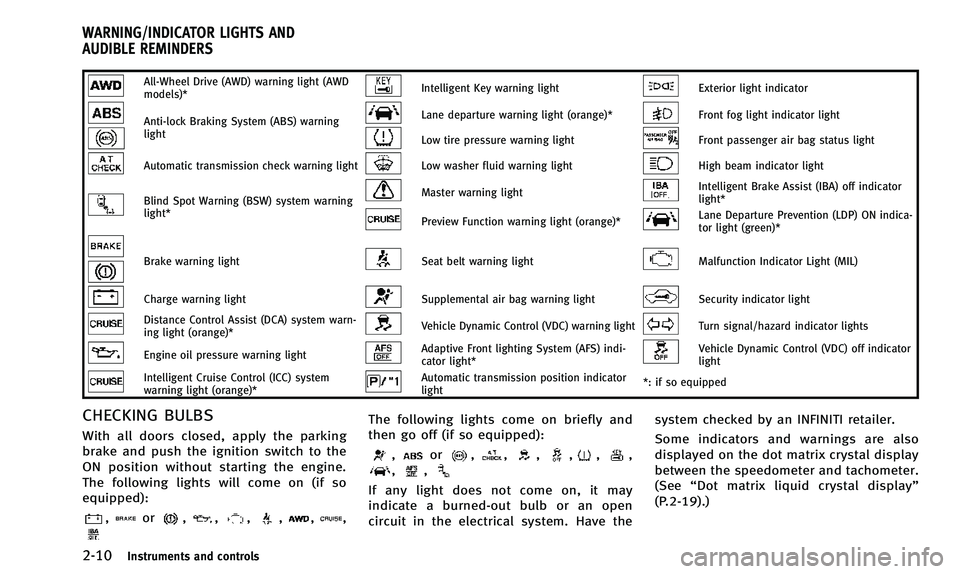
CHECKING BULBS
With all doors closed, apply the parking
brake and push the ignition switch to the
ON position without starting the engine.
The following lights will come on (if so
equipped):
,or,,,,,,
The following lights come on briefly and
then go off (if so equipped):
,or,,,,,,,,
If any light does not come on, it may
indicate a burned-out bulb or an open
circuit in the electrical system. Have the system checked by an INFINITI retailer.
Some indicators and warnings are also
displayed on the dot matrix crystal display
between the speedometer and tachometer.
(See
“Dot matrix liquid crystal display”
(P.2-19).)
WARNING/INDICATOR LIGHTS AND
AUDIBLE REMINDERS
Page 84 of 498

Engine oil pressure warning
light
This light warns of low engine oil pressure.
If the light flickers or comes on during
normal driving, pull off the road in a safe
area, stop the engine immediatelyand call
an INFINITI retailer or other authorized
repair shop.
The engine oil pressure warning light is
not designed to indicate a low oil level.
Use the dipstick to check the oil level. (See
“Engine oil” (P.8-9).)
CAUTION
Running the engine with the engine oil
pressure warning light on could cause
serious damage to the engine almost
immediately. Such damage is not covered
by warranty. Turn off the engine as soon as
it is safe to do so.
Intelligent Cruise Control (ICC)
system warning light (orange; if so
equipped)
This light comes on if there is a malfunc-
tion in the Intelligent Cruise Control (ICC) system.
If the warning light comes on, park the
vehicle in a safe place. Turn the engine off,
restart the engine, resume driving and set
the ICC system again.
If it is not possible to set the system or the
indicator stays on, it may indicate that the
system is malfunctioning. Although the
vehicle is still driveable under normal
conditions, have the vehicle checked at
an INFINITI retailer.
Intelligent Key warning light
After the ignition switch is pushed to the
ON position, this light comes on for about
2 seconds and then turns off.
This light warns of a malfunction with the
Intelligent Key system.
If the light comes on while the engine is
stopped, it may be impossible to start the
engine. If the light comes on while the
engine is running, you can drive the
vehicle. However in these cases, contact
an INFINITI retailer for repair as soon as
possible.
Lane departure warning light
(orange; if so equipped)
When the ignition switch is pushed to the
ON position, the light will come on in
orange, turn green, and then turn off. This
indicates that the Lane Departure Warning
(LDW) and Lane Departure Prevention (LDP)
systems are operational.
While the LDW and/or LDP system is on,
the light will blink in orange and a warning
chime will sound if the vehicle is traveling
close to either the left or the right of a
traveling lane with detectable lane mar-
kers.
If the light comes on in orange and remains
on, it may indicate that the LDW and LDP
systems are not functioning properly. Have
the systems checked by an INFINITI retailer.
See “Lane Departure Warning (LDW) sys-
tem/Lane Departure Prevention (LDP) sys-
tem” (P.5-19).
Low tire pressure warning
light
Your vehicle is equipped with a Tire
Pressure Monitoring System (TPMS) that
monitors the tire pressure of all tires
except the spare.
Instruments and controls2-13
Page 95 of 498
2-24Instruments and controls
The cruise control set indicator (SET) is
displayed while the vehicle is controlled by
the conventional (fixed speed) cruise con-
trol mode of the ICC system.
For more details, see“Intelligent Cruise
Control (ICC) system (FULL SPEED RANGE)”
(P.5-36).
18. Distance Control Assist (DCA)
system switch indicator (if so
equipped)
The indicator is displayed when the Dis-
tance Control Assist (DCA) system switch is
pushed on. When the switch is pushed
again, the indicator disappears. While the
indicator is displayed, the DCA system is
operational. (See “Distance Control Assist
(DCA) system” (P.5-59).)
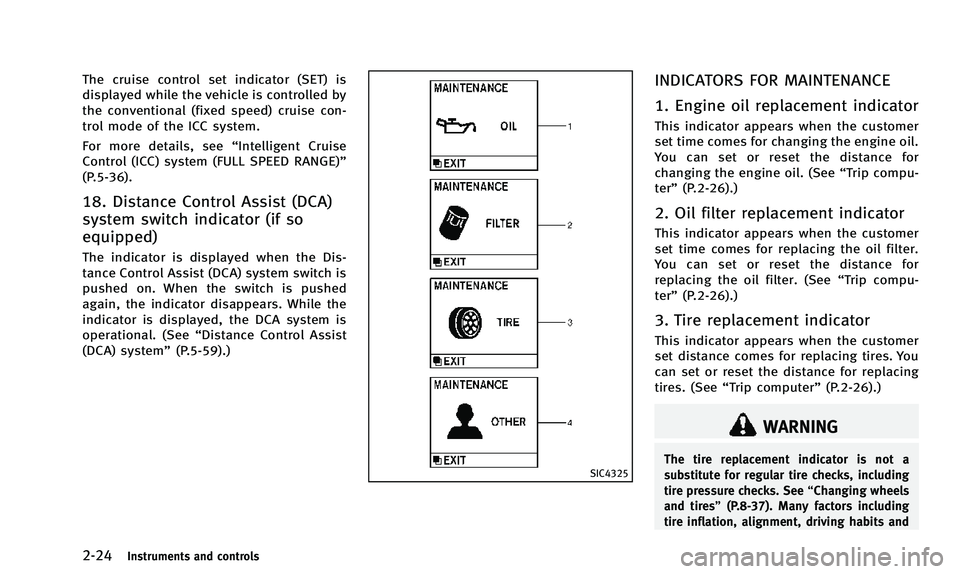
SIC4325
INDICATORS FOR MAINTENANCE
1. Engine oil replacement indicator
This indicator appears when the customer
set time comes for changing the engine oil.
You can set or reset the distance for
changing the engine oil. (See “Trip compu-
ter” (P.2-26).)
2. Oil filter replacement indicator
This indicator appears when the customer
set time comes for replacing the oil filter.
You can set or reset the distance for
replacing the oil filter. (See “Trip compu-
ter” (P.2-26).)
3. Tire replacement indicator
This indicator appears when the customer
set distance comes for replacing tires. You
can set or reset the distance for replacing
tires. (See “Trip computer” (P.2-26).)
WARNING
The tire replacement indicator is not a
substitute for regular tire checks, including
tire pressure checks. See “Changing wheels
and tires” (P.8-37). Many factors including
tire inflation, alignment, driving habits and
Page 96 of 498
road conditions affect tire wear and when
tires should be replaced. Setting the tire
replacement indicator for a certain driving
distance does not mean your tires will last
that long. Use the tire replacement indicator
as a guide only and always perform regular
tire checks. Failure to perform regular tire
checks, including tire pressure checks could
result in tire failure. Serious vehicle damage
could occur and may lead to a collision,
which could result in serious personal injury
or death.
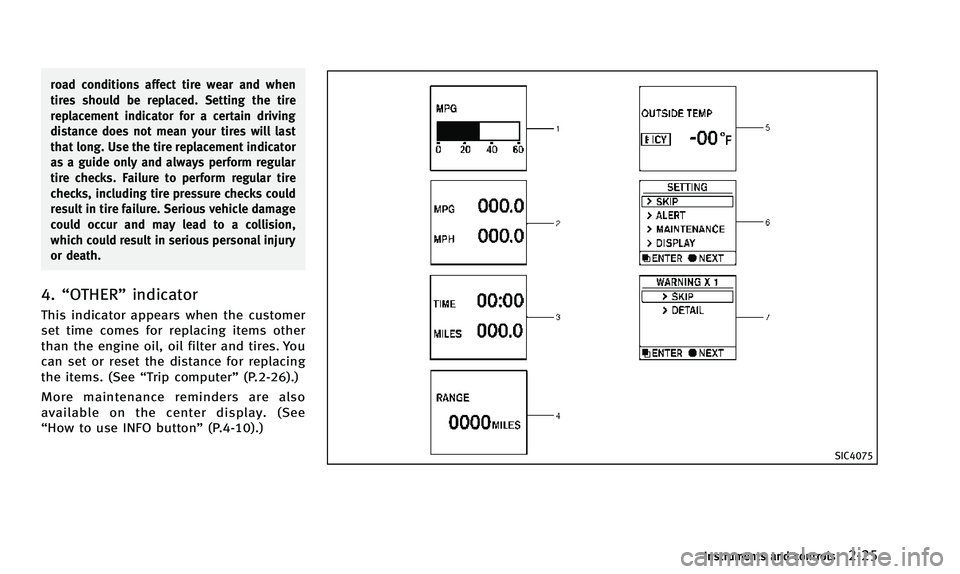
4.“OTHER” indicator
This indicator appears when the customer
set time comes for replacing items other
than the engine oil, oil filter and tires. You
can set or reset the distance for replacing
the items. (See “Trip computer” (P.2-26).)
More maintenance reminders are also
available on the center display. (See
“How to use INFO button” (P.4-10).)
SIC4075
Instruments and controls2-25
Page 98 of 498
amount of fuel in the fuel tank and the
actual fuel consumption.
The display is updated every 30 seconds.
The dte mode includes a low range warning
feature. If the fuel level is low, the warning
is displayed on the screen.
When the fuel level drops even lower, the
dte display will change to“——”.
. If the amount of fuel added is small, the
display just before the ignition switch
is pushed to the OFF position may
continue to be displayed.
. When driving uphill or rounding curves,
the fuel in the tank shifts, which may
momentarily change the display.
5. Outside air temperature (ICY —8F
or 8C)
The outside air temperature is displayed in
8For 8C in the range of −22 to 1318F(−30
to 558C).
The outside air temperature mode includes
a low temperature warning feature. If the
outside air temperature is below 378 F
(38C), the warning is displayed on the
screen.
The outside temperature sensor is located
in front of the radiator. The sensor may be affected by road or engine heat, wind
directions and other driving conditions.
The display may differ from the actual
outside temperature or the temperature
displayed on various signs or billboards.
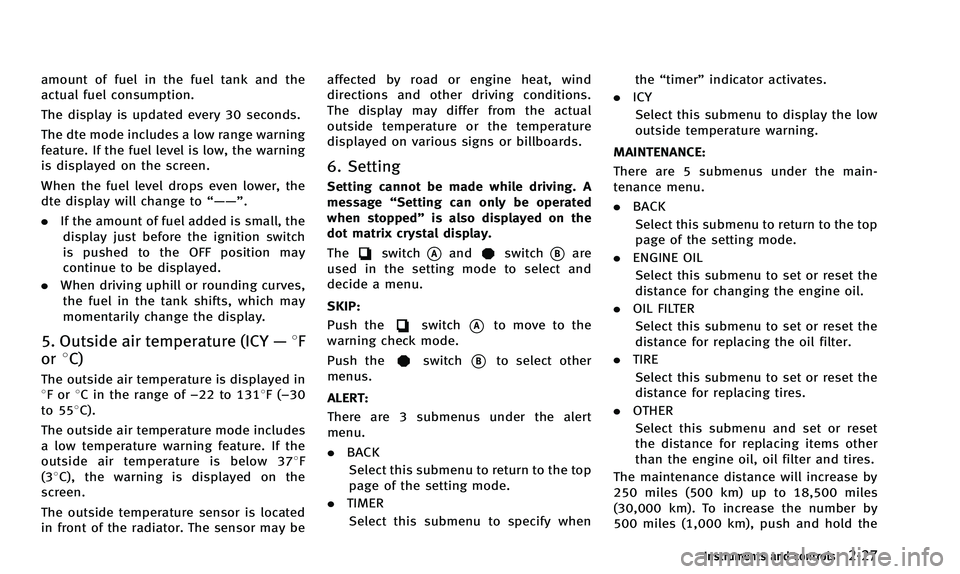
6. Setting
Setting cannot be made while driving. A
message
“Setting can only be operated
when stopped” is also displayed on the
dot matrix crystal display.
The
switch*Aandswitch*Bare
used in the setting mode to select and
decide a menu.
SKIP:
Push the
switch*Ato move to the
warning check mode.
Push the
switch*Bto select other
menus.
ALERT:
There are 3 submenus under the alert
menu.
. BACK
Select this submenu to return to the top
page of the setting mode.
. TIMER
Select this submenu to specify when the
“timer” indicator activates.
. ICY
Select this submenu to display the low
outside temperature warning.
MAINTENANCE: There are 5 submenus under the main-
tenance menu.
. BACK
Select this submenu to return to the top
page of the setting mode.
. ENGINE OIL
Select this submenu to set or reset the
distance for changing the engine oil.
. OIL FILTER
Select this submenu to set or reset the
distance for replacing the oil filter.
. TIRE
Select this submenu to set or reset the
distance for replacing tires.
. OTHER
Select this submenu and set or reset
the distance for replacing items other
than the engine oil, oil filter and tires.
The maintenance distance will increase by
250 miles (500 km) up to 18,500 miles
(30,000 km). To increase the number by
500 miles (1,000 km), push and hold the
Instruments and controls2-27
Page 176 of 498
Maintenance information
The maintenance intervals can be dis-
played for the engine oil, oil filter, tire
and other reminders.
To set a maintenance interval, select a
preferred item from the list.
You can also set to display a message to
remind you that the maintenance needs to
be performed.
The following example shows how to set
the engine oil maintenance information.
Use the same steps to set the other
maintenance information.
1. Set the interval (mileage) of the main-tenance schedule. To determine the
recommended maintenance interval,
refer to your “INFINITI Service and
Maintenance Guide”.
2. To display the reminder automatically when the desired distance is reached,
select the “Reminder” key.
3. Reset the driving distance to the new maintenance schedule.
4. To return to the previous screen, push the BACK button.
The unit can be converted between “US”
and “Metric”. (See “How to use SETTING button”
(P.4-14).)
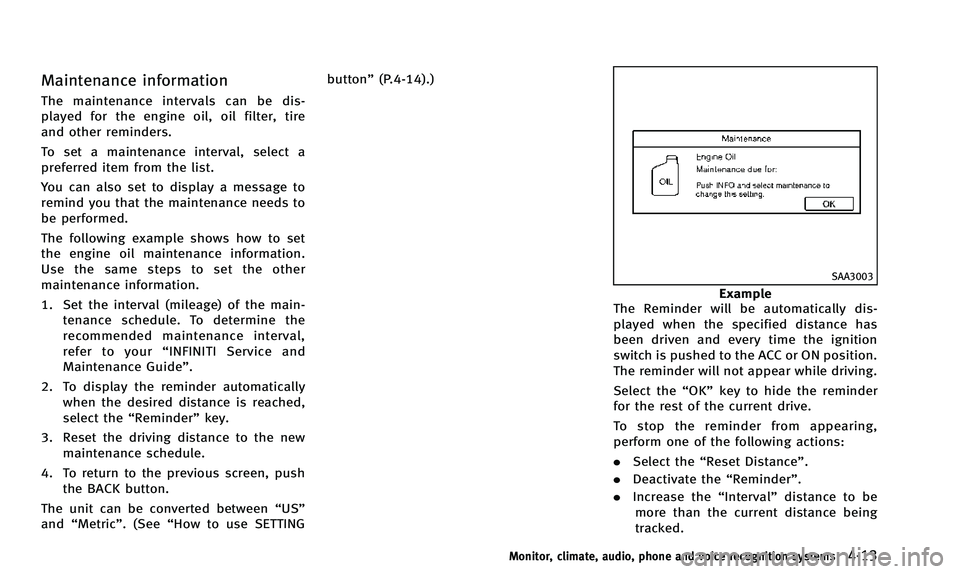
SAA3003
Example
The Reminder will be automatically dis-
played when the specified distance has
been driven and every time the ignition
switch is pushed to the ACC or ON position.
The reminder will not appear while driving.
Select the “OK”key to hide the reminder
for the rest of the current drive.
To stop the reminder from appearing,
perform one of the following actions:
. Select the “Reset Distance”.
. Deactivate the “Reminder”.
. Increase the “Interval”distance to be
more than the current distance being
tracked.
Monitor, climate, audio, phone and voice recognition systems4-13
Page 321 of 498
5-12Starting and driving
SSD0785
INTELLIGENT KEY BATTERY DIS-
CHARGE
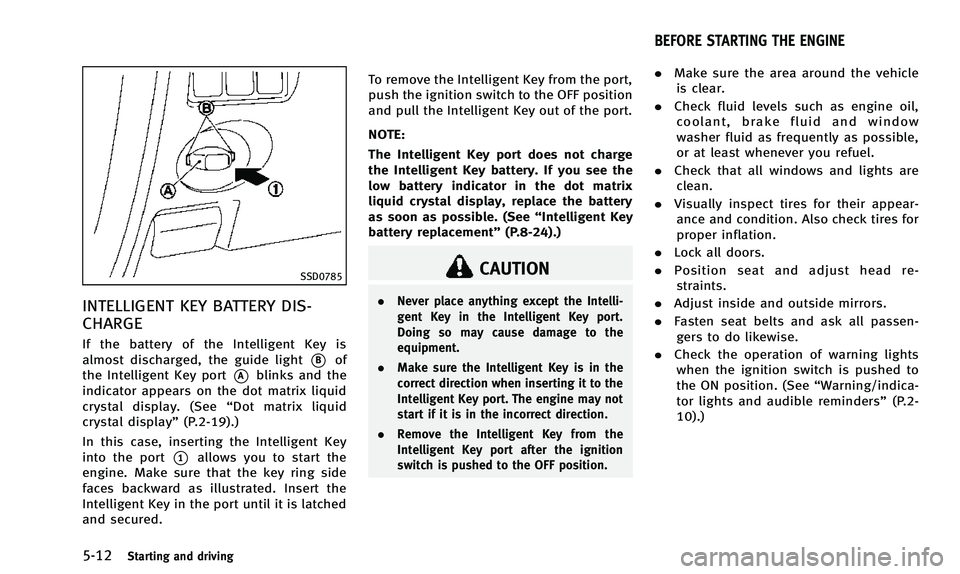
If the battery of the Intelligent Key is
almost discharged, the guide light
*Bof
the Intelligent Key port
*Ablinks and the
indicator appears on the dot matrix liquid
crystal display. (See “Dot matrix liquid
crystal display” (P.2-19).)
In this case, inserting the Intelligent Key
into the port
*1allows you to start the
engine. Make sure that the key ring side
faces backward as illustrated. Insert the
Intelligent Key in the port until it is latched
and secured. To remove the Intelligent Key from the port,
push the ignition switch to the OFF position
and pull the Intelligent Key out of the port.
NOTE:
The Intelligent Key port does not charge
the Intelligent Key battery. If you see the
low battery indicator in the dot matrix
liquid crystal display, replace the battery
as soon as possible. (See
“Intelligent Key
battery replacement” (P.8-24).)
CAUTION
.Never place anything except the Intelli-
gent Key in the Intelligent Key port.
Doing so may cause damage to the
equipment.
. Make sure the Intelligent Key is in the
correct direction when inserting it to the
Intelligent Key port. The engine may not
start if it is in the incorrect direction.
. Remove the Intelligent Key from the
Intelligent Key port after the ignition
switch is pushed to the OFF position.
.Make sure the area around the vehicle
is clear.
. Check fluid levels such as engine oil,
coolant, brake fluid and window
washer fluid as frequently as possible,
or at least whenever you refuel.
. Check that all windows and lights are
clean.
. Visually inspect tires for their appear-
ance and condition. Also check tires for
proper inflation.
. Lock all doors.
. Position seat and adjust head re-
straints.
. Adjust inside and outside mirrors.
. Fasten seat belts and ask all passen-
gers to do likewise.
. Check the operation of warning lights
when the ignition switch is pushed to
the ON position. (See “Warning/indica-
tor lights and audible reminders” (P.2-
10).)
BEFORE STARTING THE ENGINE
Page 327 of 498

5-18Starting and driving
Control on downhill roads:
The adaptive shift control system shifts to
a low gear that suits the degree of the
slope, and uses the engine braking to
reduce the number of times that the brake
must be used.
Control on winding roads:
A low gear is maintained on continuous
curves that involve repeated acceleration
and deceleration, so that smooth accelera-
tion is available instantly when the accel-
erator pedal is depressed.
NOTE:
.Adaptive shift control may not operate
when the transmission oil temperature
is low immediately after the start of
driving or when it is very hot.
. During some driving situations, hard
braking for example, the adaptive shift
control may automatically operate. The
transmission may automatically shift
to a lower gear for engine braking. This
increases engine speed but not vehicle
speed. Vehicle speed is controlled by
the accelerator pedal when the vehicle
is in the Adaptive shift control mode.
. When the adaptive shift control oper-
ates, the transmission sometimes maintains a lower gear for a longer
period of time than when adaptive shift
control is not operating. Engine speed
will be higher for a specific vehicle
speed while ASC system is operating
than when ASC is not operating.WARNING
.
Be sure the parking brake is fully
released before driving. Failure to do so
can cause brake failure and lead to an
accident.
. Do not release the parking brake from
outside the vehicle.
. Do not use the gear shift in place of the
parking brake. When parking, be sure
the parking brake is fully engaged.
. Do not leave children unattended in a
vehicle. They could release the parking
brake and cause an accident.
PARKING BRAKE