steering INFINITI QX50 2022 Owner's Manual
[x] Cancel search | Manufacturer: INFINITI, Model Year: 2022, Model line: QX50, Model: INFINITI QX50 2022Pages: 540, PDF Size: 6.58 MB
Page 125 of 540
If the ambient image sensor is damaged due
to an accident, it is recommended that you
visit an INFINITI retailer.
Battery saver system
The battery saver system automatically turns
off the ignition after a period of time when
the ignition switch is left in the AUTO ACC or
ON position.
The battery saver system automatically turns
off the following lights after a period of time
when the ignition switch is placed in the OFF
position and the doors are closed:
• Headlights, when the headlight switch is inthe
orposition
• Interior lights, when left in the ON position
CAUTION
Even though the battery saver feature au-
tomatically turns off the headlights after a
period of time, you should turn the head-
light switch to the OFF position when the
engine is not running to avoid discharging
the vehicle battery.
Adaptive Front lighting System
(AFS) (if so equipped)
The Adaptive Front lighting System (AFS) will
automatically adjust the headlights (low
beam) toward the turning direction to im-
prove the driver’s view. When the headlight
switch is ON and the driver operates the
steering wheel in a turn, the AFS system will
be activated.
The AFS will operate:
• when the headlight switch is ON.
• when the shift position is in any position other than P (Park) or R (Reverse).
• when the vehicle is driven at above 16 mph (25 km/h) for the left-side headlight. Note
that the right-side low beam headlight will
swivel but the left side will not swivel when
the vehicle is at a stop and the steering
wheel is turned. The vehicle must attain a
speed above 16 mph (25 km/h) before AFS
activates the left-side headlight.
AFS will also adjust the headlight to a proper
axis automatically, depending on the number
of occupants in the vehicle, the load the ve-
hicle is carrying and the road conditions.
If the AFS OFF indicator blinks or the vehicle
information display shows an AFS system
error message after the ignition switch has been pushed to the ON position, this may
indicate that the AFS is not functioning prop-
erly. Have the system checked. It is recom-
mended you visit an INFINITI retailer for this
service. When the engine is started, the head-
lights will vibrate to check the system condi-
tion. This is not a malfunction.
Automatic headlight aiming control
(if so equipped)
Your vehicle is equipped with an automatic
headlight levelling system. The headlight axis
is controlled automatically.
INFINITI recommends that you consult the
local regulations on the use of lights.
LED DAYTIME RUNNING LIGHTS
(DRL) SYSTEM
The LED portion of the headlights automati-
cally illuminate at 100% intensity when the
engine is started and the parking brake re-
leased. The LED Daytime Running Lights
(DRL) system operates with the headlight
switch in the OFF position or AUTO position
with bright ambient light. When you turn the
headlight switch to the
position for full
illumination, the LED lights switch from LED
DRL system to the park function.
Instruments and controls2-41
Page 128 of 540

To sound the horn, push near the horn icon on
the steering wheel.
WARNING
Do not disassemble the horn. Doing so
could affect proper operation of the
supplemental front air bag system. Tam-
pering with the supplemental front air bag
system may result in serious personal
injury.
WARNING
Do not use or allow occupants to use the
climate controlled seats if you or the occu-
pants cannot monitor seat temperatures
or have an inability to feel pain in those
body parts in contact with the seat. Use of
the climate controlled seats by such people
could result in serious injury.
CAUTION
• The battery could run down if the climate
control seat is operated while the engine
is not running.
• Do not use the climate control seat for
extended periods or when no one is using
the seat.
• Do not put anything on the seat which
insulates heat, such as a blanket, cush-
ion, seat cover, etc. Otherwise, the seat
may become overheated.
• Do not place anything hard or heavy on
the seat or pierce it with a pin or similar
objects. This may result in damage to the
climate controlled seat.
• Any liquid spilled on the seat should be
removed immediately with a dry cloth.
• When cleaning the seat, never use gaso-
line, benzine, thinner, or any similar
materials.
• If any malfunctions are found or the cli-
mate controlled seat does not operate,
turn the switch off and have the system
checked. It is recommended that you
visit an INFINITI retailer for this service.
LIC4311LIC3905
HORN CLIMATE CONTROLLED SEAT
SWITCHES (if so equipped)
2-44Instruments and controls
Page 131 of 540

2. Push the heated seat switch and selectthe desired heat range.
• For high heat, push the switch once.
• For medium heat, push the switch twice.
• For low heat, push the switch three times.
• The indicator light will illuminate when the heater is on.
3. To turn off the heater, push the heated seat switch again. Make sure that the in-
dicator light turns off.
The heater is controlled by a control mod-
ule, automatically turning the heater on
and off.
The indicator light will remain on as long
as the switch is on.
When the seat is warmed, or before you
leave the vehicle, be sure to turn the
switch off.
NOTE:
For additional information, see “Heater and
air conditioner (automatic)” (P. 4-35). The Steering Assist switch is used to turn on
and off the Steering Assist system that is
activated using the settings menu of the ve-
hicle information display.
The Steering Assist system controls the
steering system to help keep your vehicle
near the center of the lane when driving. For
additional information, see “ProPILOT As-
sist” (P. 5-71).
WARNING
• The front sonar system is a convenience
but it is not a substitute for proper
driving.
• The rear sonar system is a convenience
but it is not a substitute for proper back-
ing. Always turn and check that it is safe
to do so before backing up. Always back
up slowly.
LIC4495LIC4270
STEERING ASSIST SWITCH FRONT AND REAR SONAR SYSTEM
SWITCH (if so equipped)
Instruments and controls2-47
Page 163 of 540
3 Pre-driving checks and adjustments
Keys.............................................3-2
INFINITI Intelligent Key .......................3-2
INFINITI Vehicle Immobilizer System
keys ..........................................3-4
Doors ...........................................3-4
Locking with key ..............................3-4
Locking with inside lock knob ..................3-5
Locking with power door lock switch ..........3-5
Automatic door locks .........................3-5
Child safety rear door lock .....................3-6
INFINITI Intelligent Key System ...................3-6
Operating range ..............................3-8
Door locks/unlocks precaution ................3-8
INFINITI Intelligent Key operation .............3-9
How to use the remote keyless entry
function .................................... 3-13
Warning signals ............................. 3-16
Troubleshooting guide ......................3-16
Log-in function ............................. 3-18
Remote Engine Start (if so equipped) ...........3-18
Remote Engine Start operating range ........3-19
Remote starting the vehicle ..................3-19
Extending engine run time ...................3-20
Canceling a Remote Engine Start ............3-20
Conditions the Remote Engine Start will
not work ................................... 3-20Hood
.......................................... 3-21
Liftgate ....................................... 3-22
Operating the power liftgate ................3-22
Motion-Activated Liftgate
(if so equipped) ............................. 3-25
Power liftgate main switch ..................3-26
Liftgate release ............................. 3-27
Liftgate position setting .....................3-28
Fuel-filler door ................................. 3-28
Opening the fuel-filler door ..................3-28
Fuel-filler cap ............................... 3-29
Steering wheel ................................. 3-31
Manual operation (if so equipped) ...........3-31
Automatic operation (if so equipped) .........3-31
Sun visors ..................................... 3-32
Vanity mirrors .............................. 3-33
Card holder ................................. 3-33
Mirrors ........................................ 3-33
Automatic
anti-glare rearview mirror ........3-33
Outside mirrors ............................. 3-35
Memory Seat (if so equipped) ...................3-37
Memory storage function ...................3-37
Entry/exit function .......................... 3-38
Setting memory function ....................3-39
System operation ........................... 3-39
Page 180 of 540
LOG-IN FUNCTION
After setting up the user information, the
system will automatically recognize the user
upon turning on the vehicle.
There will be a personalized welcome greet-
ing and screen prompt to log in.
This feature allows four drivers to use their
own registration, drive mode, driving posi-
tion, air conditioner, and auto settings and
memorizes these custom settings.
The log-in user can be changed on the wel-
come greeting screen or the User List screen.
For additional information, refer to the sepa-
rate INFINITI InTouch™ Owner’s Manual.
The log-in function is linked to the following
features:
• Meter
• Audio
• Navigation system display
• Navigation settings
• Air conditioner
• Memory seat (if so equipped)
• Engine/transmission
• Steering
• Suspension (if so equipped)
• Active trace control system• Driver assistance except for the Forward
Emergency Braking (FEB) with Pedestrian
Detection system (if so equipped)
• Body Control Module (BCM)
The
button will be on the INFINITI
Intelligent Key if the vehicle has Remote En-
gine Start. This feature allows the engine to
start from outside the vehicle.
The following features may be affected
when the Remote Engine Start feature is
used:
• Vehicles with an automatic climate control system may default to either a heating or
cooling mode depending on outside and
cabin temperatures. For additional infor-
mation, see “Remote Engine Start with In-
telligent Climate Control” in the (P. 4-36).
LPD2995
REMOTE ENGINE START (if so
equipped)
3-18Pre-driving checks and adjustments
Page 192 of 540
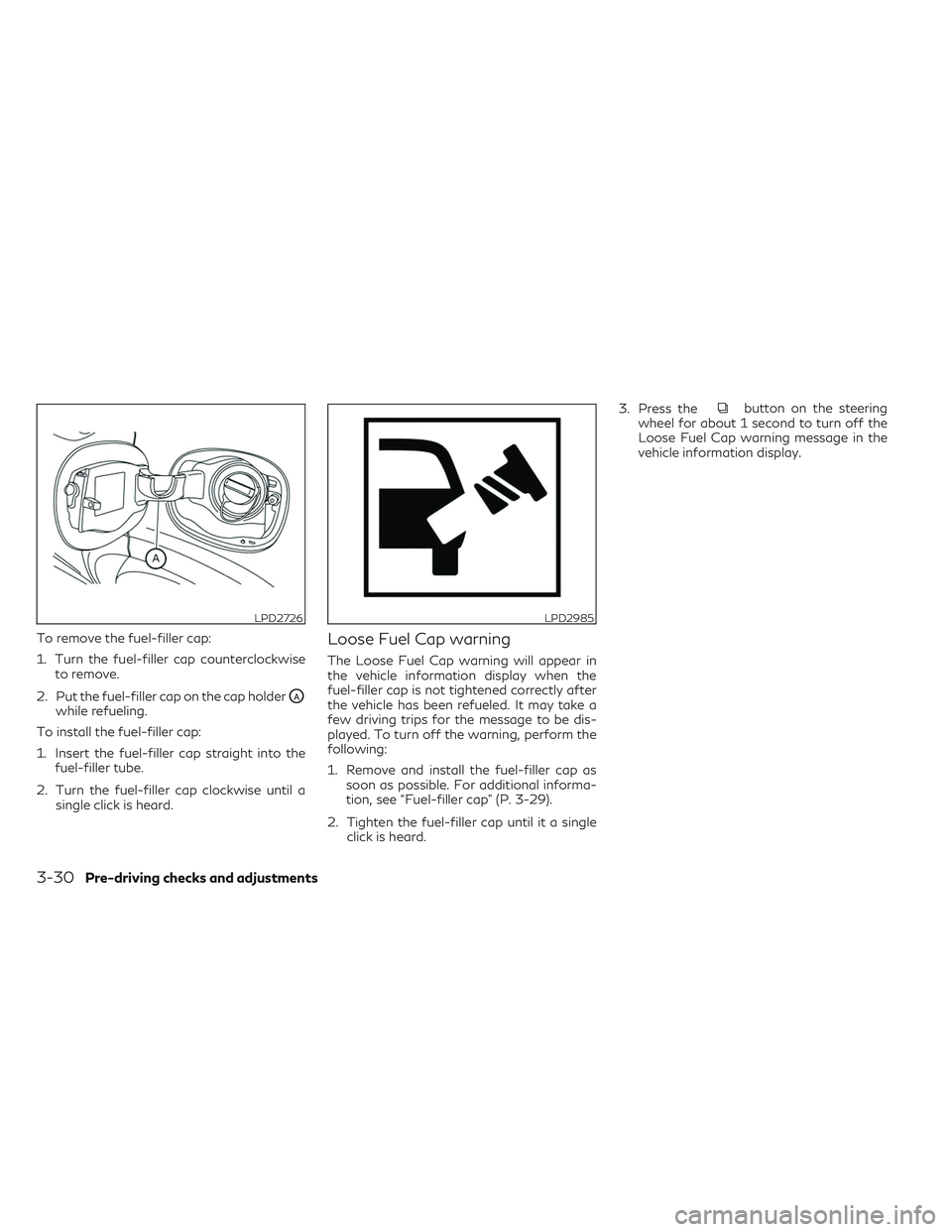
To remove the fuel-filler cap:
1. Turn the fuel-filler cap counterclockwiseto remove.
2. Put the fuel-filler cap on the cap holder
OAwhile refueling.
To install the fuel-filler cap:
1. Insert the fuel-filler cap straight into the fuel-filler tube.
2. Turn the fuel-filler cap clockwise until a single click is heard.
Loose Fuel Cap warning
The Loose Fuel Cap warning will appear in
the vehicle information display when the
fuel-filler cap is not tightened correctly after
the vehicle has been refueled. It may take a
few driving trips for the message to be dis-
played. To turn off the warning, perform the
following:
1. Remove and install the fuel-filler cap assoon as possible. For additional informa-
tion, see “Fuel-filler cap” (P. 3-29).
2. Tighten the fuel-filler cap until it a single click is heard. 3. Press the
button on the steering
wheel for about 1 second to turn off the
Loose Fuel Cap warning message in the
vehicle information display.
LPD2726LPD2985
3-30Pre-driving checks and adjustments
Page 193 of 540
WARNING
• Do not adjust the steering wheel while
driving. You could lose control of your
vehicle and cause an accident.
• Do not adjust the steering wheel any
closer to you than is necessary for proper
steering operation and comfort. The
driver's air bag inflates with great force.
If you are unrestrained, leaning forward,
sitting sideways or out of position in any
way, you are at greater risk of injury or
death in a crash. You may also receive
serious or fatal injuries from the air bag if
you are up against it when it inflates.
Always sit back against the seatback and
as far away as practical from the steer-
ing wheel. Always use the seat belts.
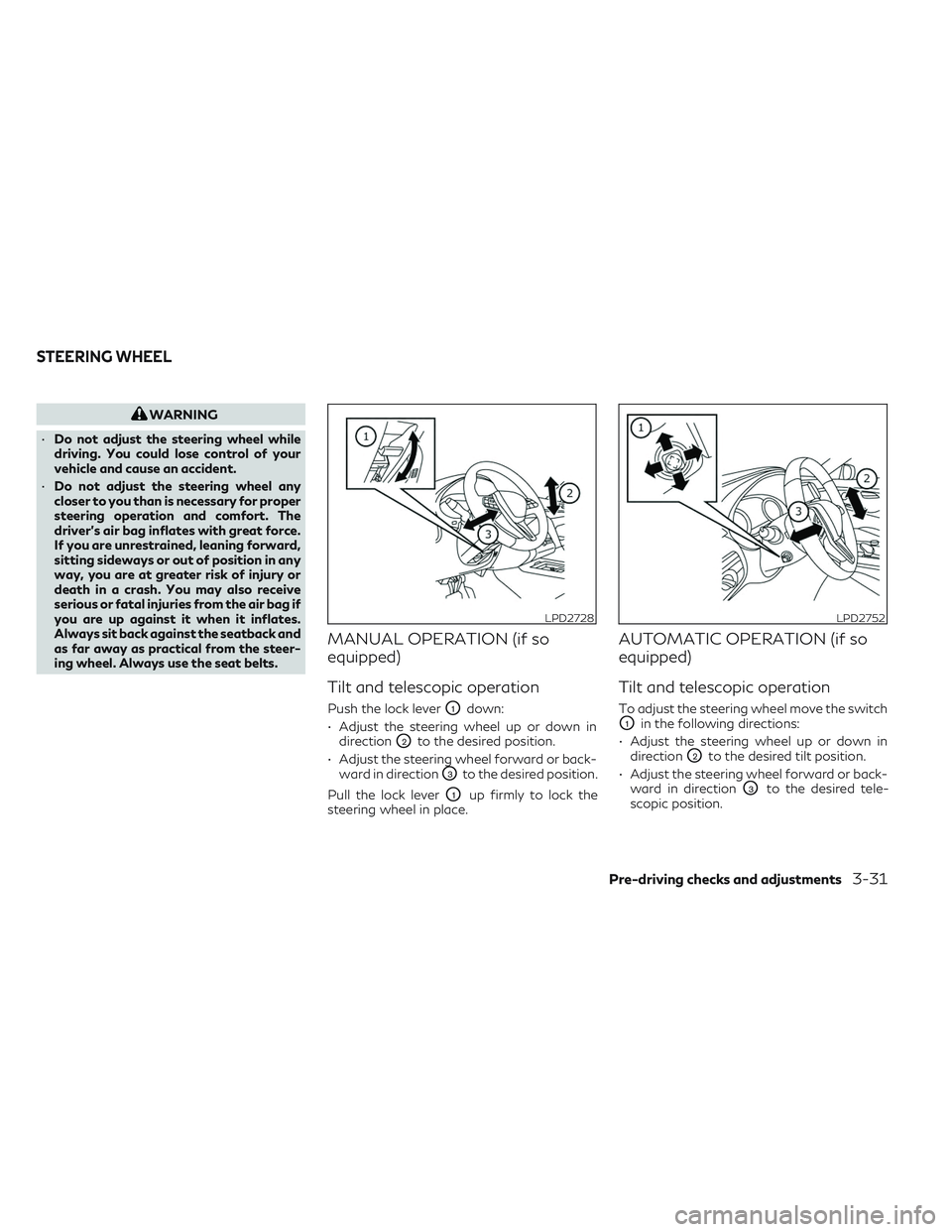
MANUAL OPERATION (if so
equipped)
Tilt and telescopic operation
Push the lock leverO1down:
• Adjust the steering wheel up or down in direction
O2to the desired position.
• Adjust the steering wheel forward or back- ward in direction
O3to the desired position.
Pull the lock lever
O1up firmly to lock the
steering wheel in place.
AUTOMATIC OPERATION (if so
equipped)
Tilt and telescopic operation
To adjust the steering wheel move the switch
O1in the following directions:
• Adjust the steering wheel up or down in direction
O2to the desired tilt position.
• Adjust the steering wheel forward or back- ward in direction
O3to the desired tele-
scopic position.
LPD2728LPD2752
STEERING WHEEL
Pre-driving checks and adjustments3-31
Page 194 of 540
Entry/Exit function (if so equipped)
The memory seat system will make the steer-
ing wheel move up automatically when the
driver's door is opened and the ignition switch
is in the LOCK position. This lets the driver get
into and out of the seat more easily. The
steering wheel moves back into position
when the driver's door is closed and the igni-
tion switch is pushed.
For additional information, see “Memory
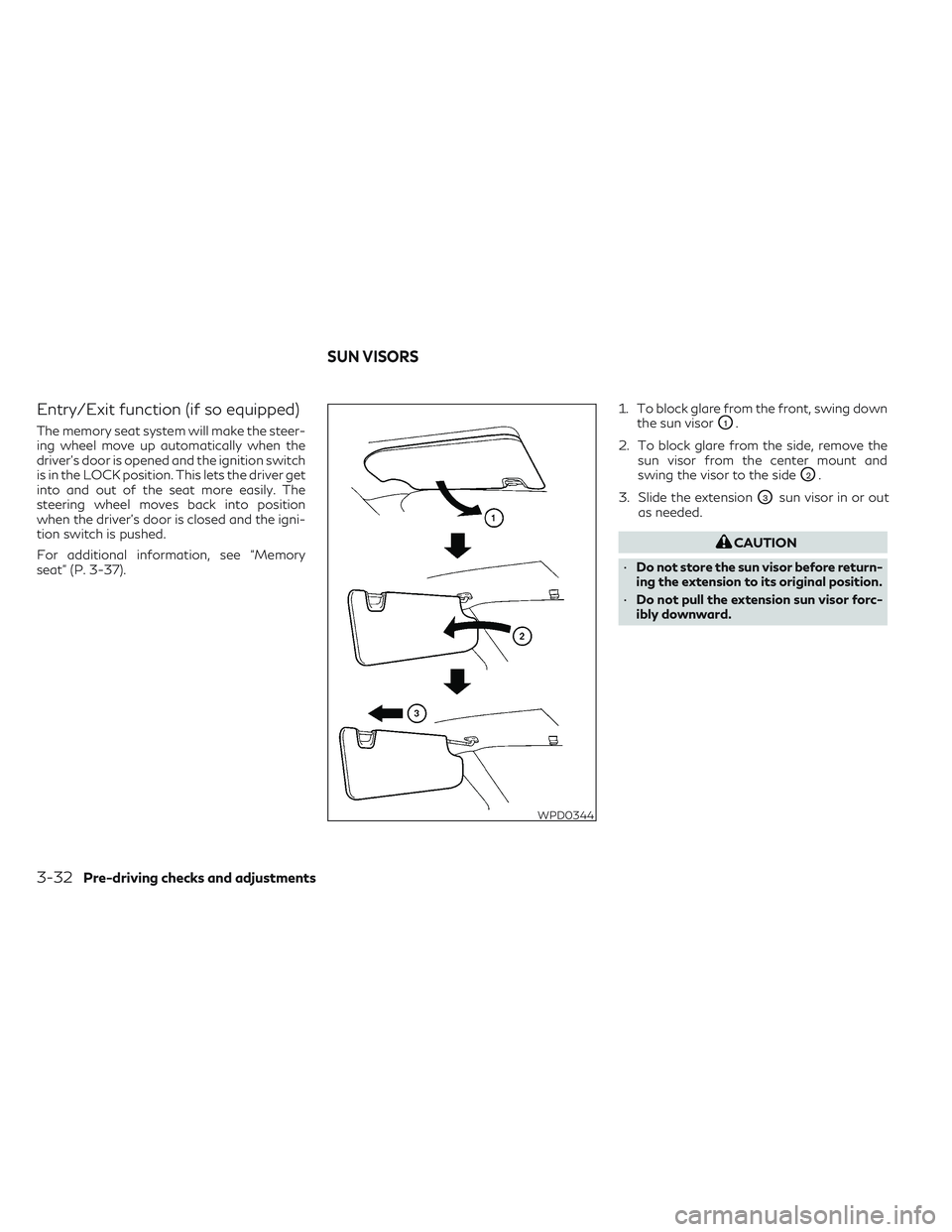
seat” (P. 3-37).1. To block glare from the front, swing down
the sun visorO1.
2. To block glare from the side, remove the sun visor from the center mount and
swing the visor to the side
O2.
3. Slide the extension
O3sun visor in or out
as needed.
CAUTION
• Do not store the sun visor before return-
ing the extension to its original position.
• Do not pull the extension sun visor forc-
ibly downward.
WPD0344
SUN VISORS
3-32Pre-driving checks and adjustments
Page 199 of 540
The mirrors automatically return to their
original position when you shift out of R
(Reverse).
The outside mirror surfaces will return to
their original position when one of the fol-
lowing conditions has occurred:
• The shift lever is moved to any positionother than R (Reverse).
• The outside mirror control switch is set to the neutral or center position.
• The ignition switch is placed in the OFF position.
NOTE:
If the outside mirror control switch is in the
center position, the mirror surface will NOT
turn downward when the shift lever is
moved to R (Reverse).
For additional information, see “Memory
seat” (P. 3-37). The memory seat system has two features:
• Memory storage function
• Entry/exit functionMEMORY STORAGE FUNCTION
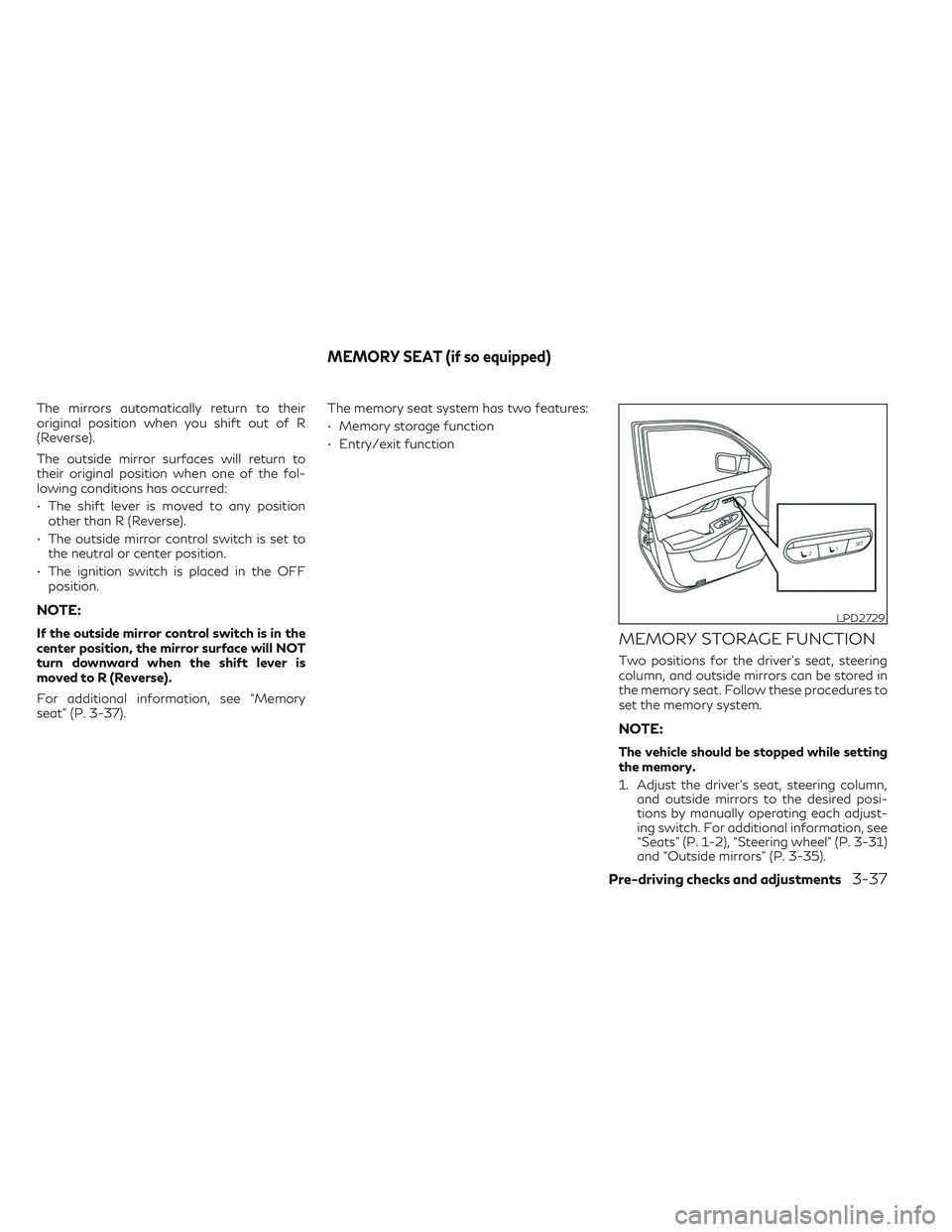
Two positions for the driver's seat, steering
column, and outside mirrors can be stored in
the memory seat. Follow these procedures to
set the memory system.
NOTE:
The vehicle should be stopped while setting
the memory.
1. Adjust the driver's seat, steering column,
and outside mirrors to the desired posi-
tions by manually operating each adjust-
ing switch. For additional information, see
“Seats” (P. 1-2), “Steering wheel” (P. 3-31)
and “Outside mirrors” (P. 3-35).
LPD2729
MEMORY SEAT (if so equipped)
Pre-driving checks and adjustments3-37
Page 200 of 540
2. Push the SET switch and, within 5 sec-onds, push the memory switch (1 or 2).
The indicator light for the pushed memory
switch will come on and stay on for ap-
proximately 5 seconds.
The chime will sound when the memory is
stored.
NOTE:
If a new memory position is stored in the
same memory switch, the previous memory
position will be overwritten by the new
stored position.
Confirming memory storage
• Push the SET switch.
• If a memory position has been stored in the switch (1 or 2) then the indicator light for
the respective switch will stay on for ap-
proximately 5 seconds.
Linking log-in function to a stored
memory position
The log-in function can be linked to a stored
memory position with the following procedure.
1. Place the ignition switch in the ON posi- tion while carrying the Intelligent Key that
was registered to the vehicle with a log-in
function.
NOTE:Make sure the Intelligent Keys are far apart.
Otherwise, the vehicle may detect the
wrong Intelligent Key.
2. Adjust the position of the driver’s seat, steering column and outside mirrors. For
additional information, see “Seats”
(P. 1-2), “Steering wheel” (P. 3-31) and
“Outside mirrors” (P. 3-35).
3. Place the ignition switch in the OFF position.
The next time you log in (selecting the user on
the display) after placing the ignition switch in
the ON position while carrying the Intelligent
Key, the system will automatically adjust to
the memorized driving position.
For additional information, see “Log-in func-
tion” (P. 3-18) and the separate INFINITI In-
Touch™ Owner’s Manual.ENTRY/EXIT FUNCTION
This system is designed so that the driver's
seat and steering column will automatically
move when the vehicle is engaged in the P
(Park) position. This allows the driver to easily
get in and out of the driver’s seat.
The driver’s seat will slide backward and the
steering column will move up when the igni-
tion is switched to OFF and the driver’s door
is opened.
The driver’s seat and steering wheel will re-
turn to the previous position when the igni-
tion is switched to ON.
The entry/exit function can be adjusted or
canceled through the “Comfort & Conve-
nience” options of the “Settings” menu in the
lower touch-screen display by performing the
following:
• Switch the Lift Steering upon Exit from ON to OFF.
• Switch the Slide Driver Seat Back on Exit from ON to OFF.
For additional information, refer to the sepa-
rate INFINITI InTouch™ Owner’s Manual.
3-38Pre-driving checks and adjustments