ABS INFINITI QX50 2022 Owners Manual
[x] Cancel search | Manufacturer: INFINITI, Model Year: 2022, Model line: QX50, Model: INFINITI QX50 2022Pages: 540, PDF Size: 6.58 MB
Page 17 of 540
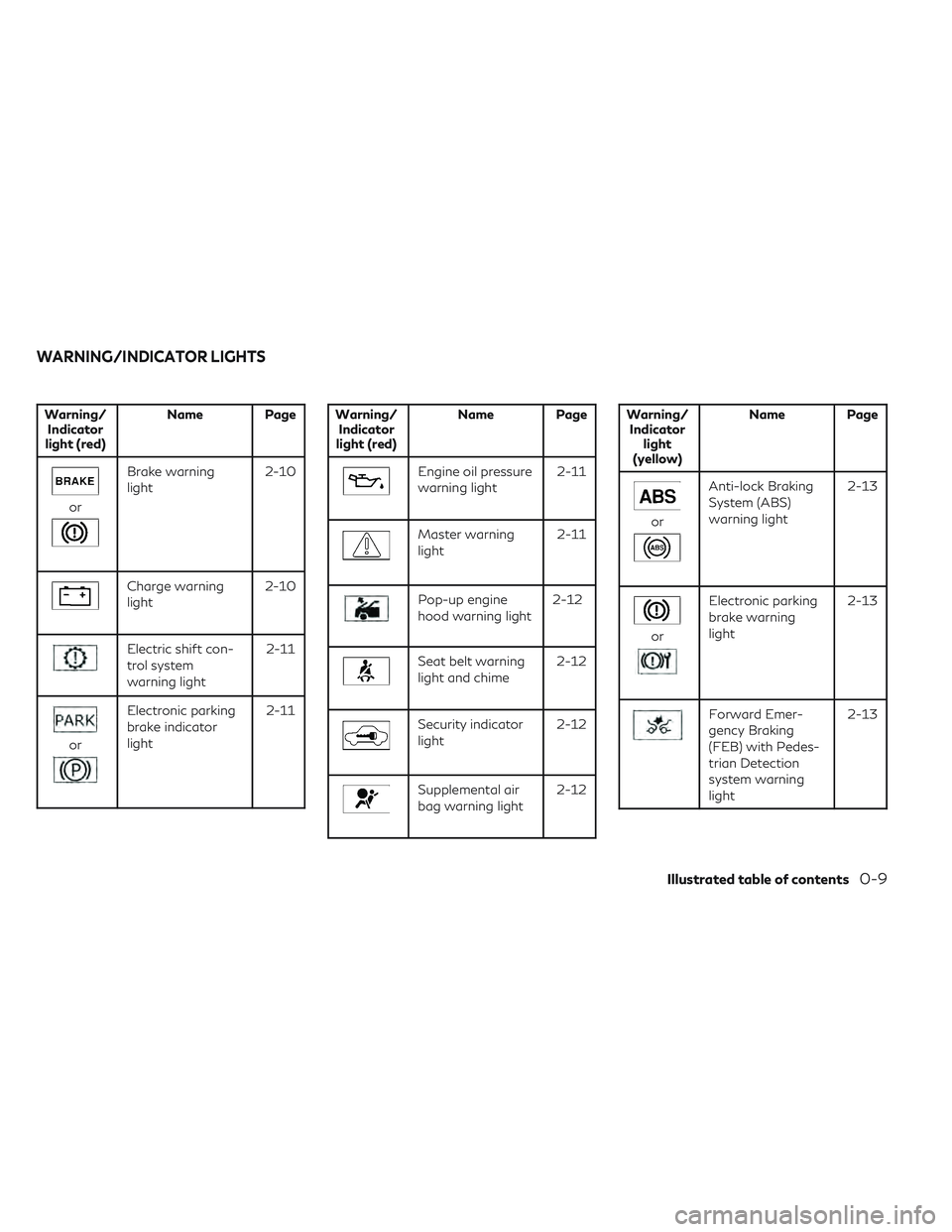
Warning/Indicator
light (red) Name Page
or
Brake warning
light
2-10
Charge warning
light2-10
Electric shift con-
trol system
warning light 2-11
or
Electronic parking
brake indicator
light2-11
Warning/
Indicator
light (red) Name Page
Engine oil pressure
warning light
2-11
Master warning
light2-11
Pop-up engine
hood warning light2-12
Seat belt warning
light and chime 2-12
Security indicator
light2-12
Supplemental air
bag warning light2-12
Warning/
Indicator light
(yellow) Name Page
or
Anti-lock Braking
System (ABS)
warning light
2-13
or
Electronic parking
brake warning
light2-13
Forward Emer-
gency Braking
(FEB) with Pedes-
trian Detection
system warning
light2-13
WARNING/INDICATOR LIGHTS
Illustrated table of contents0-9
Page 93 of 540
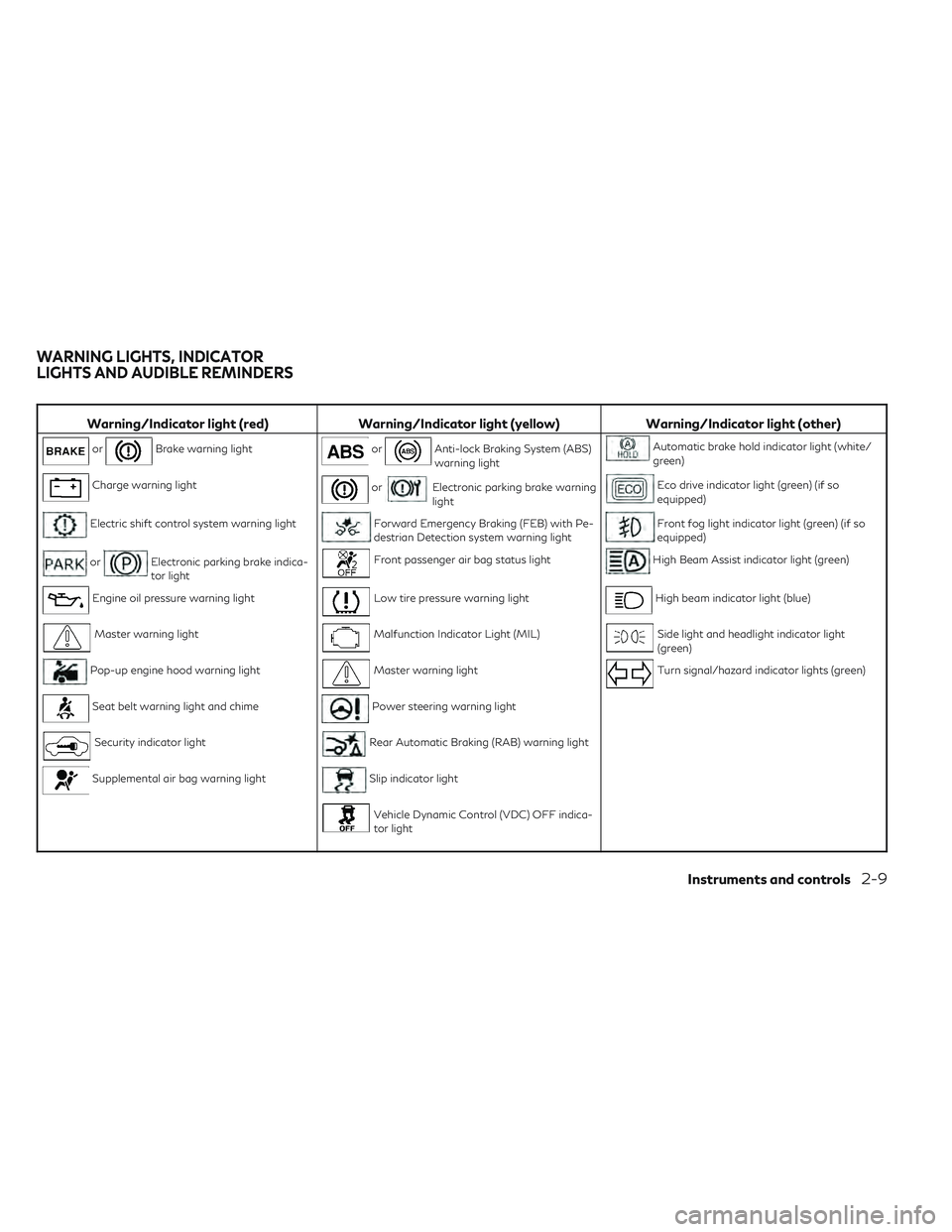
Warning/Indicator light (red)Warning/Indicator light (yellow) Warning/Indicator light (other)
orBrake warning lightorAnti-lock Braking System (ABS)
warning lightAutomatic brake hold indicator light (white/
green)
Charge warning lightorElectronic parking brake warning
lightEco drive indicator light (green) (if so
equipped)
Electric shift control system warning lightForward Emergency Braking (FEB) with Pe-
destrian Detection system warning lightFront fog light indicator light (green) (if so
equipped)
orElectronic parking brake indica-
tor lightFront passenger air bag status lightHigh Beam Assist indicator light (green)
Engine oil pressure warning lightLow tire pressure warning lightHigh beam indicator light (blue)
Master warning lightMalfunction Indicator Light (MIL)Side light and headlight indicator light
(green)
Pop-up engine hood warning lightMaster warning lightTurn signal/hazard indicator lights (green)
Seat belt warning light and chimePower steering warning light
Security indicator lightRear Automatic Braking (RAB) warning light
Supplemental air bag warning lightSlip indicator light
Vehicle Dynamic Control (VDC) OFF indica-
tor light
WARNING LIGHTS, INDICATOR
LIGHTS AND AUDIBLE REMINDERS
Instruments and controls2-9
Page 97 of 540

WARNING
If the supplemental air bag warning light is
on, it could mean that the front air bag, side
air bag, curtain air bag and/or preten-
sioner systems will not operate in an acci-
dent. To help avoid injury to yourself or
others, have your vehicle checked as soon
as possible. It is recommended that you
visit an INFINITI retailer for this service.
WARNING/INDICATOR LIGHTS
(yellow)
For additional information, see “Vehicle in-
formation display” (P. 2-19).
orAnti-lock Braking
System (ABS)
warning light
When the ignition switch is placed in the ON
position, the ABS warning light illuminates
and then turns off. This indicates the ABS is
operational.
If the ABS light comes on while the engine is
running, it may indicate the anti-lock braking
system is not functioning properly. Have the
system checked. It is recommended that you
visit an INFINITI retailer for this service. If an ABS malfunction occurs, the anti-lock
function is turned off. The brake system then
operates normally, but without anti-lock as-
sistance. For additional information, see
“Brake system” (P. 5-138).
orElectronic parking
brake warning light
The electronic parking brake system warning
light functions for the electronic parking
brake system. If the warning light illuminates,
it may indicate the electronic parking brake
system is not functioning properly. Have the
system checked. It is recommended that you
visit an INFINITI retailer for this service.
For additional information, see “Electronic
parking brake” (P. 5-23).
Forward Emergency
Braking (FEB) with
Pedestrian Detection
system warning light
This light comes on when the ignition switch
is placed in the ON position. It turns off after
the engine is started.
This light illuminates when the FEB with Pe-
destrian Detection system is set to OFF in the
lower display. If the light illuminates when the FEB with
Pedestrian Detection system is on, it may
indicate that the system is unavailable. For
additional information, see “Forward Emer-
gency Braking (FEB) with Pedestrian Detec-
tion” (P. 5-108) and “Predictive Forward Col-
lision Warning (PFCW)” (P. 5-118).
Front passenger air bag
status light
The front passenger air bag status light will
be lit and the passenger front air bag will be
off depending on how the front passenger
seat is being used.
For additional information, see “Front pas-
senger air bag and status light” (P. 1-52).
Low tire pressure warning
light
Your vehicle is equipped with a Tire Pressure
Monitoring System (TPMS) that monitors the
tire pressure of all tires.
The low tire pressure warning light warns of
low tire pressure or indicates that the TPMS
is not functioning properly.
After the ignition switch is placed in the ON
position, this light illuminates for about 1 sec-
ond and turns off.
Instruments and controls2-13
Page 152 of 540

Auto-reverse function
The auto-reverse function can be activated
when a window is closed by automatic
operation.
Depending on the environment or driving
conditions, the auto-reverse function may
be activated if an impact or load similar to
something being caught in the window
occurs.
WARNING
There are some small distances immedi-
ately before the closed position which can-
not be detected. Make sure that all passen-
gers have their hands, etc., inside the
vehicle before closing the window.
If the vehicle's battery is disconnected, re-
placed, or jump started, the power window
auto-reverse function may not operate prop-
erly. If this occurs, it is recommended that you
visit an INFINITI retailer to re-initialize the
power window auto-reverse system.
If the control unit detects something caught
in a window equipped with automatic opera-
tion as it is closing, the window will be imme-
diately lowered.
REAR DOOR SUNSHADE (if so
equipped)
The rear door sunshade is located within the
rear doors at the base of the window.
• To raise the sunshade, pull up the center tab
O1.
• Hook the sunshade slots onto the tabs ex- tending from the top of the window frame
O2.
CAUTION
• Do not release the rear door sunshade
during operation. This could damage the
sunshade or cause injury.
• Do not forcefully pull the sunshade. Do-
ing so may elongate the sunshade. This
could cause improper operation or could
damage the sunshade.
• Do not place objects on or near the rear
sunshade. This could cause improper op-
eration or could damage the sunshade.
NOTE:
To avoid damage to the sunshade, please
note the following:
• Do not pull or push the sunshade, other than upwards.
• Do not pull or push the sunshade with the sunshade hung on the hooks.
• Do not allow liquids or objects on the stor- ing area of the sunshade.
LIC4169
2-68Instruments and controls
Page 243 of 540
Ion control:
The Automatic Climate Control System unit
generates highly concentrated Plasmaclus-
ter® ions into the air blown from the ventila-
tors to reduce odor absorbed into the interior
trim and to suppress airborne bacteria. The
high-density Plasmacluster® ions also have a
proven skin moisture preserving effect.
The Plasmacluster® icon on the CLIMATE
screen indicates the status of the Plasma-
cluster® ion emission from the system and
changes with the amount of the air flow.
Automatic air recirculation control with the
exhaust gas/outside odor detection sensor:
The Automatic Climate Control System
comes with an exhaust gas detection/
outside odor sensor. When the automatic air
circulation control is activated, the sensor de-
tects odors outside the vehicle such as pulp or
chemicals, and exhaust such as gasoline or
diesel. When such odors or gases are de-
tected the display and the system automati-
cally change from fresh air mode to the recir-
culation mode.
When the automatic air recirculation is on, for
the first 5 minutes, the air recirculation mode
is selected to prevent dust, dirt, and pollen
from entering the vehicle and to clean the air
inside of the vehicle.After 5 minutes, the sensor detects exhaust
gas and automatically alternates between
the air recirculation mode and the fresh air
mode.
The automatic air recirculation mode can be
activated under the following conditions.
• The air flow control is not in the front de-
froster mode (the indicator light on the
front defroster button is turned off).
• The outside temperature is about 32°F (0°C) or more.
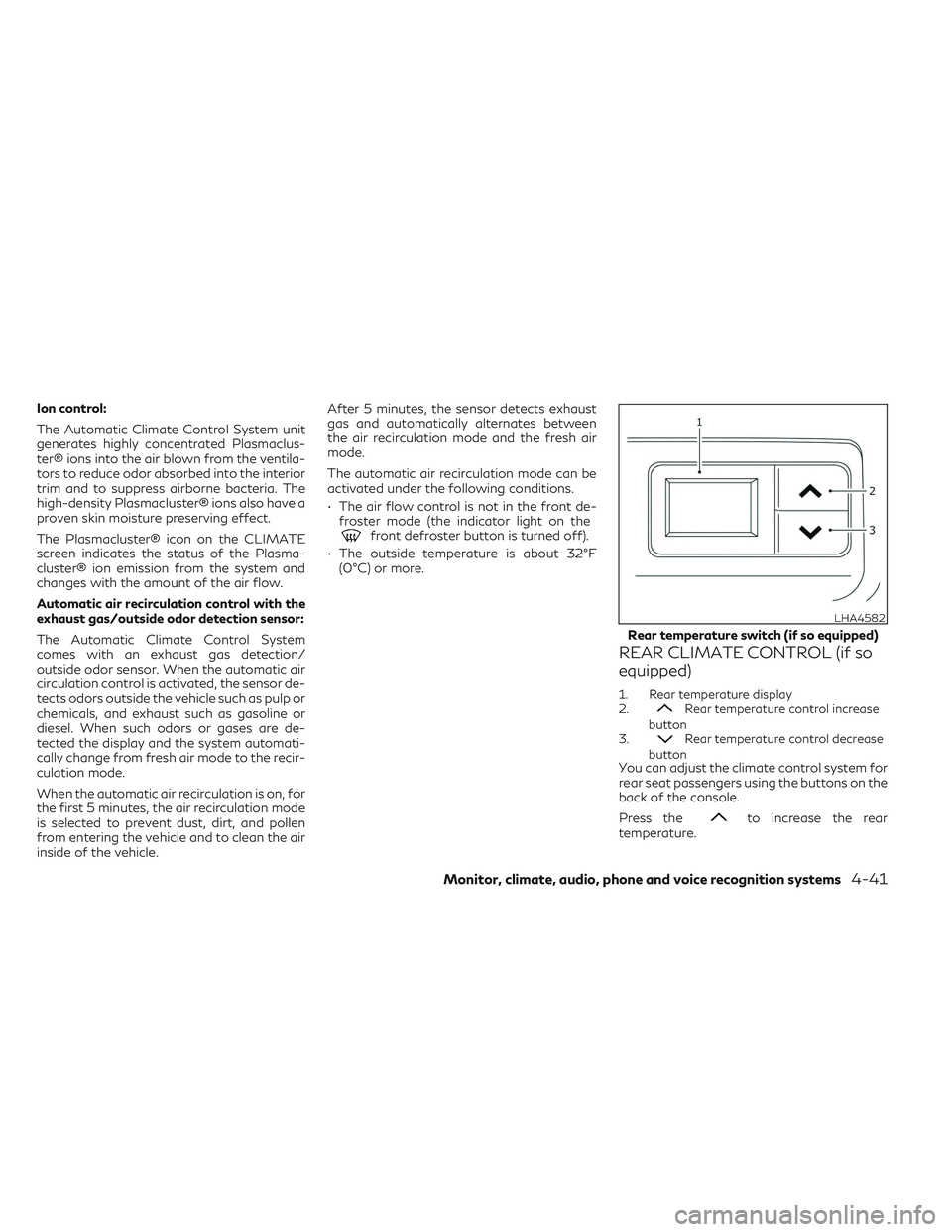
REAR CLIMATE CONTROL (if so
equipped)
1. Rear temperature display
2.Rear temperature control increase
button
3.
Rear temperature control decrease
button
You can adjust the climate control system for
rear seat passengers using the buttons on the
back of the console.
Press the
to increase the rear
temperature.
LHA4582
Rear temperature switch (if so equipped)
Monitor, climate, audio, phone and voice recognition systems4-41
Page 250 of 540
System malfunction........................ 5-107
System maintenance ....................... 5-107
Forward Emergency Braking (FEB) with
Pedestrian Detection system ..................5-108
System operation .......................... 5-109
Turning the FEB with Pedestrian
Detection system on/off ...................5-110
FEB with Pedestrian Detection system
limitations ................................. 5-111
System temporarily unavailable .............5-115
System malfunction ........................ 5-116
System maintenance ....................... 5-117
Predictive Forward Collision Warning (PFCW) . 5-118 PFCW system operation ...................5-120
Turning the PFCW system on/off ..........5-121
PFCW system limitations ...................5-122
System temporarily unavailable .............5-127
System malfunction ........................ 5-128
System maintenance ....................... 5-128
Break-in schedule ............................. 5-130
Fuel efficient driving tips ......................5-130
Increasing fuel economy .......................5-131
Intelligent All-Wheel Drive (AWD)
(if so equipped) ............................... 5-131
Parking/parking on hills .......................5-134Power steering
............................... 5-135
Electric power steering type ................5-135
Direct Adaptive Steering® type .............5-136
Brake system ................................. 5-138
Brake precautions .......................... 5-138
Anti-lock Braking System (ABS) .............5-138
Brake Assist ............................... 5-139
Vehicle Dynamic Control (VDC) system ........5-140
Brake force distribution ....................5-141
Chassis Control ............................... 5-142
Active Trace Control ....................... 5-142
Active Engine Brake ........................ 5-143
Active Ride Control ........................
5-144
Hill
start assist system ........................ 5-145
Front and rear sonar system (if so equipped) . . . 5-146 System operation .......................... 5-147
How to enable/disable the sonar system ....5-149
Sonar limitations ........................... 5-150
System temporarily unavailable .............5-151
System maintenance ....................... 5-151
Cold weather driving .......................... 5-152
Freeing a frozen door lock ..................5-152
Antifreeze ................................. 5-152
Battery .................................... 5-152
Draining of coolant water ..................5-152
Page 290 of 540

While the LDP system is operating, you may
hear a sound of brake operation. This is nor-
mal and indicates that the LDP system is
operating properly.
SYSTEM TEMPORARILY
UNAVAILABLE
Condition A:
The warning and assist functions of the LDP
system are not designed to work under the
following conditions:
• When you operate the lane change signaland change the traveling lanes in the direc-
tion of the signal. (The LDP system will be
deactivated for approximately 2 seconds
after the lane change signal is turned off.)
• When the vehicle speed lowers to less than approximately 37 mph (60 km/h).
After the above conditions have finished and
the necessary operating conditions are satis-
fied, the warning and assist functions will
resume.
Condition B:
The assist function of the LDP system is not
designed to work under the following condi-
tions (warning is still functional):
• When the brake pedal is depressed. • When the steering wheel is turned as far as
necessary for the vehicle to change lanes.
• When the vehicle is accelerated during LDP system operation.
• When the Intelligent Cruise Control (ICC) approach warning occurs.
• When the hazard warning flashers are operated.
• When driving on a curve at high speed.
After the above conditions have finished and
the necessary operating conditions are satis-
fied, the LDP system application of the
brakes will resume.
Condition C:
If the following messages appear in the ve-
hicle information display the LDP system will
be turned off automatically:
• “Not Available Poor Road Conditions”: When the VDC system (except Traction
Control System [TCS] function) or ABS
operates.
• “Currently not available”: When the VDC system is turned off.
Action to take:
When the above conditions no longer exist,
turn off the LDP system. Push the ProPILOT
Assist switch on the steering wheel again to
turn the LDP system back on. Temporary disabled status at high
temperature:
If the vehicle is parked in direct sunlight under
high temperature conditions (over approxi-
mately 104°F [40°C]) and then the LDP sys-
tem is turned on, the LDP system may be
deactivated automatically and the following
message will appear on the vehicle informa-
tion display: “Not available: High Camera
Temp.” When the interior temperature is re-
duced, the system will resume operating
automatically.
SYSTEM MALFUNCTION
If the LDP system malfunctions, it will cancel
automatically. The LDP indicator (orange)
will illuminate in the display. If the LDP indi-
cator (orange) illuminates in the display, pull
off the road to a safe location and stop the
vehicle. Turn the engine off and restart the
engine. If the LDP indicator (orange) contin-
ues to illuminate, have the LDP system
checked. It is recommended that you visit an
INFINITI retailer for this service.
5-42Starting and driving
Page 310 of 540

– When the ICC, PFCW or FEB with Pe-destrian Detection warnings sound.
– When the hazard warning flashers are operated.
– When driving on a curve at a high speed.
SYSTEM TEMPORARILY
UNAVAILABLE
When any of the following messages appear
on the vehicle information display, a chime
will sound and the BSI system will be turned
off automatically.
• “Not Available Poor Road Conditions”: When the VDC system (except traction
control system function) or ABS operates.
• “Currently Not Available”: When the VDC system is turned off.
• “Not Available: High Camera Temp”: When the camera detects that the interior
temperature is high (over approximately
104°F [40°C]).
• “Unavailable: Side Radar Obstruction”: When side radar blockage is detected.
Turn off the BSI system and turn it on again
when the above conditions no longer exist.
SYSTEM MALFUNCTION
When the BSI system malfunctions, it will be
turned off automatically, a chime will sound
and the warning message will appear in the
vehicle information display.
Action to take:
Stop the vehicle in a safe location, place the
vehicle in the P (Park) position, turn the en-
gine off and restart the engine. If the warning
light (orange) continues to illuminate, have
the system checked. It is recommended that
you visit an INFINITI retailer for this service.
SYSTEM MAINTENANCE
The lane camera unitO1for the BSI system is
located above the inside mirror. The two ra-
dar sensors
O2for the BSI system are located
near the rear bumper. To keep the proper
operation of the BSI system and prevent a
system malfunction, be sure to observe the
following:
• Always keep the windshield and the area near the radar sensors clean.
LSD2924
5-62Starting and driving
Page 319 of 540

CAUTION TO USERS
Changes or modifications not expressly ap-
proved by the party responsible for compli-
ance could void the user’s authority to oper-
ate the equipment.
For Canada
Model: SRR3–B
Applicable law: Canada 310
This device complies with Industry Canada’s
RSS — 310.
Operation is subject to the condition that this
device must not cause harmful interference
and must accept any interference, including
interference that may cause undesired op-
eration of the device.
Cet appareil est conforme au RSS — 310
d’Industrie Canada.
Le fonctionnement est soumis à la condition
que cet appareil ne provoque pas
d’interférences nuisibles et accepte toute in-
terférence, y compris les interférences sus-
ceptibles de provoquer un fonctionnement
indésirable de l’appareil.WARNING
Failure to follow the warnings and instruc-
tions for proper use of the ProPILOT Assist
system could result in serious injury or
death.
• ProPILOT Assist is not a self-driving
system. Within the limits of its capabili-
ties, as described in this manual, it helps
the driver with certain driving activities.
• The ProPILOT Assist system is not a re-
placement for proper driving procedures
and is not designed to correct careless,
inattentive or absent-minded driving.
ProPILOT Assist will not always steer
the vehicle to keep it in the lane. The Pro-
PILOT Assist system is not designed to
prevent loss of control. It is the driver’s
responsibility to stay alert, drive safely,
keep the vehicle in the traveling lane, and
be in control of the vehicle at all times.
• There are limitations to the ProPILOT
Assist system capability. The ProPILOT
Assist system does not function in all
driving, traffic, weather, and road condi-
tions. It is the driver’s responsibility to
stay alert, drive safely, keep the vehicle
in the traveling lane, and be in control of
the vehicle at all times. •
The ProPILOT Assist system is only an
aid to assist the driver and is not a colli-
sion warning or avoidance device.
• The ProPILOT Assist system is for high-
way use only and is not intended for city
driving. Failure to apply the brakes or
steer the vehicle when necessary may re-
sult in a serious accident.
• Always observe posted speed limits and
do not set the speed over them.
• Never take your hands off the steering
wheel when driving. Always keep your
hands on the steering wheel and drive
your vehicle safely.
• Never unfasten your safety belt when
using ProPILOT Assist. Doing so auto-
matically cancels the ProPILOT Assist
system.
• The ProPILOT Assist system does not
react to stationary and slow moving
vehicles.
PROPILOT ASSIST
Starting and driving5-71
Page 336 of 540
•As there is a performance limit to the
distance control function, never rely
solely on the ICC system. This system
does not correct careless, inattentive or
absentminded driving or overcome poor
visibility in rain, fog, or other bad
weather. Decelerate the vehicle speed by
depressing the brake pedal, depending
on the distance to the vehicle ahead and
the surrounding circumstances in order
to maintain a safe distance between
vehicles.
• When the ICC system automatically
brings the car to a stop, your vehicle can
automatically accelerate if the vehicle is
stopped for less than approximately 3
seconds. Be prepared to stop your ve-
hicle if necessary.
• Always pay attention to the operation of
the vehicle and be ready to manually
control the proper following distance.
The ICC system may not be able to main-
tain the selected distance between ve-
hicles (following distance) or selected
vehicle speed under some circumstances. •
The system may not detect the vehicle in
front of you in certain road or weather
conditions. To avoid accidents, never use
the ICC system under the following con-
ditions:
– On roads with heavy, high-speed
traffic or sharp curves
– On slippery road surfaces such as on
ice or snow, etc.
– During bad weather (rain, fog, snow,
etc.)
– When rain, snow or dirt adhere to the
bumper around the distance sensor
– On steep downhill roads (the vehicle
may go beyond the set vehicle speed
and frequent braking may result in
overheating the brakes)
– On repeated uphill and downhill roads
– When traffic conditions make it diffi-
cult to keep a proper distance be-
tween vehicles because of frequent
acceleration or deceleration
– Interference by other radar sources.
• Do not use the ICC system if you are
towing a trailer. The system may not de-
tect a vehicle ahead. •
In some road or traffic conditions, a ve-
hicle or object can unexpectedly come
into the sensor detection zone and cause
automatic braking. Always stay alert
and avoid using the ICC system where
not recommended in this warning
section.
The ICC system will not detect the following
objects:
• Stationary or slow moving vehicles
• Pedestrians or objects in the roadway
• Oncoming vehicles in the same lane
• Motorcycles traveling offset in the travel lane
The following are some conditions in which
the radar sensor cannot properly detect a
vehicle ahead and the system may not oper-
ate properly:
• When the sensor detection is reduced (con- ditions such as rain, snow, fog, dust storms,
sandstorms, and road spray from other
vehicles)
• Driving on a steep downhill slope or roads with sharp curves
• Driving on a bumpy road surface, such as an uneven dirt road
• If dirt, ice, snow or other material is cover- ing the radar sensor area
5-88Starting and driving