radio INFINITI QX55 2022 User Guide
[x] Cancel search | Manufacturer: INFINITI, Model Year: 2022, Model line: QX55, Model: INFINITI QX55 2022Pages: 252, PDF Size: 1.52 MB
Page 63 of 252
![INFINITI QX55 2022 User Guide list. If displayed, touch [ < ] or [ > ] to
scroll the preset list.
Touch and hold one of the keys in the
preset list to store the currently playing
station to that key location.
“Presetting” (pag](/img/42/41124/w960_41124-62.png "INFINITI QX55 2022 User Guide list. If displayed, touch [ < ] or [ > ] to
scroll the preset list.
Touch and hold one of the keys in the
preset list to store the currently playing
station to that key location.
“Presetting” (pag")
list. If displayed, touch [ < ] or [ > ] to
scroll the preset list.
Touch and hold one of the keys in the
preset list to store the currently playing
station to that key location.
“Presetting” (page 3-17)
INFO:
HD Radio reception needs to be enabled to
receive HD Radio broadcasts. This enables
you to receive radio broadcasts digitally
(where available), providing a better quality
sound with clear reception. When this
feature is not enabled or HD Radio broad-
casts are not available, you will receive
analog radio (AM/FM) broadcasts. SiriusXM® screen:
3. Audio system
3-15
Page 64 of 252
![INFINITI QX55 2022 User Guide 3. Audio system
[SXM Menu]:
Touch to display the SiriusXM® menu
screen.
“Radio Menu” (page 3-18)
[Source]:
Touch to switch to the source menu
screen.
“Selecting audio source”
(page 3-13)
Spor](/img/42/41124/w960_41124-63.png "INFINITI QX55 2022 User Guide 3. Audio system
[SXM Menu]:
Touch to display the SiriusXM® menu
screen.
“Radio Menu” (page 3-18)
[Source]:
Touch to switch to the source menu
screen.
“Selecting audio source”
(page 3-13)
Spor")
3. Audio system
[SXM Menu]:
Touch to display the SiriusXM® menu
screen.
“Radio Menu” (page 3-18)
[Source]:
Touch to switch to the source menu
screen.
“Selecting audio source”
(page 3-13)
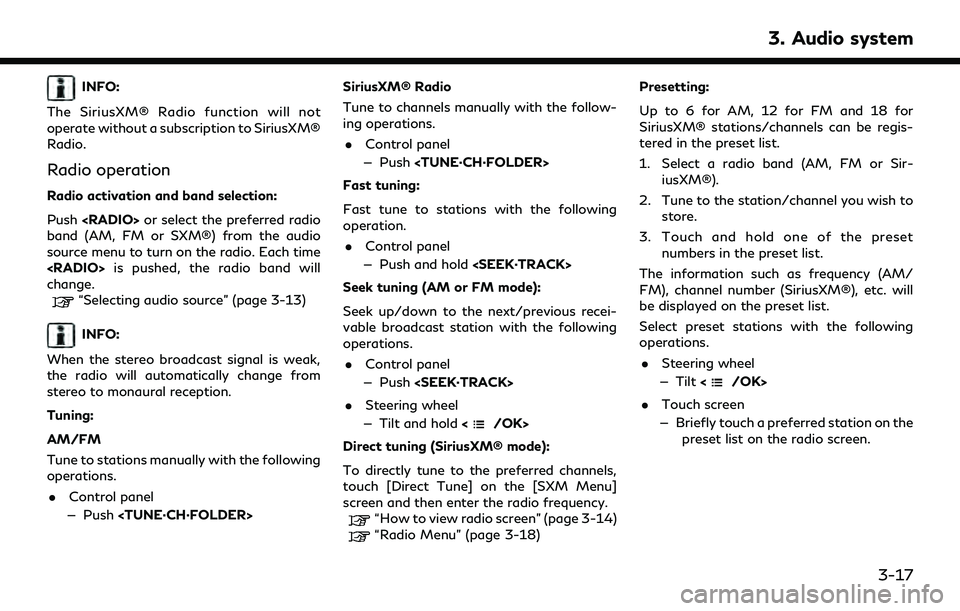
Sports Flash indicator:
An indicator will be displayed when
sports information is available for pre-
registered sports teams. The indicator
color signifies the current status:
GrayNo Sports Flash audio is
available yet, or Sports
Flash monitoring is deacti-
vated.
White Sports Flash monitoring is activated, but favorite
teams are not playing
games.
Light green Favorite teams are playing games.
Orange Replaying (listening to) Sports Flash audio.
Audio source indicator:
Indicates the currently selected audio
source.
Reception information display:
The channel logo will indicate the cur-
rently tuned channel name. Also the
channel number, artist and title of the
currently played song is displayed.
Album artwork:
Images or album artwork displayed by
the currently playing channel.
[Replay]:
Up to 60 minutes of the broadcast of
the currently playing channel can be
replayed. Touching [Presets] will return
to current SiriusXM® reception.
Traffic & Weather Now (TWN) indica-
tor:
An indicator will be displayed when
SiriusXM Traffic
TMand SiriusXM®
Weather information are available for
pre-registered cities. The indicator color
signifies the current status:
Gray TWN audio is loading, or no
city has been defined yet.
White Already listened to current TWN audio information.
Light green New TWN audio informa- tion is available.
Orange Playing TWN audio infor- mation.
The information can be played by touching
the indicator when the indicator is light
green.
Preset list:
To listen to a preset channel, touch the
corresponding channel from the preset
list. Touch [ < ] or [ > ] to scroll the preset
list. Touch and hold one of the keys in
the preset list to store the currently
playing station to that key location.
“Presetting” (page 3-17)
Mode indicator:
Displays the current play mode. "Live
Mode" or "Replay Mode" will be dis-
played.
3-16
Page 65 of 252
INFO:
The SiriusXM® Radio function will not
operate without a subscription to SiriusXM®
Radio.
Radio operation
Radio activation and band selection:
Push
band (AM, FM or SXM®) from the audio
source menu to turn on the radio. Each time
change.
“Selecting audio source” (page 3-13)
INFO:
When the stereo broadcast signal is weak,
the radio will automatically change from
stereo to monaural reception.
Tuning:
AM/FM
Tune to stations manually with the following
operations. . Control panel
— Push
Tune to channels manually with the follow-
ing operations.
. Control panel
— Push
Fast tuning:
Fast tune to stations with the following
operation. . Control panel
— Push and hold
Seek tuning (AM or FM mode):
Seek up/down to the next/previous recei-
vable broadcast station with the following
operations. . Control panel
— Push
. Steering wheel
— Tilt and hold <
/OK>
Direct tuning (SiriusXM® mode):
To directly tune to the preferred channels,
touch [Direct Tune] on the [SXM Menu]
screen and then enter the radio frequency.
“How to view radio screen” (page 3-14)“Radio Menu” (page 3-18) Presetting:
Up to 6 for AM, 12 for FM and 18 for
SiriusXM® stations/channels can be regis-
tered in the preset list.
1. Select a radio band (AM, FM or Sir- iusXM®).
2. Tune to the station/channel you wish to store.
3. Touch and hold one of the preset numbers in the preset list.
The information such as frequency (AM/
FM), channel number (SiriusXM®), etc. will
be displayed on the preset list.
Select preset stations with the following
operations. . Steering wheel
— Tilt <
/OK>
. Touch screen
— Briefly touch a preferred station on the preset list on the radio screen.
3. Audio system
3-17
Page 66 of 252
![INFINITI QX55 2022 User Guide 3. Audio system
Radio Menu
Touch [FM Menu], [AM Menu], and [SXM Menu] on each radio screen to display the corresponding menu screen.
Available menu items may vary depending on models, specifications a](/img/42/41124/w960_41124-65.png "INFINITI QX55 2022 User Guide 3. Audio system
Radio Menu
Touch [FM Menu], [AM Menu], and [SXM Menu] on each radio screen to display the corresponding menu screen.
Available menu items may vary depending on models, specifications a")
3. Audio system
Radio Menu
Touch [FM Menu], [AM Menu], and [SXM Menu] on each radio screen to display the corresponding menu screen.
Available menu items may vary depending on models, specifications and software versions.
[FM Menu]/[AM Menu]:
[SCAN]To scan tune the stations, touch [FM Menu] or [AM Menu] on the radio screen and then
touch [SCAN]. The stations will be tuned from low to high frequencies and stop at each
broadcasting station for several seconds. Touching [SCAN] again during this period of
several seconds will stop scan tuning and the radio will remain tuned to that station.
[Radio Text] Displays the radio text information.
[Refresh] Touch to update the station list displayed on the right side of the FM or AM menu screen.
Station List Displays the station list on the right side of the FM or AM menu screen.
[SXM Menu]:
[Now Playing]Touch to display the SiriusXM® screen.
[Channel List] Touch to display the channel list.
[Direct Tune] Touch to select a channel by entering channel number directly. Touch [Now Playing] to return to the
SiriusXM® screen without any changes.
[Tag Artist] Touch to save the current artist as a favorite.
[Tag Song] Touch to save the current song as a favorite.
[Categories] Touch to select a channel by selecting from the category list.
3-18
Page 68 of 252
![INFINITI QX55 2022 User Guide 3. Audio system
[Tune Start]Touch to turn on/off the Tune Start feature. This feature buffers the content playing on each of the
SiriusXM® preset channels, so that when a preset channel is selected,](/img/42/41124/w960_41124-67.png "INFINITI QX55 2022 User Guide 3. Audio system
[Tune Start]Touch to turn on/off the Tune Start feature. This feature buffers the content playing on each of the
SiriusXM® preset channels, so that when a preset channel is selected,")
3. Audio system
[Tune Start]Touch to turn on/off the Tune Start feature. This feature buffers the content playing on each of the
SiriusXM® preset channels, so that when a preset channel is selected, the currently playing song always starts
playing from the beginning.
INFO:
. SiriusXM® Audio requires a subscription
after trial period and are sold separately
or as a package. The satellite service is
available only in the 48 contiguous USA
and DC. SiriusXM® service is also avail-
able in Canada; see www.siriusxm.ca.
. It may take some time to receive the
activation signal after the initiation of
the SiriusXM® Radio subscription. After
receiving the activation signal, an avail-
able channel list will automatically be
updated in the radio. Change the posi-
tion of the ignition switch from LOCK to
ACC to update the SiriusXM® channel
list.
3-20
Page 86 of 252
4. Hands-Free Phone
BLUETOOTH® HANDS-FREE
PHONE SYSTEM
WARNING
.Use a phone after stopping your
vehicle in a safe location. If you have
to use a phone while driving, exercise
extreme caution at all times so full
attention may be given to vehicle
operation.
. If you find yourself unable to devote
full attention to vehicle operation
while talking on the phone, pull off
the road to a safe location and stop
your vehicle before doing so.
CAUTION
To avoid draining the vehicle battery, use
a phone only after starting the engine.
Your vehicle is equipped with Bluetooth®
Hands-Free Phone System. If you are an
owner of a compatible Bluetooth® enabled
cellular phone, you can set up the wireless
connection between your cellular phone and
the in-vehicle phone module. With Blue- tooth® wireless technology, you can make
or receive a telephone call with your cellular
phone in your pocket.
Once a cellular phone is connected to the in-
vehicle phone module, the procedures for
connecting the phone does not need to be
performed again. Your phone will automati-
cally re-connect to the in-vehicle phone
module when the ignition switch is placed
in the ACC or ON position with the selected
cellular phone turned on and carried in the
vehicle.
You can register up to 6 different Blue-
tooth® devices in the in-vehicle phone
module. However, you can talk on only one
cellular phone at a time.
The Voice Recognition System supports
phone and text message commands, so
dialing a phone number using your voice is
possible.“7. Voice recognition”
Before using the Bluetooth® Hands-Free
Phone System, refer to the following notes. . Wireless LAN (Wi-Fi) and the Blue-
tooth® functions share the same fre-
quency band (2.4 GHz). Using the
Bluetooth® and the wireless LAN func-
tions at the same time may slow down or disconnect the communication and cause
undesired noise. It is recommended that
you turn off the wireless LAN (Wi-Fi)
when using the Bluetooth® functions.
. Set up the wireless connection between
a compatible cellular phone and the in-
vehicle phone module before using the
Bluetooth® Hands-Free Phone System.
. Some Bluetooth® enabled cellular
phones may not be recognized by the
in-vehicle phone module. Visit the web-
site below for a recommended phone list.
www.infinitiusa.com/bluetooth/
. When Apple CarPlay® or Android Auto
is active, Apple CarPlay® or Android
Auto will take the place of your Blue-
tooth® Hands-Free Phone functionality.
. You will not be able to use a hands-free
phone under the following conditions:
— Your vehicle is outside of the tele- phone service area.
— Your vehicle is in an area where it is difficult to receive radio waves; such
as in a tunnel, in an underground
parking garage, behind a tall building
or in a mountainous area.
4-2
Page 87 of 252
— Your cellular phone is locked in orderto prevent dialing.
. If Apple CarPlay® or Android Auto is
active, the Bluetooth® Hands-Free
Phone cannot be used.
. When the radio wave condition is not
ideal or ambient sound is too loud, it may
be difficult to hear the other person’s
voice during a call.
. Immediately after the ignition switch is
placed in the ACC or ON position, it may
not be possible to receive a call for a
short period of time.
. Do not place the cellular phone in an area
surrounded by metal or far away from
the in-vehicle phone module to prevent
tone quality degradation and wireless
connection disruption.
. While a cellular phone is connected
through the Bluetooth® wireless con-
nection, the battery power of the cellular
phone may discharge quicker than usual.
. Visit the website below for trouble-
shooting help if the Bluetooth® Hands-
Free Phone System seems to be mal-
functioning.
www.infinitiusa.com/bluetooth/ .
Some cellular phones or other devices
may cause interference or a buzzing
noise to come from the audio system
speakers. Storing the device in a differ-
ent location may reduce or eliminate the
noise.
. Refer to the cellular phone Owner’s
Manual regarding the telephone pairing
procedure specific to your phone, bat-
tery charging, cellular phone antenna,
etc.
. The antenna or battery display on the
monitor may not coincide with the
antenna or battery display of some
cellular phones.
. If reception between callers is unclear,
adjusting the incoming or outgoing call
volume may improve the clarity.
“Volume and Beeps settings”
(page 2-31)
. The microphone is located near the map
light.
. To improve call quality, the microphone is
optimized to recognize the driver’s voice.
Speech from vehicle passengers may not
be captured by the Bluetooth® Hands-
Free Phone System. .
Keep the interior of the vehicle as quiet
as possible to hear the caller’s voice
clearly as well as to minimize echo.
Reduce background noise as much as
possible by closing windows and point-
ing HVAC vents away from the ceiling.
PHONE SCREEN
The phone screen can be displayed by on
both the upper display and the lower display.
. Push <
>on the steering wheel to
display the phone screen on the upper
display.
. Push
Page 101 of 252
![INFINITI QX55 2022 User Guide Menu itemAction
[System Information] [Version Information] Displays the information of the Software Version, etc.
[Software Update] The system software can be updated.
“Updating system software” (](/img/42/41124/w960_41124-100.png "INFINITI QX55 2022 User Guide Menu itemAction
[System Information] [Version Information] Displays the information of the Software Version, etc.
[Software Update] The system software can be updated.
“Updating system software” (")
Menu itemAction
[System Information] [Version Information] Displays the information of the Software Version, etc.
[Software Update] The system software can be updated.
“Updating system software” (page 5-5)
[Map Update] The map data can be updated.
“How to update map data” (page 6-61)
[SXM Information] Displays the SiriusXM® information.
The signal quality, subscription status and SiriusXM® radio ID, etc.
are displayed.
[License Information] Displays the Open Source Software (OSS) licenses information.
[GPS Position] Displays GPS information, such as number of satellites, latitude/
longitude, and approximate altitude, etc.
[Vehicle Data Transmission] When [OK] is touched, data transmission to INFINITI is enabled.
Touching [Decline] disables the INFINITI InTouch
TMServices,
Premium Traffic, Online Search, etc.
[Apps] [Apple CarPlay] Displays the Apple CarPlay® screen.
“Apple CarPlay®” (page 5-18)
[Android Auto] Displays the Android Auto screen.
“Android AutoTM” (page 5-22)
5. Information and vehicle settings
5-3
Page 106 of 252

5. Information and vehicle settings
or data usage may apply. INFINITI In-
TouchTMwith WiFi terms and conditions of
subscriber agreement apply. Included with
vehicle purchase 1 GB or 30 Day Trial on
equipped new INFINITI vehicles. If your
Vehicle is outside the scope of the initial
roadside assistance plan included with the
purchase of your Vehicle that applies for a
period of 48 months, without regard to
mileage from the date the Vehicle is deliv-
ered to the first retail buyer or otherwise put
into use, whichever is earlier you will be
responsible to the Service Provider for any
additional charges incurred by receiving
services through that roadside assistance
Service Provider.
The INFINITI names, logos and slogans are
trademarks owned by or licensed to Nissan
Motor Co. Ltd. or its North American
subsidiaries. Other trademarks and trade
names are those of their respective owners.
For important safety information, system
limitations, and additional operating and
feature information, see dealer, owner’s
manual, or https://www.infinitiusa.com/in-
touch/legal.html.INFINITI INTOUCHTMSERVICES
FEATURES
INFINITI InTouchTMServices provides var-
ious types of information and services by
connecting your vehicle to the INFINITI
InTouch
TMServices Data Center and
INFINITI InTouchTMServices Response Cen-
ter using the TCU (Telematics Control Unit)
installed in your vehicle.
If equipped, your vehicle may include
INFINITI InTouch
TMconnected features
and services such as emergency SOS calling,
Automatic Collision Notification, Wi-Fi, Re-
mote Services, Navigation, Bluetooth® and
more. For complete information about your
INFINITI InTouch
TMfeatures and services,
please visit www.infinitiusa.com/intouch.
For frequently asked questions, please visit
www.infinitiusa.com/intouch/faq.
WARNING
. Please note that the Automatic Colli-
sion Notification service and Emer-
gency Call function cannot be used in
the following conditions:
— Emergency functions and services will not be available without a paid
subscription to INFINITI InTouch
TM
Services.
— The INFINITI InTouch
TMServices
network system is disabled.
— The vehicle moves outside the ser- vice area where the TCU (Tele-
matics Control Unit) is connected
to the system.
— The vehicle is outside the area where the cellular network service
is receivable.
— The vehicle is in a location with poor signal reception such as tunnels,
underground parking garages, be-
hind buildings or in mountainous
areas.
— The line is busy.
— The TCU (Telematics Control Unit) or other systems of your vehicle are
not working properly.
— It may not be possible to make an emergency call depending on the
severity of a collision and/or emer-
gency.
. Radio waves could adversely affect
electric medical equipment. Indivi-
duals who use a pacemaker should
5-8
Page 107 of 252

contact the device manufacturer re-
garding any possible effects before
using the system.
. The TCU (Telematics Control Unit)
antenna is installed inside the upper
central part of the instrument panel.
An occupant should not get any closer
to the antenna than specified by the
pacemaker manufacturer. The radio
waves from the TCU antenna may
adversely affect the operation of the
pacemaker while using the INFINITI
InTouch
TMServices.
INFO:
. INFINITI InTouch
TMServices features
are dependent upon subscription enroll-
ment and the telematics device being in
operative condition, cellular connectivity,
navigation map data and GPS satellite
signal reception. Terms and conditions of
the INFINITI InTouch
TMServices Sub-
scription Agreement apply.
. Enrollment is required in order to use
INFINITI InTouch
TMServices. The ser-
vices that can be received vary depend-
ing on the plan in which you are enrolled. .
All services are complimentary for the
trial period.
. After the trial period, use of the service
will no longer be complimentary.
. Laws in some jurisdictions may restrict
the use of “Text-to-Speech.” Check local
regulations before using this feature.
If equipped, your vehicle may include
INFINITI InTouch
TMconnected features
and services such as emergency SOS calling,
Automatic Collision Notification, Wi-Fi, Re-
mote Services, Navigation, Bluetooth® and
more.
INFINITI InTouch
TMServices may be up-
dated. The latest detailed information is
available on the following websites or from
the support line.
INFINITI InTouch
TMServices website:
For U.S.
www.infinitiusa.com/intouch
For Canada
https://www.infiniti.ca/intouch (Eng-
lish)
https://fr.infiniti.ca/intouch (French)
INFINITI InTouch
TMServices support
line: 1-855-444-7244
. Automatic Collision Notification (if so
equipped):
The TCU (Telematics Control Unit) gen-
erates a signal automatically to the
INFINITI InTouch
TMServices Response
Center in the case of an accident severe
enough to trigger one of the vehicle’s air
bags. Upon the signal, a Response
Specialist receives the vehicle location
and customer information and notifies
the proper authorities in accordance with
established policies and procedures.
. Emergency Call (if so equipped):
The Emergency Call feature provides
emergency assistance by connecting to
a Response Specialist. In the event of an
emergency, push the in–vehicle E-Call
(SOS) button to use this feature. The
Response Specialist provides various
assistance depending on the situation.
For details of the E-Call (SOS) button
operation, refer to the vehicle Owner’s
Manual.
. Connection to Roadside Assistance (if
so equipped):
Roadside Assistance allows you to re-
ceive assistance from the Roadside Re-
5. Information and vehicle settings
5-9