horn INFINITI QX55 2023 Owners Manual
[x] Cancel search | Manufacturer: INFINITI, Model Year: 2023, Model line: QX55, Model: INFINITI QX55 2023Pages: 526, PDF Size: 5.75 MB
Page 16 of 526
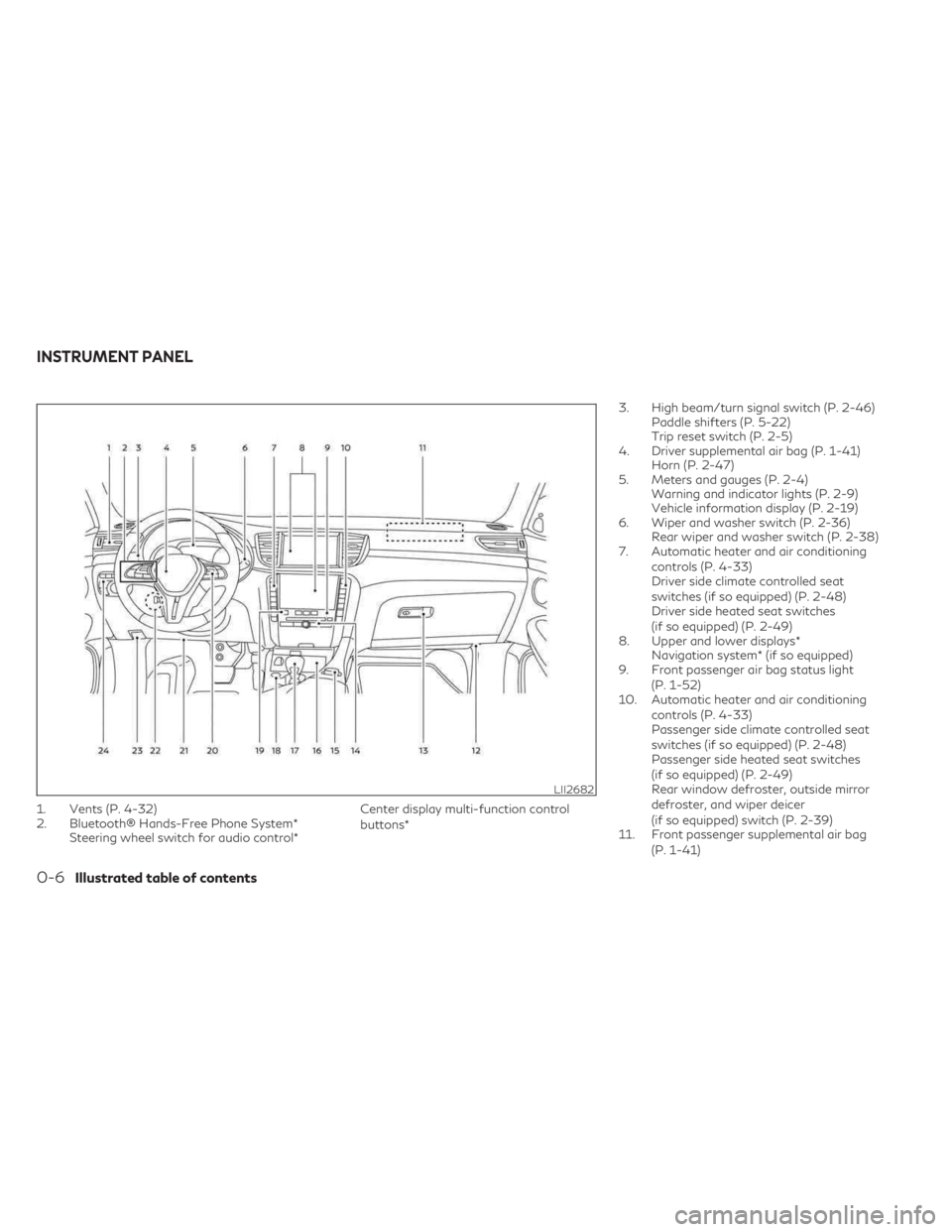
1. Vents (P. 4-32)
2. Bluetooth® Hands-Free Phone System*Steering wheel switch for audio control* Center display multi-function control
buttons*3. High beam/turn signal switch (P. 2-46)
Paddle shifters (P. 5-22)
Trip reset switch (P. 2-5)
4. Driver supplemental air bag (P. 1-41) Horn (P. 2-47)
5. Meters and gauges (P. 2-4) Warning and indicator lights (P. 2-9)
Vehicle information display (P. 2-19)
6. Wiper and washer switch (P. 2-36) Rear wiper and washer switch (P. 2-38)
7. Automatic heater and air conditioning
controls (P. 4-33)
Driver side climate controlled seat
switches (if so equipped) (P. 2-48)
Driver side heated seat switches
(if so equipped) (P. 2-49)
8. Upper and lower displays* Navigation system* (if so equipped)
9. Front passenger air bag status light
(P. 1-52)
10. Automatic heater and air conditioning
controls (P. 4-33)
Passenger side climate controlled seat
switches (if so equipped) (P. 2-48)
Passenger side heated seat switches
(if so equipped) (P. 2-49)
Rear window defroster, outside mirror
defroster, and wiper deicer
(if so equipped) switch (P. 2-39)
11. Front passenger supplemental air bag
(P. 1-41)
LII2682
INSTRUMENT PANEL
0-6Illustrated table of contents
Page 86 of 526
2 Instruments and controls
Instrument panel.................................2-2
Meters and gauges ..............................2-4
Speedometer and odometer ...................2-4
Tachometer ..................................2-6
Engine coolant temperature gauge ............2-6
Fuel gauge ...................................2-7
Distance To Empty (DTE) .....................2-7
Variable Compression Turbo ..................2-8
Warning lights, indicator lights and audible
reminders ........................................2-9
Checking lights .............................. 2-10
Warning/Indicator lights (red) ...............2-10
Warning/Indicator lights (yellow) ............2-13
Warning/Indicator lights (other) ..............2-17
Audible reminders ........................... 2-18
Vehicle information display .....................2-19
How to use the vehicle information
display ...................................... 2-20
Startup display .............................. 2-20
Trip computer ............................... 2-21
Resetting the trip computer .................2-24
Tire Pressure Information (Display
Settings) .................................... 2-24
Oil control system ........................... 2-25
Vehicle information display warnings and
indicators ................................... 2-25
Security systems ............................... 2-33Vehicle security system
......................2-33
INFINITI Vehicle Immobilizer System .........2-34
Wiper and washer switch ......................2-36
Switch operation ............................ 2-36
Rain-sensing auto wiper system
(if so equipped) ............................. 2-37
Rear switch operation ....................... 2-38
Rear window defroster, outside mirror
defroster, and wiper deicer (if so equipped)
switch ......................................... 2-39
Headlight switch ............................... 2-40
Headlight control switch ....................2-40
LED Daytime Running Lights (DRL)
system ..................................... 2-45
Instrument brightness control ................2-46
Turn signal switch ........................... 2-46
Fog light switch ............................. 2-47
Horn .......................................... 2-47
Climate
controlled seat switches
(if so equipped) ................................ 2-48
Heated seats (if so equipped) ...................2-49
Heated rear seat switches (if so equipped) ......2-50
Steering Assist switch ........................... 2-51
Front and rear sonar system switch
(if so equipped) ................................. 2-51
Head Up Display (HUD) (if so equipped) .........2-52
Page 88 of 526

1. Vents (P. 4-32)
2. Bluetooth® Hands-Free Phone System*Steering wheel switch for audio control* Center display multi-function control
buttons*3. High beam/turn signal switch (P. 2-46)
Paddle shifters (P. 5-22)
Trip reset switch (P. 2-5)
4. Driver supplemental air bag (P. 1-41) Horn (P. 2-47)
5. Meters and gauges (P. 2-4) Warning and indicator lights (P. 2-9)
Vehicle information display (P. 2-19)
6. Wiper and washer switch (P. 2-36) Rear wiper and washer switch (P. 2-38)
7. Automatic heater and air conditioning
controls (P. 4-33)
Driver side climate controlled seat
switches (if so equipped) (P. 2-48)
Driver side heated seat switches
(if so equipped) (P. 2-49)
8. Upper and lower displays* Navigation system* (if so equipped)
9. Front passenger air bag status light
(P. 1-52)
10. Automatic heater and air conditioning
controls (P. 4-33)
Passenger side climate controlled seat
switches (if so equipped) (P. 2-48)
Passenger side heated seat switches
(if so equipped) (P. 2-49)
Rear window defroster, outside mirror
defroster, and wiper deicer
(if so equipped) switch (P. 2-39)
11. Front passenger supplemental air bag
(P. 1-41)
LII2682
INSTRUMENT PANEL
2-2Instruments and controls
Page 120 of 526

The system helps deter vehicle theft but can-
not prevent it nor can it prevent the theft of
interior or exterior vehicle components in all
situations. Always secure your vehicle even if
parking for a brief period. Never leave your
Intelligent Key in the vehicle, and always lock
the vehicle when unattended. Be aware of
your surroundings, and park in secure, well-lit
areas whenever possible.
Many devices offering additional protection,
such as component locks, identification
markers, and tracking systems, are available
at auto supply stores and specialty shops. An
INFINITI retailer may also offer such equip-
ment. Check with your insurance company to
see if you may be eligible for discounts for
various theft protection features.
How to arm the vehicle security
system
1. Close all windows and the moonroof (if soequipped). (The system can be armed even
if the windows and moonroof are open.)
2. Remove the Intelligent Key from the vehicle.
3. Close all doors, hood and liftgate. Lock all doors. The doors can be locked with the
Intelligent Key, door handle request
switch, or power door lock switch. 4. Confirm that the
security indicator
light stays on for about 30 seconds. The
vehicle security system is now pre-armed.
The vehicle security system will automati-
cally shift into the armed phase. The
security light begins to flash once every
three seconds. If during the pre-armed
phase one of the following occurs, the
system will not arm:
• Any door is unlocked with the Intelligent Key or door request switch.
• Ignition switch is placed in AUTO ACC or ON position.
• Even when the driver and/or passengers
are in the vehicle, the system will activate
with all the doors, hood and liftgate locked
with the ignition switch placed in the
LOCK position. When placing the ignition
switch in the AUTO ACC or ON position,
the system will be released.
Vehicle security system activation
The vehicle security system will give the fol-
lowing alarm:
• The turn signals blink and the horn sounds intermittently. • The alarm automatically turns off after a
period of time. However, the alarm reacti-
vates if the vehicle is tampered with again.
The alarm can be shut off by pressing the
button on the Intelligent Key.
The alarm is activated by:
• Opening the door or liftgate without using the Intelligent Key (even if the door is un-
locked by releasing the door inside lock
switch).
How to stop an activated alarm
The alarm stops only by unlocking the driver’s
door or the liftgate by pressing the
button on the Intelligent Key or pushing the
request switch on the driver's or passenger's
door with the Intelligent Key in range of the
door handle.
INFINITI VEHICLE IMMOBILIZER
SYSTEM
The INFINITI Vehicle Immobilizer System will
not allow the engine to start without the use
of a registered INFINITI Vehicle Immobilizer
System key.
2-34Instruments and controls
Page 133 of 526

Move the lever up or down until the turn
signal begins to flash, but the lever does not
latch, and release the lever. The turn signal
will automatically flash three times.
Choose the appropriate method to signal a
lane change based on road and traffic
conditions.
FOG LIGHT SWITCH
To turn the fog lights on, turn the headlight
switch to theposition, then push the fog
light switch on.
To turn the fog lights on with the headlight
switch in the AUTO position, the headlights
must be on, then push the fog light switch on.
To turn the fog lights off, push the fog light
switch again.
The headlights must be on and the low beams
selected for the fog lights to operate. The fog
lights automatically turn off when the high
beam headlights are selected. To sound the horn, push near the horn icon on
the steering wheel.WARNING
Do not disassemble the horn. Doing so
could affect proper operation of the
supplemental front air bag system. Tam-
pering with the supplemental front air bag
system may result in serious personal
injury.
LIC3824LIC4757
HORN
Instruments and controls2-47
Page 176 of 526

HOW TO USE THE REMOTE
KEYLESS ENTRY FUNCTION
The remote keyless entry function can oper-
ate all door locks using the remote keyless
function of the Intelligent Key. The remote
keyless function can operate at a distance of
33 ft (10 m) away from the vehicle. The op-erating distance depends upon the conditions
around the vehicle.
The remote keyless entry function will not
function under the following conditions:
• When the Intelligent Key is not within the
operational range.
• When the Intelligent Key battery is discharged.
CAUTION
When locking the doors using the Intelli-
gent Key, be sure not to leave the key in the
vehicle.
Locking doors and fuel-filler door
1. Place the ignition switch in the LOCK position.
2. Close all doors.
3. Press the
button on the Intelligent
Key.
4. The hazard indicator lights flash twice and the horn beeps once.
5. All doors, liftgate and fuel-filler door will be locked.
WARNING
After locking the doors using the Intelli-
gent Key, be sure that the doors have been
securely locked by operating the door
handles within two seconds of locking.
Failure to follow these instructions may re-
sult in inadvertently unlocking the doors,
which may decrease the safety and secu-
rity of your vehicle.
Unlocking doors and fuel-filler door
1. Press thebutton on the Intelligent
Key.
2. The hazard indicator lights flash once and the driver’s and fuel-filler doors unlock.
3. Press the
button again within 1 min-
ute to unlock all doors and liftgate.
All doors, liftgate and fuel-filler door will be
locked automatically unless one of the fol-
lowing operations is performed within 1 min-
ute after pressing the
button:
• Opening any doors.
• Pushing the ignition switch.
LPD3702
1.(remote engine start) button
2.
(lock) button
3.
(unlock) button
4.
(liftgate) button
5.
(panic) button
3-14Pre-driving checks and adjustments
Page 177 of 526

Using the interior lights
The interior lights illuminate for a period of
time when a door is unlocked.
The lights can be turned off without waiting
by performing one of the following
operations:
• Placing the ignition switch in the ONposition.
• Locking the doors with the Intelligent Key.
• Switching the interior light switch to the OFF position.
For additional information, see “Interior
lights” (P. 2-69).
Opening windows
The Intelligent Key allows you to simultane-
ously open windows equipped with auto-
matic operation.
To open the windows, press and hold the
button on the Intelligent Key for longer
than 3 seconds after all doors are unlocked.
The door windows will open while pressing
the
button on the Intelligent Key.
The door windows cannot be closed by using
the Intelligent Key.
Releasing the rear liftgate
The rear liftgate can be opened and closed by
performing the following:
• Press the
button for longer than 1
second to open the rear liftgate.
• Press the
button again for longer than
1 second to close the rear liftgate.
When the
button is pressed during the
open or close process, the liftgate motors will
stop. When the
button is pressed again
for longer than 1 second the liftgate will re-
verse direction.
Using the panic alarm
If you are near your vehicle and feel threat-
ened, you may activate the panic alarm to call
attention by pressing and holding the
button on the Intelligent Key for longer than
0.5 seconds.
The panic alarm and headlights will stay on
for a period of time.
The panic alarm stops when:
• It has run for a period of time, or
• Any button is pressed on the Intelligent Key.
• The request switch on the driver or passen- ger door is pushed and the Intelligent Key is
in range of the door handle.
Answer back horn feature
If desired, the answer back horn feature can
be deactivated using the Intelligent Key.
When it is deactivated and the
button
is pressed, the hazard indicator lights flash
twice. When the
button is pressed, nei-
ther the hazard indicator lights nor the horn
operates.
NOTE:
If you change the answer back horn and light
flash feature with the Intelligent Key, the
lower touch-screen display will show the
current mode after the ignition switch has
been cycled from the OFF to the ON position
of the ”Comfort & Convenience” options of
the “Settings” menu in the lower touch-
screen display can also be used to change the
answer back horn mode between “Conve-
nience” and “Security” settings.
To deactivate: Press and hold the
andbuttonsfor at least 2 seconds.
The hazard indicator lights will flash three
times to confirm that the answer back horn
feature has been deactivated.
Pre-driving checks and adjustments3-15
Page 178 of 526

To activate:Press and hold theandbuttonsfor at least 2 seconds once
more.
The hazard indicator lights will flash once and
the horn will sound once to confirm that the
horn beep feature has been reactivated.
Deactivating the horn beep feature does not
silence the horn if the alarm is triggered.WARNING SIGNALS
To help prevent the vehicle from moving un-
expectedly by erroneous operation of the In-
telligent Key or to help prevent the vehicle
from being stolen, a chime or buzzer sounds
from inside and outside the vehicle and a
warning is displayed in the instrument panel.
When a chime or beep sounds or a warning is
displayed, be sure to check the vehicle and
the Intelligent Key. For additional information, see “Trouble-
shooting guide” (P. 3-16) and the separate
INFINITI InTouch™ Owner’s Manual.
TROUBLESHOOTING GUIDE
Verify the location of all Intelligent Keys that
are programmed for the vehicle. If another
Intelligent Key is in range or inside the vehicle,
the vehicle system may respond differently
than expected.
Symptom
Possible CauseRemedy
When stopping the engine The Shift to Park warning appears on the
display and the inside warning chime
sounds continuously. A door is opened while the P (Park) posi-
tion is not engaged and the ignition
switch is still in the ON position.Place the ignition switch in the ON posi-
tion. Apply the parking brake. Place the
ignition switch in the OFF position.
When engaging the P (Park) position The Push Ignition to OFF warning ap-
pears in the display. The ignition switch is in the ON position.Place the ignition switch in the OFF
position.
When opening the driver’s door to get
out of the vehicle The Door/liftgate Open warning appears
on the display and the inside warning
chime sounds continuously.
The ignition switch is in the ON position.
Place the ignition switch in the OFF
position.
When closing the door after getting out
of the vehicle The No Key Detected warning appears
on the display, the outside chime sounds
three times and the inside warning chime
sounds for approximately 3 seconds.
The ignition switch is in the ON position.
Place the ignition switch in the OFF
position.
The Shift to Park warning appears on the
display and the outside chime sounds
continuously. The ignition switch is in the ON position
and the P (Park) position is not engaged.Apply the parking brake.
Place the ignition switch in the OFF
position.
When closing the door with the inside
lock knob turned to LOCK The outside chime sounds for approxi-
mately 3 seconds and all the doors un-
lock.
The Intelligent Key is inside the vehicle. Carry the Intelligent Key with you.
3-16Pre-driving checks and adjustments
Page 254 of 526

Vehicle set-up:
1. Park the vehicle in a safe and level place.
2. Apply the parking brake and press thepark button to engage the P (Park)
position.
3. Place the ignition switch in the ON posi- tion. Do not start the engine.
Operation:
1. Add air to the tire.
2. After a few seconds, the hazard indicators will start flashing.
3. When the designated pressure is reached, the horn beeps once and the hazard indi-
cators stop flashing.
4. Perform the above steps for each tire. • If the tire is over-inflated more than ap-proximately 4 psi (30 kPa), the horn
beeps and the hazard indicators flash
three times. To correct the pressure,
push the core of the valve stem on the
tire briefly to release pressure. When the
pressure reaches the designated pres-
sure, the horn beeps once. • If the hazard indicator does not flash
within approximately 15 seconds after
starting to inflate the tire, it indicates
that the TPMS with Tire Inflation Indi-
cator is not operating.
• The TPMS will not activate the TPMS with Tire Inflation Indicator under the
following conditions:– If there is interference from an exter- nal device or transmitter.
– The air pressure from the inflation de- vice is not sufficient to inflate the tire.
– There is a malfunction in the TPMS.
– There is a malfunction in the horn or hazard indicators.
– The identification code of the tire pressure sensor is not registered to
the system.
– The battery of the tire pressure sensor is low.
• If the TPMS with Tire Inflation Indicator does not operate due to TPMS interfer-
ence, move the vehicle about 3 ft (1 m)
backward or forward and try again.
If the TPMS with Tire Inflation Indicator is
not working, use a tire pressure gauge.ON-PAVEMENT AND OFF-ROAD
DRIVING PRECAUTIONS
Utility vehicles have a significantly higher
rollover rate than other types of vehicles.
They have higher ground clearance than pas-
senger cars to make them capable of per-
forming in a variety of on-pavement and off-
road applications. This gives them a higher
center of gravity than ordinary vehicles. An
advantage of higher ground clearance is a
better view of the road, allowing you to an-
ticipate problems. However, they are not de-
signed for cornering at the same speeds as
conventional 2-Wheel Drive vehicles any
more than low-slung sports cars are de-
signed to perform satisfactorily under off-
road conditions. If at all possible, avoid sharp
turns at high speeds. As with other vehicles of
this type, failure to operate this vehicle cor-
rectly may result in loss of control or vehicle
rollover.
In a rollover crash, an unbelted person is sig-
nificantly more likely to die than a person
wearing a seat belt.
For additional information, see “Driving
safety precautions” (P. 5-10).
5-8Starting and driving
Page 394 of 526

•Read and understand the limitations of
the sonar system as contained in this
section. The colors of the sonar indicator
indicates different distances to the
object.
• Inclement weather or ultrasonic sources
such as an automatic car wash, a truck’s
compressed-air brakes or a pneumatic
drill may affect the function of the sys-
tem; this may include reduced perfor-
mance or a false activation.
• The sonar system is designed as an aid to
the driver in detecting large stationary
objects to help avoid damaging the
vehicle.
• The sonar system is not designed to pre-
vent contact with small or moving ob-
ject. Always move slowly. The system
will not detect small objects below the
bumper, and may not detect objects
close to the bumper or on the ground.
• The sonar system may not detect the fol-
lowing objects: fluffy objects such as
snow, cloth, cotton, glass-wool, etc.;
thin objects such as rope, wire and chain,
etc.; or wedge-shaped objects.CAUTION
• Excessive noise (such as audio system
volume or an open vehicle window) will
interfere with the tone and it may not be
heard.
• The front and rear sonar detect the dis-
tance between the vehicle and the ob-
stacle by detecting the sound wave re-
flected from the surface of an obstacle.
When there is a sound such as horn, or an
ultrasonic source (such as sonar of other
vehicles) around the vehicle, the sonar
may not detect objects properly.
• Keep the sonar sensors (located on the
bumper fascia) free from snow, ice and
large accumulations of dirt. Do not clean
the sonar with sharp objects. If the sen-
sors are covered, the accuracy of the so-
nar function will be diminished.
SYSTEM OPERATION
The system informs with a visual and audible
signal of front obstacles when the shift lever
is in the D (Drive) position and both front and
rear obstacles when the shift lever is in the R
(Reverse) position. Sonar Operation Table
FR Sensor RR Sensor
Range Sound Display Sound Display Px † x†
Roooo
Nx † x † Do o x †
o – Display/Beep when detect
† – Display on camera view
x – No Display and Beep
The system is deactivated at speeds above 6
mph (10 km/h). It is reactivated at lower
speeds.
The intermittent tone will stop after 3 sec-
onds when an obstacle is detected by only
the corner sensor and the distance does not
change. The tone will stop when the obstacle
get away from the vehicle.
When the object is detected, the indicator
(green) appears and blinks and the tone
sounds intermittently. When the vehicle
moves closer to the object, the color of the
indicator turns yellow and the rate of the
blinking increases. When the vehicle is very
close to the object, the indicator stops blink-
ing and turns red, and the tone sounds
continuously.
5-148Starting and driving