ESP INFINITI QX60 2014 Owners Manual
[x] Cancel search | Manufacturer: INFINITI, Model Year: 2014, Model line: QX60, Model: INFINITI QX60 2014Pages: 544, PDF Size: 5.2 MB
Page 48 of 544
WARNING
Do not allow children to play with the seat
belts. Most seating positions are
equipped with Automatic Locking Retrac-
tor (ALR) mode seat belts. If the seat belt
becomes wrapped around a child’s neck
with the ALR mode activated, the child can
be seriously injured or killed if the seat
belt retracts and becomes tight. This can
occur even if the vehicle is parked. Un-
buckle the seat belt to release the child. If
the seat belt cannot be unbuckled or is
already unbuckled, release the child by
cutting the seat belt with a suitable tool
(such as a knife or scissors) to release the
seat belt.
Children need adults to help protect them.
They need to be properly restrained.
In addition to the general information in this
manual, child safety information is available from
many other sources, including doctors, teachers,
government traffic safety offices, and community
organizations. Every child is different, so be sure
to learn the best way to transport your child. There are three basic types of child restraint
systems:
● Rear-facing child restraint
● Forward-facing child restraint
● Booster seat
The proper restraint depends on the child’s size.
Generally, infants up to about 1 year and less
than 20 lbs (9 kg) should be placed in rear-facing
child restraints. Forward-facing child restraints
are available for children who outgrow rear-
facing child restraints and are at least 1 year old.
Booster seats are used to help position a vehicle
lap/shoulder belt on a child who can no longer
use a forward-facing child restraint.
WARNING
Infants and children need special protec-
tion. The vehicle’s seat belts may not fit
them properly. The shoulder belt may
come too close to the face or neck. The lap
belt may not fit over their small hip bones.
In an accident, an improperly fitting seat
belt could cause serious or fatal injury.
Always use appropriate child restraints.
All U.S. states and Canadian provinces or territo-
ries require the use of approved child restraints
for infants and small children. See “Child re-
straints” later in this section. A child restraint may be secured in the vehicle by
using either the LATCH (Lower Anchor and Teth-
ers for CHildren) system or with the vehicle seat
belt. See “Child restraints” later in this section for
more information.
INFINITI recommends that all pre-teens
and children be restrained in the rear seat.
Studies show that children are safer when
properly restrained in the rear seat than in
the front seat.
This is especially important because your
vehicle has a supplemental restraint sys-
tem (Air bag system) for the front passen-
ger. See “Supplemental restraint system”
later in this section.
INFANTS
Infants up to at least 1 year old should be placed
in a rear-facing child restraint. INFINITI recom-
mends that infants be placed in child restraints
that comply with Federal Motor Vehicle Safety
Standards or Canadian Motor Vehicle Safety
Standards. You should choose a child restraint
that fits your vehicle and always follow the manu-
facturer’s instructions for installation and use.
CHILD SAFETY
Safety—Seats, seat belts and supplemental restraint system1-31
Page 76 of 544
WARNING
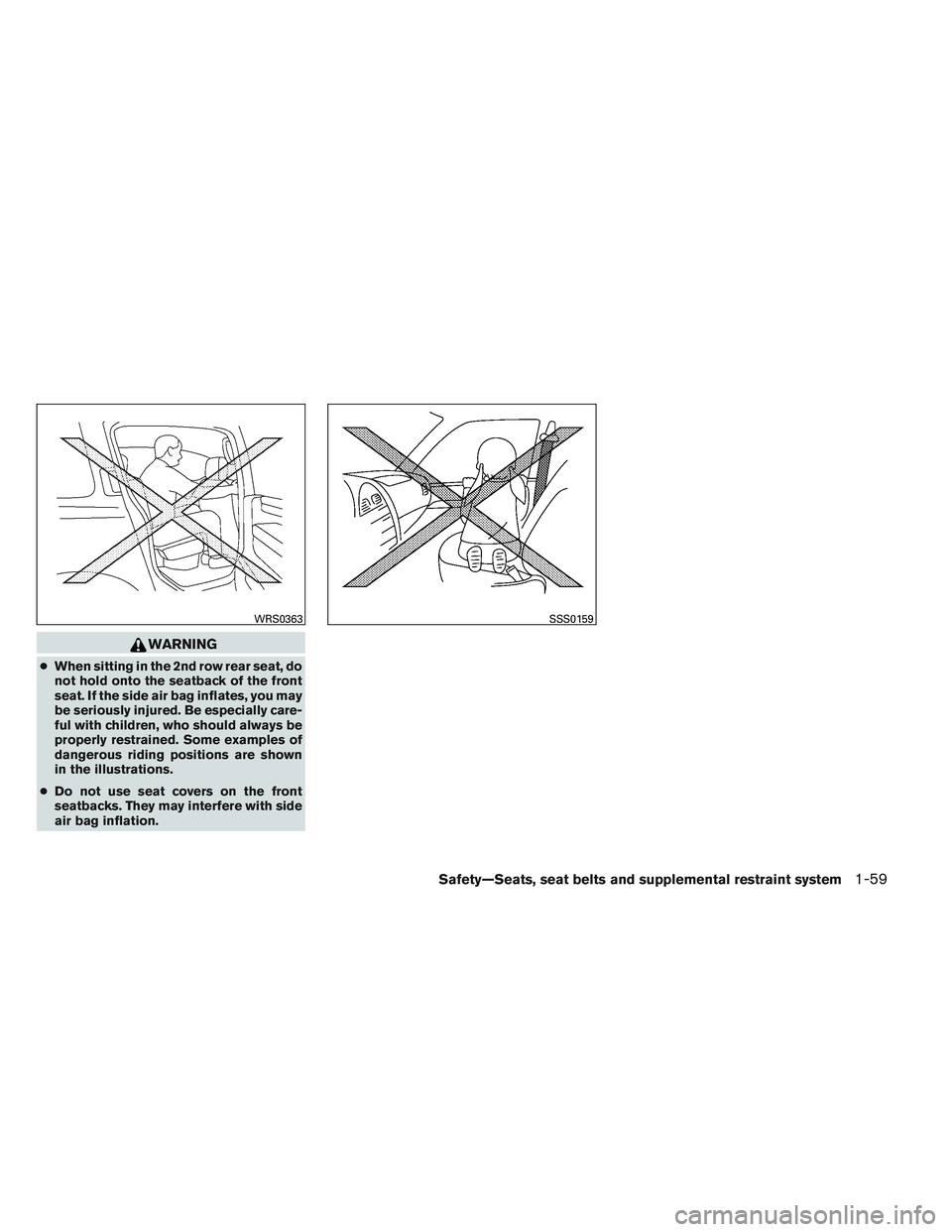
●When sitting in the 2nd row rear seat, do
not hold onto the seatback of the front
seat. If the side air bag inflates, you may
be seriously injured. Be especially care-
ful with children, who should always be
properly restrained. Some examples of
dangerous riding positions are shown
in the illustrations.
● Do not use seat covers on the front
seatbacks. They may interfere with side
air bag inflation.
WRS0363SSS0159
Safety—Seats, seat belts and supplemental restraint system1-59
Page 100 of 544
When the power steering warning light illumi-
nates with the engine running, there will be no
power assist for the steering but you will still have
control of the vehicle. At this time, greater steer-
ing effort is required to operate the steering
wheel, especially in sharp turns and at low
speeds.
See “Power steering” in the “Starting and driving”
section.
Seat belt warning light andchime
The light and chime remind you to fasten your
seat belts. The light illuminates whenever the
ignition switch is placed in the ON or START
position and remains illuminated until the driver’s
seat belt is fastened. At the same time, the chime
sounds for about 6 seconds unless the driver’s
seat belt is securely fastened.
The seat belt warning light may also illuminate if
the front passenger’s seat belt is not fastened
when the front passenger’s seat is occupied . For
7 seconds after the ignition switch is placed in
the ON position, the system does not activate the
warning light for the front passenger.
Refer to “Seat belts” in the “Safety—Seats, seat
belts and supplemental restraint system” section
for precautions on seat belt usage.
Supplemental air bag warninglight
When the ignition switch is placed in the ON
position, the supplemental air bag warning light
illuminates for about 7 seconds and then turns
off. This means the system is operational.
If any of the following conditions occur, the front
air bag, front seat-mounted side-impact air bag,
roof-mounted curtain air bag and pretensioner
systems need servicing and your vehicle must be
taken to an INFINITI retailer:
● The supplemental air bag warning light re-
mains on after approximately 7 seconds.
● The supplemental air bag warning light
flashes intermittently.
● The supplemental air bag warning light does
not come on at all.
Unless checked and repaired, the supplemental
restraint system (air bag system) and/or the pre-
tensioner systems may not function properly. For
additional details see “Supplemental restraint
system” in the “Safety—Seats, seat belts and
supplemental restraint system” section of this
manual.
WARNING
If the supplemental air bag warning light
is on, it could mean that the front air bag,
side air bag, curtain air bag systems
and/or pretensioner systems will not op-
erate in an accident. To help avoid injury to
yourself or others, have your vehicle
checked by an INFINITI retailer as soon as
possible.
INDICATOR LIGHTS
For additional information on warnings and indi-
cators, see “Vehicle information display” later in
this section.
Fog light indicator light
The front fog light indicator light illuminates when
the front fog lights are ON when the headlights
are ON. See “Fog light switch” later in this sec-
tion.
Front passenger air bag status light
The front passenger air bag status light will be lit
and the passenger front air bag will be OFF
depending on how the front passenger seat is
being used.
Instruments and controls2-11
Page 106 of 544
I-Key Door Lock
When this item is turned on, the request switch
on the door is activated. From the Vehicle Set-
tings menu, select “I-Key Door Unlock”. Use the
ENTER button to activate this function.
Selective-Unlock
When this item is turned on, only the driver’s door
is unlocked first after the door unlock operation.
When the door handle request switch on the
driver’s or front passenger’s side door is pushed
to be unlocked, only the corresponding door is
unlocked first. All the doors can be unlocked if the
door unlock operation is performed again within
1 minute. When this item is turned to off, all the
doors will be unlocked after the door unlock
operation is performed once. From the Vehicle
Settings menu, select “Selective Unlock”. Use
the ENTER button to activate this function.
Auto Door Unlock
The auto door unlock function automatically un-
locks all the doors when the shift lever is placed in
the P (Park) position. From the Vehicle Settings
menu, select “Auto Door Unlock”. Use the EN-
TER button to enable/disable this function.Answer back horn
When the answer back horn is on the horn will
chirp and the hazard indicators will flash once
when locking the vehicle with the Intelligent Key.
Remote Start (if so equipped)
The remote start function can be turned on or off.
If the setting is OFF the vehicle cannot be started
using the intelligent key. From the Vehicle Set-
tings menu, select “Remote Start”. Use the EN-
TER button to enable/disable.
Battery Saver
The battery saver automatically turns off the igni-
tion after a period of time when the ignition switch
is left in the ACC or ON position.
Exit Seat Slide (if so equipped)
When the Exit seat slide is ON the driver’s seat
will move backward for easy exit when the ignition
switch is placed in the OFF position and the
driver’s door is opened.
After getting into the vehicle and placing the
ignition switch in the ACC position, the driver’s
seat will move to the previous set position. For
more information for setting the seat position see
“Automatic drive positioner” in the “Pre-driving
checks and adjustments” section. Use the EN-
TER button to enable/disable this function.Exit steering up (if so equipped)
When the exit steering up is turned ON, the
steering wheel moving upward for easy exit when
the ignition switch is in the OFF position and the
driver’s door is opened.
After getting into the vehicle and placing the
ignition switch in the ACC position, the steering
wheel moves to the previous position. For more
information for setting the steering wheel posi-
tion, see “Tilt and telescopic operation” in the
“Pre-driving checks and adjustments” section.
Use the ENTER button to enable/disable this
function.
Main Menu Selection
The items that display can be turned
enabled/disabled when the ignition switch is
placed in the ON position. To change the items
that display.
Use the
button to select and the ENTER
button to change a menu item.
● Driver assistance (if so equipped)
● Trip computer
● Fuel economy
● Tire pressures
Instruments and controls2-17
Page 115 of 544
FCC Notice:
For USA:
This device complies with part 15 of the
FCC Rules. Operation is subject to the fol-
lowing two conditions: (1) This device may
not cause harmful interference, and (2) this
device must accept any interference re-
ceived, including interference that may
cause undesired operation.
NOTE:
Changes or modifications not expressly ap-
proved by the party responsible for compli-
ance could void the user’s authority to op-
erate the equipment.
For Canada:
This device complies with RSS-210 of In-
dustry Canada. Operation is subject to the
following two conditions: (1) This device
may not cause harmful interference, and (2)
this device must accept any interference
received, including interference that may
cause undesired operation of the device.
Security indicator light
The security indicator light blinks whenever the
ignition switch is in the LOCK, OFF or ACC
position. This function indicates the INFINITI Ve-
hicle Immobilizer System is operational.
If the INFINITI Vehicle Immobilizer System is mal-
functioning, the light will remain on while the
ignition switch is in the ON position.
If the light still remains on and/or the en-
gine will not start, see an INFINITI retailer
for service as soon as possible. Please
bring all INFINITI Vehicle Immobilizer Sys-
tem keys that you have when visiting your
INFINITI retailer for service.
WARNING
In freezing temperatures the washer solu-
tion may freeze on the window and ob-
scure your vision which may lead to an
accident. Warm the window with the de-
froster before you wash the window.
CAUTION
●Do not operate the washer continuously
for more than 30 seconds.
● Do not operate the washer if the reser-
voir tank is empty.
● Do not fill the window washer reservoir
with washer fluid concentrates at full
strength. Some methyl alcohol based
washer fluid concentrates may perma-
nently stain the grille if spilled while
filling the window washer reservoir.
● Pre-mix washer fluid concentrates with
water to the manufacturer’s recom-
mended levels before pouring the fluid
into the window washer reservoir. Do
not use the window washer reservoir to
mix the washer fluid concentrate and
water.
LIC0474
WINDSHIELD WIPER AND WASHER
SWITCH
2-26Instruments and controls
Page 138 of 544
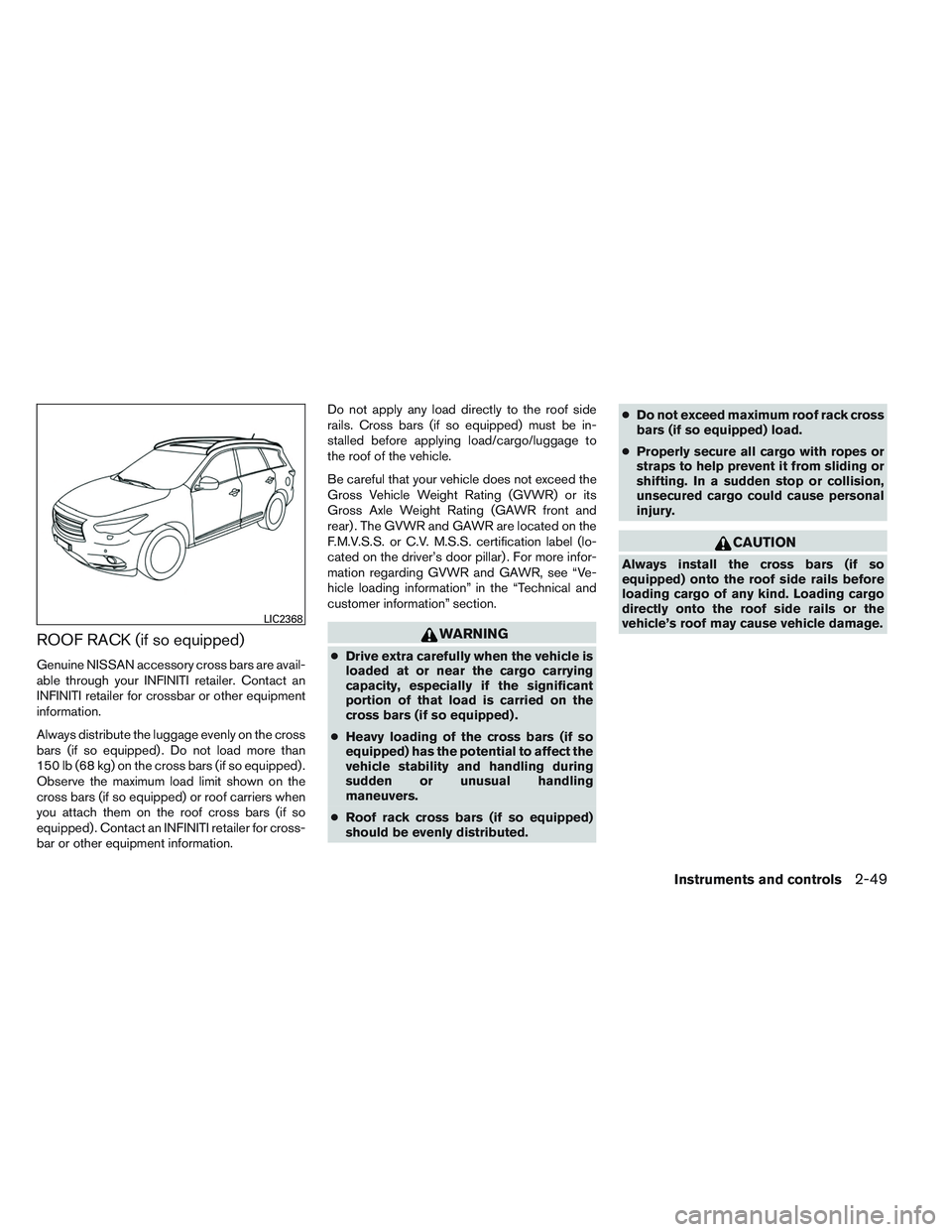
ROOF RACK (if so equipped)
Genuine NISSAN accessory cross bars are avail-
able through your INFINITI retailer. Contact an
INFINITI retailer for crossbar or other equipment
information.
Always distribute the luggage evenly on the cross
bars (if so equipped) . Do not load more than
150 lb (68 kg) on the cross bars (if so equipped) .
Observe the maximum load limit shown on the
cross bars (if so equipped) or roof carriers when
you attach them on the roof cross bars (if so
equipped) . Contact an INFINITI retailer for cross-
bar or other equipment information.Do not apply any load directly to the roof side
rails. Cross bars (if so equipped) must be in-
stalled before applying load/cargo/luggage to
the roof of the vehicle.
Be careful that your vehicle does not exceed the
Gross Vehicle Weight Rating (GVWR) or its
Gross Axle Weight Rating (GAWR front and
rear) . The GVWR and GAWR are located on the
F.M.V.S.S. or C.V. M.S.S. certification label (lo-
cated on the driver’s door pillar) . For more infor-
mation regarding GVWR and GAWR, see “Ve-
hicle loading information” in the “Technical and
customer information” section.
WARNING
●
Drive extra carefully when the vehicle is
loaded at or near the cargo carrying
capacity, especially if the significant
portion of that load is carried on the
cross bars (if so equipped) .
● Heavy loading of the cross bars (if so
equipped) has the potential to affect the
vehicle stability and handling during
sudden or unusual handling
maneuvers.
● Roof rack cross bars (if so equipped)
should be evenly distributed. ●
Do not exceed maximum roof rack cross
bars (if so equipped) load.
● Properly secure all cargo with ropes or
straps to help prevent it from sliding or
shifting. In a sudden stop or collision,
unsecured cargo could cause personal
injury.
CAUTION
Always install the cross bars (if so
equipped) onto the roof side rails before
loading cargo of any kind. Loading cargo
directly onto the roof side rails or the
vehicle’s roof may cause vehicle damage.
LIC2368
Instruments and controls2-49
Page 140 of 544
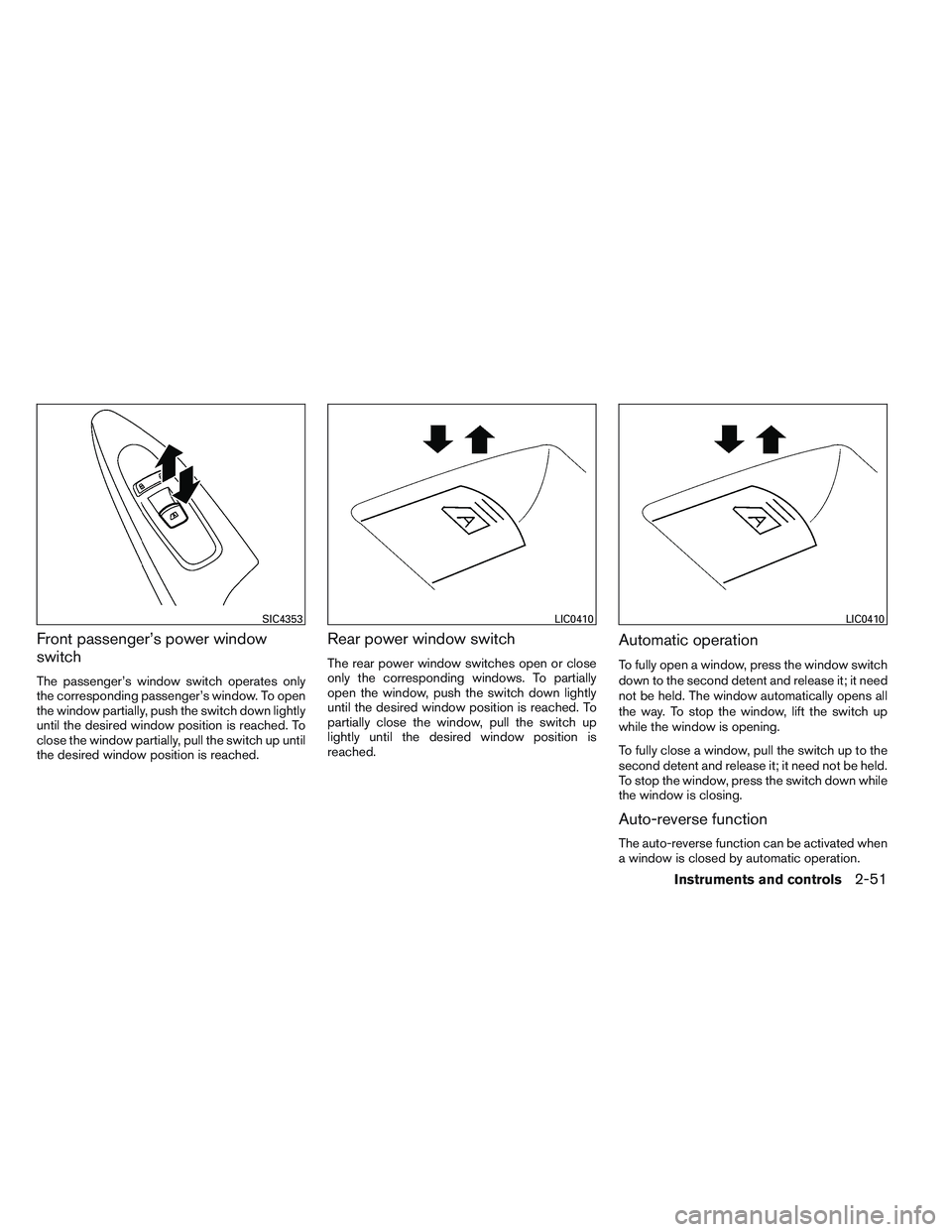
Front passenger’s power window
switch
The passenger’s window switch operates only
the corresponding passenger’s window. To open
the window partially, push the switch down lightly
until the desired window position is reached. To
close the window partially, pull the switch up until
the desired window position is reached.
Rear power window switch
The rear power window switches open or close
only the corresponding windows. To partially
open the window, push the switch down lightly
until the desired window position is reached. To
partially close the window, pull the switch up
lightly until the desired window position is
reached.
Automatic operation
To fully open a window, press the window switch
down to the second detent and release it; it need
not be held. The window automatically opens all
the way. To stop the window, lift the switch up
while the window is opening.
To fully close a window, pull the switch up to the
second detent and release it; it need not be held.
To stop the window, press the switch down while
the window is closing.
Auto-reverse function
The auto-reverse function can be activated when
a window is closed by automatic operation.
SIC4353LIC0410LIC0410
Instruments and controls2-51
Page 150 of 544
FCC Notice:
For USA:
This device complies with Part 15 of the
FCC Rules. Operation is subject to the fol-
lowing two conditions: (1) This device may
not cause harmful interference, and (2) this
device must accept any interference re-
ceived, including interference that may
cause undesired operation.
NOTE:
Changes or modifications not expressly ap-
proved by the party responsible for compli-
ance could void the user’s authority to op-
erate the equipment.
For Canada:
This device complies with RSS-210 of In-
dustry Canada. Operation is subject to the
following two conditions: (1) this device
may not cause interference, and (2) this
device must accept any interference, in-
cluding interference that may cause unde-
sired operation of the device.
Instruments and controls2-61
Page 158 of 544
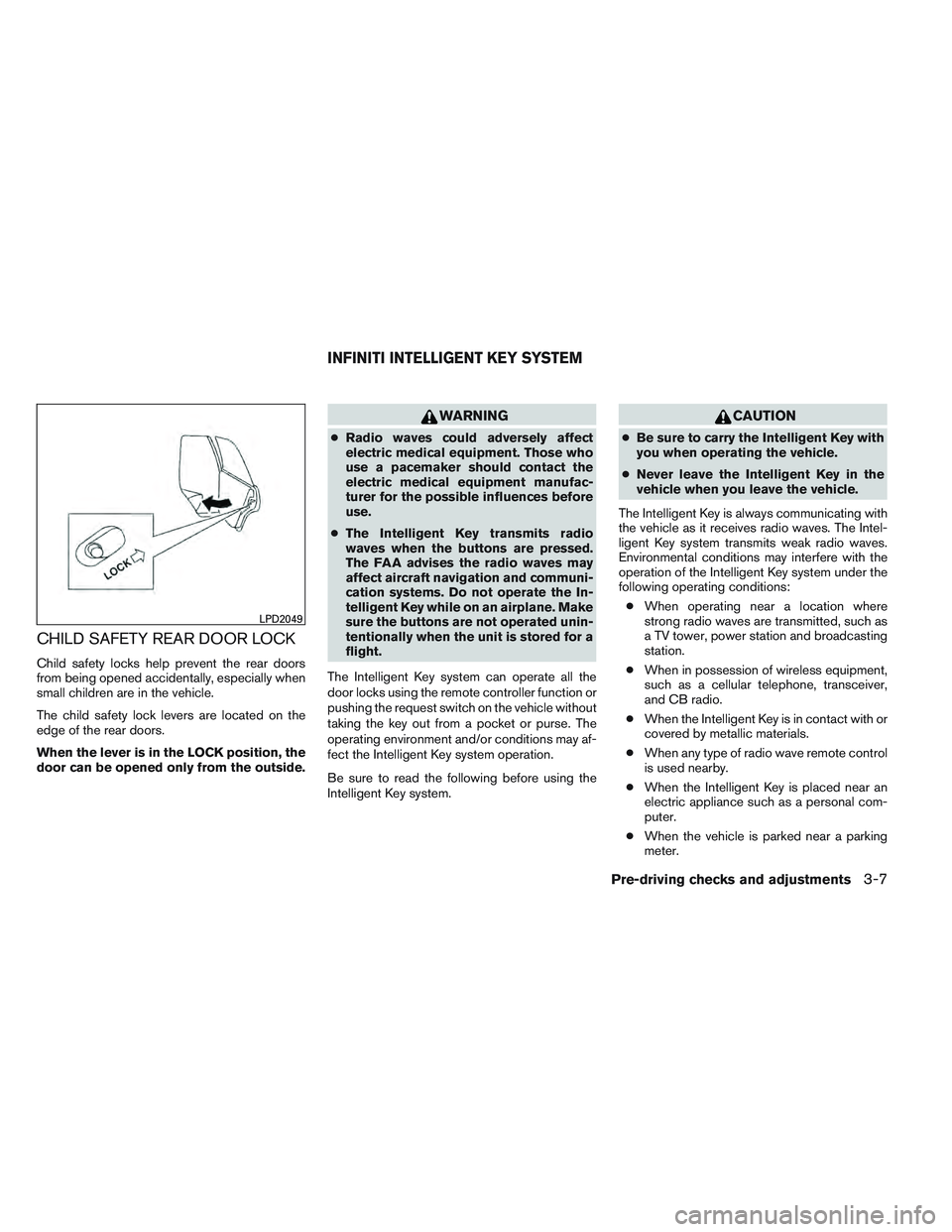
CHILD SAFETY REAR DOOR LOCK
Child safety locks help prevent the rear doors
from being opened accidentally, especially when
small children are in the vehicle.
The child safety lock levers are located on the
edge of the rear doors.
When the lever is in the LOCK position, the
door can be opened only from the outside.
WARNING
●Radio waves could adversely affect
electric medical equipment. Those who
use a pacemaker should contact the
electric medical equipment manufac-
turer for the possible influences before
use.
● The Intelligent Key transmits radio
waves when the buttons are pressed.
The FAA advises the radio waves may
affect aircraft navigation and communi-
cation systems. Do not operate the In-
telligent Key while on an airplane. Make
sure the buttons are not operated unin-
tentionally when the unit is stored for a
flight.
The Intelligent Key system can operate all the
door locks using the remote controller function or
pushing the request switch on the vehicle without
taking the key out from a pocket or purse. The
operating environment and/or conditions may af-
fect the Intelligent Key system operation.
Be sure to read the following before using the
Intelligent Key system.
CAUTION
● Be sure to carry the Intelligent Key with
you when operating the vehicle.
● Never leave the Intelligent Key in the
vehicle when you leave the vehicle.
The Intelligent Key is always communicating with
the vehicle as it receives radio waves. The Intel-
ligent Key system transmits weak radio waves.
Environmental conditions may interfere with the
operation of the Intelligent Key system under the
following operating conditions: ● When operating near a location where
strong radio waves are transmitted, such as
a TV tower, power station and broadcasting
station.
● When in possession of wireless equipment,
such as a cellular telephone, transceiver,
and CB radio.
● When the Intelligent Key is in contact with or
covered by metallic materials.
● When any type of radio wave remote control
is used nearby.
● When the Intelligent Key is placed near an
electric appliance such as a personal com-
puter.
● When the vehicle is parked near a parking
meter.
LPD2049
INFINITI INTELLIGENT KEY SYSTEM
Pre-driving checks and adjustments3-7
Page 168 of 544
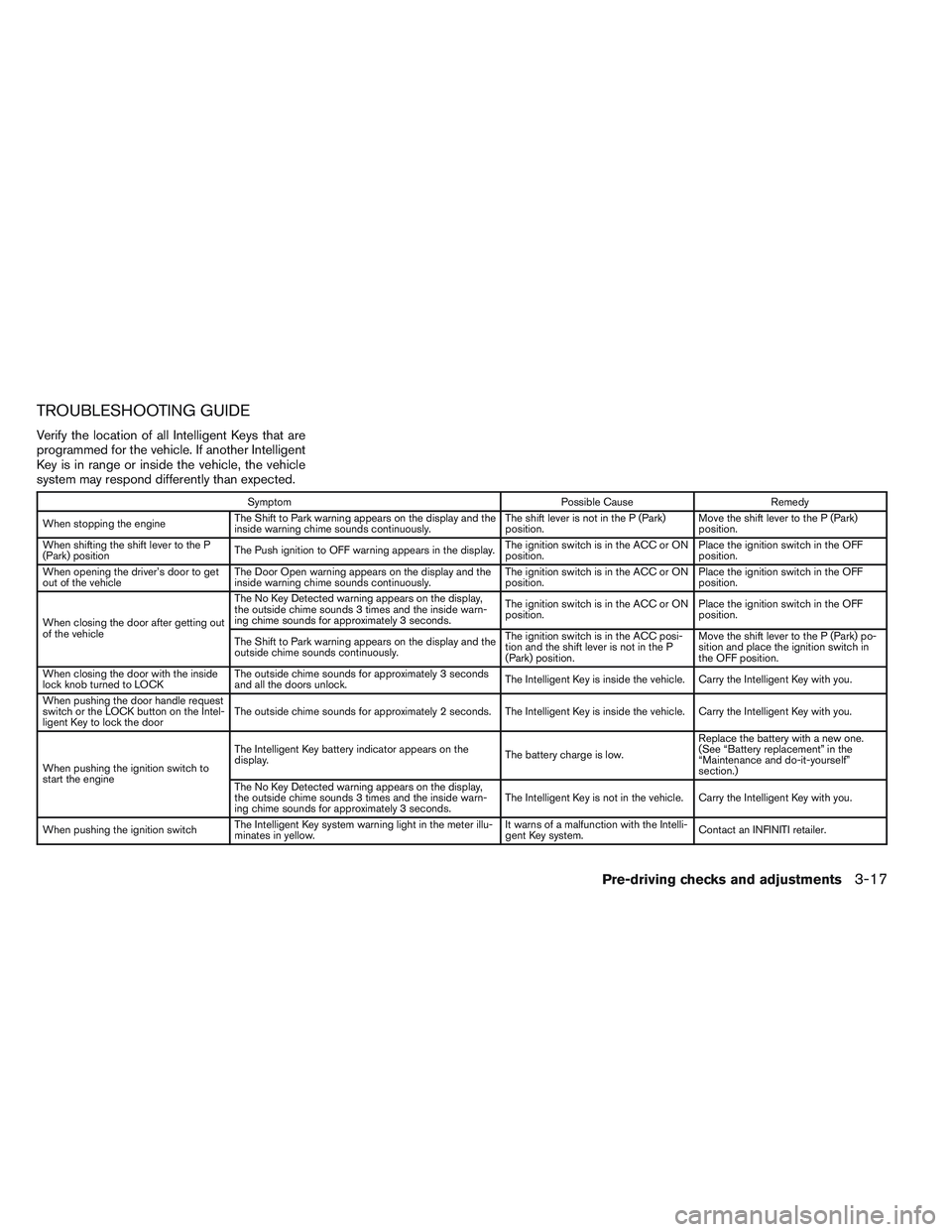
TROUBLESHOOTING GUIDE
Verify the location of all Intelligent Keys that are
programmed for the vehicle. If another Intelligent
Key is in range or inside the vehicle, the vehicle
system may respond differently than expected.
SymptomPossible CauseRemedy
When stopping the engine The Shift to Park warning appears on the display and the
inside warning chime sounds continuously. The shift lever is not in the P (Park)
position.Move the shift lever to the P (Park)
position.
When shifting the shift lever to the P
(Park) position The Push ignition to OFF warning appears in the display. The ignition switch is in the ACC or ON
position.Place the ignition switch in the OFF
position.
When opening the driver’s door to get
out of the vehicle The Door Open warning appears on the display and the
inside warning chime sounds continuously. The ignition switch is in the ACC or ON
position.Place the ignition switch in the OFF
position.
When closing the door after getting out
of the vehicle The No Key Detected warning appears on the display,
the outside chime sounds 3 times and the inside warn-
ing chime sounds for approximately 3 seconds.
The ignition switch is in the ACC or ON
position.
Place the ignition switch in the OFF
position.
The Shift to Park warning appears on the display and the
outside chime sounds continuously. The ignition switch is in the ACC posi-
tion and the shift lever is not in the P
(Park) position.Move the shift lever to the P (Park) po-
sition and place the ignition switch in
the OFF position.
When closing the door with the inside
lock knob turned to LOCK The outside chime sounds for approximately 3 seconds
and all the doors unlock.
The Intelligent Key is inside the vehicle. Carry the Intelligent Key with you.
When pushing the door handle request
switch or the LOCK button on the Intel-
ligent Key to lock the door The outside chime sounds for approximately 2 seconds. The Intelligent Key is inside the vehicle. Carry the Intelligent Key with you.
When pushing the ignition switch to
start the engine The Intelligent Key battery indicator appears on the
display.
The battery charge is low.Replace the battery with a new one.
(See “Battery replacement” in the
“Maintenance and do-it-yourself”
section.)
The No Key Detected warning appears on the display,
the outside chime sounds 3 times and the inside warn-
ing chime sounds for approximately 3 seconds. The Intelligent Key is not in the vehicle. Carry the Intelligent Key with you.
When pushing the ignition switch The Intelligent Key system warning light in the meter illu-
minates in yellow. It warns of a malfunction with the Intelli-
gent Key system.
Contact an INFINITI retailer.
Pre-driving checks and adjustments3-17