climate settings INFINITI QX60 2016 User Guide
[x] Cancel search | Manufacturer: INFINITI, Model Year: 2016, Model line: QX60, Model: INFINITI QX60 2016Pages: 607, PDF Size: 6.51 MB
Page 216 of 607
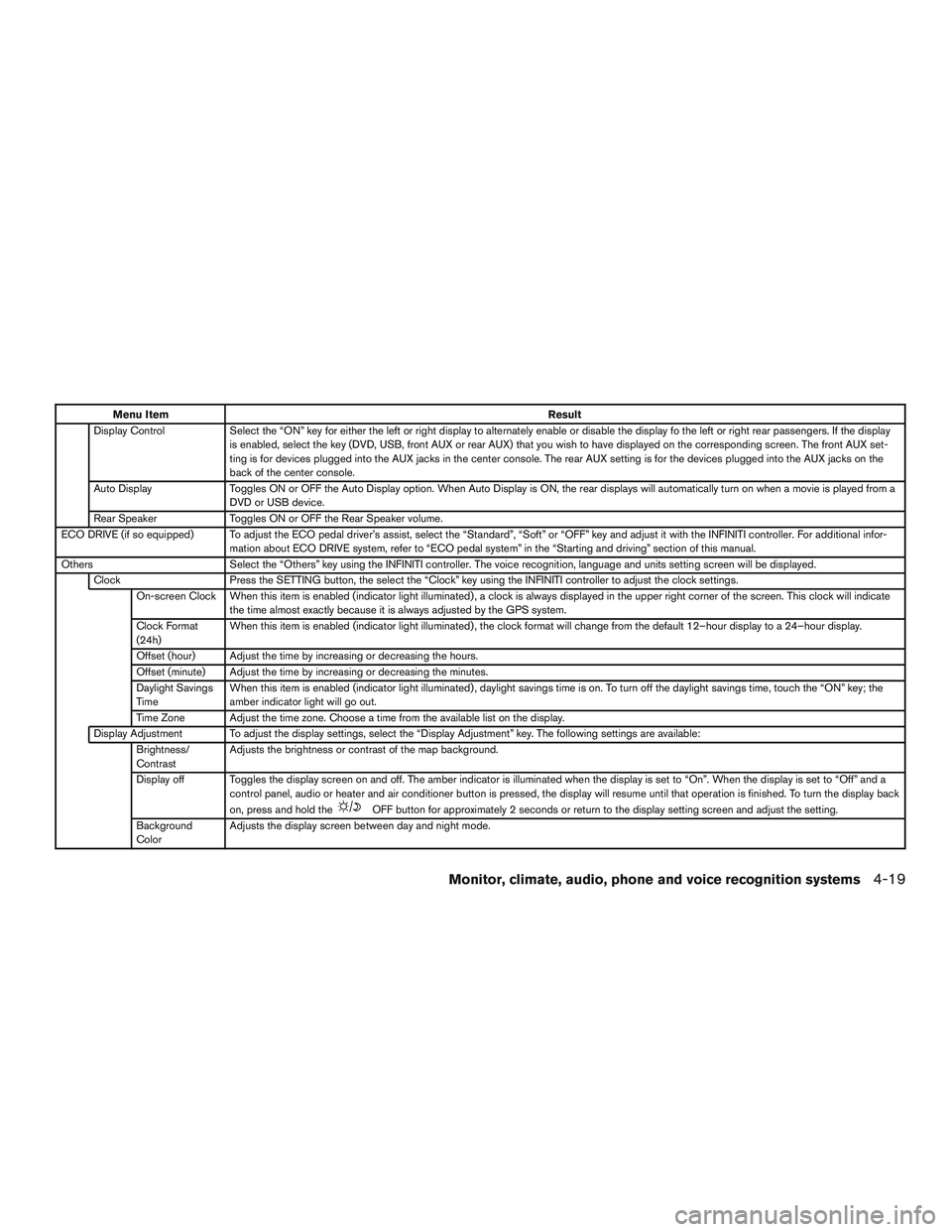
Menu ItemResult
Display Control Select the “ON” key for either the left or right display to alternately enable or disable the display fo the left or right rear passengers. If the display
is enabled, select the key (DVD, USB, front AUX or rear AUX) that you wish to have displayed on the corresponding screen. The front AUX set-
ting is for devices plugged into the AUX jacks in the center console. The rear AUX setting is for the devices plugged into the AUX jacks on the
back of the center console.
Auto Display Toggles ON or OFF the Auto Display option. When Auto Display is ON, the rear displays will automatically turn on when a movie is played from a
DVD or USB device.
Rear Speaker Toggles ON or OFF the Rear Speaker volume.
ECO DRIVE (if so equipped) To adjust the ECO pedal driver’s assist, select the “Standard”, “Soft” or “OFF” key and adjust it with the INFINITI controller. For additional infor- mation about ECO DRIVE system, refer to “ECO pedal system” in the “Starting and driving” section of this manual.
Others Select the “Others” key using the INFINITI controller. The voice recognition, language and units setting screen will be displayed.
Clock Press the SETTING button, the select the “Clock” key using the INFINITI controller to adjust the clock settings.
On-screen Clock When this item is enabled (indicator light illuminated) , a clock is always displayed in the upper right corner of the screen. This cloc k will indicate
the time almost exactly because it is always adjusted by the GPS system.
Clock Format
(24h) When this item is enabled (indicator light illuminated) , the clock format will change from the default 12–hour display to a 24–hour display.
Offset (hour) Adjust the time by increasing or decreasing the hours.
Offset (minute) Adjust the time by increasing or decreasing the minutes.
Daylight Savings
Time When this item is enabled (indicator light illuminated) , daylight savings time is on. To turn off the daylight savings time, touch the “ON” key; the
amber indicator light will go out.
Time Zone Adjust the time zone. Choose a time from the available list on the display.
Display Adjustment To adjust the display settings, select the “Display Adjustment” key. The following settings are available: Brightness/
Contrast Adjusts the brightness or contrast of the map background.
Display off Toggles the display screen on and off. The amber indicator is illuminated when the display is set to “On”. When the display is set to “Off” and a
control panel, audio or heater and air conditioner button is pressed, the display will resume until that operation is finished. To turn the display bac k
on, press and hold the
OFF button for approximately 2 seconds or return to the display setting screen and adjust the setting.
Background
Color Adjusts the display screen between day and night mode.
Monitor, climate, audio, phone and voice recognition systems4-19
Page 217 of 607
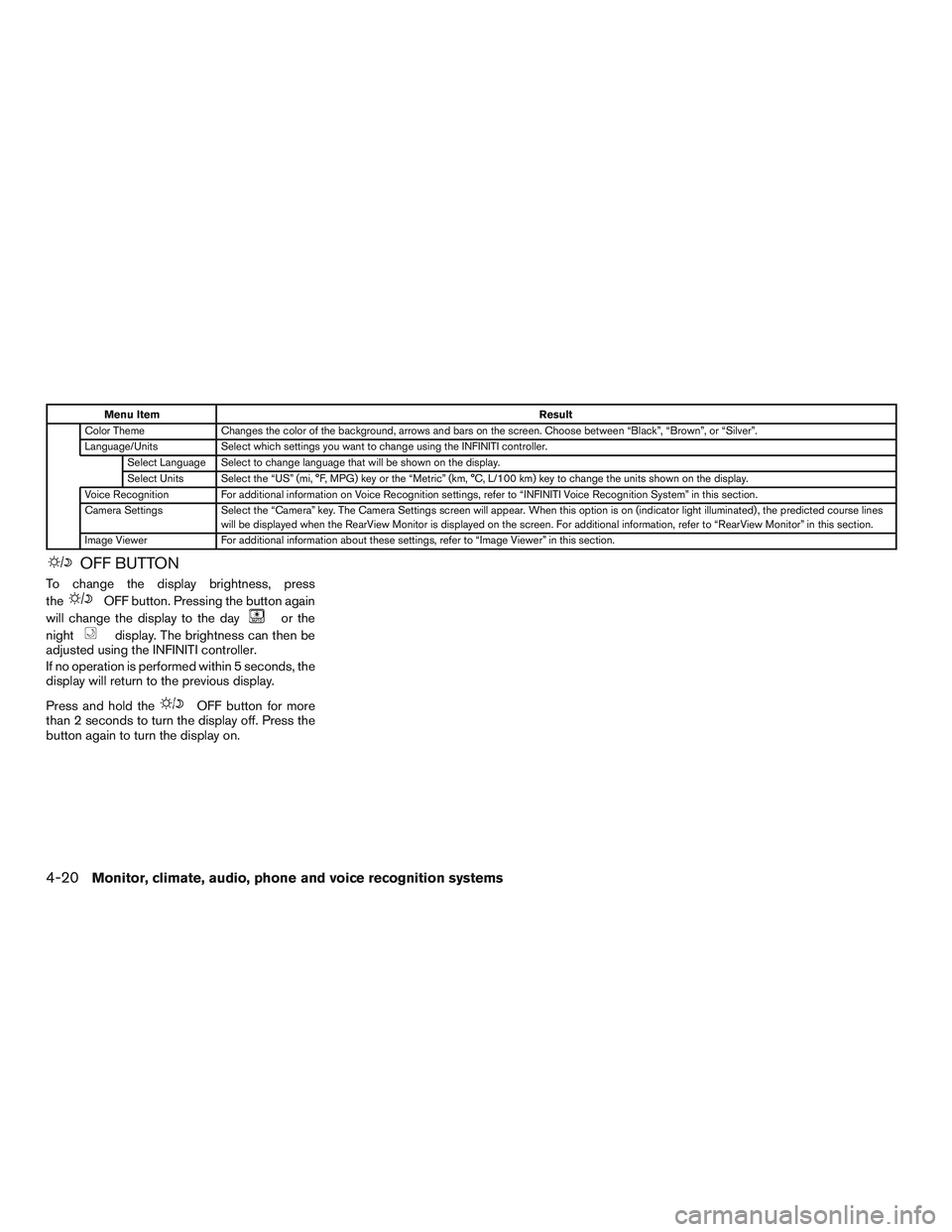
Menu ItemResult
Color Theme Changes the color of the background, arrows and bars on the screen. Choose between “Black”, “Brown”, or “Silver”.
Language/Units Select which settings you want to change using the INFINITI controller.
Select Language Select to change language that will be shown on the display.
Select Units Select the “US” (mi, °F, MPG) key or the “Metric” (km, °C, L/100 km) key to change the units shown on the display.
Voice Recognition For additional information on Voice Recognition settings, refer to “INFINITI Voice Recognition System” in this section.
Camera Settings Select the “Camera” key. The Camera Settings screen will appear. When this option is on (indicator light illuminated) , the predicted course lines
will be displayed when the RearView Monitor is displayed on the screen. For additional information, refer to “RearView Monitor” in this section.
Image Viewer For additional information about these settings, refer to “Image Viewer” in this section.
OFF BUTTON
To change the display brightness, press
the
OFF button. Pressing the button again
will change the display to the day
or the
night
display. The brightness can then be
adjusted using the INFINITI controller.
If no operation is performed within 5 seconds, the
display will return to the previous display.
Press and hold the
OFF button for more
than 2 seconds to turn the display off. Press the
button again to turn the display on.
4-20Monitor, climate, audio, phone and voice recognition systems
Page 219 of 607
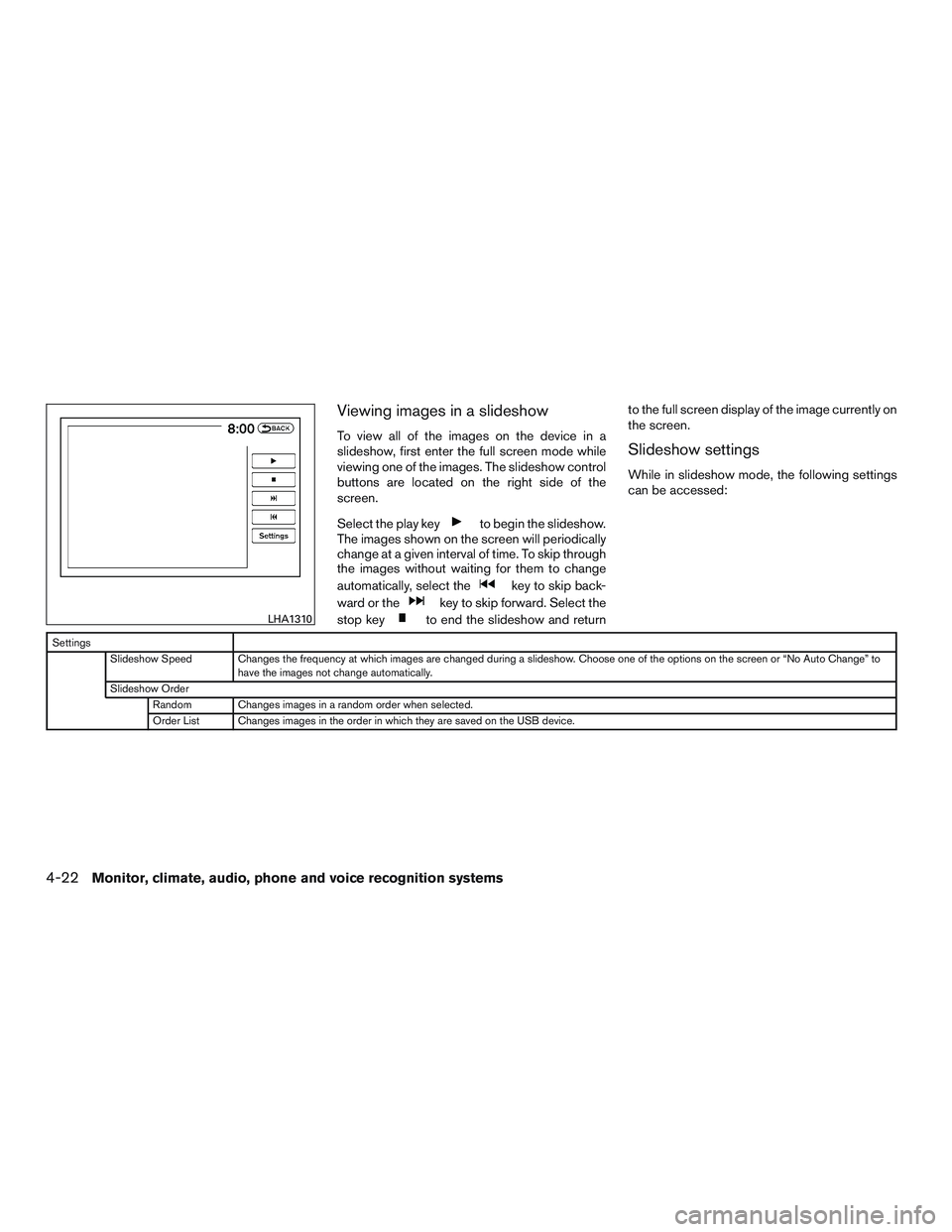
Viewing images in a slideshow
To view all of the images on the device in a
slideshow, first enter the full screen mode while
viewing one of the images. The slideshow control
buttons are located on the right side of the
screen.
Select the play key
to begin the slideshow.
The images shown on the screen will periodically
change at a given interval of time. To skip through
the images without waiting for them to change
automatically, select the
key to skip back-
ward or the
key to skip forward. Select the
stop key
to end the slideshow and return to the full screen display of the image currently on
the screen.
Slideshow settings
While in slideshow mode, the following settings
can be accessed:
Settings
Slideshow Speed Changes the frequency at which images are changed during a slideshow. Choose one of the options on the screen or “No Auto Change” to have the images not change automatically.
Slideshow Order Random Changes images in a random order when selected.
Order List Changes images in the order in which they are saved on the USB device.
LHA1310
4-22Monitor, climate, audio, phone and voice recognition systems
Page 225 of 607
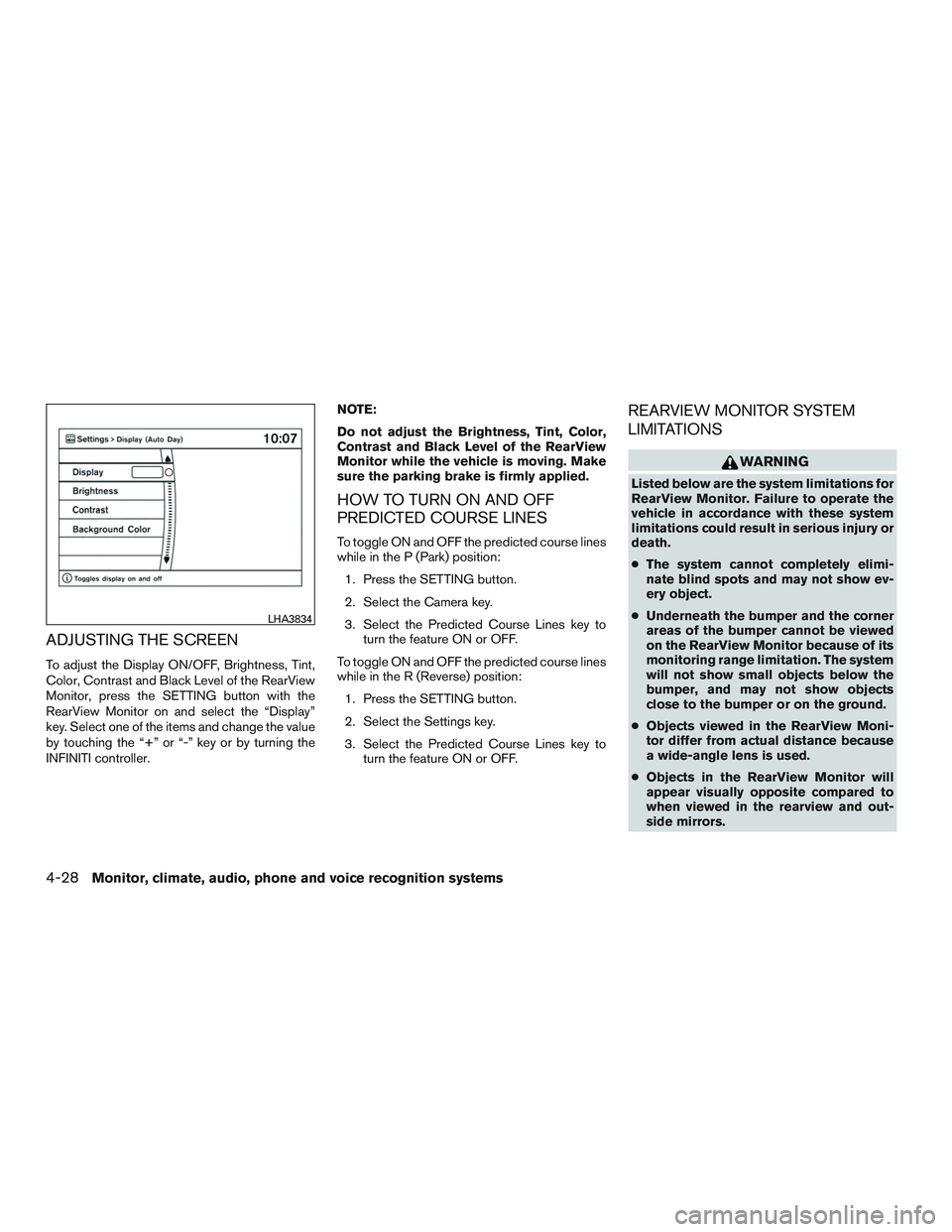
ADJUSTING THE SCREEN
To adjust the Display ON/OFF, Brightness, Tint,
Color, Contrast and Black Level of the RearView
Monitor, press the SETTING button with the
RearView Monitor on and select the “Display”
key. Select one of the items and change the value
by touching the “+” or “-” key or by turning the
INFINITI controller.NOTE:
Do not adjust the Brightness, Tint, Color,
Contrast and Black Level of the RearView
Monitor while the vehicle is moving. Make
sure the parking brake is firmly applied.
HOW TO TURN ON AND OFF
PREDICTED COURSE LINES
To toggle ON and OFF the predicted course lines
while in the P (Park) position:
1. Press the SETTING button.
2. Select the Camera key.
3. Select the Predicted Course Lines key to turn the feature ON or OFF.
To toggle ON and OFF the predicted course lines
while in the R (Reverse) position: 1. Press the SETTING button.
2. Select the Settings key.
3. Select the Predicted Course Lines key to turn the feature ON or OFF.
REARVIEW MONITOR SYSTEM
LIMITATIONS
WARNING
Listed below are the system limitations for
RearView Monitor. Failure to operate the
vehicle in accordance with these system
limitations could result in serious injury or
death.
●The system cannot completely elimi-
nate blind spots and may not show ev-
ery object.
● Underneath the bumper and the corner
areas of the bumper cannot be viewed
on the RearView Monitor because of its
monitoring range limitation. The system
will not show small objects below the
bumper, and may not show objects
close to the bumper or on the ground.
● Objects viewed in the RearView Moni-
tor differ from actual distance because
a wide-angle lens is used.
● Objects in the RearView Monitor will
appear visually opposite compared to
when viewed in the rearview and out-
side mirrors.
LHA3834
4-28Monitor, climate, audio, phone and voice recognition systems
Page 239 of 607

●If your vehicle sustains damage to the
bumper fascia, leaving it misaligned or
bent, the sensing zone may be altered
causing inaccurate measurement of ob-
jects or false alarms.
CAUTION
● Excessive noise (such as audio system
volume or an open vehicle window) will
interfere with the tone and it may not be
heard.
● Keep the surface of the Camera Aiding
Sonars (parking sensors) (located on
the front and rear bumper fascia) free
from accumulations of snow, ice and
dirt. Do not scratch the surface of the
Camera Aiding Sonars (parking sen-
sors) when cleaning. If the Camera Aid-
ing Sonars (parking sensors) are cov-
ered, the accuracy of the Camera Aiding
Sonar’s (parking sensor’s) function will
be diminished. The system gives the tone for rear objects when
the shift lever is in the R (Reverse) position.
The system is deactivated at speeds above
6 mph (10 km/h). It is reactivated at lower
speeds.
When the objects are detected, the indicator
(green) appears and blinks and the tone sounds
intermittently. When the vehicle moves closer to
the object, the color of the indicator turns yellow
and the rate of the blinking and the rate of the
tone increase. When the vehicle is very close to
the object, the indicator stops blinking and turns
red, and the tone sounds continuously.
The intermittent tone will stop after 3 seconds
when an object is detected by only the corner
Camera Aiding Sonar (parking sensor) and the
distance does not change.
The tone will stop when the object is no longer
near the vehicle.
In the below cases, the Camera Aiding Sonar
(parking sensor) will be turned back on automati-
cally:
● When the shift lever is in the R (Reverse)
position.
● When vehicle speed decreases below ap-
proximately 6 mph (10 km/h).
● When the ignition switch is placed in the
OFF position and turned back to the ON
position again.
● The Camera Aiding Sonar (parking sensor)
system can be permanently turned off using
the meter settings.
4-42Monitor, climate, audio, phone and voice recognition systems
Page 248 of 607

The sunload sensor, located on the top driver’s
side of the instrument panel, helps the system
maintain a constant temperature. Do not put any-
thing on or around this sensor.CLIMATE SETTING SCREEN
Climate control settings can be changed on the
screen.
Press the CLIMATE button on the instrument
panel and turn the display to the Climate mode.
Heating (A/C off)
The air conditioner does not activate in this mode.
When you need to heat only, use this mode.1. Press the CLIMATE button.
2. If the “A/C” indicator on the screen illumi- nates, select the “A/C” key. (The “A/C” indi-
cator will turn off.) 3. Press the temperature control button to set
the desired temperature.
● The temperature of the passenger compart-
ment will be maintained automatically. Air
flow distribution and fan speed are also con-
trolled automatically.
● Do not set the temperature lower than the
outside air temperature or the system may
not work properly.
● This procedure is not recommended if win-
dows fog up.
When the outside temperature decreases to ap-
proximately 32°F (0°C) , the A/C function does
not activate even if the “A/C” indicator light illu-
minates.
Dual control mode setting
You can individually set the driver and front pas-
senger side temperature and air flow mode using
each temperature control button or manual air
flow control button. 1. Press the CLIMATE button.
2. By touching the “DUAL” key, or when the passenger side temperature control button
or manual air control button is pressed, the
“DUAL” indicator on the screen will illumi-
nate.
LHA2173LHA2167
Monitor, climate, audio, phone and voice recognition systems4-51
Page 270 of 607
Audio settings
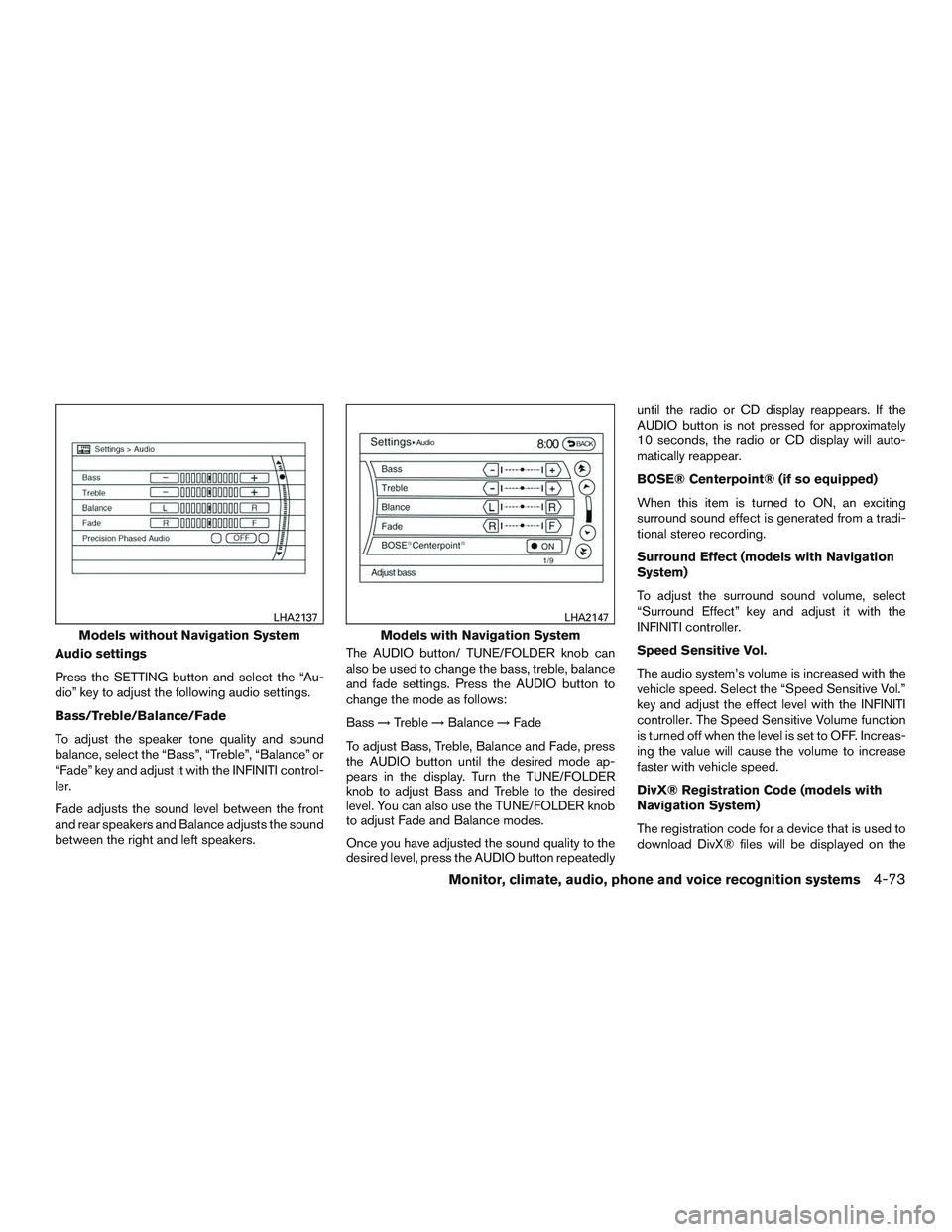
Press the SETTING button and select the “Au-
dio” key to adjust the following audio settings.
Bass/Treble/Balance/Fade
To adjust the speaker tone quality and sound
balance, select the “Bass”, “Treble”, “Balance” or
“Fade” key and adjust it with the INFINITI control-
ler.
Fade adjusts the sound level between the front
and rear speakers and Balance adjusts the sound
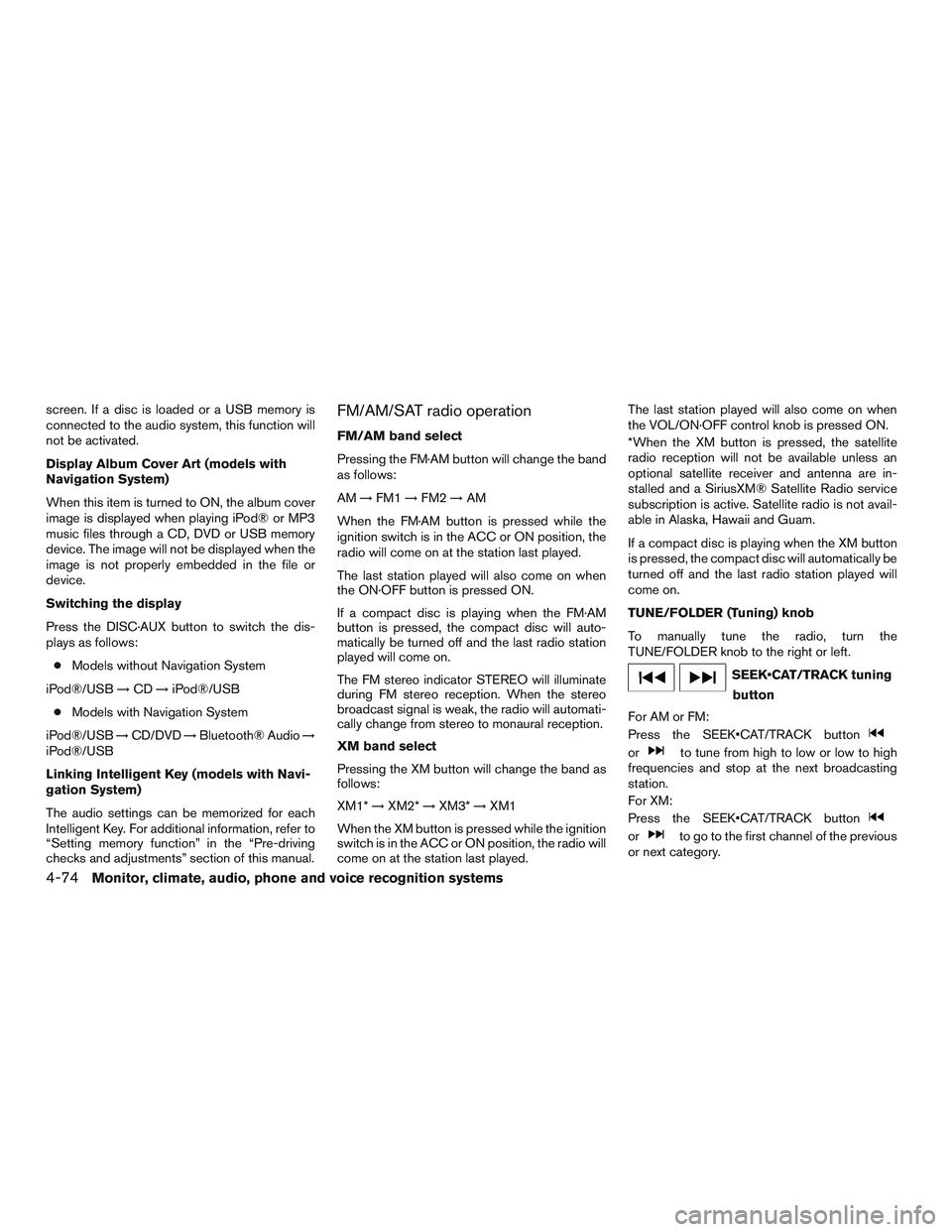
between the right and left speakers.The AUDIO button/ TUNE/FOLDER knob can
also be used to change the bass, treble, balance
and fade settings. Press the AUDIO button to
change the mode as follows:
Bass
→Treble →Balance →Fade
To adjust Bass, Treble, Balance and Fade, press
the AUDIO button until the desired mode ap-
pears in the display. Turn the TUNE/FOLDER
knob to adjust Bass and Treble to the desired
level. You can also use the TUNE/FOLDER knob
to adjust Fade and Balance modes.
Once you have adjusted the sound quality to the
desired level, press the AUDIO button repeatedly until the radio or CD display reappears. If the
AUDIO button is not pressed for approximately
10 seconds, the radio or CD display will auto-
matically reappear.
BOSE® Centerpoint® (if so equipped)
When this item is turned to ON, an exciting
surround sound effect is generated from a tradi-
tional stereo recording.
Surround Effect (models with Navigation
System)
To adjust the surround sound volume, select
“Surround Effect” key and adjust it with the
INFINITI controller.
Speed Sensitive Vol.
The audio system’s volume is increased with the
vehicle speed. Select the “Speed Sensitive Vol.”
key and adjust the effect level with the INFINITI
controller. The Speed Sensitive Volume function
is turned off when the level is set to OFF. Increas-
ing the value will cause the volume to increase
faster with vehicle speed.
DivX® Registration Code (models with
Navigation System)
The registration code for a device that is used to
download DivX® files will be displayed on the
Models without Navigation System
LHA2137
Models with Navigation System
LHA2147
Monitor, climate, audio, phone and voice recognition systems4-73
Page 271 of 607
screen. If a disc is loaded or a USB memory is
connected to the audio system, this function will
not be activated.
Display Album Cover Art (models with
Navigation System)
When this item is turned to ON, the album cover
image is displayed when playing iPod® or MP3
music files through a CD, DVD or USB memory
device. The image will not be displayed when the
image is not properly embedded in the file or
device.
Switching the display
Press the DISC·AUX button to switch the dis-
plays as follows:● Models without Navigation System
iPod®/USB →CD →iPod®/USB
● Models with Navigation System
iPod®/USB →CD/DVD →Bluetooth® Audio →
iPod®/USB
Linking Intelligent Key (models with Navi-
gation System)
The audio settings can be memorized for each
Intelligent Key. For additional information, refer to
“Setting memory function” in the “Pre-driving
checks and adjustments” section of this manual.FM/AM/SAT radio operation
FM/AM band select
Pressing the FM·AM button will change the band
as follows:
AM →FM1 →FM2 →AM
When the FM·AM button is pressed while the
ignition switch is in the ACC or ON position, the
radio will come on at the station last played.
The last station played will also come on when
the ON·OFF button is pressed ON.
If a compact disc is playing when the FM·AM
button is pressed, the compact disc will auto-
matically be turned off and the last radio station
played will come on.
The FM stereo indicator STEREO will illuminate
during FM stereo reception. When the stereo
broadcast signal is weak, the radio will automati-
cally change from stereo to monaural reception.
XM band select
Pressing the XM button will change the band as
follows:
XM1* →XM2* →XM3* →XM1
When the XM button is pressed while the ignition
switch is in the ACC or ON position, the radio will
come on at the station last played. The last station played will also come on when
the VOL/ON·OFF control knob is pressed ON.
*When the XM button is pressed, the satellite
radio reception will not be available unless an
optional satellite receiver and antenna are in-
stalled and a SiriusXM® Satellite Radio service
subscription is active. Satellite radio is not avail-
able in Alaska, Hawaii and Guam.
If a compact disc is playing when the XM button
is pressed, the compact disc will automatically be
turned off and the last radio station played will
come on.
TUNE/FOLDER (Tuning) knob
To manually tune the radio, turn the
TUNE/FOLDER knob to the right or left.
SEEK•CAT/TRACK tuning
button
For AM or FM:
Press the SEEK•CAT/TRACK button
orto tune from high to low or low to high
frequencies and stop at the next broadcasting
station.
For XM:
Press the SEEK•CAT/TRACK button
orto go to the first channel of the previous
or next category.
4-74Monitor, climate, audio, phone and voice recognition systems
Page 277 of 607

AUX settings
Select the “Menu” key using the INFINITI control-
ler.
The display mode can be set to Normal, Wide or
Cinema. The volume setting can be set to Low,
Medium or High.
Additional features
For additional information about the iPod® player
available with this system, refer to “iPod® player
operation without navigation system” or “iPod®
player operation with navigation system” in this
section.For additional information about the USB (Uni-
versal Serial Bus) Connection Port available with
this system, refer to “USB (Universal Serial Bus)
Connection Port (models without navigation sys-
tem)” or “USB (Universal Serial Bus) Connection
Port (models with navigation system)” in this sec-
tion.
For additional information about the Bluetooth®
streaming audio feature available with this sys-
tem, refer to “Bluetooth® streaming audio” in this
section.
DIGITAL VERSATILE DISC (DVD)
PLAYER OPERATION (models with
Navigation System)
Precautions
Start the engine when using the DVD entertain-
ment system.
Movies will not be shown on the front display
while the vehicle is in any drive position to reduce
driver distraction. Audio is available when a movie
is played. To view movies on the front display,
stop the vehicle in a safe location, move the shift
lever to the P (Park) position and apply the park-
ing brake.
WARNING
●
The driver must not attempt to operate
the DVD system or wear the head-
phones while the vehicle is in motion so
that full attention may be given to ve-
hicle operation.
● Do not attempt to modify the system to
display a movie on the front screen
while the vehicle is being driven. Doing
so may distract the driver and may
cause a collision and serious personal
injury or death.
CAUTION
● Only operate the DVD while the vehicle
engine is running. Operating the DVD
for extended periods of time with the
engine OFF can discharge the vehicle
battery.
● Do not allow the system to get wet.
Excessive moisture such as spilled liq-
uids may cause the system to
malfunction.
● While playing VIDEO-CD media, this
DVD player does not guarantee com-
plete functionality of all VIDEO-CD
formats.
LHA1394
4-80Monitor, climate, audio, phone and voice recognition systems
Page 278 of 607

Display settings
To adjust the front display mode, press the SET-
TING button while the DVD is playing. Select the
“Others” key with the INFINITI controller or with
the touch-screen, then select the “Display” key.
To adjust the display ON/OFF, brightness, tint,
color and contrast, select the “Display Adjust-
ment” key with the INFINITI controller or with the
touch-screen and then select the key of the set-
ting you wish to adjust. After the desired changes
have been made, press the
BACK button
to save the settings.
Playing a DVD
DISC·AUX button
Park the vehicle in a safe location for the front
seat occupants to operate the DVD drive while
watching the images.
Press the DISC·AUX button until the DVD mode
is active on the display.
When a DVD is loaded, it will be replayed auto-
matically.
The operation screen will be turned on when the
DISC·AUX button is pressed while a DVD is
playing. The operation screen will turn off auto-
matically after a period of time. To turn it on again,
press the DISC·AUX button. DVD operation keys
When the DVD is playing without the operation
screen being shown, you may use the touch-
screen to select items from the displayed video.
You may also use the INFINITI controller to select
an item from the displayed video. When the op-
eration screen is being shown, use the INFINITI
controller or the touch-screen to select an item
from the displayed menus.
PAUSE
Select the
key to pause the DVD. To re-
sume playing the DVD, use the
key.
PLAY
Select the
key to start playing the DVD or
resume playing the DVD after it has been paused.
STOP
Select the
key to stop playing the DVD.
NEXT/PREVIOUS
CHAPTER
Select the
key to skip the chapter(s) of the
disc forward. Select the
key to skip the
chapter(s) of the disc backward. The chapters
will advance forward or backward the number of
times the respective key is touched or selected
with the INFINITI controller.
CM SKIP
This function is only for DVD-VIDEO and DVD-
VR. Select the
orkey to fast forward
or rewind a set interval of time based on the CM
settings. For additional information, refer to “DVD
settings” in this section.
Top Menu
When the “Top Menu” key is selected while the
DVD is playing, the top menu specific to each
disc will be displayed. For additional information,
refer to the instructions attached to the disc.
DVD settings
Select the “Settings” key to adjust the following
settings:
● Key (DVD-VIDEO)
Displays the operation keys for the specific
DVD menu.
– Select the directional keys to move the cursor on the DVD menu.
– Select the “Enter” key to fix the selected menu item.
– Select the “Move” key to move the loca- tion of the operation keys on the screen.
Monitor, climate, audio, phone and voice recognition systems4-81