display INFINITI QX60 2016 User Guide
[x] Cancel search | Manufacturer: INFINITI, Model Year: 2016, Model line: QX60, Model: INFINITI QX60 2016Pages: 607, PDF Size: 6.51 MB
Page 99 of 607

the generator belt. If the belt is loose, broken,
missing, or if the light remains on, have your
vehicle serviced immediately. It is recommended
that you visit an INFINITI retailer for this service.
CAUTION
●Do not continue driving if the generator
belt is loose, broken or missing.
Forward Emergency Braking
(FEB) system warning light (if
so equipped)
This light illuminates when the Forward Emer-
gency Braking system is set to OFF on the meter
display.
If the light illuminates when the Forward Emer-
gency Braking system is ON, it may indicate that
the system is unavailable. For additional informa-
tion, refer to “Forward Emergency Braking (FEB)”
in the “Starting and driving” section of this
manual.
Low tire pressure warning light
Your vehicle is equipped with a TPMS that moni-
tors the tire pressure of all tires except the spare.
The low tire pressure warning light warns of low
tire pressure or indicates that the TPMS is not
functioning properly. After the ignition switch is placed in the ON
position, this light illuminates for about 1 second
and turns off.
Low tire pressure warning
If the vehicle is being driven with low tire
pressure, the warning light will illuminate.
A “Tire Press Low - Add Air” warning also
appears in the vehicle information display.
When the low tire pressure warning light
illuminates, you should stop and adjust the
tire pressure of all four tires to the recom-
mended COLD tire pressure shown on the
Tire and Loading Information label located
in the driver’s door opening. The low tire
pressure warning light does not automati-
cally turn off when the tire pressure is ad-
justed. After the tire is inflated to the rec-
ommended pressure, the vehicle must be
driven at speeds above 16 mph (25 km/h) to
activate the TPMS and turn off the low tire
pressure warning light. Use a tire pressure
gauge to check the tire pressure.
The “Tire Press Low - Add Air” warning appears
each time the ignition switch is placed in the ON
position as long as the low tire pressure warning
light remains illuminated.
For additional information, refer to “Vehicle infor-
mation display” in the “Instruments and controls”section and “Tire Pressure Monitoring System
(TPMS)” in the “Starting and driving” section and
in the “In case of emergency” section of this
manual.
TPMS malfunction
If the TPMS is not functioning properly, the low
tire pressure warning light will flash for approxi-
mately 1 minute when the ignition switch is
placed in the ON position. The light will remain on
after the 1 minute. Have the system checked. It is
recommended that you visit an INFINITI retailer
for this service. The “Tire Pressure Low - Add Air”
warning does not appear if the low tire pressure
warning light illuminates to indicate a TPMS mal-
function.
For additional information, refer to “Tire Pressure
Monitoring System (TPMS)” in the “Starting and
driving” section and “Tire pressure” in the “Main-
tenance and do-it-yourself” section of this
manual.
WARNING
●
Radio waves could adversely affect
electric medical equipment. Those who
use a pacemaker should contact the
electric medical equipment manufac-
turer for the possible influences before
use.
2-10Instruments and controls
Page 100 of 607

●If the light does not illuminate with the
ignition switch placed in the ON posi-
tion, have the vehicle checked. It is rec-
ommended that you visit an INFINITI
retailer for this service.
● If the light illuminates while driving,
avoid sudden steering maneuvers or
abrupt braking, reduce vehicle speed,
pull off the road to a safe location and
stop the vehicle as soon as possible.
Driving with under-inflated tires may
permanently damage the tires and in-
crease the likelihood of tire failure. Se-
rious vehicle damage could occur and
may lead to an accident and could result
in serious personal injury or death.
Check the tire pressure for all four tires.
Adjust the tire pressure to the recom-
mended COLD tire pressure shown on
the tire placard label located in the driv-
er’s door opening to turn the low tire
pressure warning light OFF. If the light
still illuminates while driving after ad-
justing the tire pressure, a tire may be
flat. If you have a flat tire, replace it with
a spare tire as soon as possible. ●
Since the spare tire is not equipped with
the TPMS, when a spare tire is mounted
or a wheel is replaced tire pressure will
not be indicated, the TPMS will not
function and the low tire pressure warn-
ing light will flash for approximately
1 minute. The light will remain on after
1 minute. Have your tires replaced
and/or TPMS system reset as soon as
possible. It is recommended that you
visit an INFINITI retailer for these
services.
● Replacing tires with those not originally
specified by INFINITI could affect the
proper operation of the TPMS.
CAUTION
● The TPMS is not a substitute for the
regular tire pressure check. Be sure to
check the tire pressure regularly.
● If the vehicle is being driven at speeds
of less than 16 mph (25 km/h), the
TPMS may not operate correctly.
● Be sure to install the specified size of
tires to the four wheels correctly.
Master warning light
When the ignition switch is in the ON position,
the master warning light illuminates if any of the
following are displayed on the vehicle information
display:
● No key warning
● Low fuel warning
● Low washer fluid warning
● Parking brake release warning
● Door open warning
● Loose fuel cap warning
● Check tire pressure warning
For additional information, refer to “Vehicle infor-
mation display” in this section.
Power steering warning light
WARNING
● If the engine is not running or is turned
off while driving, the power assist for
the steering will not work. Steering will
be harder to operate.
Instruments and controls2-11
Page 102 of 607

INDICATOR LIGHTS
For additional information, refer to “Vehicle infor-
mation display” in this section.
Continuously VariableTransmission (CVT) position
indicator light
When the ignition switch is placed in the ON
position, this indicator light shows the shift lever
position. For additional information, refer to “Driv-
ing the vehicle” in the “Starting and driving” sec-
tion of this manual.
Front fog light indicator light(green)
The front fog light indicator light illuminates when
the front fog lights are ON. For additional infor-
mation, refer to “Fog light switch” in this section.
Front passenger air bag statuslight
The front passenger air bag status light will be lit
and the passenger front air bag will be OFF
depending on how the front passenger seat is
being used.
For additional information, refer to “Front passen-
ger air bag and status light” in the “Safety — Seats, seat belts and supplemental restraint sys-
tem” section of this manual.
High beam indicator light
(blue)
This blue light comes on when the headlight high
beams are on and goes out when the low beams
are selected.
The high beam indicator light also comes on
when the passing signal is activated.
Malfunction Indicator Light(MIL)
If this indicator light comes on steady or blinks
while the engine is running, it may indicate a
potential emission control malfunction.
The MIL may also come on steady if the fuel-filler
cap is loose or missing, or if the vehicle runs out
of fuel. Check to make sure the fuel-filler cap is
installed and closed tightly, and that the vehicle
has at least 3 gal (11.4 L) of fuel in the fuel tank.
After a few driving trips, the
light should
turn off if no other potential emission control
system malfunction exists.
If this indicator light comes on steady for 20 sec-
onds and then blinks for 10 seconds when the
engine is not running, it indicates that the vehicle
is not ready for an emission control system inspection/maintenance test. For additional infor-
mation, refer to “Readiness for
inspection/maintenance (I/M) test” in the “Tech-
nical and consumer information” section of this
manual.
Operation
The MIL will come on in one of two ways:
● MIL on steady — An emission control system
malfunction has been detected. Check the
fuel-filler cap if the LOOSE FUEL CAP
warning appears in the vehicle information
display. If the fuel-filler cap is loose or miss-
ing, tighten or install the cap and continue to
drive the vehicle. The
light should turn
off after a few driving trips. If the
light
does not turn off after a few driving trips,
have the vehicle inspected. It is recom-
mended you visit an INFINITI retailer for this
service. You do not need to have your vehicle
towed to the retailer.
● MIL blinking — An engine misfire has been
detected which may damage the emission
control system. To reduce or avoid emission
control system damage:
– do not drive at speeds above 72 km (45 mph) .
– avoid hard acceleration or deceleration.
Instruments and controls2-13
Page 105 of 607
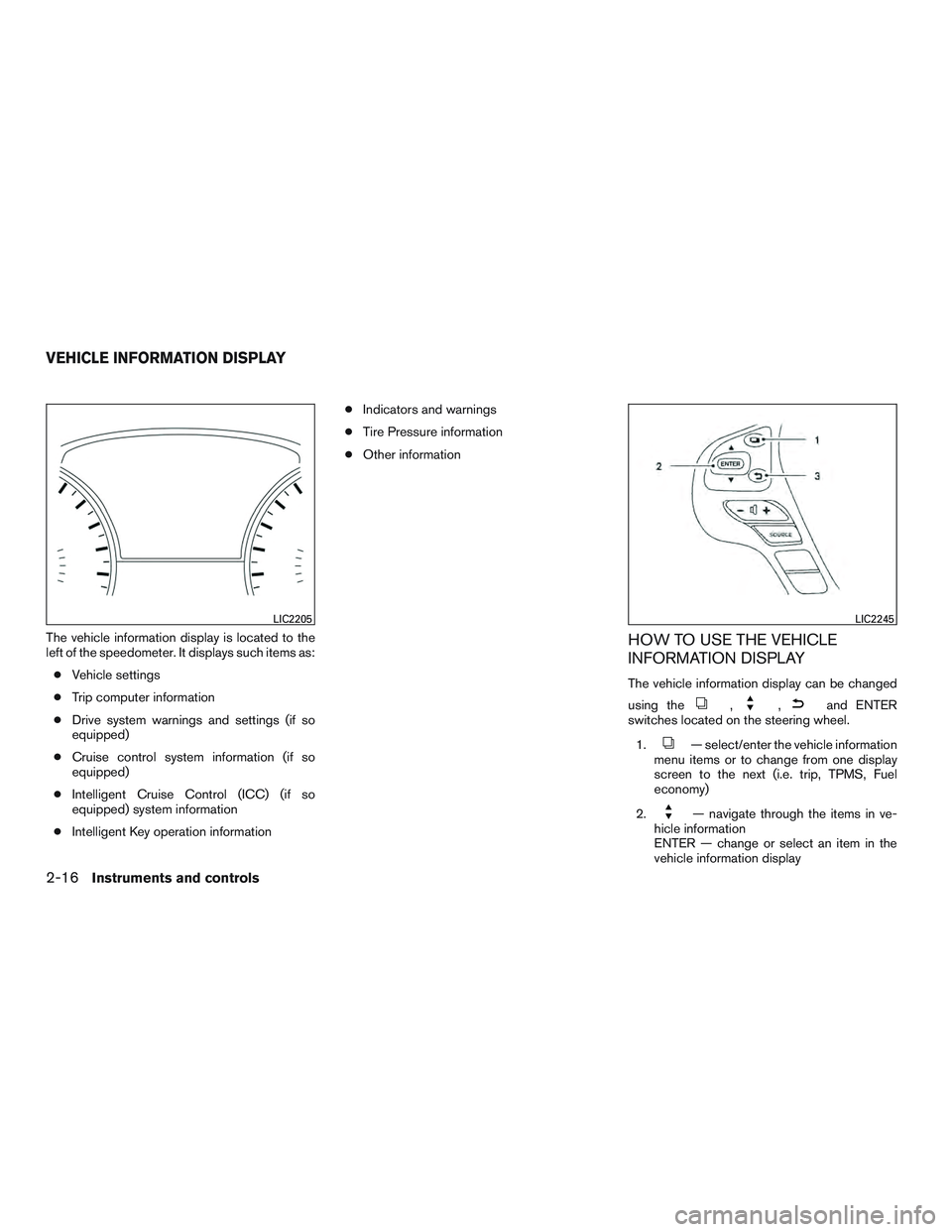
The vehicle information display is located to the
left of the speedometer. It displays such items as:● Vehicle settings
● Trip computer information
● Drive system warnings and settings (if so
equipped)
● Cruise control system information (if so
equipped)
● Intelligent Cruise Control (ICC) (if so
equipped) system information
● Intelligent Key operation information ●
Indicators and warnings
● Tire Pressure information
● Other informationHOW TO USE THE VEHICLE
INFORMATION DISPLAY
The vehicle information display can be changed
using the
,,and ENTER
switches located on the steering wheel.
1.
— select/enter the vehicle information
menu items or to change from one display
screen to the next (i.e. trip, TPMS, Fuel
economy)
2.
— navigate through the items in ve-
hicle information
ENTER — change or select an item in the
vehicle information display
LIC2205LIC2245
VEHICLE INFORMATION DISPLAY
2-16Instruments and controls
Page 106 of 607

3.— go back to the previous menu
The ENTER and
switches also control au-
dio and control panel functions. For additional
information, refer to “Steering wheel switch for
audio control” in the “Monitor, climate, audio,
phone and voice recognition systems” section of
this manual.
STARTUP DISPLAY
When the vehicle in placed in the ON or ACC
position the screens that display in the vehicle
information include:
● Active system status (if so equipped)
● Trip computer
● Tire pressure information
● Fuel economy
● Warnings
Warnings will only display if there are any pres-
ent. For additional information refer to, “Vehicle
information display warnings and indicators” sec-
tion of this manual.
To control what items display in the vehicle infor-
mation display, refer to “Main menu selection”
section of this manual.
SETTINGS
The setting mode allows you to change the infor-
mation displayed in the vehicle information dis-
play: ● Driver Assistance (if so equipped)
● Vehicle Settings
● Main Menu Selection
● Body Color
● Maintenance
● Alarms
● Language
● Units
● Welcome Effects
● Factory Reset
Instruments and controls2-17
Page 107 of 607

Driver Assistance (if so equipped)
The driver assistance menu allows the user to
change the various driving aids.
Menu itemResult
Driving Aids Displays available Driving Aids
Forward Displays available forward driving aids.
Assistance (DCA) Allows user to turn the Distance Control Assist (DCA) system ON/OFF. For additional information, refer to “Distance
Control Assist (DCA)” in the “Starting and driving” section of this manual.
Lane Displays available lane driving aids.
Lane Allows user to turn the Lane Departure Warning (LDW) system ON/OFF. For additional information, refer to “Lane De-
parture Warning (LDW)” in the “Starting and driving” section of this manual.
Assistance (LDP) Allows user to turn the Lane Departure Prevention (LDP) system ON/OFF. For additional information, refer to “Lane De-
parture Prevention (LDP) system” in the “Starting and driving” section of this manual.
Blind Spot Displays available blind spot driving aids and settings.
Blind Spot Allows user to turn the Blind Spot Warning system ON/OFF. For additional information, refer to “Blind Spot Warning
(BSW)” in the “Starting and driving” section of this manual.
Assistance (BSI) Allows user to turn the Blind Spot Intervention (BSI) system ON/OFF. For additional information, refer to “Blind Spot In-
tervention ®(BSI) system” in the “Starting and driving” section of this manual.
Brightness Allows user to choose between standard (STD) , dark or bright settings for the Blind Spot display.
Back-Up Collision Interv. Allows user to turn the Back-Up Collision Intervention system ON/OFF. For additional information, refer to “Back-Up Col-
lision Intervention (BCI)” in the “Starting and driving” section of this manual.
Forward Emergency Braking Allows user to turn the Forward Emergency Braking system ON/OFF. For additional information, refer to “Forward Emer-
gency Braking (FEB)” in the “Starting and driving” section of this manual.
2-18Instruments and controls
Page 108 of 607

Vehicle Settings
The vehicle settings allow the user to change the
settings for lights, wipers, locking, keys, and
other vehicle settings.
Menu itemResult
Welcome Light Allows the user the turn the Welcome Light ON/OFF
Auto Room Lamp Allows the user to turn the Auto Room Lamp ON/OFF
Light Sensitivity Allows the user to change when the lights illuminate based on the brightness outside the vehicle
Light Off Delay Allows the user to change the duration of time, from 0 to 180 seconds, that the automatic headlights stay on after the vehicle is shut off
Rain Sensor (if so equipped) Allows user to turn the Rain Sensor ON/OFF. For additional information, refer to “Wiper and washer switch” in this section .
Wiper with Speed Allows user to turn the Wiper with Speed feature ON/OFF. For additional information, refer to Wiper and washer switch” in this section .
I-Key Door Lock Allows user to turn the I-Key Door Lock ON/OFF. When this item is turned on, the request switch on the door is activated.
Selective Unlock Allows user to turn Selective Unlock ON/OFF. When turned on, only the driver’s door is unlocked after the door unlock operation. When the door
handle request switch on the driver’s or front passenger’s side door is pushed to be unlocked, only the corresponding door is unlocked first. All
the doors can be unlocked if the door unlock operation is performed again within 1 minute. When this item is turned to OFF, all the doors will be
unlocked after the door unlock operation is performed once.
Auto Door Unlock Displays the options for the Auto Door Unlock
Off Doors will have to be manually unlocked
IGN Off Doors will unlock when the ignition is turned OFF
Shift into P Doors will unlock when the vehicle is shifted into P (Park)
Answer Back Horn Allows user to turn Answer Back Horn ON/OFF. When turned on, the horn will chirp and the hazard indicators will flash once when locking the
vehicle with the Intelligent Key. For additional information, refer to “Answer back horn feature” in the “pre-driving checks and adjustments” section
of this manual.
Remote Start (if so equipped) Allows user to turn the Remote Start ON/OFF. When turned off, the vehicle cannot be started using the Intelligent Key.
Battery Saver Allows the user to turn the Battery Saver feature ON/OFF. When turned on, this feature will turn off the ignition switch after a period of time if left
in the ACC or ON position.
Instruments and controls2-19
Page 109 of 607

Menu itemResult
Exit Seat Slide (if so equipped) Allows the user to turn the Exit Seat Slide ON/OFF. When turned on, this feature will move the driver’s seat backward for an easy exit when the ignition is turned off and the driver’s door is opened. After getting into the vehicle and placing the ignition switch in the ACC position, the driver’s
seat will move to the previous set position. For additional information, refer to “Automatic drive positioner” in the “Pre-driving checks and adjust -
ments” section of this manual.
Exit Steering Up (if so equipped) Allows the user to turn the Exit Steering Up feature ON/OFF. When turned on, this feature will move the steering wheel upward for an easy exit when the ignition is turned off and the driver’s door is opened. After getting into the vehicle and placing the ignition switch in the ACC position,
the steering wheel moves to the previous position. For additional information, refer to “Automatic drive positioner” in the “Pre-driving checks and
adjustments” section of this manual.
Main Menu Selection
The main menu selection menu allows the user to
customize the information that appears in the
vehicle information display when the ignition is
placed in the ON position.
Menu item Result
Driver Assistance (if so equipped) Allows user to turn the Driver Assistance display ON/OFF in the vehicle information display
Trip Computer Allows user to turn the Trip Computer display ON/OFF in the vehicle information display
Tire Pressures Allows user to turn the Tire Pressures display ON/OFF in the vehicle information display
Fuel Economy Allows user to turn the Fuel Economy display ON/OFF in the vehicle information display
Body Color
The body color menu allows the user to custom-
ize the information that appears in the vehicle
information display.
Menu item Result
Body Color Allows user to select the color of the vehicle that appears in the vehicle information display
2-20Instruments and controls
Page 110 of 607
Maintenance
The maintenance menu allows the user to set
reminders for various vehicle maintenance inter-
vals.
WARNING
The tire replacement indicator is not a
substitute for regular tire checks, includ-
ing tire pressure checks. For additional
information, refer to “Changing wheels
and tires” in the “Maintenance and do-it-
yourself” section of this manual. Many fac-
tors including tire inflation, alignment,
driving habits and road conditions affect
tire wear and when tires should be re-
placed. Setting the tire replacement indi-
cator for a certain driving distance doesnot mean your tires will last that long. Use
the tire replacement indicator as a guide
only and always perform regular tire
checks. Failure to perform regular tire
checks, including tire pressure checks
could result in tire failure. Serious vehicle
damage could occur and may lead to a
collision, which could result in serious
personal injury or death.
Menu item
Result
Maintenance Displays various Maintenance settings
Service This indicator appears when the customer set distance is reached for checking or replacing maintenance items like the en-
gine oil, oil filter and tires. You can set or reset the distance for checking or replacing the items. You can set or reset the
distance for service type items. For scheduled maintenance items and intervals, refer to your “INFINITI Service and Mainte-
nance Guide.”
Tire This indicator appears when the customer set distance is reached for replacing tires. You can set or reset the distance for
replacing tires.
Other This indicator appears when the customer set distance is reached for checking or replacing maintenance items other than
the engine oil, oil filter and tires. Other maintenance items can include such things as air filter or tire rotation. The distance
for checking or replacing the items can be set or reset.
Instruments and controls2-21
Page 111 of 607

Alarms
The Alarms menu allows the user to set various
alerts.
Menu itemResult
Outside Temp. Allows user to turn the Outside Temp. alarm ON/OFF
Timer Alert Allows user to set the Timer Alert for a specific interval
Navigation (if so equipped) Allows user to turn the Navigation alarm ON/OFF
Language
The language menu allows the user to change the
languages displayed in the vehicle information
display.
The language of the center display/navigation
can be changed independently of the vehicle
information display. For additional information re-
fer to “How to use the Setting Button” in the
“Monitor, climate, audio, phone and voice recog-
nition systems” section of this manual.
Menu item Result
Language Displays available languages that can be used in the vehicle information display
2-22Instruments and controls