Lift up INFINITI QX60 2016 Owners Manual
[x] Cancel search | Manufacturer: INFINITI, Model Year: 2016, Model line: QX60, Model: INFINITI QX60 2016Pages: 607, PDF Size: 6.51 MB
Page 13 of 607

1. Rear wiper and washer switch (P. 2-32)
2. Liftgate release (P. 3-22)Rearview camera (P.4-23, 4-30)
3. Sonar sensors (if so equipped)
(P. 5-140)
4. Replacing bulbs (P. 8-26)
5. Fuel-filler cap (P. 3-27) Fuel recommendation (P. 9-2)
Fuel-filler door (P. 3-27)
6. Child safety rear door lock (P. 3-4)
Refer to the page number indicated in pa-
rentheses for operating details.
LII2418
EXTERIOR REAR
0-4Illustrated table of contents
Page 16 of 607

14. Center multi-function control buttons(P. 4-5, 4-12)
15. Power outlet (P. 2-48)
16. Shift lever (P. 5-18)
17. Audio system controls (P. 4-56) Front passenger air bag status light
(P. 2-13)
18. Hazard warning flasher switch (P. 6-2)
19. Push-button ignition switch (P. 5-13)
20. Cruise control main/set switches
(if so equipped) (P. 5-74)
Intelligent Cruise Control (ICC)
switches (if so equipped) (P. 5-76)
21. Dynamic Driver Assistance switch
(if so equipped) (P. 5-95)
22. Tilt steering wheel control (P. 3-29)
23. Bluetooth® Hands-Free Phone System
(P. 4-113, 4-127)
24. Steering wheel switch for audio control
(P. 4-99) 25. Hood release (P. 3-21)
Vehicle Dynamic Control (VDC) OFF
switch (P. 2-47)
Heated steering wheel switch
(if so equipped) (P. 2-45)
Headlight aiming control (P. 2-36)
Warning Systems switch (if so
equipped) (P. 2-46)
Power inverter switch (if so equipped)
(P. 2-47)
Liftgate release switch (P. 3-22)
Power liftgate main switch (P. 3-22)
Front and rear sonar system switch
(if so equipped) (P. 5-140)
26. Control panel and Vehicle information
display switches (P. 4-14, 2-16)
*: Refer to the separate Navigation System Own-
er’s Manual (if so equipped) .
Refer to the page number indicated in pa-
rentheses for operating details.
Illustrated table of contents0-7
Page 23 of 607
belt fit. For additional information, refer to “Pre-
cautions on seat belt usage” in this section. Also,
the seatback can be reclined to allow occupants
to rest when the vehicle is stopped and the shift
lever is in P (Park) .
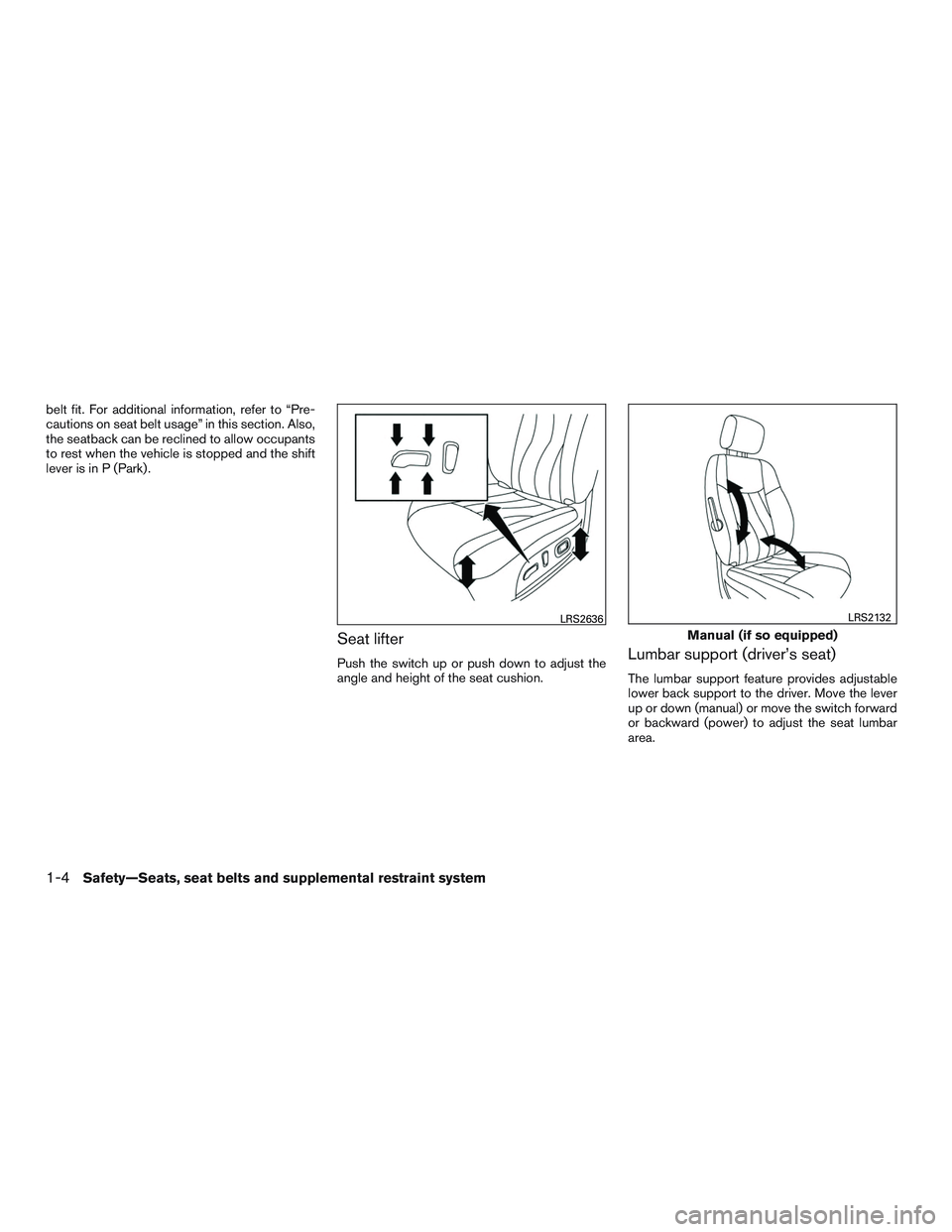
Seat lifter
Push the switch up or push down to adjust the
angle and height of the seat cushion.Lumbar support (driver’s seat)
The lumbar support feature provides adjustable
lower back support to the driver. Move the lever
up or down (manual) or move the switch forward
or backward (power) to adjust the seat lumbar
area.
LRS2636
Manual (if so equipped)
LRS2132
1-4Safety—Seats, seat belts and supplemental restraint system
Page 25 of 607
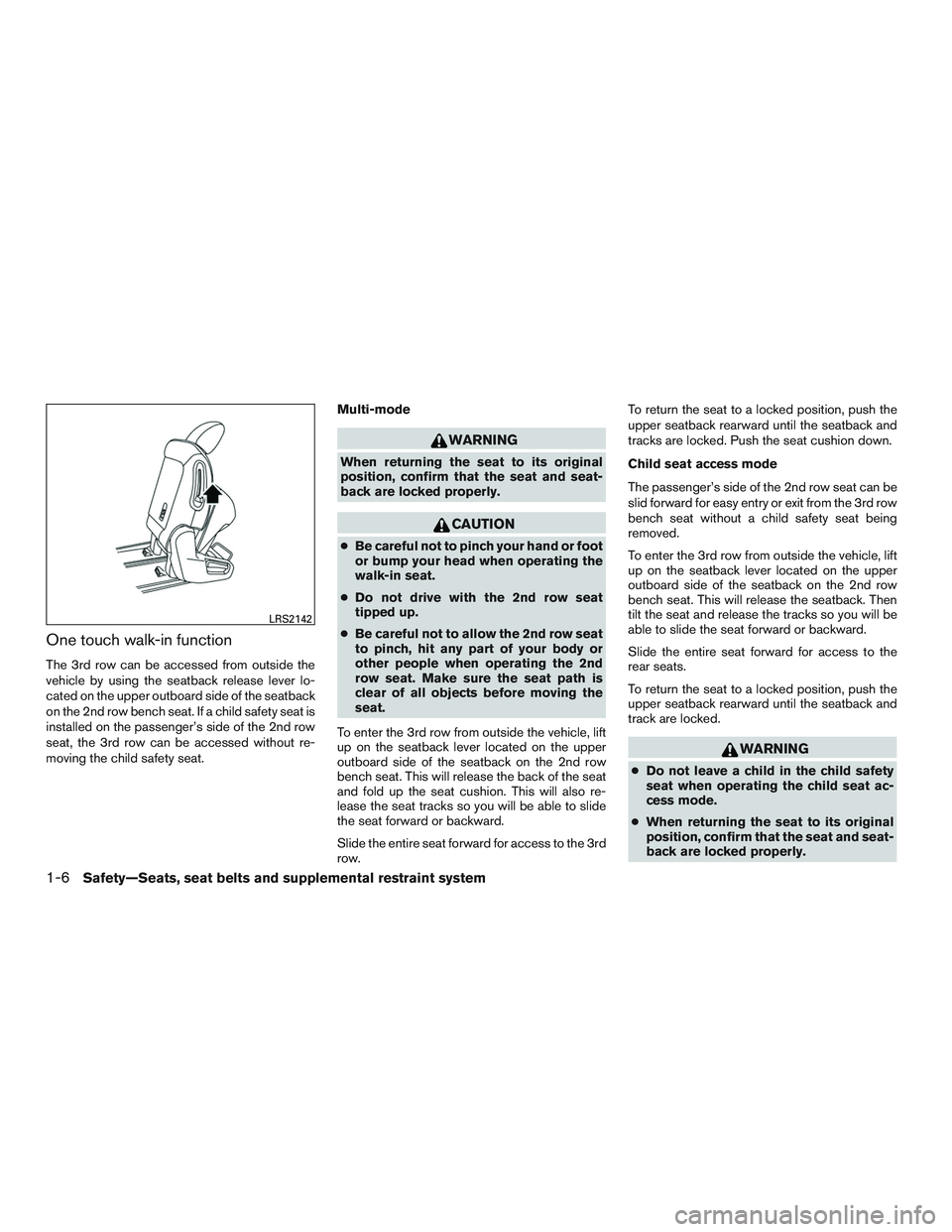
One touch walk-in function
The 3rd row can be accessed from outside the
vehicle by using the seatback release lever lo-
cated on the upper outboard side of the seatback
on the 2nd row bench seat. If a child safety seat is
installed on the passenger’s side of the 2nd row
seat, the 3rd row can be accessed without re-
moving the child safety seat.Multi-mode
WARNING
When returning the seat to its original
position, confirm that the seat and seat-
back are locked properly.
CAUTION
●
Be careful not to pinch your hand or foot
or bump your head when operating the
walk-in seat.
● Do not drive with the 2nd row seat
tipped up.
● Be careful not to allow the 2nd row seat
to pinch, hit any part of your body or
other people when operating the 2nd
row seat. Make sure the seat path is
clear of all objects before moving the
seat.
To enter the 3rd row from outside the vehicle, lift
up on the seatback lever located on the upper
outboard side of the seatback on the 2nd row
bench seat. This will release the back of the seat
and fold up the seat cushion. This will also re-
lease the seat tracks so you will be able to slide
the seat forward or backward.
Slide the entire seat forward for access to the 3rd
row. To return the seat to a locked position, push the
upper seatback rearward until the seatback and
tracks are locked. Push the seat cushion down.
Child seat access mode
The passenger’s side of the 2nd row seat can be
slid forward for easy entry or exit from the 3rd row
bench seat without a child safety seat being
removed.
To enter the 3rd row from outside the vehicle, lift
up on the seatback lever located on the upper
outboard side of the seatback on the 2nd row
bench seat. This will release the seatback. Then
tilt the seat and release the tracks so you will be
able to slide the seat forward or backward.
Slide the entire seat forward for access to the
rear seats.
To return the seat to a locked position, push the
upper seatback rearward until the seatback and
track are locked.
WARNING
●
Do not leave a child in the child safety
seat when operating the child seat ac-
cess mode.
● When returning the seat to its original
position, confirm that the seat and seat-
back are locked properly.
LRS2142
1-6Safety—Seats, seat belts and supplemental restraint system
Page 26 of 607
CAUTION
●Be careful not to pinch your hand or foot
or bump your head when operating the
walk-in seat.
● Do not drive with the 2nd row seat
tipped up.
● Be careful not to allow the 2nd row seat
to pinch, hit any part of your body or
other people when operating the 2nd
row seat. Make sure the seat path is
clear of all objects before moving the
seat.
Exiting the 3rd row
To exit the 3rd row from either seating position, lift
the upper seatback release lever to the upper-
most position. This will release the back of the
seat, then fold the seat cushion up and release
the tracks.
Slide the entire seat forward.
To return the seat to a locked position, push the
upper seatback rearward until the seatback and
track are locked.
WARNING
When returning the seat to its original
position, confirm that the seat and seat-
back are locked properly.
CAUTION
Be careful not to pinch your hand or foot
or bump your head when operating the
walk-in seat.
3RD ROW BENCH SEAT
ADJUSTMENT
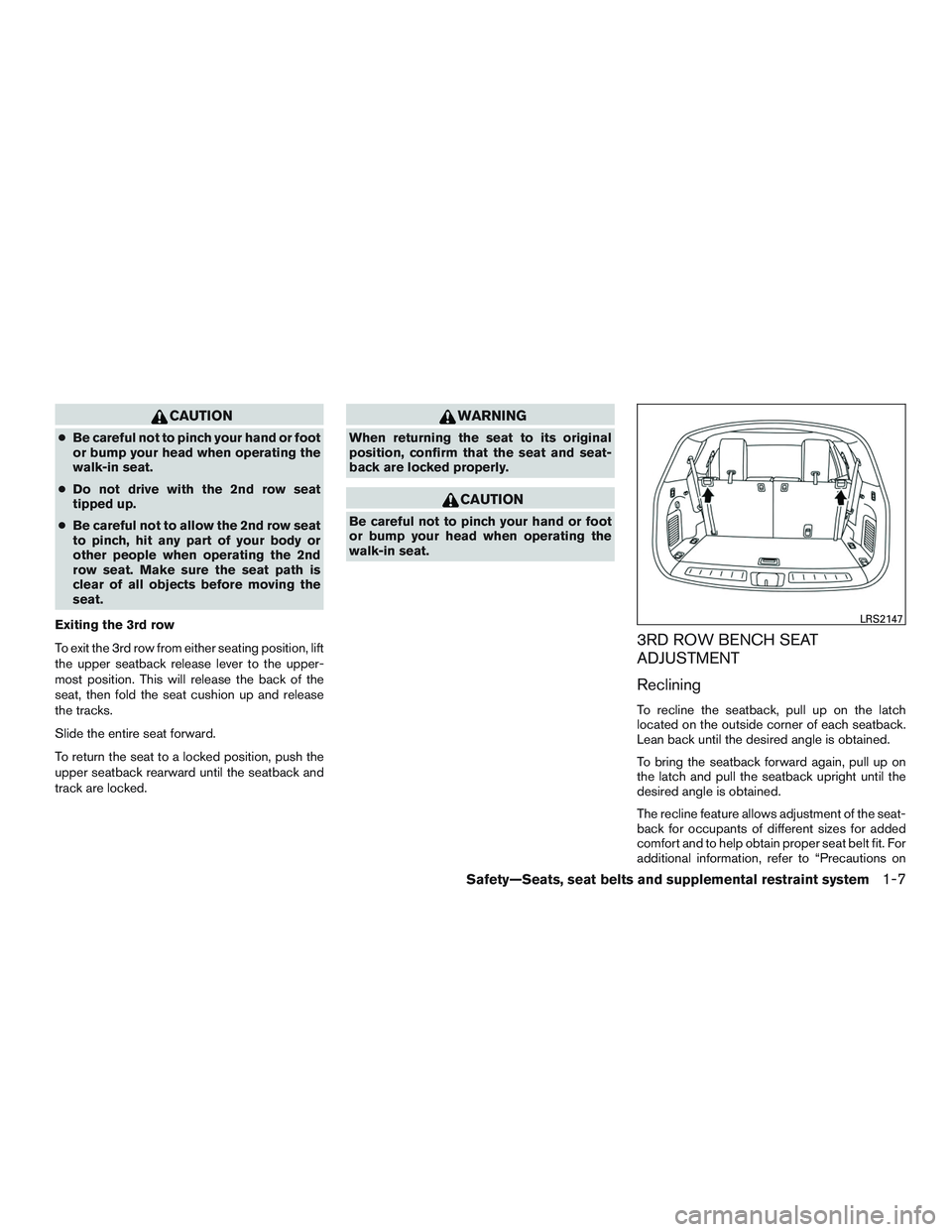
Reclining
To recline the seatback, pull up on the latch
located on the outside corner of each seatback.
Lean back until the desired angle is obtained.
To bring the seatback forward again, pull up on
the latch and pull the seatback upright until the
desired angle is obtained.
The recline feature allows adjustment of the seat-
back for occupants of different sizes for added
comfort and to help obtain proper seat belt fit. For
additional information, refer to “Precautions on
LRS2147
Safety—Seats, seat belts and supplemental restraint system1-7
Page 28 of 607

●When returning the seatbacks to the
upright position, be certain they are
completely secured in the latched posi-
tion. If they are not completely secured,
passengers may be injured in an acci-
dent or sudden stop.
● Properly secure all cargo to help pre-
vent it from sliding or shifting. Do not
place cargo higher than the seatbacks.
In a sudden stop or collision, unsecured
cargo could cause personal injury.
Folding the 2nd row bench seat
To fold the 2nd row bench seat flat for maximum
cargo hauling:
1. Make sure that the head restraints/headrests are lowered. To remove
the head restraints/headrests, push and
hold the lock knob while moving the head
restraints/headrests in an upward direction.
Store the head restraints/headrests properly
so it is not loose in the vehicle. 2. Stow the 2nd row seat belts in the seat belt
hooks found on the sides of the vehicle.
3. Lift up on the recline lever on the side of the outboard seats to fold the seatbacks flat.
4. To return the 2nd row bench seats to a seating position, push up on the seatback
until it latches in place.
LRS2144
Safety—Seats, seat belts and supplemental restraint system1-9
Page 92 of 607

14. Center multi-function control buttons(P. 4-5, 4-12)
15. Power outlet (P. 2-48)
16. Shift lever (P. 5-18)
17. Audio system controls (P. 4-56) Front passenger air bag status light
(P. 2-13)
18. Hazard warning flasher switch (P. 6-2)
19. Push-button ignition switch (P. 5-13)
20. Cruise control main/set switches
(if so equipped) (P. 5-74)
Intelligent Cruise Control (ICC)
switches (if so equipped) (P. 5-76)
21. Dynamic Driver Assistance switch
(if so equipped) (P. 5-95)
22. Tilt steering wheel control (P. 3-29)
23. Bluetooth® Hands-Free Phone System
(P. 4-113, 4-127)
24. Steering wheel switch for audio control
(P. 4-99)
25. Hood release (P. 3-21) Vehicle Dynamic Control (VDC) OFF
switch (P. 2-47)
Heated steering wheel switch
(if so equipped) (P. 2-45)
Headlight aiming control (P. 2-36) Warning Systems switch
(if so equipped) (P. 2-46)
Power inverter switch (if so equipped)
(P. 2-47)
Liftgate release switch (P. 3-22)
Power liftgate main switch (P. 3-22)
Front and rear sonar system switch
(if so equipped) (P. 5-140)
26. Control panel and Vehicle information
display switches (P. 4-14, 2-16)
*: Refer to the separate Navigation System Own-
er’s Manual (if so equipped) .
Refer to the page number indicated in pa-
rentheses for operating details.
Instruments and controls2-3
Page 114 of 607

VEHICLE INFORMATION DISPLAY
WARNINGS AND INDICATORS
1. No Key Detected
2. Key ID Incorrect
3. Shift to Park4. Push ignition to OFF
5. Key Battery Low
6. Engine start operation for Intelligent Key sys-
tem
7. Release Parking Brake 8. Low Fuel
9. Low Washer Fluid
10. Door Open
11. Liftgate Open
LIC3515
Instruments and controls2-25
Page 116 of 607
Key Battery Low
This indicator illuminates when the Intelligent Key
battery is running out of power.
If this indicator illuminates, replace the battery
with a new one. For additional information, refer
to “Battery replacement” in the “Maintenance and
do-it-yourself” section of this manual.
Engine start operation for Intelligent Key
system
This indicator appears when the battery of the
Intelligent Key is low and when the Intelligent Key
system and the vehicle are not communicating
normally.
If this appears, touch the ignition switch with the
Intelligent Key while depressing the brake pedal.
For additional information, refer to “INFINITI Intel-
ligent Key battery discharge” in the “Starting and
driving” section of this manual.
Release Parking Brake
This warning illuminates in the message area of
the vehicle information display when the parking
brake is set and the vehicle is driven.
Low Fuel
This warning illuminates when the fuel level in the
fuel tank is getting low. Refuel as soon as it is
convenient, preferably before the fuel gaugereaches 0 (Empty) .
There will be a small re-
serve of fuel in the tank when the fuel
gauge needle reaches 0 (Empty) .
Low Washer Fluid
This warning illuminates when the windshield-
washer fluid is at a low level. Add windshield-
washer fluid as necessary. For additional informa-
tion, refer to “Windshield-washer fluid” in the
“Maintenance and do-it-yourself” section of this
manual.
Door Open
This warning illuminates when a door has been
opened when the engine is running.
Liftgate Open
This warning illuminates when the liftgate has
been opened when the engine is running.
Time for a driver break?
This indicator appears when the set time is
reached. The time can be set up to six hours. For
additional information, refer to “Settings” in this
section.
Low Outside Temperature
This warning appears if the outside temperature
is below 37°F (3°C) . The temperature can be changed to display in Celsius or Fahrenheit. For
additional information, refer to “Unit” in this sec-
tion.
Power will turn off to save the battery
This warning appears in the message area of the
vehicle information display after a period of time if
the shift lever has not moved from the P (Park)
position.
CVT Error: See Owner’s Manual
This warning illuminates when the there is a prob-
lem with the CVT system. If this warning comes
on, have the system checked. It is recommended
that you visit an INFINITI retailer for this service.
Turn off the lights
This warning appears when the headlights are
left in the ON position when exiting the vehicle.
Place the headlight switch to OFF or AUTO po-
sition. For additional information, refer to “Head-
light and turn signal switch” in this section.
Low Oil Pressure: See Owner’s Manual
This warning appears in the message area of the
vehicle information display if low oil pressure is
detected. This gauge is not designed to indicate
low oil level.
The low oil pressure warning is
not designed to indicate a low oil level. Use
the dipstick to check the oil level. For additional
Instruments and controls2-27
Page 119 of 607

BCI OFF (if so equipped)
This message appears when the Back-up Colli-
sion Intervention (BCI) system is turned OFF
using the BCI switch. For additional information,
refer to “Back-up Collision Intervention (BCI)
system” in the “Starting and driving” section of
this manual.
Loose Fuel Cap
This warning appears when the fuel-filler cap is
not tightened correctly after the vehicle has been
refueled. For additional information, refer to
“Fuel-filler cap” in the “Pre-driving checks and
adjustments” section of this manual.
Shipping Mode On Push Storage Fuse
This warning may appear if the extended storage
switch is not pushed in. When this warning ap-
pears, push in the extended storage switch to
turn off the warning. For additional information,
refer to “Extended storage switch” in the “Instru-
ments and controls” section of this manual.Your vehicle has two types of security systems:
● Vehicle security system
● INFINITI Vehicle Immobilizer System
VEHICLE SECURITY SYSTEM
The vehicle security system provides visual and
audible alarm signals if someone opens the
doors, liftgate or hood when the system is armed.
It is not, however, a motion detection type system
that activates when a vehicle is moved or when a
vibration occurs. The system helps deter vehicle theft but cannot
prevent it, nor can it prevent the theft of interior or
exterior vehicle components in all situations. Al-
ways secure your vehicle even if parking for a
brief period. Never leave your Intelligent Key in
the vehicle, and always lock the vehicle when
unattended. Be aware of your surroundings, and
park in secure, well-lit areas whenever possible.
Many devices offering additional protection, such
as component locks, identification markers, and
tracking systems, are available at auto supply
stores and specialty shops. An INFINITI retailer
may also offer such equipment. Check with your
insurance company to see if you may be eligible
for discounts for various theft protection features.
How to arm the vehicle security
system
1. Close all windows and the moonroof.
The
system can be armed even if the win-
dows and moonroof are open.
2. Remove the Intelligent Key from the vehicle.
3. Close all doors, hood and liftgate. Lock all doors. The doors can be locked with the
Intelligent Key, door handle request switch
or power door lock switch.
Key fob operation:
LIC0661
SECURITY SYSTEMS
2-30Instruments and controls