maintenance INFINITI QX60 2016 Owners Manual
[x] Cancel search | Manufacturer: INFINITI, Model Year: 2016, Model line: QX60, Model: INFINITI QX60 2016Pages: 607, PDF Size: 6.51 MB
Page 2 of 607
An INFINITI represents a new way of thinking
about vehicle design. It integrates advanced en-
gineering and superior craftsmanship with a
simple, refined aesthetic sensitivity associated
with traditional Japanese culture.
The result is a different notion of luxury and
beauty. The car itself is important, but so is the
sense of harmony that the vehicle evokes in its
driver, and the sense of satisfaction you feel with
the INFINITI — from the way it looks and drives to
the high level of retailer service.
To ensure that you enjoy an INFINITI to the fullest,
we encourage you to read this Owner’s Manual
immediately. It explains all of the features, con-
trols and performance characteristics of an
INFINITI; it also provides important instructions
and safety information.
A separate Warranty Information Booklet
is included in your Owner’s literature port-
folio. The INFINITI Service and Mainte-
nance Guide explains details about main-
taining and servicing your vehicle. Always
carry it with you when you take your vehicle
to an INFINITI retailer. The Warranty Infor-
mation Booklet contents provide complete
information about all warranties covering
this vehicle, the requirements to keep the
warranties in effect as well as the INFINITI
Roadside Assistance program.Additionally, a separate Customer Care
and Lemon Law Information Booklet will
explain how to resolve any concerns you
may have with your vehicle, as well as
clarify your rights under your state’s lemon
law.
In addition to factory-installed options, your ve-
hicle may also be equipped with additional ac-
cessories installed prior to delivery. It is recom-
mended that you visit an INFINITI retailer for this
service. It is important that you familiarize yourself
with all disclosures, warnings, cautions and in-
structions concerning proper use of such acces-
sories prior to operating the vehicle and/or ac-
cessory. It is recommended that you visit an
INFINITI retailer for details concerning the par-
ticular accessories with which your vehicle is
equipped.
Before driving your vehicle, please read this
Owner’s Manual carefully. This will ensure famil-
iarity with controls and maintenance require-
ments, assisting you in the safe operation of your
vehicle.
WARNING
IMPORTANT SAFETY INFORMATION
REMINDERS!
Follow these important driving rules to
help ensure a safe and comfortable trip
for you and your passengers!
●
NEVER drive under the influence of al-
cohol or drugs.
● ALWAYS observe posted speed limits
and never drive too fast for conditions.
●
ALWAYS give your full attention to driving
and avoid using vehicle features or taking
other actions that could distract you.
●ALWAYS use your seat belts and appro-
priate child restraint systems. Pre-teen
children should be seated in the rear seat.
● ALWAYS provide information about the
proper use of vehicle safety features to
all occupants of the vehicle.
● ALWAYS review this Owner’s Manual
for important safety information.
FOREWORD READ FIRST—THEN DRIVE SAFELY
Page 8 of 607
Table of Contents
Illustrated table of contents
Safety—Seats, seat belts and supplemental restraint system
Instruments and controls
Pre-driving checks and adjustments
Monitor, climate, audio, phone and voice recognition systems
Starting and driving
In case of emergency
Appearance and care
Maintenance and do-it-yourself
Technical and consumer information
Index
0
1
2
3
4
5
6
7
8
9
10
Page 20 of 607

1 Safety—Seats, seat belts and
supplemental restraint system
Seats............................................1-2
Front power seat adjustment .....................1-3
2nd row bench seat adjustment ..................1-5
3rd row bench seat adjustment ..................1-7
Armrests ......................................1-8
Flexible seating .................................1-8
Head restraints/headrests ......................... 1-11
Adjustable head restraint/headrest
components .................................. 1-12
Non-adjustable head restraint/headrest
components .................................. 1-13
Remove ...................................... 1-13
Removable (without Dual head restraint/
headrest DVD system only) .....................1-13
Install ........................................ 1-14
Adjust ........................................ 1-14
Folding head restraint/headrest .................1-15
Seat belts ....................................... 1-16
Precautions on seat belt usage ..................1-16
Seat belt warning light ......................... 1-19
Pregnant women .............................. 1-19
Injured persons ................................ 1-19
Pre-crash seat belts with comfort function
(front seats) (if so equipped) ....................1-19Three-point type seat belt with retractor
..........1-20
Seat belt extenders ............................ 1-24
Seat belt maintenance ......................... 1-24
Child safety ...................................... 1-25
Infants ........................................ 1-25
Small children ................................. 1-26
Larger children ................................ 1-26
Child restraints ................................... 1-27
Precautions on child restraints ..................1-27
LATCH (Lower Anchors and Tethers for
CHildren) system .............................. 1-29
Rear-facing child restraint installation using
LATCH....................................... 1-32
Rear-facing child restraint installation using
the seat belts ................................. 1-34
Forward-facing child restraint installation
using LATCH .................................. 1-37
Forward-facing child restraint installation
using the seat belts ............................ 1-40
Booster
seats................................. 1-46
Supplemental Restraint System (SRS) ..............1-49
Precautions on SRS ........................... 1-49
Supplemental air bag warning labels .............1-67
Supplemental air bag warning light ..............1-67
Page 43 of 607
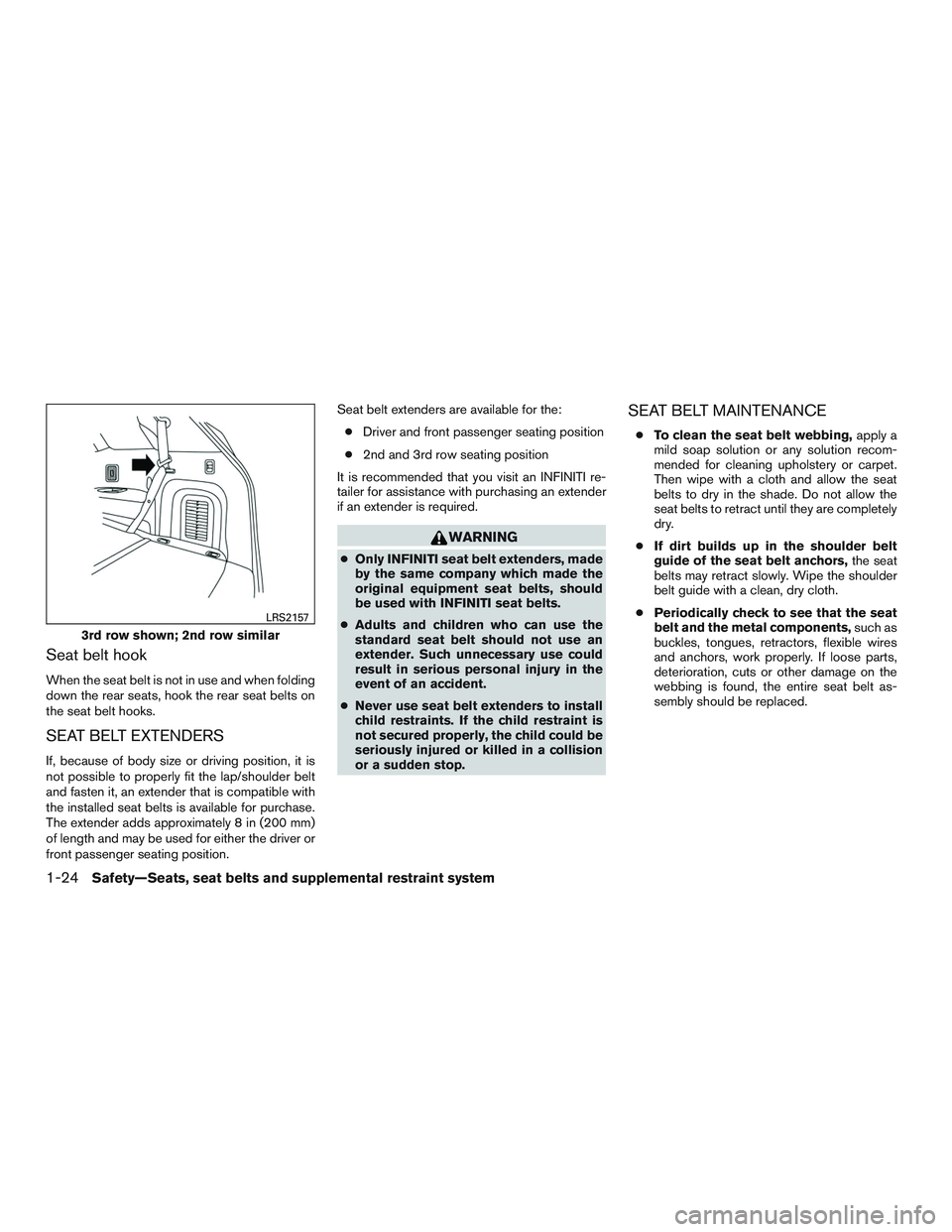
Seat belt hook
When the seat belt is not in use and when folding
down the rear seats, hook the rear seat belts on
the seat belt hooks.
SEAT BELT EXTENDERS
If, because of body size or driving position, it is
not possible to properly fit the lap/shoulder belt
and fasten it, an extender that is compatible with
the installed seat belts is available for purchase.
The extender adds approximately 8 in (200 mm)
of length and may be used for either the driver or
front passenger seating position.Seat belt extenders are available for the:
● Driver and front passenger seating position
● 2nd and 3rd row seating position
It is recommended that you visit an INFINITI re-
tailer for assistance with purchasing an extender
if an extender is required.
WARNING
● Only INFINITI seat belt extenders, made
by the same company which made the
original equipment seat belts, should
be used with INFINITI seat belts.
● Adults and children who can use the
standard seat belt should not use an
extender. Such unnecessary use could
result in serious personal injury in the
event of an accident.
● Never use seat belt extenders to install
child restraints. If the child restraint is
not secured properly, the child could be
seriously injured or killed in a collision
or a sudden stop.
SEAT BELT MAINTENANCE
● To clean the seat belt webbing, apply a
mild soap solution or any solution recom-
mended for cleaning upholstery or carpet.
Then wipe with a cloth and allow the seat
belts to dry in the shade. Do not allow the
seat belts to retract until they are completely
dry.
● If dirt builds up in the shoulder belt
guide of the seat belt anchors, the seat
belts may retract slowly. Wipe the shoulder
belt guide with a clean, dry cloth.
● Periodically check to see that the seat
belt and the metal components, such as
buckles, tongues, retractors, flexible wires
and anchors, work properly. If loose parts,
deterioration, cuts or other damage on the
webbing is found, the entire seat belt as-
sembly should be replaced.
3rd row shown; 2nd row similar
LRS2157
1-24Safety—Seats, seat belts and supplemental restraint system
Page 87 of 607
Repair and replacement procedure
The front air bags, side air bags, curtain air bags
and pretensioner(s) are designed to inflate on a
one-time-only basis. As a reminder, unless it is
damaged, the supplemental air bag warning light
remains illuminated after inflation has occurred.
These systems should be repaired and/or re-
placed as soon as possible. It is recommended
that you visit an INFINITI retailer for this service.
When maintenance work is required on the ve-
hicle, the front air bags, side air bags, curtain air
bags, pretensioner(s) and related parts should be
pointed out to the person performing the mainte-
nance. The ignition switch should always be in
the LOCK position when working under the hood
or inside the vehicle.
WARNING
●Once a front air bag, side air bag, or
curtain air bag has inflated, the air bag
module will not function again and
must be replaced. Additionally, the acti-
vated pretensioner(s) must also be re-
placed. The air bag module and preten-
sioner(s) should be replaced. It is
recommended that you visit an INFINITI
retailer for this service. However, the air
bag module and pretensioner(s) cannot
be repaired.
● The front air bag, side air bag, curtain
air bag systems and the pretensioner
system should be inspected if there is
any damage to the front end or side
portion of the vehicle. It is recom-
mended that you visit an INFINITI re-
tailer for this service.
● If you need to dispose of a supplemen-
tal air bag or pretensioner systems or
scrap the vehicle, it is recommended
you visit an INFINITI retailer. Incorrect
disposal procedures could cause per-
sonal injury. ●
If there is an impact to your vehicle from
any direction, your Occupant Classifica-
tion Sensor (OCS) should be checked to
verify it is still functioning correctly. It is
recommended that you visit an INFINITI
retailer for this service. The OCS should
be checked even if no air bags deploy as
a result of the impact. Failure to verify
proper OCS function may result in an
improper air bag deployment resulting
in injury or death. ice. The OCS should
be checked even if no air bags deploy as
a result of the impact. Failure to verify
proper OCS function may result in an
improper air bag deployment resulting
in injury or death.
1-68Safety—Seats, seat belts and supplemental restraint system
Page 98 of 607

WARNING LIGHTS
For additional information, refer to “Vehicle infor-
mation display” in this section.
orAnti-lock BrakingSystem (ABS)
warning light
When the ignition switch is placed in the ON
position, the ABS warning light illuminates and
then turns off. This indicates the ABS is opera-
tional.
If the ABS light comes on while the engine is
running, it may indicate the anti-lock braking sys-
tem is not functioning properly. Have the system
checked. It is recommended that you visit an
INFINITI retailer for this service.
If an ABS malfunction occurs, the anti-lock func-
tion is turned off. The brake system then operates
normally, but without anti-lock assistance. For
additional information, refer to “Brake system” in
the “Starting and driving” section of this manual.
orBrake warning light
This light functions for both the parking brake and
the foot brake systems. Parking brake indicator
When the ignition switch is placed in the ON
position, the light comes on when the parking
brake is applied.
Low brake fluid warning light
When the ignition switch is placed in the ON
position, the light warns of a low brake fluid level.
If the light comes on while the engine is running
with the parking brake not applied, stop the ve-
hicle and perform the following:
1. Check the brake fluid level. Add brake fluid as necessary. For additional information, re-
fer to “Brake fluid” in the “Maintenance and
do-it-yourself” section of this manual.
2. If the brake fluid level is correct, have the system checked. It is recommended that you
visit an INFINITI retailer for this service.
WARNING
●Your brake system may not be working
properly if the warning light is on. Driv-
ing could be dangerous. If you judge it
to be safe, drive carefully to the nearest
service station for repairs. Otherwise,
have your vehicle towed because driv-
ing it could be dangerous. ●
Pressing the brake pedal with the en-
gine stopped and/or a low brake fluid
level may increase your stopping dis-
tance and braking will require greater
pedal effort as well as pedal travel.
● If the brake fluid level is below the
MINIMUM or MIN mark on the brake
fluid reservoir, do not drive until the
brake system has been checked. It is
recommended that you visit an INFINITI
retailer for this service.
Anti-lock Braking System (ABS) warning
indicator
When the parking brake is released and the
brake fluid level is sufficient, if both the brake
warning light and the ABS warning light illumi-
nate, it may indicate the ABS is not functioning
properly. Have the brake system checked, and if
necessary, repaired. It is recommended that you
visit an INFINITI retailer for this service. Avoid
high-speed driving and abrupt braking. For addi-
tional information, refer to “Anti-lock Braking Sys-
tem (ABS) warning light” in this section.
Charge warning light
If this light comes on while the engine is running,
it may indicate the charging system is not func-
tioning properly. Turn the engine off and check
Instruments and controls2-9
Page 102 of 607

INDICATOR LIGHTS
For additional information, refer to “Vehicle infor-
mation display” in this section.
Continuously VariableTransmission (CVT) position
indicator light
When the ignition switch is placed in the ON
position, this indicator light shows the shift lever
position. For additional information, refer to “Driv-
ing the vehicle” in the “Starting and driving” sec-
tion of this manual.
Front fog light indicator light(green)
The front fog light indicator light illuminates when
the front fog lights are ON. For additional infor-
mation, refer to “Fog light switch” in this section.
Front passenger air bag statuslight
The front passenger air bag status light will be lit
and the passenger front air bag will be OFF
depending on how the front passenger seat is
being used.
For additional information, refer to “Front passen-
ger air bag and status light” in the “Safety — Seats, seat belts and supplemental restraint sys-
tem” section of this manual.
High beam indicator light
(blue)
This blue light comes on when the headlight high
beams are on and goes out when the low beams
are selected.
The high beam indicator light also comes on
when the passing signal is activated.
Malfunction Indicator Light(MIL)
If this indicator light comes on steady or blinks
while the engine is running, it may indicate a
potential emission control malfunction.
The MIL may also come on steady if the fuel-filler
cap is loose or missing, or if the vehicle runs out
of fuel. Check to make sure the fuel-filler cap is
installed and closed tightly, and that the vehicle
has at least 3 gal (11.4 L) of fuel in the fuel tank.
After a few driving trips, the
light should
turn off if no other potential emission control
system malfunction exists.
If this indicator light comes on steady for 20 sec-
onds and then blinks for 10 seconds when the
engine is not running, it indicates that the vehicle
is not ready for an emission control system inspection/maintenance test. For additional infor-
mation, refer to “Readiness for
inspection/maintenance (I/M) test” in the “Tech-
nical and consumer information” section of this
manual.
Operation
The MIL will come on in one of two ways:
● MIL on steady — An emission control system
malfunction has been detected. Check the
fuel-filler cap if the LOOSE FUEL CAP
warning appears in the vehicle information
display. If the fuel-filler cap is loose or miss-
ing, tighten or install the cap and continue to
drive the vehicle. The
light should turn
off after a few driving trips. If the
light
does not turn off after a few driving trips,
have the vehicle inspected. It is recom-
mended you visit an INFINITI retailer for this
service. You do not need to have your vehicle
towed to the retailer.
● MIL blinking — An engine misfire has been
detected which may damage the emission
control system. To reduce or avoid emission
control system damage:
– do not drive at speeds above 72 km (45 mph) .
– avoid hard acceleration or deceleration.
Instruments and controls2-13
Page 106 of 607

3.— go back to the previous menu
The ENTER and
switches also control au-
dio and control panel functions. For additional
information, refer to “Steering wheel switch for
audio control” in the “Monitor, climate, audio,
phone and voice recognition systems” section of
this manual.
STARTUP DISPLAY
When the vehicle in placed in the ON or ACC
position the screens that display in the vehicle
information include:
● Active system status (if so equipped)
● Trip computer
● Tire pressure information
● Fuel economy
● Warnings
Warnings will only display if there are any pres-
ent. For additional information refer to, “Vehicle
information display warnings and indicators” sec-
tion of this manual.
To control what items display in the vehicle infor-
mation display, refer to “Main menu selection”
section of this manual.
SETTINGS
The setting mode allows you to change the infor-
mation displayed in the vehicle information dis-
play: ● Driver Assistance (if so equipped)
● Vehicle Settings
● Main Menu Selection
● Body Color
● Maintenance
● Alarms
● Language
● Units
● Welcome Effects
● Factory Reset
Instruments and controls2-17
Page 110 of 607
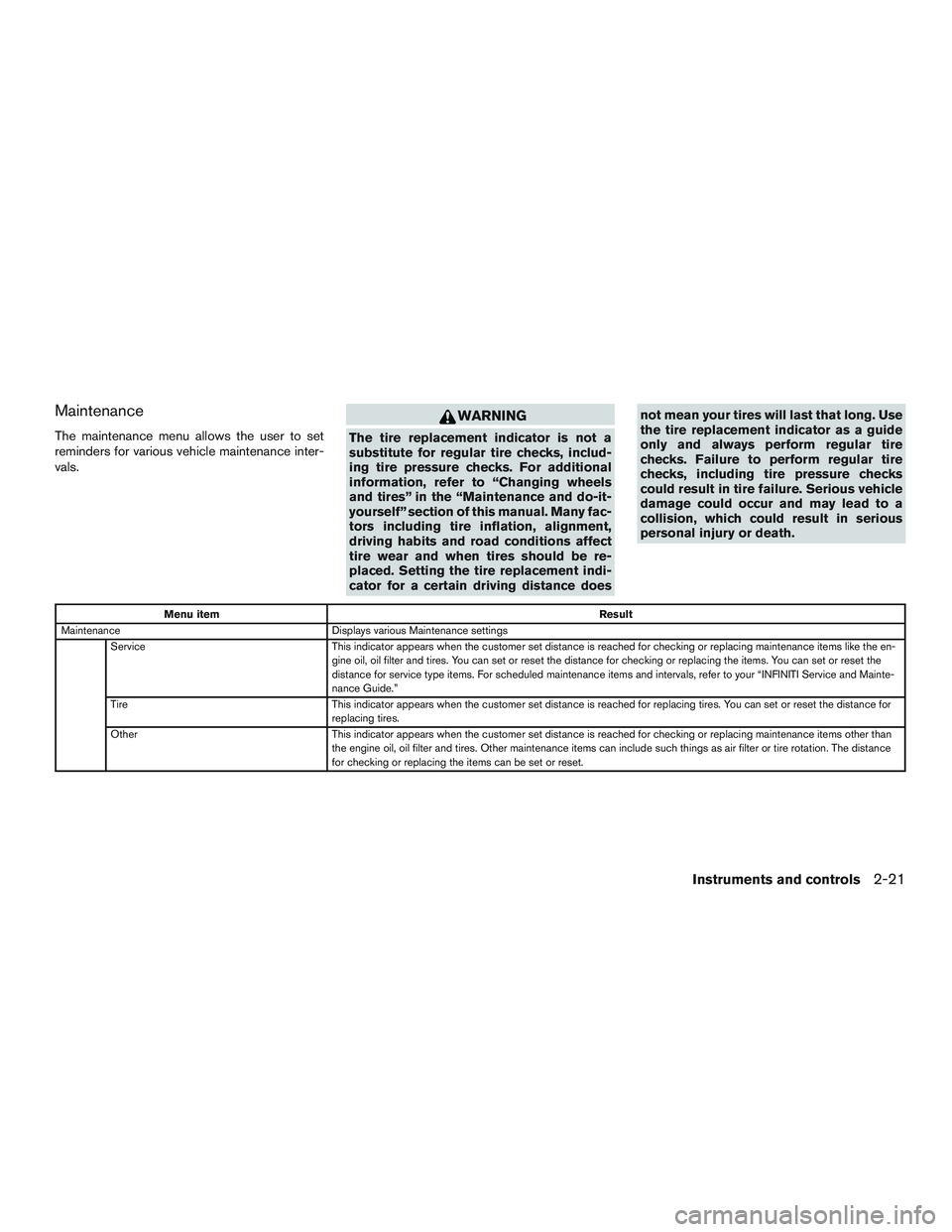
Maintenance
The maintenance menu allows the user to set
reminders for various vehicle maintenance inter-
vals.
WARNING
The tire replacement indicator is not a
substitute for regular tire checks, includ-
ing tire pressure checks. For additional
information, refer to “Changing wheels
and tires” in the “Maintenance and do-it-
yourself” section of this manual. Many fac-
tors including tire inflation, alignment,
driving habits and road conditions affect
tire wear and when tires should be re-
placed. Setting the tire replacement indi-
cator for a certain driving distance doesnot mean your tires will last that long. Use
the tire replacement indicator as a guide
only and always perform regular tire
checks. Failure to perform regular tire
checks, including tire pressure checks
could result in tire failure. Serious vehicle
damage could occur and may lead to a
collision, which could result in serious
personal injury or death.
Menu item
Result
Maintenance Displays various Maintenance settings
Service This indicator appears when the customer set distance is reached for checking or replacing maintenance items like the en-
gine oil, oil filter and tires. You can set or reset the distance for checking or replacing the items. You can set or reset the
distance for service type items. For scheduled maintenance items and intervals, refer to your “INFINITI Service and Mainte-
nance Guide.”
Tire This indicator appears when the customer set distance is reached for replacing tires. You can set or reset the distance for
replacing tires.
Other This indicator appears when the customer set distance is reached for checking or replacing maintenance items other than
the engine oil, oil filter and tires. Other maintenance items can include such things as air filter or tire rotation. The distance
for checking or replacing the items can be set or reset.
Instruments and controls2-21
Page 116 of 607
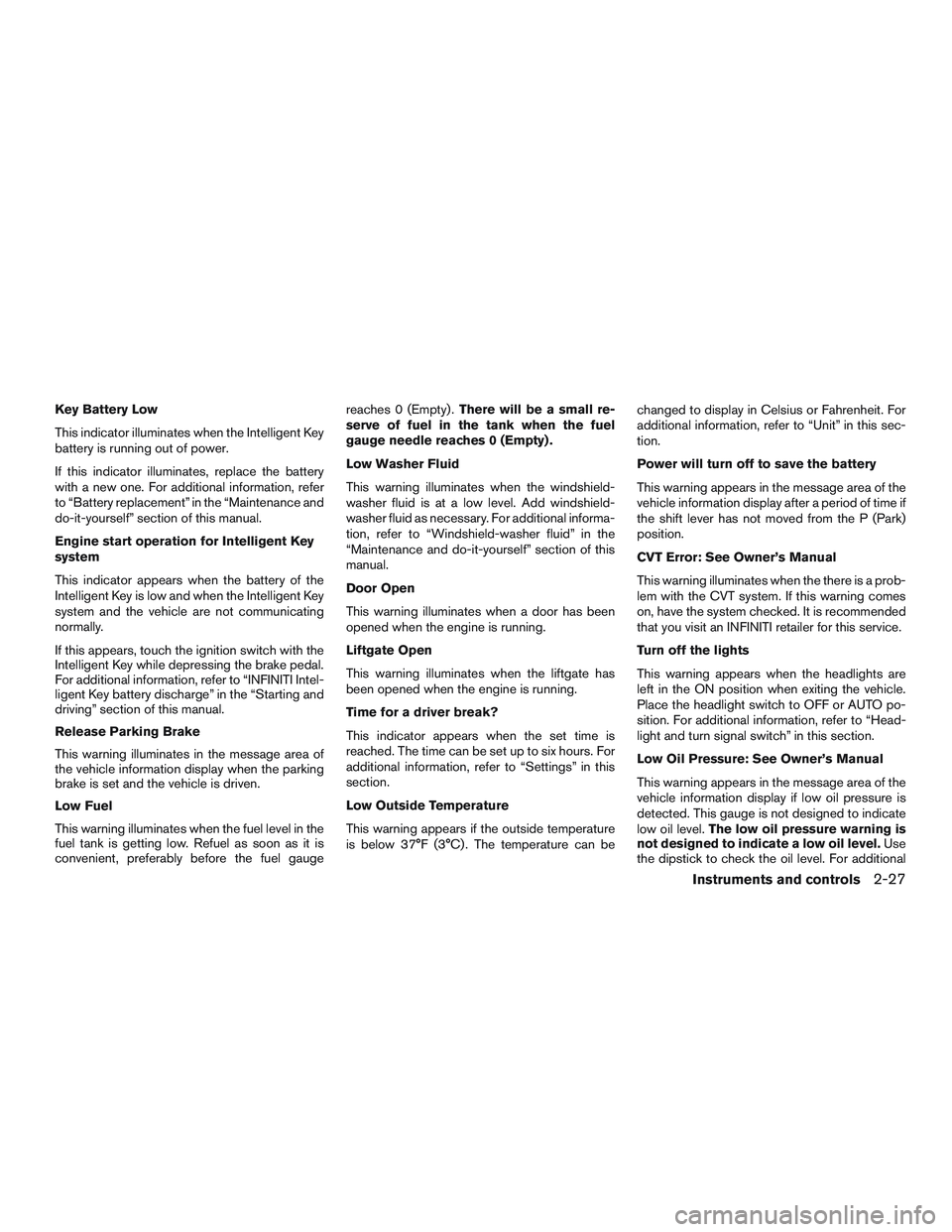
Key Battery Low
This indicator illuminates when the Intelligent Key
battery is running out of power.
If this indicator illuminates, replace the battery
with a new one. For additional information, refer
to “Battery replacement” in the “Maintenance and
do-it-yourself” section of this manual.
Engine start operation for Intelligent Key
system
This indicator appears when the battery of the
Intelligent Key is low and when the Intelligent Key
system and the vehicle are not communicating
normally.
If this appears, touch the ignition switch with the
Intelligent Key while depressing the brake pedal.
For additional information, refer to “INFINITI Intel-
ligent Key battery discharge” in the “Starting and
driving” section of this manual.
Release Parking Brake
This warning illuminates in the message area of
the vehicle information display when the parking
brake is set and the vehicle is driven.
Low Fuel
This warning illuminates when the fuel level in the
fuel tank is getting low. Refuel as soon as it is
convenient, preferably before the fuel gaugereaches 0 (Empty) .
There will be a small re-
serve of fuel in the tank when the fuel
gauge needle reaches 0 (Empty) .
Low Washer Fluid
This warning illuminates when the windshield-
washer fluid is at a low level. Add windshield-
washer fluid as necessary. For additional informa-
tion, refer to “Windshield-washer fluid” in the
“Maintenance and do-it-yourself” section of this
manual.
Door Open
This warning illuminates when a door has been
opened when the engine is running.
Liftgate Open
This warning illuminates when the liftgate has
been opened when the engine is running.
Time for a driver break?
This indicator appears when the set time is
reached. The time can be set up to six hours. For
additional information, refer to “Settings” in this
section.
Low Outside Temperature
This warning appears if the outside temperature
is below 37°F (3°C) . The temperature can be changed to display in Celsius or Fahrenheit. For
additional information, refer to “Unit” in this sec-
tion.
Power will turn off to save the battery
This warning appears in the message area of the
vehicle information display after a period of time if
the shift lever has not moved from the P (Park)
position.
CVT Error: See Owner’s Manual
This warning illuminates when the there is a prob-
lem with the CVT system. If this warning comes
on, have the system checked. It is recommended
that you visit an INFINITI retailer for this service.
Turn off the lights
This warning appears when the headlights are
left in the ON position when exiting the vehicle.
Place the headlight switch to OFF or AUTO po-
sition. For additional information, refer to “Head-
light and turn signal switch” in this section.
Low Oil Pressure: See Owner’s Manual
This warning appears in the message area of the
vehicle information display if low oil pressure is
detected. This gauge is not designed to indicate
low oil level.
The low oil pressure warning is
not designed to indicate a low oil level. Use
the dipstick to check the oil level. For additional
Instruments and controls2-27