warning light INFINITI QX60 2017 Owners Manual
[x] Cancel search | Manufacturer: INFINITI, Model Year: 2017, Model line: QX60, Model: INFINITI QX60 2017Pages: 629, PDF Size: 6.89 MB
Page 448 of 629

3. Cruise system warning light:Comes on if there is a malfunction in the
cruise control system.
Warning light
When the system is not operating properly, the
chime sounds and the system warning light (or-
ange) will come on.
Action to take:
If the warning light comes on, park the vehicle in a
safe place. Turn the engine off, restart the engine,
resume driving and then perform the setting
again. If it is not possible to set or the indicator
stays on, it may indicate that the system is
malfunctioning. Although the vehicle is still
driveable under normal conditions, have
the vehicle checked. It is recommended
that you visit an INFINITI retailer for this
service.
LSD2067
Starting and driving5-83
Page 455 of 629
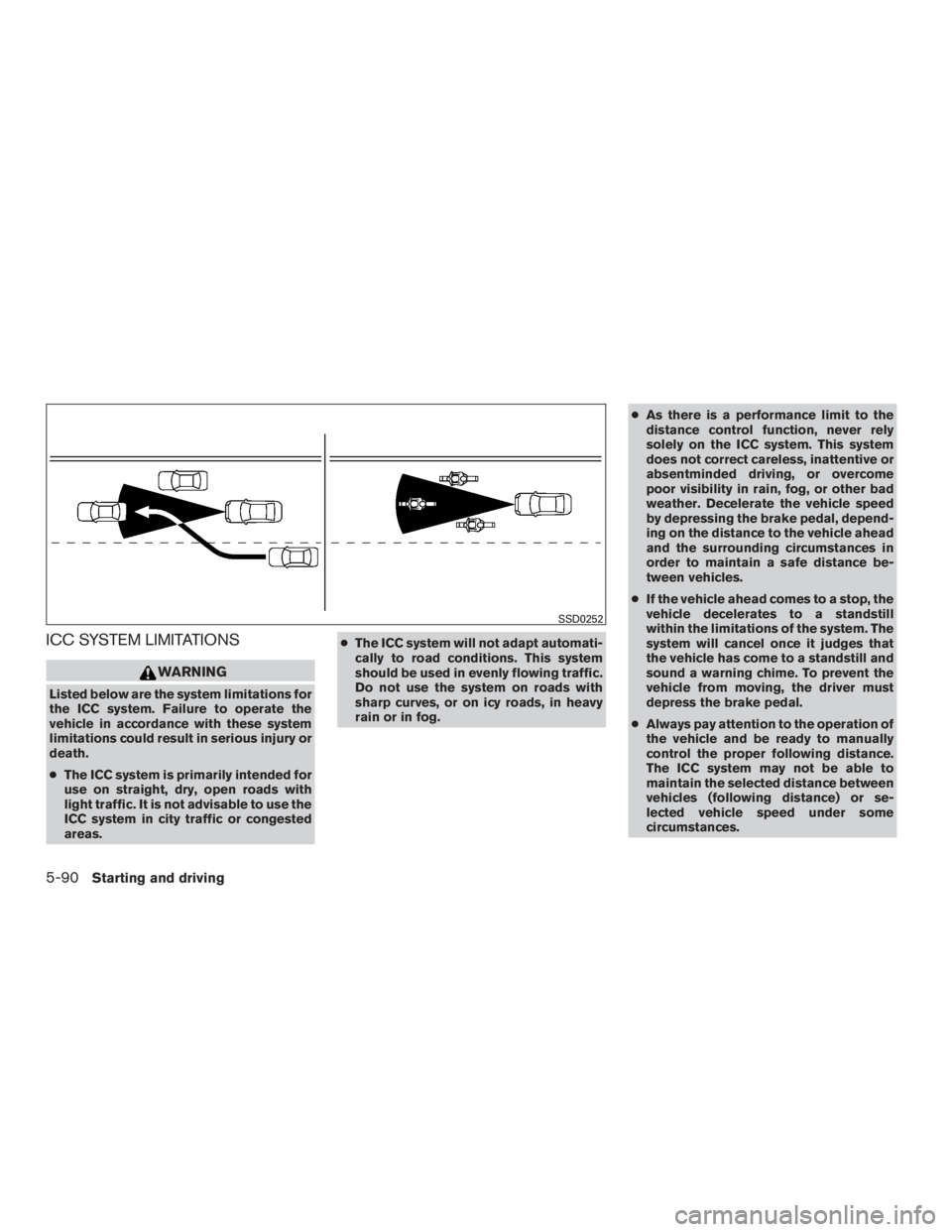
ICC SYSTEM LIMITATIONS
WARNING
Listed below are the system limitations for
the ICC system. Failure to operate the
vehicle in accordance with these system
limitations could result in serious injury or
death.
●The ICC system is primarily intended for
use on straight, dry, open roads with
light traffic. It is not advisable to use the
ICC system in city traffic or congested
areas. ●
The ICC system will not adapt automati-
cally to road conditions. This system
should be used in evenly flowing traffic.
Do not use the system on roads with
sharp curves, or on icy roads, in heavy
rain or in fog. ●
As there is a performance limit to the
distance control function, never rely
solely on the ICC system. This system
does not correct careless, inattentive or
absentminded driving, or overcome
poor visibility in rain, fog, or other bad
weather. Decelerate the vehicle speed
by depressing the brake pedal, depend-
ing on the distance to the vehicle ahead
and the surrounding circumstances in
order to maintain a safe distance be-
tween vehicles.
● If the vehicle ahead comes to a stop, the
vehicle decelerates to a standstill
within the limitations of the system. The
system will cancel once it judges that
the vehicle has come to a standstill and
sound a warning chime. To prevent the
vehicle from moving, the driver must
depress the brake pedal.
● Always pay attention to the operation of
the vehicle and be ready to manually
control the proper following distance.
The ICC system may not be able to
maintain the selected distance between
vehicles (following distance) or se-
lected vehicle speed under some
circumstances.
SSD0252
5-90Starting and driving
Page 459 of 629

Action to take
When the conditions listed above are no longer
present, turn the system off using the ICC
CRUISE ON/OFF switch. Turn the ICC system
back on to use the system.
Condition B
When the radar sensor area of the front bumper
is covered with dirt or is obstructed, the ICC
system will automatically be cancelled. If the sen-
sor area is covered with ice, a transparent or
translucent vinyl bag, etc., the ICC system may
not detect vehicles ahead. In these instances, the
ICC system may not cancel and may not be able
to maintain the selected following distance from
the vehicle ahead. Be sure to check and clean the
sensor area.
The system warning light (orange) will illuminate
and the “Unavailable: Front radar blocked” warn-
ing message will appear in the vehicle information
display.Action to take
If the warning light (orange) comes on, park the
vehicle in a safe location and turn the engine off.
Check to see if the radar sensor window is
blocked. If the radar sensor window is blocked,
remove the blocking material. Restart the engine.
If the warning light continues to illuminate, have
the ICC system checked. It is recommended that
you visit an INFINITI retailer for this service.
Condition C
When the ICC system is not operating properly, a
chime sounds and the system warning light (or-
ange) will come on.Action to take
If the warning light comes on, park the vehicle in a
safe place. Turn the engine off, restart the engine,
resume driving and set the ICC system again.
If it is not possible to set the system or the
indicator stays on, it may indicate that the
system is malfunctioning. Although the ve-
hicle is still drivable under normal condi-
tions, have the vehicle checked. It is recom-
mended that you visit an INFINITI retailer
for this service.
LSD2174LSD2175
5-94Starting and driving
Page 463 of 629

The DCA system helps assist the driver to keep a
following distance to the vehicle ahead by brak-
ing and moving the accelerator pedal upward in
the normal driving condition.
When a vehicle is detected ahead:
The vehicle ahead detection indicator comes on.
When vehicle approaches a vehicle ahead:● If the driver’s foot is not on the accelerator
pedal, the system activates the brakes to
decelerate smoothly as necessary. If the ve-
hicle ahead comes to a stop, the vehicle
decelerates to a standstill within the limita-
tions of the system.
● If the driver’s foot is on the accelerator pedal,
the system moves the accelerator pedal up-
ward to assist the driver to release the ac-
celerator pedal.
When brake operation by driver is required:
The system alerts the driver by a warning chime
and blinking the vehicle ahead detection indica-
tor. If the driver’s foot is on the accelerator pedal
after the warning, the system moves the accel-
erator pedal upward to assist the driver to switch
to the brake pedal. The stoplights of the vehicle come on when
braking is performed by the DCA system.
When the brake operates, a noise may be
heard. This is not a malfunction.
WARNING
●
When the vehicle ahead detection indi-
cator light is not illuminated, the system
will not control or warn the driver.
● Depending on the position of the accel-
erator pedal, the system may not be
able to assist the driver to release the
accelerator pedal appropriately.
● If the vehicle ahead comes to a stand-
still, the vehicle decelerates to a stand-
still within the limitations of the system.
The system will release brake control
with a warning chime once it judges the
vehicle is at a standstill. To prevent the
vehicle from moving, the driver must
depress the brake pedal. (The system
will resume control automatically once
the system reaches 3 mph (5 km/h)) . Overriding the system:
The following driver’s operations override the
system operation.
● When the driver depresses the accelerator
pedal even further while the system is mov-
ing the accelerator pedal upward, the DCA
system control of the accelerator pedal is
canceled.
● When the driver’s foot is on the accelerator
pedal, the brake control by the system is not
operated.
● When the driver’s foot is on the brake pedal,
neither the brake control nor the alert by the
system operates.
● When the ICC system is set, the DCA sys-
tem will be canceled.
5-98Starting and driving
Page 465 of 629
1. Press thebutton until “Settings” dis-
plays in the vehicle information display and
then press the ENTER button. Use
the
button to select “Driver Assis-
tance.” Then press the ENTER button.
2. Select “Driving Aids”, and press the ENTER button.
3. Select “Forward”, and press the ENTER but- ton.
4. To turn on the “Assistance (DCA)” check the box using the ENTER button.
If the LDP, BSI and DCA systems are set to off on
the information display and the dynamic driver
assistance switch is pushed, the LDP ON indica-
tor light, BSI ON indicator light, and the DCA
system switch indicator light will blink for approxi-
mately 2 seconds.
For additional information on LDP and BSI, refer
to “Lane Departure Prevention (LDP) (if so
equipped)” and “Blind Spot Intervention® (BSI)
(if so equipped)” in this section.
DCA SYSTEM LIMITATIONS
WARNING
● This system is only an aid to assist the
driver and is not a collision warning or
avoidance device. It is the driver’s re-
sponsibility to stay alert, drive safely
and be in control of the vehicle at all
times.
● This system will not adapt automatically
to road conditions.
● As there is a performance limit to the
distance control function, never rely
solely on the DCA system. This system
does not correct careless, inattentive or
absent-minded driving, or overcome
poor visibility in rain, fog, or other bad
weather. Decelerate the vehicle speed
by depressing the brake pedal, depend-
ing on the distance to the vehicle ahead
and the surrounding circumstances in
order to maintain a safe distance be-
tween vehicles.
● The system may not detect the vehicle
in front of you in certain road or weather
conditions. To avoid accidents, never
use the DCA system under the following
conditions: – On roads with sharp curves
– On slippery road surfaces such as on
ice or snow, etc.
– During bad weather (rain, fog, snow, etc.)
– When rain, snow or dirt adhere to the sensor area of the front bumper
– On steep downhill roads (frequent braking may result in overheating the
brakes)
– On repeated uphill and downhill roads
● Do not use the DCA system if you are
towing a trailer. The system may not
detect a vehicle ahead.
● In some road or traffic conditions, a
vehicle or object can unexpectedly
come into the sensor detection zone
and cause automatic braking. You may
need to control the distance from other
vehicles using the accelerator pedal. Al-
ways stay alert and avoid using the DCA
system where not recommended in this
warning section.
5-100Starting and driving
Page 471 of 629

Condition B:
When the sensor area of the front bumper is dirty,
making it impossible to detect a vehicle ahead,
the DCA system is automatically canceled.
The chime sounds and the system warning light
(orange) will come on and the “Unavailable: Front
radar blocked” indicator will appear.
Action to take:
If the warning light comes on, park the vehicle in a
safe place, turn the engine off. Clean the sensor
area of the bumper and then perform the settings
again.Condition C:
When the DCA system is not operating properly,
the chime sounds and the system warning light
(“DCA” orange) will come on.
Action to take:
If the warning light comes on, park the vehicle in a
safe place. Turn the engine off, restart the engine,
and turn on the DCA system again.If it is not possible to set the system or the
indicator stays on, it may indicate that the
system is malfunctioning. Although the ve-
hicle is still drivable under normal condi-
tions, have the vehicle checked. It is recom-
mended that you visit an INFINITI retailer
for this service.
SYSTEM MAINTENANCE
The sensor for the DCA system is common with
ICC and is located behind the front bumper.
For additional information, refer to “Intelligent
Cruise Control (ICC)” in this section.
For USA
FCC ID: OAYARS3–B
This device complies with part 15 of the FCC
Rules. Operation is subject to the following two
conditions: (1) This device may not cause harmful
interference, and (2) this device must accept any
interference received, including interference that
may cause undesired operation.
FCC Warning
Changes or modifications not expressly ap-
proved by the party responsible for compliance
could void the user’s authority to operate the
equipment.
DCA warning light (orange)
LSD2081
5-106Starting and driving
Page 473 of 629

1. Vehicle ahead detection indicator
2. FEB with pedestrian detection emergencywarning indicator
3. FEB with pedestrian detection system warn- ing light
SYSTEM OPERATION
The FEB with pedestrian detection system oper-
ates at speeds above approximately 3 mph
(5 km/h). For the pedestrian detection function,
the FEB with pedestrian detection system oper-
ates at speeds between 6 – 37 mph (10 –
60 km/h).
If a risk of a forward collision with a vehicle is
detected, the FEB with pedestrian detection sys-
tem will first provide a warning to the driver by
flashing the vehicle ahead detection indicator
and providing an audible alert. In addition, the
FEB with pedestrian detection system pushes
the accelerator pedal up, and then the system
applies partial braking. If the driver applies the
brakes quickly and forcefully, but the FEB with
pedestrian detection system detects that there is
still the possibility of a forward collision, the sys-
tem will automatically increase the braking force.
If the risk of a collision becomes imminent and the
driver does not take action, the FEB with pedes-
trian detection system issues the second warning
to the driver by flashing the FEB with pedestrian
LSD2639
5-108Starting and driving
Page 474 of 629

detection emergency warning indicator (red) ,
providing an audible warning, and then automati-
cally applies harder braking.
If a risk of a forward impact with a pedestrian is
detected, the FEB with pedestrian detection sys-
tem will provide a warning to the driver by flashing
the FEB with pedestrian detection emergency
warning indicator (red) , provides an audible alert
and the system will apply partial baking. If the
driver applies the brakes quickly and forcefully
but the FEB with pedestrian detection system
detects that there is still the possibility of a for-
ward impact with a pedestrian, the system will
automatically increase the braking force. If the
risk of collision becomes imminent and the driver
does not take action, the FEB with pedestrian
detection system automatically applies harder
braking.
NOTE:
The vehicle’s brake lights come on when
any braking is performed by the FEB with
pedestrian detection system.
Depending on vehicle speed and distance to the
vehicle or pedestrian ahead, as well as driving
and roadway conditions, the system may help the
driver avoid a forward collision or may help miti-
gate the consequences if a collision should be
unavoidable. If the driver is handling the steeringwheel, accelerating or braking, the FEB with pe-
destrian detection system will function later or
will not function.
The automatic braking will cease under the fol-
lowing conditions:
● When the steering wheel is turned to avoid a
collision.
● When the accelerator pedal is depressed.
● When there is no longer a vehicle or a pe-
destrian detected ahead.
If the FEB with pedestrian detection system has
stopped the vehicle, the vehicle will remain at a
standstill for approximately 2 seconds before the
brakes are released.
Starting and driving5-109
Page 475 of 629

TURNING THE FEB WITH
PEDESTRIAN DETECTION SYSTEM
ON/OFF
Perform the following steps to enable or disable
the FEB with pedestrian detection system.1. Press the
button until “Settings” dis-
plays in the vehicle information display and
then press ENTER button. Use the
button to select “Driver Assistance”. Then
press the ENTER button.
2. Select “Emergency Braking” and press the ENTER button.
3. Select “System” and press the ENTER but- ton.
When the FEB with pedestrian detection system
is turned off, the FEB with pedestrian detection
system warning light illuminates.
NOTE:
● The FEB with pedestrian detection system
will be automatically turned on when the
engine is restarted.
LSD2586
5-110Starting and driving
Page 476 of 629

●The PFCW system (if so equipped) is inte-
grated into the FEB with pedestrian detec-
tion system. There is not a separate selec-
tion in the vehicle information display for the
PFCW system. When the FEB with pedes-
trian detection is turned off, the PFCW sys-
tem is also turned off.
FEB WITH PEDESTRIAN
DETECTION SYSTEM LIMITATIONS
WARNING
Listed below are the system limitations for
the FEB with pedestrian detection system.
Failure to operate the vehicle in accor-
dance with these system limitations could
result in serious injury or death.
●The FEB with pedestrian detection sys-
tem cannot detect all vehicles or pedes-
trians under all conditions.
● The radar sensor FEB with pedestrian
detection system does not detect the
following objects:
– Small pedestrians (including small children) , animals and cyclists.
– Pedestrians in wheelchairs or using mobile transport such as scooters,
child-operated toys, or skateboards. – Pedestrians who are seated or other-
wise not in a full upright standing or
walking position.
– Oncoming vehicles
– Crossing vehicles
– Obstacles on the roadside
● The FEB with pedestrian detection sys-
tem has some performance limitations.
– If a stationary vehicle is in the vehi- cle’s path, the FEB with pedestrian
detection system will not function
when the vehicle is driven at speeds
over approximately 50 mph
(80 km/h).
– For pedestrian detection, the FEB with pedestrian detection system will
not function when the vehicle is
driven at speeds over approximately
37 mph (60 km/h) or below approxi-
mately 6 mph (10km/h) .
● The FEB with pedestrian detection sys-
tem will not function for pedestrians in
darkness or in tunnels, even if there is
street lighting in the area. ●
For pedestrians, the FEB with pedes-
trian detection system will not issue the
first warning and will not push the ac-
celerator pedal up.
● The FEB with pedestrian detection sys-
tem may not function if the vehicle
ahead is narrow (for example a
motorcycle) .
● The FEB with pedestrian detection sys-
tem may not function if speed differ-
ence between the two vehicles is too
small.
● The radar sensor FEB with pedestrian
detection system may not function
properly or detect a vehicle ahead in the
following conditions:
o Poor visibility (conditions such as rain, snow, fog, dust storms, sand-
storms, and road spray from other
vehicles)
o Driving on a steep downhill slope or roads with sharp curves.
o Driving on a bumpy road surface, such as an uneven dirt road.
o If dirt, ice, snow or other material is covering the radar sensor area.
Starting and driving5-111