audio INFINITI QX60 2017 Owners Manual
[x] Cancel search | Manufacturer: INFINITI, Model Year: 2017, Model line: QX60, Model: INFINITI QX60 2017Pages: 629, PDF Size: 6.89 MB
Page 364 of 629
●In some situations, the system may not be
able to recognize your command even if you
say the exact command. This can be due to
noise conditions or an accent.
● In some unique cases, the system may ex-
pect a word to be spoken as it is spelled as
opposed to the way it is normally pro-
nounced.
ADDITIONAL HELP
For additional technical information, it is recom-
mended that you visit the following websites or
contact the support line.
Websites:
www.infinitiusa.com (for U.S)
www.infiniti.ca (for Canada)
Support line:
1–855–444–7244
Monitor, climate, audio, phone and voice recognition systems4-161
Page 365 of 629
MEMO
4-162Monitor, climate, audio, phone and voice recognition systems
Page 406 of 629
●The radar sensors are designed to
ignore most stationary objects, how-
ever objects such as guardrails,
walls, foliage and parked vehicles
may occasionally be detected. This is
a normal operation condition.
● The following conditions may reduce
the ability of the radar to detect other
vehicles:
– Severe weather
– Road spray
– Ice/frost/dirt build-up on the vehicle
● Do not attach stickers (including trans-
parent material) , install accessories or
apply additional paint near the radar
sensors. These conditions may reduce
the ability of the radar to detect other
vehicles.
● Excessive noise (for example, audio
system volume, open vehicle window)
will interfere with the chime sound, and
it may not be heard.
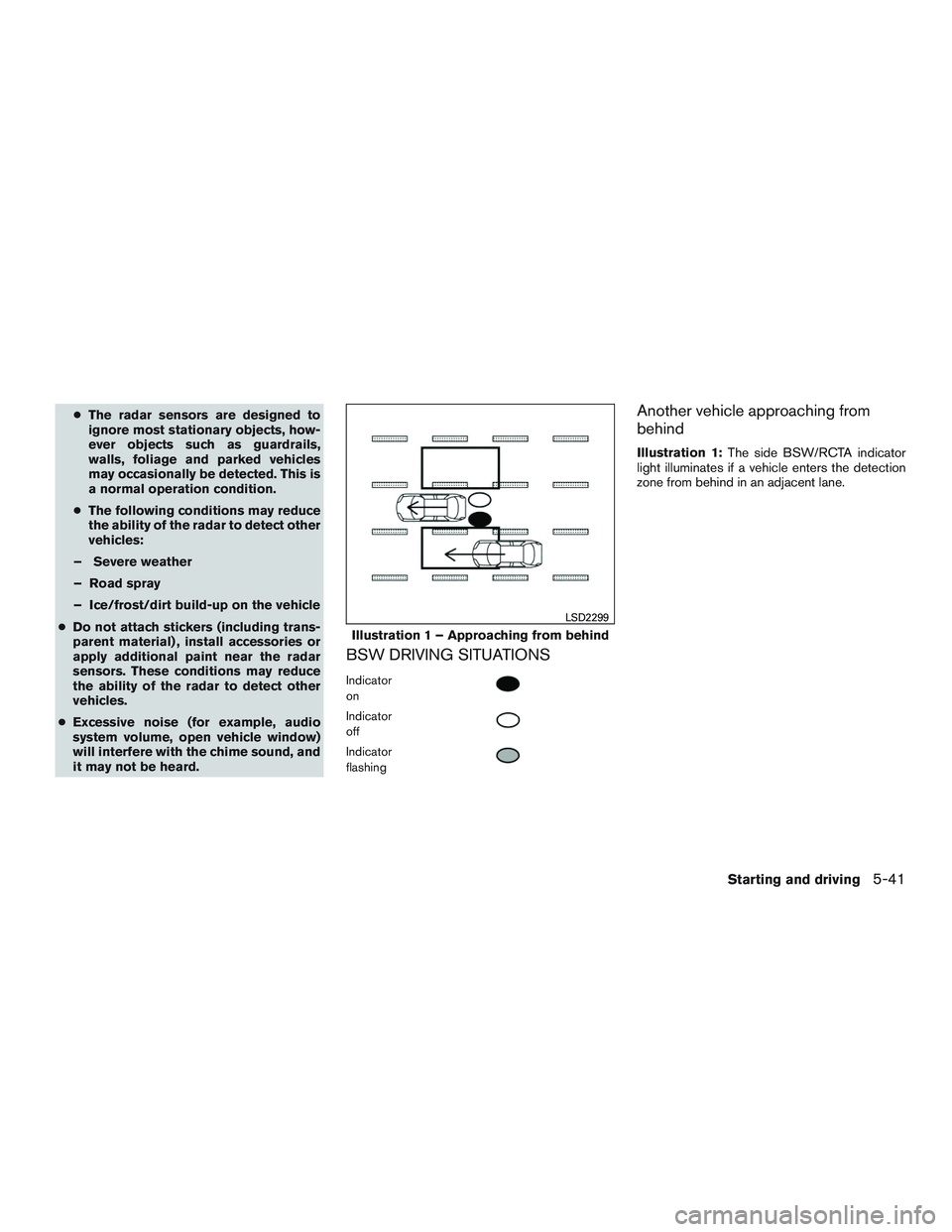
BSW DRIVING SITUATIONS
Indicator
on
Indicator
off
Indicator
flashing
Another vehicle approaching from
behind
Illustration 1: The side BSW/RCTA indicator
light illuminates if a vehicle enters the detection
zone from behind in an adjacent lane.
Illustration 1 – Approaching from behind
LSD2299
Starting and driving5-41
Page 416 of 629

– When rain, snow or dirt adheres tothe windshield in front of a lane cam-
era unit.
– When the headlights are not bright due to dirt on the lens or if aiming is
not adjusted properly.
– When strong light enters a lane cam- era unit. (For example: light directly
shines on the front of the vehicle at
sunrise or sunset.)
– When a sudden change in brightness occurs. (For example: when the ve-
hicle enters or exits a tunnel or under
a bridge.)
● Do not use the BSI system under the
following conditions because the sys-
tem may not function properly.
– During bad weather (For example: rain, fog, snow, etc.)
– When driving on slippery roads, such as on ice or snow, etc.
– When driving on winding or uneven roads.
– When there is a lane closure due to road repairs.
– When driving in a makeshift lane. – When driving on roads where the
lane width is too narrow.
– When driving with a tire that is not within normal tire conditions (e.g.
tire wear, low tire pressure, installa-
tion of spare tire, tire chains, non-
standard wheels) .
– When the vehicle is equipped with non-original brake parts or suspen-
sion parts.
● Do not use the BSI systems when tow-
ing a trailer.
● Excessive noise (e.g. audio system vol-
ume, open vehicle window) will inter-
fere with the chime sound, and it may
not be heard.
BSI DRIVING SITUATIONS
Another vehicle approaching from
behind
Illustration 1: The Blind Spot Warning indicator
light illuminates if a vehicle enters the detection
zone from behind in an adjacent lane.
However, if the overtaking vehicle is traveling
much faster than your vehicle, the indicator light
may not illuminate before the detected vehicle is
beside your vehicle. Always use the side and rear
mirrors and turn and look in the direction your
vehicle will move to ensure it is safe to change
lanes.
Illustration 1 – Approaching from behind
SSD1026
Starting and driving5-51
Page 429 of 629

– Illustration c: When the vehicle isparked on inclined ground.
– Illustration d: When an approaching vehicle turns into your vehicle’s park-
ing lot aisle.
– Illustration e: When the angle formed by your vehicle and approaching ve-
hicle is small.
● The following conditions may reduce
the ability of the radar to detect other
vehicles:
– Severe weather
– Road spray
– Ice/frost/dirt build up on the vehicle
● Do not attach stickers (including trans-
parent material) , install accessories or
apply additional paint near the radar
sensors. These conditions may reduce
the ability of the radar to detect other
vehicles.
● The sonar sensors detect stationary ob-
jects behind the vehicle. The sonar sen-
sor may not detect:
– Small or moving objects
– Wedge-shaped objects – Object close to the bumper (less than
approximately 1 ft (30 cm))
– Thin objects such as rope, wire and chain, etc.
● The brake engagement by the BCI sys-
tem is not as effective on a slope as it is
on flat ground. When on a steep slope
the system may not function properly.
● Do not use the BCI system under the
following conditions because the sys-
tem may not function properly:
– When driving with a tire that is not within normal tire conditions (e.g.
tire wear, low tire pressure, installa-
tion of spare tire, tire chains, non-
standard wheels) .
– When the vehicle is equipped with non-original brake parts or suspen-
sion parts.
● Do not use the BCI systems when tow-
ing a trailer.
● Excessive noise (e.g. audio system vol-
ume, open vehicle window) will inter-
fere with the chime sound, and it may
not be heard.SYSTEM TEMPORARILY NOT
AVAILABLE
If the following messages appear on the vehicle
information display, a chime will sound and the
BCI system will be turned off automatically.
● “Unavailable High Accelerator Temp.”:
If the vehicle is parked in direct sunlight
under high temperature conditions (over ap-
proximately 104°F (40°C)) and then started,
the BCI system may be deactivated auto-
matically and the “Unavailable High Accel-
erator Temp” message will appear in the
vehicle information display for a period of
time.
When the interior temperature is reduced,
turn off the BCI system and turn it on again.
● “Unavailable Side Radar Obstruction”:
When side radar blockage is detected.
When the blockage is removed, turn off the
BCI system and turn it on again.
5-64Starting and driving
Page 436 of 629

WARNING
Listed below are the system limitations for
the RCTA system. Failure to operate the
vehicle in accordance with these system
limitations could result in serious injury or
death.
●Always check surroundings and turn to
check what is behind you before back-
ing up. The radar sensors detect ap-
proaching (moving) vehicles. The radar
sensors cannot detect every object such
as:
– Pedestrians, bicycles, motorcycles, animals or child-operated toy
vehicles
– A vehicle that is passing at speeds greater than approximately 19 mph
(30 km/h)
– A vehicle that is passing at speeds lower than approximately 5 mph
(8 km/h)
● The radar sensors may not detect ap-
proaching vehicles in certain situations:
– Illustration a: When a vehicle parked next to you obstructs the beam of the
radar sensor. – Illustration b: When the vehicle is
parked in an angled parking space.
– Illustration c: When the vehicle is parked on inclined ground.
– Illustration d: When an approaching vehicle turns into your vehicle’s park-
ing lot aisle.
– Illustration e: When the angle formed by your vehicle and approaching ve-
hicle is small
● The following conditions may reduce
the ability of the radar to detect other
vehicles:
– Severe weather
– Road spray
– Ice/frost/dirt build-up on the vehicle
● Do not attach stickers (including trans-
parent material) , install accessories or
apply additional paint near the radar
sensors. These conditions may reduce
the ability of the radar to detect other
vehicles
● Excessive noise (e.g. audio system vol-
ume, open vehicle window) will inter-
fere with the chime sound, and it may
not be heard. NOTE:
In the case of several vehicles approaching
in a row (Illustration 1) or in the opposite
direction (Illustration 2) , a chime may not
be sounded by the RCTA system after the
first vehicle passes the sensors.
Illustration 1
LSD2043
Starting and driving5-71
Page 503 of 629

The sonar (parking sensor) system sounds a tone
to inform the driver of obstacles near the bumper.
When the sonar system is turned on, the sonar
view will automatically appear in the center dis-
play when the camera is activated.
WARNING
Failure to follow the warnings and instruc-
tions for proper use of the sonar system
could result in serious injury or death.
●The sonar system is not a replacement
for proper driving procedures and is not
designed to prevent contact with ve-
hicles or objects. ●
The driver is always responsible for
safety during parking and other maneu-
vers. Always look around and check that
it is safe to do so before parking.
● This function is designed as an aid to
the driver in detecting large stationary
objects to help avoid damaging the
vehicle.
If your vehicle sustains damage to the bumper
fascia, leaving it misaligned or bent, the sensing
zone may be altered causing inaccurate mea-
surement of obstacles or false alarm.
CAUTION
● Excessive noise (such as audio system
volume or an open vehicle window) will
interfere with the tone and it may not be
heard
● Keep the sonar sensors (located on the
bumper fascias) free from snow, ice and
large accumulations of dirt. Do not
clean the sensors with sharp objects. If
the sensors are covered, the accuracy of
the sonar function will be diminished.
SYSTEM OPERATION
The system informs with a visual and audible
signal of front obstacles when the shift lever is in
the D (Drive) position and both front and rear
obstacles when the shift lever is in the R (Re-
verse) position.
Sonar Operation Table
FR Sensor RR Sensor
Range Sound Display Sound Display Px†x †
R ooo o
Nx†x †
Doox †
o – Display/Beep when detect
† – Display on camera view
x – No Display and Beep
The system is deactivated at speeds above
6 mph (10 km/h). It is reactivated at lower
speeds.
The intermittent tone will stop after 3 seconds
when an obstacle is detected by only the corner
sensor and the distance does not change. The
tone will stop when the obstacle get away from
the vehicle.
LSD2135
FRONT AND REAR SONAR SYSTEM
(if so equipped)
5-138Starting and driving
Page 620 of 629

11 Index
2nd row bench seat adjustment......1-5,1-8
A
Air bag (See supplemental restraint
system) .....................1-50
Air bag system Front (See supplemental front impact
air bag system) ...............1-58
Airbagwarninglabels.............1-68
Airbagwarninglight...........1-69,2-12
Air bag warning light, supplemental . .1-69, 2-12
Aircleaner....................8-14
Air cleaner housing filter ............8-14
Air conditioner Air conditioner specification label ....10-12
Air conditioner system refrigerant and
oil recommendations ............10-7
Heater and air conditioner (automatic)
(if so equipped) ...............4-48
Heater and air conditioner controls ....4-49
Servicing air conditioner ..........4-56
Alarm system
(See vehicle security system) .........2-30
Anchor point locations .............1-33
Antenna .....................4-72
Antifreeze ...................5-142
Anti-lock brake warning light ..........2-9
Anti-lock Braking System (ABS) .......5-133
APPS button ...................4-5
Armrests .....................1-8
Around View® Monitor .............4-27 Audible reminders
...............2-15
Audio system ..................4-56
AMradioreception.............4-57
Bluetooth® streaming audio ........4-65
Compact disc (CD) player .........4-78
Digital Versatile Disc (DVD) Player
Operation ..................4-89
FM/AM radio with compact disc (CD)
player ....................4-70
FMradioreception.............4-57
iPod® Player .............4-62,4-82
iPod® player operation .......4-62,4-82
Radio ....................4-56
Steering wheel audio control
switch .................4-7,4-71
USB (Universal Serial Bus) Connection
Port..................4-62,4-79
Autolight switch .................2-38
Automatic Automatic drive positioner .....3-36,3-38
Automatic power window switch .....2-62
Automatic anti-glare inside mirror .......3-33
Automatic door locks ..............3-6
Automatic drive positioner .......3-36,3-38
AUXjack ....................4-90
B
Backbutton....................4-5
Backup Collision Intervention (BCI)
system ......................5-58
Backup Collision Warning (BCW) system . .5-58 Battery
.................5- 142, 8-11
Charge warning light ............2-10
Battery replacement ..............8-20
INFINITI Intelligent Key ...........8-20
Keyfob ...................8-20
Before starting the engine ...........5-16
Belt (See drive belt) ..............8-13
Blind Spot Intervention (BSI) system .....5-46
Blind Spot Warning (BSW) warning
system......................5-37
Block heater Engine ...................5-143
Boosterseats..................1-47
Brake Anti-lock Braking System (ABS) .....5-133
Brake fluid ..................8-10
Brakelight(Seestoplight).........8-22
Brake system ...............5-132
Brakewarninglight..............2-9
Brakewearindicators........2-15,8-17
Parking brake operation ..........5-22
Self-adjusting brakes ............8-17
Brake assist ..................
5-134
Brake fluid ....................8-10
Brakes ......................8-17
Brake system .................5-132
Break-inschedule...............5-126
Brightness/contrast button ...........4-5
Brightness control Instrument panel ..............2-42
Bulb check/instrument panel ..........2-8
Bulbreplacement................8-22
Page 621 of 629

C
Capacities and recommended
fuel/lubricants ..................10-2
Cargoareastoragebin.............2-58
Cargo (See vehicle loading information) . . .10-13
Car phone or CB radio .............4-115
CD care and cleaning ..............4-95
CD player (See audio system) .........4-78
Check tire pressure ...............2-27
Child restraints .......1-26,1-26,1-28,1-30
LATCH (Lower Anchors and Tethers for
CHildren) System ..............1-30
Precautions on child
restraints.........1-29,1-36,1-42,1-47
Top tether strap anchor point locations . .1-33
Child restraint with top tether strap .......1-33
Child safety rear door lock ............3-6
Chimes, audible reminders ...........2-15
Cleaningexteriorandinterior........7-2,7-4
Climatecontrolseatswitch...........2-44
Clock set/adjustment ..............4-15
C.M.V.S.S. certification label .........10-11
Cold weather driving ..............5-142
Compact disc (CD) player ...........4-78
Consolebox...................2-55
Continuously Variable Transmission (CVT) . . .5-17 Continuously Variable Transmission (CVT)
fluid .......................8-9
Driving with Continuously Variable
Transmission (CVT) .............5-17
Control panel buttons Backbutton..................4-5
Brightness/contrast button ..........4-5
Clockset...................4-15 Setting button
.................4-5
Controls Audio controls ................4-70
Audio controls (steering wheel) ....4-7,4-71
Heater and air conditioner controls .....4-49
Coolant Capacities and recommended
fuel/lubricants ................10-2
Changingenginecoolant...........8-5
Checking engine coolant level ........8-5
Engine coolant temperature gauge .....2-6
Corrosion protection ...............7-7
Cruisecontrol...............5-74,5-75
Cupholders...................2-56
D
Daytime Running Light System .........2-41
Defroster switch Rear window and outside mirror defroster
switch.....................2-36
Digital Versatile Disc (DVD) player .......4-89
Dimensionsandweights ............10-9
Dimmer switch for instrument panel ......2-42
Display......................2-17
Display controls (see control panel buttons) . .4-5, 4-8
Distance Control Assist (DCA) system .....5-96
Doors ........................3-4
Drive belt .....................8-13
Drive positioner, Automatic ........3-36,3-38
Driving Cold weather driving ............5-142
Driving with Continuously Variable
Transmission (CVT) .............5-17 Precautions when starting and driving
....5-4
Driving the vehicle ................5-17
Dual panel moonroof ..............2-64
Dual power moonroof ...........2-64,2-64
E
Economy-fuel.................5-128
Emergency engine shutoff .........5-15,6-3
Emission control information label ......10-11
Emission control system warranty .......10-30
Engine Before
starting the engine ..........5-16
Blockheater ................5-143
Capacities and recommended
fuel/lubricants ................10-2
Changing engine coolant ...........8-5
Changingengineoil..............8-7
Changing engine oil filter ...........8-8
Checking engine coolant level ........8-5
Checking engine oil level ...........8-6
Engine compartment check locations ....8-3
Engine coolant temperature gauge .....2-6
Engine cooling system ............8-4
Engineoil ...................8-6
Engine oil and oil filter recommendation . .10-6
Engine oil viscosity ..............10-7
Engine serial number ............10-11
Engine specifications ............10-8
Starting the engine .............5-16
Engine coolant temperature gauge .......2-6
Event Data recorders .............10-32
Exhaust gas (Carbon monoxide) .........5-4
Explanation of maintenance items ........9-2
Explanation of scheduled maintenance items . .9-5
11-2
Page 624 of 629

Map pocket....................2-53
Memory Seat ...............3-36,3-38
Meters and gauges ................2-4
Instrument brightness control ........2-42
Mirror Automatic anti-glare inside mirror ......3-33
Outside mirrors ...............3-34
Vanity mirror .................3-33
Mirrors ......................3-33
Mobile Entertainment System (MES) ......4-95
Moonroof ......................7-4
Moving Object Detection (MOD) ........4-43
O
Octanerating(Seefueloctanerating).....10-5
Odometer .....................2-5
Oil Capacities and recommended
fuel/lubricants ................10-2
Changing engine oil ..............8-7
Changing engine oil filter ...........8-8
Checking engine oil level ...........8-6
Engine oil ...................8-6
Engine oil and oil filter recommendation . .10-6
Engine oil viscosity ..............10-7
Outside mirrors .................3-34
Overheat Ifyourvehicleoverheats...........6-12
Owner’s manual order form ..........10-33
Owner’s manual/service manual order
information ...................10-33 P
Parking Parking brake operation ...........5-22
Parking/parking on hills ..........5-132
Parking brake ...................5-22
Personallights..................2-68
Power Power door locks ............3-5,3-6
Power outlet ..............2-50,2-51
Power rear windows .............2-61
Power steering fluid ..............8-9
Power steering system ...........5-132
Power windows ...............2-60
Rear power windows ............2-61
Power inverter switch ..............2-49
Power outlet ................2-50,2-51
Power steering .................5-132
Power steering fluid ................8-9
Precautions Maintenance precautions ...........8-2
On-pavement and off-road driving
precautions ..................5-8
Precautions on booster
seats...........1-29,1-36,1-42,1-47
Precautions on child
restraints .........1-29,1-36,1-42,1-47
Precautions on seat belt usage .......1-17
Precautions on supplemental restraint
system ....................1-50
Precautions when starting and driving ....5-4
Predictive Forward Collision Warning
(PFCW) .....................5-115
Push starting ...................6-12 R
Radio CarphoneorCBradio...........4-115
FM/AM radio with compact disc (CD)
player .....................4-70
Steering wheel audio control switch .4-7, 4-71
Rainsensor....................2-34
Readiness
for inspection maintenance (I/M)
test .......................10-31
Rear Cross Traffic Alert (RCTA) ........5-66
Rear power windows ..............2-61
RearView Monitor ................4-20
Rear window and outside mirror defroster
switch.......................2-36
Rear window wiper and washer switches . . .2-35
Recommended Fluids ..............10-2
Recorders EventData .................10-32
Refrigerant recommendation ..........10-7
Registering a vehicle in another country . . .10-10
Remote controller (See INFINITI mobile
entertainment system) .............4-105
Remote Start ...............3-19,5-17
Reporting safety defects (US only) ......10-30
Roadside assistance program ..........6-2
Roof rack .....................2-59
S
Safety Child safety rear door lock ..........3-6
Child seat belts .....1-29,1-36,1-42,1-47
Reporting safety defects (US only) ....10-30
11-5