power steering INFINITI QX60 2018 Owner's Manual
[x] Cancel search | Manufacturer: INFINITI, Model Year: 2018, Model line: QX60, Model: INFINITI QX60 2018Pages: 532, PDF Size: 6.22 MB
Page 18 of 532

16. Shift lever (P. 5-19)
17. Audio system controls*Front passenger air bag status light
(P. 1-50)
18. Hazard warning flasher switch
(P. 6-2)
19. Push-button ignition switch
(P. 5-13)
20. Cruise control main/set switches
(if so equipped) (P. 5-76)
Intelligent Cruise Control (ICC)
switches (if so equipped) (P. 5-78)
21. Dynamic Driver Assistance switch
(if so equipped) (P. 5-98)
22. Tilt and telescopic steering wheel
control (P. 3-33)
23. Bluetooth® Hands-Free Phone
System*
24. Steering wheel switch for audio
control* 25. Hood release (P. 3-23)
Vehicle Dynamic Control (VDC) OFF
switch (P. 2-51)
Heated steering wheel switch
(if so equipped) (P. 2-49)
Warning Systems switch
(if so equipped) (P. 2-50)
Power inverter switch (if so
equipped) (P. 2-53)
Liftgate release switch (P. 3-23)
Power liftgate main switch
(if so equipped) (P. 3-23)
26. Control panel and vehicle informa-
tion display switches (P. 2-17)
*: Refer to the separate Infiniti InTouchTM
Owner’s Manual (if so equipped).
Refer to the page number indicated in paren-
theses for operating details.
Illustrated table of contents0-7
Page 19 of 532
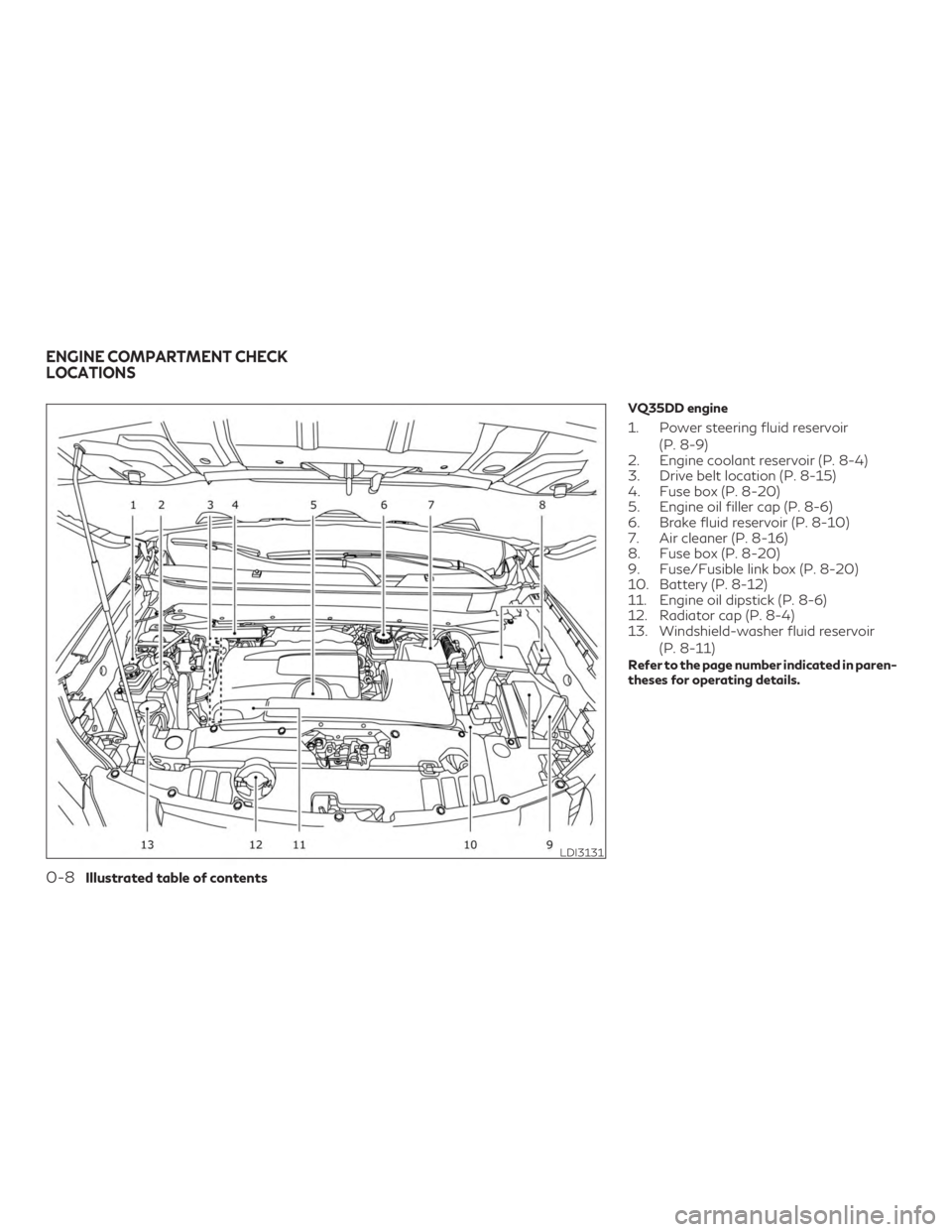
VQ35DD engine
1. Power steering fluid reservoir(P. 8-9)
2. Engine coolant reservoir (P. 8-4)
3. Drive belt location (P. 8-15)
4. Fuse box (P. 8-20)
5. Engine oil filler cap (P. 8-6)
6. Brake fluid reservoir (P. 8-10)
7. Air cleaner (P. 8-16)
8. Fuse box (P. 8-20)
9. Fuse/Fusible link box (P. 8-20)
10. Battery (P. 8-12)
11. Engine oil dipstick (P. 8-6)
12. Radiator cap (P. 8-4)
13. Windshield-washer fluid reservoir
(P. 8-11)
Refer to the page number indicated in paren-
theses for operating details.
LDI3131
ENGINE COMPARTMENT CHECK
LOCATIONS
0-8Illustrated table of contents
Page 20 of 532
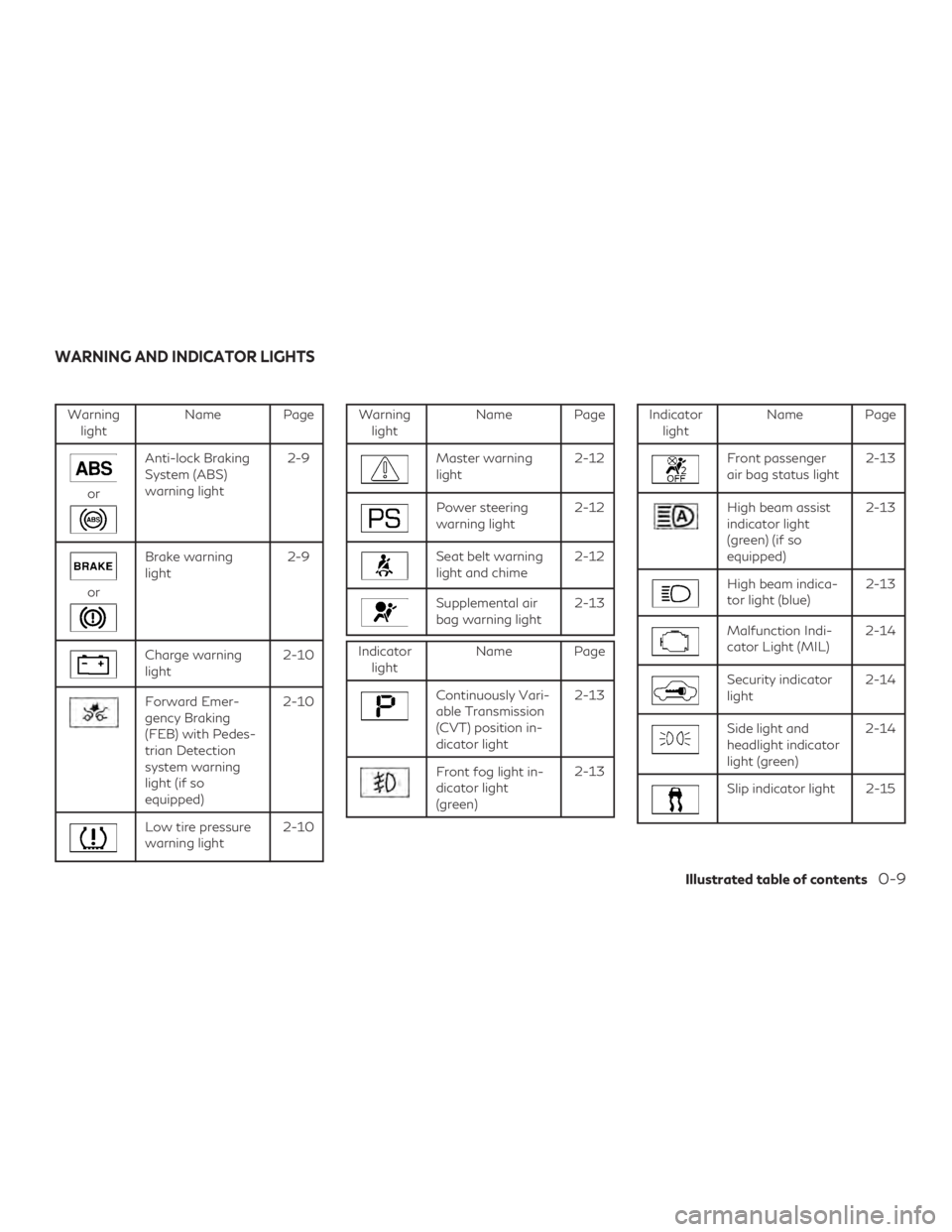
Warninglight Name Page
or
Anti-lock Braking
System (ABS)
warning light 2-9
or
Brake warning
light
2-9
Charge warning
light2-10
Forward Emer-
gency Braking
(FEB) with Pedes-
trian Detection
system warning
light (if so
equipped)2-10
Low tire pressure
warning light
2-10
Warning
light Name Page
Master warning
light 2-12
Power steering
warning light2-12
Seat belt warning
light and chime2-12
Supplemental air
bag warning light2-13
Indicator
light Name Page
Continuously Vari-
able Transmission
(CVT) position in-
dicator light 2-13
Front fog light in-
dicator light
(green)
2-13
Indicator
light Name Page
Front passenger
air bag status light 2-13
High beam assist
indicator light
(green) (if so
equipped)2-13
High beam indica-
tor light (blue)
2-13
Malfunction Indi-
cator Light (MIL)2-14
Security indicator
light2-14
Side light and
headlight indicator
light (green)2-14
Slip indicator light 2-15
WARNING AND INDICATOR LIGHTS
Illustrated table of contents0-9
Page 91 of 532
2 Instruments and controls
Instrument panel.................................2-2
Meters and gauges ...............................2-4
Speedometer and odometer ...................2-4
Tachometer ...................................2-6
Engine coolant temperature gauge .............2-6
Fuel gauge ....................................2-7
Warning lights, indicator lights and audible
reminders ........................................2-8
Checking lights ................................2-8
Warning lights ................................2-9
Indicator lights .............................. 2-13
Audible reminders ............................ 2-15
Vehicle information display .....................2-16
How to use the vehicle information
display ....................................... 2-17
Startup display ............................... 2-17
Resetting the trip computer ...................2-17
Settings ...................................... 2-17
Vehicle information display warnings and
indicators ................................... 2-26
Security systems ............................... 2-32
Vehicle security system ......................2-32
INFINITI Vehicle Immobilizer System .........2-34
Wiper and washer switch .......................2-35Switch operation
............................ 2-35
Rain-sensing auto wiper system
(if so equipped) .............................. 2-37
Rear switch operation ....................... 2-38
Rear window and outside mirror defroster
switch ......................................... 2-39
Headlight and turn signal switch ................2-40
Xenon headlights ............................ 2-40
Headlight control switch .....................2-40
LED Daytime Running Lights (DRL)
system ...................................... 2-44
Instrument brightness control ................2-45
Turn signal switch ........................... 2-45
Fog light switch ............................. 2-46
Horn ........................................... 2-46
Climate controlled seat switches
(if so equipped) ................................. 2-46
Heated seat switches (if so equipped) ...........2-47
Heated
2nd row seat switches (if so equipped) . . 2-48
Heated steering wheel switch (if so equipped) . . . 2-49
Warning systems switch (if so equipped) ........2-50
Vehicle Dynamic Control (VDC) OFF switch ......2-51
Rear Door Alert ................................ 2-52
Power inverter switch (if so equipped) ...........2-53
Page 94 of 532
16. Shift lever (P. 5-19)
17. Audio system controls*Front passenger air bag status light
(P. 1-50)
18. Hazard warning flasher switch
(P. 6-2)
19. Push-button ignition switch
(P. 5-13)
20. Cruise control main/set switches
(if so equipped) (P. 5-76)
Intelligent Cruise Control (ICC)
switches (if so equipped) (P. 5-78)
21. Dynamic Driver Assistance switch
(if so equipped) (P. 5-98)
22. Tilt and telescopic steering wheel
control (P. 3-33)
23. Bluetooth® Hands-Free Phone
System*
24. Steering wheel switch for audio
control* 25. Hood release (P. 3-23)
Vehicle Dynamic Control (VDC) OFF
switch (P. 2-51)
Heated steering wheel switch
(if so equipped) (P. 2-49)
Warning Systems switch
(if so equipped) (P. 2-50)
Power inverter switch
(if so equipped) (P. 2-53)
Liftgate release switch (P. 3-23)
Power liftgate main switch
(if so equipped) (P. 3-23)
26. Control panel and vehicle informa-
tion display switches (P. 2-17)
*: Refer to the separate Infiniti InTouchTM
Owner’s Manual (if so equipped).
Refer to the page number indicated in paren-
theses for operating details.
Instruments and controls2-3
Page 99 of 532
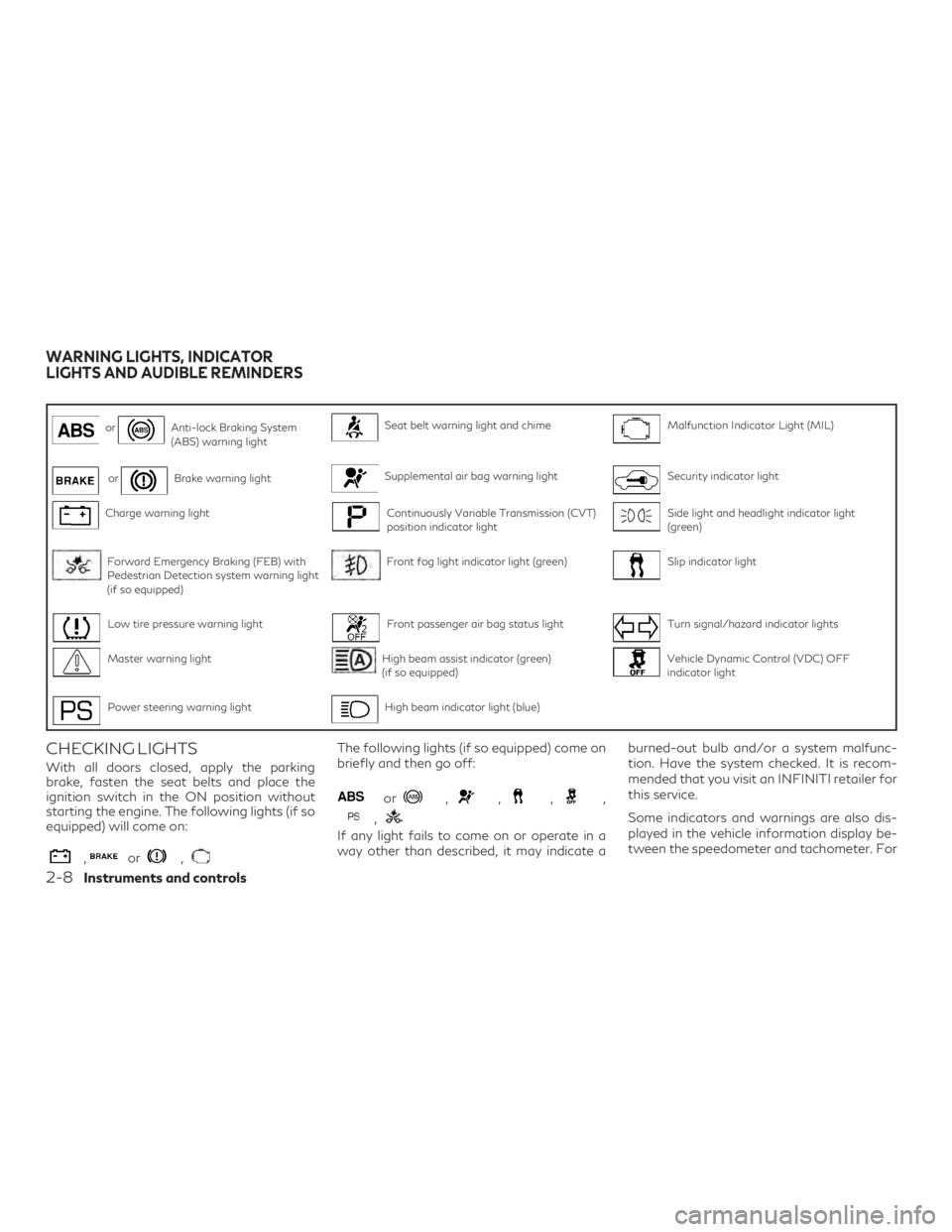
orAnti-lock Braking System
(ABS) warning lightSeat belt warning light and chimeMalfunction Indicator Light (MIL)
orBrake warning lightSupplemental air bag warning lightSecurity indicator light
Charge warning lightContinuously Variable Transmission (CVT)
position indicator lightSide light and headlight indicator light
(green)
Forward Emergency Braking (FEB) with
Pedestrian Detection system warning light
(if so equipped)Front fog light indicator light (green)Slip indicator light
Low tire pressure warning lightFront passenger air bag status lightTurn signal/hazard indicator lights
Master warning lightHigh beam assist indicator (green)
(if so equipped)Vehicle Dynamic Control (VDC) OFF
indicator light
Power steering warning lightHigh beam indicator light (blue)
CHECKING LIGHTS
With all doors closed, apply the parking
brake, fasten the seat belts and place the
ignition switch in the ON position without
starting the engine. The following lights (if so
equipped) will come on:
,or,
The following lights (if so equipped) come on
briefly and then go off:
or,,,,
,
If any light fails to come on or operate in a
way other than described, it may indicate aburned-out bulb and/or a system malfunc-
tion. Have the system checked. It is recom-
mended that you visit an INFINITI retailer for
this service.
Some indicators and warnings are also dis-
played in the vehicle information display be-
tween the speedometer and tachometer. For
WARNING LIGHTS, INDICATOR
LIGHTS AND AUDIBLE REMINDERS
2-8Instruments and controls
Page 103 of 532
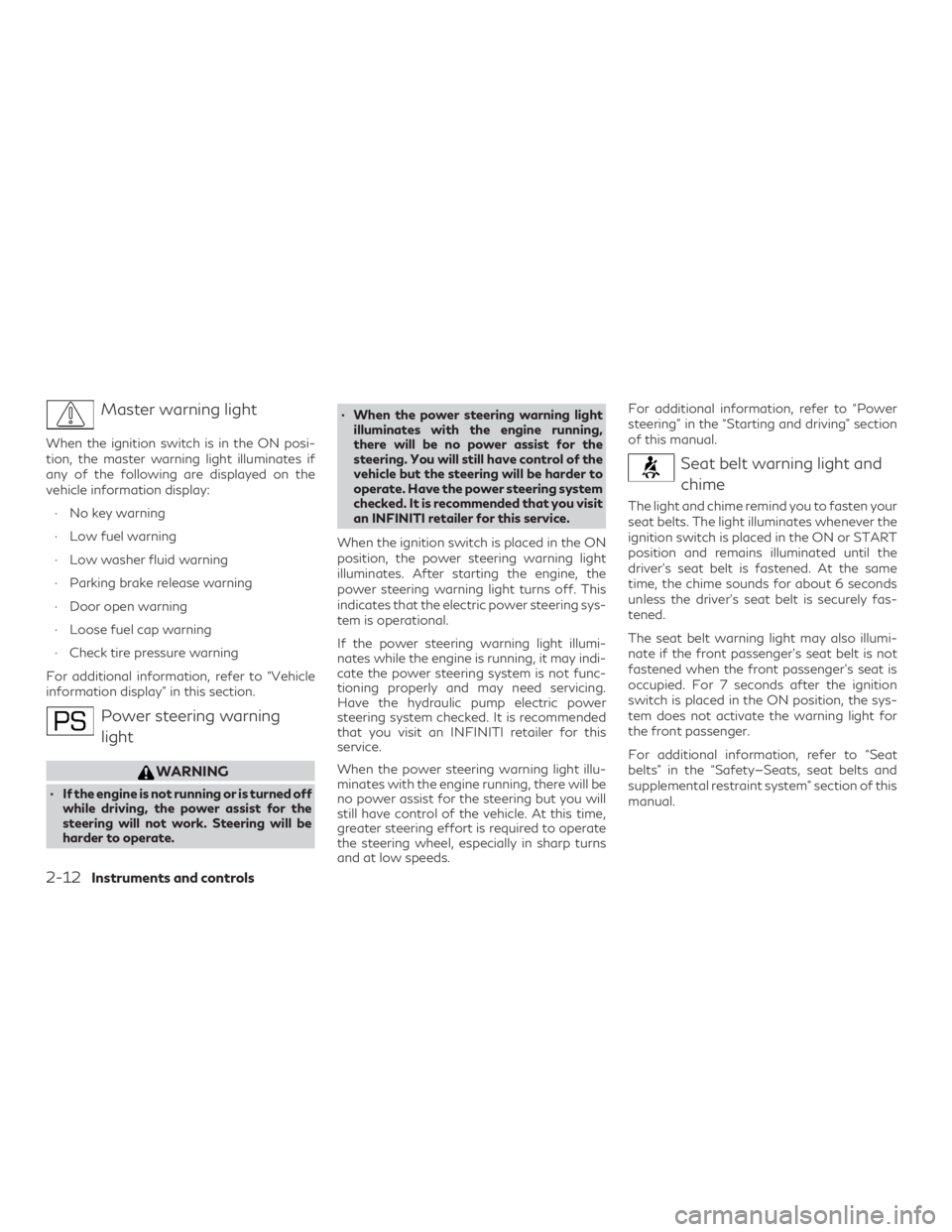
Master warning light
When the ignition switch is in the ON posi-
tion, the master warning light illuminates if
any of the following are displayed on the
vehicle information display:∙ No key warning
∙ Low fuel warning
∙ Low washer fluid warning
∙ Parking brake release warning
∙ Door open warning
∙ Loose fuel cap warning
∙ Check tire pressure warning
For additional information, refer to “Vehicle
information display” in this section.
Power steering warning light
WARNING
∙ If the engine is not running or is turned off while driving, the power assist for the
steering will not work. Steering will be
harder to operate. ∙ When the power steering warning light
illuminates with the engine running,
there will be no power assist for the
steering. You will still have control of the
vehicle but the steering will be harder to
operate. Have the power steering system
checked. It is recommended that you visit
an INFINITI retailer for this service.
When the ignition switch is placed in the ON
position, the power steering warning light
illuminates. After starting the engine, the
power steering warning light turns off. This
indicates that the electric power steering sys-
tem is operational.
If the power steering warning light illumi-
nates while the engine is running, it may indi-
cate the power steering system is not func-
tioning properly and may need servicing.
Have the hydraulic pump electric power
steering system checked. It is recommended
that you visit an INFINITI retailer for this
service.
When the power steering warning light illu-
minates with the engine running, there will be
no power assist for the steering but you will
still have control of the vehicle. At this time,
greater steering effort is required to operate
the steering wheel, especially in sharp turns
and at low speeds. For additional information, refer to “Power
steering” in the “Starting and driving” section
of this manual.
Seat belt warning light and
chime
The light and chime remind you to fasten your
seat belts. The light illuminates whenever the
ignition switch is placed in the ON or START
position and remains illuminated until the
driver’s seat belt is fastened. At the same
time, the chime sounds for about 6 seconds
unless the driver’s seat belt is securely fas-
tened.
The seat belt warning light may also illumi-
nate if the front passenger’s seat belt is not
fastened when the front passenger’s seat is
occupied. For 7 seconds after the ignition
switch is placed in the ON position, the sys-
tem does not activate the warning light for
the front passenger.
For additional information, refer to “Seat
belts” in the “Safety—Seats, seat belts and
supplemental restraint system” section of this
manual.
2-12Instruments and controls
Page 147 of 532
∙ Avoid using power outlets when the airconditioner, headlights or rear window
defroster is on.
∙ Before inserting or disconnecting a plug, be sure the electrical accessory being
used is turned OFF.
∙ Push the plug in as far as it will go. If good contact is not made, the plug may over-
heat or the internal temperature fuse
may open.
∙ When not in use, be sure to close the cap. Do not allow water or any other liquid to
contact the outlet.
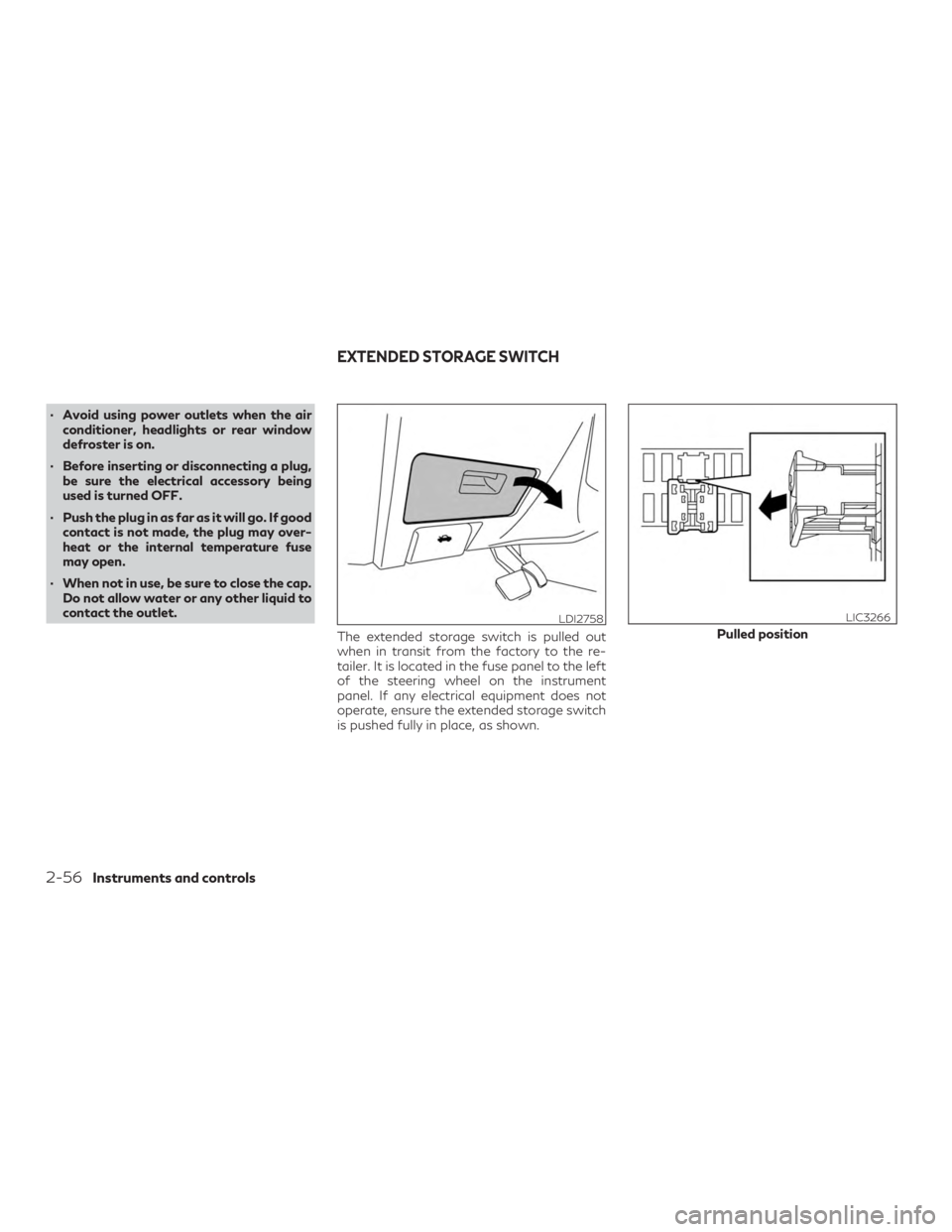
The extended storage switch is pulled out
when in transit from the factory to the re-
tailer. It is located in the fuse panel to the left
of the steering wheel on the instrument
panel. If any electrical equipment does not
operate, ensure the extended storage switch
is pushed fully in place, as shown.
LDI2758
Pulled position
LIC3266
EXTENDED STORAGE SWITCH
2-56Instruments and controls
Page 171 of 532
3 Pre-driving checks and adjustments
Keys.............................................3-2
INFINITI Intelligent Key ........................3-2
INFINITI Vehicle Immobilizer System
keys ..........................................3-4
Doors ............................................3-4
Locking with key ..............................3-5
Locking with inside lock knob — Type A
(if so equipped) ................................3-5
Locking with inside lock knob — Type B
(if so equipped) ................................3-5
Locking with power door lock switch ...........3-6
Automatic door locks ..........................3-6
Child safety rear door lock .....................3-6
INFINITI Intelligent Key System ...................3-7
Operating range ..............................3-8
Door locks/unlocks precaution .................3-9
INFINITI Intelligent Key Operation ...........3-10
How to use the remote keyless entry
function .................................... 3-14
Warning signals .............................. 3-17
Troubleshooting guide ....................... 3-18
Remote Engine Start (if so equipped) ............3-20
Remote Engine Start operating range ........3-20
Remote starting the vehicle ..................3-21Extending engine run time
...................3-21
Canceling a Remote Engine Start ............3-21
Conditions the Remote Engine Start will
not work .................................... 3-22
Hood .......................................... 3-23
Liftgate ........................................ 3-23
Operating the power liftgate ................3-24
Motion-Activated Liftgate
(if so equipped) .............................. 3-27
Power liftgate main switch
(if so equipped) .............................. 3-28
Liftgate release ............................. 3-29
Liftgate position setting .....................3-30
Fuel-filler door ................................. 3-30
Opening the fuel-filler door ..................3-30
Fuel-filler cap ............................... 3-31
Steering wheel ................................. 3-33
Tilt and telescopic operation .................3-33
Sun visors ...................................... 3-34
Vanity
mirrors ............................... 3-35
Card holder ................................. 3-35
Mirrors ........................................ 3-36
Automatic anti-glare rearview mirror
(if so equipped) .............................. 3-36
Page 212 of 532
SETTING MEMORY FUNCTION
The position of the following settings can be
linked to the Intelligent Key and the memo-
rized settings can be available for each Intel-
ligent Key.∙ Climate control system
∙ Navigation system (if so equipped)
∙ Audio system
To use the memory function, set the climate,
navigation and audio systems to the driver’s
preferred settings. Lock the doors with the
Intelligent Key. Each Intelligent Key may be
set with the driver’s individual preferences.
When a new Intelligent Key is used, “Connec-
tion with the key has been done” will be dis-
played on the vehicle information display and
the memorized settings are available.
To engage the memorized settings, perform
the following: 1. Carry the Intelligent Key that is linked to the memorized settings.
2. Unlock the doors by pushing the driver’s door handle request switch or the
button on the Intelligent Key. 3. Place the ignition switch in the ON posi-
tion. The settings linked to the Intelligent
Key will start.
For additional information on using the Cli-
mate control system, refer to “Heater and air
conditioner (automatic)” in the “Monitor, cli-
mate, audio, phone and voice recognition
systems” section of this manual.
For additional information, refer to the
INFINITI InTouch™ Owner’s Manual or the
“Monitor, climate, audio, phone and voice
recognition systems” section of this manual.
SYSTEM OPERATION
The automatic drive positioner system will
not work or will stop operating under the
following conditions: ∙ When the vehicle speed is above 0 mph (0 km/h) or 4 mph (7km/h) for some
limited functions such as linking a key fob
to the meter when the power source is
turned on from off or during the exit
function.
∙ When any of the memory switches are pushed while the automatic drive posi-
tioner is operating. ∙ When the adjusting switch for the driver’s
seat and steering column is turned on
while the automatic drive positioner is
operating.
∙ When the seat has already been moved to the memorized position.
∙ When no seat position is stored in the memory switch.
∙ When the shift lever is moved from P (Park) to any other position.
Pre-driving checks and adjustments3-41