ignition INFINITI QX60 2018 Owner's Manual
[x] Cancel search | Manufacturer: INFINITI, Model Year: 2018, Model line: QX60, Model: INFINITI QX60 2018Pages: 490, PDF Size: 6.34 MB
Page 100 of 490
You may feel or hear the system working; this
is normal.
The light will blink for a few seconds after the
VDC system stops limiting wheel spin.
The
indicator light also comes on when
you place the ignition switch in the ON posi-
tion. The light will turn off after approxi-
mately 2 seconds if the system is operational.
If the light does not come on have the system
checked. It is recommended that you visit an
INFINITI retailer for this service.
Turn signal/hazard
indicator lights
The appropriate light flashes when the turn
signal switch is activated.
Both lights flash when the hazard switch is
turned on.
Vehicle Dynamic Control(VDC) OFF indicator light
This indicator light comes on when the VDC
OFF switch is pushed to off. This indicates
the VDC has been turned off.
Push the VDC OFF switch again or restart
the engine and the system will be reactivated.
For additional information, refer to “Vehicle Dynamic Control (VDC) system” in the “Start-
ing and driving” section of this manual.
The VDC light also comes on when the igni-
tion switch is placed in the ON position. The
light will turn off after about 2 seconds if the
system is operational. If the light stays on or
comes on along with the
indicator light
while you are driving, have the VDC system
checked. It is recommended that you visit an
INFINITI retailer for this service.
WARNING
VDC should remain on unless freeing a ve-
hicle from mud or snow.
While the VDC system is operating, you
might feel a slight vibration or hear the sys-
tem working when starting the vehicle or ac-
celerating, but this is normal.
AUDIBLE REMINDERS
Brake pad wear warning
The disc brake pads have audible wear warn-
ings. When a disc brake pad requires replace-
ment, it makes a high pitched scraping sound
when the vehicle is in motion, whether or not
the brake pedal is depressed. Have the brakes
checked as soon as possible if the warning
sound is heard.
Key reminder chime
A chime sounds if the driver’s door is opened
while the ignition switch is placed in the ACC
or OFF position or placed in the OFF or
LOCK position with the Intelligent Key left in
the vehicle. Make sure the ignition switch is
placed in the LOCK position, and take the
Intelligent Key with you when leaving the
vehicle.
Lane Departure Warning (LDW)
and Lane Departure Prevention
(LDP) warning chime
(if so equipped)
When the LDW or LDP system is on, the
chime sounds if the vehicle is traveling close
to either the left or the right of a traveling
lane with detectable lane markers.
For additional information, refer to “Lane
Departure Warning (LDW) system” or “Lane
Departure Prevention (LDP) system” in the
“Starting and driving” section of this manual.
Light reminder chime
With the ignition switch placed in the OFF
position, a chime sounds when the driver’s
door is opened if the headlights or parking
lights are on.
Instruments and controls2-15
Page 101 of 490
Turn the headlight control switch off before
leaving the vehicle.
Intelligent Key door buzzer
The Intelligent Key door buzzer sounds if any
one of the following improper operations is
found.∙ The ignition switch is not returned to the LOCK position when locking the doors.
∙ The Intelligent Key is left inside the ve- hicle when locking the doors.
∙ The Intelligent Key is taken outside the vehicle when operating the vehicle.
∙ Any doors are not closed securely when locking the doors.
When the buzzer sounds, be sure to check
both the vehicle and the Intelligent Key Sys-
tem. For additional information, refer to
“INFINITI Intelligent Key” in the “Pre-driving
checks and adjustments” section of this
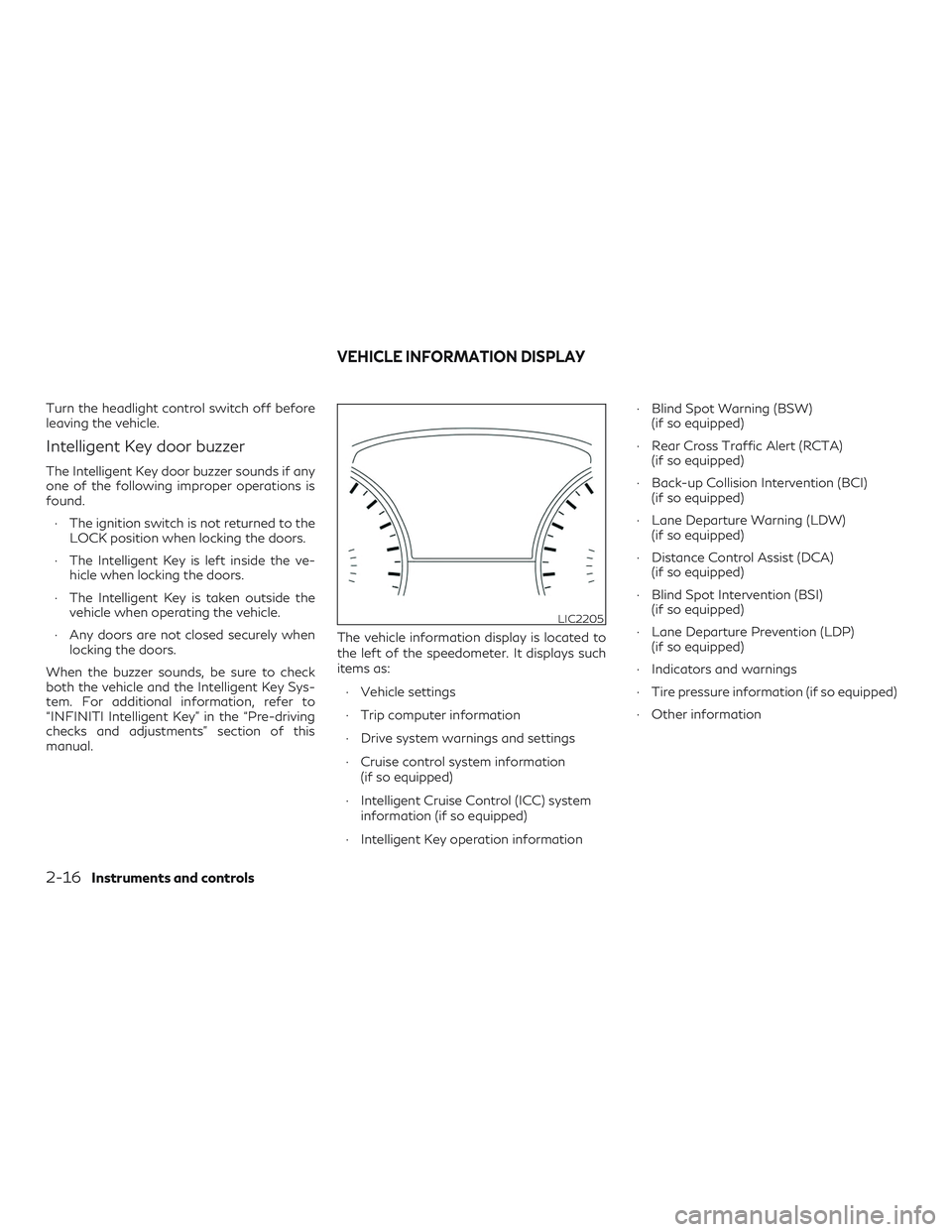
manual. The vehicle information display is located to
the left of the speedometer. It displays such
items as:
∙ Vehicle settings
∙ Trip computer information
∙ Drive system warnings and settings
∙ Cruise control system information (if so equipped)
∙ Intelligent Cruise Control (ICC) system information (if so equipped)
∙ Intelligent Key operation information ∙ Blind Spot Warning (BSW)
(if so equipped)
∙ Rear Cross Traffic Alert (RCTA) (if so equipped)
∙ Back-up Collision Intervention (BCI) (if so equipped)
∙ Lane Departure Warning (LDW) (if so equipped)
∙ Distance Control Assist (DCA) (if so equipped)
∙ Blind Spot Intervention (BSI) (if so equipped)
∙ Lane Departure Prevention (LDP) (if so equipped)
∙ Indicators and warnings
∙ Tire pressure information (if so equipped)
∙ Other information
LIC2205
VEHICLE INFORMATION DISPLAY
2-16Instruments and controls
Page 103 of 490
Driver Assistance (if so equipped)
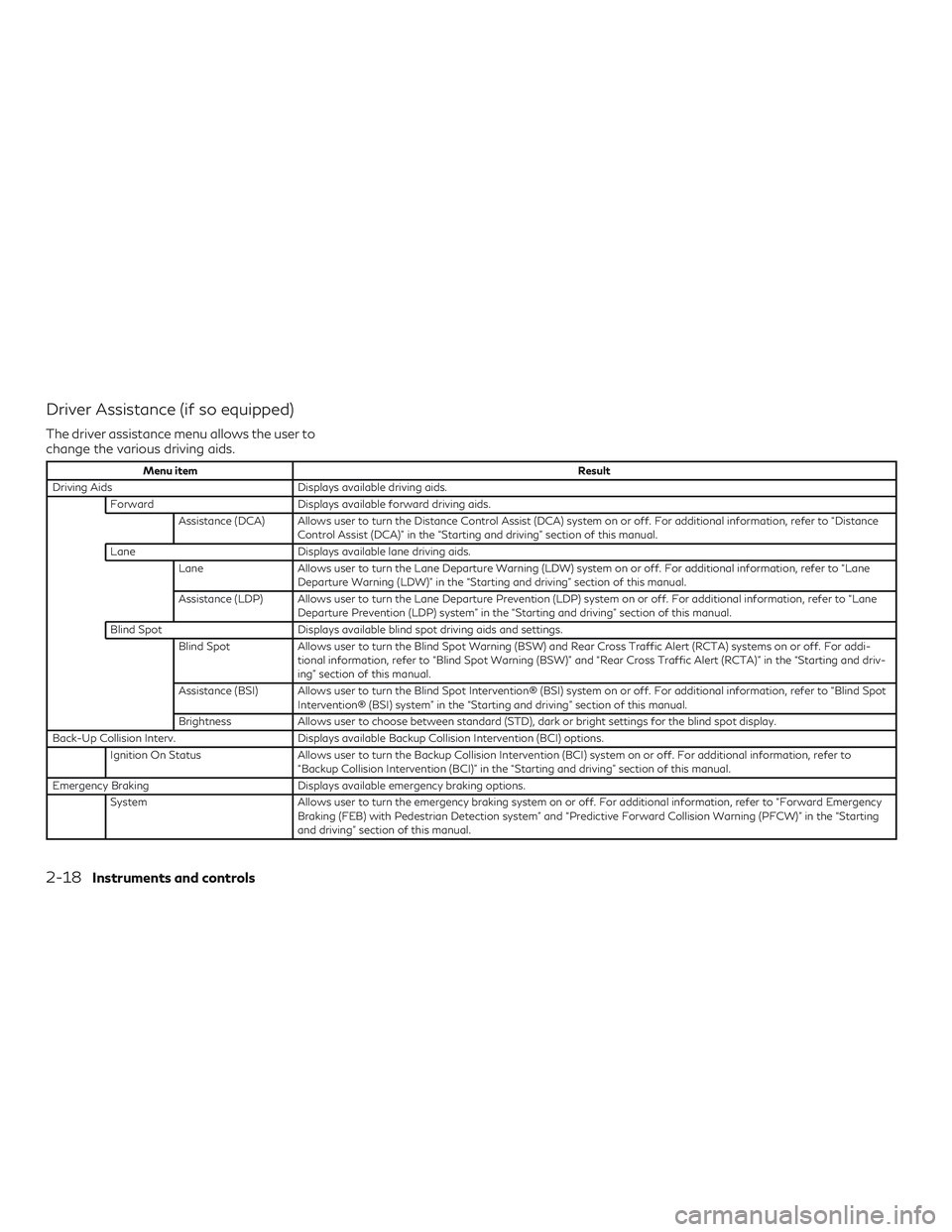
The driver assistance menu allows the user to
change the various driving aids.
Menu itemResult
Driving Aids Displays available driving aids.
Forward Displays available forward driving aids.
Assistance (DCA) Allows user to turn the Distance Control Assist (DCA) system on or off. For additional information, refer to “Distance Control Assist (DCA)” in the “Starting and driving” section of this manual.
Lane Displays available lane driving aids.
Lane Allows user to turn the Lane Departure Warning (LDW) system on or off. For additional information, refer to “Lane
Departure Warning (LDW)” in the “Starting and driving” section of this manual.
Assistance (LDP) Allows user to turn the Lane Departure Prevention (LDP) system on or off. For additional information, refer to “Lane Departure Prevention (LDP) system” in the “Starting and driving” section of this manual.
Blind Spot Displays available blind spot driving aids and settings.
Blind Spot Allows user to turn the Blind Spot Warning (BSW) and Rear Cross Traffic Alert (RCTA) systems on or off. For addi-
tional information, refer to “Blind Spot Warning (BSW)” and “Rear Cross Traffic Alert (RCTA)” in the “Starting and driv-
ing” section of this manual.
Assistance (BSI) Allows user to turn the Blind Spot Intervention® (BSI) system on or off. For additional information, refer to “Blind Spot Intervention® (BSI) system” in the “Starting and driving” section of this manual.
Brightness Allows user to choose between standard (STD), dark or bright settings for the blind spot display.
Back-Up Collision Interv. Displays available Backup Collision Intervention (BCI) options.
Ignition On Status Allows user to turn the Backup Collision Intervention (BCI) system on or off. For additional information, refer to
“Backup Collision Intervention (BCI)” in the “Starting and driving” section of this manual.
Emergency Braking Displays available emergency braking options.
System Allows user to turn the emergency braking system on or off. For additional information, refer to “Forward Emergency
Braking (FEB) with Pedestrian Detection system” and “Predictive Forward Collision Warning (PFCW)” in the “Starting
and driving” section of this manual.
2-18Instruments and controls
Page 105 of 490
Menu itemResult
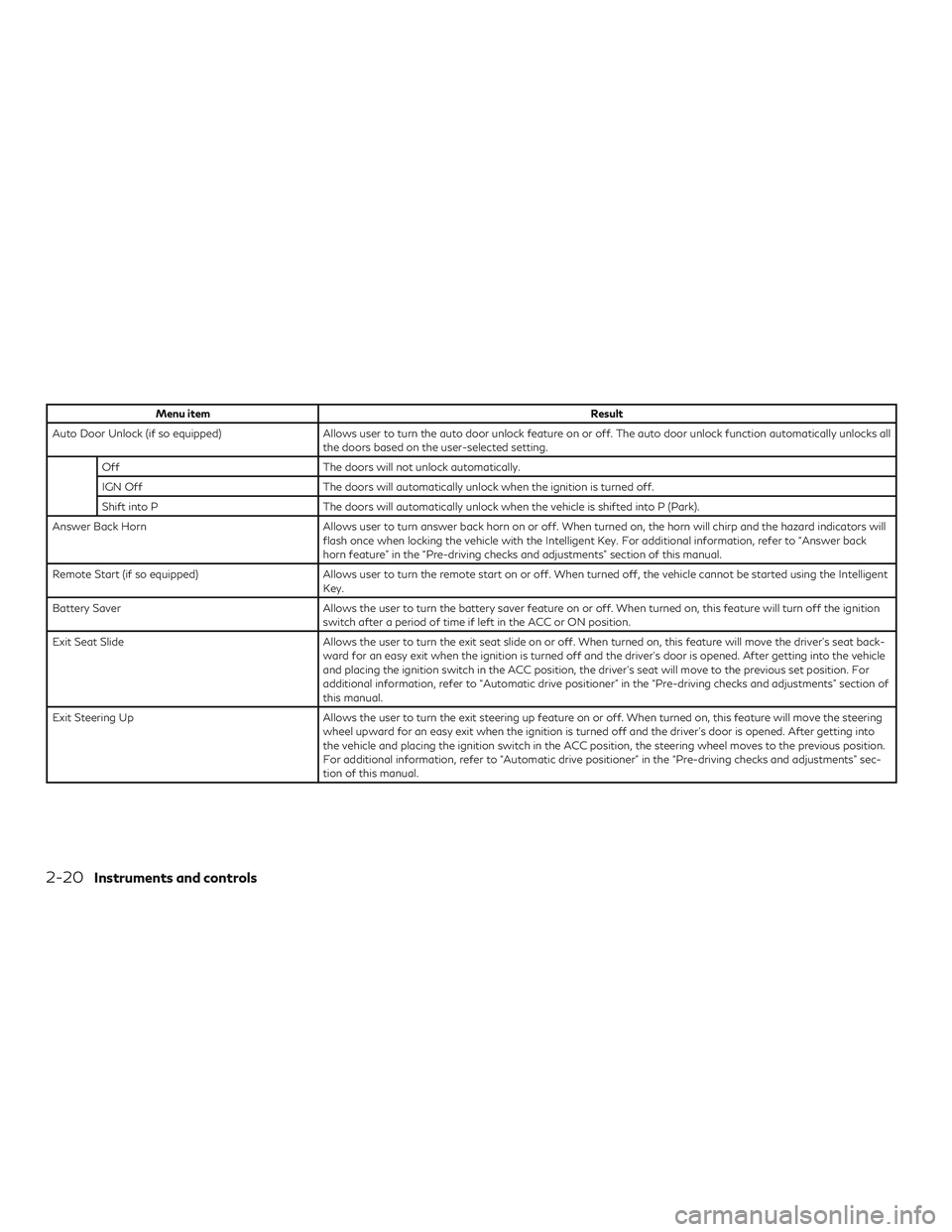
Auto Door Unlock (if so equipped) Allows user to turn the auto door unlock feature on or off. The auto door unlock function automatically unlocks all the doors based on the user-selected setting.
Off The doors will not unlock automatically.
IGN Off The doors will automatically unlock when the ignition is turned off.
Shift into P The doors will automatically unlock when the vehicle is shifted into P (Park).
Answer Back Horn Allows user to turn answer back horn on or off. When turned on, the horn will chirp and the hazard indicators will flash once when locking the vehicle with the Intelligent Key. For additional information, refer to “Answer back
horn feature” in the “Pre-driving checks and adjustments” section of this manual.
Remote Start (if so equipped) Allows user to turn the remote start on or off. When turned off, the vehicle cannot be started using the Intelligent Key.
Battery Saver Allows the user to turn the battery saver feature on or off. When turned on, this feature will turn off the ignition switch after a period of time if left in the ACC or ON position.
Exit Seat Slide Allows the user to turn the exit seat slide on or off. When turned on, this feature will move the driver’s seat back- ward for an easy exit when the ignition is turned off and the driver’s door is opened. After getting into the vehicle
and placing the ignition switch in the ACC position, the driver’s seat will move to the previous set position. For
additional information, refer to “Automatic drive positioner” in the “Pre-driving checks and adjustments” section of
this manual.
Exit Steering Up Allows the user to turn the exit steering up feature on or off. When turned on, this feature will move the steering wheel upward for an easy exit when the ignition is turned off and the driver’s door is opened. After getting into
the vehicle and placing the ignition switch in the ACC position, the steering wheel moves to the previous position.
For additional information, refer to “Automatic drive positioner” in the “Pre-driving checks and adjustments” sec-
tion of this manual.
2-20Instruments and controls
Page 106 of 490
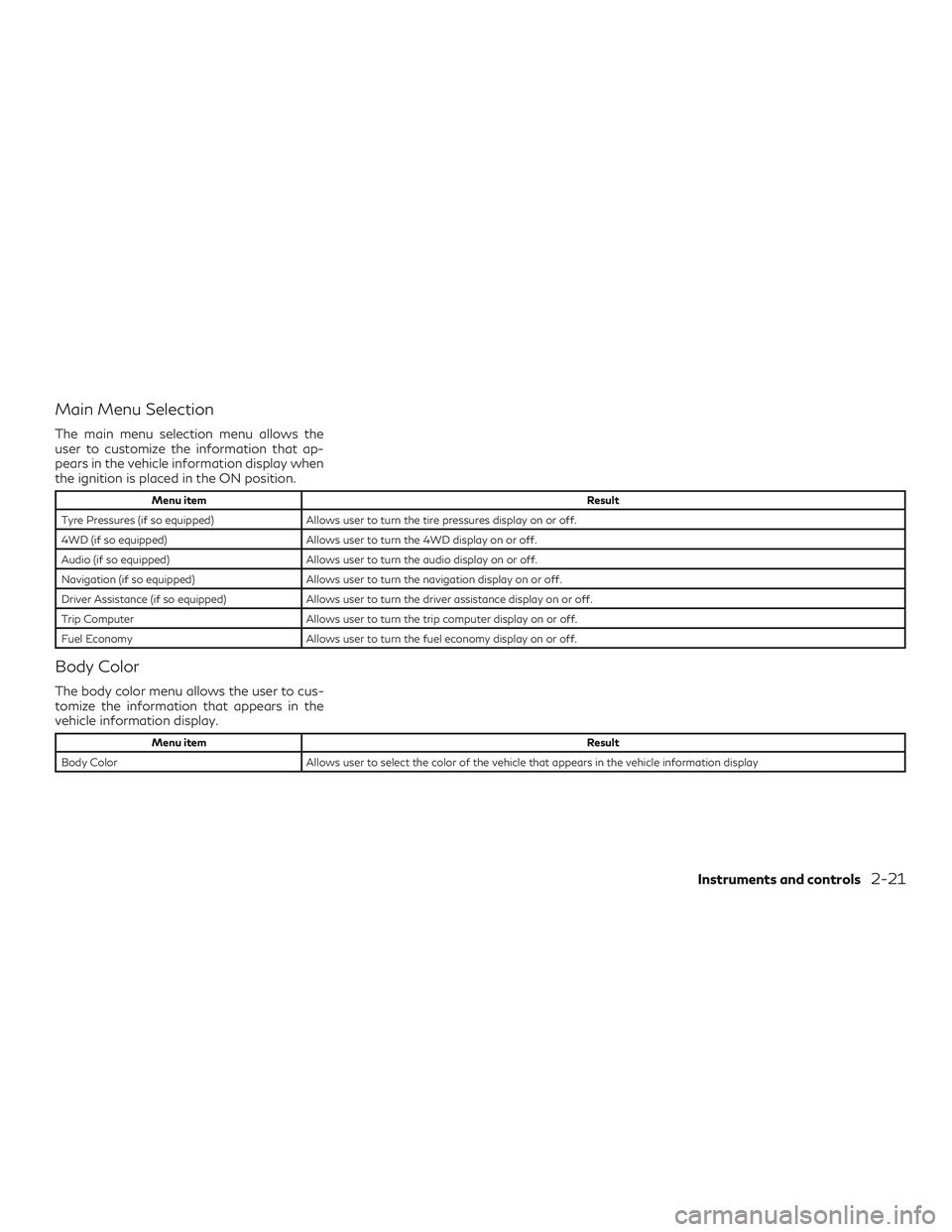
Main Menu Selection
The main menu selection menu allows the
user to customize the information that ap-
pears in the vehicle information display when
the ignition is placed in the ON position.
Menu itemResult
Tyre Pressures (if so equipped) Allows user to turn the tire pressures display on or off.
4WD (if so equipped) Allows user to turn the 4WD display on or off.
Audio (if so equipped) Allows user to turn the audio display on or off.
Navigation (if so equipped) Allows user to turn the navigation display on or off.
Driver Assistance (if so equipped) Allows user to turn the driver assistance display on or off.
Trip Computer Allows user to turn the trip computer display on or off.
Fuel Economy Allows user to turn the fuel economy display on or off.
Body Color
The body color menu allows the user to cus-
tomize the information that appears in the
vehicle information display.
Menu item Result
Body Color Allows user to select the color of the vehicle that appears in the vehicle information display
Instruments and controls2-21
Page 111 of 490
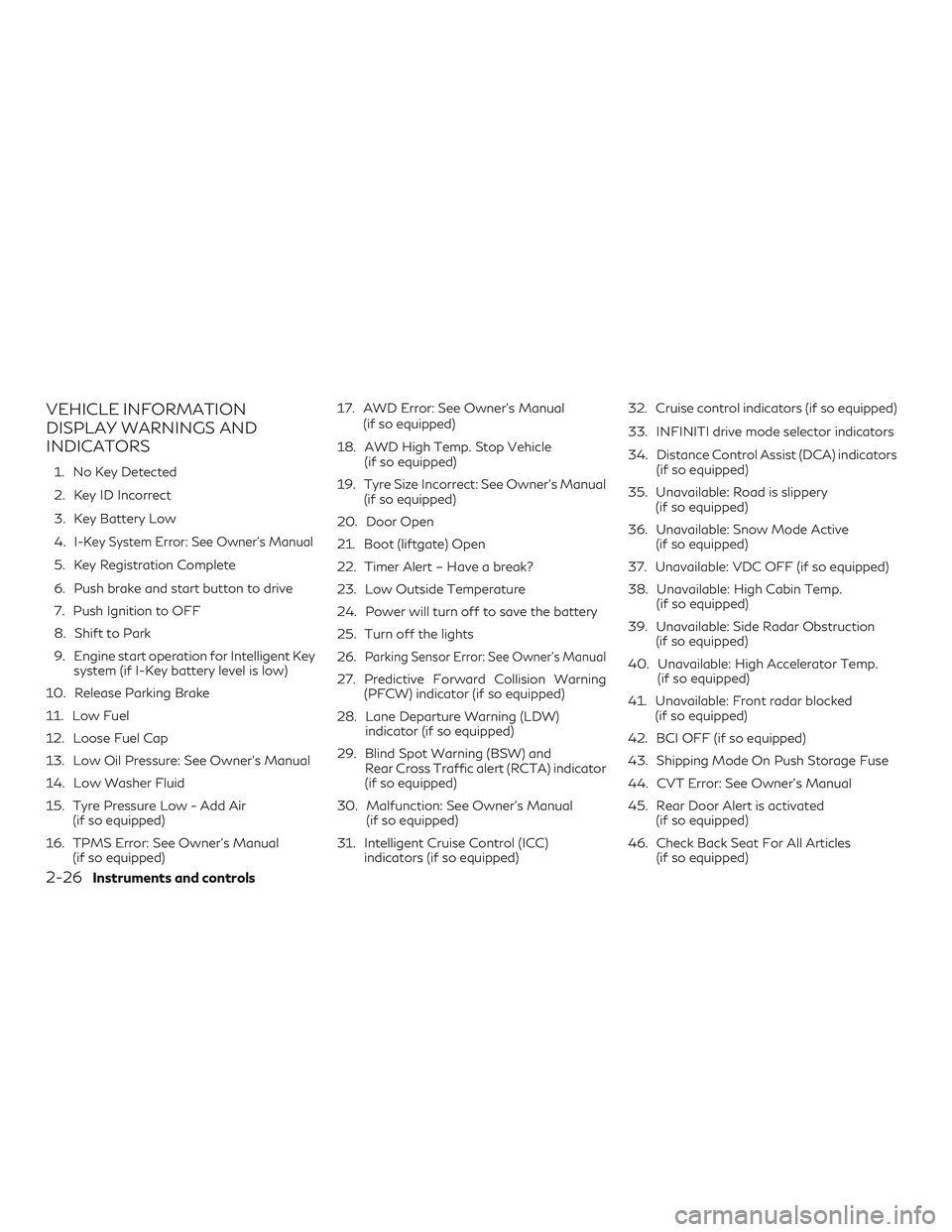
VEHICLE INFORMATION
DISPLAY WARNINGS AND
INDICATORS
1. No Key Detected
2. Key ID Incorrect
3. Key Battery Low
4.
I-Key System Error: See Owner’s Manual
5. Key Registration Complete
6. Push brake and start button to drive
7. Push Ignition to OFF
8. Shift to Park
9. Engine start operation for Intelligent Keysystem (if I-Key battery level is low)
10. Release Parking Brake
11. Low Fuel
12. Loose Fuel Cap
13. Low Oil Pressure: See Owner’s Manual
14. Low Washer Fluid
15. Tyre Pressure Low - Add Air (if so equipped)
16. TPMS Error: See Owner’s Manual (if so equipped) 17. AWD Error: See Owner’s Manual
(if so equipped)
18. AWD High Temp. Stop Vehicle (if so equipped)
19. Tyre Size Incorrect: See Owner’s Manual (if so equipped)
20. Door Open
21. Boot (liftgate) Open
22. Timer Alert – Have a break?
23. Low Outside Temperature
24. Power will turn off to save the battery
25. Turn off the lights
26.
Parking Sensor Error: See Owner’s Manual
27. Predictive Forward Collision Warning (PFCW) indicator (if so equipped)
28. Lane Departure Warning (LDW) indicator (if so equipped)
29. Blind Spot Warning (BSW) and Rear Cross Traffic alert (RCTA) indicator
(if so equipped)
30. Malfunction: See Owner’s Manual (if so equipped)
31. Intelligent Cruise Control (ICC) indicators (if so equipped) 32. Cruise control indicators (if so equipped)
33. INFINITI drive mode selector indicators
34. Distance Control Assist (DCA) indicators
(if so equipped)
35. Unavailable: Road is slippery (if so equipped)
36. Unavailable: Snow Mode Active (if so equipped)
37. Unavailable: VDC OFF (if so equipped)
38. Unavailable: High Cabin Temp. (if so equipped)
39. Unavailable: Side Radar Obstruction (if so equipped)
40. Unavailable: High Accelerator Temp. (if so equipped)
41. Unavailable: Front radar blocked (if so equipped)
42. BCI OFF (if so equipped)
43. Shipping Mode On Push Storage Fuse
44. CVT Error: See Owner’s Manual
45. Rear Door Alert is activated (if so equipped)
46. Check Back Seat For All Articles (if so equipped)
2-26Instruments and controls
Page 112 of 490
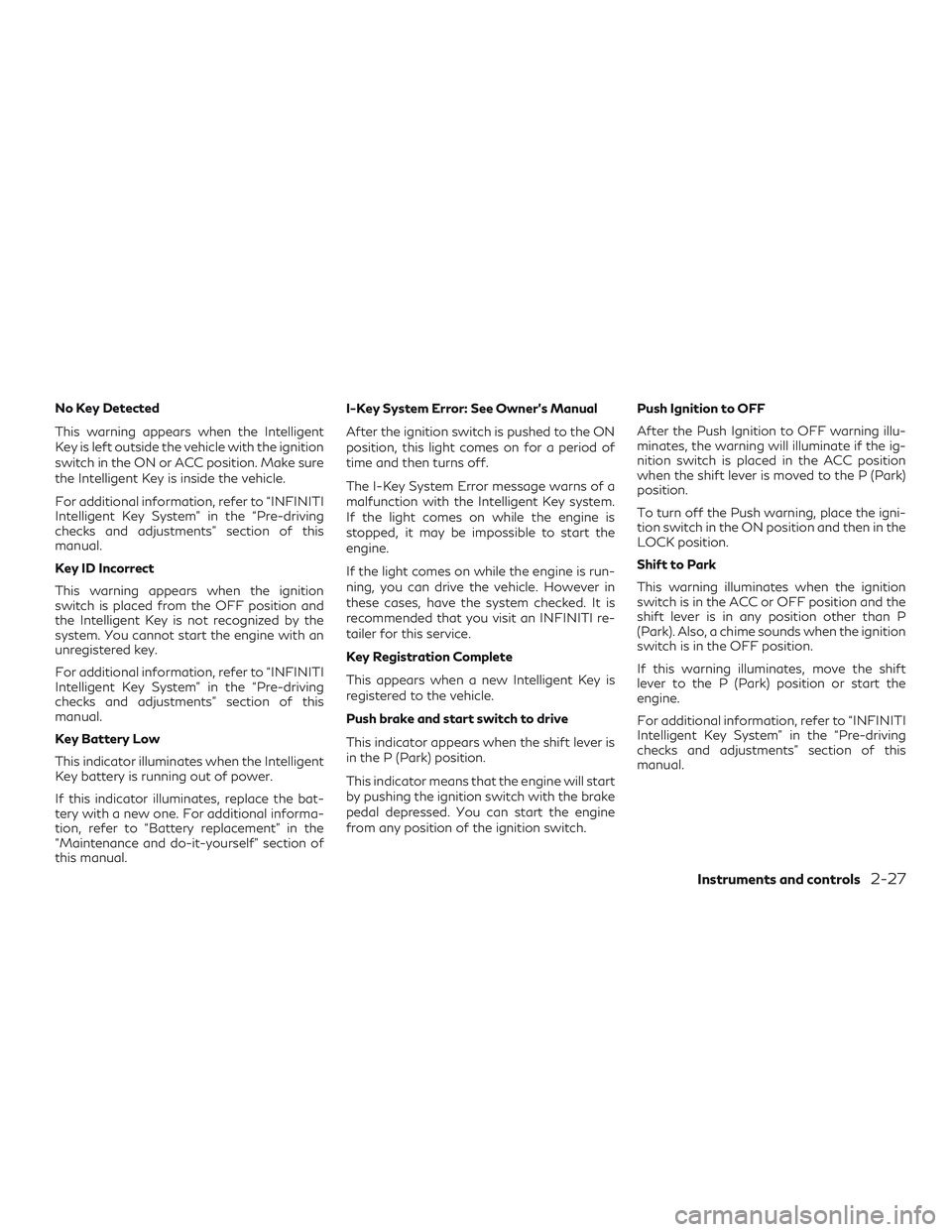
No Key Detected
This warning appears when the Intelligent
Key is left outside the vehicle with the ignition
switch in the ON or ACC position. Make sure
the Intelligent Key is inside the vehicle.
For additional information, refer to “INFINITI
Intelligent Key System” in the “Pre-driving
checks and adjustments” section of this
manual.
Key ID Incorrect
This warning appears when the ignition
switch is placed from the OFF position and
the Intelligent Key is not recognized by the
system. You cannot start the engine with an
unregistered key.
For additional information, refer to “INFINITI
Intelligent Key System” in the “Pre-driving
checks and adjustments” section of this
manual.
Key Battery Low
This indicator illuminates when the Intelligent
Key battery is running out of power.
If this indicator illuminates, replace the bat-
tery with a new one. For additional informa-
tion, refer to “Battery replacement” in the
“Maintenance and do-it-yourself” section of
this manual.I-Key System Error: See Owner’s Manual
After the ignition switch is pushed to the ON
position, this light comes on for a period of
time and then turns off.
The I-Key System Error message warns of a
malfunction with the Intelligent Key system.
If the light comes on while the engine is
stopped, it may be impossible to start the
engine.
If the light comes on while the engine is run-
ning, you can drive the vehicle. However in
these cases, have the system checked. It is
recommended that you visit an INFINITI re-
tailer for this service.
Key Registration Complete
This appears when a new Intelligent Key is
registered to the vehicle.
Push brake and start switch to drive
This indicator appears when the shift lever is
in the P (Park) position.
This indicator means that the engine will start
by pushing the ignition switch with the brake
pedal depressed. You can start the engine
from any position of the ignition switch.
Push Ignition to OFF
After the Push Ignition to OFF warning illu-
minates, the warning will illuminate if the ig-
nition switch is placed in the ACC position
when the shift lever is moved to the P (Park)
position.
To turn off the Push warning, place the igni-
tion switch in the ON position and then in the
LOCK position.
Shift to Park
This warning illuminates when the ignition
switch is in the ACC or OFF position and the
shift lever is in any position other than P
(Park). Also, a chime sounds when the ignition
switch is in the OFF position.
If this warning illuminates, move the shift
lever to the P (Park) position or start the
engine.
For additional information, refer to “INFINITI
Intelligent Key System” in the “Pre-driving
checks and adjustments” section of this
manual.
Instruments and controls2-27
Page 113 of 490
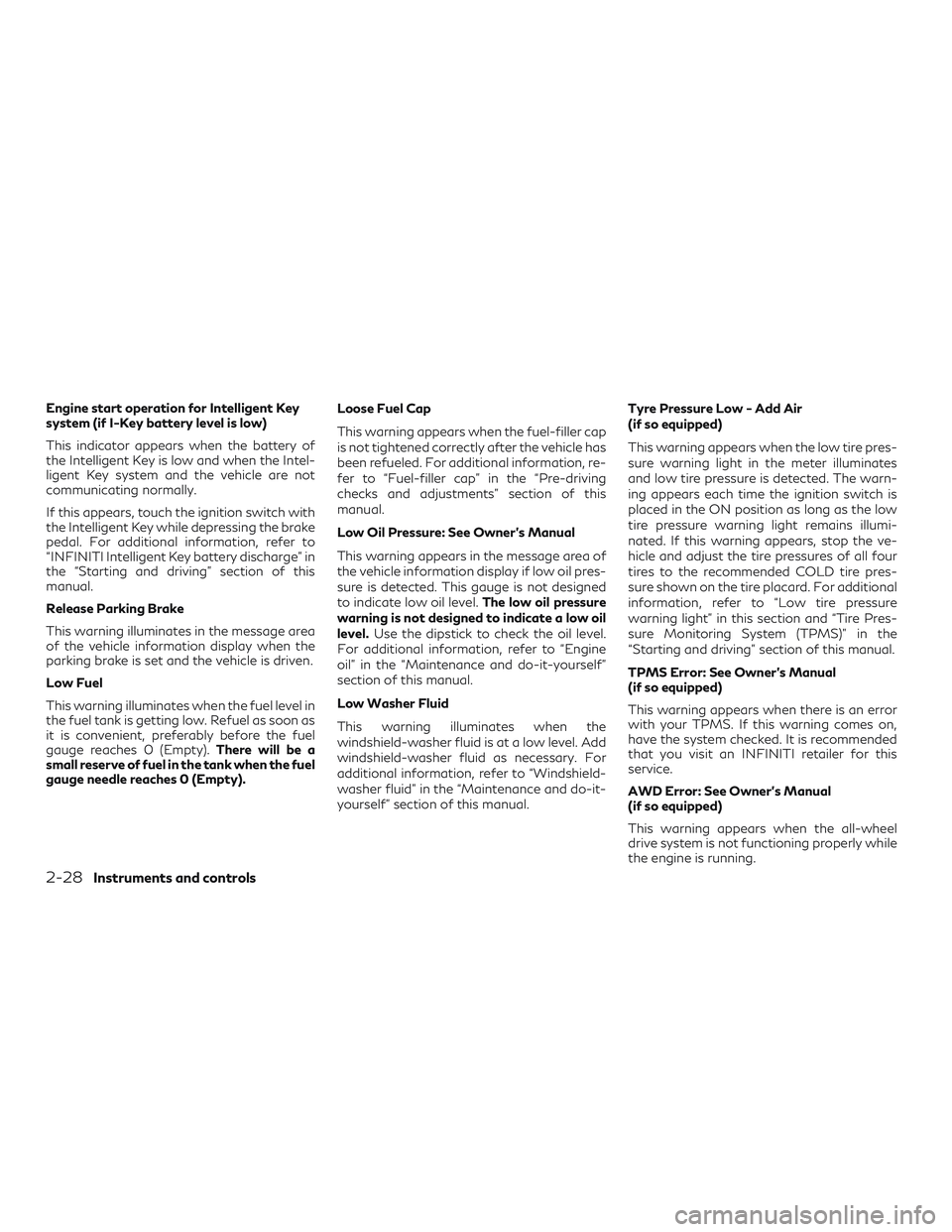
Engine start operation for Intelligent Key
system (if I-Key battery level is low)
This indicator appears when the battery of
the Intelligent Key is low and when the Intel-
ligent Key system and the vehicle are not
communicating normally.
If this appears, touch the ignition switch with
the Intelligent Key while depressing the brake
pedal. For additional information, refer to
“INFINITI Intelligent Key battery discharge” in
the “Starting and driving” section of this
manual.
Release Parking Brake
This warning illuminates in the message area
of the vehicle information display when the
parking brake is set and the vehicle is driven.
Low Fuel
This warning illuminates when the fuel level in
the fuel tank is getting low. Refuel as soon as
it is convenient, preferably before the fuel
gauge reaches 0 (Empty).There will be a
small reserve of fuel in the tank when the fuel
gauge needle reaches 0 (Empty). Loose Fuel Cap
This warning appears when the fuel-filler cap
is not tightened correctly after the vehicle has
been refueled. For additional information, re-
fer to “Fuel-filler cap” in the “Pre-driving
checks and adjustments” section of this
manual.
Low Oil Pressure: See Owner’s Manual
This warning appears in the message area of
the vehicle information display if low oil pres-
sure is detected. This gauge is not designed
to indicate low oil level.
The low oil pressure
warning is not designed to indicate a low oil
level. Use the dipstick to check the oil level.
For additional information, refer to “Engine
oil” in the “Maintenance and do-it-yourself”
section of this manual.
Low Washer Fluid
This warning illuminates when the
windshield-washer fluid is at a low level. Add
windshield-washer fluid as necessary. For
additional information, refer to “Windshield-
washer fluid” in the “Maintenance and do-it-
yourself” section of this manual. Tyre Pressure Low - Add Air
(if so equipped)
This warning appears when the low tire pres-
sure warning light in the meter illuminates
and low tire pressure is detected. The warn-
ing appears each time the ignition switch is
placed in the ON position as long as the low
tire pressure warning light remains illumi-
nated. If this warning appears, stop the ve-
hicle and adjust the tire pressures of all four
tires to the recommended COLD tire pres-
sure shown on the tire placard. For additional
information, refer to “Low tire pressure
warning light” in this section and “Tire Pres-
sure Monitoring System (TPMS)” in the
“Starting and driving” section of this manual.
TPMS Error: See Owner’s Manual
(if so equipped)
This warning appears when there is an error
with your TPMS. If this warning comes on,
have the system checked. It is recommended
that you visit an INFINITI retailer for this
service.
AWD Error: See Owner’s Manual
(if so equipped)
This warning appears when the all-wheel
drive system is not functioning properly while
the engine is running.
2-28Instruments and controls
Page 114 of 490
AWD High Temp. Stop vehicle
(if so equipped)
This warning may appear while trying to free
a stuck vehicle due to increased oil tempera-
ture. The driving mode may change to
2-Wheel Drive (2WD). If this warning is dis-
played, stop the vehicle with the engine idling,
as soon as it is safe to do so. Then if the
warning turns off, you can continue driving.
Tyre Size Incorrect: See Owner’s Manual
(if so equipped)
This warning may appear if there is a large
difference between the diameters of the
front and rear wheels. Pull off the road in a
safe area, with the engine idling. Check that
all the tire sizes are the same, that the tire
pressure is correct and that the tires are not
excessively worn.
Door Open
This warning illuminates when a door has
been opened.
Boot (liftgate) Open
This warning illuminates when the boot (lift-
gate) has been opened.Timer Alert — Have a break?
This indicator appears when the set time is
reached. The time can be set up to six hours.
For additional information, refer to “Settings”
in this section.
Low Outside Temperature
This warning appears if the outside tempera-
ture is below 3°C (37°F). The temperature
can be changed to display in Celsius or Fahr-
enheit. For additional information, refer to
“Settings” in this section.
Power will turn off to save the battery
This message appears in the vehicle informa-
tion display after a period of time if the igni-
tion switch is in the ACC or the ON position
and if the vehicle is in P (Park). For additional
information, refer to “Push-button ignition
switch positions” in the “Starting and driving”
section of this manual.
Turn off the lights
This warning appears when the headlights
are left in the ON position when exiting the
vehicle. Place the headlight switch to OFF or
AUTO position. For additional information,
refer to “Headlight and turn signal switch” in
this section.Parking Sensor Error: See Owner’s Manual
This warning illuminates when there is an
error with the system. For additional infor-
mation, refer to “Front and rear sonar sys-
tem” in the “Starting and driving” section of
this manual.
Predictive Forward Collision Warning
(PFCW) indicator (if so equipped)
This indicator shows when the PFCW system
is engaged.
Lane Departure Warning (LDW) indicator
(if so equipped)
This indicator shows when the LDW system
is engaged.
For additional information, refer to ”Warning
systems switch” in this section and “Lane De-
parture Warning (LDW) system” in the “Start-
ing and driving” section of this manual.
Blind Spot Warning (BSW) and
Rear Cross Traffic Alert (RCTA) indicator
(if so equipped)
This indicator shows when the BSW and
RCTA systems are engaged.
For additional information, refer to “Blind
Spot Warning (BSW)” and “Rear Cross Traffic
Instruments and controls2-29
Page 118 of 490
Key fob operation:
4. Confirm that the
indicator light
comes on. The
indicator stays illu-
minated for a period of time indicating
that the system is in the pre-armed
phase.
The
indicator light will blink every
3 seconds once the security system is
armed.
If during the pre-armed phase one of the
following occurs, the system will not
arm:
∙ Any door is unlocked with the me- chanical key
∙ A door is opened with the release but- ton with the Intelligent Key on your
person
∙ The doors are unlocked using the un- lock button on the Intelligent Key
∙ The ignition switch is placed in the ACC or ON position ∙
Even when the driver and/or passengers
are in the vehicle, the system will acti-
vate when all the doors, hood and lift-
gate are locked with the ignition switch
placed in the LOCK position. When plac-
ing the ignition switch in the ACC or ON
position, the system will be released.Vehicle security system activation
The vehicle security system will give the fol-
lowing alarm:
∙ The turn signals blink and the horn sounds intermittently.
∙ The alarm automatically turns off after a period of time. However, the alarm reac-
tivates if the vehicle is tampered with
again. The alarm can be shut off by un-
locking the driver’s door or liftgate with
the key, or by pressing the
button
on the Intelligent Key.
The alarm is activated by:
∙ opening the door or liftgate without us- ing the key or Intelligent Key (even if the
door is unlocked by releasing the door
inside lock switch).
How to stop an activated alarm
The alarm stops only by unlocking the driver’s
door or the liftgate with the key, pressing
the
button on the Intelligent Key, or
pressing the request switch on the driver’s or
passenger’s door with the Intelligent Key in
range of the door handle.
INFINITI VEHICLE IMMOBILIZER
SYSTEM
The INFINITI Vehicle Immobilizer System will
not allow the engine to start without the use
of a registered INFINITI Vehicle Immobilizer
System key.
If the engine fails to start using a registered
INFINITI Vehicle Immobilizer System key (for
example, when interference is caused by an-
other INFINITI Vehicle Immobilizer System
key, an automated toll road device or auto-
matic payment device on the key ring), restart
the engine using the following procedures:
1. Leave the ignition switch in the ON po- sition for approximately 5 seconds.
2. Place the ignition switch in the OFF or LOCK position, and wait approximately
10 seconds.
3. Repeat steps 1 and 2.
Instruments and controls2-33