maintenance INFINITI QX60 2023 Owner's Guide
[x] Cancel search | Manufacturer: INFINITI, Model Year: 2023, Model line: QX60, Model: INFINITI QX60 2023Pages: 636, PDF Size: 7.28 MB
Page 390 of 636

SYSTEM MAINTENANCE
The two radar sensorsO1for the BSW sys-
tem are located near the rear bumper. Always
keep the area near the radar sensors clean.
The radar sensors may be blocked by tempo-
rary ambient conditions such as splashing
water, mist or fog.
The blocked condition may also be caused by
objects such as ice, frost or dirt obstructing
the radar sensors.
Check for and remove objects obstructing
the area around the radar sensors. Do not attach stickers (including transparent
material), install accessories or apply addi-
tional paint near the radar sensors.
Do not strike or damage the area around the
radar sensors. It is recommended that you
visit an INFINITI retailer if the area around
the radar sensors is damaged due to a
collision.
Radio frequency statement
For USA
FCC ID: LTQRN5TR
CAUTION TO USERS
Changes or modifications not expressly ap-
proved by the party responsible for compli-
ance could void the user’s authority to oper-
ate the equipment.
This device complies with Part 15 of the FCC
Rules and with the RSS of the Industry
Canada. Operation is subject to the follow-
ing two conditions:
1.
This device may not cause harmful inter-
ference, and
2. this device must accept any interference
received, including interference that may
cause undesired operation. For Canada
IC: 3659A-RN5TR
This device contains licence-exempt
transmitter(s)/receiver(s) that comply with
Innovation, Science and Economic Develop-
ment Canada’s licence-exempt RSS(s). Op-
eration is subject to the following two
conditions:
(1) This device may not cause interference.
(2) This device must accept any interference,
including interference that may cause unde-
sired operation of the device.
L’émetteur/récepteur exempt de licence
contenu dans le présent appareil est con-
forme aux CNR d’Innovation, Sciences et
Développement économique Canada appli-
cables aux appareils radio exempts de li-
cence. L’exploitation est autorisée aux deux
conditions suivantes:
(1) L’appareil ne doit pas produire de
brouillage;
(2) L’appareil doit accepter tout brouillage
radioélectrique subi, même si le brouillage
est susceptible d’en compromettre le
fonctionnement.
LSD4407
5-82Starting and driving
Page 418 of 636

Condition D
When driving on roads with limited road
structures or buildings (for example, long
bridges, deserts, snow fields, driving next to
long walls), the system may display the “For-
ward Driving Aids temporarily disabled Front
Sensor blocked See Owner’s Manual”
warning message.
Action to take:
When the above driving conditions no longer
exist, turn the system back on.
ICC system malfunction
If the ICC system malfunctions, it will be
turned off automatically, a chime will sound,
and the speed control status warning (or-
ange) will illuminate.
Action to take:
If the warning light comes on, stop the vehicle
in a safe place and push the park button to
engage the P (Park) position. Turn the engine
off, restart the engine and set the ICC system
again. If it is not possible to set the ICC sys-
tem or the indicator stays on, it may be a
malfunction. Although the normal driving can
be continued, the ICC system should be in-spected. It is recommended that you visit an
INFINITI retailer for this service.
NOTE:
If the ICC system is temporarily unavailable,
the conventional cruise control mode may
still be used. For additional information, see
“Conventional (fixed speed) cruise control
mode” (P. 5-117).
ICC sensor maintenance
The radar sensor is located on the front of the
vehicle.
To keep the ICC system operating properly,
be sure to observe the following:
• Always keep the sensor area of the front
bumper/emblem clean.
• Do not strike or damage the areas around the sensor.
• Do not attach a sticker (including transpar- ent material) or install an accessory near
the sensor. This could cause failure or
malfunction.
• Do not attach metallic objects near the sensor area (brush guard, etc.). This could
cause failure or malfunction.
• Do not alter, remove, or paint the front bumper.
LSD4448
5-110Starting and driving
Page 424 of 636

Steering Assist malfunction
When the system malfunctions, it turns off
automatically. The Steering Assist status
warning illuminates (orange). A chime may
sound depending on the situation.
Action to take:
Stop the vehicle in a safe location, push the
park button to engage the P (Park) position,
turn the engine off, restart the engine, re-
sume driving, and set the Intelligent Cruise
Control system again. If the warning (orange)
continues to illuminate, the Steering Assist is
malfunctioning. Although the vehicle is still
drivable under normal conditions, have the
system checked. It is recommended that you
visit an INFINITI retailer for this service.
Steering Assist maintenance
The camera sensor is located above the in-
side mirror.
To keep the proper operation of the system
and prevent a system malfunction, be sure to
observe the following:
• Always keep the windshield clean.
• Do not attach a sticker (including transpar-ent material) or install an accessory near
the camera unit. • Do not place reflective materials, such as
white paper or a mirror, on the instrument
panel. The reflection of sunlight may ad-
versely affect the camera unit’s capability
of detecting the lane markers.
• Do not strike or damage the areas around the camera unit. Do not touch the camera
lens or remove the screw located on the
camera unit.
If the camera unit is damaged due to an
accident, it is recommended that you visit an
INFINITI retailer.
Radio frequency statement
For USA
FCC ID OAYARS4B
This device complies with Part 15 of the FCC
Rules. Operation is subject to the following
two conditions:
1. This device may not cause harmful inter- ference, and
2. This device must accept any interference received, including interference that may
cause undesired operation. FCC Warning
Changes or modifications not expressly ap-
proved by the party responsible for compli-
ance could void the user’s authority to oper-
ate the equipment.
For Canada
Model: ARS4–B
IC: 4135A-ARS4B
FCC ID: OAYARS4B
This device complies with Part 15 of the FCC
Rules and with Industry Canada licence-
exempt RSS standard(s). Operation is subject
to the following two conditions:
1. This device may not cause interference,
and
2. This device must accept any interference received, including interference that may
cause undesired operation of the device.
5-116Starting and driving
Page 435 of 636

–The vehicle is towing an object (if so
equipped).
– Suspension parts other than those
designated as Genuine INFINITI
parts are used. (If the vehicle height
or the vehicle body inclination is
changed, the system may not detect
an obstacle correctly.)
– If the vehicle is using an accessory like
a bike rack, or cargo carrier that
blocks the sensors.
• Excessive noise (e.g., audio system vol-
ume, an open vehicle window) will inter-
fere with the chime sound, and it may not
be heard.
SYSTEM MALFUNCTION
If the RAB system malfunctions, it will be
turned off automatically, the RAB system
warning light will illuminate, and the “Mal-
function” warning message will appear in the
vehicle information display.
Action to take
If the warning light illuminates, park the ve-
hicle in a safe location, turn the engine off,
and restart the engine. If the warning light
continues to illuminate, have the RAB system
checked. It is recommended that you visit an
INFINITI retailer for this service.
NOTE:
If the RAB system cannot be operated tem-
porarily, the RAB system warning light
blinks.
SYSTEM MAINTENANCE
Observe the following items to ensure proper
operation of the system:
• Always keep the parking sensors
O1clean.
• If the parking sensors are dirty, wipe them off with a soft cloth while being careful to
not damage them.
• Do not subject the area around the parking sensors
O1to strong impact. Also, do not
remove or disassemble the parking sensors.
If the parking sensors and peripheral areas
are deformed in an accident, etc., have the
sensors checked. It is recommended that
you visit an INFINITI retailer for this service.
LSD4426
Starting and driving5-127
Page 447 of 636
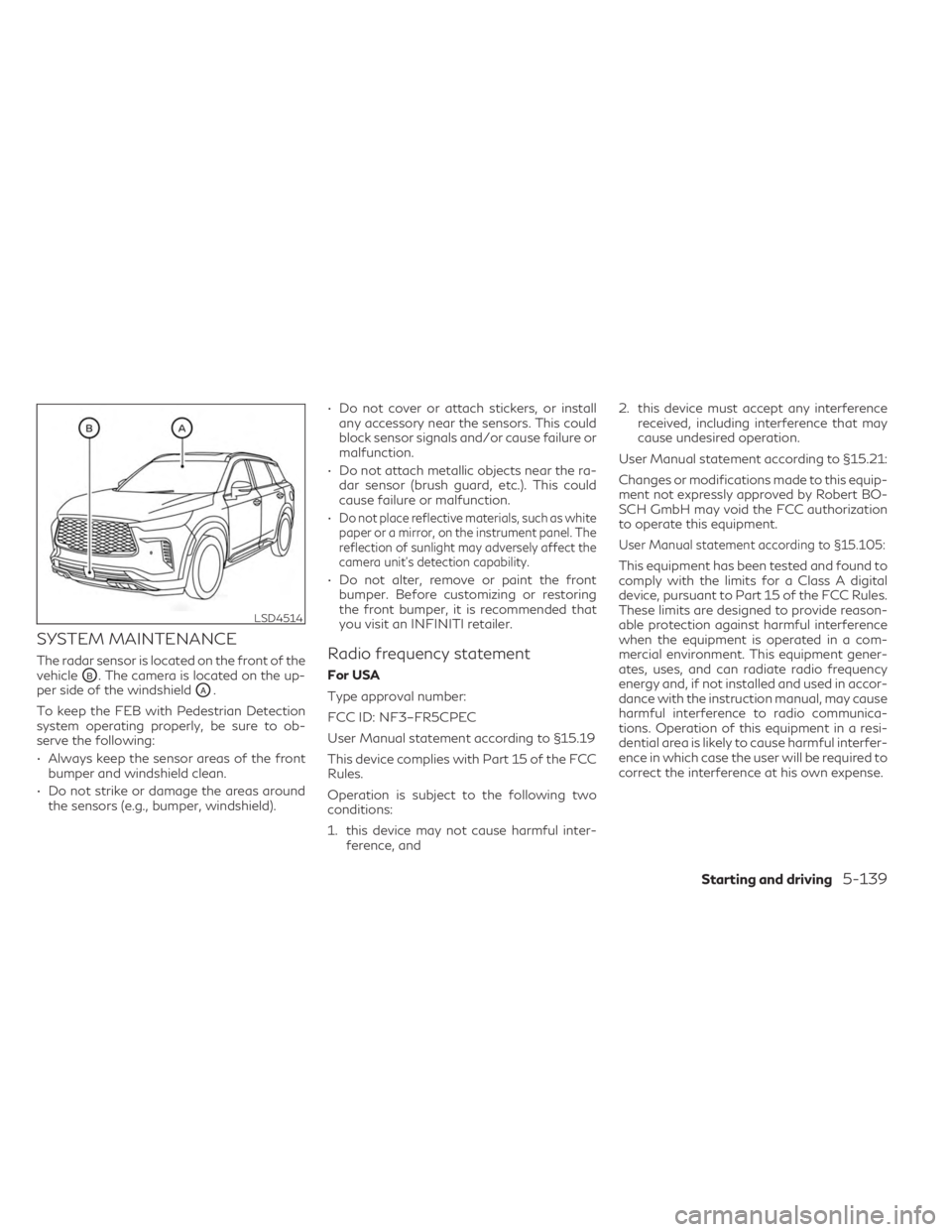
SYSTEM MAINTENANCE
The radar sensor is located on the front of the
vehicle
OB. The camera is located on the up-
per side of the windshield
OA.
To keep the FEB with Pedestrian Detection
system operating properly, be sure to ob-
serve the following:
• Always keep the sensor areas of the front bumper and windshield clean.
• Do not strike or damage the areas around the sensors (e.g., bumper, windshield). • Do not cover or attach stickers, or install
any accessory near the sensors. This could
block sensor signals and/or cause failure or
malfunction.
• Do not attach metallic objects near the ra- dar sensor (brush guard, etc.). This could
cause failure or malfunction.
•
Do not place reflective materials, such as white
paper or a mirror, on the instrument panel. The
reflection of sunlight may adversely affect the
camera unit's detection capability.
• Do not alter, remove or paint the front bumper. Before customizing or restoring
the front bumper, it is recommended that
you visit an INFINITI retailer.
Radio frequency statement
For USA
Type approval number:
FCC ID: NF3–FR5CPEC
User Manual statement according to §15.19
This device complies with Part 15 of the FCC
Rules.
Operation is subject to the following two
conditions:
1. this device may not cause harmful inter- ference, and 2. this device must accept any interference
received, including interference that may
cause undesired operation.
User Manual statement according to §15.21:
Changes or modifications made to this equip-
ment not expressly approved by Robert BO-
SCH GmbH may void the FCC authorization
to operate this equipment.
User Manual statement according to §15.105:
This equipment has been tested and found to
comply with the limits for a Class A digital
device, pursuant to Part 15 of the FCC Rules.
These limits are designed to provide reason-
able protection against harmful interference
when the equipment is operated in a com-
mercial environment. This equipment gener-
ates, uses, and can radiate radio frequency
energy and, if not installed and used in accor-
dance with the instruction manual, may cause
harmful interference to radio communica-
tions. Operation of this equipment in a resi-
dential area is likely to cause harmful interfer-
ence in which case the user will be required to
correct the interference at his own expense.
LSD4514
Starting and driving5-139
Page 463 of 636
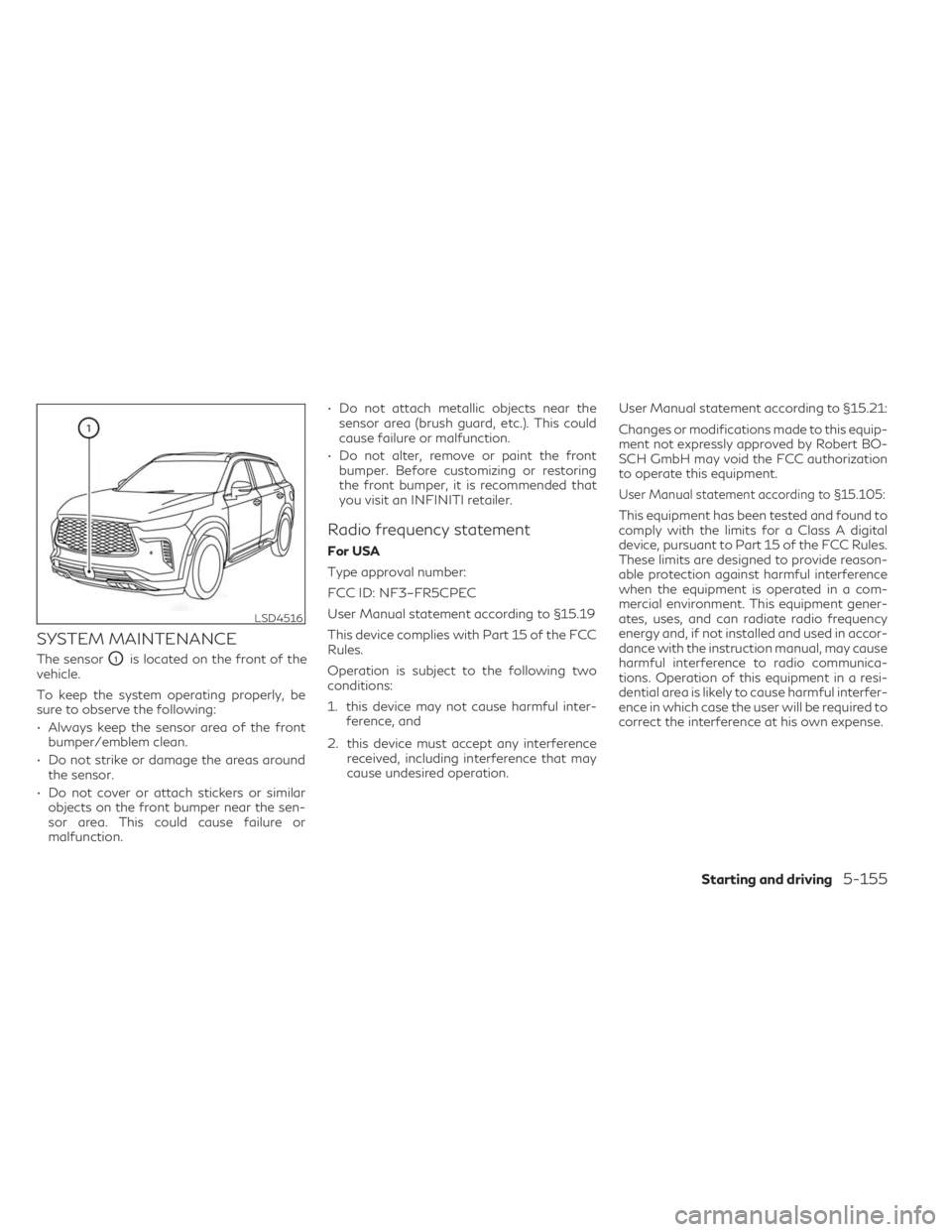
SYSTEM MAINTENANCE
The sensorO1is located on the front of the
vehicle.
To keep the system operating properly, be
sure to observe the following:
• Always keep the sensor area of the front bumper/emblem clean.
• Do not strike or damage the areas around the sensor.
• Do not cover or attach stickers or similar objects on the front bumper near the sen-
sor area. This could cause failure or
malfunction. • Do not attach metallic objects near the
sensor area (brush guard, etc.). This could
cause failure or malfunction.
• Do not alter, remove or paint the front bumper. Before customizing or restoring
the front bumper, it is recommended that
you visit an INFINITI retailer.
Radio frequency statement
For USA
Type approval number:
FCC ID: NF3–FR5CPEC
User Manual statement according to §15.19
This device complies with Part 15 of the FCC
Rules.
Operation is subject to the following two
conditions:
1. this device may not cause harmful inter- ference, and
2. this device must accept any interference received, including interference that may
cause undesired operation. User Manual statement according to §15.21:
Changes or modifications made to this equip-
ment not expressly approved by Robert BO-
SCH GmbH may void the FCC authorization
to operate this equipment.
User Manual statement according to §15.105:
This equipment has been tested and found to
comply with the limits for a Class A digital
device, pursuant to Part 15 of the FCC Rules.
These limits are designed to provide reason-
able protection against harmful interference
when the equipment is operated in a com-
mercial environment. This equipment gener-
ates, uses, and can radiate radio frequency
energy and, if not installed and used in accor-
dance with the instruction manual, may cause
harmful interference to radio communica-
tions. Operation of this equipment in a resi-
dential area is likely to cause harmful interfer-
ence in which case the user will be required to
correct the interference at his own expense.
LSD4516
Starting and driving5-155
Page 469 of 636

• Keep your engine tuned up.
• Follow the recommended scheduledmaintenance.
• Keep the tires inflated to the correct pres- sure. Low tire pressure increases tire wear
and lowers fuel economy.
• Keep all the wheels in correct alignment. Improper alignment increases tire wear and
lowers fuel economy.
• Use the recommended viscosity engine oil. For additional information, see “Engine oil
and oil filter recommendations” (P. 10-6).
If any malfunction occurs in the Intelligent
AWD system while the engine is running,
messages are displayed in the meter.
If the AWD error warning message is dis-
played, there may be a malfunction in the
Intelligent AWD system. Reduce vehicle
speed and have your vehicle checked as soon
as possible. It is recommended that you visit
an INFINITI retailer for this service. The AWD high temperature message may be
displayed when the oil temperature of the
powertrain parts increases due to the differ-
ence in rotation between the front and rear
wheels is large (wheel slip), such as when
driving on rough roads, driving through sand
or mud, or feeling a stuck vehicle. If this
warning is displayed, stop the vehicle with the
engine idling, as soon as it is safe to do so. In
these cases, the AWD changes to 2WD to
protect the powertrain parts. Then if the
warning turns off, you can continue AWD
driving.
LSD4536LSD4537
INCREASING FUEL ECONOMY INTELLIGENT ALL-WHEEL DRIVE
(AWD) (if so equipped)
Starting and driving5-161
Page 485 of 636

•The system is not designed to prevent
contact with small or moving objects. Al-
ways move slowly. The system will not
detect small objects below the bumper or
on the ground.
• The system may not detect the following
objects: fluffy objects such as snow,
cloth, cotton, glass-wool, etc.; thin ob-
jects such as rope, wire and chain, etc.; or
wedge-shaped objects; complex-shaped
objects or multiple objects in close.
• The sonar system may not detect objects
at speeds above 3 mph (5 km/h) and may
not detect certain angular or moving
objects.
• The sonar system may not operate in the
following conditions:
– When rain, snow, ice, dirt, etc. ad- heres to the sonar.
– When a loud sound is heard in the area around the vehicle.
– When the surface of the obstacle is diagonal to the front or rear of the
vehicle.
– When a sonar or the area around the sensor is extremely hot or cold. •
The sonar system may unintentionally
operate in the following conditions:
– When there is overgrown grass in the area around the vehicle.
– When there are bumps, protrusions or manhole covers on the road
surface.
– When the vehicle drives through a draped flag or a curtain.
– When there is an accumulation of snow or ice behind the vehicle.
– When driving on a steep hill.
SYSTEM TEMPORARILY
UNAVAILABLE
When sonar blockage is detected, the system
will be deactivated automatically.
The system is not available until the condi-
tions no longer exist.
The sonar sensors may be blocked by tempo-
rary ambient conditions such as splashing
water, mist or fog. The blocked condition
may also be caused by objects such as ice,
frost or dirt obstructing the sonar sensors.
Action to take:
When the above conditions no longer exist,
the system will resume automatically.
SYSTEM MAINTENANCE
The sonar sensorsOAandOBare located on
the front and rear bumpers.
• Always keep the area near the sonar sen- sors clean.
LSD4521
Starting and driving5-177
Page 519 of 636

Floor mat installation for 3rd row
seats
When installing Genuine INFINITI floor mats
in the 3rd row seating positions:
1. Position the floor mat in the floorwell sothat the floor mat’s installation tabs are
aligned with the rearmost part of 2nd row
seat tracks.
2. Insert the floor mat installation tabs
OAunderneath the 2nd row seat tracksOBand ensure that the floor mat is properly
positioned. It is recommended that you visit an INFINITI
retailer for details about installing the floor
mats in your vehicle.
SEAT BELTS
The seat belts can be cleaned by wiping them
with a sponge dampened in a mild soap solu-
tion. Allow the belts to dry completely in the
shade before using them. For additional in-
formation, see “Seat belt maintenance”
(P. 1-25).
WARNING
Do not allow wet seat belts to roll up in the
retractor. NEVER use bleach, dye or
chemical solvents to clean the seat belts,
since these materials may severely weaken
the seat belt webbing.
CLEANING THE SEAT TRACKS
CAUTION
Periodically clean the seat tracks to pre-
vent reduction of ability to move the seats.
Clean periodically with a high-powered
vacuum cleaner. Dirt and debris may reduce
the ability to adjust the seat. A wet cleansing
agent may be used if necessary.
MOST COMMON FACTORS
CONTRIBUTING TO VEHICLE
CORROSION
Most vehicle corrosion is caused by:
• The accumulation of moisture-retaining dirt and debris in body panel sections, cavi-
ties, and other areas.
• Damage to paint and other protective coatings caused by gravel and stone chips
or minor traffic collisions.
ENVIRONMENTAL FACTORS
INFLUENCE THE RATE OF
CORROSION
Moisture
Accumulation of sand, dirt and water on the
vehicle body underside can accelerate corro-
sion. Wet floor coverings will not dry com-
pletely inside the vehicle and should be re-
moved for drying to avoid floor panel
corrosion.
Relative humidity
Corrosion will be accelerated in areas of high
relative humidity, especially those areas
where the temperatures stay above freezing
and where atmospheric pollution exists and
road salt is used.
LAI2089
CORROSION PROTECTION
Appearance and care7-7
Page 521 of 636

8 Do-it-yourself
Maintenance precautions........................8-2
Engine compartment check locations .............8-3
Engine cooling system .......................... 8-4
Checking engine coolant level .................8-5
Changing engine coolant ......................8-5
Engine oil ........................................8-6
Checking engine oil level .......................8-6
Changing engine oil and oil filter ...............8-6
Automatic Transmission Fluid (ATF) ............8-10
Brake fluid ...................................... 8-11
Windshield-washer fluid ......................... 8-11
Windshield-washer fluid reservoir .............8-11
Battery ........................................ 8-13
Jump starting ............................... 8-14
Variable voltage control system ................8-15
Drive belt ...................................... 8-15
Spark plugs .................................... 8-16
Replacing spark plugs ....................... 8-16
Air cleaner ..................................... 8-17
In-cabin microfilter .......................... 8-17Windshield wiper blades
........................ 8-18
Cleaning .................................... 8-18
Replacing ................................... 8-18
Brakes ......................................... 8-20
Fuses .......................................... 8-20
Engine compartment ........................ 8-21
Passenger compartment ....................8-22
Battery replacement ........................... 8-24
INFINITI Intelligent Key .....................8-24
Lights ......................................... 8-26
Headlights .................................. 8-26
Exterior and interior lights ...................8-26
Wheels and tires ............................... 8-28
Tire pressure ................................ 8-28
Tire labeling ................................ 8-33
Types of tires ............................... 8-37
Tire chains .................................. 8-38
Changing
wheels and tires ................... 8-39