parking brake INFINITI QX60 2023 Owners Manual
[x] Cancel search | Manufacturer: INFINITI, Model Year: 2023, Model line: QX60, Model: INFINITI QX60 2023Pages: 636, PDF Size: 7.28 MB
Page 23 of 636

19. Center multi-function control buttons*
20. Push-button ignition switch (P. 5-13)
21. Electronic parking brake (P. 5-25)Automatic brake hold switch (P. 5-27)
22. Idling Stop System switch (P. 5-178)
23. INFINITI Drive Mode Selector (P. 5-29)
24. Cruise control switches (if so equipped)
(P. 5-83)
ProPILOT Assist switches
(if so equipped) (P. 5-84)
Bluetooth® Hands-Free Phone System*
25. Driver supplemental knee air bag
(P. 1-72)
26. Tilt and telescopic steering wheel control
(P. 3-30)
27. Hood release (P. 3-21)
28. Control panel and vehicle information
display switches (P. 2-22 or 2-44)
Steering wheel switch for audio control*
29. Liftgate instrument panel switch
(P. 3-22)
Steering Assist switch (if so equipped)
(P. 2-88)
Head Up Display (HUD) switch
(if so equipped) (P. 2-89)
*: Refer to the separate INFINITI InTouchtm
Owner's Manual (if so equipped).
Refer to the page number indicated in paren-
theses for operating details.
Illustrated table of contents0-7
Page 25 of 636
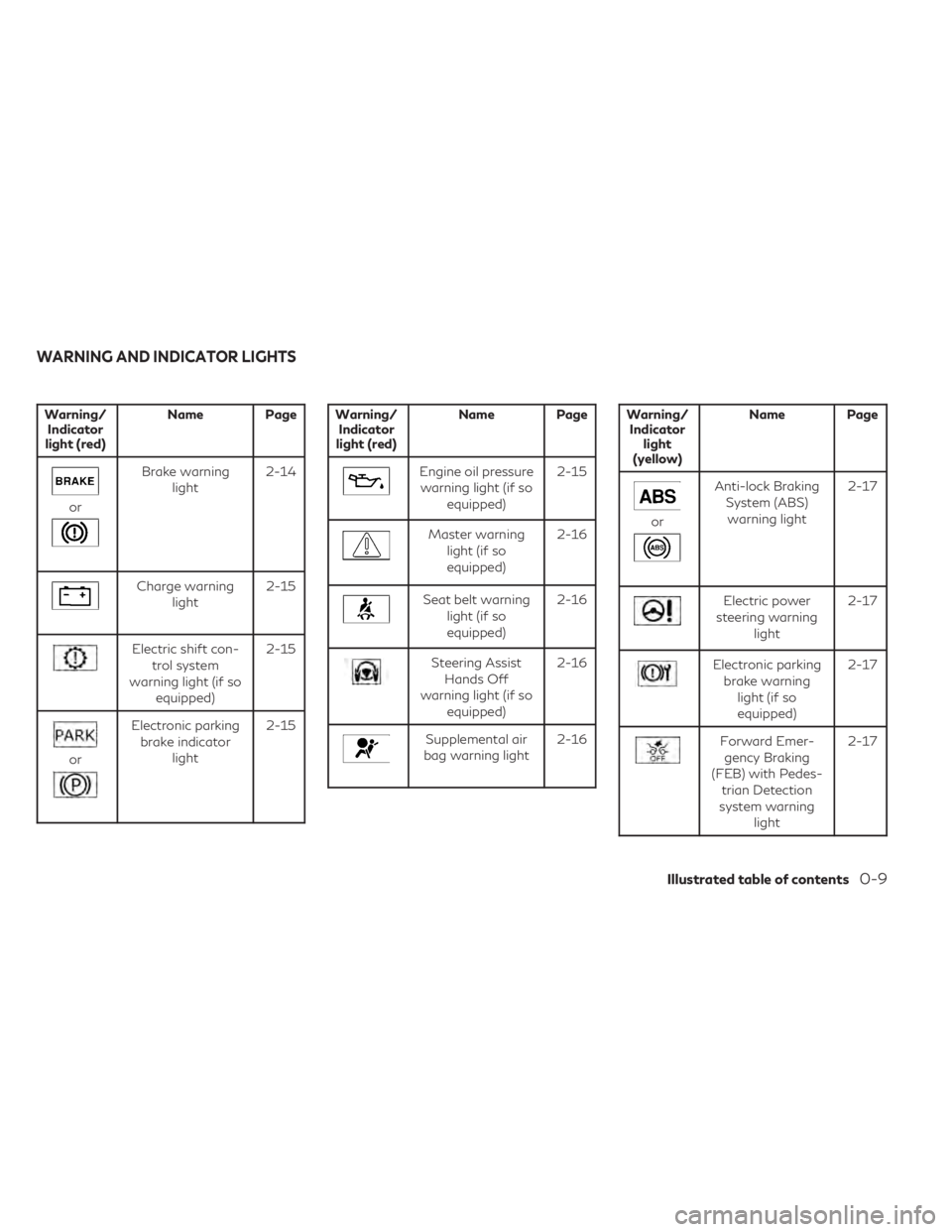
Warning/Indicator
light (red) Name Page
or
Brake warning
light 2-14
Charge warning
light 2-15
Electric shift con-
trol system
warning light (if so equipped) 2-15
or
Electronic parking
brake indicator light 2-15
Warning/
Indicator
light (red) Name Page
Engine oil pressure
warning light (if so equipped) 2-15
Master warning
light (if soequipped) 2-16
Seat belt warning
light (if soequipped) 2-16
Steering Assist
Hands Off
warning light (if so equipped) 2-16
Supplemental air
bag warning light 2-16
Warning/
Indicator light
(yellow) Name Page
or
Anti-lock Braking
System (ABS)warning light 2-17
Electric power
steering warning light 2-17
Electronic parking
brake warning light (if soequipped) 2-17
Forward Emer-
gency Braking
(FEB) with Pedes- trian Detection
system warning light 2-17
WARNING AND INDICATOR LIGHTS
Illustrated table of contents0-9
Page 107 of 636

19. Center multi-function control buttons*
20. Push-button ignition switch (P. 5-13)
21. Electronic parking brake (P. 5-25)Automatic brake hold switch (P. 5-27)
22. Idling Stop System switch (P. 5-178)
23. INFINITI Drive Mode Selector (P. 5-29)
24. Cruise control switches (if so equipped)
(P. 5-83)
ProPILOT Assist switches
(if so equipped) (P. 5-84)
Bluetooth® Hands-Free Phone System*
25. Driver supplemental knee air bag
(P. 1-72)
26. Tilt and telescopic steering wheel control
(P. 3-30)
27. Hood release (P. 3-21)
28. Control panel and vehicle information
display switches (P. 2-22 or 2-44)
Steering wheel switch for audio control*
29. Liftgate instrument panel switch
(P. 3-22)
Steering Assist switch (if so equipped)
(P. 2-88)
Head Up Display (HUD) switch
(if so equipped) (P. 2-89)
*: Refer to the separate INFINITI InTouchtm
Owner's Manual (if so equipped).
Refer to the page number indicated in paren-
theses for operating details.
Instruments and controls2-5
Page 114 of 636

Warning/Indicator light (red)Warning/Indicator light (yellow) Warning/Indicator light (other)
orBrake warning lightorAnti-lock Braking System (ABS)
warning lightAutomatic brake hold indicator light
(white/green) (if so equipped)
Charge warning lightElectric power steering warning lightHigh Beam Assist indicator light (green)
(if so equipped)
Electric shift control system warning light
(if so equipped)Electronic parking brake warning light
(if so equipped)High beam indicator light (blue)
(if so equipped)
orElectronic parking brake
indicator lightForward Emergency Braking (FEB) with
Pedestrian Detection system warning lightLow beam indicator light (green)
(if so equipped)
Engine oil pressure warning light
(if so equipped)Front passenger air bag status lightSide light and headlight indicator light
(green) (if so equipped)
Master warning light (if so equipped)Low tire pressure warning light
(if so equipped)Turn signal/hazard indicator lights (green)
(if so equipped)
Seat belt warning light (if so equipped)Malfunction Indicator Light (MIL)
(if so equipped)
WARNING LIGHTS, INDICATOR
LIGHTS AND AUDIBLE REMINDERS
2-12Instruments and controls
Page 116 of 636

CHECKING LIGHTS
With all doors closed, apply the parking
brake, fasten the seat belts and place the
ignition switch in the ON position without
starting the engine. The following lights (if so
equipped) will come on:
or,or,,,,,
The following lights (if so equipped) come on
briefly and then go off:
,or,,,,,
If any light fails to come on or operate in a
way other than described, it may indicate a
burned-out bulb and/or a system malfunc-
tion. Have the system checked. It is recom-
mended that you visit an INFINITI retailer for
this service.
Some indicators and warnings are also dis-
played in the vehicle information display be-
tween the speedometer and tachometer. For
additional information, see “Vehicle informa-
tion display–7 inch (18 cm) Type A” (P. 2-22)
or “Vehicle information display—12.3 inch (31
cm) Type B” (P. 2-44).
WARNING/INDICATOR LIGHTS
(red)
For additional information on warnings and
indicators, see “Vehicle information display–7
inch (18 cm) Type A” (P. 2-22) or “Vehicle
information display—12.3 inch (31 cm) Type
B” (P. 2-44).
orBrake warning
light
This light functions for both the parking brake
and the foot brake systems.
Parking brake indicator
When the ignition switch is placed in the ON
position, the light comes on when the parking
brake is applied.
Low brake fluid warning light
When the ignition switch is placed in the ON
position, the light warns of a low brake fluid
level. If the light comes on while the engine is
running, with the parking brake not applied,
stop the vehicle and perform the following:
1. Check the brake fluid level. Add brake fluidas necessary. For additional information,
see “Brake fluid” (P. 8-11). 2. If the brake fluid level is correct, have the
warning system checked. It is recom-
mended that you visit an INFINITI retailer
for this service.
WARNING
• Your brake system may not be working
properly if the warning light is on. Driv-
ing could be dangerous. If you judge it to
be safe, drive carefully to the nearest
service station for repairs. Otherwise,
have your vehicle towed because driving
it could be dangerous.
• Pressing the brake pedal with the engine
stopped and/or a low brake fluid level
may increase your stopping distance and
braking will require greater pedal effort
as well as pedal travel.
• If the brake fluid level is below the MINI-
MUM or MIN mark on the brake fluid
reservoir, do not drive until the brake
system has been checked. It is recom-
mended that you visit an INFINITI re-
tailer for this service.
2-14Instruments and controls
Page 117 of 636
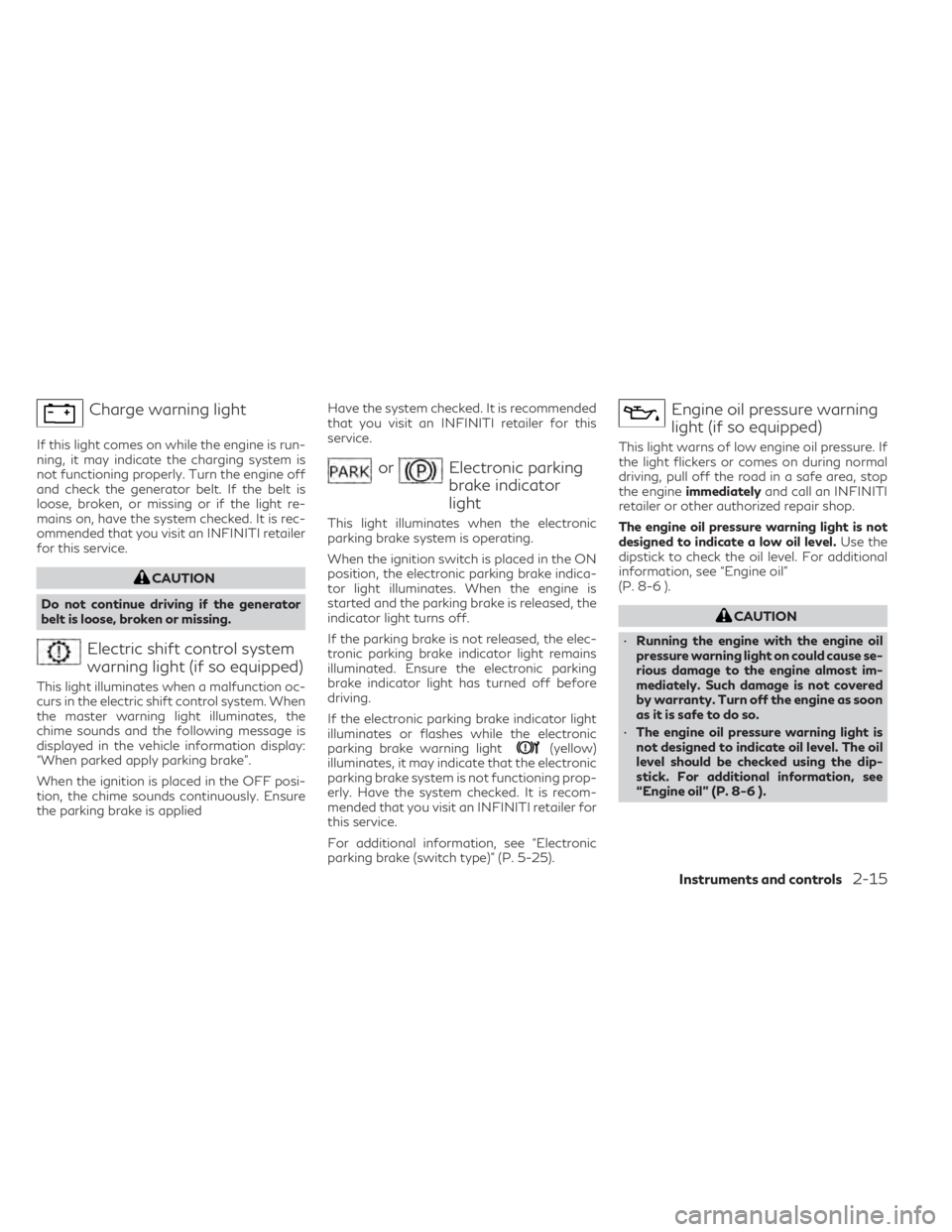
Charge warning light
If this light comes on while the engine is run-
ning, it may indicate the charging system is
not functioning properly. Turn the engine off
and check the generator belt. If the belt is
loose, broken, or missing or if the light re-
mains on, have the system checked. It is rec-
ommended that you visit an INFINITI retailer
for this service.
CAUTION
Do not continue driving if the generator
belt is loose, broken or missing.
Electric shift control system
warning light (if so equipped)
This light illuminates when a malfunction oc-
curs in the electric shift control system. When
the master warning light illuminates, the
chime sounds and the following message is
displayed in the vehicle information display:
“When parked apply parking brake”.
When the ignition is placed in the OFF posi-
tion, the chime sounds continuously. Ensure
the parking brake is applied Have the system checked. It is recommended
that you visit an INFINITI retailer for this
service.
orElectronic parking
brake indicator
light
This light illuminates when the electronic
parking brake system is operating.
When the ignition switch is placed in the ON
position, the electronic parking brake indica-
tor light illuminates. When the engine is
started and the parking brake is released, the
indicator light turns off.
If the parking brake is not released, the elec-
tronic parking brake indicator light remains
illuminated. Ensure the electronic parking
brake indicator light has turned off before
driving.
If the electronic parking brake indicator light
illuminates or flashes while the electronic
parking brake warning light
(yellow)
illuminates, it may indicate that the electronic
parking brake system is not functioning prop-
erly. Have the system checked. It is recom-
mended that you visit an INFINITI retailer for
this service.
For additional information, see “Electronic
parking brake (switch type)” (P. 5-25).
Engine oil pressure warning
light (if so equipped)
This light warns of low engine oil pressure. If
the light flickers or comes on during normal
driving, pull off the road in a safe area, stop
the engine immediately and call an INFINITI
retailer or other authorized repair shop.
The engine oil pressure warning light is not
designed to indicate a low oil level. Use the
dipstick to check the oil level. For additional
information, see “Engine oil”
(P. 8-6 ).
CAUTION
• Running the engine with the engine oil
pressure warning light on could cause se-
rious damage to the engine almost im-
mediately. Such damage is not covered
by warranty. Turn off the engine as soon
as it is safe to do so.
• The engine oil pressure warning light is
not designed to indicate oil level. The oil
level should be checked using the dip-
stick. For additional information, see
“Engine oil” (P. 8-6 ).
Instruments and controls2-15
Page 119 of 636

orAnti-lock Braking
System (ABS)
warning light
When the ignition switch is placed in the ON
position, the ABS warning light illuminates
and then turns off. This indicates the ABS is
operational.
If the ABS light comes on while the engine is
running, it may indicate the anti-lock braking
system is not functioning properly. Have the
system checked. It is recommended that you
visit an INFINITI retailer for this service.
If an ABS malfunction occurs, the anti-lock
function is turned off. The brake system then
operates normally, but without anti-lock as-
sistance. For additional information, see
“Brake system” (P. 5-165).
Electric power steering
warning light
WARNING
• If the engine is not running or is turned
off while driving, the power assist for the
steering will not work. Steering will be
harder to operate. •
When the electric power steering
warning light illuminates with the engine
running, there will be no power assist for
the steering. You will still have control of
the vehicle but the steering will be harder
to operate. Have the power steering sys-
tem checked. It is recommended that you
visit an INFINITI retailer for this service.
When the ignition switch is placed in the ON
position, the electric power steering warning
light illuminates. After starting the engine, the
electric power steering warning light turns
off. This indicates that the electric power
steering system is operational.
If the electric power steering warning light
illuminates while the engine is running, it may
indicate the power steering system is not
functioning properly and may need servicing.
Have the hydraulic pump electric power
steering system checked. It is recommended
that you visit an INFINITI retailer for this
service.
When the electric power steering warning
light illuminates with the engine running,
there will be no power assist for the steering
but you will still have control of the vehicle. At
this time, greater steering effort is required to
operate the steering wheel, especially in
sharp turns and at low speeds. For additional information, see “Power steer-
ing” (P. 5-164).
Electronic parking brake
warning light (if so equipped)
When the ignition switch is in the ON posi-
tion, the electronic parking brake warning
light illuminates and then turns off.
The electronic parking brake system warning
light functions for the electronic parking
brake system. If the warning light illuminates,
it may indicate the electronic parking brake
system is not functioning properly. Have the
system checked. It is recommended that you
visit an INFINITI retailer for this service.
For additional information, see “Parking
brake” (P. 5-25).
Forward Emergency Braking
(FEB) with Pedestrian
Detection system warning
light
This light comes on when the ignition switch
is placed in the ON position. It turns off after
the engine is started.
This light illuminates when the FEB with Pe-
destrian Detection system or the Predictive
Instruments and controls2-17
Page 124 of 636

AUDIBLE REMINDERS
Brake pad wear warning
The disc brake pads have audible wear warn-
ings. When a disc brake pad requires replace-
ment, it makes a high pitched scraping sound
when the vehicle is in motion, whether or not
the brake pedal is depressed. Have the brakes
checked as soon as possible if the warning
sound is heard.
Lane Departure Warning (LDW)
and Lane Departure Prevention
(LDP) warning chime (if so
equipped)
When the LDW or LDP system is on, the
chime sounds if the vehicle is traveling close
to either the left or the right of a traveling
lane with detectable lane markers.
For additional information, see “Lane Depar-
ture Warning (LDW) system” (P. 5-36) or
“Lane Departure Prevention (LDP) system”
(P. 5-43).
Light reminder chime
With the ignition switch placed in the OFF
position, a chime sounds when the driver's
door is opened if the headlights or parking
lights are on.
Turn the headlight control switch off before
leaving the vehicle.
Door lock warning chime
When the chime sounds, be sure to check
both the vehicle and the Intelligent Key.
For additional information, see “Trouble-
shooting guide” (P. 3-16).The vehicle information display is located to
the left of the speedometer. It displays such
items as:
• Vehicle settings
• Indicators and warnings
• Information/warning messages
• Tire pressure information
• Drive computer information
• Cruise control system information
• Driving Aids (if so equipped)
• ProPILOT Assist (if so equipped)
• INFINITI Intelligent Key operationinformation
LIC3224
VEHICLE INFORMATION DISPLAY 7
INCH (18 cm) TYPE A (if so equipped)
2-22Instruments and controls
Page 130 of 636

VDC Setting
The VDC Setting menu allows the user to enable or disable the Vehicle Dynamic Control (VDC) system.
Some menu items shown below may not be equipped on your vehicle.
Menu itemExplanation
System Allows the user to turn the VDC system on or off. For additional information, see “Vehicle Dynamic Control (VDC)
system” (P. 5-168).
Driver Assistance
The driver assistance menu allows the user to change the various driving aids, parking aids and braking features.
Some menu items shown below may not be equipped on your vehicle.
Menu item Explanation
Lane Assist Displays available lane options.
Warning Allows user to turn the Lane Departure Warning (LDW) system on or off. For additional information, see “Lane Depar-
ture Warning (LDW)” (P. 5-36).
Blind Spot Assist Displays available blind spot options.
Warning Allows user to turn the Blind Spot Warning (BSW) system on or off. For additional information, see “Blind Spot
Warning (BSW)” (P. 5-49).
Emergency Assist Displays available emergency brake options.
Front Allows user to turn the front emergency braking system on or off. For additional information, see “Forward Emergency
Braking (FEB) with Pedestrian Detection” (P. 5-128) and “Predictive Forward Collision Warning (PFCW)” (P. 5-140).
Rear Allows user to turn the rear emergency braking system on or off. For additional information, see “Rear Automatic
Braking (RAB)” (P. 5-121).
Parking Aids Displays available parking aids.
Moving Object Allows user to turn the Moving Object Detection (MOD) on or off. For additional information, see “Moving Object
Detection (MOD)” (P. 4-23).
Auto Show Sonar Allows user to auto display the sonar. For additional information, see “Front and rear sonar system” (P. 5-172).
2-28Instruments and controls
Page 141 of 636

Low Oil Pressure: See
Owner’s Manual
This warning appears in the message area of
the vehicle information display if low oil pres-
sure is detected. This gauge is not designed
to indicate low oil level.The low oil pressure
warning is not designed to indicate a low oil
level. Use the dipstick to check the oil level.
For additional information, see “Engine oil”
(P. 8-6).
Low Outside Temperature
This warning appears if the outside tempera-
ture is below 37°F (3°C). The temperature
can be changed to display in Celsius or Fahr-
enheit. For additional information, see “Driver
Assistance” (P. 2-28).
Low Washer Fluid
This warning appears when the windshield-
washer fluid is at a low level. Add windshield-
washer fluid as necessary. For additional in-
formation, see “Windshield-washer fluid”
(P. 8-11).
Neutral Hold Mode activated indicator
This indicator appears when the Neutral hold
mode is activated. To exit the Neutral hold
mode, place the vehicle in any other shift
position other than N (Neutral). For addi-
tional information, see “Neutral hold mode
function” (P. 5-21).
Neutral Hold Mode guidance indicator
This indicator appears after approximately
5 seconds when the shift position is in the N
(Neutral) position (Neutral hold mode is avail-
able). For additional information, see “Neu-
tral hold mode function” (P. 5-21).
Neutral Hold Mode was not activated
indicator
This indicator appears when the Neutral hold
mode is unavailable. To activate the Neutral
hold mode, wait for a while without shifting
and then perform the operations again. For
additional information, see “Neutral hold
mode function” (P. 5-21).
Parking Sensor Error: See Owner’s
Manual
This warning appears when there is an error
with the system. For additional information,
see “Front and rear sonar system” (P. 5-172).
Power will turn off to save the battery
This message appears in the vehicle informa-
tion display after a period of time if the igni-
tion switch is in the ON position and if the
vehicle is in P (Park). For additional informa-
tion, see “Push-button ignition switch posi-
tions” (P. 5-14).
Power turned off to save the battery
This message appears after the ignition
switch is automatically turned off. For addi-
tional information, see “Push-button ignition
switch positions” (P. 5-14).
Press brake pedal to prevent
rolling
This warning appears in the following situa-
tions:
• The driver tries to release the electronic parking brake manually without depressing
the brake pedal.
• The vehicle is stopped on a steep hill and there is a possibility of moving backward,
even if the electronic parking brake is
applied.
• This warning appears and chime sounds if the vehicle moves while the automatic
brake hold function is activated. Apply the
foot brake to stop the vehicle moving.
Instruments and controls2-39