service INFINITI QX60-HYBRID 2015 Owners Manual
[x] Cancel search | Manufacturer: INFINITI, Model Year: 2015, Model line: QX60-HYBRID, Model: INFINITI QX60-HYBRID 2015Pages: 577, PDF Size: 5.58 MB
Page 2 of 577

Your INFINITI represents a new way of thinking
about vehicle design. It integrates advanced en-
gineering and superior craftsmanship with a
simple, refined aesthetic sensitivity associated
with traditional Japanese culture.
The result is a different notion of luxury and
beauty. The car itself is important, but so is the
sense of harmony that the vehicle evokes in its
driver, and the sense of satisfaction you feel with
the INFINITI — from the way it looks and drives to
the high level of retailer service.
To ensure that you enjoy your INFINITI to the
fullest, we encourage you to read this Owner’s
Manual immediately. It explains all of the features,
controls and performance characteristics of your
INFINITI; it also provides important instructions
and safety information.
A separate Warranty Information Booklet
is included in your Owner’s literature port-
folio. The INFINITI Service and Mainte-
nance Guide explains details about main-
taining and servicing your vehicle. Always
carry it with you when you take your vehicle
to an INFINITI retailer. The Warranty Infor-
mation Booklet contents provide complete
information about all warranties covering
this vehicle, the requirements to keep the
warranties in effect as well as the INFINITI
Roadside Assistance program.Additionally, a separate Customer Care
and Lemon Law Information Booklet will
explain how to resolve any concerns you
may have with your vehicle, as well as
clarify your rights under your state’s lemon
law.
In addition to factory-installed options, your ve-
hicle may also be equipped with additional ac-
cessories installed by INFINITI or by your INFINITI
retailer prior to delivery. It is important that you
familiarize yourself with all disclosures, warnings,
cautions and instructions concerning proper use
of such accessories prior to operating the vehicle
and/or accessory. See an INFINITI retailer for
details concerning the particular accessories
with which your vehicle is equipped.
Before driving your vehicle, please read this
Owner’s Manual carefully. This will ensure famil-
iarity with controls and maintenance require-
ments, assisting you in the safe operation of your
vehicle.
WARNING
IMPORTANT SAFETY INFORMATION RE-
MINDERS FOR SAFETY!
Follow these important driving rules to
help ensure a safe and comfortable trip
for you and your passengers!
●
NEVER drive under the influence of al-
cohol or drugs.
● ALWAYS observe posted speed limits
and never drive too fast for conditions.
●
ALWAYS give your full attention to driving
and avoid using vehicle features or taking
other actions that could distract you.
●ALWAYS use your seat belts and appro-
priate child restraint systems. Pre-teen
children should be seated in the rear seat.
● ALWAYS provide information about the
proper use of vehicle safety features to
all occupants of the vehicle.
● ALWAYS review this Owner’s Manual
for important safety information.
FOREWORD READ FIRST—THEN DRIVE SAFELY
Page 6 of 577
INFINITI CARES...
Both INFINITI and your INFINITI retailer are dedicated to serving all your automotive needs. Your satisfaction with your vehicle and your INFINITI retailer are
our primary concerns. Your INFINITI retailer is always available to assist you with all your automobile sales and service needs.
However, if there is something that your INFINITI
retailer cannot assist you with or you would like to
provide INFINITI directly with comments or ques-
tions, please contact our (INFINITI’s) Consumer
Affairs Department using our toll-free number:
For U.S. customers1-800-662-6200
For Canadian customers 1-800-361-4792 The Consumer Affairs Department will ask for the
following information:
– Your name, address, and telephone number
– Vehicle identification number (on dash panel)
– Date of purchase
– Current odometer reading
– Your INFINITI retailer’s name
– Your comments or questions
OR You can write to INFINITI with the information on
the left at:
For U.S. customers
INFINITI Division
Nissan North America, Inc. Consumer Affairs Department
P.O. Box 685003
Franklin, TN 37068-5003
or via e-mail at:
[email protected]
For Canadian customers INFINITI Division
Nissan Canada Inc.
5290 Orbitor Drive
Mississauga, Ontario L4W 4Z5
or via e-mail at:
information.centre@nissancanada. com
If you prefer, visit us at:
www.infinitiUSA.com (for U.S. customers)
or
www.infiniti.ca (for Canadian customers)
We appreciate your interest in INFINITI and thank you for buying a quality INFINITI vehicle.
INFINITI CUSTOMER CARE PROGRAM
Page 11 of 577

The INFINITI Direct Response Hybrid® System
combines the power of a gasoline engine and an
electric motor to help minimize fuel consumption
and emissions.
Depending on driving conditions, the vehicle runs
on a combination of the gasoline engine and the
electric motor, whichever is best for those condi-
tions.
Because the gasoline engine charges the
Lithium-ion (Li-ion) battery as needed, the battery
does not have to be charged from an outside
source like an all-electric vehicle.WARNING
If you continue to drive the vehicle while
the warning is displayed, the hybrid sys-
tem may become temporarily inoperative
and the system can not provide power to
the wheels. This can result in reduced or
zero vehicle speed. The reduced speed or
zero speed may be lower than other traf-
fic, which could increase the chance of a
collision. If the vehicle cannot maintain a
safe driving speed, pull to the side of the
road in a safe area. If this occurs, place the
shift lever in the “P” position, ignition in
the READY position with the vehicle
stopped until the display turns off. The
Hybrid system overheat warning and the
SHIFT “P” warning messages will be alter-
nately displayed. For additional informa-
tion, refer to “Shift to Park” in the “Instru-
ments and controls” section of this
manual.
WARNING
Your vehicle contains a sealed Lithium ion
(Li-ion) high-voltage battery. If the Li-ion
battery is disposed of improperly, there is
a risk of severe burns and electrical shock
that may result in serious injury or death
and there is also a risk of environmental
damage.
CAUTION
Do not misuse the Li-ion battery (to use
the Li-ion battery for completely another
purpose) .
The Li-ion battery is used to drive the electric
motors in the INFINITI Direct Response Hybrid®
System.
The Li-ion battery has a limited service life. Con-
tact your INFINITI retailer for information about
recycling or disposal of the battery.
INFINITI DIRECT RESPONSE
HYBRID® SYSTEM LITHIUM-ION (Li-ion) BATTERY
HEV-2HEV Overview
Page 12 of 577

WARNING
●The INFINITI Direct Response Hybrid®
System uses high voltage up to approxi-
mately 144volts. The system can be hot
while and after starting. Be careful of
both the high voltage and the high tem-
perature. Obey the warning labels at-
tached to the vehicle.
● Never disassemble, remove or replace
high-voltage parts and harnesses as
well as their connectors can cause se-
vere burns or electric shock that may
result in serious injury or death. High-
voltage harnesses are colored orange.
The vehicle high-voltage system has no
user serviceable parts. Take your ve-
hicle to an INFINITI retailer for any nec-
essary maintenance.
● Never try to remove the service plug
located in the trunk. The service plug is
used only when the vehicle is serviced
by trained technicians wearing personal
protection equipment and is part of the
high-voltage system. Touching the ser-
vice plug can cause severe burns or
electric shock that may result in serious
injury or death.
WARNING
In case of a collision:
●If your vehicle is drivable, pull your ve-
hicle off the road, put the transmission
in the P (Park) position, apply the park-
ing brake and turn the INFINITI Direct
Response Hybrid® System off.
● Check to see if there are exposed high-
voltage parts and cables. Never touch
the parts and cables. For their locations,
refer to “High-voltage components and
their locations” in this section. To avoid
personal injury, never touch high-
voltage wiring, connectors, and other
high-voltage parts, such as electric mo-
tor inverter and Li-ion battery. An elec-
tric shock may occur if exposed electric
wires are visible when viewed from in-
side or outside of your vehicle. There-
fore, never touch exposed electric
wires.
● If the vehicle receives a strong impact to
the floor while driving, stop the vehicle
in a safe location and check the floor.
● Inspect the ground under the vehicle. If
liquid has leaked onto the ground, the
fuel system may have been damaged.
Leave the vehicle as soon as possible. ●
Leaks or damage to the Li-ion battery
may result in a fire. If you discover them,
contact emergency services immedi-
ately. Since the fluid leak may be
lithium organic electrolyte from the Li-
ion battery, never touch the fluid leak
inside or outside the vehicle. If the fluid
contacts your skin or eyes, wash it off
immediately with a large amount of wa-
ter and receive immediate medical at-
tention to help avoid serious injury.
● If a fire occurs in the hybrid vehicle,
leave the vehicle as soon as possible.
Only use a type ABC, BC or C fire extin-
guisher that is meant for use on electri-
cal fires. Using water or the incorrect
fire extinguisher can result in serious
injury or death from electrical shock.
● If you are not able to safely assess the
vehicle due to vehicle damage, do not
touch the vehicle. Leave the vehicle and
contact emergency services. Advise 1st
responders that this is a hybrid vehicle.
HIGH-VOLTAGE CAUTIONS ROAD ACCIDENT CAUTIONS
HEV OverviewHEV-3
Page 21 of 577
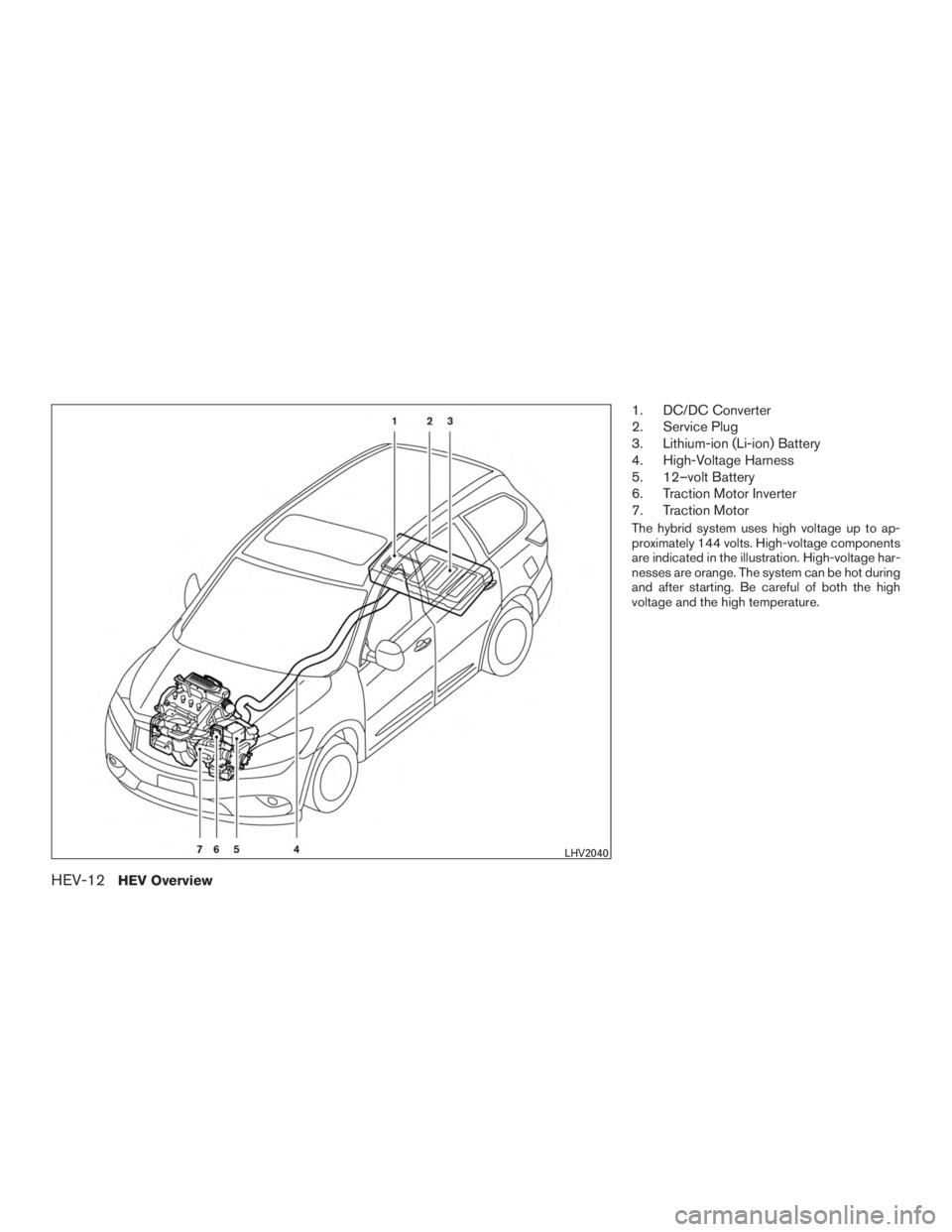
1. DC/DC Converter
2. Service Plug
3. Lithium-ion (Li-ion) Battery
4. High-Voltage Harness
5. 12–volt Battery
6. Traction Motor Inverter
7. Traction Motor
The hybrid system uses high voltage up to ap-
proximately 144 volts. High-voltage components
are indicated in the illustration. High-voltage har-
nesses are orange. The system can be hot during
and after starting. Be careful of both the high
voltage and the high temperature.
LHV2040
HEV-12HEV Overview
Page 111 of 577
WARNING
●Your brake system may not be working
properly if the warning light is on. Driv-
ing could be dangerous. If you judge it
to be safe, drive carefully to the nearest
service station for repairs. Otherwise,
have your vehicle towed because driv-
ing it could be dangerous.
● Pressing the brake pedal with the en-
gine stopped and/or a low brake fluid
level may increase your stopping dis-
tance and braking will require greater
pedal effort as well as pedal travel.
● If the brake fluid level is below the
MINIMUM or MIN mark on the brake
fluid reservoir, do not drive until the
brake system has been checked at an
INFINITI retailer.
Anti-lock Braking System (ABS) warning
indicator
When the parking brake is released and the
brake fluid level is sufficient, if both the brake
warning light and the Anti-lock Braking System
(ABS) warning light illuminate, it may indicate the
ABS is not functioning properly. Have the brake
system checked, and if necessary, repaired by an
INFINITI retailer promptly. Avoid high-speed driv-
ing and abrupt braking. For additional informa- tion, refer to “Anti-lock Braking System (ABS)
warning light” in this section.Direct Response Hybrid™
warning light
When the ignition switch is in the “ON” position,
the hybrid system warning light illuminates. After
starting the hybrid system, the hybrid system
warning light turns off. If the hybrid system warn-
ing light illuminates while driving, it may indicate
that there is a malfunction in the electric motor
and/or other hybrid system components. Stop
your vehicle immediately and contact an INFINITI
retailer.
Engine oil pressure warninglight
This light warns of low engine oil pressure. If the
light flickers or comes on during normal driving,
pull off the road in a safe area, stop the engine
immediately and call an INFINITI retailer or
other authorized repair shop.
The engine oil pressure warning light is not
designed to indicate a low oil level. Use the
dipstick to check the oil level. For additional in-
formation, refer to “Engine oil” in the “Mainte-
nance and do-it-yourself” section of this manual.
CAUTION
Running the engine with the engine oil
pressure warning light on could cause se-
rious damage to the engine almost imme-
diately. Such damage is not covered by
warranty. Turn off the engine as soon as it
is safe to do so.
Low fuel warning light
This light comes on when the fuel level in the fuel
tank is getting low. Refuel as soon as it is conve-
nient, preferably before the fuel gauge reaches E
(Empty) . There will be a small reserve of fuel
in the tank when the fuel gauge needle
reaches E (Empty) .
Low tire pressure warning light
Your vehicle is equipped with a Tire Pressure
Monitoring System (TPMS) that monitors the tire
pressure of all tires except the spare.
The low tire pressure warning light warns of low
tire pressure or indicates that the TPMS is not
functioning properly.
After the ignition switch is placed in the ON
position, this light illuminates for about 1 second
and turns off.
2-10Instruments and controls
Page 123 of 577
Trip Computer
The trip computer can be enabled/disabled to
display in the vehicle information display when
the ignition switch is placed in the ON position.
From the “Main Menu Selection” select “Trip
Computer” to display in the vehicle information
display when the ignition is placed in the ON
position.
Tire Pressures
The tire pressures can be enabled/disabled to
display in the vehicle information display when
the ignition switch is placed in the ON position.
From the “Main Menu Selection” select “Tire
Pressures” to display in the vehicle information
display when the ignition is placed in the ON
position.
Fuel Economy
The fuel economy can be enabled/disabled to
display in the vehicle information display when
the ignition switch is placed in the ON position.
From the “Main Menu Selection” select “Fuel
Economy” to display in the vehicle information
display when the ignition is placed in the ON
position.Body Color
The color of the vehicle that displays in the ve-
hicle information display when the ignition switch
is placed in the ON position can be changed.
Maintenance
The maintenance mode allows you to set alerts
for the reminding of maintenance intervals for the
following:● Scheduled service
● Tires
● Other
1. Press the
button.
2. Use the
button until “Settings” is se-
lected, and press ENTER.
3. Select “Maintenance” using the
but-
tons and press ENTER.
Service
This indicator appears when the customer set
distance is reached for checking or replacing
maintenance items other than the engine oil, oil
filter and tires. Other maintenance items can in-
clude such things as air filter or tire rotation. You
can set or reset the distance for checking or
replacing the items. You can set or reset the distance for service type items. For scheduled
maintenance items and intervals, refer to your
“INFINITI Service and Maintenance Guide.”
Tire
This indicator appears when the customer set
distance is reached for replacing tires. You can
set or reset the distance for replacing tires.
WARNING
The tire replacement indicator is not a
substitute for regular tire checks, includ-
ing tire pressure checks. For additional
information, refer to “Changing Wheels
and Tires” in “Maintenance & Do- It-
Yourself” section. Many factors including
tire inflation, alignment, driving habits
and road conditions affect tire wear and
when tires should be replaced. Setting the
tire replacement indicator for a certain
driving distance does not mean your tires
will last that long. Use the tire replace-
ment indicator as a guide only and always
perform regular tire checks. Failure to per-
form regular tire checks, including tire
pressure checks could result in tire failure.
Serious vehicle damage could occur and
may lead to a collision, which could result
in serious personal injury or death.
2-22Instruments and controls
Page 132 of 577
If the engine fails to start using a registered
INFINITI Vehicle Immobilizer System key (for ex-
ample, when interference is caused by another
INFINITI Vehicle Immobilizer System key, an au-
tomated toll road device or automatic payment
device on the key ring) , restart the engine using
the following procedures:1. Leave the ignition switch in the ON position for approximately 5 seconds.
2. Place the ignition switch in the OFF or LOCK position, and wait approximately
10 seconds.
3. Repeat steps 1 and 2.
4. Restart the engine while holding the device (which may have caused the interference)
separate from the registered INFINITI Ve-
hicle Immobilizer System key.
If the no start condition re-occurs, INFINITI rec-
ommends placing the registered INFINITI Vehicle
Immobilizer System key on a separate key ring to
avoid interference from other devices. FCC Notice:
For USA:
This device complies with part 15 of the
FCC Rules. Operation is subject to the fol-
lowing two conditions: (1) This device may
not cause harmful interference, and (2) this
device must accept any interference re-
ceived, including interference that may
cause undesired operation.
NOTE:
Changes or modifications not expressly ap-
proved by the party responsible for compli-
ance could void the user’s authority to op-
erate the equipment.
For Canada:
This device complies with Industry Canada
license-exempt RSS standard(s) . Opera-
tion is subject to the following two condi-
tions: (1) this device may not cause inter-
ference, and (2) this device must accept any
interference, including interference that
may cause undesired operation of the de-
vice.
Security indicator light
The security indicator light blinks whenever the
ignition switch is in the LOCK, OFF or ACC
position. This function indicates the INFINITI Ve-
hicle Immobilizer System is operational.
If the INFINITI Vehicle Immobilizer System is mal-
functioning, the light will remain on while the
ignition switch is in the ON position.
If the light still remains on and/or the en-
gine will not start, see an INFINITI retailer
for service as soon as possible. Please
bring all INFINITI Vehicle Immobilizer Sys-
tem keys that you have when visiting your
INFINITI retailer for service.
LIC0474
Instruments and controls2-31
Page 256 of 577
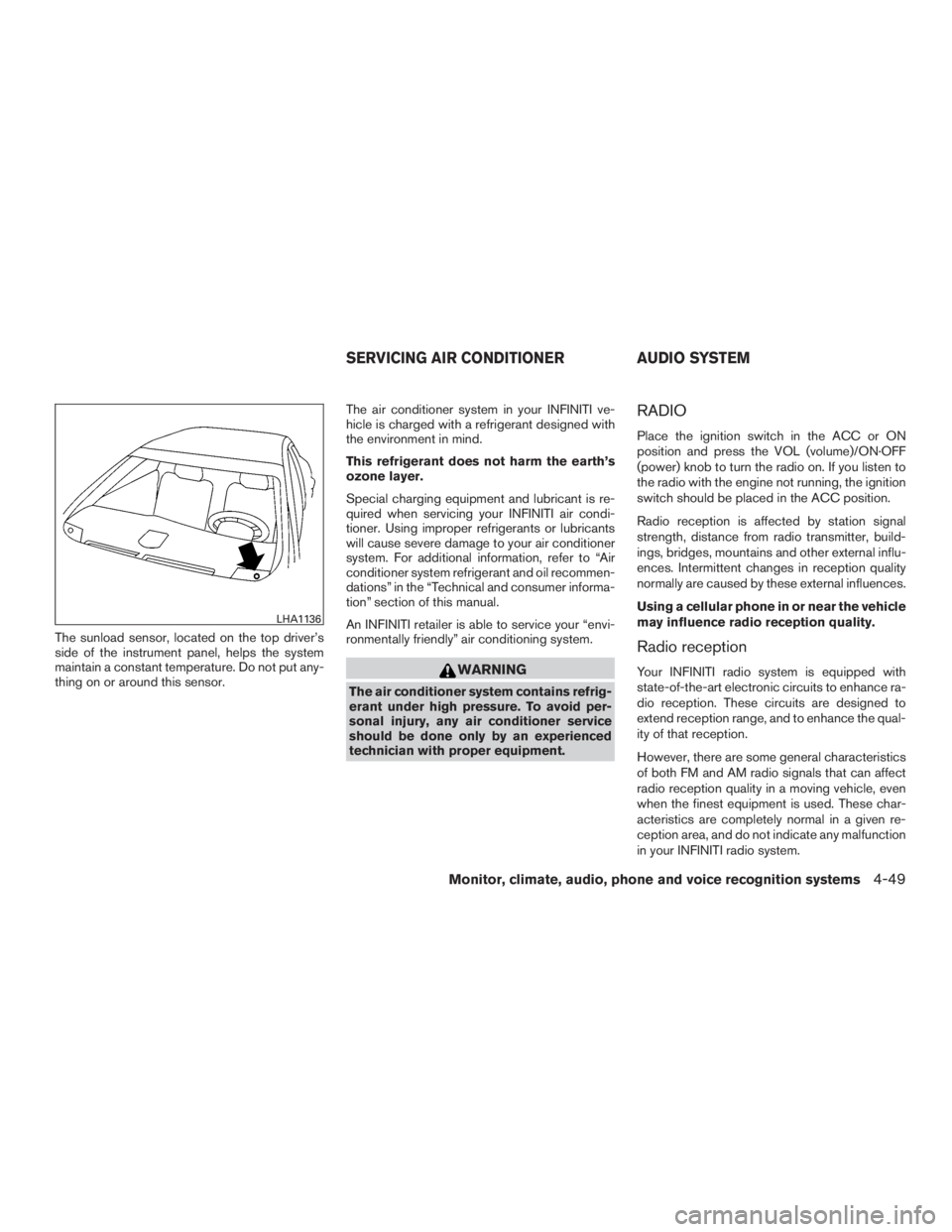
The sunload sensor, located on the top driver’s
side of the instrument panel, helps the system
maintain a constant temperature. Do not put any-
thing on or around this sensor.The air conditioner system in your INFINITI ve-
hicle is charged with a refrigerant designed with
the environment in mind.
This refrigerant does not harm the earth’s
ozone layer.
Special charging equipment and lubricant is re-
quired when servicing your INFINITI air condi-
tioner. Using improper refrigerants or lubricants
will cause severe damage to your air conditioner
system. For additional information, refer to “Air
conditioner system refrigerant and oil recommen-
dations” in the “Technical and consumer informa-
tion” section of this manual.
An INFINITI retailer is able to service your “envi-
ronmentally friendly” air conditioning system.
WARNING
The air conditioner system contains refrig-
erant under high pressure. To avoid per-
sonal injury, any air conditioner service
should be done only by an experienced
technician with proper equipment.
RADIO
Place the ignition switch in the ACC or ON
position and press the VOL (volume)/ON·OFF
(power) knob to turn the radio on. If you listen to
the radio with the engine not running, the ignition
switch should be placed in the ACC position.
Radio reception is affected by station signal
strength, distance from radio transmitter, build-
ings, bridges, mountains and other external influ-
ences. Intermittent changes in reception quality
normally are caused by these external influences.
Using a cellular phone in or near the vehicle
may influence radio reception quality.
Radio reception
Your INFINITI radio system is equipped with
state-of-the-art electronic circuits to enhance ra-
dio reception. These circuits are designed to
extend reception range, and to enhance the qual-
ity of that reception.
However, there are some general characteristics
of both FM and AM radio signals that can affect
radio reception quality in a moving vehicle, even
when the finest equipment is used. These char-
acteristics are completely normal in a given re-
ception area, and do not indicate any malfunction
in your INFINITI radio system.
LHA1136
SERVICING AIR CONDITIONER AUDIO SYSTEM
Monitor, climate, audio, phone and voice recognition systems4-49
Page 257 of 577
Reception conditions will constantly change be-
cause of vehicle movement. Buildings, terrain,
signal distance and interference from other ve-
hicles can work against ideal reception. De-
scribed below are some of the factors that can
affect your radio reception.
Some cellular phones or other devices may
cause interference or a buzzing noise to come
from the audio system speakers. Storing the de-
vice in a different location may reduce or elimi-
nate the noise.
FM RADIO RECEPTION
Range: FM range is normally limited to 25 – 30 mi
(40 – 48 km) , with monaural (single channel) FM
having slightly more range than stereo FM. Exter-
nal influences may sometimes interfere with FM
station reception even if the FM station is within
25 mi (40 km) . The strength of the FM signal is
directly related to the distance between the
transmitter and receiver. FM signals follow a line-
of-sight path, exhibiting many of the same char-
acteristics as light. For example, they will reflect
off objects.
Fade and drift: As your vehicle moves away from
a station transmitter, the signals will tend to fade
and/or drift.Static and flutter: During signal interference from
buildings, large hills or due to antenna position
(usually in conjunction with increased distance
from the station transmitter) , static or flutter can
be heard. This can be reduced by adjusting the
treble control to reduce treble response.
Multipath reception: Because of the reflective
characteristics of FM signals, direct and reflected
signals reach the receiver at the same time. The
signals may cancel each other, resulting in mo-
mentary flutter or loss of sound.
AM RADIO RECEPTION
AM signals, because of their low frequency, can
bend around objects and skip along the ground.
In addition, the signals can be bounced off the
ionosphere and bent back to earth. Because of
these characteristics, AM signals are also sub-
ject to interference as they travel from transmitter
to receiver.
Fading: Occurs while the vehicle is passing
through freeway underpasses or in areas with
many tall buildings. It can also occur for several
seconds during ionospheric turbulence even in
areas where no obstacles exist.
Static: Caused by thunderstorms, electrical
power lines, electric signs and even traffic lights.
SATELLITE RADIO RECEPTION
When the satellite radio is used for the first time
or the battery has been replaced, the satellite
radio may not work properly. This is not a mal-
function. Wait more than 10 minutes with satellite
radio ON and the vehicle outside of any metal or
large building for satellite radio to receive all of
the necessary data.
The satellite radio mode will be skipped unless an
optional satellite receiver and antenna are in-
stalled and a SiriusXM® Satellite Radio service
subscription is active. Satellite radio is not avail-
able in Alaska, Hawaii and Guam.
Satellite radio performance may be affected if
cargo carried on the roof blocks the satellite radio
signal.
If possible, do not put cargo over the satellite
antenna.
A build up of ice on the satellite radio antenna can
affect satellite radio performance. Remove the
ice to restore satellite radio reception.
XM® is a registered trademark of SiriusXM®
Satellite Radio, Inc.
4-50Monitor, climate, audio, phone and voice recognition systems