brake light INFINITI QX70 2014 Owner's Guide
[x] Cancel search | Manufacturer: INFINITI, Model Year: 2014, Model line: QX70, Model: INFINITI QX70 2014Pages: 530, PDF Size: 2.48 MB
Page 341 of 530

5-14Starting and driving
.Make sure the area around the vehicle
is clear.
. Check fluid levels such as engine oil,
coolant, brake fluid and window
washer fluid as frequently as possible,
or at least whenever you refuel.
. Check that all windows and lights are
clean.
. Visually inspect tires for their appear-
ance and condition. Also check tires for
proper inflation.
. Lock all doors.
. Position seat and adjust head re-
straints.
. Adjust inside and outside mirrors.
. Fasten seat belts and ask all passen-
gers to do likewise.
. Check the operation of warning lights
when the ignition switch is pushed to
the ON position. (See “Warning/indica-
tor lights and audible reminders” (P.2-
13).) 1. Apply the parking brake.
2. Move the shift lever to the P (Park) or N
(Neutral) position. (P is recommended.)
The starter is designed not to operate
unless the shift lever is in either of the
above positions.
3. Push the ignition switch to the ON position. Depress the brake pedal and
push the ignition switch to start the
engine.
To start the engine immediately, push
and release the ignition switch while
depressing the brake pedal with the
ignition switch in any position.
.If the engine is very hard to start inextremely cold weather or when
restarting, depress the accelerator
pedal a little (approximately 1/3 to
the floor) and while holding, crank
the engine. Release the accelerator
pedal when the engine starts.
.If the engine is very hard to startbecause it is flooded, depress the
accelerator pedal all the way to the
floor and hold it. Push the ignition
switch to the ON position to start
cranking the engine. After 5 or 6
seconds, stop cranking by pushing
the ignition switch to OFF. After cranking the engine, release the
accelerator pedal. Crank the engine
with your foot off the accelerator
pedal
by depressing the brake pedal
and pushing the push-button igni-
tion switch to start the engine. If the
engine starts, but fails to run, repeat
the above procedure.
CAUTION
Do not operate the starter for more than 15
seconds at a time. If the engine does not
start, push the ignition switch to OFF and
wait 10 seconds before cranking again,
otherwise the starter could be damaged.
4. Warm-up
Allow the engine to idle for at least 30
seconds after starting. Do not race the
engine while warming it up. Drive at
moderate speed for a short distance
first, especially in cold weather. In cold
weather, keep the engine running for a
minimum of 2 - 3 minutes before
shutting it off. Starting and stopping
the engine over a short period of time
may make the vehicle more difficult to
start.
BEFORE STARTING THE ENGINE STARTING THE ENGINE
Page 348 of 530

SPA2331
To apply:Fully depress the parking brake
pedal
*1.
To release:
1. Firmly apply the foot brake
*2.
2. Depress the parking brake pedal
*1and the parking brake will be released.
3. Before driving, be sure the brake warning light goes out. The Lane Departure Warning (LDW) sys-
tem/Lane Departure Prevention (LDP) sys-
tem will operate when the vehicle is driven
at speeds of approximately 45 MPH (70
km/h) and above, and when it is traveling
close to either the left or the right of a
traveling lane.
Each system functions as follows:
.
Lane Departure Warning (LDW) system
— warns the driver with a warning light
and chime that the vehicle is beginning
to leave the driving lane.
. Lane Departure Prevention (LDP) system
— warns the driver with a warning light
and chime, and helps assist the driver
to return the vehicle to the center
direction of the traveling lane by
applying brake control to the left or
right wheels individually (for a short
period of time).
JVS0123X
SSD1182
The LDW and LDP systems monitor the lane
Starting and driving5-21
LANE DEPARTURE WARNING (LDW)
SYSTEM/LANE DEPARTURE PREVENTION
(LDP) SYSTEM (if so equipped)
Page 349 of 530
5-22Starting and driving
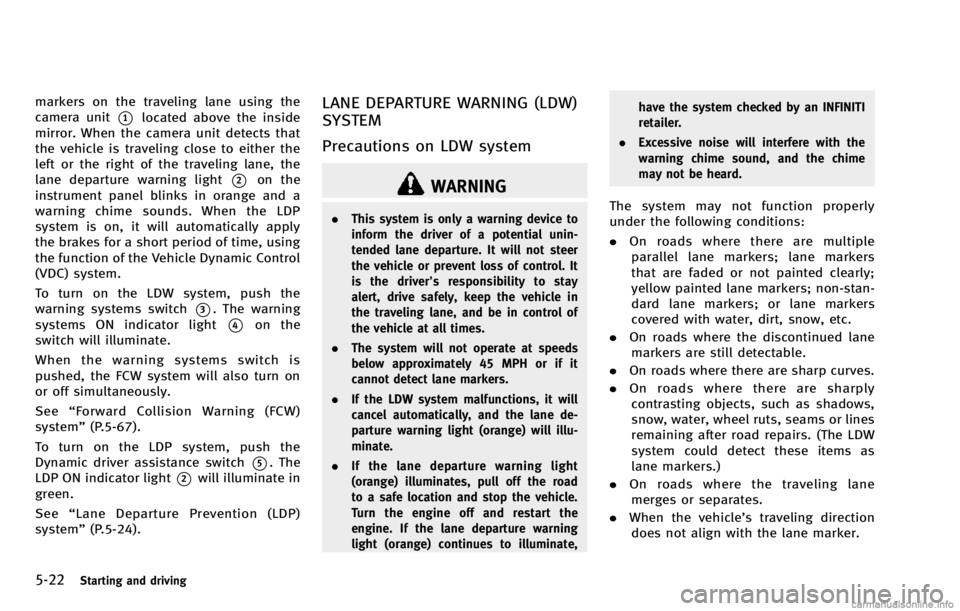
markers on the traveling lane using the
camera unit
*1located above the inside
mirror. When the camera unit detects that
the vehicle is traveling close to either the
left or the right of the traveling lane, the
lane departure warning light
*2on the
instrument panel blinks in orange and a
warning chime sounds. When the LDP
system is on, it will automatically apply
the brakes for a short period of time, using
the function of the Vehicle Dynamic Control
(VDC) system.
To turn on the LDW system, push the
warning systems switch
*3. The warning
systems ON indicator light
*4on the
switch will illuminate.
When the warning systems switch is
pushed, the FCW system will also turn on
or off simultaneously.
See “Forward Collision Warning (FCW)
system” (P.5-67).
To turn on the LDP system, push the
Dynamic driver assistance switch
*5. The
LDP ON indicator light
*2will illuminate in
green.
See “Lane Departure Prevention (LDP)
system” (P.5-24).
LANE DEPARTURE WARNING (LDW)
SYSTEM
Precautions on LDW system
WARNING
.This system is only a warning device to
inform the driver of a potential unin-
tended lane departure. It will not steer
the vehicle or prevent loss of control. It
is the driver’ s responsibility to stay
alert, drive safely, keep the vehicle in
the traveling lane, and be in control of
the vehicle at all times.
. The system will not operate at speeds
below approximately 45 MPH or if it
cannot detect lane markers.
. If the LDW system malfunctions, it will
cancel automatically, and the lane de-
parture warning light (orange) will illu-
minate.
. If the lane departure warning light
(orange) illuminates, pull off the road
to a safe location and stop the vehicle.
Turn the engine off and restart the
engine. If the lane departure warning
light (orange) continues to illuminate, have the system checked by an INFINITI
retailer.
. Excessive noise will interfere with the
warning chime sound, and the chime
may not be heard.The system may not function properly
under the following conditions:
.On roads where there are multiple
parallel lane markers; lane markers
that are faded or not painted clearly;
yellow painted lane markers; non-stan-
dard lane markers; or lane markers
covered with water, dirt, snow, etc.
. On roads where the discontinued lane
markers are still detectable.
. On roads where there are sharp curves.
. On roads where there are sharply
contrasting objects, such as shadows,
snow, water, wheel ruts, seams or lines
remaining after road repairs. (The LDW
system could detect these items as
lane markers.)
. On roads where the traveling lane
merges or separates.
. When the vehicle’s traveling direction
does not align with the lane marker.
Page 352 of 530
—When driving on roads where thelane width is too narrow.
—When driving without normal tireconditions (for example, tire wear,
low tire pressure, installation of
spare tire, tire chains, non-standard
wheels).
—When the vehicle is equipped withnonoriginal brake parts or suspen-
sion parts.
—When you are towing a trailer.
. If the LDP system malfunctions, it will
cancel automatically. The lane departure
warning light (orange) on the instrument
panel will illuminate.
. If the lane departure warning light
(orange) illuminates, pull off the road
to a safe location and stop the vehicle.
Turn the engine off and restart the
engine. If the warning light (orange)
continues to illuminate, have the LDP
system checked by an INFINITI retailer.
. Excessive noise will interfere with the
warning chime sound, and the chime
may not be heard.
The functions of the LDP system (warning and brake control assist) may or may not
operate properly under the following con-
ditions:
.
On roads where there are multiple
parallel lane markers; lane markers
that are faded or not painted clearly;
yellow painted lane markers; non-stan-
dard lane markers; or lane markers
covered with water, dirt, snow, etc.
. On roads where discontinued lane
markers are still detectable.
. On roads where there are sharp curves.
. On roads where there are sharply
contrasting objects, such as shadows,
snow, water, wheel ruts, seams or lines
remaining after road repairs. (The LDP
system could detect these items as
lane markers.)
. On roads where the traveling lane
merges or separates.
. When the vehicle’s traveling direction
does not align with the lane marker.
. When traveling close to the vehicle in
front of you, which obstructs the lane
camera unit detection range.
. When rain, snow or dirt adheres to the
windshield in front of the lane camera
unit. .
When the headlights are not bright due
to dirt on the lens or if the aiming is not
adjusted properly.
. When strong light enters the lane
camera unit. (For example, the light
directly shines on the front of the
vehicle at sunrise or sunset.)
. When a sudden change in brightness
occurs. (For example, when the vehicle
enters or exits a tunnel or under a
bridge.)
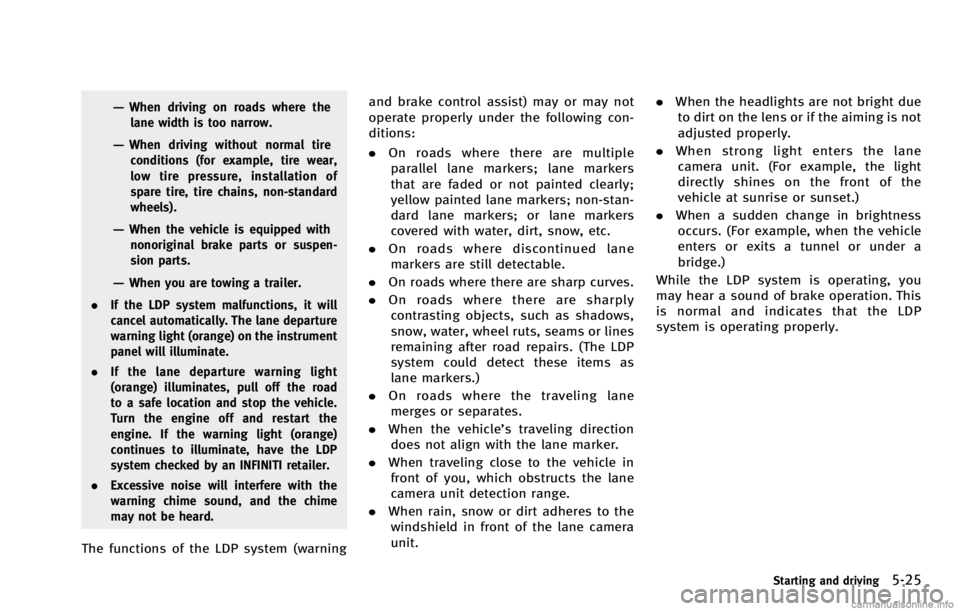
While the LDP system is operating, you
may hear a sound of brake operation. This
is normal and indicates that the LDP
system is operating properly.
Starting and driving5-25
Page 353 of 530

5-26Starting and driving
SSD0672
LDP ON indicator light (green)/ Warninglight (orange)
LDP system operation
The LDP system provides a lane departure
warning and brake control assistance when
the vehicle is driven at speeds of approxi-
mately 45 MPH (70 km/h) and above.
When the vehicle approaches either the left
or the right side of the traveling lane, a
warning chime will sound and the lane
departure warning light (orange) on the
instrument panel will blink to alert the
driver. Then, the LDP system will automa-
tically apply the brakes for a short period
of time to help assist the driver to return the vehicle to the center of the traveling
lane.
The warning and assist functions will stop
when the vehicle returns to a position
inside of the lane marker.
SSD0912
Dynamic driver assistance switch
To turn on the LDP system, push the
dynamic driver assistance switch on the
steering wheel after starting the engine.
The LDP ON indicator light (green) on the
instrument panel will illuminate. Push the
dynamic driver assistance switch again to
turn off the LDP system. The LDP ON
indicator light will turn off.
The dynamic driver assistance switch is
used as both the LDP and DCA system.
When the dynamic driver assistance switch
is pushed, the DCA system will also turn on
or off simultaneously. The LDP system can
be individually set to on or off on the
display. If the system is set to off, the
Page 355 of 530

5-28Starting and driving
SSD0886
3. To set the LDP system to on or off,highlight the “Lane Departure Preven-
tion” key, select ON or OFF and push
the ENTER
*2button.
If both the LDP and DCA systems are set to
OFF on the display, when the dynamic
driver assistance switch is pushed, the LDP
ON indicator light and the Distance Control
Assist (DCA) system switch indicator light
will blink for approximately 2 seconds. See
“ Distance Control Assist (DCA) system”
(P.5-54).
Automatic deactivation
Condition A:
The warning and assist functions of the
LDP system are not designed to work under
the following conditions:
. When you operate the lane change
signal and change the traveling lanes
in the direction of the signal. (The LDP
system will be deactivated for approxi-
mately 2 seconds after the lane change
signal is turned off.)
. When the vehicle speed lowers to less
than approximately 45 MPH (70 km/h).
After the above conditions have finished
and the necessary operating conditions are
satisfied, the warning and assist functions
will resume.
Condition B:
The assist function of the LDP system is not
designed to work under the following
conditions (warning is still functional):
. When the brake pedal is depressed.
. When the steering wheel is turned as
far as necessary for the vehicle to
change lanes.
. When the accelerator pedal is de-
pressed while the brake control assist is provided.
. When the Intelligent Cruise Control (ICC)
approach warning occurs.
. When the hazard warning flashers are
operated.
. When driving on a curve at high speed.
After the above conditions have finished
and the necessary operating conditions are
satisfied, the LDP brake control assist
function will resume.
Condition C:
Under the following conditions, a beep will
sound and the LDP system will be canceled
automatically. The LDP ON indicator light
will blink in green, and the LDP system
cannot be activated:
. When the VDC system (except TCS
function) or ABS operates.
. When the VDC system is turned off.
. When the SNOW mode switch is turned
on.
Action to take:
When the above conditions no longer exist,
turn off the LDP system. Push the dynamic
driver assistance switch again to turn the
LDP system back on.
Page 358 of 530

COAST/SET switch and release it. (The
CRUISE SET indicator will come on in the
instrument panel.) Take your foot off the
accelerator pedal. Your vehicle will main-
tain the set speed.
.To pass another vehicle, depress the
accelerator pedal. When you release
the pedal, the vehicle will return to the
previously set speed.
. The vehicle may not maintain the set
speed on winding or hilly roads. If this
happens, drive without the cruise con-
trol.
To cancel the preset speed, follow any of
these methods:
1. Push the CANCEL button. The SET indicator will go out.
2. Tap the brake pedal. The SET indicator will go out.
3. Move the shift lever to the N (Neutral) position. The SET indicator will go out.
4. Turn the MAIN switch off. Both the CRUISE indicator and SET indicator will
go out.
. If you depress the brake pedal while
pushing the ACCELERATE/RESUME or
COAST/SET switch and reset at the
cruising speed, the cruise control will disengage. Turn the MAIN switch off
once and then turn it on again.
. The cruise control will automatically
cancel if the vehicle slows more than
8 MPH (13 km/h) below the set speed.
. If you move the shift lever to the N
(Neutral) position, the cruise control
will be canceled.
To reset at a faster cruising speed, use one
of the following methods:
. Depress the accelerator pedal. When
the vehicle attains the desired speed,
push and release the COAST/SET
switch.
. Push and hold the ACCELERATE/RE-
SUME switch. When the vehicle attains
the speed you desire, release the
switch.
. Push, then quickly release the ACCEL-
ERATE/RESUME switch. Each time you
do this, the set speed will increase by
about 1 MPH (1.6 km/h).
To reset at a slower cruising speed, use
one of the following methods:
. Lightly tap the brake pedal. When the
vehicle attains the desired speed, push
the COAST/SET switch and release it. .
Push and hold the COAST/SET switch.
Release the switch when the vehicle
slows down to the desired speed.
. Push, then quickly release the COAST/
SET switch. Each time you do this, the
set speed will decrease by about 1 MPH
(1.6 km/h).
To resume the preset speed, push and
release the ACCELERATE/RESUME switch.
The vehicle will resume the last set
cruising speed when the vehicle speed is
over 25 MPH (40 km/h).
Starting and driving5-31
Page 361 of 530
5-34Starting and driving
JVS0124X
PRECAUTIONS ON VEHICLE-TO-VE-
HICLE DISTANCE CONTROL MODE
The system is intended to enhance the
operation of the vehicle when following a
vehicle traveling in the same lane and
direction.
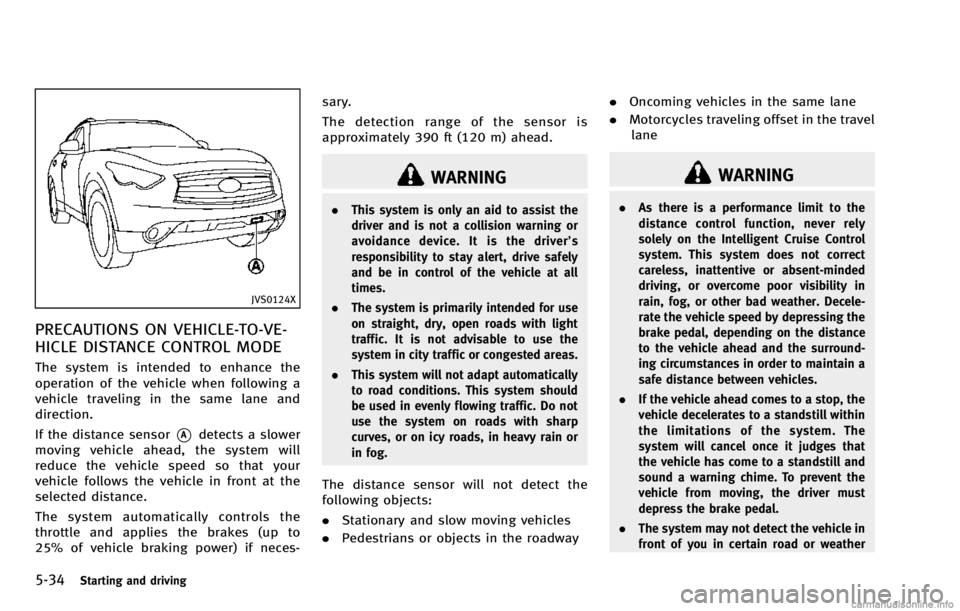
If the distance sensor
*Adetects a slower
moving vehicle ahead, the system will
reduce the vehicle speed so that your
vehicle follows the vehicle in front at the
selected distance.
The system automatically controls the
throttle and applies the brakes (up to
25% of vehicle braking power) if neces- sary.
The detection range of the sensor is
approximately 390 ft (120 m) ahead.
WARNING
.
This system is only an aid to assist the
driver and is not a collision warning or
avoidance device. It is the driver’ s
responsibility to stay alert, drive safely
and be in control of the vehicle at all
times.
. The system is primarily intended for use
on straight, dry, open roads with light
traffic. It is not advisable to use the
system in city traffic or congested areas.
. This system will not adapt automatically
to road conditions. This system should
be used in evenly flowing traffic. Do not
use the system on roads with sharp
curves, or on icy roads, in heavy rain or
in fog.
The distance sensor will not detect the
following objects:
.Stationary and slow moving vehicles
. Pedestrians or objects in the roadway .
Oncoming vehicles in the same lane
. Motorcycles traveling offset in the travel
lane
WARNING
. As there is a performance limit to the
distance control function, never rely
solely on the Intelligent Cruise Control
system. This system does not correct
careless, inattentive or absent-minded
driving, or overcome poor visibility in
rain, fog, or other bad weather. Decele-
rate the vehicle speed by depressing the
brake pedal, depending on the distance
to the vehicle ahead and the surround-
ing circumstances in order to maintain a
safe distance between vehicles.
. If the vehicle ahead comes to a stop, the
vehicle decelerates to a standstill within
the limitations of the system. The
system will cancel once it judges that
the vehicle has come to a standstill and
sound a warning chime. To prevent the
vehicle from moving, the driver must
depress the brake pedal.
. The system may not detect the vehicle in
front of you in certain road or weather
Page 362 of 530
conditions. To avoid accidents, never use
the Intelligent Cruise Control system
under the following conditions:
—On roads where the traffic is heavyor there are sharp curves
—On slippery road surfaces such as
on ice or snow, etc.
—During bad weather (rain, fog, snow,etc.)
When the windshield wiper is oper-
ated at the low speed (LO) or high
speed (HI) position, the Intelligent
Cruise Control system is automati-
cally canceled.
—When strong light (for example, atsunrise or sunset) is directly shining
on the front of the vehicle
—When rain, snow or dirt adhere to
the system sensor
—On steep downhill roads (the vehi-cle may go beyond the set vehicle
speed and frequent braking may
result in overheating the brakes)
—On repeated uphill and downhillroads
—When traffic conditions make itdifficult to keep a proper distance
between vehicles because of fre-
quent acceleration or deceleration
. Do not use the Intelligent Cruise Control
system if you are towing a trailer. The
system may not detect a vehicle ahead.
. In some road or traffic conditions, a
vehicle or object can unexpectedly come
into the sensor detection zone and cause
automatic braking. You may need to
control the distance from other vehicles
using the accelerator pedal. Always stay
alert and avoid using the ICC system
when it is not recommended in this
section.
JVS0124X
VEHICLE-TO-VEHICLE DISTANCE
CONTROL MODE OPERATION
Always pay attention to the operation of
the vehicle and be ready to manually
control the proper following distance. The
vehicle-to-vehicle distance control mode of
the Intelligent Cruise Control (ICC) system
may not be able to maintain the selected
distance between vehicles (following dis-
tance) or selected vehicle speed under
some circumstances.
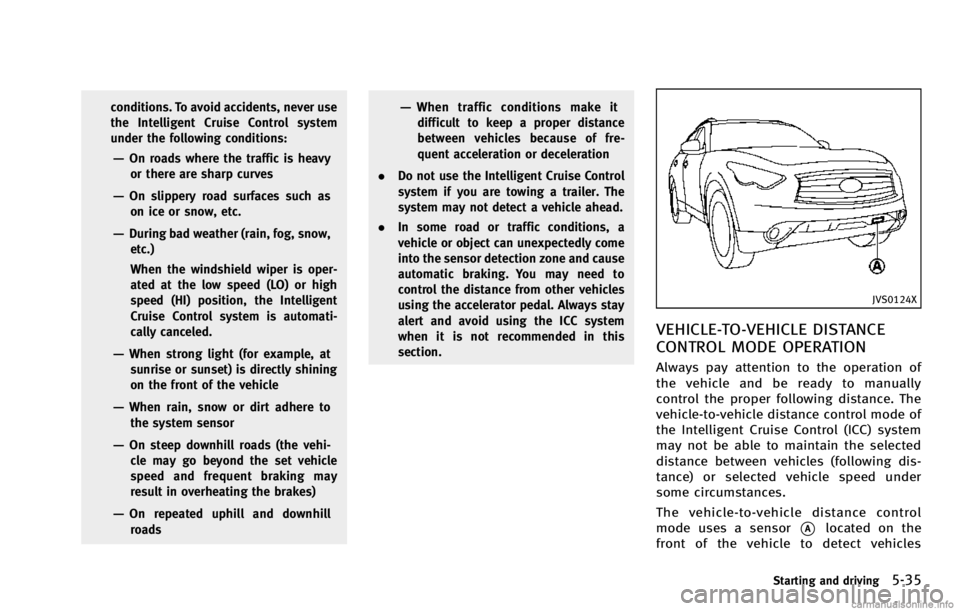
The vehicle-to-vehicle distance control
mode uses a sensor
*Alocated on the
front of the vehicle to detect vehicles
Starting and driving5-35
Page 370 of 530

SSD0610
1. System set display with vehicle ahead
2. System set display without vehicleahead
System operation
WARNING
Normally when controlling the distance to a
vehicle ahead, this system automatically
accelerates or decelerates your vehicle
according to the speed of the vehicle ahead.
Depress the accelerator to properly accel-
erate your vehicle when acceleration is
required for a lane change. Depress the brake pedal when deceleration is required to
maintain a safe distance to the vehicle
ahead due to its sudden braking or if a
vehicle cuts in. Always stay alert when
using the ICC system.
The driver sets the desired vehicle speed
based on the road conditions. The ICC
system maintains the set vehicle speed,
similar to standard cruise control, as long
as no vehicle is detected in the lane ahead.
The ICC system displays the set speed.Vehicle detected ahead:
When a vehicle is detected in the lane
ahead, the ICC system decelerates the
vehicle by controlling the throttle and
applying the brakes to match the speed
of a slower vehicle ahead. The system then
controls the vehicle speed based on the
speed of the vehicle ahead to maintain the
driver selected distance.
The stoplights of the vehicle come on and
the brake pedal depresses when braking is
performed by the ICC system.
When the brake operates, a noise may be
heard. This is not a malfunction.
When a vehicle ahead is detected, the
vehicle ahead detection indicator comes
on. The ICC system will also display the set
speed and selected distance.
Vehicle ahead not detected:
When a vehicle is no longer detected
ahead, the ICC system gradually acceler-
ates your vehicle to resume the previously
set vehicle speed. The ICC system then
maintains the set speed.
When a vehicle is no longer detected the
vehicle ahead detection indicator turns off.
If a vehicle ahead appears during accel-
eration to the set vehicle speed or any time
Starting and driving5-43