trailer INFINITI QX80 2014 User Guide
[x] Cancel search | Manufacturer: INFINITI, Model Year: 2014, Model line: QX80, Model: INFINITI QX80 2014Pages: 578, PDF Size: 2.8 MB
Page 400 of 578

under the following conditions. To avoid
accidents, never use the ICC system
under the following conditions:
—On roads where the traffic is heavyor there are sharp curves
—On slippery road surfaces such as
on ice or snow, etc.
—On off-road surfaces such as onsand or rock, etc.
—During bad weather (rain, fog, snow,
etc.)
—When the windshield wipers areoperating at high speed. The system
may cancel when the wipers are set
to the AUTO position.
—When strong light (for example, at sunrise or sunset) is directly shining
on the front of the vehicle
—When rain, snow or dirt adhere tothe system sensor
—On steep downhill roads (the vehi-cle may go beyond the set vehicle
speed and frequent braking may
result in overheating the brakes)
—On repeated uphill and downhillroads
—When traffic conditions make itdifficult to keep a proper distance
between vehicles because of fre-
quent acceleration or deceleration
—When towing a trailer or othervehicle
. In some road or traffic conditions, a
vehicle or object can unexpectedly come
into the sensor detection zone and cause
automatic braking. You may need to
control the distance from other vehicles
using the accelerator pedal. Always stay
alert and avoid using the ICC system
when it is not recommended in this
section.
JVS0227X
VEHICLE-TO-VEHICLE DISTANCE
CONTROL MODE OPERATION
Always pay attention to the operation of
the vehicle and be ready to manually
control the proper following distance. The
vehicle-to-vehicle distance control mode of
the Intelligent Cruise Control (ICC) system
may not be able to maintain the selected
distance between vehicles (following dis-
tance) or selected vehicle speed under
some circumstances.
The vehicle-to-vehicle distance control
mode uses a sensor
*Alocated on the
front of the vehicle to detect vehicles
Starting and driving5-59
Page 401 of 578

5-60Starting and driving
traveling ahead. The sensor generally
detects the signals returned from the
reflectors on a vehicle ahead. Therefore, if
the sensor cannot detect the reflector on
the vehicle ahead, the ICC system may not
maintain the selected distance.
The following are some conditions in which
the sensor cannot detect the signals:
.When the reflector of the vehicle ahead
is positioned high on the vehicle
(trailer, etc.)
. When the reflector on the vehicle ahead
is missing, damaged or covered
. When the reflector of the vehicle ahead
is covered with dirt, snow and road
spray
. When the snow or road spray from
traveling vehicles reduces the sensor’s
visibility
. When dense exhaust or other smoke
(black smoke) from vehicles reduces
the sensor’s visibility
. When excessively heavy baggage is
loaded in the rear seat or the luggage
area of your vehicle
. When your vehicle is towing a trailer,
etc.
The ICC system is designed to automati- cally check the sensor’s operation within
the limitation of the system. When the
sensor is covered with dirt or obstructs, the
system will automatically be canceled. If
the sensor is covered with ice, a transpar-
ent or translucent vinyl bag, etc., the ICC
system may not detect them. In these
instances, the vehicle-to-vehicle distance
control mode may not cancel and may not
be able to maintain the selected following
distance from the vehicle ahead. Be sure to
check and clean the sensor regularly.
The vehicle-to-vehicle distance control
mode is designed to maintain a selected
distance and reduce the speed to match
the slower vehicle ahead; the system will
decelerate the vehicle as necessary, and if
the vehicle ahead comes to a stop, the
vehicle decelerates to a standstill. How-
ever, the ICC system can only apply up to
25% of the vehicles total braking power.
This system should only be used when
traffic conditions allow vehicle speeds to
remain fairly constant or when vehicle
speeds change gradually. If a vehicle
moves into the traveling lane ahead or if
a vehicle traveling ahead rapidly decele-
rates, the distance between vehicles may
become closer because the ICC system
cannot decelerate the vehicle quickly en-
ough. If this occurs, the ICC system will
sound a warning chime and blink the
system display to notify the driver to take
necessary action.
The system will cancel and a warning
chime will sound if the speed falls below
approximately 15 MPH (24 km/h) and a
vehicle is not detected ahead. The system
will also disengage when the vehicle goes
above the maximum set speed.
See
“Approach warning” later in this
section.
The following items are controlled in the
vehicle-to-vehicle distance control mode:
. When there are no vehicles traveling
ahead, the vehicle-to-vehicle distance
control mode maintains the speed set
by the driver. The set speed range is
between approximately 20 and 90 MPH
(32 and 144 km/h).
. When there is a vehicle traveling ahead,
the vehicle-to-vehicle distance control
mode adjusts the speed to maintain the
distance, selected by driver, from the
vehicle ahead. The adjusting speed
range is up to the set speed. If the
vehicle ahead comes to a stop, the
vehicle decelerates to a standstill with-
Page 420 of 578

The detection range of the sensor is
approximately 390 ft (120 m) ahead.
WARNING
.This system is only an aid to assist the
driver and is not a collision warning or
avoidance device. It is the driver’ s
responsibility to stay alert, drive safely
and be in control of the vehicle at all
times.
. This system will not adapt automatically
to road conditions. Do not use the
system on roads with sharp curves, or
on icy roads, in heavy rain or in fog.
The distance sensor will not detect the
following objects:
.Stationary and slow moving vehicles
. Pedestrians or objects in the roadway
. Oncoming vehicles in the same lane
. Motorcycles traveling offset in the travel
lane
WARNING
. As there is a performance limit to the
distance control function, never rely
solely on the Distance Control Assist
system. This system does not correct
careless, inattentive or absent-minded
driving, or overcome poor visibility in
rain, fog, or other bad weather. Decele-
rate the vehicle speed by depressing the
brake pedal, depending on the distance
to the vehicle ahead and the surround-
ing circumstances in order to maintain a
safe distance between vehicles.
. The system may not function properly
under the following conditions. To avoid
accidents, never use the Distance Con-
trol Assist system under the following
conditions:
—On roads with sharp curves
—On slippery road surfaces such as
on ice or snow, etc.
—On off-road surfaces such as onsand or rock, etc.
—During bad weather (rain, fog, snow,etc.)
—When strong light (for example, atsunrise or sunset) is directly shining
on the front of the vehicle
—When rain, snow or dirt adhere tothe system sensor
—On steep downhill roads (frequent
braking may result in overheating
the brakes)
—On repeated uphill and downhillroads
—When towing a trailer or othervehicle
. In some road or traffic conditions, a
vehicle or object can unexpectedly come
into the sensor detection zone and cause
automatic braking. You may need to
control the distance from other vehicles
using the accelerator pedal. Always stay
alert and avoid using the DCA system
when it is not recommended in this
section.
Starting and driving5-79
Page 421 of 578

5-80Starting and driving
JVS0227X
DISTANCE CONTROL ASSIST OP-
ERATION
Always pay attention to the operation of
the vehicle and be ready to manually
decelerate to maintain the proper following
distance. The Distance Control Assist (DCA)
system may not be able to decelerate the
vehicle under some circumstances.
The DCA system uses a sensor
*Alocated
on the front of the vehicle to detect
vehicles traveling ahead. The sensor gen-
erally detects the signals returned from the
reflectors on a vehicle ahead. Therefore, if
the sensor cannot detect the reflector on the vehicle ahead, the DCA system may not
operate.
The following are some conditions in which
the sensor cannot detect the signals:
.
When the reflector of the vehicle ahead
is positioned high on the vehicle
(trailer, etc.)
. When the reflector on the vehicle ahead
is missing, damaged or covered
. When the reflector of the vehicle ahead
is covered with dirt, snow and road
spray
. When the snow or road spray from
traveling vehicles reduces the sensor’s
visibility
. When dense exhaust or other smoke
(black smoke) from vehicles reduces
the sensor’s visibility
. When excessively heavy baggage is
loaded in the rear seat or the luggage
room of your vehicle
The DCA system is designed to automati-
cally check the sensor’s operation. When
the sensor is covered with dirt or is
obstructed, the system will automatically
be canceled. If the sensor is covered with
ice, a transparent or translucent vinyl bag,
etc., the DCA system may not detect them. In these instances, the Distance Control
Assist (DCA) system may not be able to
decelerate the vehicle properly. Be sure to
check and clean the sensor regularly.
The DCA system is designed to help assist
the driver to maintain a following distance
from the vehicle ahead. The system will
decelerate as necessary and if the vehicle
ahead comes to a stop, the vehicle
decelerates to a standstill. However, the
DCA system can only apply up to 25% of
the vehicles total braking power. If a
vehicle moves into the traveling lane ahead
or if a vehicle traveling ahead rapidly
decelerates, the distance between vehicles
may become closer because the DCA
system cannot decelerate the vehicle
quickly enough. If this occurs, the DCA
system will sound a warning chime and
blink the system display to notify the driver
to take necessary action.
See
“Approach warning” later in this
section.
This system only brakes and moves the
accelerator pedal upward to help assist the
driver to maintain a following distance
from the vehicle ahead. Acceleration
should be operated by the driver.
Page 432 of 578

The FCW system uses the distance sensor
*Alocated below the front bumper to
measure the distance to the vehicle ahead.
When the system judges that your vehicle
is getting close to the vehicle ahead in the
travel lane, the vehicle ahead detection
indicator blinks and a warning chime
sounds.
PRECAUTIONS ON FCW SYSTEM
WARNING
. The FCW system is intended to warn you
before a collision but will not avoid a
collision. It is the driver’s responsibility
to stay alert, drive safely and be in
control of the vehicle at all times.
. As there is a performance limit, the
system may not provide a warning in
certain conditions.
. The system will not detect the following
objects:
—Pedestrians, animals or obstacles in
the roadway
—Oncoming vehicles in the same lane
. The system will not detect another
vehicle under the following conditions:
—When the sensor gets dirty and it is
impossible to detect the distance
from the vehicle ahead.
—When driving into a strong light (forexample, sunlight)
. The sensor generally detects the signals
returned from the reflectors on a vehicle
ahead. Therefore, the system may not
function properly under the following
conditions:
—When the reflectors of the vehicle
ahead are positioned high or close to
each other (including a small vehicle
such as motorcycles).
—When the sensor gets dirty or it isimpossible to detect the distance
from the vehicle ahead.
—When the reflectors on the vehicle
ahead are missing, damaged or
covered.
—When the reflectors of the vehicleahead are covered with dirt, snow or
road spray.
—When visibility is low (such as rain,fog, snow, etc.).
—When snow or road spray fromtraveling vehicles is splashed.
—When dense exhaust or other smoke (black smoke) from vehicles reduces
the visibility of the sensor.
—When excessively heavy baggage is
loaded in the rear seat or the
luggage room of your vehicle.
—When abruptly accelerating or de-celerating.
—On a steep downhill slope or onroads with sharp curves.
—When there is a highly reflectiveobject near the vehicle ahead (for
example, being very close to another
vehicle, signboard, etc.).
—When you are towing a trailer.
. Depending on certain road conditions
(curved or beginning of a curve), vehicle
conditions (steering position or vehicle
position), or the preceding vehicle’ s
conditions (position in lane, etc.), the
system may not function properly. The
system may detect highly reflective
objects such as reflectors, signs, white
markers, and other stationary objects on
the road or near the traveling lane and
Starting and driving5-91
Page 437 of 578
5-96Starting and driving
—When the reflectors of the vehicleahead are covered with dirt, snow or
road spray.
—When visibility is low (such as rain,fog, snow, etc.).
—When snow or road spray from
traveling vehicles is splashed.
—When dense exhaust or other smoke (black smoke) from vehicles reduces
the visibility of the sensor.
—When excessively heavy baggage isloaded in the rear seat or the
luggage room of your vehicle.
—When abruptly accelerating or de-
celerating.
—On a steep downhill slope or onroads with sharp curves.
—When there is a highly reflective
object near the vehicle ahead (for
example, being very close to another
vehicle, signboard, etc.).
—When towing a trailer or othervehicle.
. Depending on certain road conditions
(curved or beginning of a curve), vehicle
conditions (steering position or vehicle position), or the preceding vehicle’
s
conditions (position in lane, etc.), the
system may not function properly.
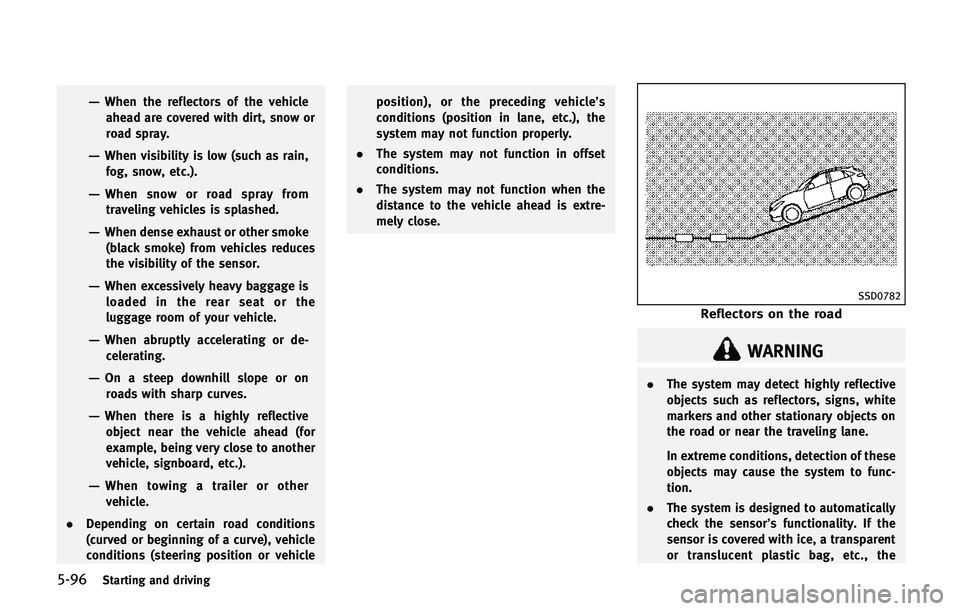
. The system may not function in offset
conditions.
. The system may not function when the
distance to the vehicle ahead is extre-
mely close.
SSD0782
Reflectors on the road
WARNING
.The system may detect highly reflective
objects such as reflectors, signs, white
markers and other stationary objects on
the road or near the traveling lane.
In extreme conditions, detection of these
objects may cause the system to func-
tion.
. The system is designed to automatically
check the sensor’s functionality. If the
sensor is covered with ice, a transparent
or translucent plastic bag, etc., the
Page 439 of 578

5-98Starting and driving
will illuminate. When the IBA OFF switch is
pushed again, the system will turn on and
the IBA OFF indicator light will turn off.
The IBA system will remain in the last ON
or OFF state it was left in until it is
manually changed by pressing the IBA
OFF switch.
Illumination of the IBA OFF indicator light
without a beep sound is an indication that
the IBA system is temporarily unavailable.
It will occur under the following conditions:
.When driving into a strong light (for
example, sunlight)
. When the 4WD shift switch is in the 4H
or 4L position (for 4WD models)
The IBA OFF indicator light will turn off
when the system returns to its normal
operating conditions.
For the sensor maintenance, see “Intelli-
gent Cruise Control (ICC) system” earlier in
this section.
CAUTION
During the first 1,200 miles (2,000 km),
follow these recommendations to obtain
maximum engine performance and ensure
the future reliability and economy of your
new vehicle.
Failure to follow these recommendations
may result in shortened engine life and
reduced engine performance.
. Avoid driving for long periods at con-
stant speed, either fast or slow. Do not
run the engine over 4,000 rpm.
. Do not accelerate at full throttle in any
gear.
. Avoid quick starts.
. Avoid hard braking as much as possi-
ble.
. Do not tow a trailer for the first 500
miles (805 km). Follow these easy-to-use Fuel Efficient
Driving Tips to help you achieve the most
fuel economy from your vehicle.
1. Use smooth accelerator and brake
pedal application.
.Avoid rapid starts and stops..Use smooth, gentle accelerator andbrake application whenever possi-
ble.
.Maintain constant speed while com-muting and coast whenever possi-
ble.
2. Maintain constant speed.
.Look ahead to try and anticipate and minimize stops.
.Synchronizing your speed with traf-fic lights allows you to reduce your
number of stops.
.Maintaining a steady speed can
minimize red light stops and im-
prove fuel efficiency.
3. Use air conditioning (A/C) at higher vehicle speeds.
.Below 40 MPH (64 km/h), it is moreefficient to open windows to cool the
vehicle due to reduced engine load.
.Above 40 MPH (64 km/h), it is moreefficient to use A/C to cool the
vehicle due to increased aerody-
BREAK-IN SCHEDULE FUEL EFFICIENT DRIVING TIPS
Page 450 of 578

SIC4474
The TOW MODE should be used when
pulling a heavy trailer or hauling a heavy
load. Driving the vehicle in the TOW MODE
with no trailer/load or light trailer/light
load will not cause any damage. However,
fuel economy may be reduced, and the
transmission/engine driving characteris-
tics may feel unusual.
Push the TOW MODE switch to activate
TOW MODE. The indicator light on the TOW
MODE switch illuminates when the TOW
MODE is selected. Push the TOW MODE
switch again to turn the TOW MODE OFF.
TOW MODE is automatically canceled when
the ignition switch is placed in the OFFposition.
SIC4454
For driving or starting the vehicle on snowy
roads or slippery areas, turn the SNOW
mode on.
To turn the SNOW mode on, push the
SNOW mode switch. The SNOW mode
indicator light on the meter panel will
illuminate. When the SNOW mode is
activated, engine output is controlled to
avoid wheel spin.
To turn the SNOW mode off, push the
switch and the indicator on the meter
panel will turn off. Turn the SNOW mode off
for normal driving and fuel economy.
Starting and driving5-109
TOW MODE
SNOW MODE
Page 532 of 578

9 Technical and consumer information
Capacities and recommended fuel/lubricants....... 9-2Fuel information .............................................. 9-4
Engine oil and oil filter recommendation ......... 9-6
Air conditioning system refrigerant and
lubricant recommendations ............................. 9-7
Specifications ...................................................... 9-8
Engine............................................................. 9-8
Wheels and tires ............................................. 9-9
Dimensions ................................................... 9-10
When traveling or registering your vehicle in
another country ................................................. 9-11
Vehicle identification ......................................... 9-11 Vehicle Identification Number (VIN) plate ....... 9-11
Vehicle identification number
(chassis number) ........................................... 9-11
Engine serial number .................................... 9-12
F.M.V.S.S./C.M.V.S.S. certification label .......... 9-12
Emission control information label ................ 9-12
Tire and loading information label ................. 9-13
Air conditioner specification label.................. 9-13
Installing front license plate .............................. 9-13 Vehicle loading information............................... 9-14
Terms .......................................................... 9-14
Vehicle load capacity ................................... 9-15
Securing the load ........................................ 9-16
Loading tips................................................. 9-17
Measurement of weights.............................. 9-17
Towing a trailer ................................................. 9-18 Maximum load limits ................................... 9-18
Maximum Gross Vehicle Weight (GVW)/
maximum Gross Axle Weight (GAW) ............. 9-20
Towing load/specification ............................ 9-22
Towing safety............................................... 9-22
Flat towing................................................... 9-29
Uniform tire quality grading .............................. 9-30 Treadwear .................................................... 9-30
Traction AA, A, B and C................................ 9-30
Temperature A, B and C ............................... 9-30
Emission control system warranty ..................... 9-31
Reporting safety defects.................................... 9-31
Readiness for Inspection/Maintenance
(I/M) test .......................................................... 9-32
Event Data Recorders (EDR) ............................... 9-33
Owner’s Manual/Service Manual
order information .............................................. 9-34
Page 538 of 578

Oil which may contain foreign matter or
has been previously used should not be
used.
Oil viscosity
The engine oil viscosity or thickness
changes with temperature. Because of this,
it is important that the engine oil viscosity
be selected based on the temperatures at
which the vehicle will be operated before
the next oil change. Choosing an oil
viscosity other than that recommended
could cause serious engine damage.
Selecting the correct oil filter
Your new vehicle is equipped with a high-
quality genuine NISSAN oil filter. When
replacing, use the genuine oil filter or its
equivalent for the reason described in
change intervals.
Change intervals
The oil and oil filter change intervals for
your engine are based on the use of the
specified quality oils and filters. Oil and
filter other than the specified quality, or oil
and filter change intervals longer than
recommended could reduce engine life.
Damage to engines caused by improper
maintenance or use of incorrect oil andfilter quality and/or viscosity is not covered
by the new INFINITI vehicle limited warran-
ties.
Your engine was filled with a high quality
engine oil when it was built. You do not
have to change the oil before the first
recommended change interval. Oil and
filter change intervals depend upon how
you use your vehicle. Operation under the
following conditions may require more
frequent oil and filter changes.
.
repeated short distance driving at cold
outside temperatures,
. driving in dusty conditions,
. extensive idling,
. towing a trailer,
. stop and go “rush hour”traffic,
Refer to the “INFINITI Service and Main-
tenance Guide” for the maintenance sche-
dule.
AIR CONDITIONING SYSTEM RE-
FRIGERANT AND LUBRICANT RE-
COMMENDATIONS
The air conditioning system in your
INFINITI vehicle must be charged with the
refrigerant HFC-134a (R-134a) and the
lubricant, NISSAN A/C system oil Type S
or the exact equivalents.
CAUTION
The use of any other refrigerant or lubricant
will cause severe damage to the air con-
ditioning system and will require the repla-
cement of all air conditioner system
components.
The refrigerant HFC-134a (R-134a) in your
INFINITI vehicle will not harm the earth’s
ozone layer. Although this refrigerant does
not affect the earth’s atmosphere, certain
governmental regulations require the re-
covery and recycling of any refrigerant
during automotive air conditioning system
service. Your INFINITI retailer has the
trained technicians and equipment needed
to recover and recycle your air conditioning
system refrigerant.
Technical and consumer information9-7