ignition INFINITI QX80 2018 Repair Manual
[x] Cancel search | Manufacturer: INFINITI, Model Year: 2018, Model line: QX80, Model: INFINITI QX80 2018Pages: 522, PDF Size: 2.42 MB
Page 208 of 522
to other objects.
. Do not adjust the mirrors while
driving. You could lose control of
your vehicle and cause an accident.
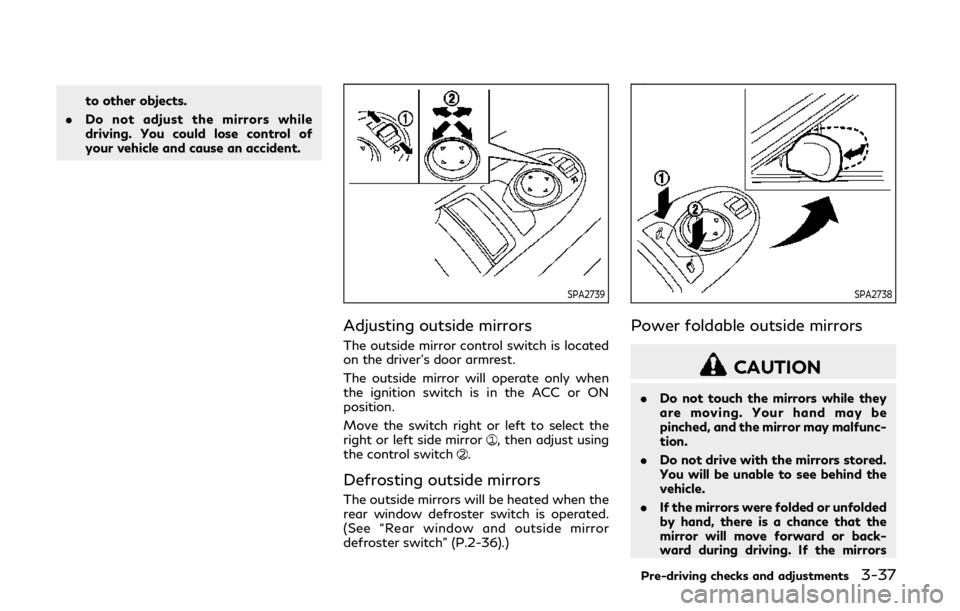
SPA2739
Adjusting outside mirrors
The outside mirror control switch is located
on the driver’s door armrest.
The outside mirror will operate only when
the ignition switch is in the ACC or ON
position.
Move the switch right or left to select the
right or left side mirror
, then adjust using
the control switch.
Defrosting outside mirrors
The outside mirrors will be heated when the
rear window defroster switch is operated.
(See “Rear window and outside mirror
defroster switch” (P.2-36).)
SPA2738
Power foldable outside mirrors
CAUTION
. Do not touch the mirrors while they
are moving. Your hand may be
pinched, and the mirror may malfunc-
tion.
. Do not drive with the mirrors stored.
You will be unable to see behind the
vehicle.
. If the mirrors were folded or unfolded
by hand, there is a chance that the
mirror will move forward or back-
ward during driving. If the mirrors
Pre-driving checks and adjustments3-37
Page 209 of 522

3-38Pre-driving checks and adjustments
were folded or unfolded by hand, be
sure to adjust them again electrically
before driving.
The outside rearview mirror remote control
operates when the ignition switch is in the
ACC or ON position.
To fold the outside rearview mirrors, push
the outside rearview mirror folding switch to
the “CLOSE” position
. To unfold, push to
the “OPEN” position.
If mirrors are manually operated or bumped,
the mirror body can become loose at the
pivot point. To correct electronic mirror
operation, cycle the mirrors by pushing
“CLOSE” until completely closed, then push
“OPEN” until the mirrors are in the open
position.
Reverse tilt-down feature
When backing up the vehicle, the right and
left outside mirrors will turn downward
automatically to provide better rear visibility.
1. Push the ignition switch to the ON position.
2. Move the shift lever to the R (Reverse) position.
3. Choose the right or left outside mirror by operating the outside mirror control
switch. 4. The outside mirror surfaces move down-
ward.
When one of the following conditions has
occurred, the outside mirror surfaces will
return to their original positions.
. The shift lever is moved to any position
other than R (Reverse).
. The outside mirror control switch is set to
the center position.
. The ignition switch is placed in to the
OFF position.
Automatic anti-glare
The outside rearview mirrors are designed so
that its automatically change reflection
according to the intensity of the headlights
of the vehicle following you.
The anti-glare system will be automatically
turned on when you place the ignition switch
in the ON position.SIC4448
VANITY MIRROR
To use the front vanity mirror, pull down the
sun visor and pull up the cover.
Page 210 of 522

JVP0250X
SET/memory switches
The automatic drive positioner system has
three features:
. Entry/exit function
. Memory storage
. Setting memory function
ENTRY/EXIT FUNCTION
This system is designed so that the driver’s
seat and steering column will automatically
move when the automatic transmission shift
lever is in the P (Park) position. This allows
the driver to get into and out of the driver’s
seat more easily.
The driver’s seat will slide backward and the
steering wheel will move up when the driver’s door is opened with the ignition
switch in the LOCK position.
The driver’s seat and steering wheel will
return to the previous positions when the
ignition switch is pushed to the ACC posi-
tion.
The driver’s seat will not return to the
previous positions if the seat or steering
adjusting switch is operated when the seat is
at the exit position.
Cancel or activate entry/exit func-
tion
The shift lever must be in the P (Park)
position with the ignition switch in the OFF
position.
The entry/exit function can be activated or
canceled by pressing and holding the SET
switch for more than 10 seconds.
The entry/exit function can also be acti-
vated or canceled if the “Lift Steering Wheel
on Exit” key or “Slide Driver’s Seat Back on
Exit” key is turned to ON or OFF in the
Vehicle settings on the center display. (See
Infiniti InTouch Owner’s Manual.)
Initialize entry/exit function
If the battery cable is disconnected, or if the
fuse opens, the entry/exit function will not
work though this function was set on before.
In such a case, after connecting the batteryor replacing with a new fuse, open and close
the driver’s door more than two times after
the ignition switch is turned from the ON
position to the LOCK position. The entry/
exit function will be activated.
MEMORY STORAGE
Two positions for the driver’s seat, steering
column and outside mirrors can be stored in
the automatic drive positioner memory.
Follow these procedures to use the memory
system.
1. Move the shift lever to the P (Park)
position.
2. Adjust the driver’s seat, steering column and outside mirrors to the desired posi-
tions by manually operating each adjust-
ing switch. For additional information,
see “Seats” (P.1-3) and “Tilt/telescopic
steering” (P.3-29) and “Outside mirrors”
(P.3-36).
3. Push the SET switch and, within 5 seconds, push the memory switch (1 or
2) fully for at least 1 second.
The indicator light for the pushed mem-
ory switch will stay on for approximately
5 seconds after pushing the switch.
When the memory is stored in the
memory switch (1 or 2), a buzzer will
sound.
If memory is stored in the same memory
Pre-driving checks and adjustments3-39
AUTOMATIC DRIVE POSITIONER
Page 211 of 522

3-40Pre-driving checks and adjustments
switch, the previous memory will be
deleted.
Linking Intelligent Key to a stored
memory position
The Intelligent Key can be linked to a stored
memory position with the following proce-
dure.
1. Follow the steps for storing a memoryposition.
2. While the indicator light for the memory switch being set is illuminated for 5
seconds, push the
button on the
Intelligent Key. If the indicator light
blinks, the Intelligent Key is linked to
that memory setting.
Push the ignition switch to the OFF position,
and then push the
button on the
Intelligent Key. The driver’s seat, steering
wheel and outside mirrors will move to the
memorized position.
Confirming memory storage
. Push the ignition switch to the ON
position and push the SET switch. If the
main memory has not been stored, the
indicator light will come on for approxi-
mately 0.5 second. When the memory
has stored in position, the indicator light
will stay on for approximately 5 seconds. .
If the battery cable is disconnected, or if
the fuse opens, the memory will be
canceled. In this case, reset the desired
position using the previous procedure.
. If optional Intelligent Keys are added to
your vehicle, the memory storage proce-
dure to switch 1 or 2 and linking
Intelligent Key procedure to a stored
memory position should be performed
again for each Intelligent Key. For addi-
tional Intelligent Key information, see
“Keys” (P.3-2).
Selecting the memorized position
1. Move the shift lever to the P (Park)
position.
2. Use one of the following methods to move the driver’s seat, the outside
mirrors and the steering wheel.
.Push the memory switch (1 or 2) fullyfor at least 1 second.
The driver’s seat, steering column and
outside mirrors will move to the memor-
ized position or to the exit position when
the entry/exit function is set to active
with the indicator light flashing, and then
the light will stay on for approximately 5
seconds.
SETTING MEMORY FUNCTION
The status of the following settings can be
linked to the Intelligent Key and the memor-
ized settings can be available for each
Intelligent Key.
. Air conditioner system
. Navigation system
. Audio system
To use the memory function, lock the doors
with the Intelligent Key that is linked to the
settings.
To enable the memorized settings:
1. Carry the Intelligent Key that is linked to the settings, and unlock the doors by
pushing the driver’s door handle request
switch or “UNLOCK”
button on the
Intelligent Key.
2. Place the ignition switch in the ON position. “Connection with the key has
been done” will be displayed on the
screen and the memorized settings are
available (only when a new Intelligent
Key is used).
Page 217 of 522

4-4Monitor, climate, audio, phone and voice recognition systems
The monitor displays various views of the
position of the vehicle in a split screen
format. All views are not available at all
times.
Available views:
.Front view
An approximately 150-degree view of
the front of the vehicle.
. Rear view
An approximately 150-degree view of
the rear of the vehicle.
. Bird’s-eye view
The surrounding view of the vehicle from
above.
. Front-side view
The view around and ahead of the front
passenger’s side wheel.
. Front-wide view
An approximately 180-degree view of
the front of the vehicle.
. Rear-wide view
An approximately 180-degree view of
the rear of the vehicle.
JVH1213X
To display the multiple views, the Around
View®Monitor system uses cameraslocated in the front grill, on the vehicle’s
outside mirrors and one just above the
vehicle’s license plate.
AROUND VIEW®MONITOR SYS-
TEM OPERATION
With the ignition switch in the ON position,
move the shift lever to the R (Reverse)
position or push the CAMERA button to
operate the Around View
®Monitor.
Available views
WARNING
. The distance guide lines and the
vehicle width lines should be used as
a reference only when the vehicle is
on a paved, level surface. The appar-
ent distance viewed on the monitor
may be different than the actual
distance between the vehicle and
displayed objects.
. Use the displayed lines and the bird’s-
eye view as a reference. The lines and
the bird’s-eye view are greatly af-
fected by the number of occupants,
fuel level, vehicle position, road con-
dition and road grade.
. If the tires are replaced with different
sized tires, the predictive course lines
and the bird’s-eye view may be dis-
played incorrectly.
. When driving the vehicle up a hill,
objects viewed in the monitor are
further than they appear. When
driving the vehicle down a hill, objects
viewed in the monitor are closer than
they appear.
. Objects in the monitor will appear
visually opposite compared to when
Page 219 of 522

4-6Monitor, climate, audio, phone and voice recognition systems
course linesare displayed. When the
steering wheel turns about 90 degrees or
more, a line is displayed only on the
opposite side of the turn.
JVH1140X
Bird’s-eye view:
The bird’s-eye view shows the overhead
view of the vehicle, which helps confirm the
vehicle position and the predictive course to
a parking space.
The vehicle icon
shows the position of the
vehicle. Note that the size of the vehicle icon
on the bird’s-eye view may differ somewhat
from the actual distance to the vehicle.
The areas that the cameras cannot cover
are indicated in black.
The non-viewable area
is highlighted in
yellow for several seconds after the bird’s-
eye view is displayed. It will be shown only
the first time after the ignition switch is
placed in the ON position. The driver can check the approximate direc-
tion and angle of the tire on the display by
tire icon
when driving the vehicle forward
or backward.
Predictive course lines (
and) indicate
the predictive course when operating the
vehicle. The predictive course lines will be
displayed on the monitor when the steering
wheel is turned. The predictive course lines
will move depending on how much the
steering wheel is turned and will not be
displayed while the steering wheel is in the
straight-ahead position.
When the monitor displays the front view
and the steering wheel turns about 90
degrees or less from the straight-ahead
position, the two green predictive course
lines
are shown in front of the vehicle.
When the steering wheel turns about 90
degrees or more, one green predictive course
line
is shown in front of the vehicle and the
other green predictive course lineis shown
at side of the vehicle.
When the monitor displays the rear view, the
predictive course lines are shown at back of
the vehicle.
Page 226 of 522

Available setting items:
Setting itemAction
Camera Back-up Collision Intervention Turns the Back-up Collision Intervention (BCI) system on/off. See “Back-up
Collision Intervention (BCI)” (P.5-55).
Moving Object Detection Turns the MOD system on/off. See “Moving Object Detection (MOD)” (P.4-20).
Non-viewable Area Reminder With this item is turned on, the non-viewable area is highlighted in yellow for
several seconds after the bird’s-eye view is displayed. It will be shown only the first
time after the ignition switch is placed in the ON position.
Predictive Course Lines When this item is turned on, the predictive course lines are displayed in the front
and the rear view and bird’s-eye view.
Automatic Display with Sonar The automatic sonar display can be turned on/off.
Sonar For the information about the sonar, see “Sonar function settings” (P.4-19).
Display Brightness Adjust display settings by using the “+”/“-” key.
Contrast
Black Level
Tint
Color
Reset Settings Return all the settings to default.
Monitor, climate, audio, phone and voice recognition systems4-13
Page 231 of 522

4-18Monitor, climate, audio, phone and voice recognition systems
longer near the vehicle.
JVH1694X
TURNING ON AND OFF THE SO-
NAR FUNCTION
When the Sonar/MOD keyis selected, the
indicatorwill turn off and the sonar will be
turned off temporarily. The Moving Object
Detection (MOD) system will also be turned
off at the same time. (See “Moving Object
Detection (MOD)” (P.4-20).) When the key
is selected again, the indicatorwill turn
on and the sonar will turn back on.
In the below cases, the sonar will be turned
back on automatically:
. When the shift lever is placed in the R
(Reverse) position. .
When the CAMERA button is pushed
and a screen other than the camera view
is shown on the display.
. When vehicle speed decreases below
approximately 6 MPH (10 km/h).
. When the ignition switch is placed in the
OFF position and turned back to the ON
position again.
To deactivate the sonar system completely,
use the “Sonar” settings. See “Sonar function
settings” (P.4-19).
Page 232 of 522

JVH1695X
Sonar function settings
To set up the sonar function to your
preferred settings, push the SETTING but-
ton while the Around View
®Monitor screen
is not displayed, select the “Camera/Sonar”
key and then select the “Sonar” key on the
center display.
Sonar:
When this item is turned on, the front and
rear sonars are activated. When this item is
turned off (indicator turns off), the front and
rear sonars are deactivated. The amber
markers are displayed at the corners of the
vehicle icon and the sonar icon will disappear
from the Sonar/MOD key. The next time the ignition switch is placed in the ON position,
“Sonar is OFF” is displayed briefly.
FR Sensor Only:
When this item is turned on, only the front
sonar is activated. The amber markers are
displayed at the rear corners of the vehicle
icon.
Interrupt Display:
When this item is turned on, the Around
View
®Monitor will interrupt the current
view in the display to see the surrounding
area of the vehicle.
Sonar Sensitivity:
Adjust the sensitivity level of the sonars.
Sonar Volume:
Adjust the tone volume of the sonar.
SONAR SYSTEM LIMITATIONS
WARNING
Listed below are the system limitations
for the sonar function. Failure to operate
the vehicle in accordance with these
system limitations could result in serious
injury or death.
. Inclement weather or ultrasonic
sources such as an automatic car
wash, a truck’s compressed-air brakes or a pneumatic drill may affect
the function of the system, including
reduced performance or a false acti-
vation.
. This function is designed as an aid to
the driver in detecting large station-
ary objects to help avoid damaging
the vehicle.
. The system is not designed to pre-
vent contact with small or moving
objects.
. The system will not detect small
objects below the bumper, and may
not detect objects close to the bum-
per or on the ground.
. The system may not detect the
following objects:
— Fluffy objects such as snow, cloth, cotton, grass or wool.
— Thin objects such as rope, wire or chain.
— Wedge-shaped objects.
. If your vehicle sustains damage to the
bumper fascia, leaving it misaligned
or bent, the sensing zone may be
altered causing inaccurate measure-
ment of objects or false alarms.
Monitor, climate, audio, phone and voice recognition systems4-19
Page 252 of 522

5 Starting and driving
Precautions when starting and driving ...................... 5-4Exhaust gas (carbon monoxide) .............................. 5-4
Three-way catalyst ..................................................... 5-4
Tire Pressure Monitoring System (TPMS) ........... 5-5
Avoiding collision and rollover ................................. 5-8
On-pavement and off-road
driving precautions ..................................................... 5-8
Off-road recovery ....................................................... 5-9
Rapid air pressure loss ............................................... 5-9
Drinking alcohol/drugs and driving ..................... 5-10
Driving safety precautions ..................................... 5-10
Push-button ignition switch ........................................ 5-12 Operating range for engine start function ........ 5-12
Push-button ignition switch positions ................ 5-13
Emergency engine shut off .................................... 5-14
Intelligent Key battery discharge .......................... 5-14
Before starting the engine ........................................... 5-15
Starting the engine ......................................................... 5-15 Remote start (if so equipped) ................................ 5-16
Driving the vehicle .......................................................... 5-17
Engine protection mode .......................................... 5-17
Automatic transmission ........................................... 5-18
Parking brake ................................................................... 5-22
Lane Departure Warning (LDW)/Lane Departure
Prevention (LDP) (if so equipped) ............................ 5-22 LDW system operation ......................................... 5-24
Turning the LDW system ON/OFF ................... 5-25
How to enable/disable the LDW system ........ 5-26
LDP system operation ........................................... 5-26
Turning the LDP system ON/OFF .................... 5-27
How to enable/disable the LDP system .......... 5-28
LDW/LDP system limitations ............................. 5-28
System temporarily unavailable ......................... 5-30
System malfunction ................................................ 5-31
System maintenance .............................................. 5-31
Blind Spot Warning (BSW) (if so equipped) ........... 5-32 BSW system operation .......................................... 5-34
Turning the BSW system ON/OFF ................... 5-35
How to enable/disable the BSW system ......... 5-36
BSW system limitations ........................................ 5-36
BSW driving situations .......................................... 5-37
System temporarily unavailable ......................... 5-40
System malfunction ................................................ 5-41
System maintenance .............................................. 5-41
Blind Spot Intervention
®(BSI) (if so equipped) ..... 5-42
BSI system operation ............................................. 5-43
Turning the BSI system ON/OFF ...................... 5-45
How to enable/disable the BSI system ............ 5-46
BSI system limitations ........................................... 5-46
BSI driving situations ............................................. 5-47