Air conditioner INFINITI QX80 2020 Owner's Manual
[x] Cancel search | Manufacturer: INFINITI, Model Year: 2020, Model line: QX80, Model: INFINITI QX80 2020Pages: 516, PDF Size: 1.89 MB
Page 18 of 516
0-10Illustrated table of contents
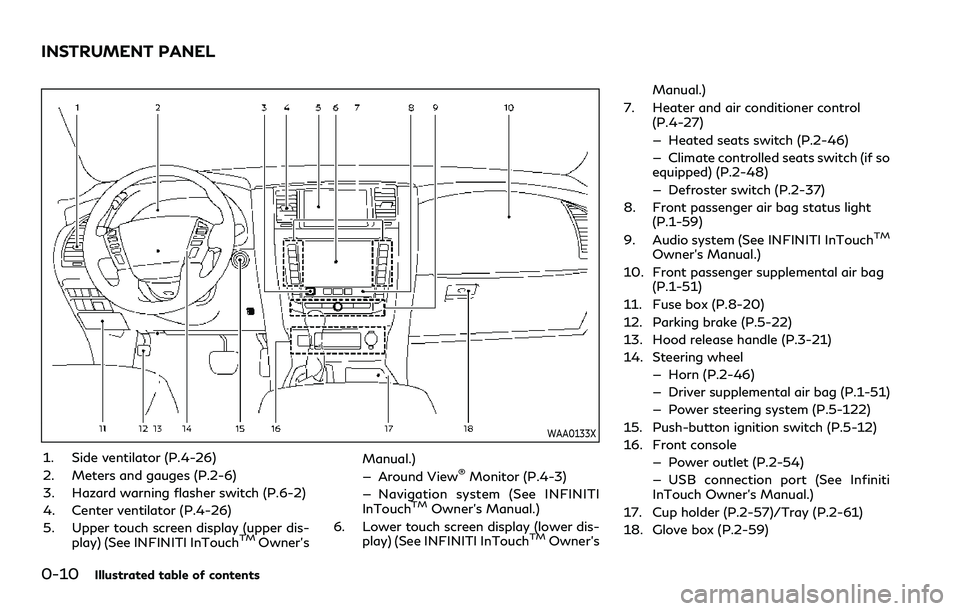
WAA0133X
1. Side ventilator (P.4-26)
2. Meters and gauges (P.2-6)
3. Hazard warning flasher switch (P.6-2)
4. Center ventilator (P.4-26)
5. Upper touch screen display (upper dis-play) (See INFINITI InTouch
TMOwner’s Manual.)
— Around View
®Monitor (P.4-3)
— Navigation system (See INFINITI
InTouch
TMOwner’s Manual.)
6. Lower touch screen display (lower dis- play) (See INFINITI InTouch
TMOwner’s Manual.)
7. Heater and air conditioner control (P.4-27)
— Heated seats switch (P.2-46)
— Climate controlled seats switch (if so
equipped) (P.2-48)
— Defroster switch (P.2-37)
8. Front passenger air bag status light (P.1-59)
9. Audio system (See INFINITI InTouch
TM
Owner’s Manual.)
10. Front passenger supplemental air bag (P.1-51)
11. Fuse box (P.8-20)
12. Parking brake (P.5-22)
13. Hood release handle (P.3-21)
14. Steering wheel — Horn (P.2-46)
— Driver supplemental air bag (P.1-51)
— Power steering system (P.5-122)
15. Push-button ignition switch (P.5-12)
16. Front console — Power outlet (P.2-54)
— USB connection port (See Infiniti
InTouch Owner’s Manual.)
17. Cup holder (P.2-57)/Tray (P.2-61)
18. Glove box (P.2-59)
INSTRUMENT PANEL
Page 97 of 516
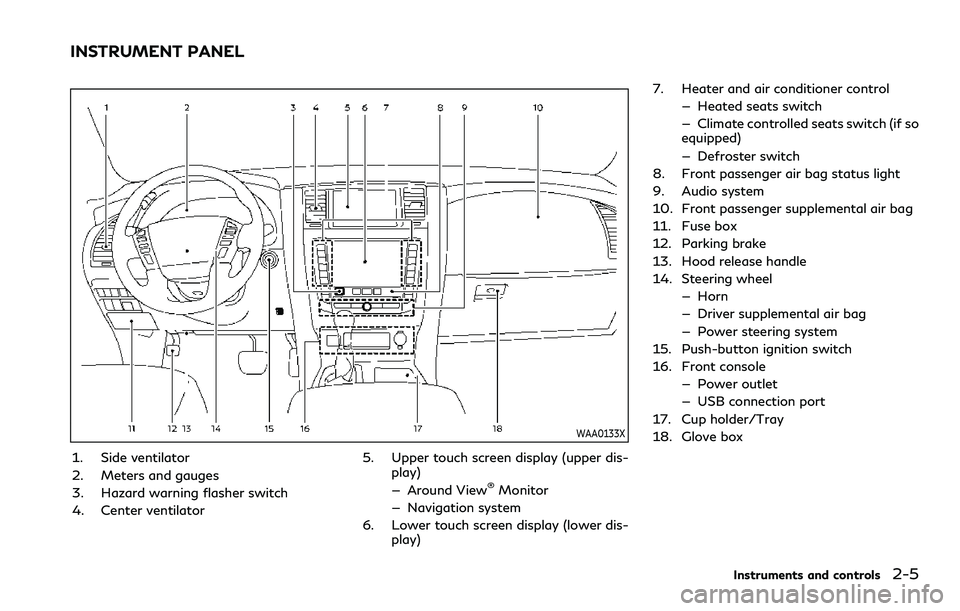
WAA0133X
1. Side ventilator
2. Meters and gauges
3. Hazard warning flasher switch
4. Center ventilator5. Upper touch screen display (upper dis-
play)
— Around View
®Monitor
— Navigation system
6. Lower touch screen display (lower dis- play) 7. Heater and air conditioner control
— Heated seats switch
— Climate controlled seats switch (if so
equipped)
— Defroster switch
8. Front passenger air bag status light
9. Audio system
10. Front passenger supplemental air bag
11. Fuse box
12. Parking brake
13. Hood release handle
14. Steering wheel — Horn
— Driver supplemental air bag
— Power steering system
15. Push-button ignition switch
16. Front console — Power outlet
— USB connection port
17. Cup holder/Tray
18. Glove box
Instruments and controls2-5
INSTRUMENT PANEL
Page 146 of 516

2-54Instruments and controls
.Usingswitch, a driver can select
“Disable Alert” to disable the horn alert
for the remainder of the current trip.
WARNING
. There may be times when there is an
object or passenger in the rear seat(s)
but the audible alert does not sound.
For example, this may occur if rear
seat passengers enter or exit the
vehicle during a trip.
. The system does not directly detect
objects or passengers in the rear seat
(s). Instead, it can detect when a rear
door is opened and closed, indicating
that there may be something in the
rear seat(s).
NOTE:
There may be times when the horn sounds
but there are no objects or passengers in the
rear seat(s).
CAUTION
. Use power outlet with the engine
running to avoid discharging the
vehicle battery.
. Avoid using power outlet when the
air conditioner, headlights or rear
window defroster is on.
. Before inserting or disconnecting a
plug, be sure the electrical accessory
being used is turned OFF.
. When not in use, be sure to close the
cap. Do not allow water or any liquid
to contact the outlet.
WAC0172X
Instrument panel
SIC4456
Back side of front console
POWER OUTLET
Page 192 of 516

3-18Pre-driving checks and adjustments
Switching procedure:
Push the LOCK
and UNLOCKbuttons on the Intelligent Key simulta-
neously for more than 2 seconds to switch
the mode from one to the other.
When pushing the buttons to set the hazard
indicator mode, the hazard indicator flashes
3 times.
When pushing the buttons to set the hazard
indicator and horn mode, the hazard indica-
tor flashes once and the horn chirps once.WARNING
To avoid risk of injury or death, do not
use the remote engine start function
when the vehicle is in an enclosed area
such as a garage.
JVP0445X
The remote engine startbutton is on the
Intelligent Key if the vehicle has remote
engine start function. This function allows
the engine to start from outside the vehicle.
Some systems, such as the air conditioner
system, will turn on during a remote engine
start, if the system was on the last time the
ignition switch was turned off.
Laws in some local communities may restrict
the use of remote engine starters. For
example, some laws require a person using
remote engine start to have the vehicle in
view. Check local regulations for any re-
quirements.
Other conditions may affect the remote
engine start function. See “Conditions the
REMOTE ENGINE START (if so equipped)
Page 193 of 516
remote engine start will not work” (P.3-20).
Other conditions can affect the performance
of the Intelligent Key transmitter. See “In-
telligent Key system” (P.3-7) for additional
information.
REMOTE ENGINE START OPER-
ATING RANGE
The remote engine start function can only be
used when the Intelligent Key is within the
specified operating range from the vehicle.
When the Intelligent Key battery is dis-
charged or other strong radio wave sources
are present near the operating location, the
Intelligent Key operating range becomes
narrower, and the Intelligent Key may not
function properly.
The remote engine start operating range is
approximately 197 ft (60 m) from the
vehicle.
REMOTE STARTING THE ENGINE
To use the remote engine start function to
start the engine, perform the following:
1. Aim the Intelligent Key at the vehicle.
2. Push the “LOCK”
button to lock all
doors.
3. Within 5 seconds push and hold the remote engine start
button until
the turn signal lights flash and the tail lights illuminate. If the vehicle is not
within view, push and hold the remote
engine start
button for at least 2
seconds.
The following events will occur when the
engine starts:
. The front parking lights will turn on and
remain on as long as the engine is
running.
. The doors will be locked and the air
conditioner system may turn on.
. The engine will continue to run for about
10 minutes. Repeat the steps to extend
the time for an additional 10 minutes.
See “Extending engine run time” (P.3-
19).
Depress and hold the brake pedal, then place
the ignition switch in the ON position before
driving. For further instructions, see “Driving
the vehicle” (P.5-17).
EXTENDING ENGINE RUN TIME
The remote engine start function can be
extended one time by performing the steps
listed in “Remote starting the engine” (P.3-
19). Run time will be calculated as follows:
. The first 10 minute run time will start
when the remote engine start function is
performed.
. The second 10 minutes will start imme-
diately when the remote engine start function is performed. For example, if
the engine has been running for 5
minutes, and 10 minutes are added, the
engine will run for a total of 15 minutes.
. Extending engine run time will count
towards the two remote engine start
limit.
A maximum of two remote engine starts, or
a single start with an extension, are allowed
between ignition cycles.
The ignition switch must be cycled to the ON
position and then back to the OFF position
before the remote engine start procedure
can be used again.
CANCELING A REMOTE ENGINE
START
To cancel a remote engine start, perform one
of the following:
. Aim the Intelligent Key at the vehicle and
push and hold the remote engine start
button until the front parking lights
turn off.
. Turn on the hazard indicator flashers.
. Cycle the ignition switch ON and then
OFF.
. The extended engine run time has ex-
pired.
. The first 10 minute timer has expired.
Pre-driving checks and adjustments3-19
Page 214 of 516
3-40Pre-driving checks and adjustments
3. Push the SET switch and, within 5seconds, push the memory switch (1 or
2) fully for at least 1 second.
The indicator light for the pushed mem-
ory switch will stay on for approximately
5 seconds after pushing the switch.
When the memory is stored in the
memory switch (1 or 2), a buzzer will
sound.
If memory is stored in the same memory
switch, the previous memory will be
deleted.
Linking Intelligent Key to a stored
memory position
The Intelligent Key can be linked to a stored
memory position with the following proce-
dure.
1. Follow the steps for storing a memoryposition.
2. While the indicator light for the memory switch being set is illuminated for 5
seconds, push the
button on the
Intelligent Key. If the indicator light
blinks, the Intelligent Key is linked to
that memory setting.
Push the ignition switch to the OFF position,
and then push the
button on the
Intelligent Key. The driver’s seat, steering
wheel and outside mirrors will move to the memorized position.
Confirming memory storage
.
Push the ignition switch to the ON
position and push the SET switch. If the
main memory has not been stored, the
indicator light will come on for approxi-
mately 0.5 second. When the memory
has stored in position, the indicator light
will stay on for approximately 5 seconds.
. If the battery cable is disconnected, or if
the fuse opens, the memory will be
canceled. In this case, reset the desired
position using the previous procedure.
. If optional Intelligent Keys are added to
your vehicle, the memory storage proce-
dure to switch 1 or 2 and linking
Intelligent Key procedure to a stored
memory position should be performed
again for each Intelligent Key. For addi-
tional Intelligent Key information, see
“Keys” (P.3-2).
Selecting the memorized position
1. Move the shift lever to the P (Park) position.
2. Use one of the following methods to move the driver’s seat, the outside
mirrors and the steering wheel.
.Push the memory switch (1 or 2) fully
for at least 1 second. The driver’s seat, steering column and
outside mirrors will move to the memor-
ized position or to the exit position when
the entry/exit function is set to active
with the indicator light flashing, and then
the light will stay on for approximately 5
seconds.
SETTING MEMORY FUNCTION
The status of the following settings can be
linked to the Intelligent Key and the memor-
ized settings can be available for each
Intelligent Key.
.
Air conditioner system
. Navigation system
. Audio system
To use the memory function, lock the doors
with the Intelligent Key that is linked to the
settings.
To enable the memorized settings:
1. Carry the Intelligent Key that is linked to the settings, and unlock the doors by
pushing the driver’s door handle request
switch or “UNLOCK”
button on the
Intelligent Key.
2. Place the ignition switch in the ON position. The memorized settings are
available.
Page 217 of 516
4 Monitor, climate, audio, phone and voice re-cognition systems
INFINITI InTouchTMOwner’s Manual ........................ 4-2
Safety note ........................................................................\
. 4-2
Around View
®Monitor ................................................... 4-3
Around View®Monitor system operation ........... 4-4
Around View®Monitor settings ........................... 4-11
Around View®Monitor system limitations ........ 4-13
System maintenance ................................................ 4-15
Camera aiding sonar function ..................................... 4-16 Sonar system operation .......................................... 4-17
Turning on and off the sonar function ............... 4-17
Sonar system limitations ........................................ 4-20
System maintenance ............................................... 4-20
Moving Object Detection (MOD) .............................. 4-21
MOD system operation ........................................... 4-22
Turning on and off the MOD system .................. 4-23
MOD system limitations ........................................ 4-24
System maintenance ................................................ 4-25 Ventilators ........................................................................\
4-26
Center ventilators ................................................... 4-26
Side ventilators ........................................................ 4-26
Rear ventilators ....................................................... 4-26
Heater and air conditioner .......................................... 4-27 Automatic air conditioner .................................... 4-28
Rear automatic air conditioning system ........... 4-32
Operating tips .......................................................... 4-35
In-cabin microfilter ................................................. 4-36
Servicing climate control ....................................... 4-36
Antenna ........................................................................\
.... 4-36 Window antenna ..................................................... 4-36
Satellite antenna ..................................................... 4-37
Car phone or CB radio ................................................. 4-37
Page 243 of 516

SAA3055
Adjust the air flow direction of the ventila-
tors by moving the center knob (up/down,
left/right) until the desired position is
achieved.
WARNING
.The air conditioner cooling function
operates only when the engine is
running.
. Do not leave children or adults who
would normally require the support
of others alone in your vehicle. Pets
should not be left alone either. On
hot, sunny days, temperatures in a
closed vehicle could quickly become
high enough to cause severe or
possibly fatal injuries to people or
animals.
. Do not use the recirculation mode for
long periods as it may cause the
interior air to become stale and the
windows to fog up.
. Do not adjust the heating and air
conditioning controls while driving so
that full attention may be given to
vehicle operation.
Start the engine and operate the climate
control system.
NOTE:
. Odors from inside and outside the
vehicle can build up in the air conditioner
unit. Odor can enter the passenger compartment through the ventilators.
. When parking, set the heater and air
conditioner controls to turn off air
recirculation to allow fresh air into the
passenger compartment. This should
help reduce odors inside the vehicle.
Monitor, climate, audio, phone and voice recognition systems4-27
HEATER AND AIR CONDITIONER
Page 244 of 516
4-28Monitor, climate, audio, phone and voice recognition systems
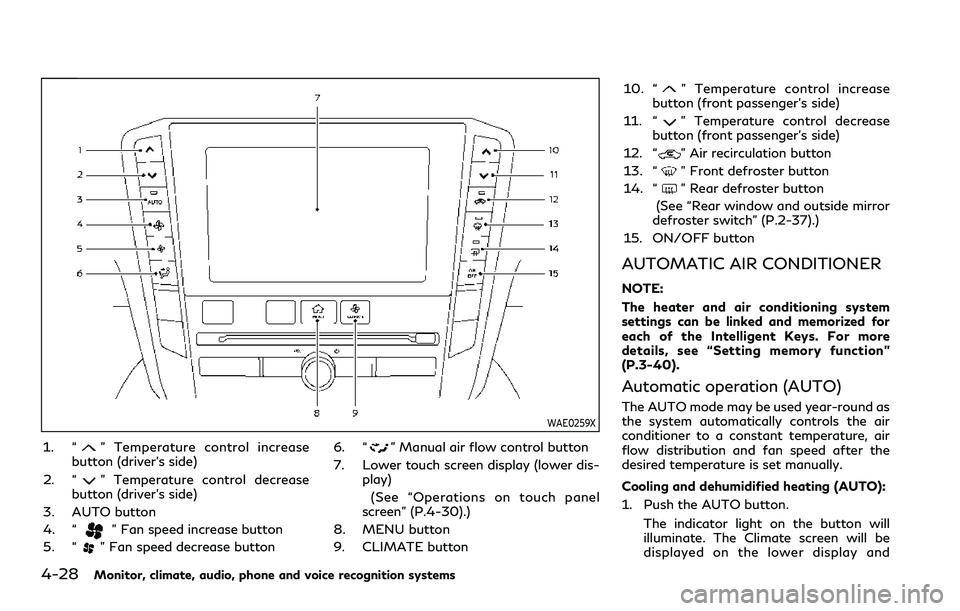
WAE0259X
1. “” Temperature control increase
button (driver’s side)
2. “
” Temperature control decrease
button (driver’s side)
3. AUTO button
4. “
” Fan speed increase button
5. “
” Fan speed decrease button 6. “
” Manual air flow control button
7. Lower touch screen display (lower dis- play)
(See “Operations on touch panel
screen” (P.4-30).)
8. MENU button
9. CLIMATE button 10. “
” Temperature control increase
button (front passenger’s side)
11. “
” Temperature control decrease
button (front passenger’s side)
12. “
” Air recirculation button
13. “
” Front defroster button
14. “
” Rear defroster button
(See “Rear window and outside mirror
defroster switch” (P.2-37).)
15. ON/OFF button
AUTOMATIC AIR CONDITIONER
NOTE:
The heater and air conditioning system
settings can be linked and memorized for
each of the Intelligent Keys. For more
details, see “Setting memory function”
(P.3-40).
Automatic operation (AUTO)
The AUTO mode may be used year-round as
the system automatically controls the air
conditioner to a constant temperature, air
flow distribution and fan speed after the
desired temperature is set manually.
Cooling and dehumidified heating (AUTO):
1. Push the AUTO button.
The indicator light on the button will
illuminate. The Climate screen will be
displayed on the lower display and
Page 245 of 516

“AUTO” will appear on the Climate
screen.
2. Push the temperature control buttons (driver’s side) to set the preferred tem-
perature.
.When the DUAL mode is turned on,you can individually set temperatures
for the driver’s side and front passen-
ger’s side, using the temperature
control buttons on the corresponding
side. (To turn on the DUAL mode,
touch the "DUAL" key.)
.The temperature of the passengercompartment will be maintained
automatically. Air flow distribution
and fan speed will also be controlled
automatically.
A visible mist may be seen coming from the
ventilators in hot, humid conditions as the air
is cooled rapidly. This does not indicate a
malfunction.
Heating (A/C off):
The air conditioner does not activate in this
mode. Use this mode when you only need to
heat.
1. Push the CLIMATE button. The Climate screen will be displayed on
the lower display.
2. Touch the "A/C" key. The "A/C" indica- tor will turn off. See “Operations on touch panel screen” (P.4-30).
3. Push the temperature control buttons (driver’s side) to set the preferred tem-
perature.
.When the DUAL mode is turned on,you can individually set temperatures
for the driver’s side and front passen-
ger’s side, using the temperature
control buttons on the corresponding
side. (To turn on the DUAL mode,
touch the "DUAL" key.)
.The temperature of the passengercompartment will be maintained
automatically. Air flow distribution
and fan speed will also be controlled
automatically.
NOTE:
. Do not set the temperature lower than
the outside air temperature. Otherwise
the system may not work properly.
. This mode is not recommended if the
windows fog up.
Dehumidified defrosting/defogging:
1. Push the “
” front defroster button.
The indicator light on the button will
illuminate.
2. Push the temperature control buttons on the driver’s side to set the preferred
temperature. NOTE:
.
To quickly remove ice from the outside
of the windows, push the “
” fan
speed increase button and set it to the
maximum position.
. As soon as possible after the windshield
is cleaned, push the AUTO button to
return to the AUTO mode.
. When the “
” front defroster button
is pushed, the air conditioner will auto-
matically be turned on at outside tem-
peratures above 23°F (-5°C) to defog
the windshield, and the air recirculate
mode will automatically be turned off.
The outside air circulation mode will be
selected to improve the defrosting per-
formance.
Manual operation
The manual mode can be used to control the
heater and air conditioner to your desired
settings.
Fan speed control:
Push the “
” fan speed increase button
to increase the fan speed.
Push the “
” fan speed decrease button to
decrease the fan speed.
Push the AUTO button to change the fan
speed to the automatic mode.
Monitor, climate, audio, phone and voice recognition systems4-29