door lock INFINITI QX80 2020 Owner's Manual
[x] Cancel search | Manufacturer: INFINITI, Model Year: 2020, Model line: QX80, Model: INFINITI QX80 2020Pages: 516, PDF Size: 1.89 MB
Page 11 of 516
JVC1126X
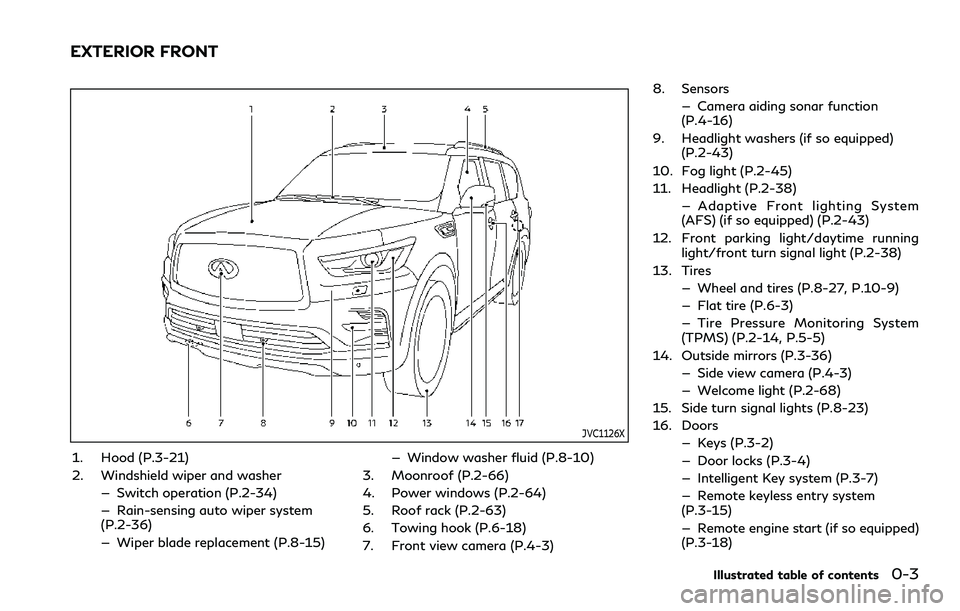
1. Hood (P.3-21)
2. Windshield wiper and washer— Switch operation (P.2-34)
— Rain-sensing auto wiper system
(P.2-36)
— Wiper blade replacement (P.8-15) — Window washer fluid (P.8-10)
3. Moonroof (P.2-66)
4. Power windows (P.2-64)
5. Roof rack (P.2-63)
6. Towing hook (P.6-18)
7. Front view camera (P.4-3) 8. Sensors
— Camera aiding sonar function
(P.4-16)
9. Headlight washers (if so equipped) (P.2-43)
10. Fog light (P.2-45)
11. Headlight (P.2-38) — Adaptive Front lighting System
(AFS) (if so equipped) (P.2-43)
12. Front parking light/daytime running light/front turn signal light (P.2-38)
13. Tires — Wheel and tires (P.8-27, P.10-9)
— Flat tire (P.6-3)
— Tire Pressure Monitoring System
(TPMS) (P.2-14, P.5-5)
14. Outside mirrors (P.3-36) — Side view camera (P.4-3)
— Welcome light (P.2-68)
15. Side turn signal lights (P.8-23)
16. Doors — Keys (P.3-2)
— Door locks (P.3-4)
— Intelligent Key system (P.3-7)
— Remote keyless entry system
(P.3-15)
— Remote engine start (if so equipped)
(P.3-18)
Illustrated table of contents0-3
EXTERIOR FRONT
Page 12 of 516

0-4Illustrated table of contents
17. Child safety rear door locks (P.3-6)
Page 14 of 516

0-6Illustrated table of contents
WAA0131X
1. Cargo light (P.2-71)
2. Cup holders (3rd row seat) (P.2-58)
3. Rear ventilators (P.4-26)
4. Coat hooks (P.2-62)
5. Rear personal lights (P.2-69)6. Door armrest
— Power window controls (P.2-64)
— Power door lock switch (P.3-5)
— Outside rearview mirror remote con-
trol switch (driver’s side) (P.3-36) 7. Automatic drive positioner switch
(P.3-39)
8. Sun visors (P.3-29)
9. Map lights (P.2-69)
10. Moonroof switch (P.2-66)
11. SOS call switch (See INFINITI In- Touch
TMOwner’s Manual.)
12. Sunglasses holder (P.2-59)
13. Inside rearview mirror (P.3-30) — Smart Rearview Mirror (if so
equipped) (P.3-31)
— HomeLink
®universal transceiver
(P.2-71, P.2-75)
14. Cargo area — Power outlet (P.2-54)
— Cargo floor box (P.2-63)
— Luggage hooks (P.2-62)
— Jacking tools (P.6-5)
15. Rear console box (P.2-61) — Cup holders (2nd row seat) (if so
equipped) (P.2-57)
— Pocket (if so equipped) (P.2-61)
16. Cup holders (2nd row seat) (if so equipped) (P.2-57)
17. Mobile Entertainment System (MES) (if so equipped) (See INFINITI InTouch
TM
Owner’s Manual.)
PASSENGER COMPARTMENT
Page 93 of 516

2 Instruments and controls
Cockpit ........................................................................\
......... 2-3
Instrument panel ............................................................... 2-5
Meters and gauges .......................................................... 2-6Speedometer and odometer ..................................... 2-7
Tachometer ................................................................... 2-8
Engine coolant temperature gauge ....................... 2-8
Fuel gauge ..................................................................... 2-9
Engine oil pressure gauge ......................................... 2-9
Voltmeter ..................................................................... 2-10
Warning lights, indicator lights and
audible reminders ............................................................ 2-11 Checking lights ........................................................... 2-12
Warning lights ............................................................ 2-12
Indicator lights ........................................................... 2-17
Audible reminders ..................................................... 2-19
Vehicle information display .......................................... 2-19
Operational indicators ............................................. 2-22
Trip computer ............................................................. 2-29
Clock and outside air temperature ....................... 2-31
Security systems ............................................................. 2-32
Vehicle Security System .......................................... 2-32
INFINITI Vehicle Immobilizer System .................. 2-33
Wiper and washer switch ............................................. 2-34
Washer operation ..................................................... 2-35
Rain-sensing auto wiper system ........................... 2-36 Rear window wiper and washer operation ..... 2-37
Rear window and outside mirror
defroster switch ............................................................. 2-37
Rear window and outside mirror defroster ..... 2-37
Headlight and turn signal switch ............................... 2-38 Headlight switch ..................................................... 2-38
Headlight washer (if so equipped) ..................... 2-43
Instrument brightness control ............................ 2-44
Turn signal switch .................................................. 2-44
Fog light switch ....................................................... 2-45
Heated steering wheel ................................................. 2-45
Horn ........................................................................\
........... 2-46
Heated seats ................................................................... 2-46 Front ........................................................................\
... 2-47
Rear (if so equipped) ............................................. 2-48
Climate controlled seats (if so equipped) ............... 2-48
Warning systems switch ............................................. 2-50
SNOW mode switch .................................................... 2-50
TOW mode switch ......................................................... 2-51
Vehicle Dynamic Control (VDC) OFF switch ......... 2-51
Rear door alert ................................................................ 2-52 Turning the rear door alert
system ON/OFF ..................................................... 2-53
System operation .................................................... 2-53
Page 104 of 516
2-12Instruments and controls
CHECKING LIGHTS
With all doors closed, apply the parking
brake, fasten the seat belts and place the
ignition switch in the ON position without
starting the engine. The following lights (if
so equipped) will come on:
,or,,,,
The following lights (if so equipped) will
come on briefly and then go off:
,or,,,,,,
If any light does not come on or operates in a
way other than described, it may indicate a
burned-out bulb and/or a system malfunc-
tion. Have the system checked. It is recom-
mended you visit an INFINITI retailer for this
service.
Some indicators and warnings are also
displayed on the vehicle information display
between the speedometer and tachometer.
(See “Vehicle information display” (P.2-19).)
WARNING LIGHTS
orAnti-lock Braking
System (ABS) warning light
When the ignition switch is in the ON
position, the Anti-lock Braking System
(ABS) warning light illuminates and then
turns off. This indicates the ABS is opera-
tional.
If the ABS warning light illuminates while the
engine is running, or while driving, it may
indicate the ABS is not functioning properly.
Have the system checked. It is recommended
you visit an INFINITI retailer for this service.
If an ABS malfunction occurs, the anti-lock
function is turned off. The brake system then
operates normally, but without anti-lock
assistance. (See “Brake system” (P.5-122).)
Automatic transmission check
warning light
When the ignition switch is pushed to the
ON position, the light comes on for 2
seconds. If the light comes on at any other
time, it may indicate the transmission is not
functioning properly. It is recommend you
visit an INFINITI retailer to check and repair
the transmission.
Automatic Transmission (AT)
oil temperature warning light
This light illuminates when the Automatic
Transmission (AT) oil temperature is too
high. If the light illuminates while driving,
reduce the vehicle speed as soon as safely
possible until the light turns off.
CAUTION
Continued vehicle operation when the
AT oil temperature warning light is on
may damage the AT.
Automatic Transmission (AT)
park warning light (4WD models)
This light indicates that the Automatic
Transmission (AT) parking function is not
engaged. If the transfer control is not
secured in any driving position while the AT
shift lever is in the P (Park) position, the
transmission will disengage and the wheels
will not lock.
If the AT park warning light illuminates with
the shift lever in the P (Park) position, shift
the Four-Wheel Drive (4WD) shift switch
to the AUTO, 4H or 4L position again with
Page 111 of 516

VDC system is disabled and the VDC off
indicator light illuminates. (4WD models)
For additional information, see “Vehicle
Dynamic Control (VDC) system” (P.5-124).
AUDIBLE REMINDERS
Key reminder chime
A chime will sound if the driver side door is
opened while the ignition switch is pushed to
the ACC position. Make sure the ignition
switch is pushed to the OFF position, and
take the Intelligent Key with you when
leaving the vehicle.
Light reminder chime
A chime will sound when the driver side door
is opened with the light switch in theorposition and the ignition switch in the
ACC, OFF or LOCK position.
Turn the light switch off when you leave the
vehicle.
Parking brake reminder chime
The chime will sound if the vehicle is driven
at more than 4 MPH (7 km/h) with the
parking brake applied. Stop the vehicle and
release the parking brake.
Brake pad wear warning
The disc brake pads have audible wear
warnings. When a brake pad requires repla-
cement, it will make a high pitched scraping
sound when the vehicle is in motion. This
scraping sound will first occur only when the
brake pedal is depressed. After more wear of
the brake pad, the sound will always be
heard even if the brake pedal is not
depressed. Have the brakes checked as soon
as possible if the warning sound is heard.
JVI1272X
The vehicle information displayis located
between the tachometer and the speed-
ometer, and it displays the warnings and
information. The following items are also
displayed if the vehicle is equipped with
them:
. Odometer/twin trip odometer
— “Odometer/twin trip odometer” (P.2- 7)
. Automatic Transmission (AT)
— “Driving the vehicle” (P.5-17).
. Four-Wheel Drive (4WD) system
— “INFINITI all-mode 4WD
®” (P.5-111)
. Cruise control system
Instruments and controls2-19
VEHICLE INFORMATION DISPLAY
Page 116 of 516

2-24Instruments and controls
remains illuminated. If this warning appears,
stop the vehicle and adjust the tire pressure
to the recommended COLD tire pressure
shown on the Tire and Loading Information
label. (See “Low tire pressure warning light”
(P.2-14) and “Tire Pressure Monitoring
System (TPMS)” (P.5-5).)
15. SNOW mode indicator
This indicator appears when SNOW mode is
selected by the SNOW mode switch. (See
“SNOW mode” (P.5-121).)
16. Four-Wheel Drive (4WD) shift
indicator (4WD models)
This indicator shows the Four-Wheel Drive
(4WD) driving mode (AUTO, 4HI or 4LO)
that is selected by the 4WD shift switch.
(See “INFINITI all-mode 4WD
®” (P.5-111).)
17. Door/liftgate open warning
(ignition switch is in the ON posi-
tion)
This warning appears if any of the doors
and/or the liftgate are open or not closed
securely. The vehicle icon indicates which
door or the liftgate is open on the display.
18. Power will turn off to save the
battery
This warning appears after a period of time
if the ignition switch is in ACC or ON
position.
19. Power turned off to save the
battery
This warning appears after the ignition
switch is automatically turned OFF to save
the battery.
20. Light reminder warning
This warning appears when the driver side
door is opened with the headlight switch is
left ON and the ignition switch is placed in
the OFF or LOCK position. Place the head-
light switch in OFF or AUTO position. For
additional information, see “Headlight and
turn signal switch” (P.2-38).
21. Vehicle ahead detection indica-
tor
This indicator shows the status of the
following systems, if the vehicle is equipped
with them.
.Forward Emergency Braking (FEB) with
pedestrian detection system
. Predictive Forward Collision Warning
(PFCW) .
Distance Control Assist (DCA)
For more details, see “Forward Emergency
Braking (FEB) with pedestrian detection”
(P.5-93), “Predictive Forward Collision
Warning (PFCW)” (P.5-101) or “Distance
Control Assist (DCA)” (P.5-82).
The figure and color of these indicators will
change depending on the conditions of the
above systems.
22. LDW indicator
This indicator shows the status of the
following systems, if the vehicle is equipped
with them.
. Lane Departure Warning (LDW)
. Lane Departure Prevention (LDP)
For more details, see “Lane Departure
Warning (LDW)/Lane Departure Prevention
(LDP)” (P.5-22).
The figure and color of these indicators will
change depending on the conditions of the
above systems.
23. BSW indicator
This indicator shows the status of the
following systems, if the vehicle is equipped
with them.
. Blind Spot Warning (BSW)
. Blind Spot Intervention
®(BSI)
For more details, see “Blind Spot Warning
Page 124 of 516

2-32Instruments and controls
SIC2133
Your vehicle has two types of security
systems, as follows:
.Vehicle security system
. INFINITI Vehicle Immobilizer System
The security condition will be shown by the
security indicator light.
VEHICLE SECURITY SYSTEM
The vehicle security system provides visual
and audio alarm signals if someone opens
the doors, hood, or liftgate when the system
is armed. It is not, however, a motion
detection type system that activates when
a vehicle is moved or when a vibration
occurs.
The system helps deter vehicle theft but
cannot prevent it, nor can it prevent the
theft of interior or exterior vehicle compo-
nents in all situations. Always secure your
vehicle even if parking for a brief period.
Never leave your Intelligent Key(s) in the
vehicle, and always lock it when unattended.
Be aware of your surroundings, and park in
secure, well-lit areas whenever possible.
Many devices offering additional protection,
such as component locks, identification
markers, and tracking systems, are available
at auto supply stores and specialty shops.
Your INFINITI retailer may also offer such
equipment. Check with your insurance com-
pany to see if you may be eligible for
discounts for various theft protection fea-
tures.
SIC2045
How to arm the vehicle security
system
1. Close all windows.
The system can be armed even if the
windows are open.
2. Push the ignition switch to the OFF position.
3. Remove the Intelligent Key from the vehicle.
4. Close all doors, hood and liftgate. Lock all doors. The doors can be locked with
the Intelligent Key, door handle request
switch, power door lock switch or me-
chanical key.
SECURITY SYSTEMS
Page 125 of 516

5. Confirm that the security indicator lightcomes on. The security indicator light
stays on for about 30 seconds. The
vehicle security system is now pre-
armed. After about 30 seconds the
vehicle security system automatically
shifts into the armed phase. The security
light begins to flash once every approxi-
mately 3 seconds. If, during this 30-
second pre-arm time period, the door is
unlocked, or the ignition switch is pushed
to ACC or ON, the system will not arm.
Even when the driver and/or passengers
are in the vehicle, the system will activate
with all doors, hood, and liftgate locked
with the ignition switch in the LOCK
position. When pushing the ignition switch
to the ACC or ON position, the system will
be released.
Vehicle security system activation
The vehicle security system will give the
following alarm:
. The headlights blink and the horn sounds
intermittently.
. The alarm automatically turns off after
approximately 50 seconds. However, the
alarm reactivates if the vehicle is tam-
pered with again. The alarm is activated by:
.
Unlocking the door or opening the lift-
gate without using the button on the
Intelligent Key, the door handle request
switch or the mechanical key. (Even if the
door is opened by releasing the door
inside lock knob, the alarm will activate.)
. Opening the hood.
How to stop an activated alarm
The alarm will stop when a door is unlocked
by pushing the unlock button on the Intelli-
gent Key, the door handle request switch or
using the mechanical key, or when the
ignition switch is pushed to the ACC or ON
position.
If the system does not operate as described
above, it is recommended you have it
checked by an INFINITI retailer.
INFINITI VEHICLE IMMOBILIZER
SYSTEM
The INFINITI Vehicle Immobilizer System
will not allow the engine to start without
the use of the registered Intelligent Key.
Never leave these keys in the vehicle.
FCC Notice: For USA:
This device complies with Part 15 of the
FCC Rules. Operation is subject to the
following two conditions: (1) This device
may not cause harmful interference, and (2)
this device must accept any interference
received, including interference that may
cause undesired operation.
NOTE:
Changes or modifications not expressly
approved by the party responsible for
compliance could void the user’s authority
to operate the equipment.
For Canada:
This device complies with Industry Canada
licence-exempt RSS standard(s). Operation
is subject to the following two conditions:
(1) this device may not cause interference,
and (2) this device must accept any inter-
ference, including interference that may
cause undesired operation of the device.
Instruments and controls2-33
Page 134 of 516

2-42Instruments and controls
an INFINITI retailer for this service.
Battery saver system
A chime will sound when the driver side door
is opened with the light switch in theorposition and the ignition switch in the
OFF or LOCK position.
When the headlight switch is in the
orposition while the ignition switch is in
the ON position, the lights will automatically
turn off after a period of time when the
ignition switch has been pushed to the OFF
position.
When the headlight switch remains in the
orposition after the lights auto-
matically turn off, the lights will turn on
when the ignition switch is pushed to the ON
position.
CAUTION
. When you turn on the headlight
switch again after the lights auto-
matically turn off, the lights will not
turn off automatically. Be sure to
turn the light switch to the OFF
position when you leave the vehicle
for extended periods of time, other-
wise the battery will be discharged. .
Never leave the light switch on when
the engine is not running for ex-
tended periods of time even if the
headlights turn off automatically.
SIC2275
Headlight aiming control (if so
equipped)
Depending on the number of occupants in
the vehicle and the load it is carrying, the
headlight axis may be higher than desired. If
the vehicle is traveling on a hilly road, the
headlights may directly hit the rearview
mirror of the vehicle ahead or the windshield
of the oncoming vehicle. The light axis can be
lowered with the operation of the switch.
The larger the number designated on the
switch, the lower the axis.
When traveling with no heavy load or on a
flat road, select position 0.