light ISUZU TROOPER 1998 Service Manual PDF
[x] Cancel search | Manufacturer: ISUZU, Model Year: 1998, Model line: TROOPER, Model: ISUZU TROOPER 1998Pages: 3573, PDF Size: 60.36 MB
Page 906 of 3573
5C – 28 POWER ASSISTED BRAKE SYSTEM
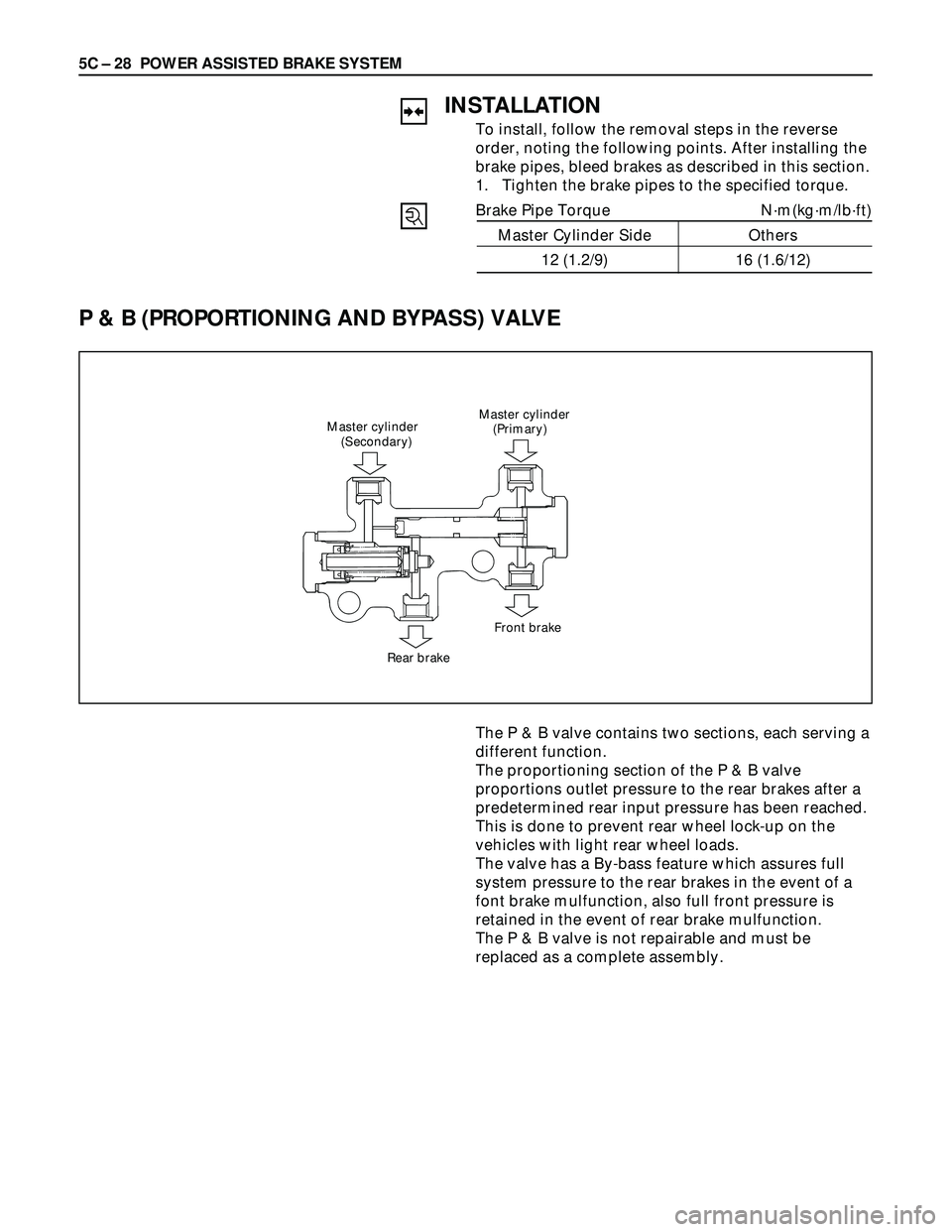
P & B (PROPORTIONING AND BYPASS) VALVE
Master cylinder
(Primary) Master cylinder
(Secondary)
Rear brakeFront brake
INSTALLATION
To install, follow the removal steps in the reverse
order, noting the following points. After installing the
brake pipes, bleed brakes as described in this section.
1. Tighten the brake pipes to the specified torque.
Brake Pipe Torque N·m(kg·m/lb·ft)
Master Cylinder Side Others
12 (1.2/9) 16 (1.6/12)
The P & B valve contains two sections, each serving a
different function.
The proportioning section of the P & B valve
proportions outlet pressure to the rear brakes after a
predetermined rear input pressure has been reached.
This is done to prevent rear wheel lock-up on the
vehicles with light rear wheel loads.
The valve has a By-bass feature which assures full
system pressure to the rear brakes in the event of a
font brake mulfunction, also full front pressure is
retained in the event of rear brake mulfunction.
The P & B valve is not repairable and must be
replaced as a complete assembly.
Page 912 of 3573
5C – 34 POWER ASSISTED BRAKE SYSTEM
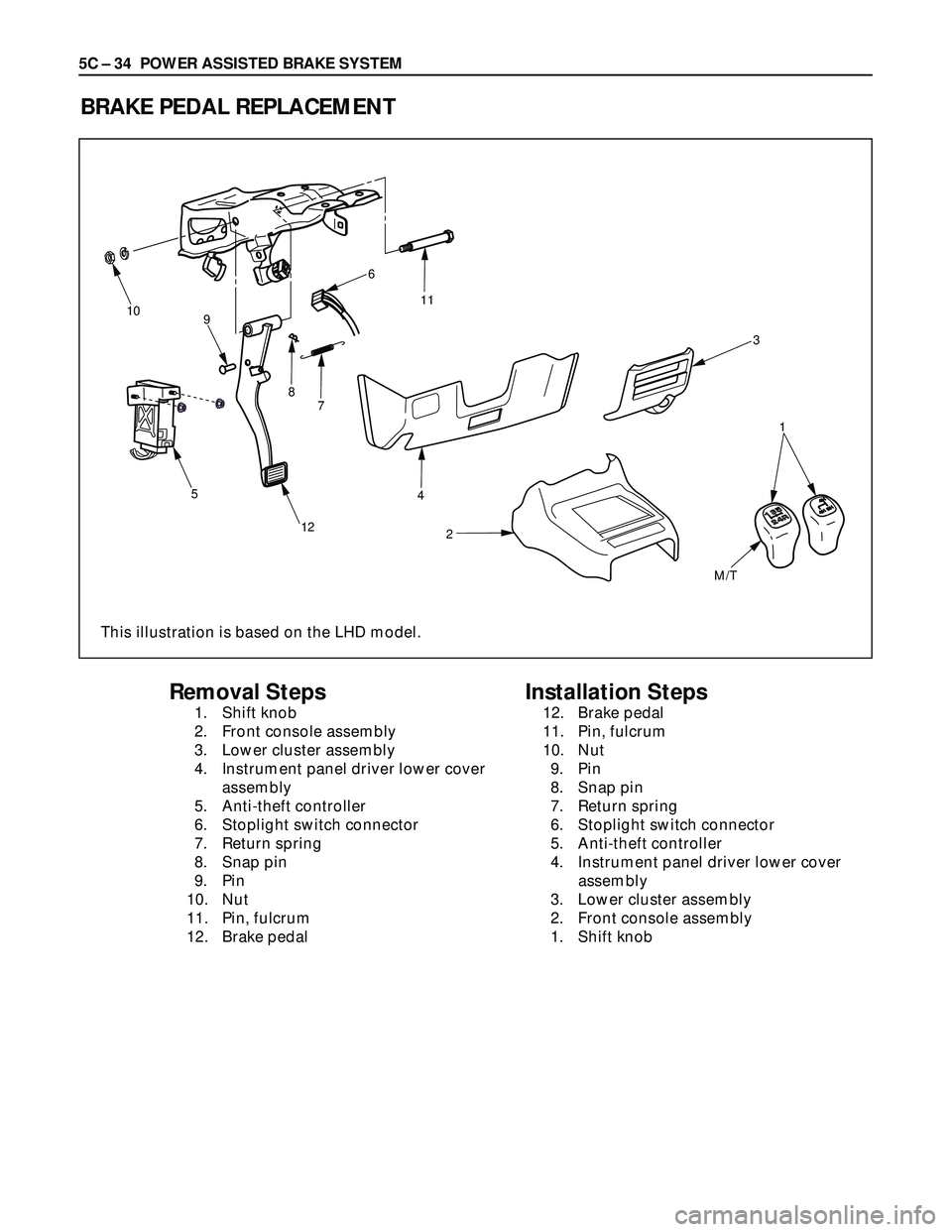
BRAKE PEDAL REPLACEMENT
10
9
5
124
2 7 86
11
3
1
M/T
Removal Steps
1. Shift knob
2. Front console assembly
3. Lower cluster assembly
4. Instrument panel driver lower cover
assembly
5. Anti-theft controller
6. Stoplight switch connector
7. Return spring
8. Snap pin
9. Pin
10. Nut
11. Pin, fulcrum
12. Brake pedal
Installation Steps
12. Brake pedal
11. Pin, fulcrum
10. Nut
9. Pin
8. Snap pin
7. Return spring
6. Stoplight switch connector
5. Anti-theft controller
4. Instrument panel driver lower cover
assembly
3. Lower cluster assembly
2. Front console assembly
1. Shift knob
This illustration is based on the LHD model.
Page 913 of 3573
POWER ASSISTED BRAKE SYSTEM 5C – 35
REMOVAL
1. Shift Knob
2. Front Console Assembly
3. Lower Cluster Assembly
4. Instrument Panel Driver Lower Cover Assembly
5. Anti-theft Controller
6. Stoplight switch Connector
7. Return Spring
8. Snap Pin
9. Pin
10. Nut
11. Pin, Fulcrum
12. Brake Pedal
INSTALLATION
12. Brake Pedal
11. Pin, Fulcrum
•Apply grease to the entire circumference of the
fulcrum pin.
10. Nut
Bolt and Nut Torque N·m (kg·m / lb·ft)
33 (3.3 / 24)
9. Pin
•Apply grease to the entire circumference of the
push rod pin.
8. Snap Pin
•Adjust pedal free travel. Refer to “Brake Pedal
Adjustment” previously in this section.
7. Return Spring
6. Stoplight Switch Connector
5. Anti-theft Connector
4. Instrument Panel Driver Lower Cover Assembly
3. Lower Cluster Assembly
2. Front Console Assembly
1. Shift Knob
Page 914 of 3573
5C – 36 POWER ASSISTED BRAKE SYSTEM
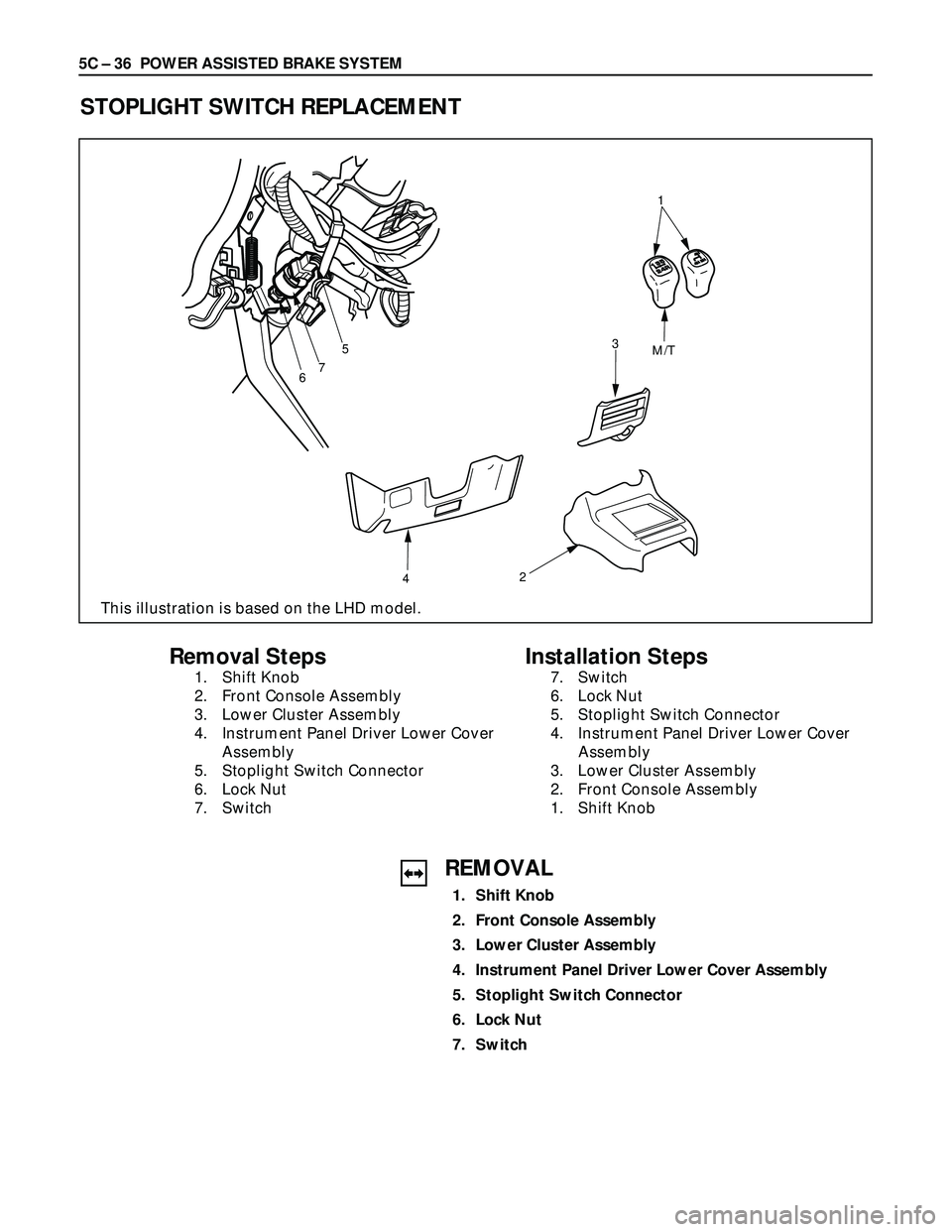
STOPLIGHT SWITCH REPLACEMENT
675
423
M/T1
Removal Steps
1. Shift Knob
2. Front Console Assembly
3. Lower Cluster Assembly
4. Instrument Panel Driver Lower Cover
Assembly
5. Stoplight Switch Connector
6. Lock Nut
7. Switch
Installation Steps
7. Switch
6. Lock Nut
5. Stoplight Switch Connector
4. Instrument Panel Driver Lower Cover
Assembly
3. Lower Cluster Assembly
2. Front Console Assembly
1. Shift Knob
REMOVAL
1. Shift Knob
2. Front Console Assembly
3. Lower Cluster Assembly
4. Instrument Panel Driver Lower Cover Assembly
5. Stoplight Switch Connector
6. Lock Nut
7. Switch
This illustration is based on the LHD model.
Page 915 of 3573
POWER ASSISTED BRAKE SYSTEM 5C – 37
INSTALLATION
7. Switch
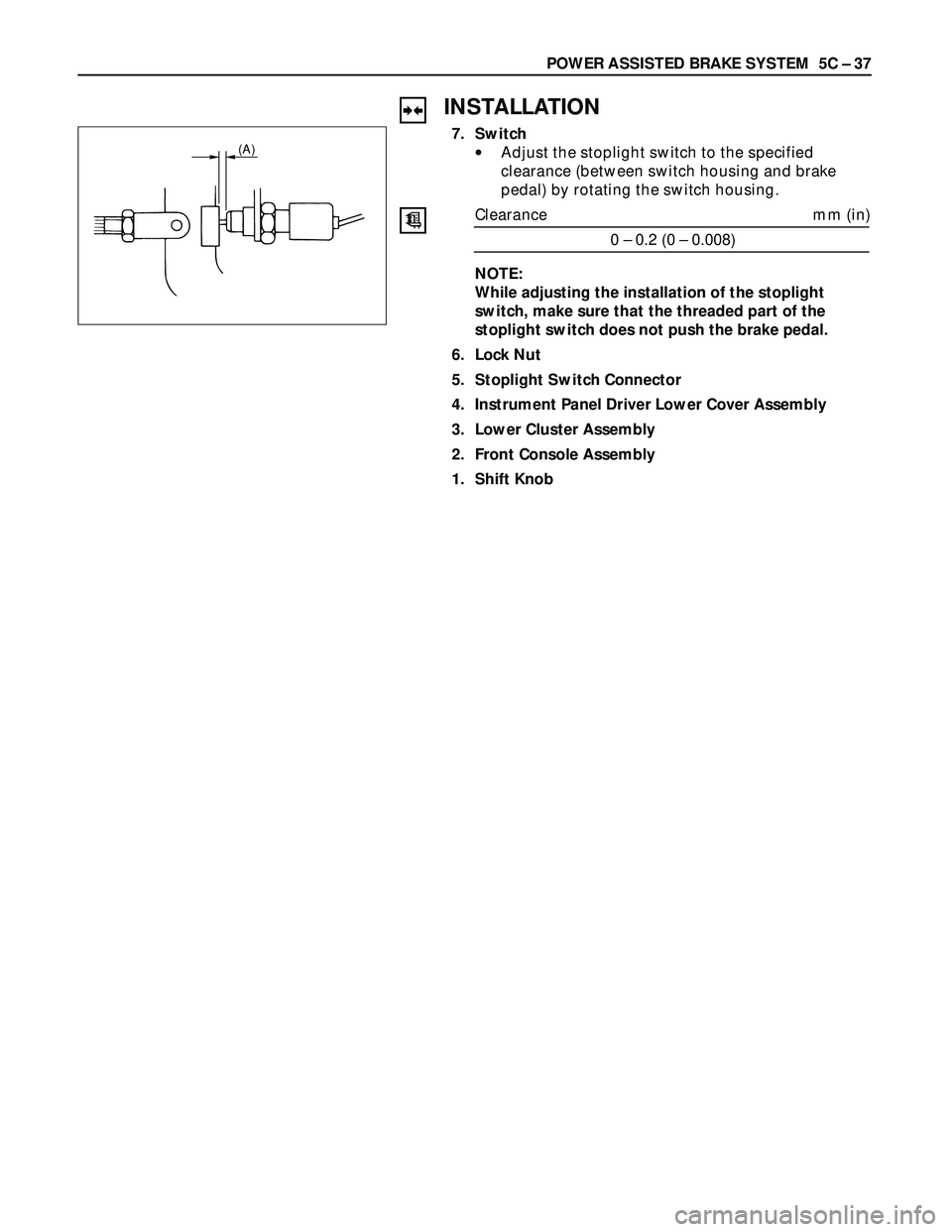
•Adjust the stoplight switch to the specified
clearance (between switch housing and brake
pedal) by rotating the switch housing.
Clearance mm (in)
0 – 0.2 (0 – 0.008)
NOTE:
While adjusting the installation of the stoplight
switch, make sure that the threaded part of the
stoplight switch does not push the brake pedal.
6. Lock Nut
5. Stoplight Switch Connector
4. Instrument Panel Driver Lower Cover Assembly
3. Lower Cluster Assembly
2. Front Console Assembly
1. Shift Knob(A)
Page 948 of 3573
PARKING BRAKES 5D Ð 3
REAR DRUM (IN DISC) INSIDE
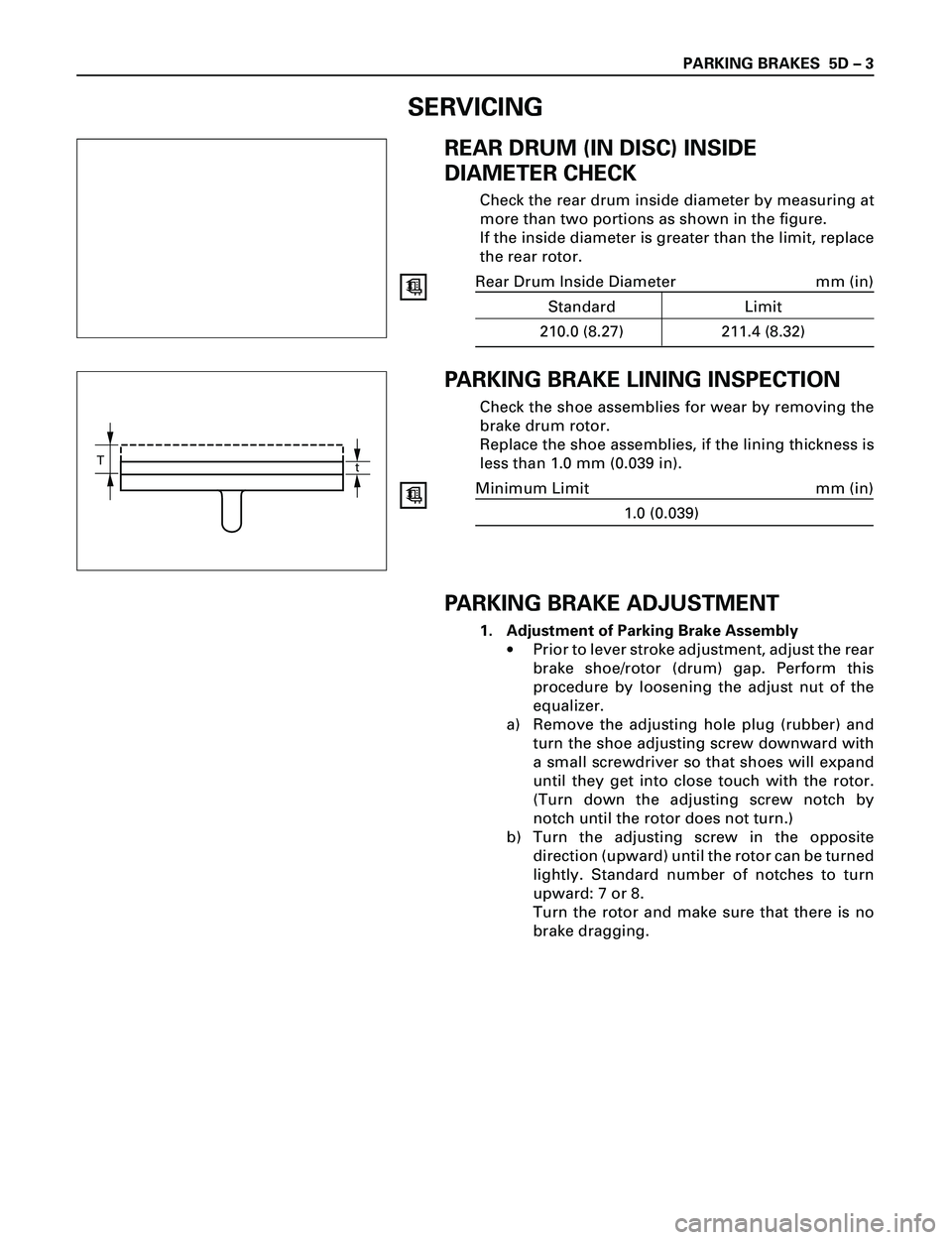
DIAMETER CHECK
Check the rear drum inside diameter by measuring at
more than two portions as shown in the figure.
If the inside diameter is greater than the limit, replace
the rear rotor.
Rear Drum Inside Diameter mm (in)
Standard Limit
210.0 (8.27) 211.4 (8.32)
PARKING BRAKE LINING INSPECTION
Check the shoe assemblies for wear by removing the
brake drum rotor.
Replace the shoe assemblies, if the lining thickness is
less than 1.0 mm (0.039 in).
Minimum Limit mm (in)
1.0 (0.039)
PARKING BRAKE ADJUSTMENT
1. Adjustment of Parking Brake Assembly
·Prior to lever stroke adjustment, adjust the rear
brake shoe/rotor (drum) gap. Perform this
procedure by loosening the adjust nut of the
equalizer.
a) Remove the adjusting hole plug (rubber) and
turn the shoe adjusting screw downward with
a small screwdriver so that shoes will expand
until they get into close touch with the rotor.
(Turn down the adjusting screw notch by
notch until the rotor does not turn.)
b) Turn the adjusting screw in the opposite
direction (upward) until the rotor can be turned
lightly. Standard number of notches to turn
upward: 7 or 8.
Turn the rotor and make sure that there is no
brake dragging.
T
t
SERVICING
Page 951 of 3573
5D Ð 6 PARKING BRAKES
GENERAL DESCRIPTION
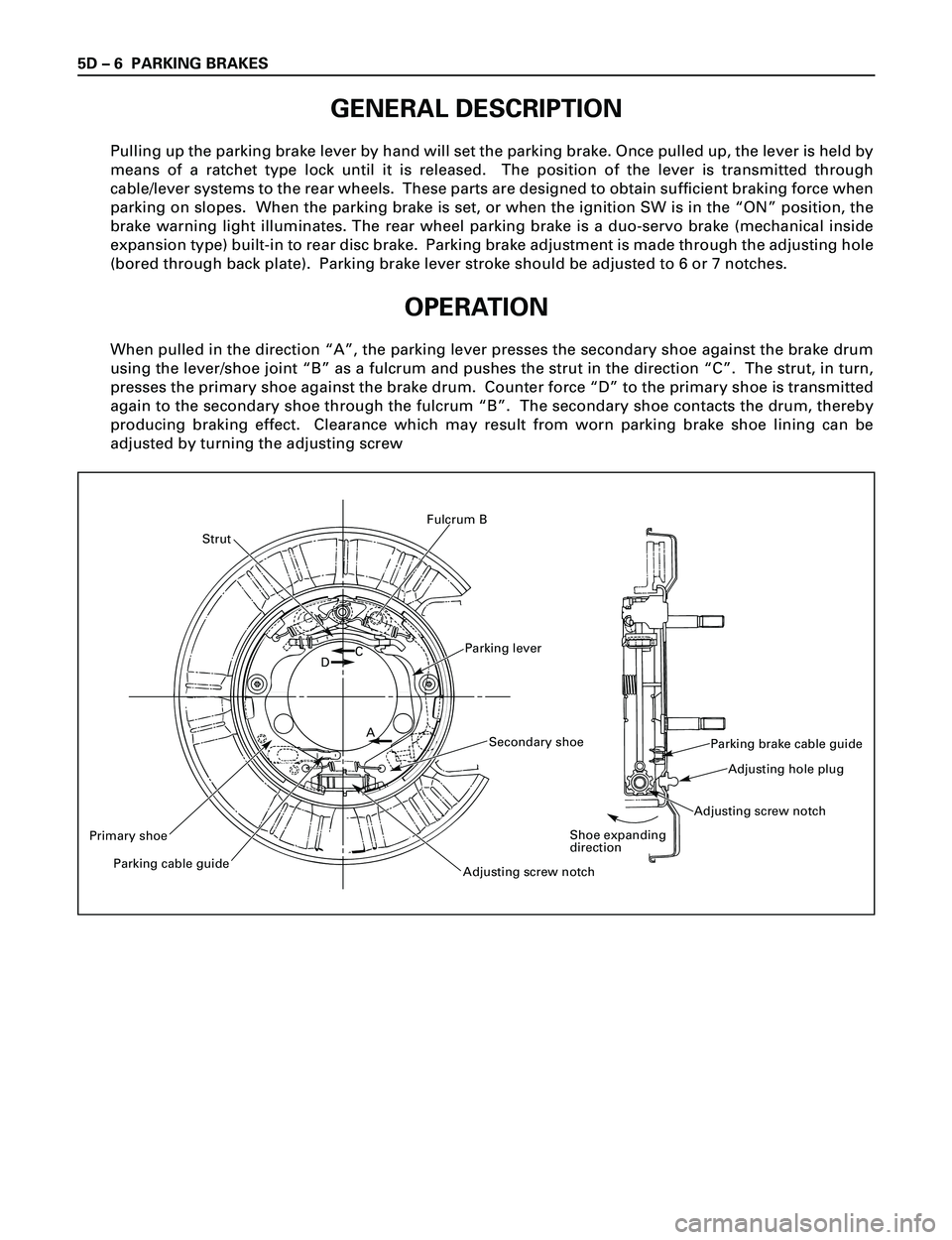
Pulling up the parking brake lever by hand will set the parking brake. Once pulled up, the lever is held by
means of a ratchet type lock until it is released. The position of the lever is transmitted through
cable/lever systems to the rear wheels. These parts are designed to obtain sufficient braking force when
parking on slopes. When the parking brake is set, or when the ignition SW is in the ÒONÓ position, the
brake warning light illuminates. The rear wheel parking brake is a duo-servo brake (mechanical inside
expansion type) built-in to rear disc brake. Parking brake adjustment is made through the adjusting hole
(bored through back plate). Parking brake lever stroke should be adjusted to 6 or 7 notches.
OPERATION
When pulled in the direction ÒAÓ, the parking lever presses the secondary shoe against the brake drum
using the lever/shoe joint ÒBÓ as a fulcrum and pushes the strut in the direction ÒCÓ. The strut, in turn,
presses the primary shoe against the brake drum. Counter force ÒDÓ to the primary shoe is transmitted
again to the secondary shoe through the fulcrum ÒBÓ. The secondary shoe contacts the drum, thereby
producing braking effect. Clearance which may result from worn parking brake shoe lining can be
adjusted by turning the adjusting screw
Parking lever
Strut
Primary shoe
Parking cable guide
Adjusting screw notch
Secondary shoe
DC
A
Fulcrum B
Parking brake cable guide
Adjusting hole plug
Adjusting screw notch
Shoe expanding
direction
Page 960 of 3573
6A±4
ENGINE MECHANICAL
Engine Diagnosis
Hard Starting
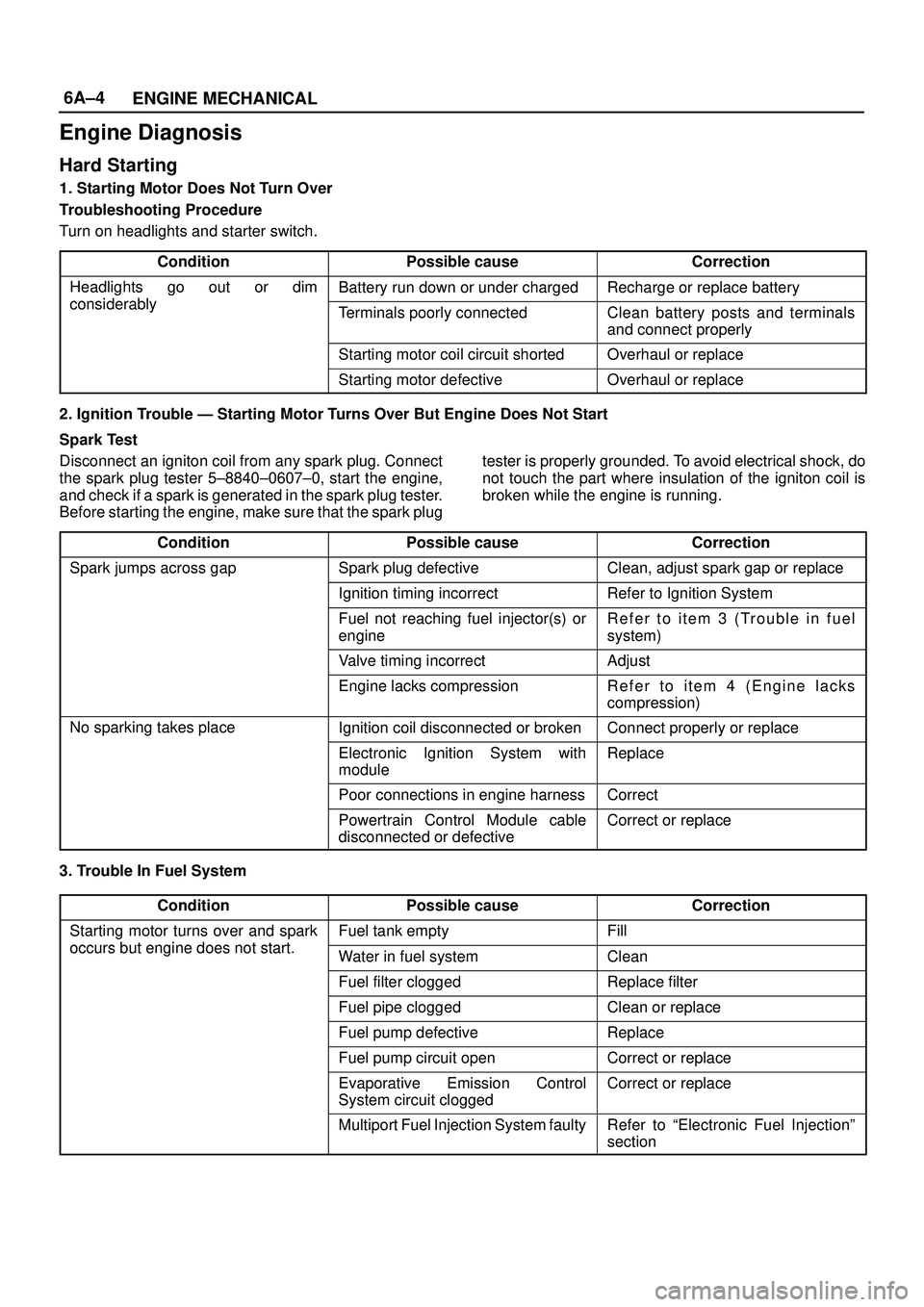
1. Starting Motor Does Not Turn Over
Troubleshooting Procedure
Turn on headlights and starter switch.
Condition
Possible causeCorrection
Headlights go out or dim
considerably
Battery run down or under chargedRecharge or replace battery
considerablyTerminals poorly connectedClean battery posts and terminals
and connect properly
Starting motor coil circuit shortedOverhaul or replace
Starting motor defectiveOverhaul or replace
2. Ignition Trouble Ð Starting Motor Turns Over But Engine Does Not Start
Spark Test
Disconnect an igniton coil from any spark plug. Connect
the spark plug tester 5±8840±0607±0, start the engine,
and check if a spark is generated in the spark plug tester.
Before starting the engine, make sure that the spark plugtester is properly grounded. To avoid electrical shock, do
not touch the part where insulation of the igniton coil is
broken while the engine is running.
Condition
Possible causeCorrection
Spark jumps across gapSpark plug defectiveClean, adjust spark gap or replace
Ignition timing incorrectRefer to Ignition System
Fuel not reaching fuel injector(s) or
engineRefer to item 3 (Trouble in fuel
system)
Valve timing incorrectAdjust
Engine lacks compressionRefer to item 4 (Engine lacks
compression)
No sparking takes placeIgnition coil disconnected or brokenConnect properly or replace
Electronic Ignition System with
moduleReplace
Poor connections in engine harnessCorrect
Powertrain Control Module cable
disconnected or defectiveCorrect or replace
3. Trouble In Fuel System
Condition
Possible causeCorrection
Starting motor turns over and spark
occurs but engine does not start
Fuel tank emptyFill
occurs but engine does not start.Water in fuel systemClean
Fuel filter cloggedReplace filter
Fuel pipe cloggedClean or replace
Fuel pump defectiveReplace
Fuel pump circuit openCorrect or replace
Evaporative Emission Control
System circuit cloggedCorrect or replace
Multiport Fuel Injection System faultyRefer to ªElectronic Fuel Injectionº
section
Page 968 of 3573
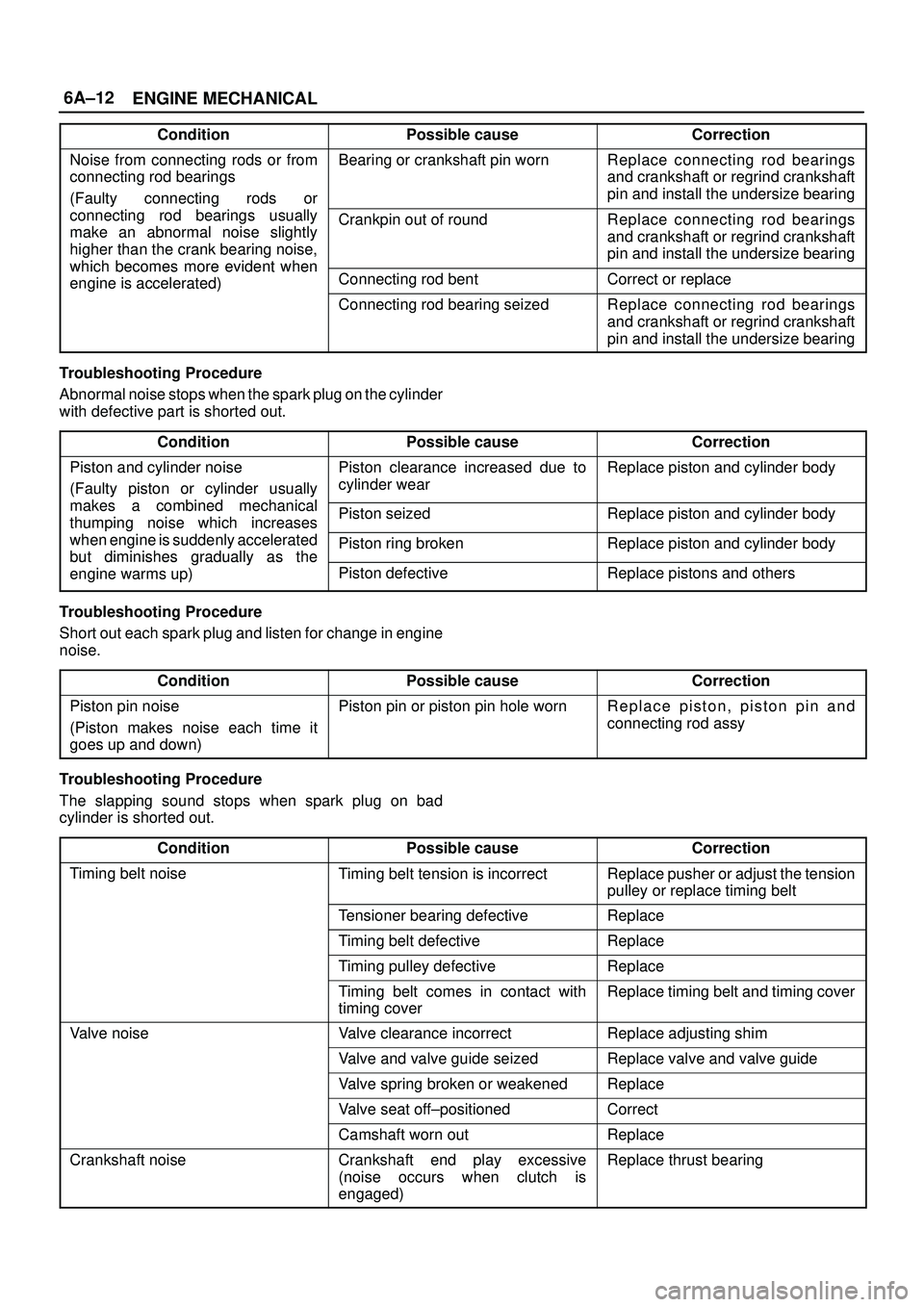
6A±12
ENGINE MECHANICAL
ConditionPossible causeCorrection
Noise from connecting rods or from
connecting rod bearings
(Faulty connecting rods orBearing or crankshaft pin wornReplace connecting rod bearings
and crankshaft or regrind crankshaft
pin and install the undersize bearing
yg
connecting rod bearings usually
make an abnormal noise slightly
higher than the crank bearing noise,
which becomes more evident when
Crankpin out of roundReplace connecting rod bearings
and crankshaft or regrind crankshaft
pin and install the undersize bearing
which becomes more evident when
engine is accelerated)Connecting rod bentCorrect or replaceg)
Connecting rod bearing seizedReplace connecting rod bearings
and crankshaft or regrind crankshaft
pin and install the undersize bearing
Troubleshooting Procedure
Abnormal noise stops when the spark plug on the cylinder
with defective part is shorted out.
Condition
Possible causeCorrection
Piston and cylinder noise
(Faulty piston or cylinder usually
k bid hil
Piston clearance increased due to
cylinder wearReplace piston and cylinder body
makes a combined mechanical
thumping noise which increasesPiston seizedReplace piston and cylinder bodyg
when engine is suddenly accelerated
but diminishes
gradually as thePiston ring brokenReplace piston and cylinder bodybut diminishes gradually as the
engine warms up)Piston defectiveReplace pistons and others
Troubleshooting Procedure
Short out each spark plug and listen for change in engine
noise.
Condition
Possible causeCorrection
Piston pin noise
(Piston makes noise each time it
goes up and down)Piston pin or piston pin hole wornReplace piston, piston pin and
connecting rod assy
Troubleshooting Procedure
The slapping sound stops when spark plug on bad
cylinder is shorted out.
Condition
Possible causeCorrection
Timing belt noiseTiming belt tension is incorrectReplace pusher or adjust the tension
pulley or replace timing belt
Tensioner bearing defectiveReplace
Timing belt defectiveReplace
Timing pulley defectiveReplace
Timing belt comes in contact with
timing coverReplace timing belt and timing cover
Valve noiseValve clearance incorrectReplace adjusting shim
Valve and valve guide seizedReplace valve and valve guide
Valve spring broken or weakenedReplace
Valve seat off±positionedCorrect
Camshaft worn outReplace
Crankshaft noiseCrankshaft end play excessive
(noise occurs when clutch is
engaged)Replace thrust bearing
Page 985 of 3573
6A±29
ENGINE MECHANICAL
Timing Belt
Removal
1. Disconnect battery ground cable.
2. Remove air cleaner assembly.
3. Remove radiator upper fan shroud from radiator.
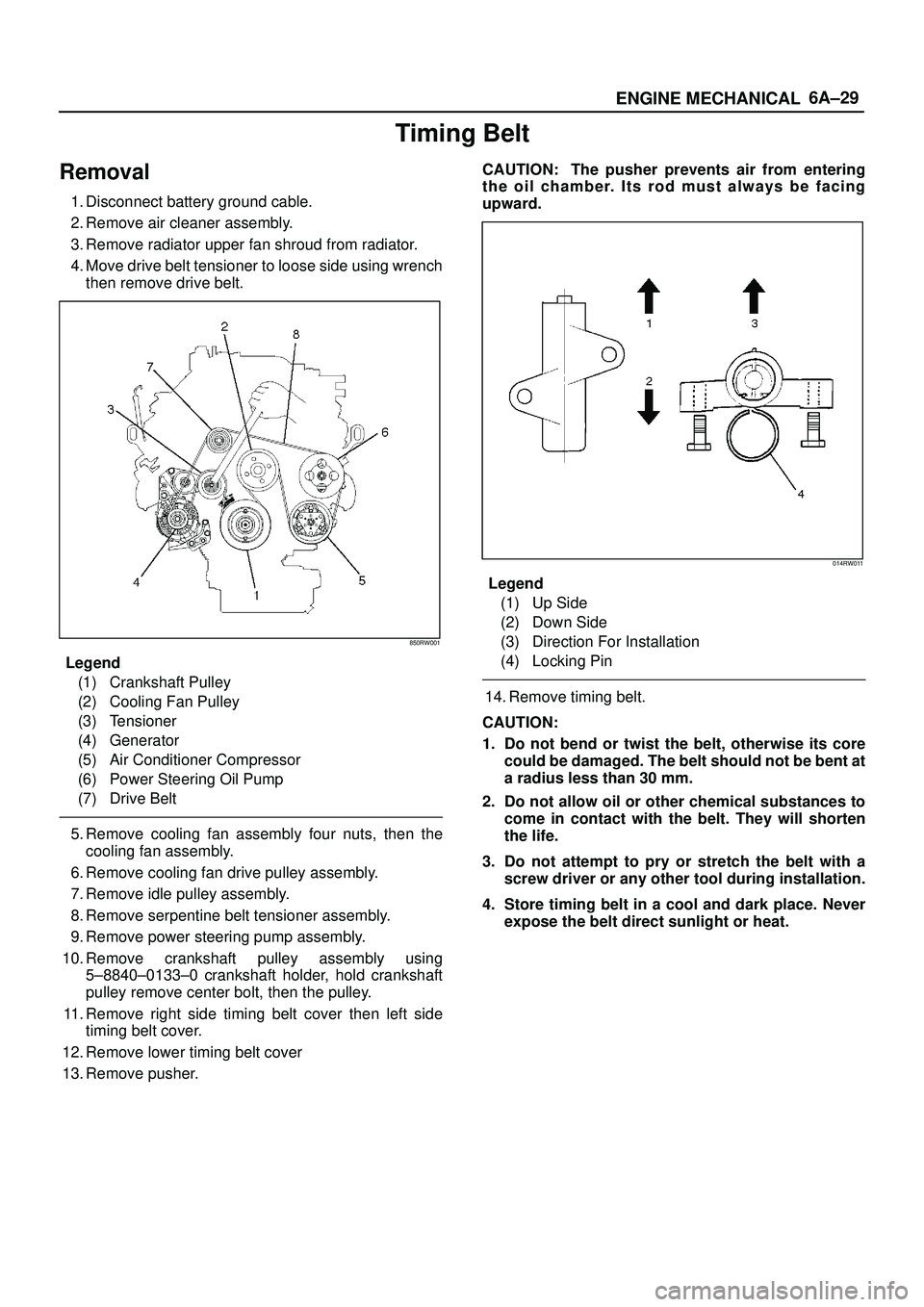
4. Move drive belt tensioner to loose side using wrench
then remove drive belt.
850RW001
Legend
(1) Crankshaft Pulley
(2) Cooling Fan Pulley
(3) Tensioner
(4) Generator
(5) Air Conditioner Compressor
(6) Power Steering Oil Pump
(7) Drive Belt
5. Remove cooling fan assembly four nuts, then the
cooling fan assembly.
6. Remove cooling fan drive pulley assembly.
7. Remove idle pulley assembly.
8. Remove serpentine belt tensioner assembly.
9. Remove power steering pump assembly.
10. Remove crankshaft pulley assembly using
5±8840±0133±0 crankshaft holder, hold crankshaft
pulley remove center bolt, then the pulley.
11. Remove right side timing belt cover then left side
timing belt cover.
12. Remove lower timing belt cover
13. Remove pusher.CAUTION: The pusher prevents air from entering
the oil chamber. Its rod must always be facing
upward.
014RW011
Legend
(1) Up Side
(2) Down Side
(3) Direction For Installation
(4) Locking Pin
14. Remove timing belt.
CAUTION:
1. Do not bend or twist the belt, otherwise its core
could be damaged. The belt should not be bent at
a radius less than 30 mm.
2. Do not allow oil or other chemical substances to
come in contact with the belt. They will shorten
the life.
3. Do not attempt to pry or stretch the belt with a
screw driver or any other tool during installation.
4. Store timing belt in a cool and dark place. Never
expose the belt direct sunlight or heat.