disable JAGUAR XF 2010 1.G User Guide
[x] Cancel search | Manufacturer: JAGUAR, Model Year: 2010, Model line: XF, Model: JAGUAR XF 2010 1.GPages: 225, PDF Size: 8 MB
Page 47 of 225

R
(FM8) SEMCON JLR OWNER GUIDE VER 1.00 EURO
LANGUAGE: english-en; MARQUE: jaguar; MODEL: XF
Blind spot monitoring
47
Note: This radar sensor is approved in all RTTE
countries.
Note: The system covers an area of a fixed lane
width. If the lanes are narrower than a typical
carriageway lane, obj ects travelling in
non-adjacent lanes may be detected.
BSM automatically switches on and becomes
active when the vehicle is travelling at more
than 16 km/h (10 mph) in a forward gear.
When the system initiates, it performs a
self-check, during which the warning icons in
the mirrors illuminate alternately for a short
period of time.
The indicator dot (2) re mains illuminated until
forward vehicle speed exceeds 16 km/h
(10 mph).
BSM is designed to work most effectively when
driving on multi-lane highways.
Note: If an overtaking vehicle is detected on
both sides of the vehicle simultaneously, the
warning icons in both mirrors will illuminate.
Note: BSM is automatically turned off when
reverse ( R) gear is selected, when the vehicle is
in park ( P), the vehicle is travelling below
16 km/h (10 mph). Under these conditions, an
amber warning indicator within the exterior
mirror is displayed.
SENSOR BLOCKAGE
The BSM system will automatically disable if
either of the sensor s become completely
obscured, an amber wa rning indicator dot (2)
is displayed in the exterior mirror and the
message BLIND SPOT MONITOR SENSOR
BLOCKED appears in the message centre.
Note: Blockage testing is only initiated when
vehicle speed is above 32 km/h (20 mph) and
will take at least two minutes of accumulated
driving above this speed, to determine that the
sensor is blocked. If the sensors become blocked, then please
check that there is nothing obscuring the rear
bumper and that it is cl
ear from ice, frost and
dirt.
BSM SYSTEM FAULT
If a fault with one of the radar sensors is
detected, an amber warning indicator dot is
displayed in the exterior mirror and the
message BLIND SPOT MONITOR NOT
AVAILABLE is displayed in the message centre.
Note: Even if the detected fault only affects the
radar sensor on one side of the vehicle, the
whole system is disabled. If the fault is
temporary, the system will operate correctly
once the engine has been switched off and then
on again.
If a fault in the system occurs, consult your
Dealer/Authorised Repairer.
Page 61 of 225
R
(FM8) SEMCON JLR OWNER GUIDE VER 1.00 EURO
LANGUAGE: english-en; MARQUE: jaguar; MODEL: XF
Touch screen
61
The training session can be cancelled at any
time by touching the on-screen pop-up or by
pressing and holding the Voice button on the
steering wheel. See 126, USING VOICE
CONTROL .
TRIP COMPUTER SETTINGS
Trip Computer : Select to switch trip computer
readings between Trip A, Trip B and Trip Auto .
Select Reset to zero the trip computer
readings. Select Units to switch the trip
computer readings between Imperial and
Metric measurements.
VEHICLE SETTINGS
• Security : Select to enable/disable or alter
the settings of the following:
• Single/multi-point entry (2 stage
unlocking).
• Alarm sensors (interior and tilt).
• Drive-away locking.
Scroll down through the menu until the
desired feature is disp layed, then select On
or Off, as appropriate.
If drive-away locking is switched on, select
the desired speed (8, 16 or 32 km/h or 5,
10 or 20 mph).
• Windows/mirrors : Select to
enable/disable:
• Global opening/closing of windows
and sunroof.
• Exterior mirror dip when reversing.
• Automatic folding/unfo lding of exterior
mirrors when vehicle is locked/
unlocked.
• Interior mirror dimming.
Scroll down through the menu until the
desired feature is disp layed, then select On
or Off, as appropriate. •
Units : Select to switch between Imperial
and Metric measurements.
• Auto (AHB) high beam : Select to turn AHB
on or off, and set AHB for side of road
being driven on.
SELECTING VALET MODE
Valet mode allows the vehi cle to be locked by a
parking attendant, without giving access to the
luggage compartment and glove box. Valet
mode also prevents ope ration of the touch
screen, to prevent access to telephone
numbers or naviga tion addresses.
From the Home menu, select Valet, then enter
a four digit Personal Identification Number
(PIN) (personally chosen ). You will then be
prompted to re-enter the same PIN. On
completion, touch the OK soft key.
If you wish to cancel the PIN, touch the C soft
key. If the PIN is cancelled, or incorrectly
entered, you will be prompted to enter the PIN
again.
Once the PIN has been correctly entered, a
security information pop- up is displayed. Read
the information and remove the emergency key
from the Jaguar Smart Key.
Valet on is displayed to indicate that the PIN
has been accepted. The luggage compartment
and glove box are now securely locked in Valet
mode.
On exiting and securing the vehicle, remove the
emergency key from the Jaguar Smart Key.
Retain the emergency key and give the Jaguar
Smart Key to the attendant.
Note: The emergency key ca n be used to open
the luggage compartment, which may
de-activate Valet mode.
Page 69 of 225
R
(FM8) SEMCON JLR OWNER GUIDE VER 1.00 EURO
LANGUAGE: english-en; MARQUE: jaguar; MODEL: XF
Towing
69
TowingTOWING A TRAILER
(V6 petrol and diesel vehicles only)
Never exceed the maximum weights
for the vehicle or the trailer. Damage
to the vehicle coul d occur and vehicle
stability and braking could be
adversely affected. This could lead to
loss of control and increased braking
distance, resulting in a rollover or
crash.
To preserve handling and stability,
only fit Jaguar approved towing
accessories.
Never use towing eyes or lashing
points to tow a trailer. They have not
been designed for this purpose and
doing so may cause them to fail,
resulting in injury or death.
When towing, do not exceed 100 km/h
(60 mph). If using a temporary spare
wheel, do not exceed 80 km/h (50
mph).
Note: It is the driver’s re sponsibility to ensure
that the towing vehicle, and the trailer, are
being used correctly and in accordance with
manufacturer’s reco mmendations and any
applicable legislation.
Information on towing, towing weight
capacities and regulati ons is available from
your Dealer and from the main motoring and
caravanning organisations.
The following are important points of safety,
stability and comfort. Seek further advice if
necessary.
• Maximum braked to wing weight is
permissible, provided that long periods of
uphill driving on gradients over 8% are not
undertaken. •
At altitudes above 1000 metres (3250 feet),
the stipulated maximum permitted Gross
Train Weight must be reduced by 10% for
every 1000 metres (3250 feet) in altitude,
because the thinner atmosphere can
reduce engine performance.
Diesel engines : When ambient temperature
exceeds 40°C (104°F), the engine coolant
temperature may increase above normal
operating level. If this occurs, the engine
management system will initiate a series of
actions to restore normal operating conditions,
which may include:
• A message centre message.
• Engine performance reduction.
• Air conditioning system cycling. The air
conditioning temper ature output will
fluctuate between hot and cold, in order to
dissipate engine heat. If engine overheat
persists, the air conditioning will move to
continuous heat output.
It is advisable to bring the vehicle and trailer to
a convenient stop and allo w the engine to idle
until normal temperature is restored. Do not
turn off the engine.
TRAILER ELECTRICAL CONNECTION
Only connect approved electrical
circuits, which are in good condition, to
the trailer socket. Connecting incorrect
or faulty circuits, may seriously damage
the vehicle’s electrical circuits.
The vehicle’s electrical system has been
designed to support all towing requirements
and comply with legal requirements for the
specific territory in which the vehicle is first
sold.
Note: The rear parking se nsors automatically
disable when the trailer electrical connection is
made using Jaguar approved towing
equipment.
Page 72 of 225
L
(FM8) SEMCON JLR OWNER GUIDE VER 1.00 EURO
LANGUAGE: english-en; MARQUE: jaguar; MODEL: XF
Storage compartments
72
Storage compartmentsSTORAGE COMPARTMENTS
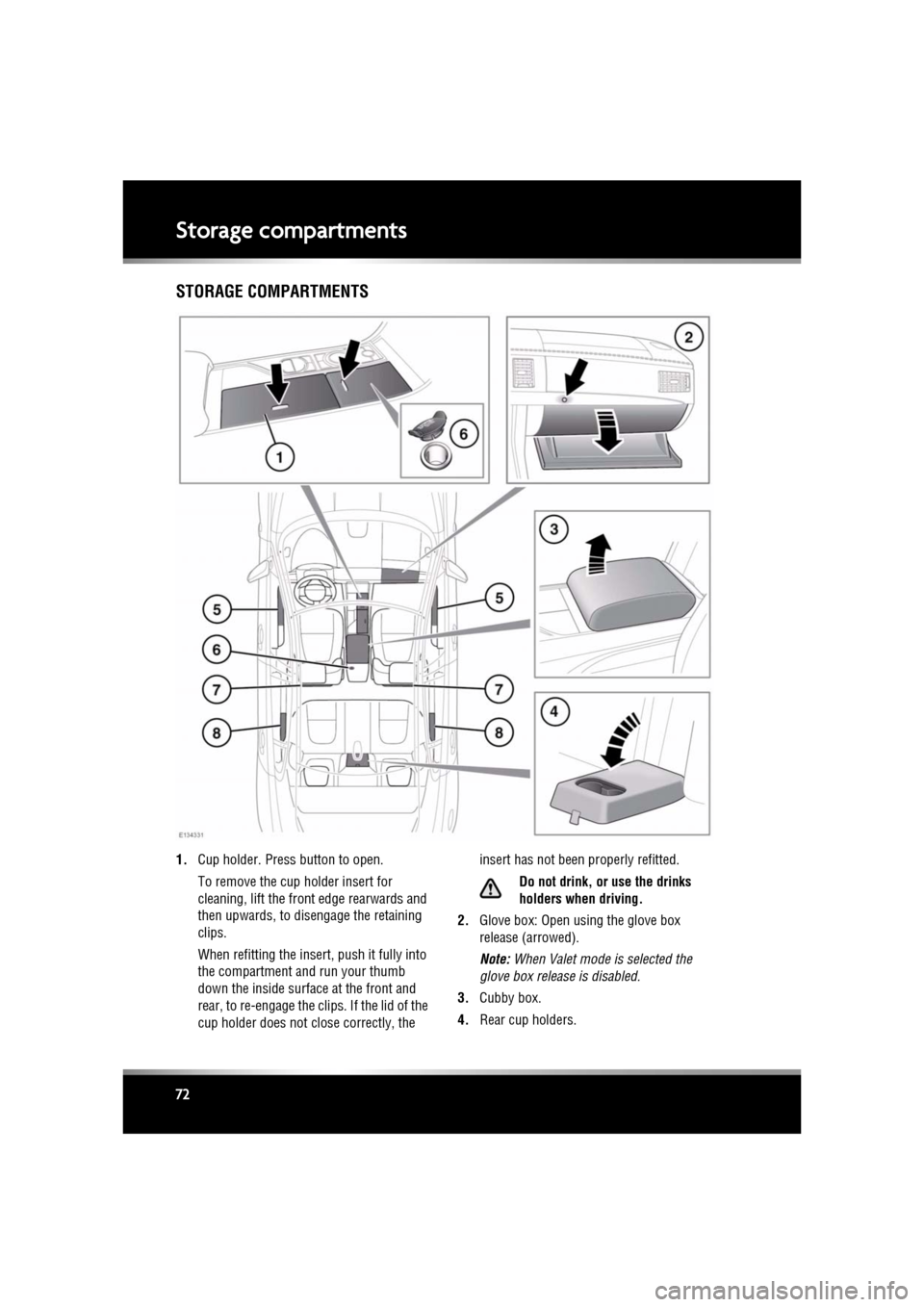
1. Cup holder. Press button to open.
To remove the cup holder insert for
cleaning, lift the front edge rearwards and
then upwards, to disengage the retaining
clips.
When refitting the insert , push it fully into
the compartment and run your thumb
down the inside surface at the front and
rear, to re-engage the clips. If the lid of the
cup holder does not close correctly, the insert has not been properly refitted.
Do not drink, or use the drinks
holders when driving.
2. Glove box: Open using the glove box
release (arrowed).
Note: When Valet mode is selected the
glove box relea se is disabled.
3. Cubby box.
4. Rear cup holders.
Page 82 of 225

L
(FM8) SEMCON JLR OWNER GUIDE VER 1.00 EURO
LANGUAGE: english-en; MARQUE: jaguar; MODEL: XF
Gearbox
82
Do not allow the vehicle to remain
stationary with a drive gear selected and
the engine running . Always select P or
N if the engine is to idle for a prolonged
period.
ROTARY GEAR SELECTOR
The JaguarDrive selector elevates out of the
centre console when the engine is started, in
readiness for gear selection
P should be selected before switching off the
engine. However, it is possible to switch the
engine off with R, D or S selected - the selector
will automatica lly select P, while retracting into
the centre console.
Note: If the engine is switched off with N
selected, the system will wait for 10 minutes
before selecting P. This procedure is to allow
the vehicle to be conveyed through a car wash
only and should not be used for vehicle
recovery purposes.
In the event of a vehicle breakdown, the
transmission will automatically select P. This
prevents the vehicle from being towed on all
four wheels. Therefore, vehicle recovery
should only be undertaken by suitably qualified
personnel.
IF THE SELECTOR FAILS TO ELEVATE
If the JaguarDrive selector is obstructed
remove the obstruction and then start the
engine. The selector s hould elevate as normal.
If the selector still fails to elevate, even if there
is no obstruction, a faul t in the system is
indicated. The selector ca n still be used in the
lowered position, but be aware that it will not
automatically select P when the engine is
switched off. P should be selected manually.
The fault should be re ctified by a Dealer/
Authorised Repairer at the earliest opportunity.
MANUAL GEAR SELECTION
When the gear selector is in the D position,
manual mode may be directly accessed by the
single action of operating the steering wheel
mounted shift paddles.
If continued use of manua l mode is required,
the gear selector may be subsequently moved
to the S position to enter permanent manual
mode.
If the gear selector remains in the D position,
temporary manual mode will be held whilst the
driver is accelerating, decelerating, cornering
or continuing to request shifts via the paddles.
LIMP-HOME MODE
Note: The driver should be aware that the
vehicle’s performance will be reduced and
must take this into account when driving. Also
the use of the Jaguar Sequential Shift paddles
will be disabled. In this event, seek qualified
assistance as soon as possible.
In the event of an electrical or mechanical
failure, transmission ope ration will be limited.
P , R , N , D and S may still be used to enable the
vehicle to be driven to a safe area.
Some faults will cause the selector to be locked
in position until the ignition is switched off. If
the selected range flashes, it signifies that the
driver request cannot be engaged. Re-select N
and repeat the attempt.
If the transmission is st ill unable to select the
requested gear, contact your Dealer/
Authorised Repairer.
Page 93 of 225
R
(FM8) SEMCON JLR OWNER GUIDE VER 1.00 EURO
LANGUAGE: english-en; MARQUE: jaguar; MODEL: XF
Parking aids
93
CLEANING THE SENSORS
For reliable operation, th e sensors in the front
and rear bumpers should be kept free from ice,
frost and grime.
Do not clean the sensors with abrasive
or sharp objects or materials.
When using a high pressure spray, only
spray the sensors briefly, from a
distance greater than 200 mm
(8 inches).
PARKING AID SYSTEM FAULT
If the system has a fault when engaging reverse
gear or turning on the ignition, then a single, 3
second tone will be heard and a pop-up
warning will appear on the touch screen. If
both front and rear park ing aids are fitted, the
warning indicator in the parking aid switch will
flash for 3 seconds and then switch off.
If a fault is detected, the system is
automatically disabled.
Note: The parking aid may emit spurious tones
if it detects a frequenc y tone using the same
band as the sensors (e.g. air brakes).
REAR VIEW CAMERA
It remains the driver's responsibility
to detect obstacles and estimate the
vehicle's distance from them when
reversing.
When Reverse ( R) is selected, the system uses
a camera to provide a wide-angle colour rear
view image on the touch screen.
The camera display has priority over the
parking aid display. To view the parking aid
display instead, or to cancel camera display at
any time, touch the display.
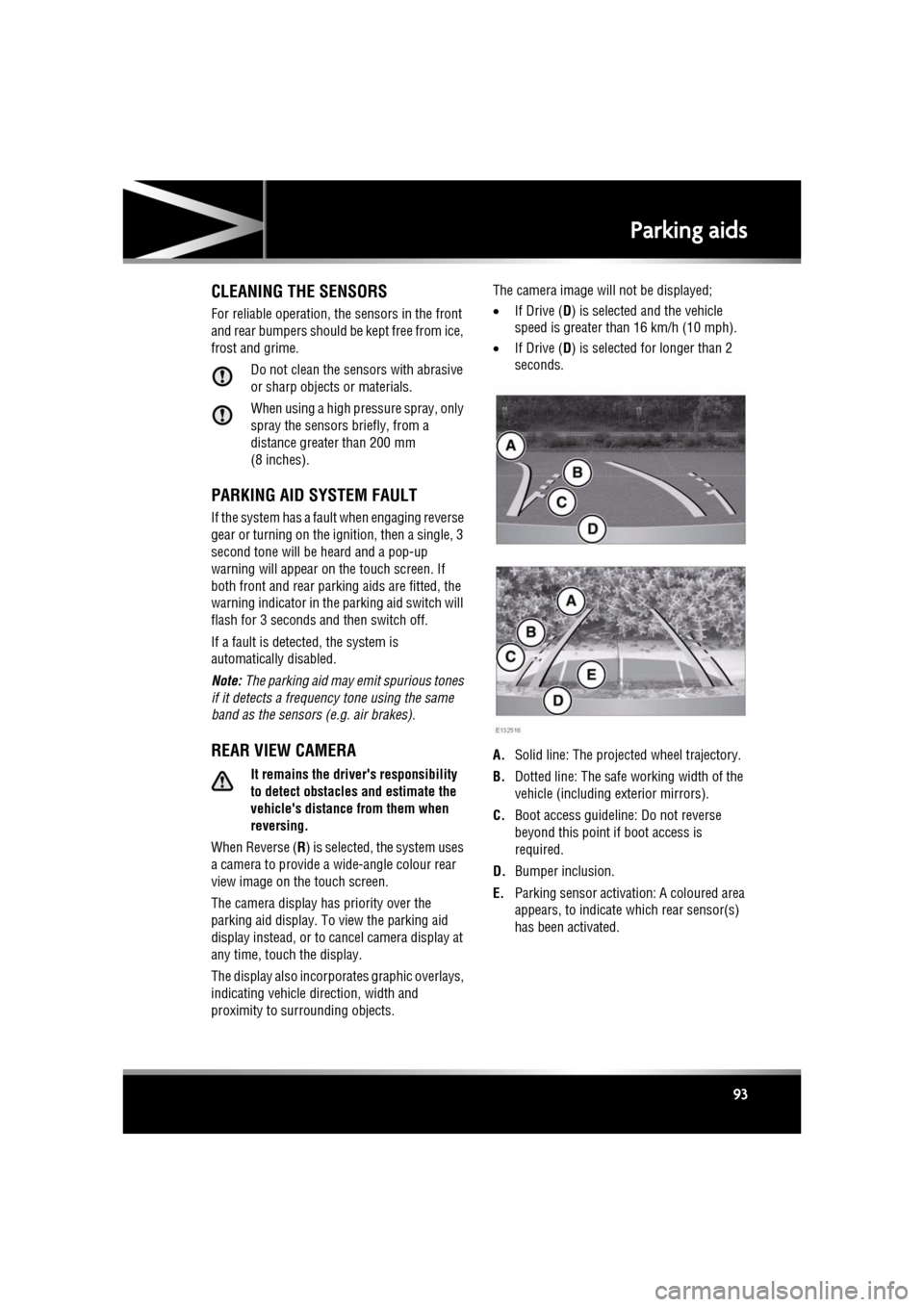
The display also incorporates graphic overlays,
indicating vehicle di rection, width and
proximity to surrounding objects. The camera image will not be displayed;
•
If Drive ( D) is selected and the vehicle
speed is greater than 16 km/h (10 mph).
• If Drive ( D) is selected for longer than 2
seconds.
A. Solid line: The projec ted wheel trajectory.
B. Dotted line: The safe working width of the
vehicle (including exterior mirrors).
C. Boot access guideline: Do not reverse
beyond this point if boot access is
required.
D. Bumper inclusion.
E. Parking sensor activati on: A coloured area
appears, to indicate which rear sensor(s)
has been activated.
Page 133 of 225
R
(FM8) SEMCON JLR OWNER GUIDE VER 1.00 EURO
LANGUAGE: english-en; MARQUE: jaguar; MODEL: XF
Telephone
133
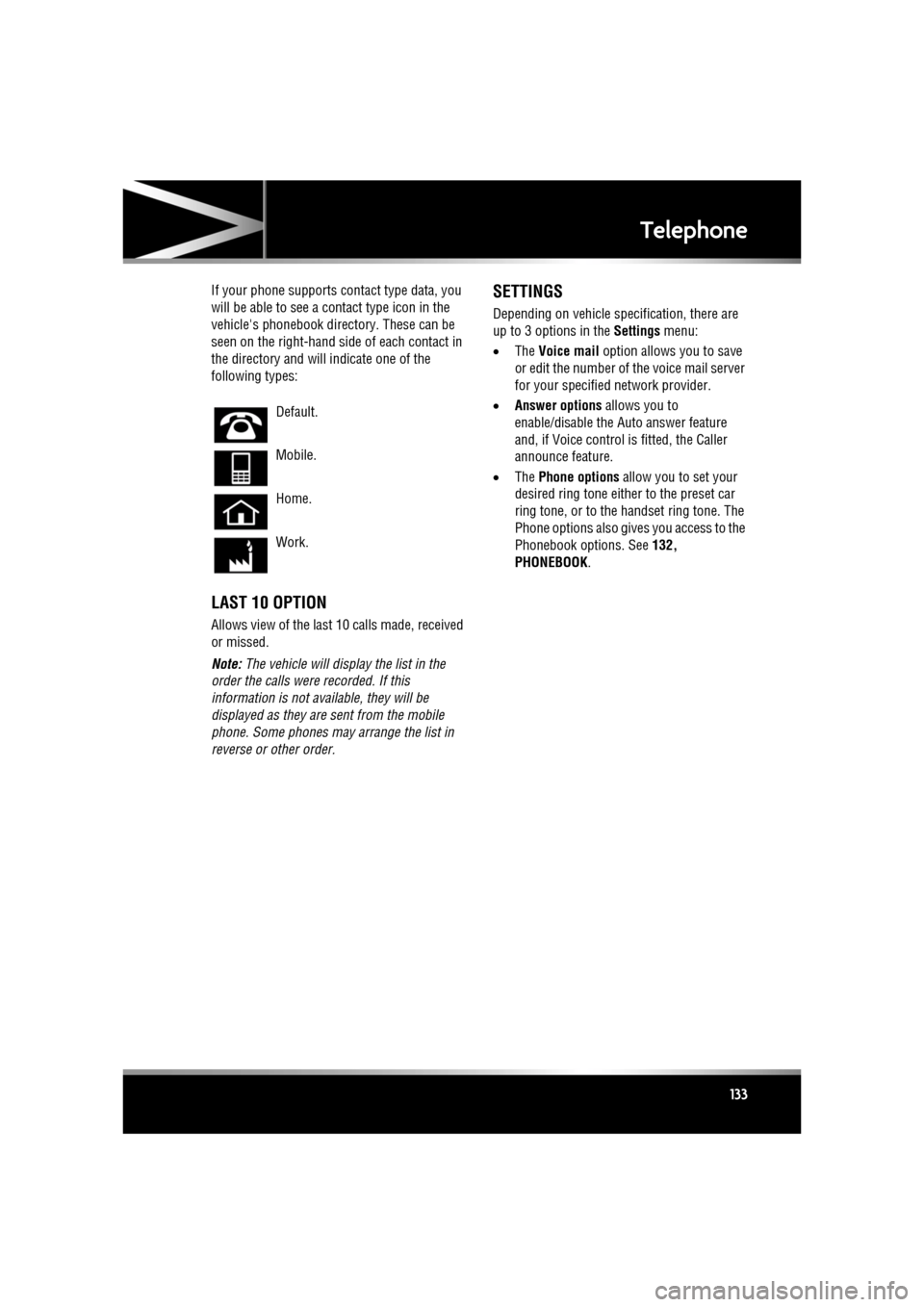
If your phone supports co ntact type data, you
will be able to see a contact type icon in the
vehicle's phonebook dire ctory. These can be
seen on the right-hand side of each contact in
the directory and will indicate one of the
following types:
LAST 10 OPTION
Allows view of the last 10 calls made, received
or missed.
Note: The vehicle will display the list in the
order the calls were recorded. If this
information is not available, they will be
displayed as they are sent from the mobile
phone. Some phones may arrange the list in
reverse or other order.
SETTINGS
Depending on vehicle specification, there are
up to 3 options in the Settings menu:
• The Voice mail option allows you to save
or edit the number of the voice mail server
for your specified network provider.
• Answer options allows you to
enable/disable the Auto answer feature
and, if Voice control is fitted, the Caller
announce feature.
• The Phone options allow you to set your
desired ring tone either to the preset car
ring tone, or to the handset ring tone. The
Phone options also give s you access to the
Phonebook options. See 132,
PHONEBOOK .
Default.
Mobile.
Home.
Work.
Page 183 of 225
R
(FM8) SEMCON JLR OWNER GUIDE VER 1.00 EURO
LANGUAGE: english-en; MARQUE: jaguar; MODEL: XF
Vehicle battery
183
BATTERY MONITORING SYSTEM
(BMS)
If excessive battery discharge is occurring
when the engine isn't running, the system will
shut down non-essential el ectrical systems to
protect battery power.
CONNECTING BOOSTER CABLES
Always wear appropriate eye
protection when working with
batteries.
Make sure both batteries are of the 12
volt type and that the booster cables
have insulated clamps and are
approved for use with 12 volt
batteries.
Do not disconnect the discharged
battery.
Do not connect a booster cable to the
negative (-) terminal of the battery.
Always connect to the recommended
earthing point.
Ensure the bodywork of the donor and
disabled vehicles do not touch.
If the vehicle is fitted with a dual
battery system, the larger of the two
batteries must be used when
connecting booster cables.
Note: Before connecting booster cables,
ensure that the battery connections on the
disabled vehicle are correct and that all
electrical equipment has been switched off.
1. Connect the positive booster cable to the
positive terminal on the donor vehicle's
battery.
2. Connect the other e nd of the positive
booster cable to the positive terminal on
the disabled vehicle's battery. If the vehicle is fitted with a dual
battery system, t
he larger of the
two batteries must be used when
connecting booster cables.
3. Connect the negative booster cable to the
recommended jump starting earth point of
the donor vehicle.
4. Connect the other e nd of the negative
booster cable to a suitable earth point on
the disabled vehicle. The earth point should
be at least 0.5 metres (20 inches) away
from the battery and as far as possible
from any fuel or brake pipes.
• Check that all cables are clear of any
moving components and that all four
connections are secure.
5. Start the engine of the donor vehicle, and
allow it to idle for a few minutes.
6. Start the engine of the disabled vehicle.
7. Allow both vehicles to idle for two minutes.
8. Switch off the donor vehicle.
DISCONNECTING THE BOOSTER
CABLES
To avoid serious injury use extreme
caution when removing the booster
cables as the engine will be running
on the previously disabled vehicle.
This means that you may be working
close to components which are
moving at high speed, carry high
voltage, or may be hot.
Note: Do not switch on any electrical
equipment until after th e cables have been
disconnected.
The engine should be running on the
previously disabled ve hicle and the engine
switched off on the donor vehicle. Disconnect
the booster cables in the exact reverse order of
that used for connection.