tow JAGUAR XF 2010 1.G User Guide
[x] Cancel search | Manufacturer: JAGUAR, Model Year: 2010, Model line: XF, Model: JAGUAR XF 2010 1.GPages: 225, PDF Size: 8 MB
Page 73 of 225

R
(FM8) SEMCON JLR OWNER GUIDE VER 1.00 EURO
LANGUAGE: english-en; MARQUE: jaguar; MODEL: XF
Storage compartments
73
5. Front door stowage.
6. Auxiliary power sockets.
Only use approved accessories and
always run the engine when using
accessories for a prolonged period.
7. Map pockets.
8. Rear door stowage.
Page 82 of 225

L
(FM8) SEMCON JLR OWNER GUIDE VER 1.00 EURO
LANGUAGE: english-en; MARQUE: jaguar; MODEL: XF
Gearbox
82
Do not allow the vehicle to remain
stationary with a drive gear selected and
the engine running . Always select P or
N if the engine is to idle for a prolonged
period.
ROTARY GEAR SELECTOR
The JaguarDrive selector elevates out of the
centre console when the engine is started, in
readiness for gear selection
P should be selected before switching off the
engine. However, it is possible to switch the
engine off with R, D or S selected - the selector
will automatica lly select P, while retracting into
the centre console.
Note: If the engine is switched off with N
selected, the system will wait for 10 minutes
before selecting P. This procedure is to allow
the vehicle to be conveyed through a car wash
only and should not be used for vehicle
recovery purposes.
In the event of a vehicle breakdown, the
transmission will automatically select P. This
prevents the vehicle from being towed on all
four wheels. Therefore, vehicle recovery
should only be undertaken by suitably qualified
personnel.
IF THE SELECTOR FAILS TO ELEVATE
If the JaguarDrive selector is obstructed
remove the obstruction and then start the
engine. The selector s hould elevate as normal.
If the selector still fails to elevate, even if there
is no obstruction, a faul t in the system is
indicated. The selector ca n still be used in the
lowered position, but be aware that it will not
automatically select P when the engine is
switched off. P should be selected manually.
The fault should be re ctified by a Dealer/
Authorised Repairer at the earliest opportunity.
MANUAL GEAR SELECTION
When the gear selector is in the D position,
manual mode may be directly accessed by the
single action of operating the steering wheel
mounted shift paddles.
If continued use of manua l mode is required,
the gear selector may be subsequently moved
to the S position to enter permanent manual
mode.
If the gear selector remains in the D position,
temporary manual mode will be held whilst the
driver is accelerating, decelerating, cornering
or continuing to request shifts via the paddles.
LIMP-HOME MODE
Note: The driver should be aware that the
vehicle’s performance will be reduced and
must take this into account when driving. Also
the use of the Jaguar Sequential Shift paddles
will be disabled. In this event, seek qualified
assistance as soon as possible.
In the event of an electrical or mechanical
failure, transmission ope ration will be limited.
P , R , N , D and S may still be used to enable the
vehicle to be driven to a safe area.
Some faults will cause the selector to be locked
in position until the ignition is switched off. If
the selected range flashes, it signifies that the
driver request cannot be engaged. Re-select N
and repeat the attempt.
If the transmission is st ill unable to select the
requested gear, contact your Dealer/
Authorised Repairer.
Page 86 of 225

L
(FM8) SEMCON JLR OWNER GUIDE VER 1.00 EURO
LANGUAGE: english-en; MARQUE: jaguar; MODEL: XF
Stability control
86
JAGUARDRIVE CONTROL SCENARIOS
The table below gives examples of the drive
control settings suggested for different driving
scenarios.
Scenario Suggested driver selection
Tyre fitment JaguarDrive ControlDynamic
Stability Control (DSC) Transmission
Wet grass Standard Winter mode Default (On) Drive (D)
Very wet tarmac
Slippery boat launch
ramp
Hill descents while
towing on slippery
surfaces Sport (S) +
Manual
Ice/light snow Standard or All
Season tyres Drive (D)
Snow ploughed
hard-topped roads
(including black ice) All Season tyres
Packed snow roads Winter tyres
Deep fresh snow Snow chains Sport (S)
Normal driving
conditions (e.g. dry
tarmac, town driving,
motorway cruising etc. Standard No driver
selection
required.
Special modes
off Drive (D)
Overtaking on a dry
road Drive (D) or
Sport (S)
Pulling out onto a busy
road in dry conditions
Favourite country lane
(public road) Standard Dynamic mode
Sport (S) or
Sport (S) +
Manual
Private track/race day Standard Trac DSC
(where
conditions
permit)
Page 112 of 225

L
(FM8) SEMCON JLR OWNER GUIDE VER 1.00 EURO
LANGUAGE: english-en; MARQUE: jaguar; MODEL: XF
DAB radio
112
7. Channel list : Touch to view a list of
available Ensembles an d channels. The list
can be sorted by Ensemble, Channel ,
Subchannel or by Category .
• If an Ensemble is selected from the
list, all available channels from that
ensemble will be displayed.
• Sorting by Subchannel is only
available when the current channel is
broadcasting subchannels.
• If Category is selected, touch the
chosen category to view
corresponding channels, before
making your selection from the list.
Once the desired sele ction has been made,
select the Back soft key to return to the
main DAB menu.
8. Subchannel : If subchannels are broadcast
by the current channel, this soft key will be
active. Select to al low subchannels then
select the required subchannel with the
seek down / up keys.
9. Auto-tune: Select to scan for all available DAB Ensembles/channels. This needs to be
done before using the DAB radio for the
first time.
Auto-tune is also useful when travelling
long distances, so re gional Ensembles can
be tuned.
During Auto-tune, a pop-up shows tuning
progress.
The Auto-tune process will not affect
current presets, but some presets may not
operate if the channel they relate to is no
longer available ( No reception displays). 10.
Station presets: Each DAB band has 6
preset positions.
•Touch and release to tune the radio to
the station stored on that preset.
• Touch and hold to store the current
station on that preset (the radio will
mute while the station is stored).
• Use the seek buttons on the steering
wheel to select the next or previous
preset station.
Note: If you attempt to select a preset
channel that is now una vailable or invalid,
No reception is displayed.
DIGITAL RADIO RECEPTION
DAB radio can significa ntly increase the
number of radio channels /stations available.
The DAB signals are transmitted to most major
cities, towns and motorway networks.
Digital radio is transm itted from regional
transmitters. Some local channels are not
available outside th e range of their
transmitters. If you want to listen to local
channels as you move around the country, use
the auto-tune function (AUTO) to build new
channel lists.
Note: If any auxiliary electrical equipment is
connected to the vehicle, then this may reduce
the DAB radio sound quality.
ENSEMBLES
Unlike AM/FM radio, DAB transmits several
channels/stations on a single frequency. A
group of channels is k nown as an ensemble.
Some channels within the ensemble may have
subchannels offering seve ral listening options.
If reception is lost when the vehicle is in
motion, the vehicle may be out of range of the
ensemble. To build a new list of ensembles,
select Auto-tune .
Page 127 of 225

R
(FM8) SEMCON JLR OWNER GUIDE VER 1.00 EURO
LANGUAGE: english-en; MARQUE: jaguar; MODEL: XF
Voice control
127
The voice tutorial can be cancelled at any time
by touching the on-screen pop-up or by
pressing and holding the Voice button.
VOICE TRAINING
This is a feature designed to enable the system
to better recognise the vocal characteristics of
a user, once the training has been completed.
To carry out Voice training:
1. Select Setup from the Home menu.
2. Select Voice and from the Setup menu.
3. Select Voice training from the Voice
settings menu.
4. Select User 1 or User 2 , to start the
training.
5. Follow the on-screen and audible
instructions.
The training session can be cancelled at any
time by touching the on-screen pop-up or by
pressing and holding the Voice button.
VOICETAGS
Voicetags enable the user to personalise the
Voice system so that a single name can be used
to call-up a navigation destination, telephone
number or radio channel.
To add a Voicetag:
1. Briefly press the Voice button to start a
Voice session.
2. Wait for the tone to sound then say Phone,
Navigation or Radio .
3. Say Store voicetag .
Alternatively, Voicetag s can be managed via
the touch screen as follows:
1. Select Setup from the Home menu.
2. Select Voice from the Setup menu.
3. Select Voicetags from the Voice settings
menu. 4.
Select the system which the Voicetag is to
activate ( Phone, Navigation or Radio ).
Follow the on-screen and audible instructions.
NAVIGATION POI VOICE COMMANDS
To request the display of POI (Point Of Interest)
identifiers on the navi gation display, say
Navigation , followed by the name of the
desired POI category from the following list:
• Petrol station/Petrol.
• Parking/Car park.
• Jaguar Dealer.
• Hospital.
• Golf course.
• Tourist information.
• Restaurant/I’m hungry.
• Shopping centre.
• Hotel.
• Motorway service.
• Town centre.
Icons will appear on th e navigation display,
indicating the locations of the selected POI. For
further information about POIs, see 141,
CATEGORIES AND SUB-CATEGORIES.
Page 129 of 225

R
(FM8) SEMCON JLR OWNER GUIDE VER 1.00 EURO
LANGUAGE: english-en; MARQUE: jaguar; MODEL: XF
Telephone
129
BLUETOOTH® INFORMATION
The Jaguar Bluetoot h® system supports
Bluetooth® Hands-Fre e Profile (HFP),
Advanced Audio Distribution Profile (A2DP)
and Audio Video Remote Control Profile
(AVRCP).
Note: HFP and A2DP/AVRCP profiles can be
connected independently, so a phone can be
connected via one, while a media device can be
connected via the other, at the same time.
Before making use of the vehicle’s Bluetooth
phone system, your Bl uetooth phone must be
paired and connected to the vehicle system.
This is done using one of two methods; via
your phone to the vehicl e or from the touch
screen to your phone. If one of these methods
is not successful, try the other option.
Each time the ignition is switched on the
system will attempt to connect with the last
connected phone.
As mobile phones have a wide range of audio
and echo characteristics, it may take a few
seconds for the vehicle system to adapt and
deliver optimum audio performance. To
achieve this, it may be necessary to reduce the
in-vehicle volume a nd ventilation fan speed
slightly.
TELEPHONE SAFETY
Switch off your telephone in areas
with a high explos ion risk. This
includes filling stat ions, fuel storage
areas or chemical factories, as well
as places where the air contains fuel
vapour, chemicals or metal dust. Always stow your mobile phone
securely.
The functioning of cardiac
pacemakers or hearing aids may be
impaired when the phone is in use.
Check with a doctor or manufacturer
whether any such devices you or your
passengers are using, are sufficiently
protected against high-frequency
energy.
The Health Industry Manufacturers'
Association recommends that a minimum
separation of 15 centimetres (six inches) is
maintained between a wireless phone antenna
and a pacemaker, to avoid potential
interference with the pacemaker. These
recommendations are consistent with the
independent research by, and
recommendations of, Wi reless Technology
Research.
Bluetooth® is the name for
short-range radio frequency (RF)
technology that allows electronic
devices to communicate
wirelessly with each other.
Page 138 of 225
L
(FM8) SEMCON JLR OWNER GUIDE VER 1.00 EURO
LANGUAGE: english-en; MARQUE: jaguar; MODEL: XF
Navigation system
138
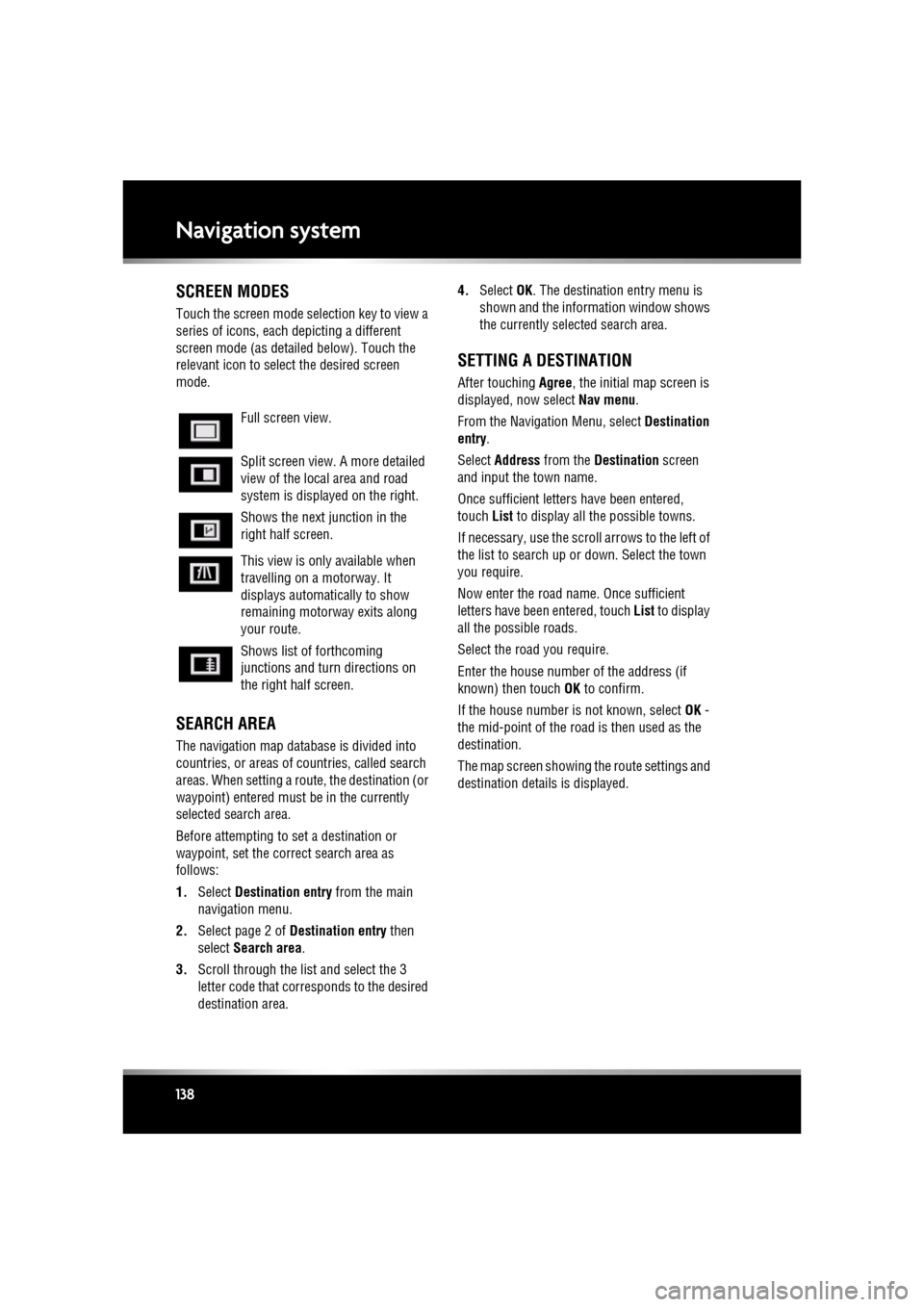
SCREEN MODES
Touch the screen mode selection key to view a
series of icons, each depicting a different
screen mode (as detail ed below). Touch the
relevant icon to select the desired screen
mode.
SEARCH AREA
The navigation map databa se is divided into
countries, or areas of countries, called search
areas. When setting a route, the destination (or
waypoint) entered must be in the currently
selected search area.
Before attempting to set a destination or
waypoint, set the correct search area as
follows:
1. Select Destination entry from the main
navigation menu.
2. Select page 2 of Destination entry then
select Search area .
3. Scroll through the list and select the 3
letter code that corre sponds to the desired
destination area. 4.
Select OK. The destination entry menu is
shown and the information window shows
the currently selected search area.
SETTING A DESTINATION
After touching Agree, the initial map screen is
displayed, now select Nav menu.
From the Navigati on Menu, select Destination
entry .
Select Address from the Destination screen
and input the town name.
Once sufficient letter s have been entered,
touch List to display all the possible towns.
If necessary, use the scroll arrows to the left of
the list to search up or down. Select the town
you require.
Now enter the road name. Once sufficient
letters have been entered, touch List to display
all the possible roads.
Select the road you require.
Enter the house number of the address (if
known) then touch OK to confirm.
If the house number is not known, select OK -
the mid-point of the road is then used as the
destination.
The map screen showing the route settings and
destination detail s is displayed.
Full screen view.
Split screen view. A more detailed
view of the local area and road
system is displayed on the right.
Shows the next junction in the
right half screen.
This view is only available when
travelling on a motorway. It
displays automatically to show
remaining motorway exits along
your route.
Shows list of forthcoming
junctions and turn directions on
the right half screen.
Page 141 of 225

R
(FM8) SEMCON JLR OWNER GUIDE VER 1.00 EURO
LANGUAGE: english-en; MARQUE: jaguar; MODEL: XF
Navigation system
141
MOTORWAY
After selecting Motorway from the menu, enter
the motorway name or number, then select an
entrance or exit. All of the entrance or exit
junctions for the chosen motorway are
displayed.
The map showing the selected motorway and
the selected exit junction is displayed.
The destination has now been set and the route
is calculated.
POINTS OF INTEREST (POI)
After selecting Points of interest from the Nav
menu, touch Name to input the POI name, for
example Petrol to display fuel stations on the
map, or touch List for a list of POIs.
Alternatively, choose Category to see all
categories of POI and make your selection.
Use the scroll arrows to change pages.
Some POIs are sub-categorised, e.g. selecting
Community will be further divided into:
• Community Centre.
• Exhibition Centre.
• Hospital.
• Park & Recreation.
• Town Hall
Note: If entering a POI name results in too
many matches being lis ted, try entering the
town name first. If y ou do not know the name
of the POI you want, try selecting a POI
category.
Note: POI icons can only be displayed up to the
1 km (½ mile ) zoom level.
Once the POI has been selected the route is
determined. Touch Change route. to change
the route settings, or touch OK to start the
route calculation.
JAGUAR DEALER LOCATIONS
Details of Jaguar Dealers are held on the
Navigation System hard drive as a points of
interest (POI) category. Certain Dealers may be
located in areas that are not fully mapped on
the hard drive. If a route is set to one of these
Dealers, guidance may only be possible to the
nearest town centre; in this case a warning
message will be displayed.
Note: If Jaguar Dealers (or certain other
categories, such as airports) are selected, they
will be displayed across all search areas.
ENTRY BY TOWN
If a town name is entered first, the points of
interest listed will be restricted to that town.
• From the Input POI Name screen, touch
Town .
• Enter the town name required.
• Touch List to display the list of possible
towns.
• Select the town required.
The Input POI screen is displayed again.
• Enter the POI name required.
CATEGORIES AND SUB-CATEGORIES
The POI database is divided into a number of
categories. Each main category is further
divided into a number of sub-categories.
The first entry in the list of Restaurant
sub-categories, is ALL. This selects all of the
Restaurant sub-categories.
To narrow the search, touch the Town button.
This will display the alpha keyboard to allow the
desired town name to be entered.
When searching the database, only points of
interest in the current search area are included,
except for the sub-categories marked All
search areas in the POI category list.
Page 142 of 225

L
(FM8) SEMCON JLR OWNER GUIDE VER 1.00 EURO
LANGUAGE: english-en; MARQUE: jaguar; MODEL: XF
Navigation system
142
LIST SOFT KEY
The List button can be used when the
characters entered reduce the possible entries
to a small enough number.
You can also select List (when active) without
entering a POI name. All the relevant points of
interest will be displayed, e.g. in a selected
town or category.
ALL SOFTKEY
The All button shows a list of all POI
categories.
LOCAL POI SEARCH
This selects the points of interest in all
categories within 32 kilometres (20 miles) of
the vehicle.
• Touch the All Local POIs button.
RDS-TMC OVERVIEW
RDS-TMC (Radio Data System-Traffic
Message Channel) is a feature that announces
traffic hold-ups on your route as broadcast by
radio stations that transmit TMC information.
Touch the TMC button on the Navigation Menu
to access the TMC menu.
TMC events ahead on route can be displayed by
touching the Events ahead soft key. TMC can
be set to display on the map for all events, for
major events or can be switched off. During
route calculation, it can be set to avoid TMC
events along the route.
RDS-TMC DISPLAY
When a TMC signal is received the icon in the
top left of the screen will appear green. If a TMC
signal is not being received, the icon will be
shown with a bar through it.
The system will inform the driver of any
roadworks, narrow road, contraflow,
accidents, slippery road, diversion,
information, parking in formation, congestion
or other hazard.
The driver is informed of a traffic event as
follows:
• A TMC Event icon shown on the map at the
location of the event.
• Text can be displaye d showing the details
of each occurrence which can be selected
either by touching the screen icon or from
the traffic information list.
• Dynamic route guidance, which calculates
an alternative route when the system
receives the traffic event warning affecting
the route currently set in the navigation
system.
• Traffic event list shows all events sorted by
road name/ distance on your selected route
in a straight line or along your actual route.
The information rega rding the hold-up is
maintained and updated even if the vehicle
crosses into another country.
Page 154 of 225
L
(FM8) SEMCON JLR OWNER GUIDE VER 1.00 EURO
LANGUAGE: english-en; MARQUE: jaguar; MODEL: XF
Fuel and refuelling
154
DIESEL ENGINES
Vehicles with diesel e ngines are equipped with
a system to prevent the fuel tank from
emptying completely. When the fuel reaches a
minimum level, the system will activate a
reduced power mode (i.e. the engine will not
run properly). This will be followed by the
engine stopping in appr oximately 1.6 km (1
mile).
This feature prevents the fuel system from
running dry, which could cause damage to the
vehicle. If the gauge indicates low fuel or the
warning indicator illuminates, the fuel tank
should be refuelled as s oon as possible at the
next filling station, with at least 4 litres (0.9
gallons) of fuel.
If the system protection function has activated,
the vehicle must firstly be refuelled, then
restarted using the following procedure:
1. With the brake pedal pressed, press and
hold the engine START/STOP button and
crank the engine for five seconds.
2. Release the STAR T/STOP button.
3. With the brake pedal pressed, press and
release the START/STOP button to crank
the engine. The engine should start within
approximately five seconds.
Note: If the engine does not start, pause for ten
seconds with the ignition in convenience
mode, before repeating the procedure from the
beginning.
Do not crank the engine for longer than
30 seconds continuously.
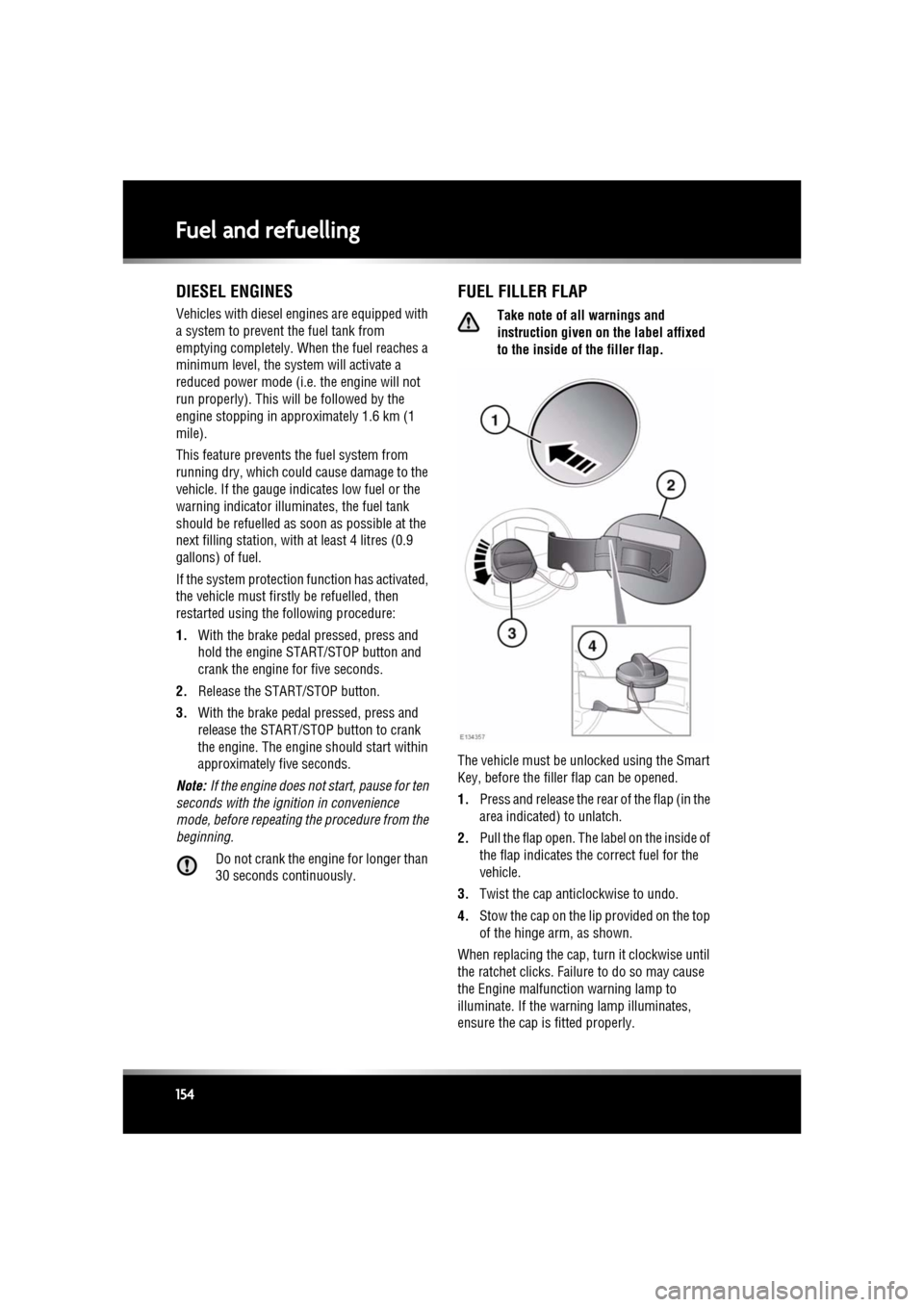
FUEL FILLER FLAP
Take note of all warnings and
instruction given on the label affixed
to the inside of the filler flap.
The vehicle must be unl ocked using the Smart
Key, before the filler flap can be opened.
1. Press and release the rear of the flap (in the
area indicated) to unlatch.
2. Pull the flap open. The label on the inside of
the flap indicates the correct fuel for the
vehicle.
3. Twist the cap anticlockwise to undo.
4. Stow the cap on the lip provided on the top
of the hinge arm, as shown.
When replacing the cap, turn it clockwise until
the ratchet clicks. Failure to do so may cause
the Engine malfunction warning lamp to
illuminate. If the warning lamp illuminates,
ensure the cap is fitted properly.