park JAGUAR XF 2010 1.G Owner's Manual
[x] Cancel search | Manufacturer: JAGUAR, Model Year: 2010, Model line: XF, Model: JAGUAR XF 2010 1.GPages: 225, PDF Size: 8 MB
Page 141 of 225
R
(FM8) SEMCON JLR OWNER GUIDE VER 1.00 EURO
LANGUAGE: english-en; MARQUE: jaguar; MODEL: XF
Navigation system
141
MOTORWAY
After selecting Motorway from the menu, enter
the motorway name or number, then select an
entrance or exit. All of the entrance or exit
junctions for the chosen motorway are
displayed.
The map showing the selected motorway and
the selected exit junction is displayed.
The destination has now been set and the route
is calculated.
POINTS OF INTEREST (POI)
After selecting Points of interest from the Nav
menu, touch Name to input the POI name, for
example Petrol to display fuel stations on the
map, or touch List for a list of POIs.
Alternatively, choose Category to see all
categories of POI and make your selection.
Use the scroll arrows to change pages.
Some POIs are sub-categorised, e.g. selecting
Community will be further divided into:
• Community Centre.
• Exhibition Centre.
• Hospital.
• Park & Recreation.
• Town Hall
Note: If entering a POI name results in too
many matches being lis ted, try entering the
town name first. If y ou do not know the name
of the POI you want, try selecting a POI
category.
Note: POI icons can only be displayed up to the
1 km (½ mile ) zoom level.
Once the POI has been selected the route is
determined. Touch Change route. to change
the route settings, or touch OK to start the
route calculation.
JAGUAR DEALER LOCATIONS
Details of Jaguar Dealers are held on the
Navigation System hard drive as a points of
interest (POI) category. Certain Dealers may be
located in areas that are not fully mapped on
the hard drive. If a route is set to one of these
Dealers, guidance may only be possible to the
nearest town centre; in this case a warning
message will be displayed.
Note: If Jaguar Dealers (or certain other
categories, such as airports) are selected, they
will be displayed across all search areas.
ENTRY BY TOWN
If a town name is entered first, the points of
interest listed will be restricted to that town.
• From the Input POI Name screen, touch
Town .
• Enter the town name required.
• Touch List to display the list of possible
towns.
• Select the town required.
The Input POI screen is displayed again.
• Enter the POI name required.
CATEGORIES AND SUB-CATEGORIES
The POI database is divided into a number of
categories. Each main category is further
divided into a number of sub-categories.
The first entry in the list of Restaurant
sub-categories, is ALL. This selects all of the
Restaurant sub-categories.
To narrow the search, touch the Town button.
This will display the alpha keyboard to allow the
desired town name to be entered.
When searching the database, only points of
interest in the current search area are included,
except for the sub-categories marked All
search areas in the POI category list.
Page 142 of 225

L
(FM8) SEMCON JLR OWNER GUIDE VER 1.00 EURO
LANGUAGE: english-en; MARQUE: jaguar; MODEL: XF
Navigation system
142
LIST SOFT KEY
The List button can be used when the
characters entered reduce the possible entries
to a small enough number.
You can also select List (when active) without
entering a POI name. All the relevant points of
interest will be displayed, e.g. in a selected
town or category.
ALL SOFTKEY
The All button shows a list of all POI
categories.
LOCAL POI SEARCH
This selects the points of interest in all
categories within 32 kilometres (20 miles) of
the vehicle.
• Touch the All Local POIs button.
RDS-TMC OVERVIEW
RDS-TMC (Radio Data System-Traffic
Message Channel) is a feature that announces
traffic hold-ups on your route as broadcast by
radio stations that transmit TMC information.
Touch the TMC button on the Navigation Menu
to access the TMC menu.
TMC events ahead on route can be displayed by
touching the Events ahead soft key. TMC can
be set to display on the map for all events, for
major events or can be switched off. During
route calculation, it can be set to avoid TMC
events along the route.
RDS-TMC DISPLAY
When a TMC signal is received the icon in the
top left of the screen will appear green. If a TMC
signal is not being received, the icon will be
shown with a bar through it.
The system will inform the driver of any
roadworks, narrow road, contraflow,
accidents, slippery road, diversion,
information, parking in formation, congestion
or other hazard.
The driver is informed of a traffic event as
follows:
• A TMC Event icon shown on the map at the
location of the event.
• Text can be displaye d showing the details
of each occurrence which can be selected
either by touching the screen icon or from
the traffic information list.
• Dynamic route guidance, which calculates
an alternative route when the system
receives the traffic event warning affecting
the route currently set in the navigation
system.
• Traffic event list shows all events sorted by
road name/ distance on your selected route
in a straight line or along your actual route.
The information rega rding the hold-up is
maintained and updated even if the vehicle
crosses into another country.
Page 143 of 225
R
(FM8) SEMCON JLR OWNER GUIDE VER 1.00 EURO
LANGUAGE: english-en; MARQUE: jaguar; MODEL: XF
Navigation system
143
RDS-TMC ICONS
Any traffic event (broadcast on TMC) in your
area, will be displayed as a warning icon on the
map and an alert may be displayed as a
message giving the road number(s) and
between which junctions the hold-up or event
occurs.
This data is stored in th e system for up to of 30
minutes.
The colour of the TMC icon changes in order to
show the type and priority of a TMC event. The
background colour of the icon returns to
normal when there is no longer an event or
hold-up, or if any re-route instructions are
calculated.
The TMC Event icons appear on the navigation
map display to indicate the location and nature
of a TMC event.
TMC Event icons will appear on the map, even
if the event does not occur on your route.
LEVEL 1 TMC EVENT ICONS
Note: Single arrow icons i ndicate that the
traffic event affects traffic travelling in the
direction of the arrow. Double arrows indicate
that both directions are affected.
LEVEL 2 TMC EVENT ICONS
Incident (Red star)
Moving Tailback Ahead (Red
arrow)
Moving Tailback Both
Carriageways (Red double arrow)
Slow Traffic Ahead (Yellow arrow)
Slow Traffic Both Carriageways
(Yellow double arrow)
Information (Yellow circle)
Incident (Yellow star)
Stationary Traffic Ahead (Red
arrow pointing on line)
Stationary Traffic Both
Carriageways (Red double arrow
pointing on line)
Other Hazard (Yellow)
Roadworks (Pink)
Narrow Road (Pink)
Contraflow (Pink)
Accidents (Pink)
Slippery Road (Yellow)
Diversion (Yellow)
Parking Information (Grey)
Information (Grey)
Congestion (Red)
Page 149 of 225
R
(FM8) SEMCON JLR OWNER GUIDE VER 1.00 EURO
LANGUAGE: english-en; MARQUE: jaguar; MODEL: XF
Tyre repair kit
149
USING THE TYRE REPAIR KIT
Avoid skin contact with the sealant
which contains natural rubber latex.
If the tyre inflation pressure does not
reach 1.8 bar (26 psi, 180 kPa) within
seven minutes, the tyre may have
suffered excessive damage. A
temporary repair will not be possible,
and the vehicle should not be driven
until the tyre has been replaced.
Before attempting a tyre repair, ensure
that the vehicle is parked safely, as far
away from passing traffic as possible.
Ensure that the parking brake is applied
and P (Park) is selected.
Do not attempt to remove foreign
objects such as nails, screws, etc. from
the tyre.
Always run the engine when using the
compressor, unless the vehicle is in an
enclosed or poorly ventilated space, as
this may cause asphyxiation.
To prevent overheatin g, do not operate
the compressor continuously for longer
than ten minutes.
Note: All vehicle drivers and occupants should
be made aware that a temporary repair has
been made to a tyre fitt ed to the vehicle. They
should also be made aware of the special
driving conditions im posed when using a
repaired tyre.
REPAIR PROCEDURE
Check the tyre sidewall prior to
inflation. If there are any cracks,
bumps or similar damage, do not
attempt to inflate the tyre. Do not
stand directly besi de the tyre while
the compressor is pumping. Watch the
tyre sidewall. If any cracks, bumps or
similar damage appear, turn off the
compressor and let the air out by
means of the pressure relief valve. Do
not continue to use the tyre.
1. Open the tyre repair kit and peel off the
maximum speed label. Attach the label to
the facia in the driver's field of vision. Take
care not to obstruct an y of the instruments
or warning lights.
2. Uncoil the compressor power cable and
the inflation hose.
3. Unscrew the orange cap from the sealant
bottle receiver and the sealant bottle cap.
4. Screw the sealant bottle into the receiver
(clockwise) until tight.
•Screwing the bottle onto the receiver
will pierce the bottle's seal. Once the
receiver has been fitted, a ratchet
prevents it from being removed.
5. Remove the valve cap from the damaged
tyre.
6. Remove the protective cap from the
inflation hose and connect the inflation
hose to the tyre valve. Ensure that the hose
is screwed on firmly.
7. Ensure that the compressor switch is in the
off ( 0) position.
8. Insert the power cable connector into the
auxiliary power socket.
9. Unless the vehicle is in an enclosed area,
start the engine.
Page 152 of 225
L
(FM8) SEMCON JLR OWNER GUIDE VER 1.00 EURO
LANGUAGE: english-en; MARQUE: jaguar; MODEL: XF
Fuel and refuelling
152
Fuel and refuellingSAFETY PRECAUTIONS
Avoid exposing the f uel gasses to any
potential sources of ignition as the
resulting fire and explosion may
cause serious injuries and/or death.
Switch off the engine when refuelling,
as it is both a source of extreme
temperatures, and electrical sparks.
Switch off any personal electronic
devices such as mobile phones, or
music players.
PETROL ENGINED VEHICLES
Do not use leaded fuels, lead
substitutes or fuel additives.
Fuel system cleaning agents should not
be used, unless a pproved by Jaguar.
OCTANE RATING
The minimum octane rating for fuel used is 95
RON (Research Octane Number). The vehicle
will run on lower ratings, but it may cause
pronounced engine knock or pinking. If the
pinking is severe it ca n cause damage to the
engine, fuel and emis sion control systems.
Note: Occasional, light, engine knock
experienced while accele rating or climbing hills
is acceptable.
Super Green Plus 98 RON unleaded fuel (where
available) may be used as an alternative to the
standard 95 RON unleaded fuel.
Some countries have only 91 RON fuel
available. Vehicles sold in these countries are
specially calibrated to use this fuel.
ETHANOL
This vehicle is not suitable for use with
fuels containing more than 10%
ethanol.
Do not use E85 fuels (85% ethanol
content). Equipment necessary for the
use of fuels containing more than 10%
ethanol is not fitted to this vehicle. If
E85 fuels are used, serious engine and
fuel system damage will occur.
Fuels containing up to 10% ethanol (grain
alcohol) may be used. Ensure that the fuel has
octane ratings no lower than those
recommended for unleaded fuel. Most drivers
will not notice any opera ting difference with
fuel containing ethanol. If a difference is
detected, the use of co nventional unleaded fuel
should be resumed.
METHANOL
Wherever possible avoid using fuel
containing methanol.
Some fuels contain methanol (Methyl or wood
alcohol). If you use fuels containing methanol
the fuels must also contain co-solvents and
corrosion inhibitors fo r methanol. Also, do not
use fuels which contain more than 10%
methanol even if they contain co-solvents and
corrosion inhibitors. Fu el system damage or
vehicle performance pr oblems resulting from
the use of such fuels is not the responsibility of
Jaguar, and may not be covered under the
warranty.
Page 155 of 225
R
(FM8) SEMCON JLR OWNER GUIDE VER 1.00 EURO
LANGUAGE: english-en; MARQUE: jaguar; MODEL: XF
Fuel and refuelling
155
To close the filler flap, push the flap until
latched closed.
Note: The filler flap will only be locked closed
when the vehicle is centrally locked.
FUEL FILLER
When refuelling ensure that all
windows, doors, and sunroof are fully
closed, particularly if young children
or animals are in the vehicle.
Do not attempt to fill the tank to its
maximum capacity. If the vehicle is to
be parked on a slope, in direct
sunlight or high am bient temperature,
expansion of the fuel could cause
spillage.
Check the fuel pump information
carefully, to ensure that you are putting
the correct fuel into the vehicle.
If the vehicle is filled with incorrect fuel,
it is essential that you seek qualified
assistance before you start the engine.
Fuel station pumps are equipped with
automatic cut-off sensing, to avoid fuel
spillage. Fill the tank until the filler nozzle
automatically cuts off the supply. Do not
attempt to fill the tank beyond this point.
Note: Filling station pumps used for diesel
commercial vehicles deliver fuel at a higher
rate than normal. The hi gher fill rate can cause
premature cut-off and ma y cause fuel spillage.
Therefore, it is recommended that only
standard light vehicle pumps are used.
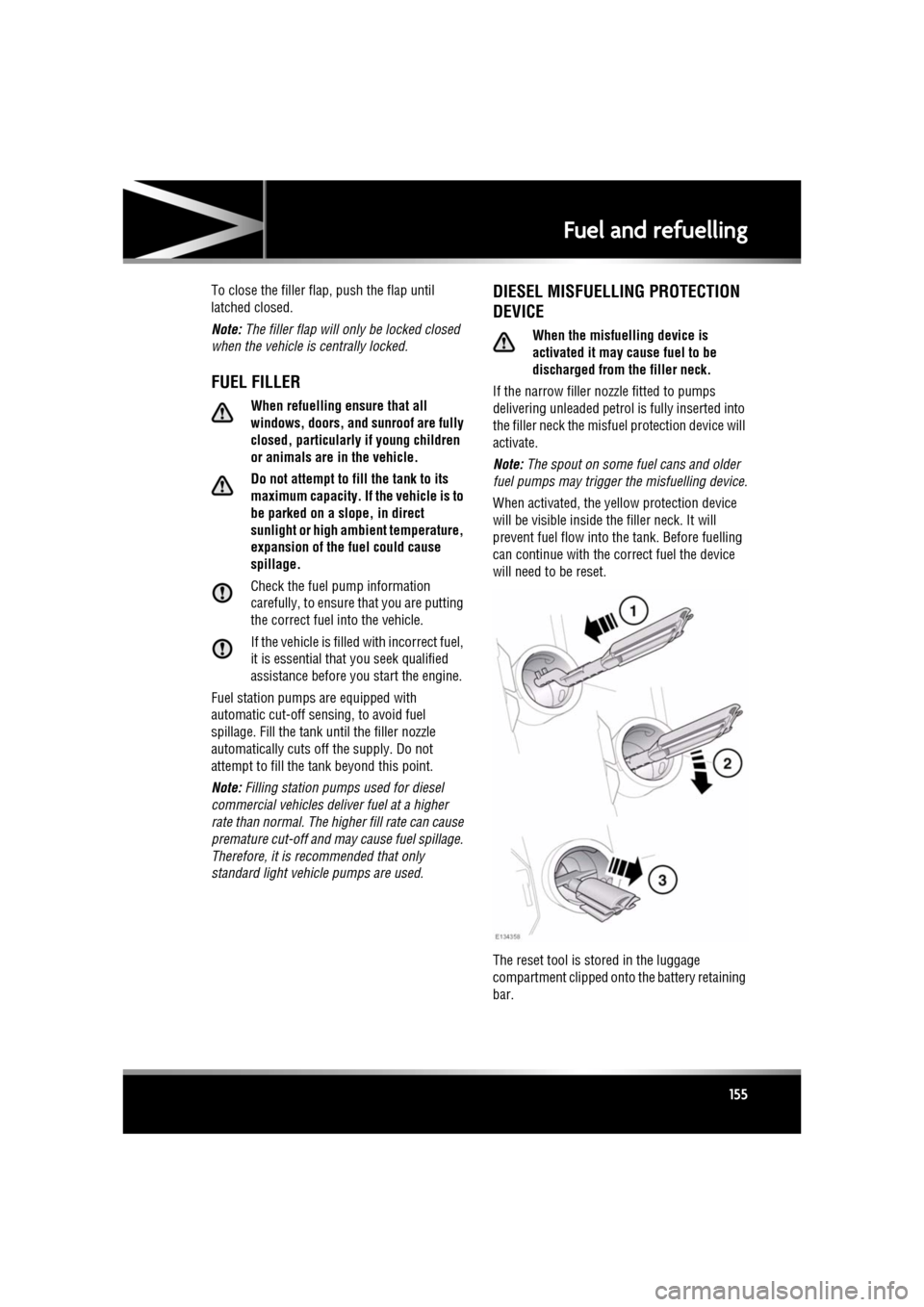
DIESEL MISFUELLING PROTECTION
DEVICE
When the misfuelling device is
activated it may cause fuel to be
discharged from the filler neck.
If the narrow filler nozzl e fitted to pumps
delivering unleaded petrol is fully inserted into
the filler neck the misfue l protection device will
activate.
Note: The spout on some fuel cans and older
fuel pumps may trigger the misfuelling device.
When activated, the ye llow protection device
will be visible inside the filler neck. It will
prevent fuel flow into the tank. Before fuelling
can continue with the correct fuel the device
will need to be reset.
The reset tool is stored in the luggage
compartment clipped onto the battery retaining
bar.
Page 160 of 225
L
(FM8) SEMCON JLR OWNER GUIDE VER 1.00 EURO
LANGUAGE: english-en; MARQUE: jaguar; MODEL: XF
Maintenance
160
FUEL SYSTEM
Under no circumst ances should any
part of the fuel system be dismantled
or replaced by anyone other than a
suitably qualified vehi cle technician.
Ensure sparks and naked lights are
kept away from the engine
compartment.
Wear protective clothing, including,
where practicable, gloves made from
an impervious material.
USED ENGINE OIL
Prolonged contact with engine oil may cause
serious skin disorders, including dermatitis
and cancer of the skin. Always wash
thoroughly after contact.
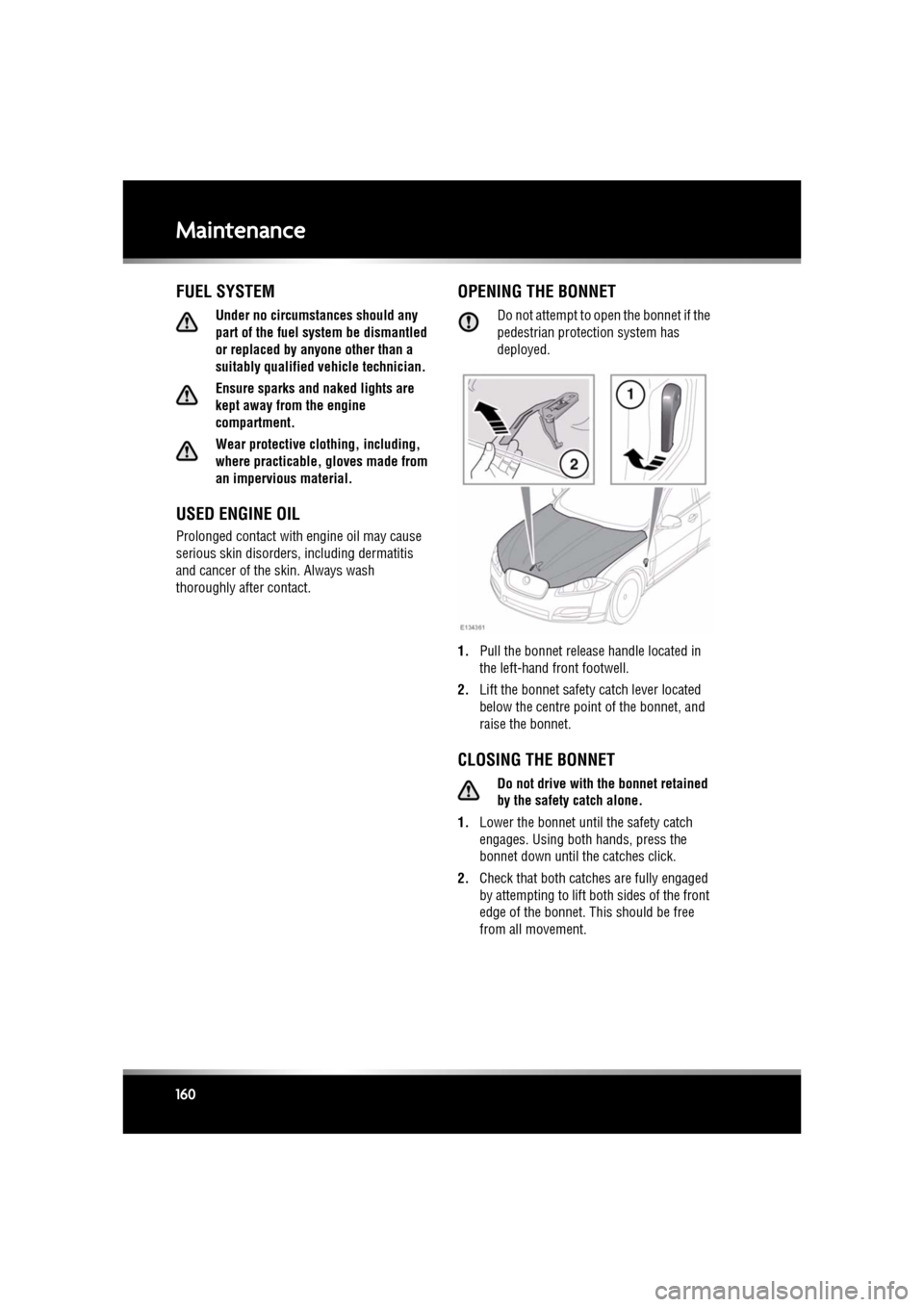
OPENING THE BONNET
Do not attempt to open the bonnet if the
pedestrian protec tion system has
deployed.
1. Pull the bonnet release handle located in
the left-hand front footwell.
2. Lift the bonnet safety catch lever located
below the centre point of the bonnet, and
raise the bonnet.
CLOSING THE BONNET
Do not drive with the bonnet retained
by the safety catch alone.
1. Lower the bonnet until the safety catch
engages. Using bot h hands, press the
bonnet down until the catches click.
2. Check that both catche s are fully engaged
by attempting to lift both sides of the front
edge of the bonnet. This should be free
from all movement.
Page 168 of 225
L
(FM8) SEMCON JLR OWNER GUIDE VER 1.00 EURO
LANGUAGE: english-en; MARQUE: jaguar; MODEL: XF
Fluid level checks
168
Fluid level checksCHECKING THE ENGINE OIL LEVEL
Check the engine oil weekly. If any
significant or sudden drop in oil level is
noted, seek qualified assistance.
If the message ENGINE OIL PRESSURE
LOW is displayed, stop the engine as
soon as it is safe to do so and seek
qualified assistance. Do not start the
engine until the cause has been
rectified.
Prior to checking the oil level ensure that the
vehicle is on level ground.
All except V6 petrol engines
Ensure that:
• The engine oil has reached working
temperature (oil is hot).
• The engine has been switched off for ten
minutes, as the syst em will not give an
accurate reading until the oil level has
stabilised.
The oil level can then be checked as follows:
1. Switch on the ignition (do not start the
engine).
2. Ensure Park (P ) is selected.
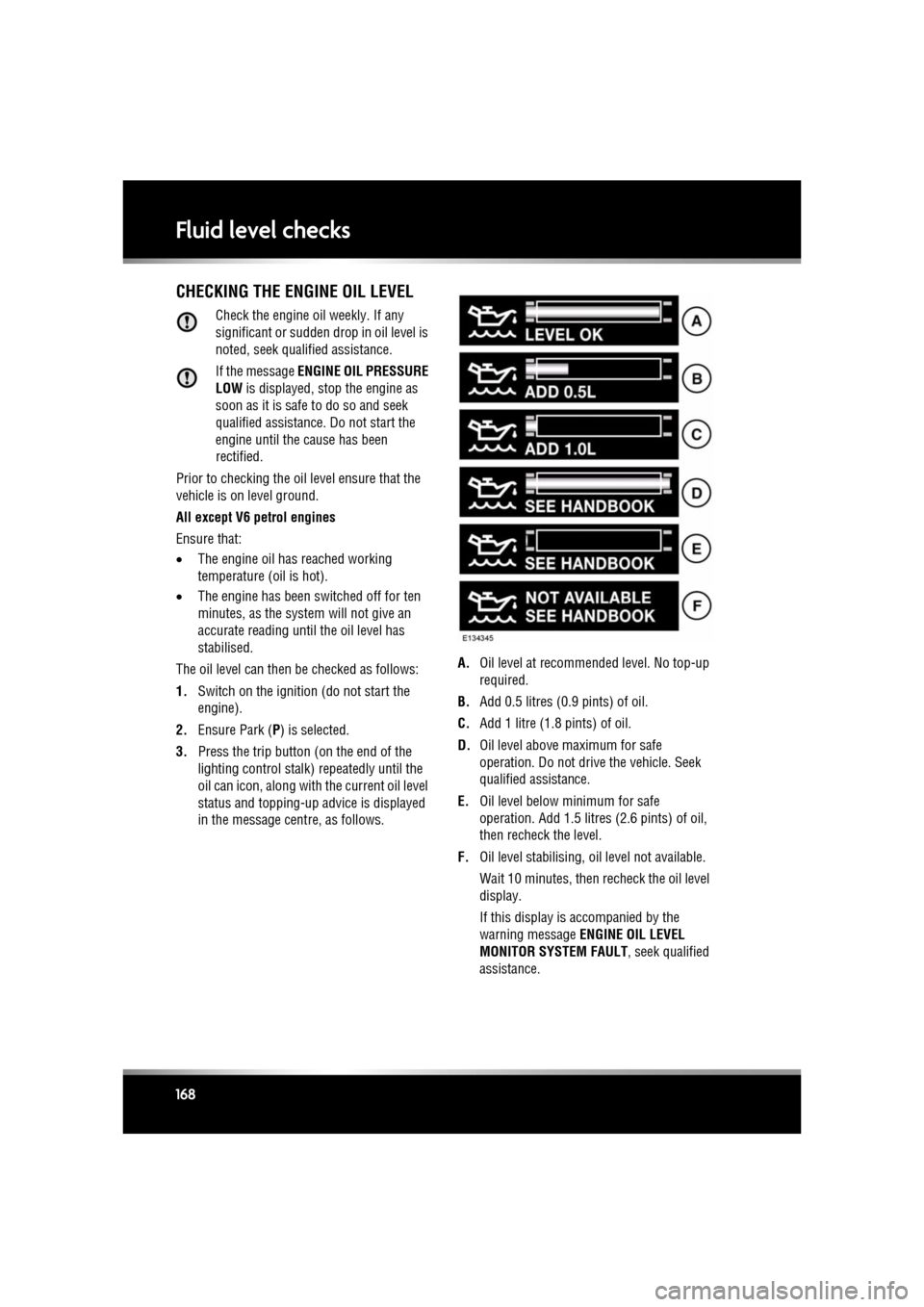
3. Press the trip button (on the end of the
lighting control stalk) repeatedly until the
oil can icon, along with the current oil level
status and topping-up ad vice is displayed
in the message centre, as follows. A.
Oil level at recommended level. No top-up
required.
B. Add 0.5 litres (0.9 pints) of oil.
C. Add 1 litre (1.8 pints) of oil.
D. Oil level above maximum for safe
operation. Do not drive the vehicle. Seek
qualified assistance.
E. Oil level below mi nimum for safe
operation. Add 1.5 litres (2.6 pints) of oil,
then recheck the level.
F. Oil level stabilising, oil level not available.
Wait 10 minutes, then recheck the oil level
display.
If this display is accompanied by the
warning message ENGINE OIL LEVEL
MONITOR SYSTEM FAULT , seek qualified
assistance.
Page 182 of 225
L
(FM8) SEMCON JLR OWNER GUIDE VER 1.00 EURO
LANGUAGE: english-en; MARQUE: jaguar; MODEL: XF
Vehicle battery
182
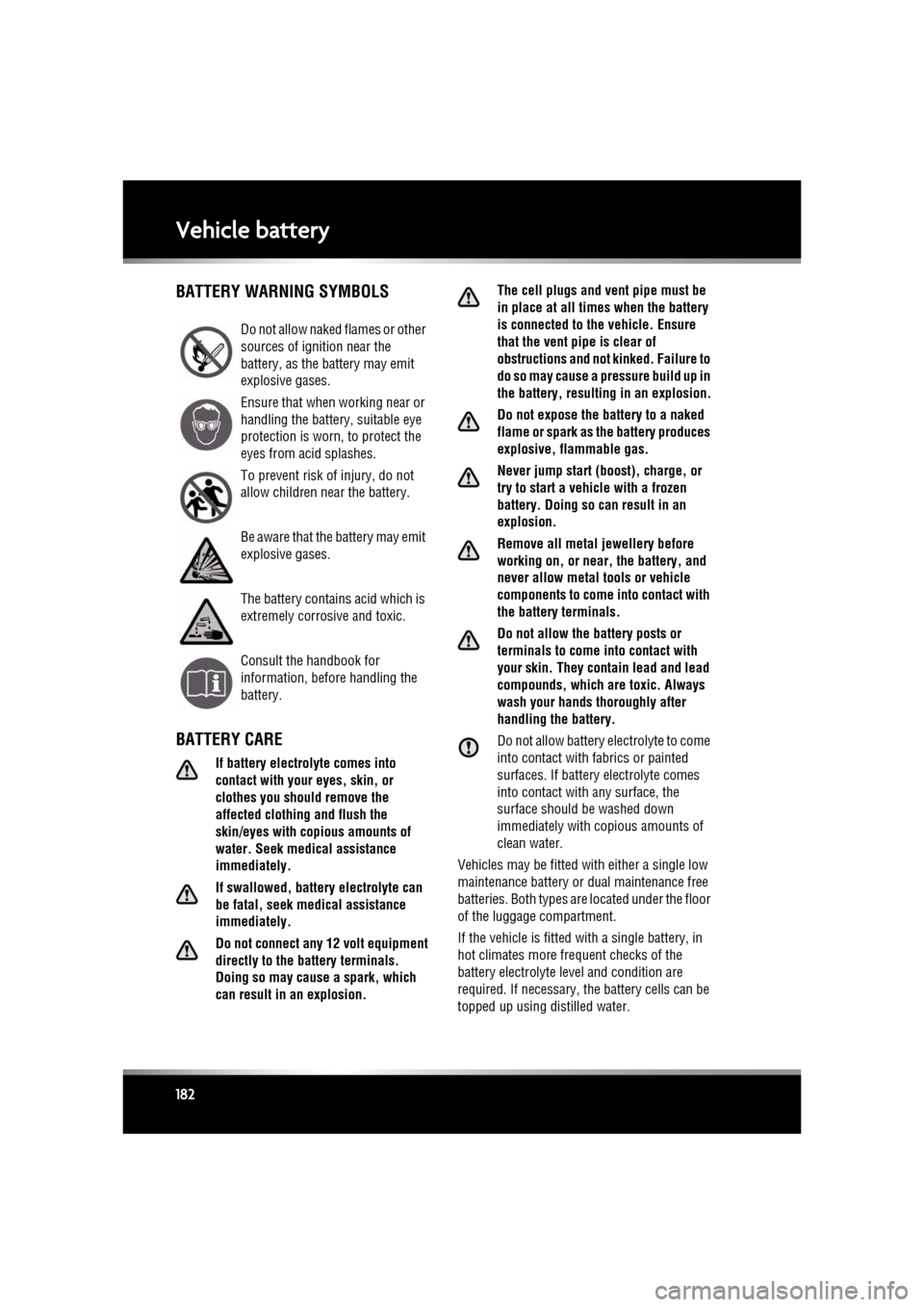
Vehicle batteryBATTERY WARNING SYMBOLS
BATTERY CARE
If battery electrolyte comes into
contact with your eyes, skin, or
clothes you should remove the
affected clothing and flush the
skin/eyes with copious amounts of
water. Seek medical assistance
immediately.
If swallowed, battery electrolyte can
be fatal, seek medical assistance
immediately.
Do not connect any 12 volt equipment
directly to the bat tery terminals.
Doing so may cause a spark, which
can result in an explosion. The cell plugs and vent pipe must be
in place at all tim
es when the battery
is connected to t he vehicle. Ensure
that the vent pipe is clear of
obstructions and not kinked. Failure to
do so may cause a pressure build up in
the battery, resulting in an explosion.
Do not expose the battery to a naked
flame or spark as the battery produces
explosive, flammable gas.
Never jump start (boost), charge, or
try to start a vehicle with a frozen
battery. Doing so can result in an
explosion.
Remove all metal jewellery before
working on, or near, the battery, and
never allow metal tools or vehicle
components to come into contact with
the battery terminals.
Do not allow the battery posts or
terminals to come into contact with
your skin. They contain lead and lead
compounds, which are toxic. Always
wash your hands thoroughly after
handling the battery.
Do not allow battery electrolyte to come
into contact with fabrics or painted
surfaces. If battery electrolyte comes
into contact with any surface, the
surface should be washed down
immediately with copious amounts of
clean water.
Vehicles may be fitted with either a single low
maintenance battery or dual maintenance free
batteries. Both types are located under the floor
of the luggage compartment.
If the vehicle is fitted with a single battery, in
hot climates more fre quent checks of the
battery electrolyte level and condition are
required. If necessary, the battery cells can be
topped up using distilled water.
Do not allow naked flames or other
sources of ignition near the
battery, as the battery may emit
explosive gases.
Ensure that when working near or
handling the battery, suitable eye
protection is worn, to protect the
eyes from acid splashes.
To prevent risk of injury, do not
allow children near the battery.
Be aware that the battery may emit
explosive gases.
The battery contains acid which is
extremely corrosive and toxic.
Consult the handbook for
information, before handling the
battery.
Page 185 of 225
R
(FM8) SEMCON JLR OWNER GUIDE VER 1.00 EURO
LANGUAGE: english-en; MARQUE: jaguar; MODEL: XF
Tyres
185
TyresTYRE CARE
Do not drive the vehi cle if a tyre is
damaged, excessively worn, or
incorrectly inflated.
Avoid contaminating the tyres with
vehicle fluids as they may cause
damage to the tyre.
Avoid spinning the wheels. The forces
released can damage the structure of
the tyre and cause it to fail.
If wheel spin is unavoidable due to a
loss of traction (in deep snow, for
example), do not exceed 50 km/h (30
mph).
Do not exceed the maximum pressure
stated on the sidewall of the tyre.
TYRE PRESSURES
Never drive your vehicle if the tyre
pressures are incorrect.
Pressure checks should only be
carried out when the tyres are cold,
and the vehicle has been stationary
for more than three hours. A hot tyre at
or below recommended cold inflation
pressure is dangerously
under-inflated.
If the vehicle has been parked in
strong sunlight, or used in high
ambient temperatures, do not reduce
the tyre pressures. Move the vehicle
into the shade and allow the tyres to
cool before re-checking the
pressures.
CHECKING THE TYRE PRESSURES
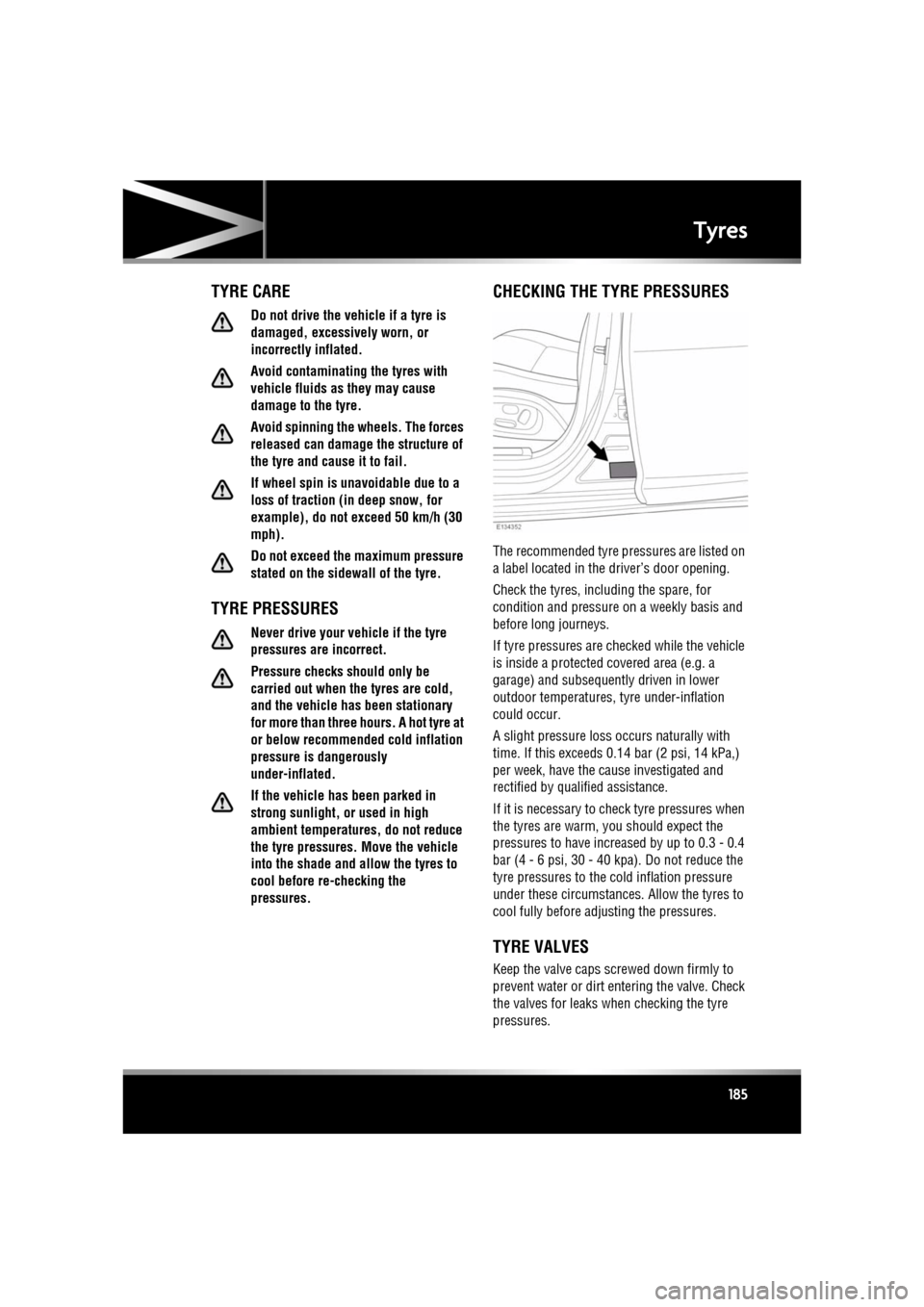
The recommended tyre pressures are listed on
a label located in the driver’s door opening.
Check the tyres, including the spare, for
condition and pressure on a weekly basis and
before long journeys.
If tyre pressures are checked while the vehicle
is inside a protected covered area (e.g. a
garage) and subsequent ly driven in lower
outdoor temperatures, tyre under-inflation
could occur.
A slight pressure loss occurs naturally with
time. If this exceeds 0. 14 bar (2 psi, 14 kPa,)
per week, have the cause investigated and
rectified by qualified assistance.
If it is necessary to check tyre pressures when
the tyres are warm, you should expect the
pressures to have increased by up to 0.3 - 0.4
bar (4 - 6 psi, 30 - 40 kpa). Do not reduce the
tyre pressures to the cold inflation pressure
under these circumstances. Allow the tyres to
cool fully before ad justing the pressures.
TYRE VALVES
Keep the valve caps screwed down firmly to
prevent water or dirt entering the valve. Check
the valves for leaks when checking the tyre
pressures.