Screen JAGUAR XF 2010 1.G Workshop Manual
[x] Cancel search | Manufacturer: JAGUAR, Model Year: 2010, Model line: XF, Model: JAGUAR XF 2010 1.GPages: 225, PDF Size: 8 MB
Page 138 of 225
L
(FM8) SEMCON JLR OWNER GUIDE VER 1.00 EURO
LANGUAGE: english-en; MARQUE: jaguar; MODEL: XF
Navigation system
138
SCREEN MODES
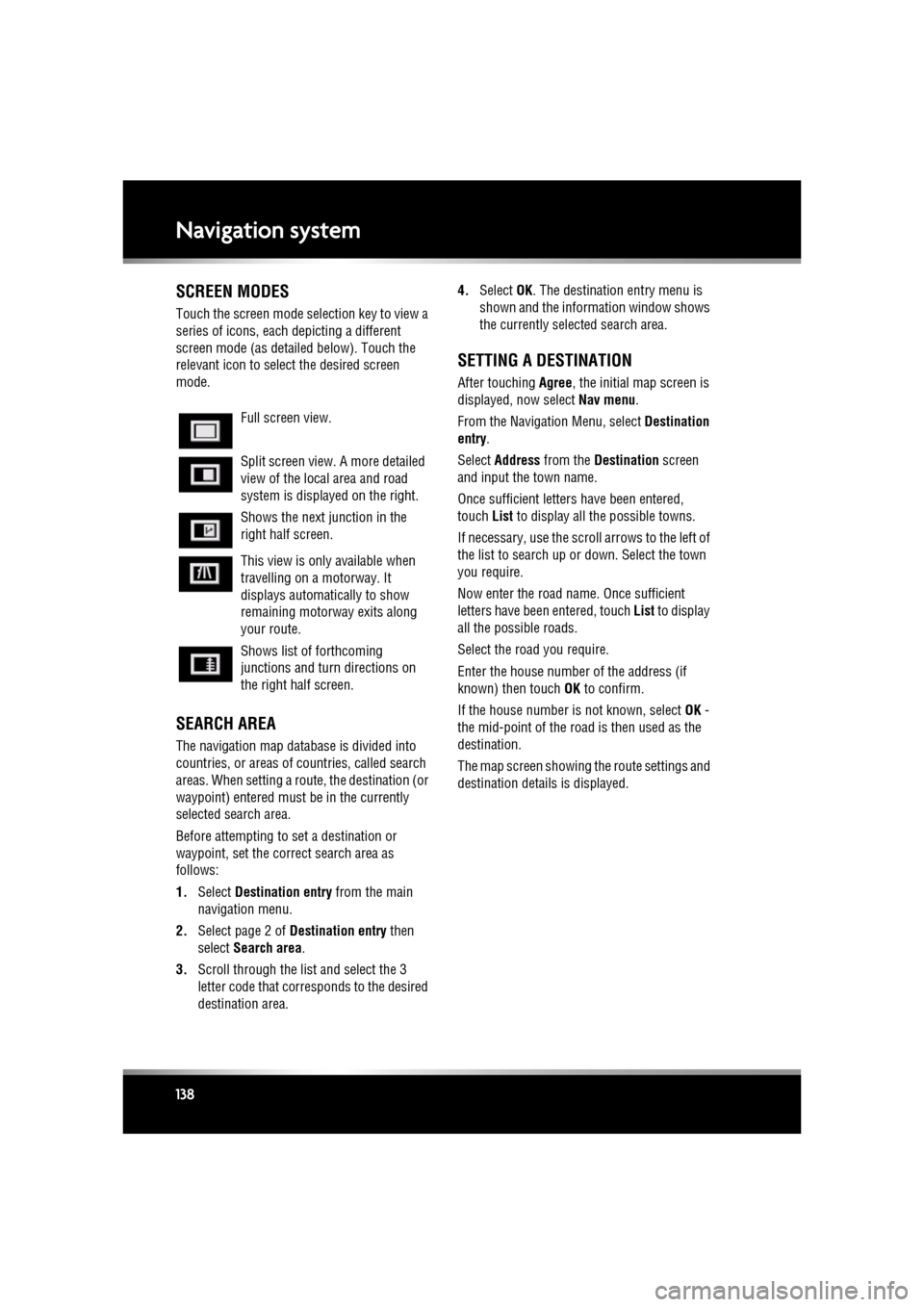
Touch the screen mode selection key to view a
series of icons, each depicting a different
screen mode (as detail ed below). Touch the
relevant icon to select the desired screen
mode.
SEARCH AREA
The navigation map databa se is divided into
countries, or areas of countries, called search
areas. When setting a route, the destination (or
waypoint) entered must be in the currently
selected search area.
Before attempting to set a destination or
waypoint, set the correct search area as
follows:
1. Select Destination entry from the main
navigation menu.
2. Select page 2 of Destination entry then
select Search area .
3. Scroll through the list and select the 3
letter code that corre sponds to the desired
destination area. 4.
Select OK. The destination entry menu is
shown and the information window shows
the currently selected search area.
SETTING A DESTINATION
After touching Agree, the initial map screen is
displayed, now select Nav menu.
From the Navigati on Menu, select Destination
entry .
Select Address from the Destination screen
and input the town name.
Once sufficient letter s have been entered,
touch List to display all the possible towns.
If necessary, use the scroll arrows to the left of
the list to search up or down. Select the town
you require.
Now enter the road name. Once sufficient
letters have been entered, touch List to display
all the possible roads.
Select the road you require.
Enter the house number of the address (if
known) then touch OK to confirm.
If the house number is not known, select OK -
the mid-point of the road is then used as the
destination.
The map screen showing the route settings and
destination detail s is displayed.
Full screen view.
Split screen view. A more detailed
view of the local area and road
system is displayed on the right.
Shows the next junction in the
right half screen.
This view is only available when
travelling on a motorway. It
displays automatically to show
remaining motorway exits along
your route.
Shows list of forthcoming
junctions and turn directions on
the right half screen.
Page 139 of 225

R
(FM8) SEMCON JLR OWNER GUIDE VER 1.00 EURO
LANGUAGE: english-en; MARQUE: jaguar; MODEL: XF
Navigation system
139
START GUIDANCE
After selecting a destination, the system will
calculate the route.
There is now a choice to select 3 Routes,
Change route or to Start navigation guidance.
Touch 3 Routes to display a choice of three
different route options on the map.
The roads on the map are drawn in three
different colours to highlight each route.
EcoRoute helps you find the most fuel efficient
route available. A display of three leaves
indicates the most fuel efficient route.
Select route 1, 2 or 3 by touching the
respective box displaye d on the right side of
the map.
Touch Change Route followed by Route prefs.
to change the route setti ngs. If a destination is
already set, touch Waypoint to add a waypoint
in the journey if required.
When you have made your selection, if any,
touch Go.
Note: As you approach a j unction, in addition
to the voice guidance, an inset on the map will
display an enlarged view of the junction.
EASY ROUTE
In Route options , Easy Route can be turned On
or Off .
When On is selected, Easy Route changes the
calculation parameters of Route 3 in order to
reduce:
• Junctions.
• Turns.
• Turns that cross traffic.
• The priority of minor roads.
• Complex junction s and manoeuvres.
LEARN ROUTE
In Route options , Learn Route can be turned
On or Off.
When On is selected, if you make the same
deviation from the proposed route three times,
then the system will memorize the deviation
and offer that as the normal route from then on.
Select Reset all routes to delete any learnt
routes and return to the default settings.
VOICE GUIDANCE
To turn voice guidance on or off but maintain
route guidance, proceed as follows:
1. Touch Nav menu on the navigation screen.
2. Touch the Route voice guidance soft key.
The soft key will be highlighted when voice
guidance is enabled.
CANCEL ROUTE GUIDANCE
To cancel route guidance, proceed as follows:
1. Touch Nav menu on the navigation screen.
2. Touch the Cancel guidance soft key.
QUICK POI SELECTION
Touch the Map screen to display the POI
button. Touch the POI (Point of interest)
button. The screen shows six suggested
categories, five of which can be selected as
quick points of interest.
Note: The POI icons will not be shown if the
map zoom level is greate r than 1 km (½ mile).
Select a Quick POI category, or select More to
see further POIs. Touch OK to confirm a
selection.
The map screen with the POI icon(s) is
displayed. Select the five POIs you wish to see
when the Quick POIs are displayed.
Page 140 of 225

L
(FM8) SEMCON JLR OWNER GUIDE VER 1.00 EURO
LANGUAGE: english-en; MARQUE: jaguar; MODEL: XF
Navigation system
140
RESTORE SYSTEM DEFAULTS
If you have made any changes to the system’s
default settings, use this menu to restore the
original settings.
MEMORY POINTS
From the navigation menu, select Stored
locations . This enables you to manage
destinations such as, place of work, home,
favourite restaurant or areas to avoid.
From the Stored locations menu you can save
up to 400 memory points or add your home
address.
Select Memory Points to add a stored location.
Touching any of the Stored locations
submenus allows you to Add, Edit or Delete .
Select Add to store a memory point.
MEMORY POINT DETAILS
Touch Info to display the details of the selected
memory point. The details include Icon, Name,
Position and Tel.
The telephone number ca n be called by
touching the telephone bu tton if a telephone is
connected.
The memory point detail s can be edited from
the Stored locations screen.
POSTCODE
Not all countries have th is facility. Enter the
postcode of your waypoi nt or destination from
the keypad. The postcode must be entered
precisely, including any spaces or punctuation.
When the postcode has been entered touch OK.
EMERGENCY
Not all countries have this facility. Touch
Emergency on the Destination entry screen to
display a list of local po lice stations, hospitals
or Jaguar Dealerships. Press
Name to display the list in alphabetical
order or Distance to display the list in order of
proximity to the curre nt vehicle location.
Touch the name of the fa cility to set it as a
destination or waypoint.
MAP
After selecting map, the local area map is
displayed. Drag the circle to the area for your
destination or waypoint, zooming in if required.
This location can be stored as a destination or
waypoint.
COORDINATES
If you know the coordinates of your destination
they can be entered from this screen. The full
latitude must be entered first before the
longitude coordinates can be entered.
When the coordinates have been entered,
touch OK.
If the coordinates ente red are not contained
within the area covered by the available maps,
a message will be shown. This can also occur
if the incorrect coordina tes have been entered.
RECALLING A PREVIOUS
DESTINATION
After selecting Previous from the menu, the
screen shows a list of stored previous
destinations. Select your destination by
touching the bar. The deta ils will be displayed
for confirmation.
Note: In some markets, li st scrolling is not
active whilst driving for legislative reasons.
Only the items shown at the top of the list can
be selected.
Page 141 of 225

R
(FM8) SEMCON JLR OWNER GUIDE VER 1.00 EURO
LANGUAGE: english-en; MARQUE: jaguar; MODEL: XF
Navigation system
141
MOTORWAY
After selecting Motorway from the menu, enter
the motorway name or number, then select an
entrance or exit. All of the entrance or exit
junctions for the chosen motorway are
displayed.
The map showing the selected motorway and
the selected exit junction is displayed.
The destination has now been set and the route
is calculated.
POINTS OF INTEREST (POI)
After selecting Points of interest from the Nav
menu, touch Name to input the POI name, for
example Petrol to display fuel stations on the
map, or touch List for a list of POIs.
Alternatively, choose Category to see all
categories of POI and make your selection.
Use the scroll arrows to change pages.
Some POIs are sub-categorised, e.g. selecting
Community will be further divided into:
• Community Centre.
• Exhibition Centre.
• Hospital.
• Park & Recreation.
• Town Hall
Note: If entering a POI name results in too
many matches being lis ted, try entering the
town name first. If y ou do not know the name
of the POI you want, try selecting a POI
category.
Note: POI icons can only be displayed up to the
1 km (½ mile ) zoom level.
Once the POI has been selected the route is
determined. Touch Change route. to change
the route settings, or touch OK to start the
route calculation.
JAGUAR DEALER LOCATIONS
Details of Jaguar Dealers are held on the
Navigation System hard drive as a points of
interest (POI) category. Certain Dealers may be
located in areas that are not fully mapped on
the hard drive. If a route is set to one of these
Dealers, guidance may only be possible to the
nearest town centre; in this case a warning
message will be displayed.
Note: If Jaguar Dealers (or certain other
categories, such as airports) are selected, they
will be displayed across all search areas.
ENTRY BY TOWN
If a town name is entered first, the points of
interest listed will be restricted to that town.
• From the Input POI Name screen, touch
Town .
• Enter the town name required.
• Touch List to display the list of possible
towns.
• Select the town required.
The Input POI screen is displayed again.
• Enter the POI name required.
CATEGORIES AND SUB-CATEGORIES
The POI database is divided into a number of
categories. Each main category is further
divided into a number of sub-categories.
The first entry in the list of Restaurant
sub-categories, is ALL. This selects all of the
Restaurant sub-categories.
To narrow the search, touch the Town button.
This will display the alpha keyboard to allow the
desired town name to be entered.
When searching the database, only points of
interest in the current search area are included,
except for the sub-categories marked All
search areas in the POI category list.
Page 142 of 225
L
(FM8) SEMCON JLR OWNER GUIDE VER 1.00 EURO
LANGUAGE: english-en; MARQUE: jaguar; MODEL: XF
Navigation system
142
LIST SOFT KEY
The List button can be used when the
characters entered reduce the possible entries
to a small enough number.
You can also select List (when active) without
entering a POI name. All the relevant points of
interest will be displayed, e.g. in a selected
town or category.
ALL SOFTKEY
The All button shows a list of all POI
categories.
LOCAL POI SEARCH
This selects the points of interest in all
categories within 32 kilometres (20 miles) of
the vehicle.
• Touch the All Local POIs button.
RDS-TMC OVERVIEW
RDS-TMC (Radio Data System-Traffic
Message Channel) is a feature that announces
traffic hold-ups on your route as broadcast by
radio stations that transmit TMC information.
Touch the TMC button on the Navigation Menu
to access the TMC menu.
TMC events ahead on route can be displayed by
touching the Events ahead soft key. TMC can
be set to display on the map for all events, for
major events or can be switched off. During
route calculation, it can be set to avoid TMC
events along the route.
RDS-TMC DISPLAY
When a TMC signal is received the icon in the
top left of the screen will appear green. If a TMC
signal is not being received, the icon will be
shown with a bar through it.
The system will inform the driver of any
roadworks, narrow road, contraflow,
accidents, slippery road, diversion,
information, parking in formation, congestion
or other hazard.
The driver is informed of a traffic event as
follows:
• A TMC Event icon shown on the map at the
location of the event.
• Text can be displaye d showing the details
of each occurrence which can be selected
either by touching the screen icon or from
the traffic information list.
• Dynamic route guidance, which calculates
an alternative route when the system
receives the traffic event warning affecting
the route currently set in the navigation
system.
• Traffic event list shows all events sorted by
road name/ distance on your selected route
in a straight line or along your actual route.
The information rega rding the hold-up is
maintained and updated even if the vehicle
crosses into another country.
Page 158 of 225
L
(FM8) SEMCON JLR OWNER GUIDE VER 1.00 EURO
LANGUAGE: english-en; MARQUE: jaguar; MODEL: XF
Maintenance
158
MaintenanceDISABILITY MODIFICATIONS
Occupants with disabilities which may require
modification of the vehicle, must contact a
Dealer/Authorised Repairer before any
modifications are made.
PARTS AND ACCESSORIES
Do not fit non-approved parts and
accessories or carry out non-approved
alterations or conversions.
Your vehicle is not designed for use
with a roof rack. Do not fit a roof rack to
the vehicle, as damage may result.
AIRBAG SYSTEM
The components that make up the
airbag system are sensitive to
electrical or phys ical interference,
either of which could easily damage
the system and cause inadvertent
operation or a malfunction of the
airbag module.
To prevent malfunction of the airbag system
always consult your Dealer/Authorised
Repairer before fitting any of the following:
• Electronic equipment such as a mobile
phone, two-way radio or in-car
entertainment system.
• Accessories attached to the front of the
vehicle.
• Any modification to the front of the vehicle.
• Any modification involving the removal or
repair of any wiring or component in the
vicinity of any of the airbag system
components, including the steering wheel,
steering column, instrument or facia
panels.
• Any modification to th e fascia panels or
steering wheel.
ANTI-THEFT SYSTEM
No modifications or additions should
be made to the anti- theft system. Such
changes could cause the system to
malfunction.
OWNER MAINTENANCE
Any significant or sudden drop in fluid
levels, or uneven ty re wear, should be
reported to a qualified technician
without delay.
In addition to the routine services and
inspections, a number of simple checks must
be carried out more fr equently. These checks
can be carried out by th e owner and advice is
given on the pages that follow.
DAILY CHECKS
• Operation of lamps, horn, direction
indicators, wipers, washers and warning
indicators.
• Operation of seat belts and brakes.
• Look for fluid deposits underneath the
vehicle that might indicate a leak.
Condensation drips from the air
conditioning are normal.
WEEKLY CHECKS
•Engine oil level.
• Engine coolant level.
• Brake fluid level.
• Power steering fluid level.
• Screen washer fluid level.
• Tyre pressures and condition.
• Operate air conditioning.
Note: The engine oil leve l should be checked
more frequently if the vehicle is driven for
prolonged periods at high speeds.
Page 162 of 225
L
(FM8) SEMCON JLR OWNER GUIDE VER 1.00 EURO
LANGUAGE: english-en; MARQUE: jaguar; MODEL: XF
Maintenance
162
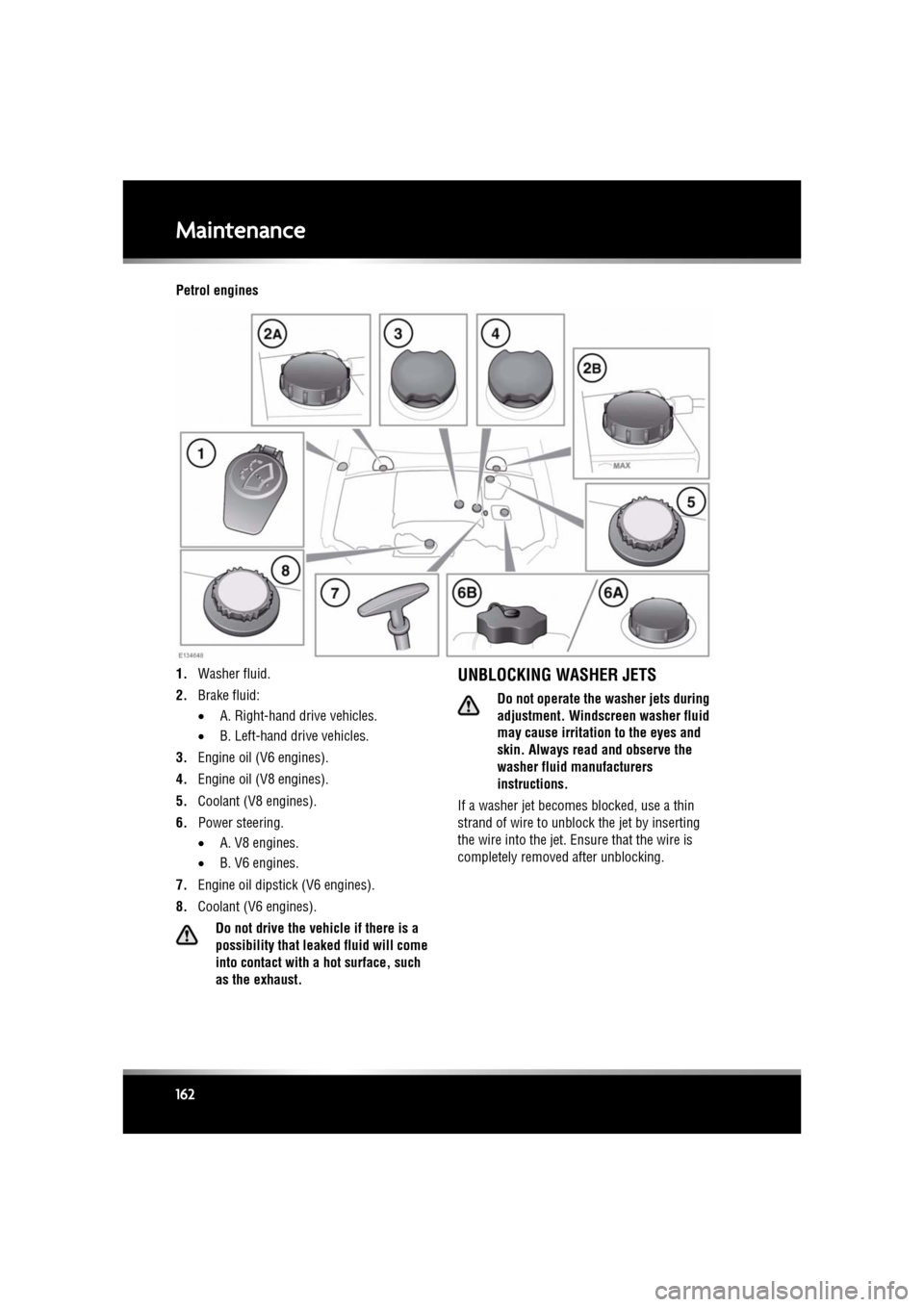
Petrol engines
1. Washer fluid.
2. Brake fluid:
•A. Right-hand drive vehicles.
• B. Left-hand drive vehicles.
3. Engine oil (V6 engines).
4. Engine oil (V8 engines).
5. Coolant (V8 engines).
6. Power steering.
•A. V8 engines.
• B. V6 engines.
7. Engine oil dipstick (V6 engines).
8. Coolant (V6 engines).
Do not drive the vehicle if there is a
possibility that leak ed fluid will come
into contact with a hot surface, such
as the exhaust.
UNBLOCKING WASHER JETS
Do not operate the washer jets during
adjustment. Windscreen washer fluid
may cause irritation to the eyes and
skin. Always read and observe the
washer fluid manufacturers
instructions.
If a washer jet becomes blocked, use a thin
strand of wire to unblock the jet by inserting
the wire into the jet. Ensure that the wire is
completely removed after unblocking.
Page 165 of 225
R
(FM8) SEMCON JLR OWNER GUIDE VER 1.00 EURO
LANGUAGE: english-en; MARQUE: jaguar; MODEL: XF
Maintenance
165
WASHING THE VEHICLE PAINTWORK
Substances which are corrosive can
damage the vehicle's paintwork and
should be removed to prevent damage.
USING AN AUTOMATIC WASH
Commercially operated automatic car
washes, jet washes and
power-operated mops, are not
recommended.
UNDER BONNET CLEANING
Do not use a high pressure washer or
steam cleaner in the engine
compartment.
Ensure that the brake fluid reservoir is
kept dry at all times. Only use a clean,
dry cloth to clean the brake fluid cap
and reservoir.
CLEANING GLASS SURFACES
Clean the rear window with a soft cloth to avoid
damaging the heating element. Do not scrape
the glass or use any abrasive cleaning fluid.
Mirror glass is particul arly susceptible to
damage. Wash with soapy water. Do not use
abrasive cleaning compounds or metal
scrapers to remove ice.
To avoid damaging the protecting coating, only
clean the interior side of the sunroof glass with
a soft cloth. Don not sc rape the glass or use
abrasive cleaning fluids.
CLEANING THE REAR SCREEN
To avoid damaging the heating elements when
cleaning the inside of th e rear screen, use only
a soft damp cloth or ch amois leather. Do not
use solvents or sharp objects to clean the
glass.
CLEANING THE SUNROOF WIND
DEFLECTOR
A mild solution of soap and water, or car
shampoo should be used to clean the wind
deflector net period ically. Support the
underside of the net with a soft cloth, and
gently scrub the net usi ng a soft bristled brush.
REMOVING GREASE AND TAR
Remove grease or tar with Jaguar Tar Remover
or methylated spirit (a lcohol). White spirit is
also effective, but must not be applied to
rubber, particularly the windscreen wiper
blades.
Ensure that after using methylated or
white spirit, the area is washed
immediately with soapy water, to
remove all traces of spirit.
POLISHING
Chrome polish, or other abrasive
cleaners, must not be used on the
vehicle's brightwork.
It is recommended that the vehicle is polished
regularly using Jaguar polish and a polishing
cloth.
CLEANING THE INTERIOR
The steering wheel ce ntre pad and other
areas containing airbags should only be
cleaned sparingly with a damp cloth,
warm water and a non-detergent soap.
Page 166 of 225
L
(FM8) SEMCON JLR OWNER GUIDE VER 1.00 EURO
LANGUAGE: english-en; MARQUE: jaguar; MODEL: XF
Maintenance
166
LEATHER
To prevent ingrained dirt and staining, inspect
the seat upholstery regularly and clean every
one to two months, as follows:
• Wipe off fine dust from the seat surfaces
using a clean, damp, non-coloured cloth.
Change frequently to a clean area of cloth,
to avoid abrasive action on the leather
surface. Avoid over-wetting.
• If this is not sufficient, use a cloth which
has been dampened with warm soapy
water and then wrun g out. Use only mild
non-caustic soap.
• Use Jaguar Leather Cleaner for heavily
soiled areas. Dry off and rub with a clean
soft cloth, changing surfaces regularly.
Use Jaguar Leather Cleaner several times a
year to maintain its appearance and
suppleness. The clea ner will nourish and
moisturise and help to improve the surface
protective film agains t dust and substances.
• Do not use solvents. Do not use
detergents, furniture polish or household
cleaners. While these products may
initially give impressive results, their use
will lead to rapid deterioration of the leather
and will invalidate the warranty. Jaguar
recommend a basic se t of products that
have been specially selected for the type of
leather in your vehicle.
• Dark clothing may stain leather seats just
like other upholstery products.
• Sharp objects such as belts, zip fasteners,
rivets, etc., can leave permanent scratches
and scratch marks on the leather surface.
• Unless spillages such as tea, coffee or ink
are washed away immediately, permanent
staining may have to be accepted.
If a valet service is used, ensure that the
specialist concer ned is aware of, and follows,
these instructions precisely.
CLEANING FABRIC UPHOLSTERY
Never use soap, ammonia, bleach or
other cleaners inte nded for use on hard
surfaces.
Do not use upholstery cleaner on
electrical equipment such as facia
switches.
When cleaning around electrical
equipment such as switches, ensure
that fluids do not leak into any gaps
around the components or between
panels or trim.
Use Jaguar Upholstery Cleaner, following the
instructions. Avoid over-wetting.
REMOVING STAINS
Most stains on woollen fabric can be removed
if treatment is carried out immediately, before
the stain has a chance to dry-in.
Most stains can be treated with one of three
cleaning fluids: Jaguar U pholstery Cleaner, dry
cleaning fluid or clean water. Follow the
instructions on the package.
INSTRUMENT PANEL, CLOCK AND
AUDIO EQUIPMENT
Only use a soft dry cloth to clean the
instrument panel, cloc k and audio equipment.
Do not use cleaning fluids or sprays.
TOUCH SCREEN
Do not use abrasive cleaners on the
touch screen. For approved cleaning
products, contact your Dealer/
Authorised Repairer.
Page 174 of 225
L
(FM8) SEMCON JLR OWNER GUIDE VER 1.00 EURO
LANGUAGE: english-en; MARQUE: jaguar; MODEL: XF
Fluid level checks
174
CHECKING THE WASHER FLUID
Do not allow screen washer fluid to
come into contact with naked flames
or sources of ignition.
If the vehicle is operated in
temperatures below 4°C (40°F), use a
washer fluid with frost protection.
Only use approved washer fluid.
Take care to avoid spillage, particularly
if an undiluted or high concentration is
being used. If spillage occurs, wash the
affected area immediately with water.
The washer reservoir supplies the windscreen
and headlamp washer jets.
Check and top-up the reservoir level at least
every week.
Fill with Jaguar Windscreen Washer Fluid,
diluted with clean water, as specified in the
instructions on the bottle. Using a
non-approved fluid may adversely affect the
wiper blade rubber, result ing in ineffectual and
noisy wiping.
Operate the washers periodically to check that
the nozzles are clear and properly directed.
TOPPING UP THE WASHER FLUID
1. Clean the filler cap before opening to
prevent dirt from entering the reservoir.
2. Open filler cap.
3. Top-up the reservoir until the fluid is visible
in the filler neck.
4. Close filler cap.