emergency JAGUAR XF 2011 1.G User Guide
[x] Cancel search | Manufacturer: JAGUAR, Model Year: 2011, Model line: XF, Model: JAGUAR XF 2011 1.GPages: 225, PDF Size: 7.32 MB
Page 76 of 225
L
(FM8) SEMCON JLR OWNER GUIDE VER 1.00 EURO
LANGUAGE: english-en; MARQUE: jaguar; MODEL: XF
Starting the engine
76
IF THE ENGINE FAILS TO START
If the brake pedal has been pumped prior to an
attempt to start the engine, it may require
greater pressure on the pedal in order for the
engine to start.
If the Jaguar Smart Key is placed in the door
pocket, it may be outside the range of the
sensors when the door is open.
If the Smart Key fails to operate, Smart Key
Not Found- Refer to Handbook is displayed in
the message centre. To start the engine it will
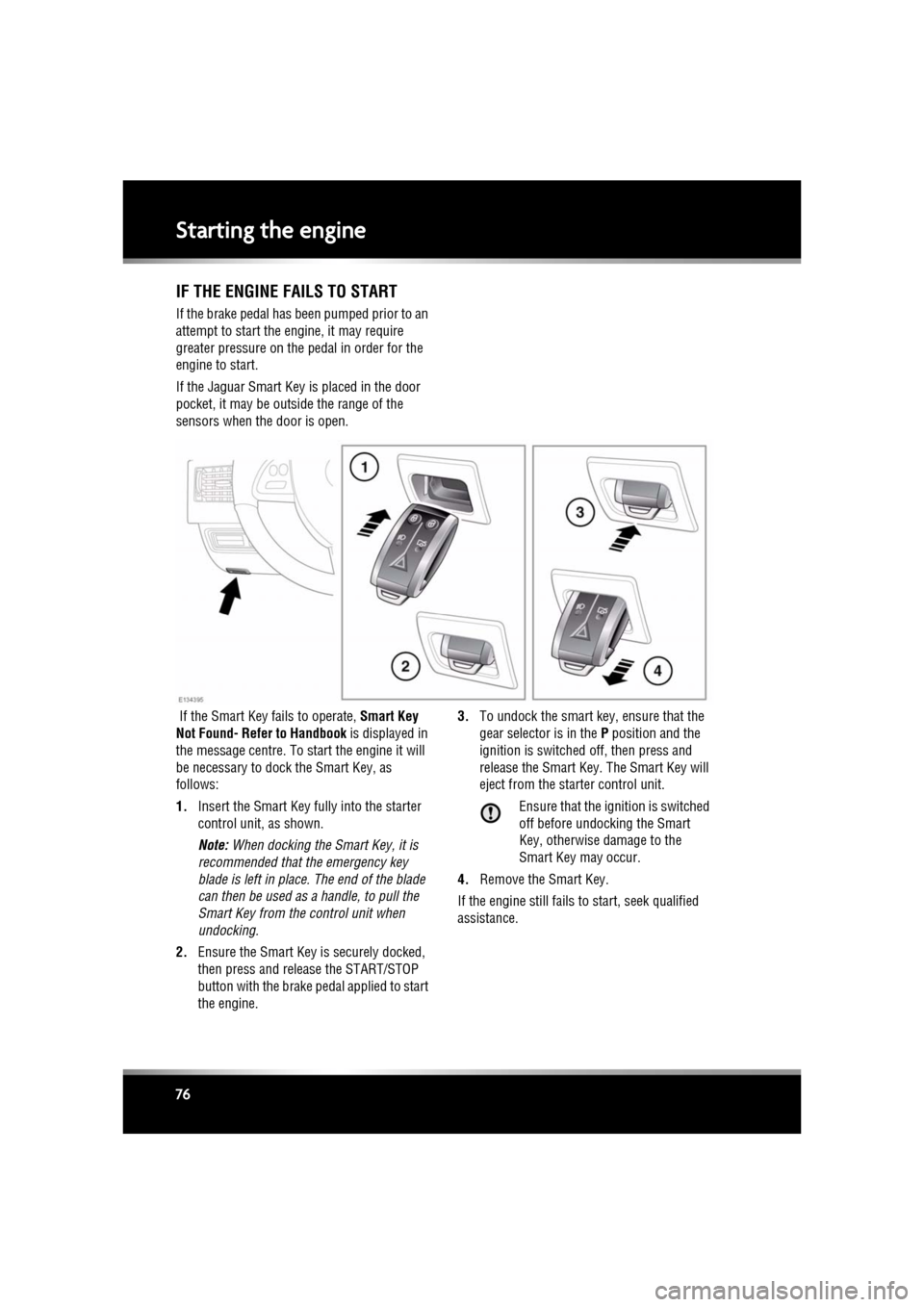
be necessary to dock the Smart Key, as
follows:
1. Insert the Smart Key fully into the starter
control unit, as shown.
Note: When docking the Smart Key, it is
recommended that the emergency key
blade is left in place. The end of the blade
can then be used as a handle, to pull the
Smart Key from the control unit when
undocking.
2. Ensure the Smart Key is securely docked,
then press and release the START/STOP
button with the brake pe dal applied to start
the engine. 3.
To undock the smart key, ensure that the
gear selector is in the P position and the
ignition is switched off, then press and
release the Smart Key. The Smart Key will
eject from the st arter control unit.
Ensure that the ignition is switched
off before undocking the Smart
Key, otherwise damage to the
Smart Key may occur.
4. Remove the Smart Key.
If the engine still fails to start, seek qualified
assistance.
Page 87 of 225
R
(FM8) SEMCON JLR OWNER GUIDE VER 1.00 EURO
LANGUAGE: english-en; MARQUE: jaguar; MODEL: XF
Brakes
87
BrakesIMPORTANT INFORMATION
Do not rest your foot on the brake
pedal whilst the vehicle is in motion.
Never allow the vehicle to coast
(freewheel) with the engine turned off.
The engine must be running to provide
full braking assistance. The brakes
will still function wi th the engine off,
but far more pressure will be required
to operate them.
If the red brake warning lamp
illuminates, safely bring the vehicle to
a stop, as quickly as possible and
seek qualified assistance.
Never place non-approved floor
matting or any other obstructions
under the brake pedal. This restricts
pedal travel and braking efficiency.
Driving through heavy rain or water can have
an adverse effect on braking efficiency. Under
such circumstances, it is recommended that
you lightly apply the brak es intermittently to
dry the brakes.
BRAKE WARNING LAMPS
Note: This warning lamp will also illuminate if
there is a fault with the parking brake. See 88,
ELECTRIC PARKIN G BRAKE (EPB).
ELECTRONIC BRAKE FORCE
DISTRIBUTION (EBD)
EBD balances the distribution of braking forces
between the wheels on the front and rear axles,
to maintain maximum braking under all vehicle
loading conditions.
For example; Under light loads, EBD applies
less braking effort to the rear wheels, to
maintain stability. Conv ersely, it allows full
braking effort to the rear wheels when the
vehicle is heavily laden.
A fault with the EBD system is indicated by the
red brake warning lamp and the message EBD
FAULT . The braking system will still operate,
but without EBD assist ance. Seek qualified
assistance to have the fault rectified.
EMERGENCY BRAKE ASSIST (EBA)
The EBA system measures the rate at which the
brake pressure increases. If the system detects
an emergency braki ng situation, EBA
automatically initiates fu ll braking effect. This
can reduce stopping distances in critical
situations.
A fault with the EBA system is indicated by the
brake warning lamp illuminating and
Emergency Brake Assist Not Available
displaying in the message centre. The braking
system will still func tion, but without EBA
assistance. Seek qualified assistance to have
the fault rectified.
EMERGENCY STOP SIGNAL (ESS)
ESS (Emergency Stop Signal) automatically
activates the hazard warning lights during
emergency braking to warn other road users
and reduce the risk of a collision.
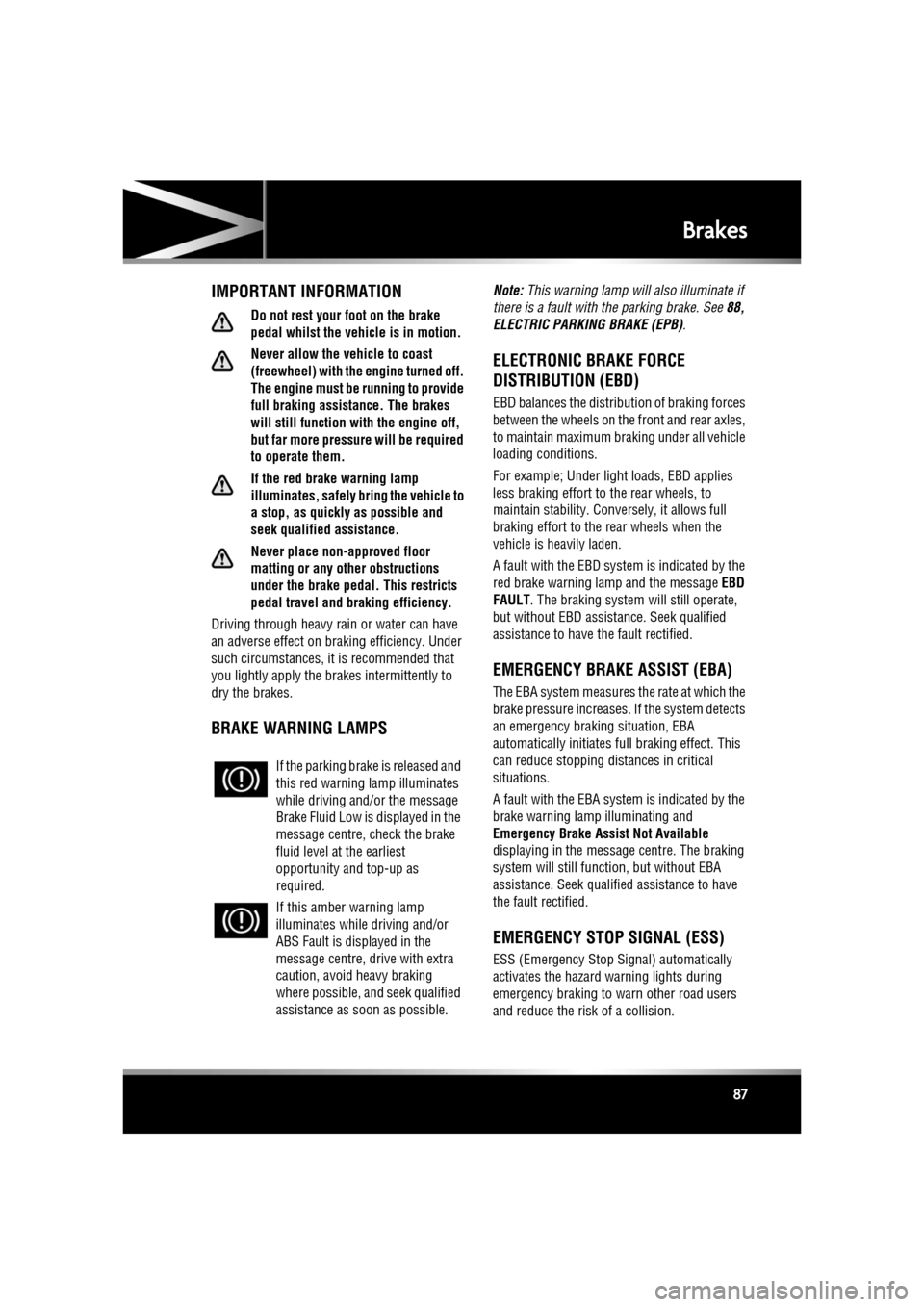
If the parking brake
is released and
this red warning lamp illuminates
while driving and/or the message
Brake Fluid Low is displayed in the
message centre, check the brake
fluid level at the earliest
opportunity and top-up as
required.
If this amber warning lamp
illuminates while driving and/or
ABS Fault is displayed in the
message centre, drive with extra
caution, avoid heavy braking
where possible, and seek qualified
assistance as soon as possible.
Page 88 of 225
L
(FM8) SEMCON JLR OWNER GUIDE VER 1.00 EURO
LANGUAGE: english-en; MARQUE: jaguar; MODEL: XF
Brakes
88
ELECTRIC PARKING BRAKE (EPB)
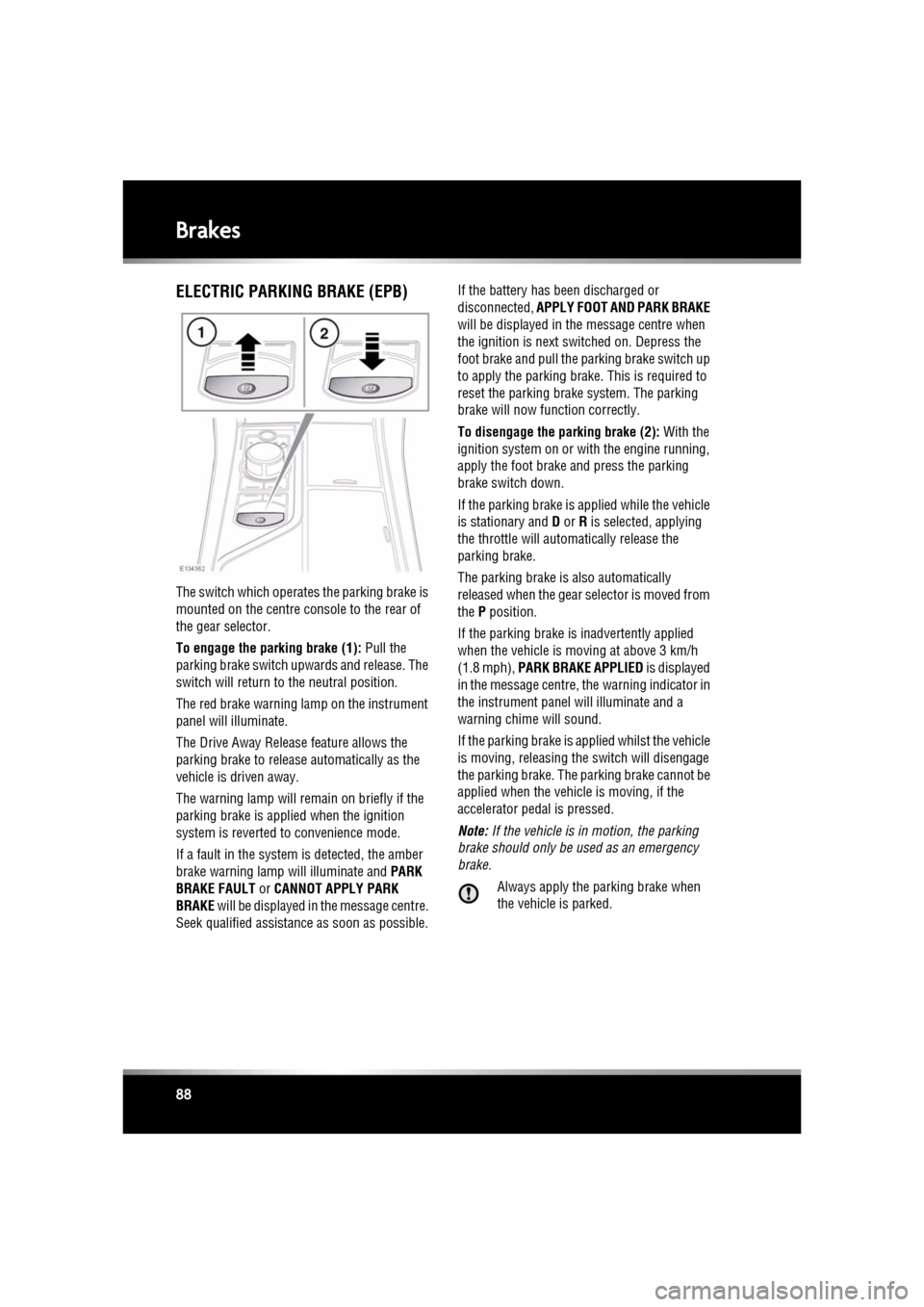
The switch which operate s the parking brake is
mounted on the centre c onsole to the rear of
the gear selector.
To engage the parking brake (1): Pull the
parking brake switch upwards and release. The
switch will return to the neutral position.
The red brake warning lamp on the instrument
panel will illuminate.
The Drive Away Release feature allows the
parking brake to release automatically as the
vehicle is driven away.
The warning lamp will remain on briefly if the
parking brake is applied when the ignition
system is reverted to convenience mode.
If a fault in the system is detected, the amber
brake warning lamp will illuminate and PARK
BRAKE FAULT or CANNOT APPLY PARK
BRAKE will be displayed in the message centre.
Seek qualified assistan ce as soon as possible. If the battery has been discharged or
disconnected,
APPLY FOOT AND PARK BRAKE
will be displayed in the message centre when
the ignition is next switched on. Depress the
foot brake and pull the parking brake switch up
to apply the parking brake. This is required to
reset the parking brake system. The parking
brake will now f unction correctly.
To disengage the parking brake (2): With the
ignition system on or with the engine running,
apply the foot brake and press the parking
brake switch down.
If the parking brake is a pplied while the vehicle
is stationary and D or R is selected, applying
the throttle will auto matically release the
parking brake.
The parking brake is also automatically
released when the gear selector is moved from
the P position.
If the parking brake is inadvertently applied
when the vehicle is moving at above 3 km/h
(1.8 mph), PARK BRAKE APPLIED is displayed
in the message centre, the warning indicator in
the instrument panel will illuminate and a
warning chime will sound.
If the parking brake is a pplied whilst the vehicle
is moving, releasing th e switch will disengage
the parking brake. The parking brake cannot be
applied when the vehicle is moving, if the
accelerator pedal is pressed.
Note: If the vehicle is in motion, the parking
brake should only be used as an emergency
brake.
Always apply the parking brake when
the vehicle is parked.
Page 101 of 225
R
(FM8) SEMCON JLR OWNER GUIDE VER 1.00 EURO
LANGUAGE: english-en; MARQUE: jaguar; MODEL: XF
Adaptive cruise control
101
The sensitivity of th e warning can only be
adjusted with ACC disengaged. Adjust as
follows:
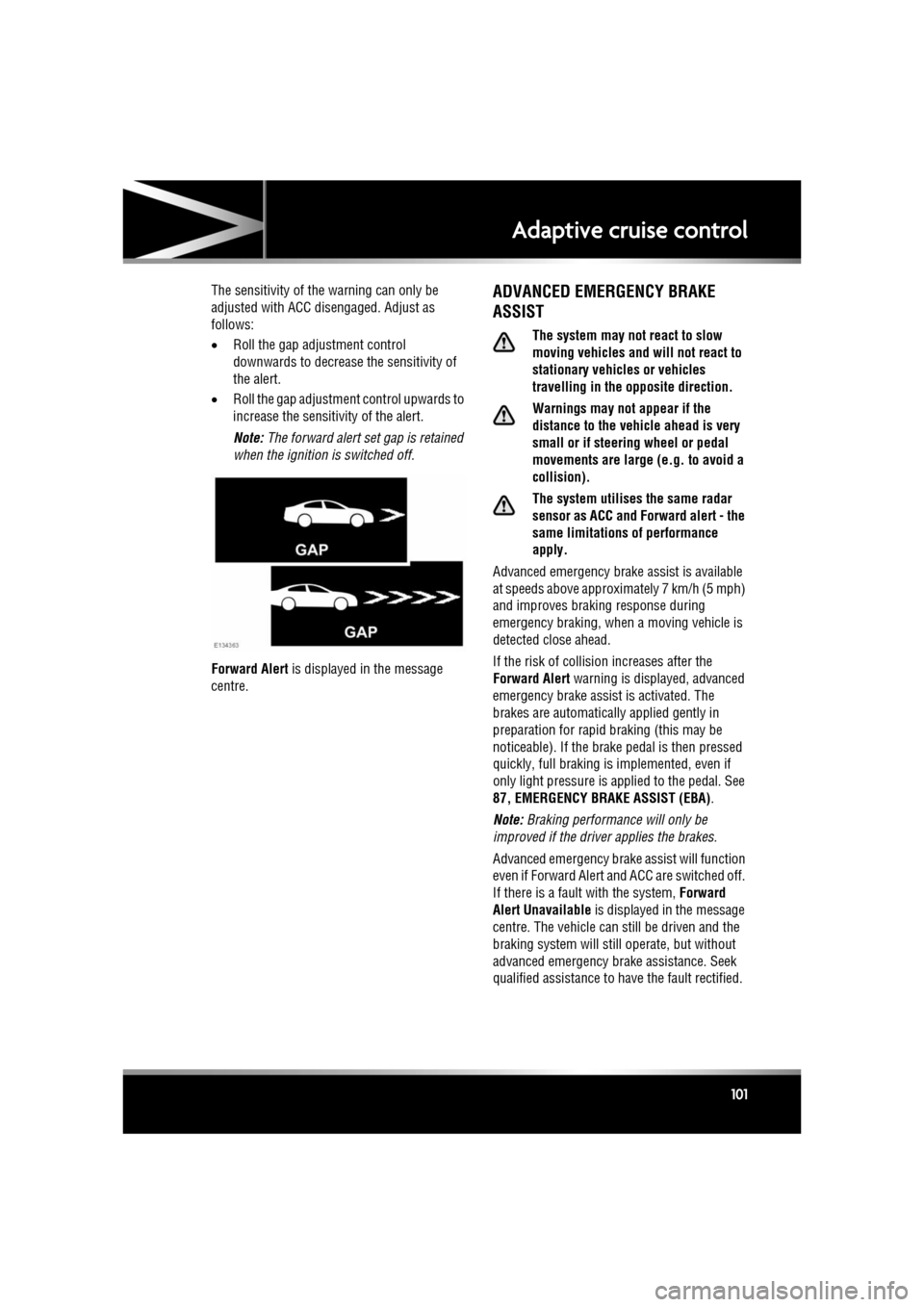
• Roll the gap adjustment control
downwards to decrease the sensitivity of
the alert.
• Roll the gap adjustment control upwards to
increase the sensitivity of the alert.
Note: The forward alert set gap is retained
when the ignition is switched off.
Forward Alert is displayed in the message
centre.ADVANCED EMERGENCY BRAKE
ASSIST
The system may not react to slow
moving vehicles and will not react to
stationary vehicles or vehicles
travelling in the opposite direction.
Warnings may not appear if the
distance to the vehicle ahead is very
small or if steering wheel or pedal
movements are large (e.g. to avoid a
collision).
The system utilises the same radar
sensor as ACC and Forward alert - the
same limitations of performance
apply.
Advanced emergency brake assist is available
at speeds above approximately 7 km/h (5 mph)
and improves brakin g response during
emergency braking, when a moving vehicle is
detected close ahead.
If the risk of collision increases after the
Forward Alert warning is displayed, advanced
emergency brake assist is activated. The
brakes are automatically applied gently in
preparation for rapid braking (this may be
noticeable). If the brake pedal is then pressed
quickly, full braking is implemented, even if
only light pressure is ap plied to the pedal. See
87, EMERGENCY BRAKE ASSIST (EBA) .
Note: Braking performance will only be
improved if the driver applies the brakes.
Advanced emergency brake assist will function
even if Forward Alert and ACC are switched off.
If there is a fault with the system, Forward
Alert Unavailable is displayed in the message
centre. The vehicle can st ill be driven and the
braking system will still operate, but without
advanced emergency brake assistance. Seek
qualified assistance to have the fault rectified.
Page 102 of 225
L
(FM8) SEMCON JLR OWNER GUIDE VER 1.00 EURO
LANGUAGE: english-en; MARQUE: jaguar; MODEL: XF
Adaptive cruise control
102
INTELLIGENT EMERGENCY BRAKING
The system may not react to slow
moving vehicles.
The system will not react to stationary
vehicles, or vehicles that are not
travelling in the same direction as
your vehicle.
Warnings and automatic braking may
not occur if the dist ance to the vehicle
ahead is very small, or if the steering
wheel and pedal movements are large
(to avoid a collis ion for example).
IEB (Intelligent Em ergency Braking)
uses the same radar sensor as
Adaptive Cruise Control and Forward
Alert. The same performance
limitations apply, see 96, ADAPTIVE
CRUISE CONTROL OVERVIEW.
IEB is available at all speeds to automatically
apply the brakes if an unavoidable collision
with a moving vehicle in front is detected.
If there is an imminent risk of collision, an
audible warning is given. If the collision then
becomes unavoidable, the IEB system applies
the brakes at up to maximum pressure. After
IEB has activated, IEB System Was Activated
is displayed in the message centre and the
system is inhibited from further operation until
reset by a Dealer/Authorised Repairer.
IEB will function even if Forward Alert and ACC
are switched off. If the radar sensor is blocked,
by snow or heavy rain for example, or there is
a fault with the system, IEB Not Available is
displayed in the message centre. The vehicle
can still be driven and the braking system will
still operate, but without IEB. If the cause of
this message being disp layed is thought to be
other than a blocked rada r sensor, consult your
Dealer/Authorised Repairer.
Page 140 of 225

L
(FM8) SEMCON JLR OWNER GUIDE VER 1.00 EURO
LANGUAGE: english-en; MARQUE: jaguar; MODEL: XF
Navigation system
140
RESTORE SYSTEM DEFAULTS
If you have made any changes to the system’s
default settings, use this menu to restore the
original settings.
MEMORY POINTS
From the navigation menu, select Stored
locations . This enables you to manage
destinations such as, place of work, home,
favourite restaurant or areas to avoid.
From the Stored locations menu you can save
up to 400 memory points or add your home
address.
Select Memory Points to add a stored location.
Touching any of the Stored locations
submenus allows you to Add, Edit or Delete .
Select Add to store a memory point.
MEMORY POINT DETAILS
Touch Info to display the details of the selected
memory point. The details include Icon, Name,
Position and Tel.
The telephone number ca n be called by
touching the telephone bu tton if a telephone is
connected.
The memory point detail s can be edited from
the Stored locations screen.
POSTCODE
Not all countries have th is facility. Enter the
postcode of your waypoi nt or destination from
the keypad. The postcode must be entered
precisely, including any spaces or punctuation.
When the postcode has been entered touch OK.
EMERGENCY
Not all countries have this facility. Touch
Emergency on the Destination entry screen to
display a list of local po lice stations, hospitals
or Jaguar Dealerships. Press
Name to display the list in alphabetical
order or Distance to display the list in order of
proximity to the curre nt vehicle location.
Touch the name of the fa cility to set it as a
destination or waypoint.
MAP
After selecting map, the local area map is
displayed. Drag the circle to the area for your
destination or waypoint, zooming in if required.
This location can be stored as a destination or
waypoint.
COORDINATES
If you know the coordinates of your destination
they can be entered from this screen. The full
latitude must be entered first before the
longitude coordinates can be entered.
When the coordinates have been entered,
touch OK.
If the coordinates ente red are not contained
within the area covered by the available maps,
a message will be shown. This can also occur
if the incorrect coordina tes have been entered.
RECALLING A PREVIOUS
DESTINATION
After selecting Previous from the menu, the
screen shows a list of stored previous
destinations. Select your destination by
touching the bar. The deta ils will be displayed
for confirmation.
Note: In some markets, li st scrolling is not
active whilst driving for legislative reasons.
Only the items shown at the top of the list can
be selected.
Page 145 of 225
R
(FM8) SEMCON JLR OWNER GUIDE VER 1.00 EURO
LANGUAGE: english-en; MARQUE: jaguar; MODEL: XF
Navigation system
145
THE DISCLAIMER OF WARRANTY AND
LIMITATION OF LIABILITY, SET FORTH IN
THIS AGREEMENT, DO NOT AFFECT OR
PREJUDICE YOUR STATUTORY RIGHTS
WHERE YOU HAVE ACQUIRED THE
DATABASE OTHERWISE THAN IN THE
COURSE OF A BUSINESS. Some states and
laws do not allow the exclusion of implied
warranties, so the above disclaimer may not
apply to you.
The DATABASE reflects reality as
existing before you received the
DATABASE and it comprises data and
information from government and
other sources, which may contain
errors and omissions. Accordingly,
the DATABASE may contain inaccurate
or incomplete information due to the
passage of time, changing
circumstances, and due to the nature
of the sources used. The DATABASE
does not include or reflect information
on - inter alia - neighbourhood safety;
law enforcement; emergency
assistance; construction work; road or
lane closures; vehicle or speed
restrictions; road slope or grade;
bridge height, weight or other limits;
road or traffic conditions; special
events; traffic congestion; or travel
time.NAVTEQ CORPORATION
Please read this agreement carefully before
using the Navigation System.
This is a licence agreement for your copy of the
Navigable Map Database , (the ‘DATABASE’)
originally made by NAVTEQ Corporation), used
in the Navigation Sy stem. By using this
DATABASE you accept and agree to all the
terms and conditions below.
OWNERSHIP
The DATABASE and the copyrights and
intellectual property or neighbouring rights
therein are owned by NAVTEQ Corporation or
its licensors.
LICENCE GRANT
NAVTEQ Corporation grants you a
non-exclusive licence to use your copy of the
DATABASE for your personal use or for use in
your business’ internal operations. This license
does not include the right to grant
sub-licenses.
LIMITATIONS OF USE
The DATABASE is restricted for use in the
specific system for which it was created.
Except to the extent ex plicitly permitted by
mandatory applicable laws, you may not
extract or re-utilise s ubstantial parts of the
contents of the DATA BASE, not reproduce,
copy, modify, adapt, translate, disassemble,
decompile, or reverse engineer any portion of
the DATABASE.
Page 171 of 225
R
(FM8) SEMCON JLR OWNER GUIDE VER 1.00 EURO
LANGUAGE: english-en; MARQUE: jaguar; MODEL: XF
Fluid level checks
171
If the message LOW COOLANT LEVEL is
displayed in the message centre, stop the
vehicle as soon as safe ty permits and top-up
the coolant reservoir with the recommended
antifreeze/water mix.
If the message centre displays the message
ENGINE OVERHEATING, pull off the
carriageway and allow the e ngine to idle for five
minutes and then switch off the ignition for ten
minutes. Switch on the engine and, provided
that the warning does not occur, continue your
journey, avoiding hars h acceleration. Seek
qualified assistance as soon as possible.
TOPPING UP THE COOLANT
Never remove the filler cap when the
engine is hot.
Antifreeze is highly inflammable. Do
not allow antifreeze to come into
contact with naked flames or other
sources of ignition (e.g. a hot engine)
- a fire may result.
Unscrew the filler cap slowly,
allowing the pressure to escape
before removing completely.
When travelling in territories where the
water supply contains salt, always
ensure you carry a supply of fresh (rain
or distilled) water. Topping up with salt
water will cause serious engine
damage.
Top-up to the upper le vel indicator mark
located on the side of the expansion tank. Use
only a 50% mix of water and antifreeze to
specification WSS M97B44 (coloured orange)
Extended Life Coolant.
Ensure the cap is tightened fully after top-up is
completed by turning the cap until the ratchet
cap clicks. Note:
In an emergency, if the approved
antifreeze is unavailable, top-up the system
with clean water, but be aware of the resultant
reduction in frost protection. Do not top-up or
refill with conventional an tifreeze formulations.
If in doubt consult a qualified technician.
BRAKE FLUID CHECK
Seek qualified assistance
immediately if brak e pedal travel is
unusually long, unusua lly short or if
there is any signific ant loss of brake
fluid. Driving under such conditions
could result in extended stopping
distances or complete brake failure.
Note: If the warning lamp illuminates or the
message is displayed while the vehicle is being
driven, stop the vehicle as soon as safety
permits by gently appl ying the brakes. Check
and top-up the fluid level if necessary.
Brake fluid is highly toxic - keep
containers sealed and out of the reach
of children. If accidental consumption
is suspected, seek medical attention
immediately.
If the fluid comes into contact with the
skin or eyes, rins e immediately with
plenty of water.
Brake fluid is highly inflammable. Do
not allow brake fluid to come into
contact with naked flames or other
sources of ignition (e.g. a hot engine).
If the quantity of fluid in the brake
reservoir drops below the
recommended level, a red warning
lamp in the inst rument panel will
illuminate and the message Brake
Fluid Low will be displayed in the
message centre.
Page 206 of 225

L
english-en (10, 18, 21 & 25)
Index
206
video media playercontrols . . . . . . . . . . . . . . . . . . . . . . 124
Auto high beam . . . . . . . . . . . . . . . . . . . . . 38
Auto mode (climate) . . . . . . . . . . . . . . . . . 65
Automatic gearbox . . . . . . . . . . . . . . . . . . 81
Automatic locking . . . . . . . . . . . . . . . . . . . . 7
Automatic reconnection (portable audio) 118
Automatic Stop/Start . . . . . . . . . . . . . . . . . 79
Automatic switch off (ACC) . . . . . . . . . . . . 98
Automatic switch off (cruise) . . . . . . . . . . 95
Auxiliary devices connecting multiple devices . . . . . . . . 117
B
Batteryboost starting . . . . . . . . . . . . . . . . . . . 183
care . . . . . . . . . . . . . . . . . . . . . . . . . . . 182
changingtimed climate remote . . . . . . . . . . . . 184
charging . . . . . . . . . . . . . . . . . . . . . . . 184
jump starting connecting cables . . . . . . . . . . . . . . 183
disconnecting cables . . . . . . . . . . . . 183
monitoring system. . . . . . . . . . . . . . . . 183
warning symbols . . . . . . . . . . . . . . . . . 182
Battery backed sounder . . . . . . . . . . . . . . . 11
Beltminder . . . . . . . . . . . . . . . . . . . . . . . . . 26 warning lamp . . . . . . . . . . . . . . . . . . 26, 52
Belts . . . . . . . . . . . . . . . . . . . . . . . . . . . . 167 safety . . . . . . . . . . . . . . . . . . . . . . . . . . . 23
seatbelt warning lamp . . . . . . . . . . . 26, 52
Bluetooth . . . . . . . . . . . . . . . . . . . . . . . . . 129 audioautomatic reconnection . . . . . . . . . . 118
pairing . . . . . . . . . . . . . . . . . . . 117, 118
media pairing . . . . . . . . . . . . . . . . . . . . . . . 117
telephone compatibility . . . . . . . . . . . . . . . . . . 130
icons . . . . . . . . . . . . . . . . . . . . . . . . 131
overview . . . . . . . . . . . . . . . . . . . . . 128
pairing . . . . . . . . . . . . . . . . . . . . . . . 130 phonebook . . . . . . . . . . . . . . . . . . . . 132
safety . . . . . . . . . . . . . . . . . . . . . . . . 129
Bonnet closing . . . . . . . . . . . . . . . . . . . . . . . . . 160
opening . . . . . . . . . . . . . . . . . . . . . . . . . 160
Boost starting . . . . . . . . . . . . . . . . . . . . . . 183
Brakes ABS warning lamp . . . . . . . . . . . . . . . . . 52
advanced emergency assist . . . . . . . . . 101
EBA (Emergency brake assist) . . . . . . . . 87
EBD (Electronic brake force distribution) 87
fluid
check. . . . . . . . . . . . . . . . . . . . . . . . . 171
specification . . . . . . . . . . . . . . . . . . . 172
top up . . . . . . . . . . . . . . . . . . . . . . . . 172
handbrake . . . . . . . . . . . . . . . . . . . . . . . . 88
pedal travel . . . . . . . . . . . . . . . . . . . . . . 180
warning lamp . . . . . . . . . . . . . . . . . . . . . 51
warning lamps . . . . . . . . . . . . . . . . . . . . 87
BSM (Blind spot monitor) . . . . . . . . . . . . . . 46 detection beam issues . . . . . . . . . . . . . . 99
sensor blockage . . . . . . . . . . . . . . . . . . . 47
system fault . . . . . . . . . . . . . . . . . . . . . . 47
Bulbs
license plate . . . . . . . . . . . . . . . . . . . . . 163
number plate . . . . . . . . . . . . . . . . . . . . . 163
C
Call volume . . . . . . . . . . . . . . . . . . . . . . . . 132
Camerasrear view . . . . . . . . . . . . . . . . . . . . . . . . . 93
Capacities . . . . . . . . . . . . . . . . . . . . . . . . . 179
Carpets and mats . . . . . . . . . . . . . . . . . . . 167
Car-wash . . . . . . . . . . . . . . . . . . . . . . . . . 165
CD player controls. . . . . . . . . . . . . . . . . . . . . . . . . 120
loading discs . . . . . . . . . . . . . . . . . . . . . 119
Chairs child seats tether straps . . . . . . . . . . . . . . . . . . . . 31
memory recalling a position . . . . . . . . . . . . . . . 15
Page 208 of 225

L
english-en (10, 18, 21 & 25)
Index
208
Daily checks . . . . . . . . . . . . . . . . . . . . . . 158
Data recording . . . . . . . . . . . . . . . . . . . . . 199
Daylight running lamps . . . . . . . . . . . . . . . 37
Dealer locations (Jaguar). . . . . . . . . . . . . 141
Declarations of conformity . . . . . . . . . . . 202navigation system . . . . . . . . . . . . . . . . 146
Derv sulphur content . . . . . . . . . . . . . . . . . . 153
Deselecting valet mode . . . . . . . . . . . . . . . 62
Destination entry . . . . . . . . . . . . . . . . . . . 138 postcode . . . . . . . . . . . . . . . . . . . . . . . 140
search area . . . . . . . . . . . . . . . . . . . . . 138
town . . . . . . . . . . . . . . . . . . . . . . . . . . 141
Detection beam issues . . . . . . . . . . . . . . . 99
Dialling a number . . . . . . . . . . . . . . . . . . 132
Diesel engine . . . . . . . . . . . . . . . . . . . . . 153, 154starting . . . . . . . . . . . . . . . . . . . . . . . 74
switching off . . . . . . . . . . . . . . . . . . . 75
filler flap. . . . . . . . . . . . . . . . . . . . 154, 155
fuel consumption . . . . . . . . . . . . . . . . . 157
misfuel device . . . . . . . . . . . . . . . . . . . 155
specification . . . . . . . . . . . . . . . . . . . . 156
sulphur content . . . . . . . . . . . . . . . . . . 153
water in fuel . . . . . . . . . . . . . . . . . . . . . 153
Diesel particulate filter (DPF) . . . . . . . . . . 159
Differential control . . . . . . . . . . . . . . . . . . . 85
Dimensions . . . . . . . . . . . . . . . . . . . . . . . 178
Direction indicators . . . . . . . . . . . . . . . . . . 36 warning lamp . . . . . . . . . . . . . . . . . . . . . 54
Disability modifications . . . . . . . . . . . . . . 158
Door mirrors BSM (Blind spot monitor)
sensor blockage . . . . . . . . . . . . . . . . . 47
system fault . . . . . . . . . . . . . . . . . . . . 47
Door transceiver
entry gate. . . . . . . . . . . . . . . . . . . . . . . . 50
garage door opener . . . . . . . . . . . . . . . . 48
programming. . . . . . . . . . . . . . . . . . . . . 48
programming a single button . . . . . . . . 49
rolling code device programming . . . . . 49
Double locking. . . . . . . . . . . . . . . . . . . . . . . 9
DPF (Diesel particulate filter) . . . . . . . . . . 159 Drive away locking . . . . . . . . . . . . . . . . . . . . 7
Drive control
operation. . . . . . . . . . . . . . . . . . . . . . . . . 86
Driver controls . . . . . . . . . . . . . . . . . . . . . 226
Driver information module information messages. . . . . . . . . . . . . . . 56
trip computer . . . . . . . . . . . . . . . . . . . . . 56
warning lamps . . . . . . . . . . . . . . . . . . . . 51
warning messages . . . . . . . . . . . . . . . . . 56
Driving ACC (Adaptive cruise c ontrol) . . . . . . 96, 99
override . . . . . . . . . . . . . . . . . . . . . . . . 98
adaptive cruise control automatic switch off . . . . . . . . . . . . . . 98
arduous conditions . . . . . . . . . . . . . . . . 159
ASL (Automatic speed limiter) . . . . . . . 103 setting . . . . . . . . . . . . . . . . . . . . . . . . 103
before starting. . . . . . . . . . . . . . . . . . . . 198
BSM (Blind spot monitor) sensor blockage . . . . . . . . . . . . . . . . . 47
controls. . . . . . . . . . . . . . . . . . . . . . . . . 226
cruise control automatic switch off . . . . . . . . . . . . . . 95
change speed . . . . . . . . . . . . . . . . . . . 94
set speed . . . . . . . . . . . . . . . . . . . . . . . 94
daily checks . . . . . . . . . . . . . . . . . . . . . 158
DSC warning lamp
active. . . . . . . . . . . . . . . . . . . . . . . . . . 53
off . . . . . . . . . . . . . . . . . . . . . . . . . . . . 53
dynamic mode . . . . . . . . . . . . . . . . . . . . 83
EBA (Emergency brake assist) . . . . . . . . 87
EBD (Electronic brake force distribution) 87
forward alert . . . . . . . . . . . . . . . . . . . . . 100
mirror dip when reversing. . . . . . . . . . . . 45
sitting correctly . . . . . . . . . . . . . . . . . . . . 15
wipers
rain sensor . . . . . . . . . . . . . . . . . . . . . 40
DSC (Dynamic st ability control)
switching between DSC and tracDSC . . . 84
switching off . . . . . . . . . . . . . . . . . . . . . . 84
switching on . . . . . . . . . . . . . . . . . . . . . . 84