mirror JAGUAR XF 2011 1.G User Guide
[x] Cancel search | Manufacturer: JAGUAR, Model Year: 2011, Model line: XF, Model: JAGUAR XF 2011 1.GPages: 225, PDF Size: 7.32 MB
Page 49 of 225

R
(FM8) SEMCON JLR OWNER GUIDE VER 1.00 EURO
LANGUAGE: english-en; MARQUE: jaguar; MODEL: XF
Garage door opener
49
4. If, after 60 seconds, the indicator lamp
does not flash rapidly, release both the
transceiver and the hand-held transmitter
buttons and repeat th e procedure starting
with Step 2. Position the hand-held
transmitter at a different angle and/or
distance.
5. Press and hold the programmed garage
door opener button and observe the
indicator lamp.
•If the indicator is continuous,
programming is complete and your
device should operate when the garage
door opener button is pressed and held
for approximately 1 to 2 seconds and
then released.
• If the indicator lamp blinks rapidly for
two seconds and then illuminates
continuously, proceed with the
following programming instructions
for rolling code de vice equipment.
TO ERASE ALL PROGRAMMING
For first time programming, ensure that the
engine is switched off:
1.Ensure that the igniti on system is in
convenience mode (see 7, CONVENIENCE
MODE ).
2. Press and hold the two outer buttons on
the transceiver in the rear-view mirror.
Keep the buttons pressed until the
indicator lamp begins to flash (this will take
approximately 20 seconds), then release
the buttons.
All memories in the gara ge door opener have
now been cleared.
Note: Do not perform this procedure when
programming the addi tional garage door
opener buttons.
ROLLING CODE DEVICE EQUIPMENT
PROGRAMMING
Note: The assistance of a second person, may
make the following steps quicker and easier.
Once the button has been pressed there are
only 30 seconds in which to complete Step 3.
1. At the garage door opener receiver (motor
head unit) in the garage, locate the learn or
smart button/switch.
•The name of the but ton or switch may
vary between manufacturers.
2. Press and release the learn or smart
button.
3. Return to the vehicle and firmly press and
hold the programmed garage door opener
button for two seconds and release.
4. Repeat the press, hold, release sequence
three times to complete the programming
process.
The garage door opener in the rear-view mirror
should now activate the rolling code device.
REPROGRAMMING A SINGLE
GARAGE DOOR OPENER BUTTON
To programme a device to a previously
programmed button:
1. Press and hold the desired
pre-programmed garage door opener
button for at least 20 seconds, but no
longer than 30 seconds, until the indicator
lamp begins to flash.
2. Without releasing th e rear-view mirror
button, position the ha nd-held transmitter
approximately 50 to 150 mm (2 to 6
inches) away from the transceiver in the
rear-view mirror, keeping the indicator
lamp in view.
3. Carry out Step 3 of Programming .
Page 50 of 225

L
(FM8) SEMCON JLR OWNER GUIDE VER 1.00 EURO
LANGUAGE: english-en; MARQUE: jaguar; MODEL: XF
Garage door opener
50
ENTRY GATE PROGRAMMING
The technology of some entry gates requires
you to press and re-press (cycle) the hand-held
transmitter button every two seconds during
programming.
Continue to press and hold the desired
rear-view mirror button while you cycle your
hand-held transmitter until the indicator lamp
flashes rapidly.
INFORMATION AND ASSISTANCE
It is recommended that when you sell or
dispose of the vehi cle, the programmed
transceiver buttons be erased for
security purposes.
For information on the range of available
compatible products or accessories, or for
assistance, you should contact your Dealer/
Authorised Repairer.
You can also contact the supplier’s helpline on
0 0800 04663 5465. This toll-free number can
be called from anywhere within Europe. No
separate country code is required (the first zero
is not required when calling from within
Germany).
Contact can also be made via the internet. The
website addres s is www.eurohomelink.com.
The e-mail address is
[email protected].
Note: Keep the original transmitter for future
use or programming procedures if, for
example, you purchase a new vehicle.
Note: The manufacturer is not responsible for
any radio or TV interference caused by
unauthorised modifications to this equipment.
Such modifications c ould void the user’s
authority to operate the equipment.
Page 61 of 225

R
(FM8) SEMCON JLR OWNER GUIDE VER 1.00 EURO
LANGUAGE: english-en; MARQUE: jaguar; MODEL: XF
Touch screen
61
The training session can be cancelled at any
time by touching the on-screen pop-up or by
pressing and holding the Voice button on the
steering wheel. See 126, USING VOICE
CONTROL .
TRIP COMPUTER SETTINGS
Trip Computer : Select to switch trip computer
readings between Trip A, Trip B and Trip Auto .
Select Reset to zero the trip computer
readings. Select Units to switch the trip
computer readings between Imperial and
Metric measurements.
VEHICLE SETTINGS
• Security : Select to enable/disable or alter
the settings of the following:
• Single/multi-point entry (2 stage
unlocking).
• Alarm sensors (interior and tilt).
• Drive-away locking.
Scroll down through the menu until the
desired feature is disp layed, then select On
or Off, as appropriate.
If drive-away locking is switched on, select
the desired speed (8, 16 or 32 km/h or 5,
10 or 20 mph).
• Windows/mirrors : Select to
enable/disable:
• Global opening/closing of windows
and sunroof.
• Exterior mirror dip when reversing.
• Automatic folding/unfo lding of exterior
mirrors when vehicle is locked/
unlocked.
• Interior mirror dimming.
Scroll down through the menu until the
desired feature is disp layed, then select On
or Off, as appropriate. •
Units : Select to switch between Imperial
and Metric measurements.
• Auto (AHB) high beam : Select to turn AHB
on or off, and set AHB for side of road
being driven on.
SELECTING VALET MODE
Valet mode allows the vehi cle to be locked by a
parking attendant, without giving access to the
luggage compartment and glove box. Valet
mode also prevents ope ration of the touch
screen, to prevent access to telephone
numbers or naviga tion addresses.
From the Home menu, select Valet, then enter
a four digit Personal Identification Number
(PIN) (personally chosen ). You will then be
prompted to re-enter the same PIN. On
completion, touch the OK soft key.
If you wish to cancel the PIN, touch the C soft
key. If the PIN is cancelled, or incorrectly
entered, you will be prompted to enter the PIN
again.
Once the PIN has been correctly entered, a
security information pop- up is displayed. Read
the information and remove the emergency key
from the Jaguar Smart Key.
Valet on is displayed to indicate that the PIN
has been accepted. The luggage compartment
and glove box are now securely locked in Valet
mode.
On exiting and securing the vehicle, remove the
emergency key from the Jaguar Smart Key.
Retain the emergency key and give the Jaguar
Smart Key to the attendant.
Note: The emergency key ca n be used to open
the luggage compartment, which may
de-activate Valet mode.
Page 93 of 225
R
(FM8) SEMCON JLR OWNER GUIDE VER 1.00 EURO
LANGUAGE: english-en; MARQUE: jaguar; MODEL: XF
Parking aids
93
CLEANING THE SENSORS
For reliable operation, th e sensors in the front
and rear bumpers should be kept free from ice,
frost and grime.
Do not clean the sensors with abrasive
or sharp objects or materials.
When using a high pressure spray, only
spray the sensors briefly, from a
distance greater than 200 mm
(8 inches).
PARKING AID SYSTEM FAULT
If the system has a fault when engaging reverse
gear or turning on the ignition, then a single, 3
second tone will be heard and a pop-up
warning will appear on the touch screen. If
both front and rear park ing aids are fitted, the
warning indicator in the parking aid switch will
flash for 3 seconds and then switch off.
If a fault is detected, the system is
automatically disabled.
Note: The parking aid may emit spurious tones
if it detects a frequenc y tone using the same
band as the sensors (e.g. air brakes).
REAR VIEW CAMERA
It remains the driver's responsibility
to detect obstacles and estimate the
vehicle's distance from them when
reversing.
When Reverse ( R) is selected, the system uses
a camera to provide a wide-angle colour rear
view image on the touch screen.
The camera display has priority over the
parking aid display. To view the parking aid
display instead, or to cancel camera display at
any time, touch the display.
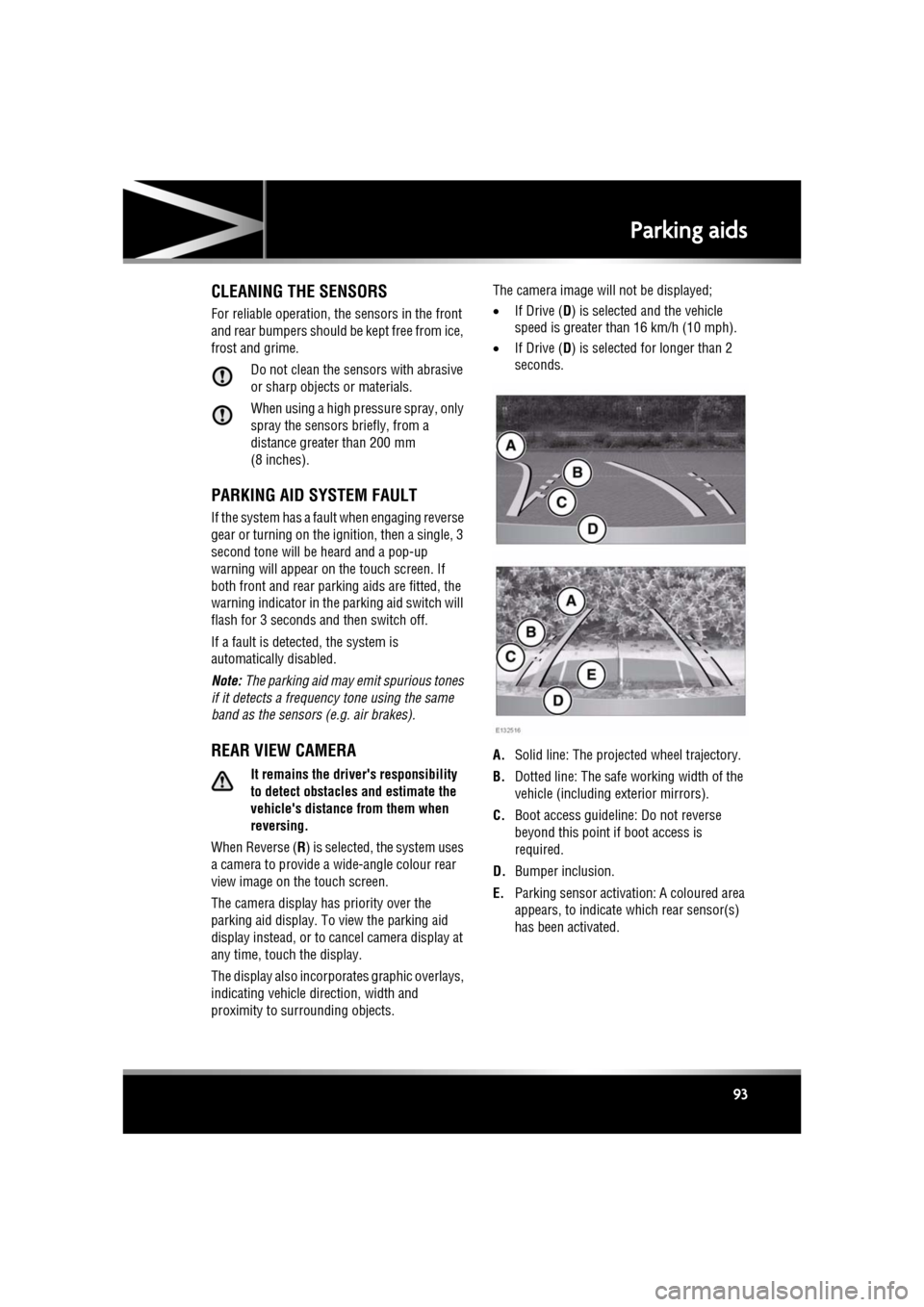
The display also incorporates graphic overlays,
indicating vehicle di rection, width and
proximity to surrounding objects. The camera image will not be displayed;
•
If Drive ( D) is selected and the vehicle
speed is greater than 16 km/h (10 mph).
• If Drive ( D) is selected for longer than 2
seconds.
A. Solid line: The projec ted wheel trajectory.
B. Dotted line: The safe working width of the
vehicle (including exterior mirrors).
C. Boot access guideline: Do not reverse
beyond this point if boot access is
required.
D. Bumper inclusion.
E. Parking sensor activati on: A coloured area
appears, to indicate which rear sensor(s)
has been activated.
Page 165 of 225
R
(FM8) SEMCON JLR OWNER GUIDE VER 1.00 EURO
LANGUAGE: english-en; MARQUE: jaguar; MODEL: XF
Maintenance
165
WASHING THE VEHICLE PAINTWORK
Substances which are corrosive can
damage the vehicle's paintwork and
should be removed to prevent damage.
USING AN AUTOMATIC WASH
Commercially operated automatic car
washes, jet washes and
power-operated mops, are not
recommended.
UNDER BONNET CLEANING
Do not use a high pressure washer or
steam cleaner in the engine
compartment.
Ensure that the brake fluid reservoir is
kept dry at all times. Only use a clean,
dry cloth to clean the brake fluid cap
and reservoir.
CLEANING GLASS SURFACES
Clean the rear window with a soft cloth to avoid
damaging the heating element. Do not scrape
the glass or use any abrasive cleaning fluid.
Mirror glass is particul arly susceptible to
damage. Wash with soapy water. Do not use
abrasive cleaning compounds or metal
scrapers to remove ice.
To avoid damaging the protecting coating, only
clean the interior side of the sunroof glass with
a soft cloth. Don not sc rape the glass or use
abrasive cleaning fluids.
CLEANING THE REAR SCREEN
To avoid damaging the heating elements when
cleaning the inside of th e rear screen, use only
a soft damp cloth or ch amois leather. Do not
use solvents or sharp objects to clean the
glass.
CLEANING THE SUNROOF WIND
DEFLECTOR
A mild solution of soap and water, or car
shampoo should be used to clean the wind
deflector net period ically. Support the
underside of the net with a soft cloth, and
gently scrub the net usi ng a soft bristled brush.
REMOVING GREASE AND TAR
Remove grease or tar with Jaguar Tar Remover
or methylated spirit (a lcohol). White spirit is
also effective, but must not be applied to
rubber, particularly the windscreen wiper
blades.
Ensure that after using methylated or
white spirit, the area is washed
immediately with soapy water, to
remove all traces of spirit.
POLISHING
Chrome polish, or other abrasive
cleaners, must not be used on the
vehicle's brightwork.
It is recommended that the vehicle is polished
regularly using Jaguar polish and a polishing
cloth.
CLEANING THE INTERIOR
The steering wheel ce ntre pad and other
areas containing airbags should only be
cleaned sparingly with a damp cloth,
warm water and a non-detergent soap.
Page 178 of 225
L
(FM8) SEMCON JLR OWNER GUIDE VER 1.00 EURO
LANGUAGE: english-en; MARQUE: jaguar; MODEL: XF
Technical specifications
178
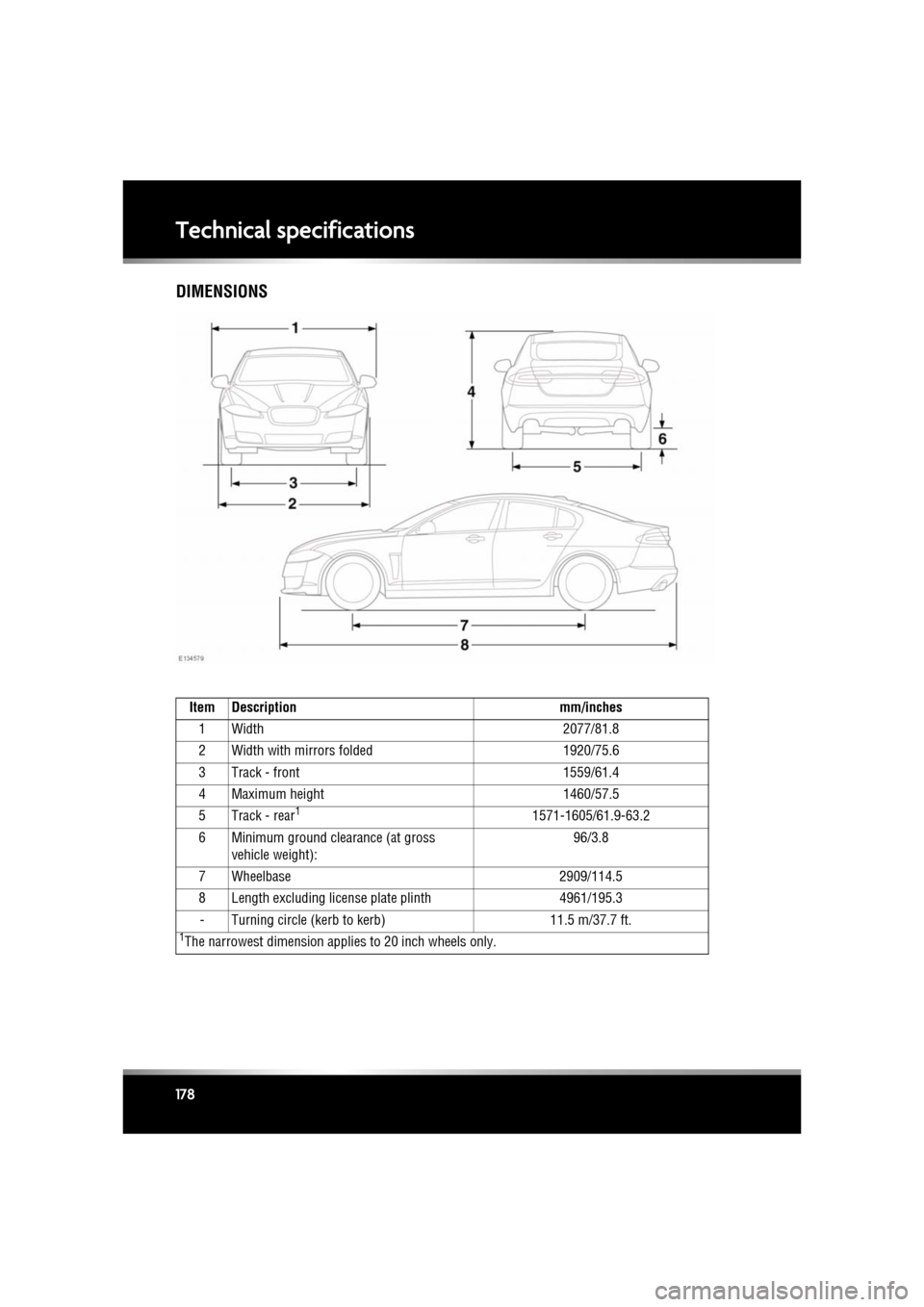
DIMENSIONS
Item Description mm/inches
1 Width 2077/81.8
2 Width with mirrors folded 1920/75.6
3 Track - front 1559/61.4
4 Maximum height 1460/57.5
5 Track - rear
11571-1605/61.9-63.2
6 Minimum ground clearance (at gross vehicle weight): 96/3.8
7 Wheelbase 2909/114.5
8 Length excluding license plate plinth 4961/195.3
- Turning circle (kerb to kerb) 11.5 m/37.7 ft.
1The narrowest dimension applies to 20 inch wheels only.
Page 191 of 225

R
(FM8) SEMCON JLR OWNER GUIDE VER 1.00 EURO
LANGUAGE: english-en; MARQUE: jaguar; MODEL: XF
Fuses
191
PASSENGER COMPARTMENT FUSE BOX
Fuse No Rating
(amps) Fuse
Colour Circuit
F1 - - -
F2 - - -
F3 20A Yellow Driver’s seat adjustment.
F4 20A Yellow Driver’s seat adjustment.
F5 - - -
F6 - - -
F7 - - -
F8 20A Yellow Front passenger's seat adjustment.
F9 20A Yellow Front passenger's seat adjustment.
F10 20A Yellow Left-hand rear door controls.
F11 20A Yellow Right-hand rear door controls.
F12 - - -
F13 10A Red Steering column adjust.
F14 - - -
F15 - - -
F16 5A Tan Sunblind.
F17 - - -
F18 - - -
F19 - - -
F20 5A Tan Remote control receiver.
F21 5A Tan Foot brake.
F22 5A Tan Electric parking brake.
F23 5A Tan Driver’s seat. Audio system. Auto headlamps. Upper centre console switches.
F24 10A Red Front passenger seat. El ectric windows. Mirror adjustment.
F25 20A Yellow Driver’s heated/climate seat.
F26 15A Blue Trailer power socket. Road pricing system.
F27 20A Yellow Front passenger’s heated/climate seat.
F28 15A Blue Auxiliary power sockets.
F29 20A Yellow Keyless entry system.
Page 208 of 225

L
english-en (10, 18, 21 & 25)
Index
208
Daily checks . . . . . . . . . . . . . . . . . . . . . . 158
Data recording . . . . . . . . . . . . . . . . . . . . . 199
Daylight running lamps . . . . . . . . . . . . . . . 37
Dealer locations (Jaguar). . . . . . . . . . . . . 141
Declarations of conformity . . . . . . . . . . . 202navigation system . . . . . . . . . . . . . . . . 146
Derv sulphur content . . . . . . . . . . . . . . . . . . 153
Deselecting valet mode . . . . . . . . . . . . . . . 62
Destination entry . . . . . . . . . . . . . . . . . . . 138 postcode . . . . . . . . . . . . . . . . . . . . . . . 140
search area . . . . . . . . . . . . . . . . . . . . . 138
town . . . . . . . . . . . . . . . . . . . . . . . . . . 141
Detection beam issues . . . . . . . . . . . . . . . 99
Dialling a number . . . . . . . . . . . . . . . . . . 132
Diesel engine . . . . . . . . . . . . . . . . . . . . . 153, 154starting . . . . . . . . . . . . . . . . . . . . . . . 74
switching off . . . . . . . . . . . . . . . . . . . 75
filler flap. . . . . . . . . . . . . . . . . . . . 154, 155
fuel consumption . . . . . . . . . . . . . . . . . 157
misfuel device . . . . . . . . . . . . . . . . . . . 155
specification . . . . . . . . . . . . . . . . . . . . 156
sulphur content . . . . . . . . . . . . . . . . . . 153
water in fuel . . . . . . . . . . . . . . . . . . . . . 153
Diesel particulate filter (DPF) . . . . . . . . . . 159
Differential control . . . . . . . . . . . . . . . . . . . 85
Dimensions . . . . . . . . . . . . . . . . . . . . . . . 178
Direction indicators . . . . . . . . . . . . . . . . . . 36 warning lamp . . . . . . . . . . . . . . . . . . . . . 54
Disability modifications . . . . . . . . . . . . . . 158
Door mirrors BSM (Blind spot monitor)
sensor blockage . . . . . . . . . . . . . . . . . 47
system fault . . . . . . . . . . . . . . . . . . . . 47
Door transceiver
entry gate. . . . . . . . . . . . . . . . . . . . . . . . 50
garage door opener . . . . . . . . . . . . . . . . 48
programming. . . . . . . . . . . . . . . . . . . . . 48
programming a single button . . . . . . . . 49
rolling code device programming . . . . . 49
Double locking. . . . . . . . . . . . . . . . . . . . . . . 9
DPF (Diesel particulate filter) . . . . . . . . . . 159 Drive away locking . . . . . . . . . . . . . . . . . . . . 7
Drive control
operation. . . . . . . . . . . . . . . . . . . . . . . . . 86
Driver controls . . . . . . . . . . . . . . . . . . . . . 226
Driver information module information messages. . . . . . . . . . . . . . . 56
trip computer . . . . . . . . . . . . . . . . . . . . . 56
warning lamps . . . . . . . . . . . . . . . . . . . . 51
warning messages . . . . . . . . . . . . . . . . . 56
Driving ACC (Adaptive cruise c ontrol) . . . . . . 96, 99
override . . . . . . . . . . . . . . . . . . . . . . . . 98
adaptive cruise control automatic switch off . . . . . . . . . . . . . . 98
arduous conditions . . . . . . . . . . . . . . . . 159
ASL (Automatic speed limiter) . . . . . . . 103 setting . . . . . . . . . . . . . . . . . . . . . . . . 103
before starting. . . . . . . . . . . . . . . . . . . . 198
BSM (Blind spot monitor) sensor blockage . . . . . . . . . . . . . . . . . 47
controls. . . . . . . . . . . . . . . . . . . . . . . . . 226
cruise control automatic switch off . . . . . . . . . . . . . . 95
change speed . . . . . . . . . . . . . . . . . . . 94
set speed . . . . . . . . . . . . . . . . . . . . . . . 94
daily checks . . . . . . . . . . . . . . . . . . . . . 158
DSC warning lamp
active. . . . . . . . . . . . . . . . . . . . . . . . . . 53
off . . . . . . . . . . . . . . . . . . . . . . . . . . . . 53
dynamic mode . . . . . . . . . . . . . . . . . . . . 83
EBA (Emergency brake assist) . . . . . . . . 87
EBD (Electronic brake force distribution) 87
forward alert . . . . . . . . . . . . . . . . . . . . . 100
mirror dip when reversing. . . . . . . . . . . . 45
sitting correctly . . . . . . . . . . . . . . . . . . . . 15
wipers
rain sensor . . . . . . . . . . . . . . . . . . . . . 40
DSC (Dynamic st ability control)
switching between DSC and tracDSC . . . 84
switching off . . . . . . . . . . . . . . . . . . . . . . 84
switching on . . . . . . . . . . . . . . . . . . . . . . 84
Page 210 of 225

L
english-en (10, 18, 21 & 25)
Index
210
pairing . . . . . . . . . . . . . . . . . . . . . . . 130
phonebook . . . . . . . . . . . . . . . . . . . . 132
settings . . . . . . . . . . . . . . . . . . . . . . 133
television
analogue/digital option. . . . . . . . . . . 123
controls . . . . . . . . . . . . . . . . . . . . . . 122
touch screen . . . . . . . . . . . . . . . . . . . . 166 display icons . . . . . . . . . . . . . . . . . . . 59
home menu . . . . . . . . . . . . . . . . . . . . 58
operating . . . . . . . . . . . . . . . . . . . . . . 59
setup . . . . . . . . . . . . . . . . . . . . . . . . . 59
system settings . . . . . . . . . . . . . . . . . 60
touch screen care . . . . . . . . . . . . . . . 59
video media player controls . . . . . . . . . . . . . . . . . . . . . . 124
Entry and exit mode. . . . . . . . . . . . . . . . . . 22
EPB (Electric parking brake) . . . . . . . . . . . 88
Ethanol . . . . . . . . . . . . . . . . . . . . . . . . . . 152
EU conformity (navigati on system) . . . . . 146
Event data recording . . . . . . . . . . . . . . . . 199
Exiting the vehicle
door locks and release levers. . . . . . . . . . 9
global closing . . . . . . . . . . . . . . . . . . . . 10
keyless locking . . . . . . . . . . . . . . . . . . . 10
Exterior cleaning . . . . . . . . . . . . . . . . . . . 164
Exterior mirrors . . . . . . . . . . . . . . . . . . . . . 44
External temperature display . . . . . . . . . . . 65
Extinguisher . . . . . . . . . . . . . . . . . . . . . . 164
F
Faulty alarm sensors . . . . . . . . . . . . . . . . . 11
Fire extiguisher . . . . . . . . . . . . . . . . . . . . 164
First aid kit . . . . . . . . . . . . . . . . . . . . . . . . 164
Flat spots . . . . . . . . . . . . . . . . . . . . . . . . . 186
Fluids brakecheck . . . . . . . . . . . . . . . . . . . . . . . . 171
specification. . . . . . . . . . . . . . . . . . . 172
top up . . . . . . . . . . . . . . . . . . . . . . . 172
capacities. . . . . . . . . . . . . . . . . . . . . . . 179
coolant specification. . . . . . . . . . . . . . . . . . . 171 top up . . . . . . . . . . . . . . . . . . . . . . . . 171
engine oil check. . . . . . . . . . . . . . . . . . . . . . . . . 168
specification . . . . . . . . . . . . . . . . . . . 169
fuel tank capacity . . . . . . . . . . . . . . . . . 156
power steering check. . . . . . . . . . . . . . . . . . . . . . . . . 173
specification . . . . . . . . . . . . . . . . . . . 173
specifications . . . . . . . . . . . . . . . . . . . . 175
washer specification . . . . . . . . . . . . . . . . . . . 174
top up . . . . . . . . . . . . . . . . . . . . . . . . 174
Fog lamps warning lamp . . . . . . . . . . . . . . . . . . . . . 53
Follow mode
entering. . . . . . . . . . . . . . . . . . . . . . . . . . 97
gap change . . . . . . . . . . . . . . . . . . . . . . . 98
override. . . . . . . . . . . . . . . . . . . . . . . . . . 98
resume . . . . . . . . . . . . . . . . . . . . . . . . . . 99
suspending . . . . . . . . . . . . . . . . . . . . . . 103
Forward alert. . . . . . . . . . . . . . . . . . . . . . . 100
Front parking aid operation. . . . . . . . . . . . . . . . . . . . . . . . . 92
system fault . . . . . . . . . . . . . . . . . . . . . . 93
Fuel and refuelling consumption . . . . . . . . . . . . . . . . . . . . . 157 extra-urban cycle. . . . . . . . . . . . . . . . 157
urban cycle . . . . . . . . . . . . . . . . . . . . 157
diesel . . . . . . . . . . . . . . . . . . . . . . . . . . 153 sulphur content . . . . . . . . . . . . . . . . . 153
ethanol . . . . . . . . . . . . . . . . . . . . . . . . . 152
Filler flap . . . . . . . . . . . . . . . . . . . . . . . . 155
filler flap . . . . . . . . . . . . . . . . . . . . . . . . 154
fuel consumption urban cycle . . . . . . . . . . . . . . . . . . . . 157
fuel specification . . . . . . . . . . . . . . . . . . 156
fuel system . . . . . . . . . . . . . . . . . . . . . . 160
methanol . . . . . . . . . . . . . . . . . . . . . . . . 152
misfuel device . . . . . . . . . . . . . . . . . . . . 155
MTBE (Methyl tertiary butyl ether) . . . . 153
octane rating . . . . . . . . . . . . . . . . . . . . . 152
running out . . . . . . . . . . . . . . . . . . . . . . 153
safety precautions . . . . . . . . . . . . . . . . . 152
Page 214 of 225

L
english-en (10, 18, 21 & 25)
Index
214
portablelost connection . . . . . . . . . . . . . . . . 118
play . . . . . . . . . . . . . . . . . . . . . . . . . 117
portable media
connections . . . . . . . . . . . . . . . . . . . 113
Memory points (navigati on system) . . . . 140
Memory seats recalling a position . . . . . . . . . . . . . . . . 15
Message centre
trip computer . . . . . . . . . . . . . . . . . . . . . 56change display . . . . . . . . . . . . . . . . . . 56
range . . . . . . . . . . . . . . . . . . . . . . . . . 56
Methanol . . . . . . . . . . . . . . . . . . . . . . . . . 152
Minor paintwork damage repair. . . . . . . . 164
Mirrors BSM (Blind spot monitor) . . . . . . . . . . . 46system fault . . . . . . . . . . . . . . . . . . . . 47
dip when reversing . . . . . . . . . . . . . . . . 45
Mirrors and windows BSM (Blind spot monitor)detection beam issues . . . . . . . . . . . . 99
sensor blockage . . . . . . . . . . . . . . . . . 47
exterior mirrors . . . . . . . . . . . . . . . . . . . 44
sunroof
anti-trap mechanism . . . . . . . . . . . . . 43
reset . . . . . . . . . . . . . . . . . . . . . . . . . 164
Misfuel device . . . . . . . . . . . . . . . . . . . . . 155
Modifications for disabilities . . . . . . . . . . 158
Monitoring system (battery) . . . . . . . . . . 183
Moon roof
anti-trap mechanism . . . . . . . . . . . . . . . 43
reset . . . . . . . . . . . . . . . . . . . . . . . . . . 164
MP3. . . . . . . . . . . . . . . . . . . . . . . . . . . . . 119
mpg . . . . . . . . . . . . . . . . . . . . . . . . . . . . . 157
MTBE (Methyl tertiary butyl ether) . . . . . 153
N
Navigation all softkey . . . . . . . . . . . . . . . . . . . . . . 142
cancel guidance . . . . . . . . . . . . . . . . . . 139
destination entry . . . . . . . . . . . . . . . . . 138coordinates . . . . . . . . . . . . . . . . . . . 140 emergency . . . . . . . . . . . . . . . . . . . . 140
motorway . . . . . . . . . . . . . . . . . . . . . 141
postcode . . . . . . . . . . . . . . . . . . . . . . 140
previous . . . . . . . . . . . . . . . . . . . . . . 140
search area . . . . . . . . . . . . . . . . . . . . 138
start guidance . . . . . . . . . . . . . . . . . . 139
entering a destination town . . . . . . . . . . 141
list . . . . . . . . . . . . . . . . . . . . . . . . . . . . . 142
map. . . . . . . . . . . . . . . . . . . . . . . . . . . . 140
map split screen . . . . . . . . . . . . . . . . . . 137
memory points . . . . . . . . . . . . . . . . . . . 140
menu. . . . . . . . . . . . . . . . . . . . . . . . . . . 135
operating. . . . . . . . . . . . . . . . . . . . . . . . 134
overview . . . . . . . . . . . . . . . . . . . . . . . . 134
POI (Points of interest) . . . . . . . . . . . . . 141 categories/sub-categories . . . . . . . . . 141
quick POI selection . . . . . . . . . . . . . . 139
POI search . . . . . . . . . . . . . . . . . . . . . . 142
restore defaults . . . . . . . . . . . . . . . . . . . 140
screen modes . . . . . . . . . . . . . . . . . . . . 138
TMC . . . . . . . . . . . . . . . . . . . . . . . . . . . 142
display. . . . . . . . . . . . . . . . . . . . . . . . 142
icons . . . . . . . . . . . . . . . . . . . . . . . . . 143
using TMC . . . . . . . . . . . . . . . . . . . . . 144
traffic event icons . . . . . . . . . . . . . . . . . 143
voice commands (POI) . . . . . . . . . . . . . 127
voice guidance . . . . . . . . . . . . . . . . . . . 139
Number plate bulb . . . . . . . . . . . . . . . . . . 163
O
Occupant safety child seats tether straps . . . . . . . . . . . . . . . . . . . . 31
seatbelts . . . . . . . . . . . . . . . . . . . . . . . . 167
seatbelt safety . . . . . . . . . . . . . . . . . . . 23
warning lamp . . . . . . . . . . . . . . . . 26, 52
Oil
engine consumption . . . . . . . . . . . . . . . . . . . 170
level check. . . . . . . . . . . . . . . . . . . . . 168
engine oil specification . . . . . . . . . . . . . 170
engine oil specifications . . . . . . . . . . . . 169