reset JAGUAR XF 2011 1.G User Guide
[x] Cancel search | Manufacturer: JAGUAR, Model Year: 2011, Model line: XF, Model: JAGUAR XF 2011 1.GPages: 225, PDF Size: 7.32 MB
Page 105 of 225
R
(FM8) SEMCON JLR OWNER GUIDE VER 1.00 EURO
LANGUAGE: english-en; MARQUE: jaguar; MODEL: XF
Audio/video overview
105
7. Seek down:
Short press:
•To auto seek down the frequency to the
next radio station.
• To select the previous track or start of
current track on chosen audio source -
CD, MP3 etc.
• To select the previous TV channel on
the channel list or the previous DVD
chapter.
Long press:
• To activate radio manual seek mode.
• To skip backward through current
audio source track.
With radio manual seek mode activated,
further short presse s will change the
frequency in single decrements. A further
long press will scan backward through the
current waveband until the button is
released.
8. CD/DVD eject button.
9. Rotate to adjust volume.
10. Rotate (up or down) and release repeatedly
to scroll through:
•The radio presets.
• The previous track or start of next track
on chosen audio source - CD, MP3 etc.
11. MODE : Press repeatedly to scroll through
all audio/video sources.
12. If Telephone and Voice control are not
fitted, press to mute/un-mute audio.
Otherwise, if Tele phone is fitted, see 128,
TELEPHONE SYSTEM OVERVIEW. If Voice
control is fitted, see 126, USING VOICE
CONTROL .AUDIO SETTINGS
To view the audio settings menu, select
Settings and then Sound on the touch screen.
To adjust the sound settings:
1. Touch the + or - soft keys to adjust Bass,
Treble or Subwoofer levels.
2. If surround sound is fitted, touch the
appropriate soft key to select DPL II X, DTS
Neo6 or select Off to switch surround
sound off.
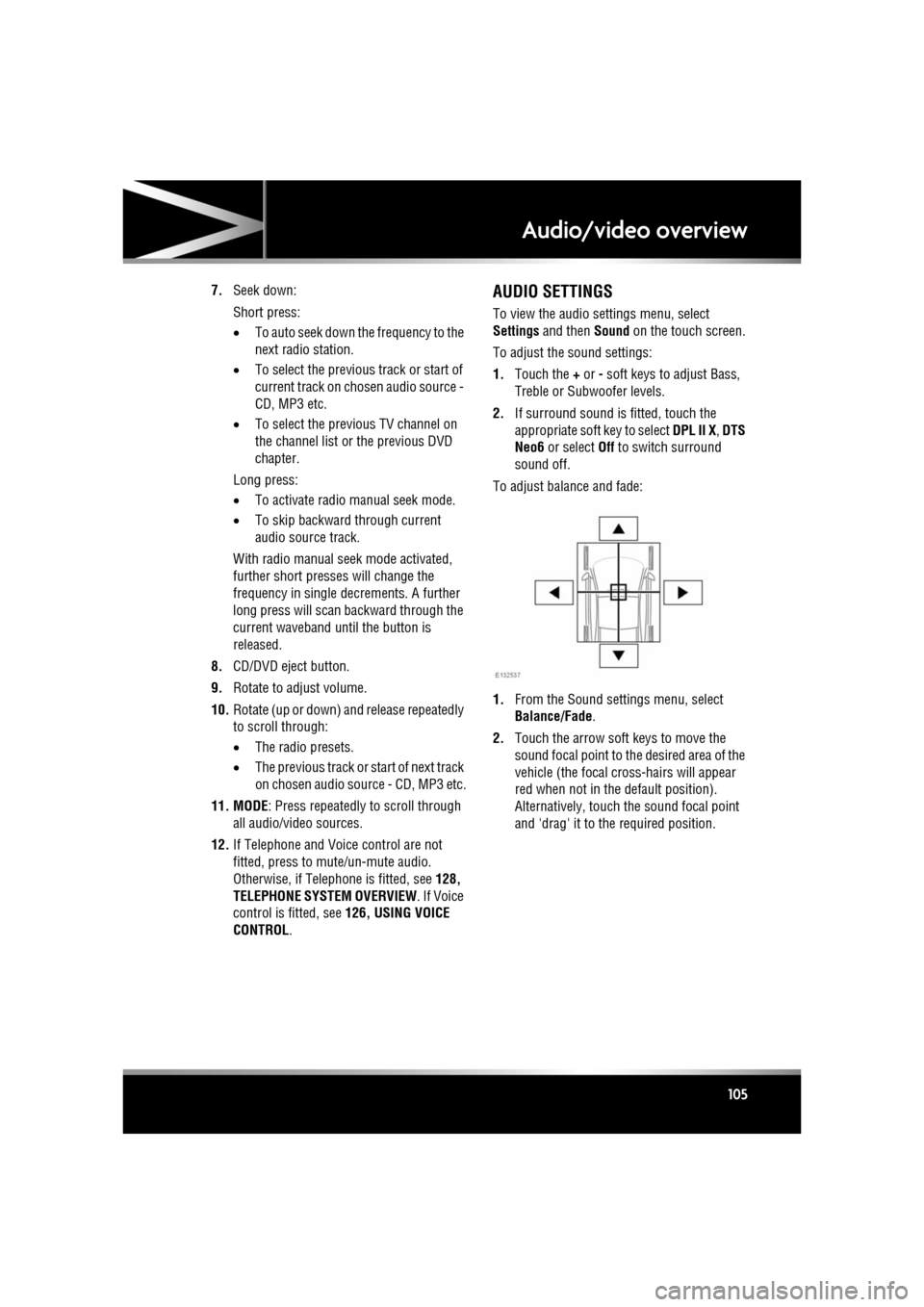
To adjust balance and fade:
1. From the Sound settings menu, select
Balance/Fade.
2. Touch the arrow soft keys to move the
sound focal point to the desired area of the
vehicle (the focal cr oss-hairs will appear
red when not in the default position).
Alternatively, touch the sound focal point
and 'drag' it to the required position.
Page 110 of 225

L
(FM8) SEMCON JLR OWNER GUIDE VER 1.00 EURO
LANGUAGE: english-en; MARQUE: jaguar; MODEL: XF
Radio
110
8. Frequency input : Select to enter a known
frequency of a station on the current
waveband, using the numeric keypad that
appears. Select OK or wait for 2 seconds to
tune to the entered frequency.
9. Station presets: Ea ch waveband has 6
preset positions.
• Touch and release to tune to the
station stored on that preset.
• Touch and hold to store the current
station on that preset (the radio will
mute while the station is stored then
beep).
• Use the seek buttons on the steering
wheel to change to th e next or previous
preset station.
RADIO DATA SYSTEM (RDS)
Your radio is equipped with RDS which enables
the audio unit to receive additional information
with normal FM radio signals.
Note: Not all FM radio stat ions broadcast RDS
information.
Select Settings (6) to view or alter RDS
settings.
• Traffic/News : Provides local travel or news
information.
• Regionalisation (REG) : Select to prevent
the radio tuning into an alternative local
station that has a stronger signal.
• Alternative Frequency (AF) : Select to
allow the radio to automatically re-tune to
a stronger alternative frequency for the
current station. This is useful on a journey
where the vehicle travels through different
transmitter areas.
Page 112 of 225

L
(FM8) SEMCON JLR OWNER GUIDE VER 1.00 EURO
LANGUAGE: english-en; MARQUE: jaguar; MODEL: XF
DAB radio
112
7. Channel list : Touch to view a list of
available Ensembles an d channels. The list
can be sorted by Ensemble, Channel ,
Subchannel or by Category .
• If an Ensemble is selected from the
list, all available channels from that
ensemble will be displayed.
• Sorting by Subchannel is only
available when the current channel is
broadcasting subchannels.
• If Category is selected, touch the
chosen category to view
corresponding channels, before
making your selection from the list.
Once the desired sele ction has been made,
select the Back soft key to return to the
main DAB menu.
8. Subchannel : If subchannels are broadcast
by the current channel, this soft key will be
active. Select to al low subchannels then
select the required subchannel with the
seek down / up keys.
9. Auto-tune: Select to scan for all available DAB Ensembles/channels. This needs to be
done before using the DAB radio for the
first time.
Auto-tune is also useful when travelling
long distances, so re gional Ensembles can
be tuned.
During Auto-tune, a pop-up shows tuning
progress.
The Auto-tune process will not affect
current presets, but some presets may not
operate if the channel they relate to is no
longer available ( No reception displays). 10.
Station presets: Each DAB band has 6
preset positions.
•Touch and release to tune the radio to
the station stored on that preset.
• Touch and hold to store the current
station on that preset (the radio will
mute while the station is stored).
• Use the seek buttons on the steering
wheel to select the next or previous
preset station.
Note: If you attempt to select a preset
channel that is now una vailable or invalid,
No reception is displayed.
DIGITAL RADIO RECEPTION
DAB radio can significa ntly increase the
number of radio channels /stations available.
The DAB signals are transmitted to most major
cities, towns and motorway networks.
Digital radio is transm itted from regional
transmitters. Some local channels are not
available outside th e range of their
transmitters. If you want to listen to local
channels as you move around the country, use
the auto-tune function (AUTO) to build new
channel lists.
Note: If any auxiliary electrical equipment is
connected to the vehicle, then this may reduce
the DAB radio sound quality.
ENSEMBLES
Unlike AM/FM radio, DAB transmits several
channels/stations on a single frequency. A
group of channels is k nown as an ensemble.
Some channels within the ensemble may have
subchannels offering seve ral listening options.
If reception is lost when the vehicle is in
motion, the vehicle may be out of range of the
ensemble. To build a new list of ensembles,
select Auto-tune .
Page 123 of 225

R
(FM8) SEMCON JLR OWNER GUIDE VER 1.00 EURO
LANGUAGE: english-en; MARQUE: jaguar; MODEL: XF
Television
123
7. TV channel presets:
•Long touch to store the current
channel as a preset. The channel name
will then be displayed on the soft key.
• Short touch to se lect the channel
stored on that preset.
Note: Stored presets contain information
identifying the country where the preset
was stored. When a stored preset is
selected, the TV format of that country will
be adopted. As analogue TV formats differ
in different countries , this may create a
situation where the analogue channel list is
empty.
For information on the use of the audio/video
controls, on the audio unit and steering wheel,
see 104, AUDIO/VIDEO CONTROLS .
ANALOGUE/DIGITAL TELEVISION
The TV offers both analogue and digital TV
reception. You can switch between the two
modes using the touc h screen controls.
• From the TV/My video menu, select TV/My
video again or touch the + button
alongside.
• Select the desired option from DTV 1or
DTV 2 - Digital or ATV - Analogue . There
is no difference in the reception mode
between DTV 1 and DTV 2. The preset list
is the only thing that changes.
Page 133 of 225
R
(FM8) SEMCON JLR OWNER GUIDE VER 1.00 EURO
LANGUAGE: english-en; MARQUE: jaguar; MODEL: XF
Telephone
133
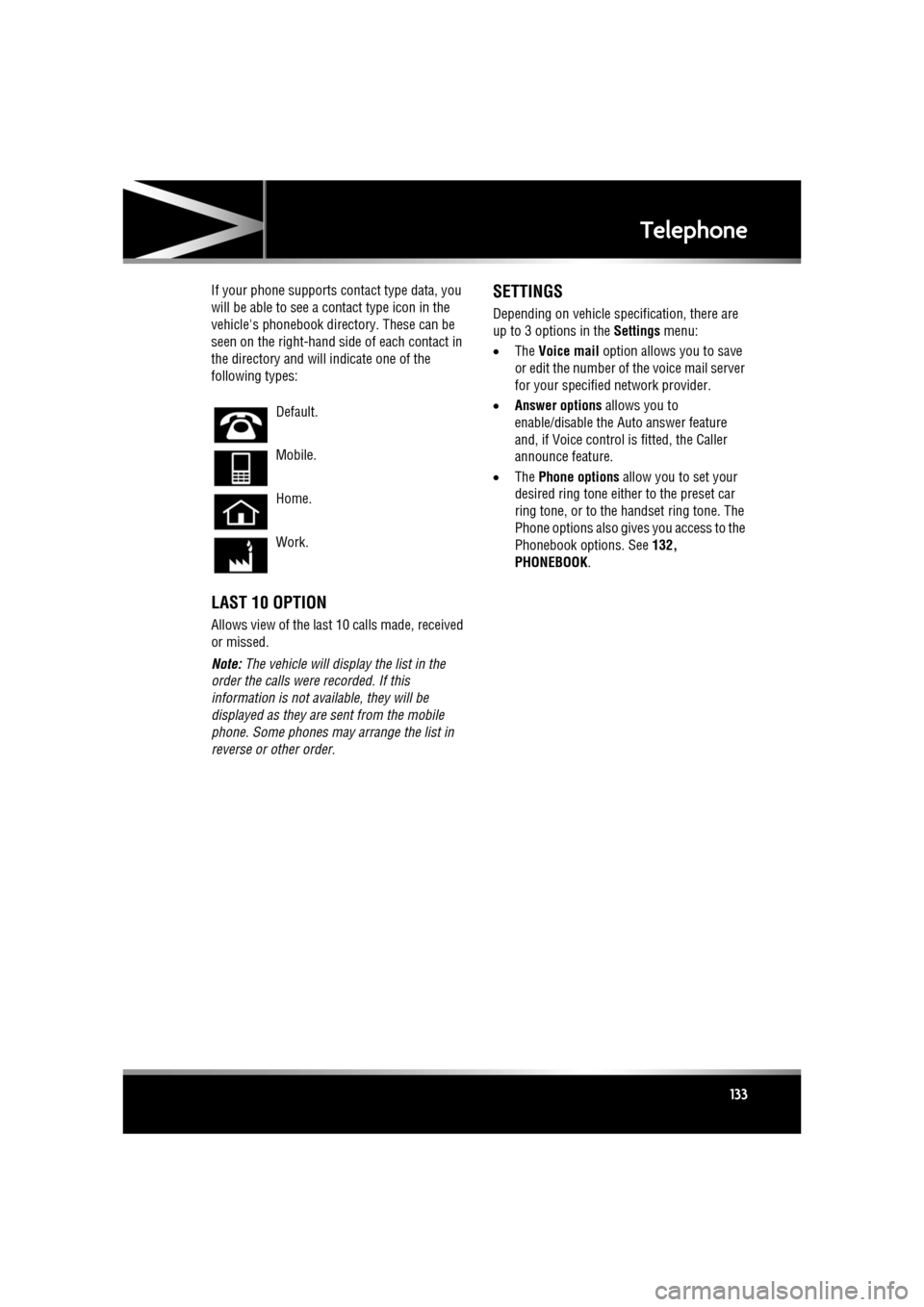
If your phone supports co ntact type data, you
will be able to see a contact type icon in the
vehicle's phonebook dire ctory. These can be
seen on the right-hand side of each contact in
the directory and will indicate one of the
following types:
LAST 10 OPTION
Allows view of the last 10 calls made, received
or missed.
Note: The vehicle will display the list in the
order the calls were recorded. If this
information is not available, they will be
displayed as they are sent from the mobile
phone. Some phones may arrange the list in
reverse or other order.
SETTINGS
Depending on vehicle specification, there are
up to 3 options in the Settings menu:
• The Voice mail option allows you to save
or edit the number of the voice mail server
for your specified network provider.
• Answer options allows you to
enable/disable the Auto answer feature
and, if Voice control is fitted, the Caller
announce feature.
• The Phone options allow you to set your
desired ring tone either to the preset car
ring tone, or to the handset ring tone. The
Phone options also give s you access to the
Phonebook options. See 132,
PHONEBOOK .
Default.
Mobile.
Home.
Work.
Page 139 of 225

R
(FM8) SEMCON JLR OWNER GUIDE VER 1.00 EURO
LANGUAGE: english-en; MARQUE: jaguar; MODEL: XF
Navigation system
139
START GUIDANCE
After selecting a destination, the system will
calculate the route.
There is now a choice to select 3 Routes,
Change route or to Start navigation guidance.
Touch 3 Routes to display a choice of three
different route options on the map.
The roads on the map are drawn in three
different colours to highlight each route.
EcoRoute helps you find the most fuel efficient
route available. A display of three leaves
indicates the most fuel efficient route.
Select route 1, 2 or 3 by touching the
respective box displaye d on the right side of
the map.
Touch Change Route followed by Route prefs.
to change the route setti ngs. If a destination is
already set, touch Waypoint to add a waypoint
in the journey if required.
When you have made your selection, if any,
touch Go.
Note: As you approach a j unction, in addition
to the voice guidance, an inset on the map will
display an enlarged view of the junction.
EASY ROUTE
In Route options , Easy Route can be turned On
or Off .
When On is selected, Easy Route changes the
calculation parameters of Route 3 in order to
reduce:
• Junctions.
• Turns.
• Turns that cross traffic.
• The priority of minor roads.
• Complex junction s and manoeuvres.
LEARN ROUTE
In Route options , Learn Route can be turned
On or Off.
When On is selected, if you make the same
deviation from the proposed route three times,
then the system will memorize the deviation
and offer that as the normal route from then on.
Select Reset all routes to delete any learnt
routes and return to the default settings.
VOICE GUIDANCE
To turn voice guidance on or off but maintain
route guidance, proceed as follows:
1. Touch Nav menu on the navigation screen.
2. Touch the Route voice guidance soft key.
The soft key will be highlighted when voice
guidance is enabled.
CANCEL ROUTE GUIDANCE
To cancel route guidance, proceed as follows:
1. Touch Nav menu on the navigation screen.
2. Touch the Cancel guidance soft key.
QUICK POI SELECTION
Touch the Map screen to display the POI
button. Touch the POI (Point of interest)
button. The screen shows six suggested
categories, five of which can be selected as
quick points of interest.
Note: The POI icons will not be shown if the
map zoom level is greate r than 1 km (½ mile).
Select a Quick POI category, or select More to
see further POIs. Touch OK to confirm a
selection.
The map screen with the POI icon(s) is
displayed. Select the five POIs you wish to see
when the Quick POIs are displayed.
Page 155 of 225
R
(FM8) SEMCON JLR OWNER GUIDE VER 1.00 EURO
LANGUAGE: english-en; MARQUE: jaguar; MODEL: XF
Fuel and refuelling
155
To close the filler flap, push the flap until
latched closed.
Note: The filler flap will only be locked closed
when the vehicle is centrally locked.
FUEL FILLER
When refuelling ensure that all
windows, doors, and sunroof are fully
closed, particularly if young children
or animals are in the vehicle.
Do not attempt to fill the tank to its
maximum capacity. If the vehicle is to
be parked on a slope, in direct
sunlight or high am bient temperature,
expansion of the fuel could cause
spillage.
Check the fuel pump information
carefully, to ensure that you are putting
the correct fuel into the vehicle.
If the vehicle is filled with incorrect fuel,
it is essential that you seek qualified
assistance before you start the engine.
Fuel station pumps are equipped with
automatic cut-off sensing, to avoid fuel
spillage. Fill the tank until the filler nozzle
automatically cuts off the supply. Do not
attempt to fill the tank beyond this point.
Note: Filling station pumps used for diesel
commercial vehicles deliver fuel at a higher
rate than normal. The hi gher fill rate can cause
premature cut-off and ma y cause fuel spillage.
Therefore, it is recommended that only
standard light vehicle pumps are used.
DIESEL MISFUELLING PROTECTION
DEVICE
When the misfuelling device is
activated it may cause fuel to be
discharged from the filler neck.
If the narrow filler nozzl e fitted to pumps
delivering unleaded petrol is fully inserted into
the filler neck the misfue l protection device will
activate.
Note: The spout on some fuel cans and older
fuel pumps may trigger the misfuelling device.
When activated, the ye llow protection device
will be visible inside the filler neck. It will
prevent fuel flow into the tank. Before fuelling
can continue with the correct fuel the device
will need to be reset.
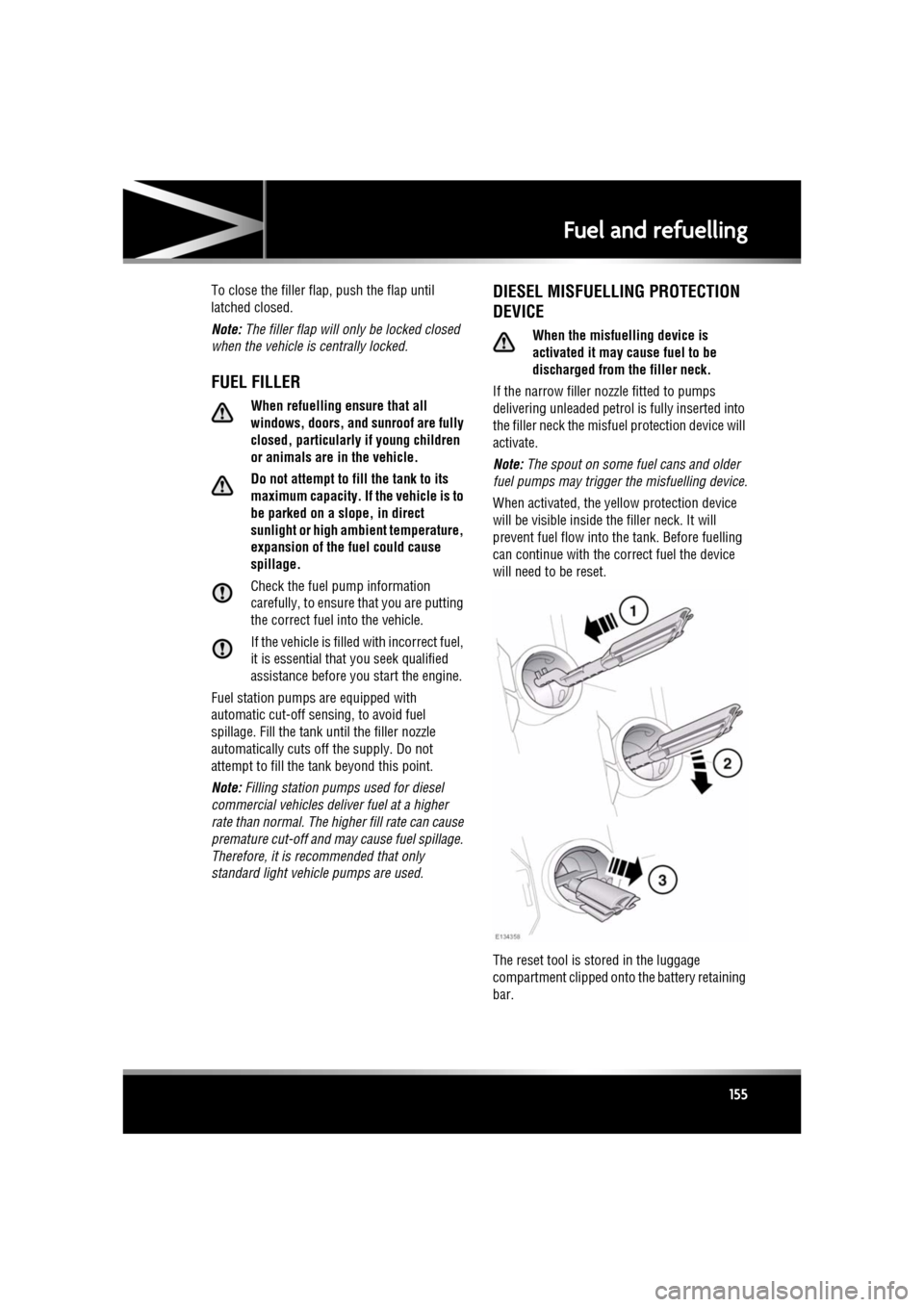
The reset tool is stored in the luggage
compartment clipped onto the battery retaining
bar.
Page 156 of 225

L
(FM8) SEMCON JLR OWNER GUIDE VER 1.00 EURO
LANGUAGE: english-en; MARQUE: jaguar; MODEL: XF
Fuel and refuelling
156
To reset the misfuelling device:-
1. Insert the reset tool with teeth uppermost,
as far as it will go into the filler neck.
2. Locate the teeth by pushing down the top
of the reset tool.
3. With the top of the tool pressed down and
the teeth engaged, slowly pull the tool out
of the filler neck to reset the device.
Do not twist the device, once the teeth
have engaged.
Note: The yellow part of the protection device
should no longer be visible in the filler neck.
Replace the reset tool in position on the battery
restraining bar.
FUEL TANK CAPACITY
Avoid the risk of running out of fuel and never
intentionally drive the vehicle when the fuel
gauge indicates that the tank is empty. When
refuelling your vehicle after the fuel gauge
reads empty, you may not be able to add the
fuel quantity shown below, as there will be a
small reserve remaining in the tank.
FUEL SPECIFICATION
Total tank capacity (usable):
Petrol engines 69.5 litres (15.3 gallons)
Diesel engines 68.1 litres (15 gallons)
Fill capacity (when fuel
gauge reads empty) 64 litres (14.1
gallons)
Reserve capacity (when fuel
gauge reads empty) 5.5 litres (1.2
gallons)
Petrol Diesel
95-98 RON EN 590
Page 164 of 225
L
(FM8) SEMCON JLR OWNER GUIDE VER 1.00 EURO
LANGUAGE: english-en; MARQUE: jaguar; MODEL: XF
Maintenance
164
SUNROOF RESET
If the battery is disconnected, or the power
supply is interrupted, whilst the sunroof is
partially open it will need to be reset.
Once the power supply is restored, reset the
sunroof as follows:
1. Switch the ignition on.
2. Press the front of the sunroof switch, so
that the sunroof is in the tilt position, then
release the switch.
3. Press the front of the sunroof switch, and
hold for 30 seconds.
4. After 30 seconds the sunroof will begin to
move. Keep the front of the switch pressed
until the sunroof has fully opened, then
closed.
5. Once the open/close cycle has completed
and the sunroof has stopped moving,
release the switch.
The sunroof can now be operated as normal.
WINDOW RESET
The windows will need to be reset if the battery
is disconnected, becomes discharged or power
supply is interrupted.
Once the power supply is restored, reset the
windows as follows:
1. Close the window fully.
2. Release the switch, then lift it to the close
position and hold for 2 seconds.
3. Open the window fully.
4. Release the switch, then push it to the open
position and hold for 2 seconds.
5. Lift and release the switch to operate the
one-touch function.
6. Repeat the procedure on each window.
WARNING TRIANGLE
The warning triangle is located in the luggage
compartment, attached to an anchor point.
FIRST AID KIT
If supplied, the first aid kit is strapped to the
side of the luggage compartment.
FIRE EXTINGUISHER
If supplied, the fire exti nguisher will be located
either in the luggage compartment, or mounted
to the front passenger seat.
REPAIRING MINOR PAINT DAMAGE
Regularly inspect the paintwork for damage.
Any stone chips, fractures, or deep scratches,
in the paint/bodywork should be repaired
promptly. Bare metal wi ll corrode quickly, and
if left untreated can resu lt in expensive repairs.
CLEANING THE ALLOY WHEELS
Only use approved wheel cleaning
products.
CLEANING THE EXTERIOR
Some high pressure cleaning systems
are sufficiently powerful to penetrate
door and window seals, and damage
trim and door locks. Never aim the
water jet directly at the engine air intake,
heater air intakes, body seals or at any
components which may be damaged.
Never use cleaning products which are
not approved for use on vehicles.
Following cleaning of the vehicle
exterior (particularly with a pressure
washer), it is recommended that the
vehicle is taken for a short drive in order
to dry out the brakes.
Page 214 of 225

L
english-en (10, 18, 21 & 25)
Index
214
portablelost connection . . . . . . . . . . . . . . . . 118
play . . . . . . . . . . . . . . . . . . . . . . . . . 117
portable media
connections . . . . . . . . . . . . . . . . . . . 113
Memory points (navigati on system) . . . . 140
Memory seats recalling a position . . . . . . . . . . . . . . . . 15
Message centre
trip computer . . . . . . . . . . . . . . . . . . . . . 56change display . . . . . . . . . . . . . . . . . . 56
range . . . . . . . . . . . . . . . . . . . . . . . . . 56
Methanol . . . . . . . . . . . . . . . . . . . . . . . . . 152
Minor paintwork damage repair. . . . . . . . 164
Mirrors BSM (Blind spot monitor) . . . . . . . . . . . 46system fault . . . . . . . . . . . . . . . . . . . . 47
dip when reversing . . . . . . . . . . . . . . . . 45
Mirrors and windows BSM (Blind spot monitor)detection beam issues . . . . . . . . . . . . 99
sensor blockage . . . . . . . . . . . . . . . . . 47
exterior mirrors . . . . . . . . . . . . . . . . . . . 44
sunroof
anti-trap mechanism . . . . . . . . . . . . . 43
reset . . . . . . . . . . . . . . . . . . . . . . . . . 164
Misfuel device . . . . . . . . . . . . . . . . . . . . . 155
Modifications for disabilities . . . . . . . . . . 158
Monitoring system (battery) . . . . . . . . . . 183
Moon roof
anti-trap mechanism . . . . . . . . . . . . . . . 43
reset . . . . . . . . . . . . . . . . . . . . . . . . . . 164
MP3. . . . . . . . . . . . . . . . . . . . . . . . . . . . . 119
mpg . . . . . . . . . . . . . . . . . . . . . . . . . . . . . 157
MTBE (Methyl tertiary butyl ether) . . . . . 153
N
Navigation all softkey . . . . . . . . . . . . . . . . . . . . . . 142
cancel guidance . . . . . . . . . . . . . . . . . . 139
destination entry . . . . . . . . . . . . . . . . . 138coordinates . . . . . . . . . . . . . . . . . . . 140 emergency . . . . . . . . . . . . . . . . . . . . 140
motorway . . . . . . . . . . . . . . . . . . . . . 141
postcode . . . . . . . . . . . . . . . . . . . . . . 140
previous . . . . . . . . . . . . . . . . . . . . . . 140
search area . . . . . . . . . . . . . . . . . . . . 138
start guidance . . . . . . . . . . . . . . . . . . 139
entering a destination town . . . . . . . . . . 141
list . . . . . . . . . . . . . . . . . . . . . . . . . . . . . 142
map. . . . . . . . . . . . . . . . . . . . . . . . . . . . 140
map split screen . . . . . . . . . . . . . . . . . . 137
memory points . . . . . . . . . . . . . . . . . . . 140
menu. . . . . . . . . . . . . . . . . . . . . . . . . . . 135
operating. . . . . . . . . . . . . . . . . . . . . . . . 134
overview . . . . . . . . . . . . . . . . . . . . . . . . 134
POI (Points of interest) . . . . . . . . . . . . . 141 categories/sub-categories . . . . . . . . . 141
quick POI selection . . . . . . . . . . . . . . 139
POI search . . . . . . . . . . . . . . . . . . . . . . 142
restore defaults . . . . . . . . . . . . . . . . . . . 140
screen modes . . . . . . . . . . . . . . . . . . . . 138
TMC . . . . . . . . . . . . . . . . . . . . . . . . . . . 142
display. . . . . . . . . . . . . . . . . . . . . . . . 142
icons . . . . . . . . . . . . . . . . . . . . . . . . . 143
using TMC . . . . . . . . . . . . . . . . . . . . . 144
traffic event icons . . . . . . . . . . . . . . . . . 143
voice commands (POI) . . . . . . . . . . . . . 127
voice guidance . . . . . . . . . . . . . . . . . . . 139
Number plate bulb . . . . . . . . . . . . . . . . . . 163
O
Occupant safety child seats tether straps . . . . . . . . . . . . . . . . . . . . 31
seatbelts . . . . . . . . . . . . . . . . . . . . . . . . 167
seatbelt safety . . . . . . . . . . . . . . . . . . . 23
warning lamp . . . . . . . . . . . . . . . . 26, 52
Oil
engine consumption . . . . . . . . . . . . . . . . . . . 170
level check. . . . . . . . . . . . . . . . . . . . . 168
engine oil specification . . . . . . . . . . . . . 170
engine oil specifications . . . . . . . . . . . . 169