Seat JAGUAR XF 2011 1.G Owner's Guide
[x] Cancel search | Manufacturer: JAGUAR, Model Year: 2011, Model line: XF, Model: JAGUAR XF 2011 1.GPages: 225, PDF Size: 7.32 MB
Page 63 of 225
R
(FM8) SEMCON JLR OWNER GUIDE VER 1.00 EURO
LANGUAGE: english-en; MARQUE: jaguar; MODEL: XF
Heating and ventilation
63
Heating and ventilationCLIMATE CONTROL
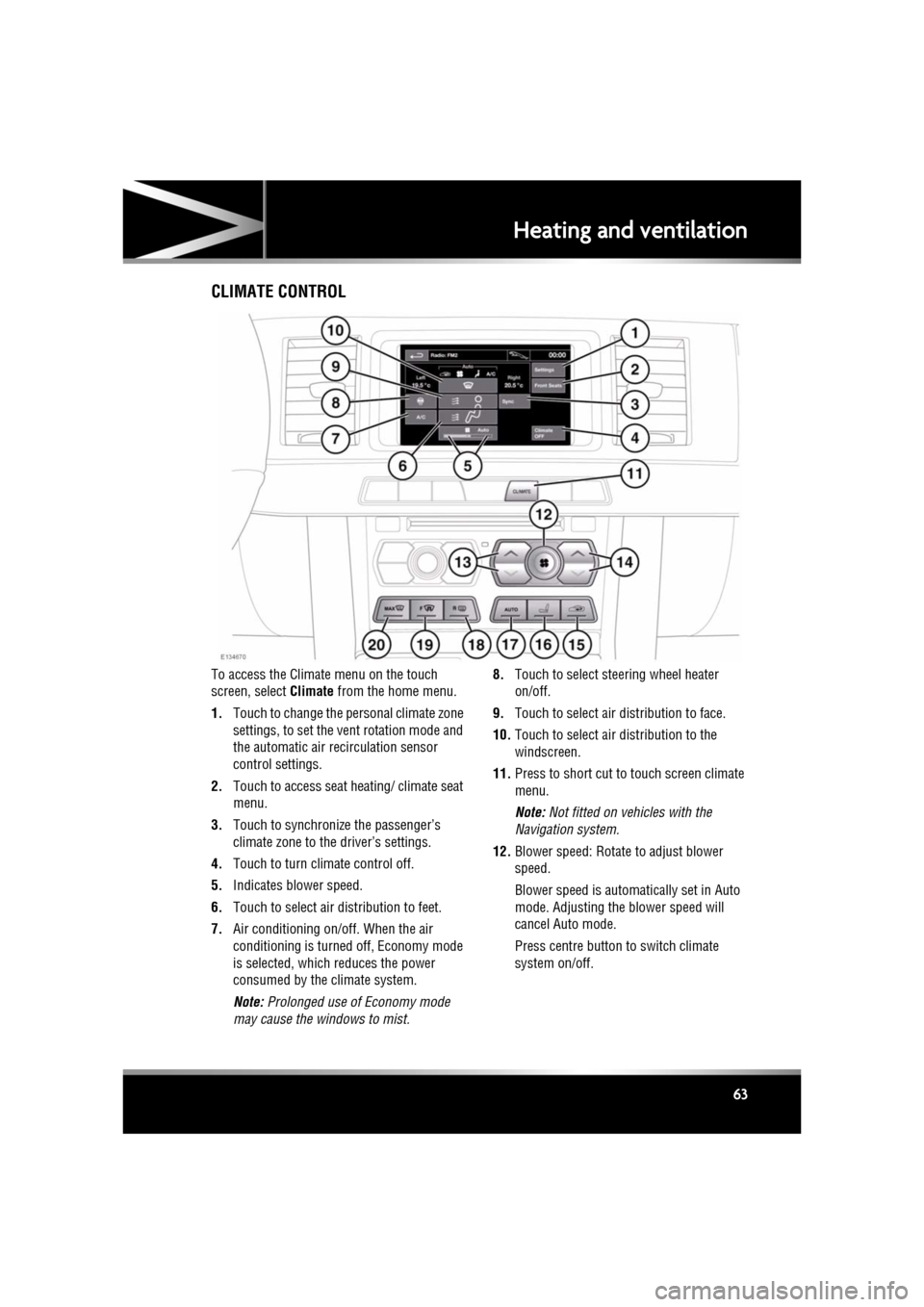
To access the Climate menu on the touch
screen, select Climate from the home menu.
1. Touch to change the personal climate zone
settings, to set the vent rotation mode and
the automatic air recirculation sensor
control settings.
2. Touch to access seat heating/ climate seat
menu.
3. Touch to synchronize the passenger’s
climate zone to the driver’s settings.
4. Touch to turn climate control off.
5. Indicates blower speed.
6. Touch to select air distribution to feet.
7. Air conditioning on/off. When the air
conditioning is turned off, Economy mode
is selected, which reduces the power
consumed by the climate system.
Note: Prolonged use of Economy mode
may cause the windows to mist. 8.
Touch to select steering wheel heater
on/off.
9. Touch to select air distribution to face.
10. Touch to select air distribution to the
windscreen.
11. Press to short cut to touch screen climate
menu.
Note: Not fitted on vehicles with the
Navigation system.
12. Blower speed: Rotate to adjust blower
speed.
Blower speed is automatically set in Auto
mode. Adjusting the blower speed will
cancel Auto mode.
Press centre button to switch climate
system on/off.
Page 64 of 225

L
(FM8) SEMCON JLR OWNER GUIDE VER 1.00 EURO
LANGUAGE: english-en; MARQUE: jaguar; MODEL: XF
Heating and ventilation
64
13. Left-hand temperature control: Press to
adjust temperature for the left side of the
vehicle. The temperat ure is displayed on
the touch screen ( HI or LO is displayed
when the maximum or minimum setting is
selected).
Note: The maximum possible temperature
differential betwee n left and right hand
temperature settings is 3°C (5.4°F).
14. Right-hand temperature control: Press to
adjust temperature for the right side of the
vehicle. The temperat ure is displayed on
the touch screen ( HI or LO is displayed
when the maximum or minimum setting is
selected).
15. Press briefly to select timed recirculation.
Press and hold to select continuous
recirculation. Press again to switch off. See
64, RECIRCULATION .
16. Press to access seat heating/ climate seat
menu.
17. AUTO control: Press to switch automatic
operation on.
18. Press to turn the heated rear screen on/off.
See 64, HEATED SCREENS .
19. Press to turn the heated front screen
on/off. See 64, HEATED SCREENS .
20. Defrost: Press to remove frost or heavy
misting from the winds creen. This setting
activates the blower s, air-conditioning,
front and rear screen heaters and prohibits
recirculation, to ac hieve a rapid defrost.
In addition to the selectable controls, the
climate menu displays symbols that indicate
the status of heating a nd ventilation functions.
Note: If the climate control system is switched
off, pressing an AUTO button or the Defrost
button, will switch the climate system on.HEATED SCREENS
With the engine running, the front (F) and rear
(R ) screen heaters, may be switched on and off
in any mode, including with the climate control
system off.
The front and rear screen heaters switch off
automatically after a timed period depending
on the ambient temperature. In cold ambient
conditions, below 5°C (41°F), the screen
heaters will switch on automatically when the
engine is started, unles s the engine or vehicle
interior is already warm.
RECIRCULATION
• Press briefly to activate timed
recirculation. The button indicator
illuminates when recirculation is on.
• Press and hold the but ton to activate
continuous recirculation. the button
indicator will flash and then illuminate
constantly.
• To cancel recirculation, press the button
briefly.
When selected, the air is recirculated inside the
vehicle. This helps to maintain a high or low
temperature, and is useful for preventing
fumes from entering the vehicle.
Timed recirculation : Recirculation will switch
off automatically after a set time (dependent on
the ambient temperature).
Latched recirculation: Recirculation will
remain on until the button is pressed again.
Note: Prolonged use at low temperatures may
cause the windows to mist.
Recirculation may also be selected in AUTO
mode, if the climate control system detects
high levels of pollution in the atmosphere
outside the vehicle (if an air quality sensor is
fitted). Manual operation of the recirculation
control will override the automatic setting.
Page 65 of 225
R
(FM8) SEMCON JLR OWNER GUIDE VER 1.00 EURO
LANGUAGE: english-en; MARQUE: jaguar; MODEL: XF
Heating and ventilation
65
AIR QUALITY SENSOR
If the air quality sensor detects pollution, air
recirculation is selected automatically to
reduce pollutants entering the vehicle.
The sensitivity of the se nsor can be adjusted
using the touch screen:
1. Select Settings from the Climate menu.
2. Touch the +/- buttons on the screen to
increase/decrease sensitivity.
To switch the function o ff, decrease sensitivity
to the minimum setting.
EXTERNAL TEMPERATURE
The external temperature is displayed in the
Home menu of the touch screen and in the
instrument panel.
When the external temp erature is low enough
that ice may be present on the road, an amber
snowflake warning lamp w ill illuminate in the
instrument panel.
AUTOMATIC CLIMATE CONTROL
AUTO mode should be used as the normal
operating mode. The air conditioning, heating
and ventilation controls automatically provide
an optimum environment at the selected
temperature.
Note: Screen heating and timed air
recirculation may be se lected in AUTO mode.
Any other manual adjustment cancels AUTO
operation.
Note: Water expelled by the air conditioning
may collect underneath the vehicle when
parked. This is not cause for concern.
TEMPERATURE CONTROLS
The driver and front seat passenger zone
temperatures can be i ndependently adjusted.
The temperature for each zone is displayed on
the relevant side of the touch screen.
Note: The maximum possible temperature
differential between the driver and passenger
settings is 3°C (5.4°F).
HEATED SEATS
Note: The seat heaters will only operate when
the engine is running.
The heated seats are controlled from the Home
or Climate menu on the touch screen.
• Touch the appropriate seat icon to switch
on the seat heater at maximum
temperature (3 red bars).
• Touch the icon a second and third time to
reduce the temperature (2 and 1 red bars).
• Touch the icon a fourth time to switch the
seat heater off.
This icon appears at the top of the
touch screen when the air quality
sensor is switched on.
Page 66 of 225

L
(FM8) SEMCON JLR OWNER GUIDE VER 1.00 EURO
LANGUAGE: english-en; MARQUE: jaguar; MODEL: XF
Heating and ventilation
66
CLIMATE SEATS
Note: The climate seats w ill only operate when
the engine is running.
Seat ventilation is cont rolled from the Home or
Climate menu on the touch screen.
Heated ventilation:
• Touch the red arrow above the appropriate
seat icon to switch he ated ventilation on at
maximum (3 red bars).
• Touch the blue arrow below the seat icon
once or twice to reduce the ventilation
setting (2 and 1 red bars).
• Touch the blue arrow a third time to switch
off seat ventilation.
Cooled ventilation:
• Touch the blue arrow below the
appropriate seat icon to switch cooled
ventilation on at maximum (3 blue bars).
• Touch the red arrow above the seat icon
once or twice to reduce the ventilation
setting (2 and 1 blue bars).
• Touch the red arrow a third time to switch
off seat ventilation.
To select backrest ventilation only:
• Select Settings from the Climate menu.
• Select the appropriate icon for full seat or
backrest only ventilation.
Page 78 of 225
L
(FM8) SEMCON JLR OWNER GUIDE VER 1.00 EURO
LANGUAGE: english-en; MARQUE: jaguar; MODEL: XF
Starting the engine
78
The engine will also restart if one of the
following occurs:
• The accelerator pe dal is pressed.
• A shift paddle is used to select a gear.
• R (Reverse) is selected.
• Climate control system demand increases.
• The vehicle’s speed exceeds approximately
1 km/h (0.5 mph).
• Battery charge becomes low.
• Brake vacuum has been reduced (e.g.
using the brake pedal repeatedly with the
engine off).
• Eco Stop/Start is deactivated.
The following conditions will prevent an
automatic engine stop:
• A shift paddle has been used to select a
gear.
• The external temperature is less than
approximately 0 °C (32 °F).
• The external temperature is more than
approximately 40 °C (104 °F).
• The engine has not reached operating
temperature.
• The driver's door is opened.
• The driver’s seat be lt is not fastened.
• The climate control system demand
requires the engine to be running (for
example, in Defrost mode).
• The battery charge is low.
• The bonnet is opened.
• Eco Stop/Start is deactivated.DEACTIVATING ECO STOP/START
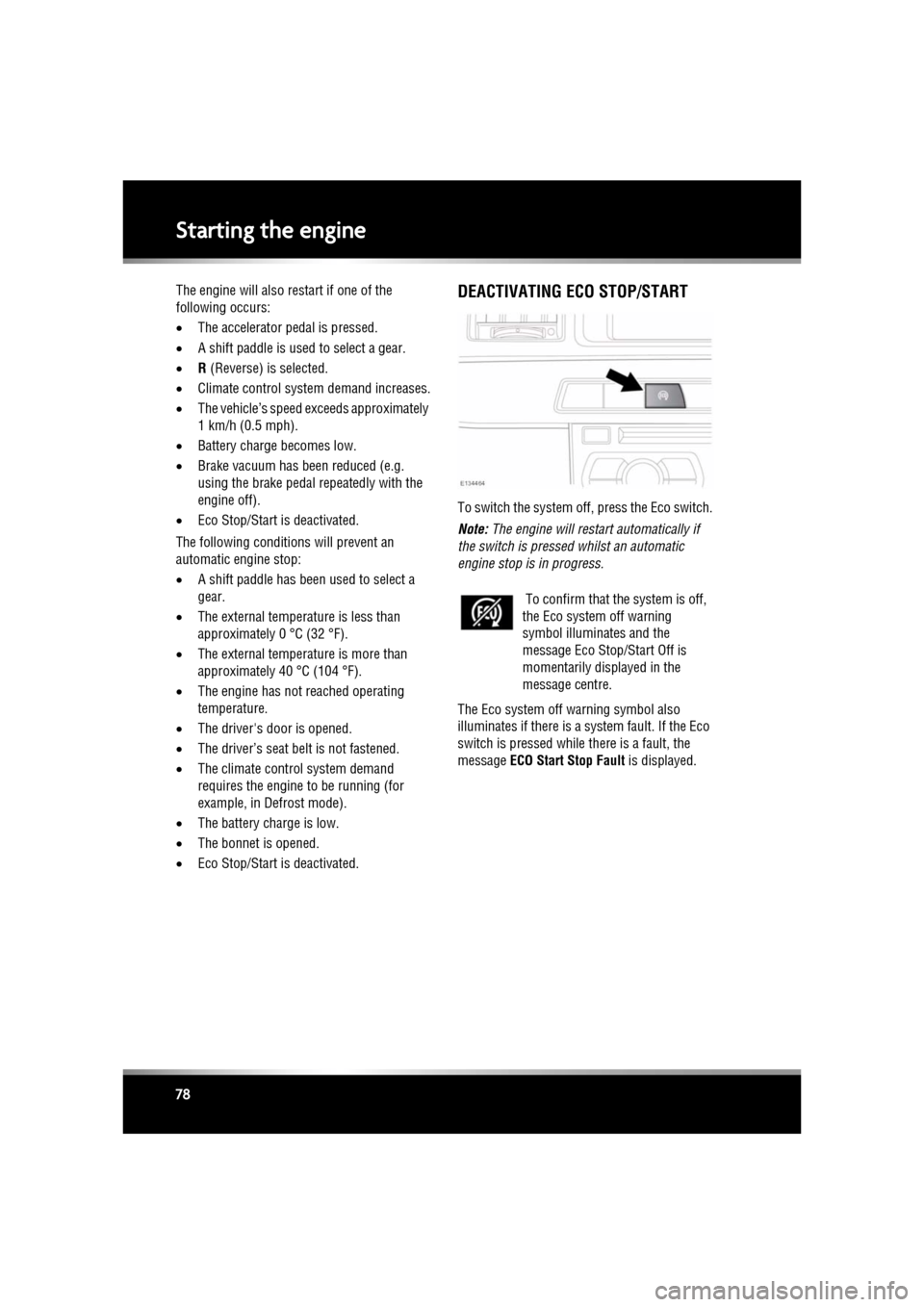
To switch the system off, press the Eco switch.
Note: The engine will restar t automatically if
the switch is pressed whilst an automatic
engine stop is in progress.
The Eco system off warning symbol also
illuminates if there is a system fault. If the Eco
switch is pressed while there is a fault, the
message ECO Start Stop Fault is displayed.
To confirm that the system is off,
the Eco system off warning
symbol illuminates and the
message Eco Stop/Start Off is
momentarily displayed in the
message centre.
Page 79 of 225

R
(FM8) SEMCON JLR OWNER GUIDE VER 1.00 EURO
LANGUAGE: english-en; MARQUE: jaguar; MODEL: XF
Intelligent stop/start
79
Intelligent stop/startECO STOP/START
The Stop/Start system is designed to improve
fuel efficiency and is automatically activated
when the ignition is turned on. If the vehicle is
stopped (e.g. at traffic lights or in traffic), the
engine will turn off ( unless it is required to
support other vehicle systems). When the
brake is released and a drive gear is selected,
the engine will restart automatically.
To activate an automatic engine stop:
• Stop the vehicle from a speed greater than
4 km/h (2.5 mph) and apply sufficient
brake pressure to ensure the vehicle is
stationary.
• Alternatively, whilst stationary, select P
(Park) or N (Neutral).
To activate an automatic engine restart release
the brake pedal with D (Drive) or S (Sport)
selected. The engine will also restart if one of the
following occurs:
•
The accelerator pedal is pressed.
• A shift paddle is used to select a gear.
• R (Reverse) is selected.
• Climate control system demand increases.
• The vehicle’s speed exceeds approximately
1 km/h (0.5 mph).
• Battery charge becomes low.
• Brake vacuum has be en reduced (e.g.
using the brake pedal repeatedly with the
engine off).
• Stop/Start is deactivated.
The following conditions will prevent an
automatic engine stop:
• A shift paddle has been used to select a
gear.
• The external temperature is less than
approximately 0 °C (32 °F).
• The external temperature is more than
approximately 40 °C (104 °F).
• The engine has not reached operating
temperature.
• The driver's door is opened.
• The driver’s seat belt is not fastened.
• The climate control system demand
requires the engine to be running (for
example, in Defrost mode).
• The battery charge is low.
• The bonnet is opened.
• Stop/Start is deactivated.
The warning lamp in the
instrument panel
illuminates when
the engine has been switched off
by the Stop/Start system.
Page 158 of 225
L
(FM8) SEMCON JLR OWNER GUIDE VER 1.00 EURO
LANGUAGE: english-en; MARQUE: jaguar; MODEL: XF
Maintenance
158
MaintenanceDISABILITY MODIFICATIONS
Occupants with disabilities which may require
modification of the vehicle, must contact a
Dealer/Authorised Repairer before any
modifications are made.
PARTS AND ACCESSORIES
Do not fit non-approved parts and
accessories or carry out non-approved
alterations or conversions.
Your vehicle is not designed for use
with a roof rack. Do not fit a roof rack to
the vehicle, as damage may result.
AIRBAG SYSTEM
The components that make up the
airbag system are sensitive to
electrical or phys ical interference,
either of which could easily damage
the system and cause inadvertent
operation or a malfunction of the
airbag module.
To prevent malfunction of the airbag system
always consult your Dealer/Authorised
Repairer before fitting any of the following:
• Electronic equipment such as a mobile
phone, two-way radio or in-car
entertainment system.
• Accessories attached to the front of the
vehicle.
• Any modification to the front of the vehicle.
• Any modification involving the removal or
repair of any wiring or component in the
vicinity of any of the airbag system
components, including the steering wheel,
steering column, instrument or facia
panels.
• Any modification to th e fascia panels or
steering wheel.
ANTI-THEFT SYSTEM
No modifications or additions should
be made to the anti- theft system. Such
changes could cause the system to
malfunction.
OWNER MAINTENANCE
Any significant or sudden drop in fluid
levels, or uneven ty re wear, should be
reported to a qualified technician
without delay.
In addition to the routine services and
inspections, a number of simple checks must
be carried out more fr equently. These checks
can be carried out by th e owner and advice is
given on the pages that follow.
DAILY CHECKS
• Operation of lamps, horn, direction
indicators, wipers, washers and warning
indicators.
• Operation of seat belts and brakes.
• Look for fluid deposits underneath the
vehicle that might indicate a leak.
Condensation drips from the air
conditioning are normal.
WEEKLY CHECKS
•Engine oil level.
• Engine coolant level.
• Brake fluid level.
• Power steering fluid level.
• Screen washer fluid level.
• Tyre pressures and condition.
• Operate air conditioning.
Note: The engine oil leve l should be checked
more frequently if the vehicle is driven for
prolonged periods at high speeds.
Page 164 of 225
L
(FM8) SEMCON JLR OWNER GUIDE VER 1.00 EURO
LANGUAGE: english-en; MARQUE: jaguar; MODEL: XF
Maintenance
164
SUNROOF RESET
If the battery is disconnected, or the power
supply is interrupted, whilst the sunroof is
partially open it will need to be reset.
Once the power supply is restored, reset the
sunroof as follows:
1. Switch the ignition on.
2. Press the front of the sunroof switch, so
that the sunroof is in the tilt position, then
release the switch.
3. Press the front of the sunroof switch, and
hold for 30 seconds.
4. After 30 seconds the sunroof will begin to
move. Keep the front of the switch pressed
until the sunroof has fully opened, then
closed.
5. Once the open/close cycle has completed
and the sunroof has stopped moving,
release the switch.
The sunroof can now be operated as normal.
WINDOW RESET
The windows will need to be reset if the battery
is disconnected, becomes discharged or power
supply is interrupted.
Once the power supply is restored, reset the
windows as follows:
1. Close the window fully.
2. Release the switch, then lift it to the close
position and hold for 2 seconds.
3. Open the window fully.
4. Release the switch, then push it to the open
position and hold for 2 seconds.
5. Lift and release the switch to operate the
one-touch function.
6. Repeat the procedure on each window.
WARNING TRIANGLE
The warning triangle is located in the luggage
compartment, attached to an anchor point.
FIRST AID KIT
If supplied, the first aid kit is strapped to the
side of the luggage compartment.
FIRE EXTINGUISHER
If supplied, the fire exti nguisher will be located
either in the luggage compartment, or mounted
to the front passenger seat.
REPAIRING MINOR PAINT DAMAGE
Regularly inspect the paintwork for damage.
Any stone chips, fractures, or deep scratches,
in the paint/bodywork should be repaired
promptly. Bare metal wi ll corrode quickly, and
if left untreated can resu lt in expensive repairs.
CLEANING THE ALLOY WHEELS
Only use approved wheel cleaning
products.
CLEANING THE EXTERIOR
Some high pressure cleaning systems
are sufficiently powerful to penetrate
door and window seals, and damage
trim and door locks. Never aim the
water jet directly at the engine air intake,
heater air intakes, body seals or at any
components which may be damaged.
Never use cleaning products which are
not approved for use on vehicles.
Following cleaning of the vehicle
exterior (particularly with a pressure
washer), it is recommended that the
vehicle is taken for a short drive in order
to dry out the brakes.
Page 166 of 225
L
(FM8) SEMCON JLR OWNER GUIDE VER 1.00 EURO
LANGUAGE: english-en; MARQUE: jaguar; MODEL: XF
Maintenance
166
LEATHER
To prevent ingrained dirt and staining, inspect
the seat upholstery regularly and clean every
one to two months, as follows:
• Wipe off fine dust from the seat surfaces
using a clean, damp, non-coloured cloth.
Change frequently to a clean area of cloth,
to avoid abrasive action on the leather
surface. Avoid over-wetting.
• If this is not sufficient, use a cloth which
has been dampened with warm soapy
water and then wrun g out. Use only mild
non-caustic soap.
• Use Jaguar Leather Cleaner for heavily
soiled areas. Dry off and rub with a clean
soft cloth, changing surfaces regularly.
Use Jaguar Leather Cleaner several times a
year to maintain its appearance and
suppleness. The clea ner will nourish and
moisturise and help to improve the surface
protective film agains t dust and substances.
• Do not use solvents. Do not use
detergents, furniture polish or household
cleaners. While these products may
initially give impressive results, their use
will lead to rapid deterioration of the leather
and will invalidate the warranty. Jaguar
recommend a basic se t of products that
have been specially selected for the type of
leather in your vehicle.
• Dark clothing may stain leather seats just
like other upholstery products.
• Sharp objects such as belts, zip fasteners,
rivets, etc., can leave permanent scratches
and scratch marks on the leather surface.
• Unless spillages such as tea, coffee or ink
are washed away immediately, permanent
staining may have to be accepted.
If a valet service is used, ensure that the
specialist concer ned is aware of, and follows,
these instructions precisely.
CLEANING FABRIC UPHOLSTERY
Never use soap, ammonia, bleach or
other cleaners inte nded for use on hard
surfaces.
Do not use upholstery cleaner on
electrical equipment such as facia
switches.
When cleaning around electrical
equipment such as switches, ensure
that fluids do not leak into any gaps
around the components or between
panels or trim.
Use Jaguar Upholstery Cleaner, following the
instructions. Avoid over-wetting.
REMOVING STAINS
Most stains on woollen fabric can be removed
if treatment is carried out immediately, before
the stain has a chance to dry-in.
Most stains can be treated with one of three
cleaning fluids: Jaguar U pholstery Cleaner, dry
cleaning fluid or clean water. Follow the
instructions on the package.
INSTRUMENT PANEL, CLOCK AND
AUDIO EQUIPMENT
Only use a soft dry cloth to clean the
instrument panel, cloc k and audio equipment.
Do not use cleaning fluids or sprays.
TOUCH SCREEN
Do not use abrasive cleaners on the
touch screen. For approved cleaning
products, contact your Dealer/
Authorised Repairer.
Page 167 of 225
R
(FM8) SEMCON JLR OWNER GUIDE VER 1.00 EURO
LANGUAGE: english-en; MARQUE: jaguar; MODEL: XF
Maintenance
167
CARPETS AND MATS
Marks or stains can be removed by gentle
scrubbing with a weak solution of soap and
warm water.
For more stubborn stains a commercially
available carpet cleaner should be used.
SEAT BELTS
Do not allow any water, cleaning
products, or fabric from cloths to enter
the seat belt mechanism. Any
substance which enters the
mechanism may affect the
performance of the seat belt in an
impact.
Extend the seat belts fully, then use warm
water and a non-detergent soap to clean. Allow
the seat belts to dry naturally whilst fully
extended and do not allow the belts to retract
until fully dry.
Note: Whilst cleaning the seat belt, take the
opportunity to examine the webbing for
damage and wear. Any wear or damage should
be reported to, and rectified by, a Dealer/
Authorised Repairer.
AIRBAG MODULE COVERS
Airbag covers should only be cleaned
using a slightly dampened cloth, and
a small amount of upholstery cleaner.
Any substance which enters the
mechanism, can prevent correct
deployment of an airbag during an
impact.