wheel bolts JAGUAR XFR 2010 1.G Owner's Manual
[x] Cancel search | Manufacturer: JAGUAR, Model Year: 2010, Model line: XFR, Model: JAGUAR XFR 2010 1.GPages: 3039, PDF Size: 58.49 MB
Page 719 of 3039
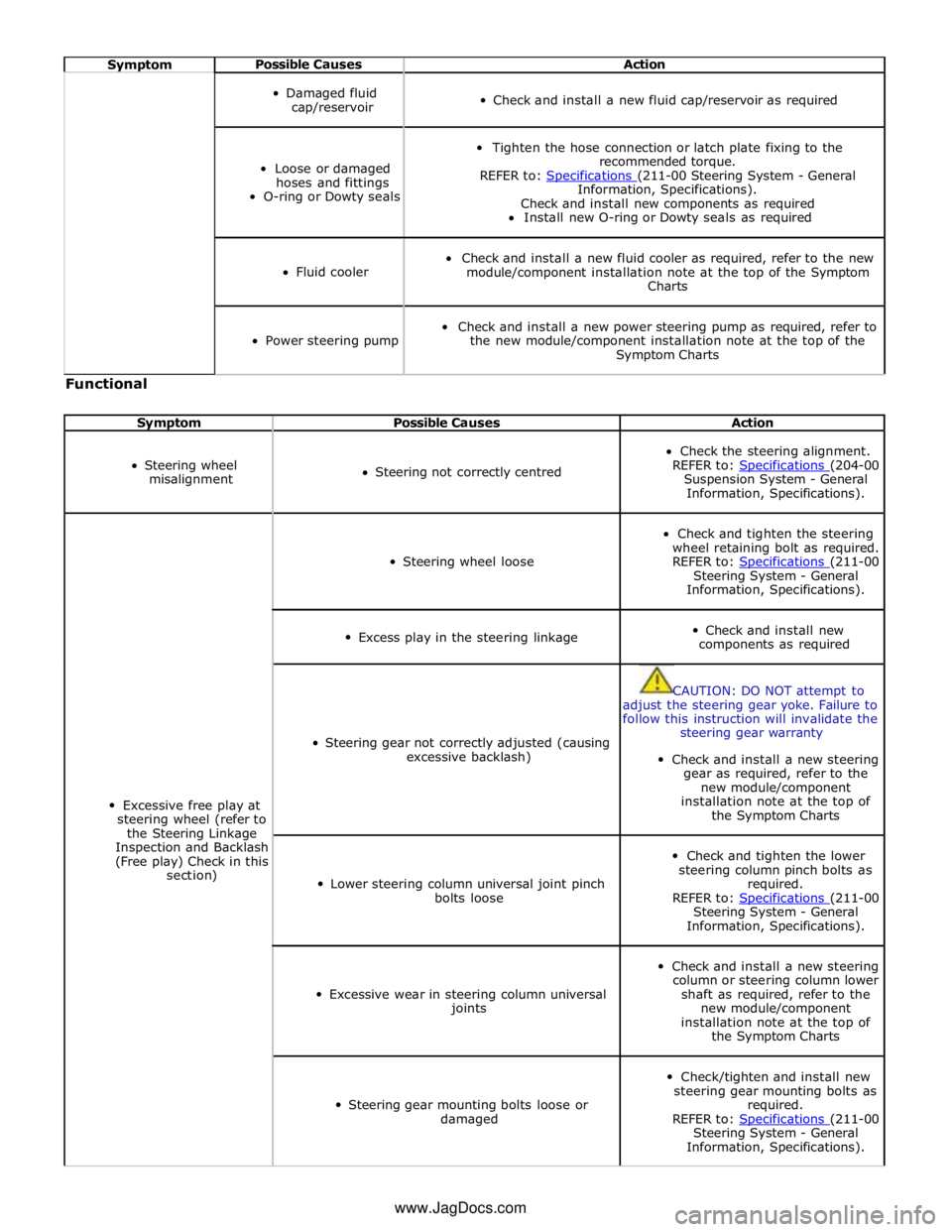
Symptom Possible Causes Action
Damaged fluid
cap/reservoir
Check and install a new fluid cap/reservoir as required
Loose or damaged
hoses and fittings
O-ring or Dowty seals
Tighten the hose connection or latch plate fixing to the
recommended torque.
REFER to: Specifications (211-00 Steering System - General Information, Specifications).
Check and install new components as required
Install new O-ring or Dowty seals as required
Fluid cooler
Check and install a new fluid cooler as required, refer to the new
module/component installation note at the top of the Symptom
Charts
Power steering pump
Check and install a new power steering pump as required, refer to
the new module/component installation note at the top of the
Symptom Charts Functional
Symptom Possible Causes Action
Steering wheel
misalignment
Steering not correctly centred
Check the steering alignment.
REFER to: Specifications (204-00 Suspension System - General
Information, Specifications).
Excessive free play at
steering wheel (refer to
the Steering Linkage
Inspection and Backlash
(Free play) Check in this
section)
Steering wheel loose
Check and tighten the steering
wheel retaining bolt as required.
REFER to: Specifications (211-00 Steering System - General
Information, Specifications).
Excess play in the steering linkage
Check and install new
components as required
Steering gear not correctly adjusted (causing
excessive backlash)
CAUTION: DO NOT attempt to
adjust the steering gear yoke. Failure to
follow this instruction will invalidate the
steering gear warranty
Check and install a new steering
gear as required, refer to the
new module/component
installation note at the top of
the Symptom Charts
Lower steering column universal joint pinch
bolts loose
Check and tighten the lower
steering column pinch bolts as
required.
REFER to: Specifications (211-00 Steering System - General
Information, Specifications).
Excessive wear in steering column universal
joints
Check and install a new steering
column or steering column lower
shaft as required, refer to the
new module/component
installation note at the top of
the Symptom Charts
Steering gear mounting bolts loose or
damaged
Check/tighten and install new
steering gear mounting bolts as
required.
REFER to: Specifications (211-00 Steering System - General
Information, Specifications). www.JagDocs.com
Page 722 of 3039
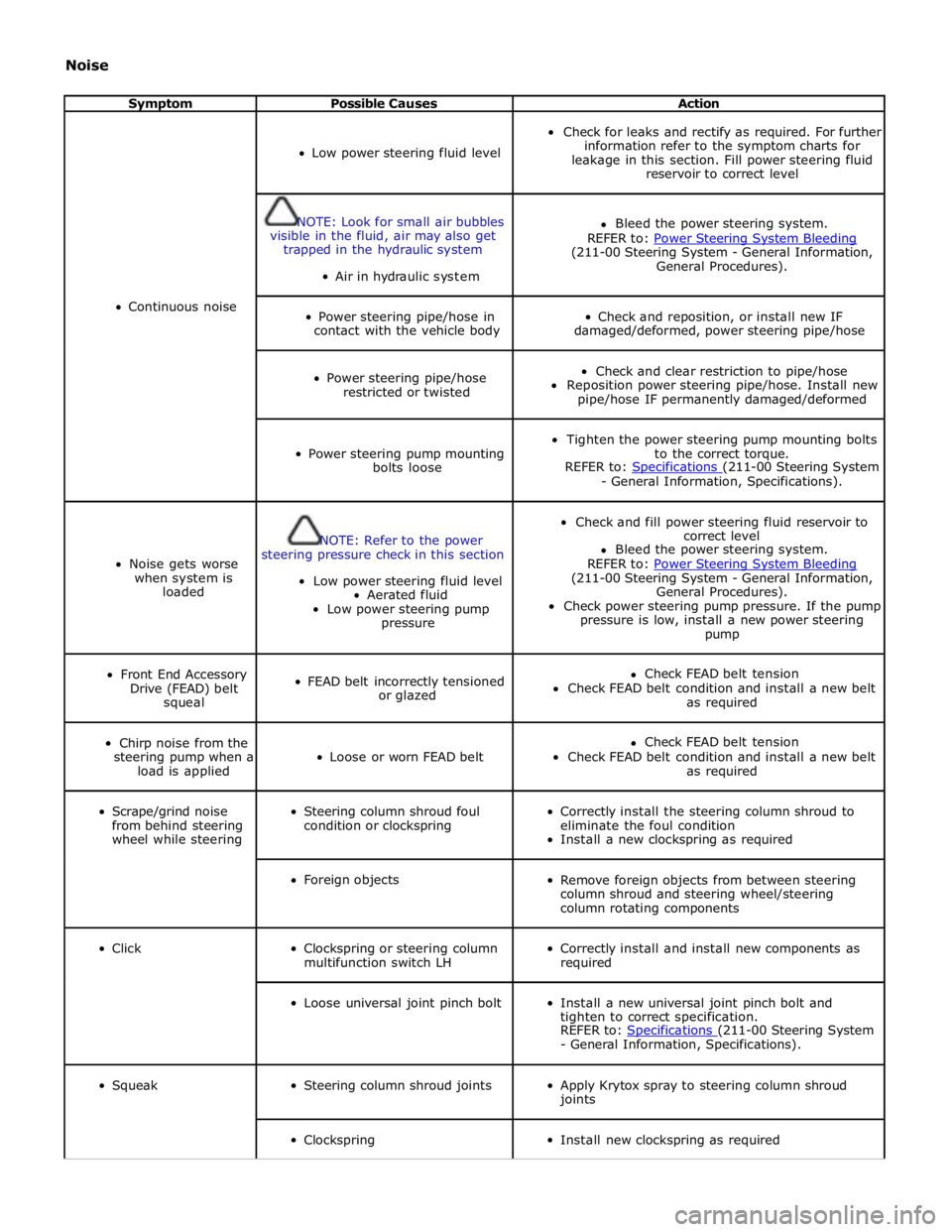
Noise
Symptom Possible Causes Action
Continuous noise
Low power steering fluid level
Check for leaks and rectify as required. For further
information refer to the symptom charts for
leakage in this section. Fill power steering fluid
reservoir to correct level
NOTE: Look for small air bubbles
visible in the fluid, air may also get
trapped in the hydraulic system
Air in hydraulic system
Bleed the power steering system.
REFER to: Power Steering System Bleeding (211-00 Steering System - General Information,
General Procedures).
Power steering pipe/hose in
contact with the vehicle body
Check and reposition, or install new IF
damaged/deformed, power steering pipe/hose
Power steering pipe/hose
restricted or twisted
Check and clear restriction to pipe/hose
Reposition power steering pipe/hose. Install new
pipe/hose IF permanently damaged/deformed
Power steering pump mounting
bolts loose
Tighten the power steering pump mounting bolts
to the correct torque.
REFER to: Specifications (211-00 Steering System - General Information, Specifications).
Noise gets worse
when system is
loaded
NOTE: Refer to the power
steering pressure check in this section
Low power steering fluid level
Aerated fluid
Low power steering pump
pressure
Check and fill power steering fluid reservoir to
correct level
Bleed the power steering system.
REFER to: Power Steering System Bleeding (211-00 Steering System - General Information,
General Procedures).
Check power steering pump pressure. If the pump
pressure is low, install a new power steering
pump
Front End Accessory
Drive (FEAD) belt
squeal
FEAD belt incorrectly tensioned
or glazed
Check FEAD belt tension
Check FEAD belt condition and install a new belt
as required
Chirp noise from the
steering pump when a
load is applied
Loose or worn FEAD belt
Check FEAD belt tension
Check FEAD belt condition and install a new belt
as required
Scrape/grind noise
from behind steering
wheel while steering
Steering column shroud foul
condition or clockspring
Correctly install the steering column shroud to
eliminate the foul condition
Install a new clockspring as required
Foreign objects
Remove foreign objects from between steering
column shroud and steering wheel/steering
column rotating components
Click
Clockspring or steering column
multifunction switch LH
Correctly install and install new components as
required
Loose universal joint pinch bolt
Install a new universal joint pinch bolt and
tighten to correct specification.
REFER to: Specifications (211-00 Steering System - General Information, Specifications).
Squeak
Steering column shroud joints
Apply Krytox spray to steering column shroud
joints
Clockspring
Install new clockspring as required
Page 745 of 3039
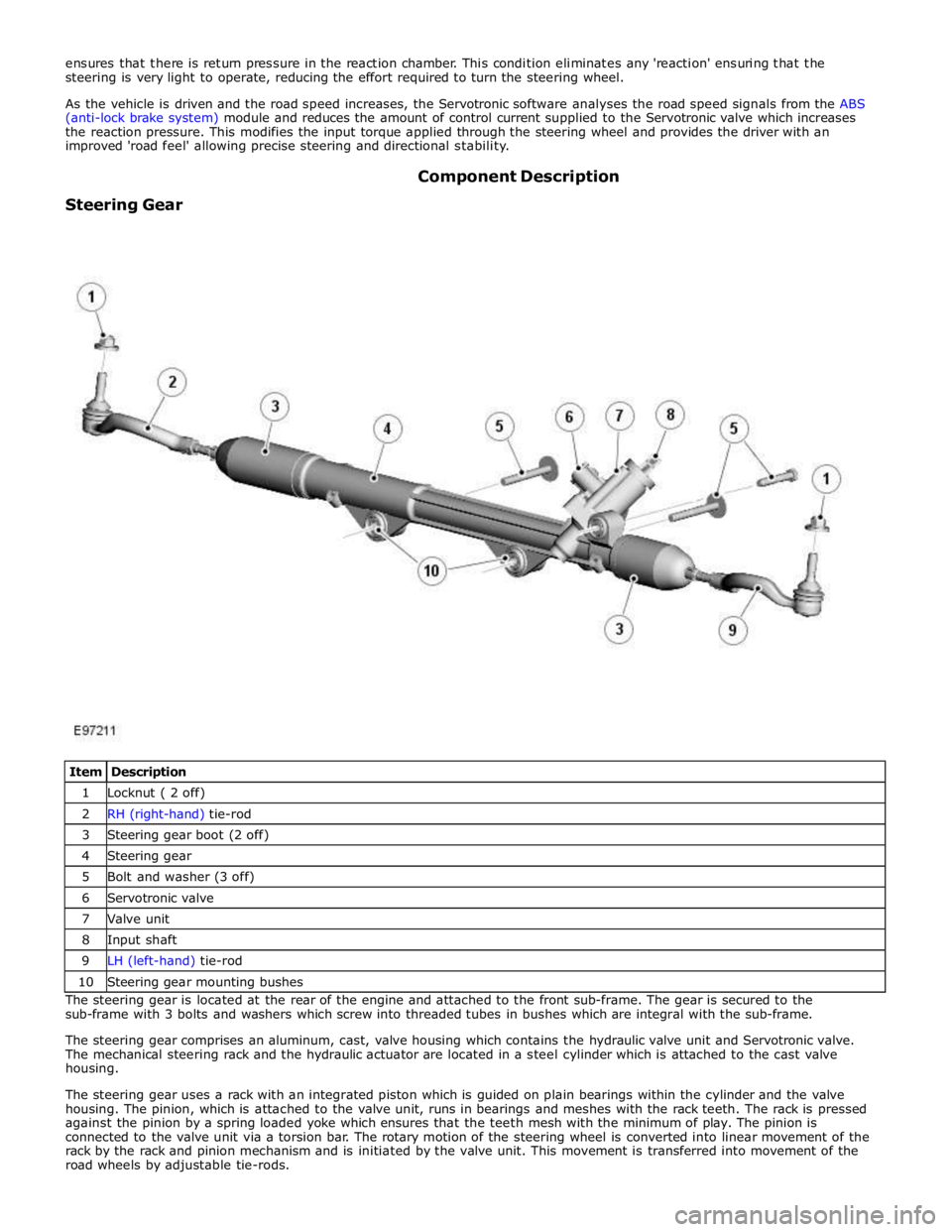
1 Locknut ( 2 off) 2 RH (right-hand) tie-rod 3 Steering gear boot (2 off) 4 Steering gear 5 Bolt and washer (3 off) 6 Servotronic valve 7 Valve unit 8 Input shaft 9 LH (left-hand) tie-rod 10 Steering gear mounting bushes The steering gear is located at the rear of the engine and attached to the front sub-frame. The gear is secured to the
sub-frame with 3 bolts and washers which screw into threaded tubes in bushes which are integral with the sub-frame.
The steering gear comprises an aluminum, cast, valve housing which contains the hydraulic valve unit and Servotronic valve.
The mechanical steering rack and the hydraulic actuator are located in a steel cylinder which is attached to the cast valve
housing.
The steering gear uses a rack with an integrated piston which is guided on plain bearings within the cylinder and the valve
housing. The pinion, which is attached to the valve unit, runs in bearings and meshes with the rack teeth. The rack is pressed
against the pinion by a spring loaded yoke which ensures that the teeth mesh with the minimum of play. The pinion is
connected to the valve unit via a torsion bar. The rotary motion of the steering wheel is converted into linear movement of the
rack by the rack and pinion mechanism and is initiated by the valve unit. This movement is transferred into movement of the
road wheels by adjustable tie-rods.
Page 775 of 3039
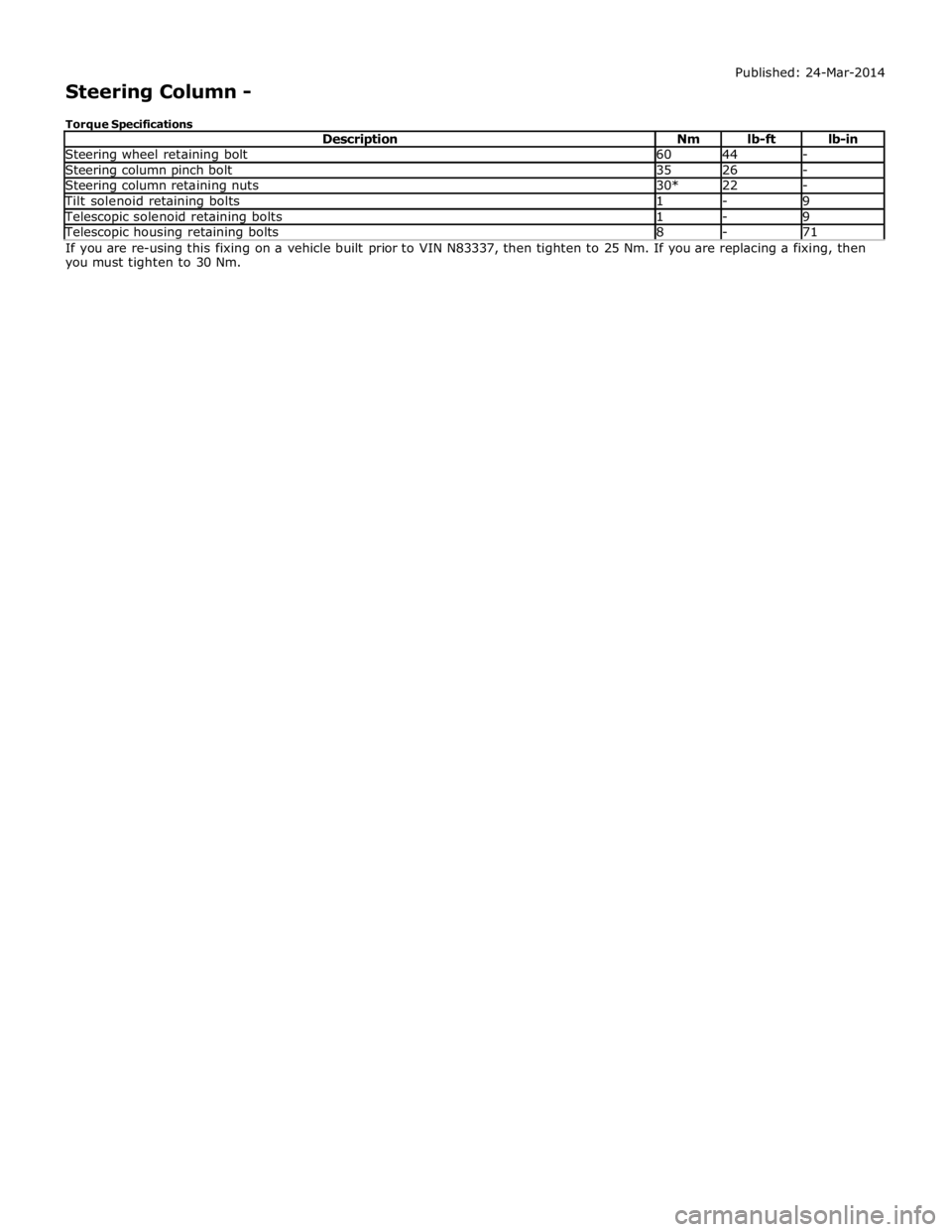
Steering wheel retaining bolt 60 44 - Steering column pinch bolt 35 26 - Steering column retaining nuts 30* 22 - Tilt solenoid retaining bolts 1 - 9 Telescopic solenoid retaining bolts 1 - 9 Telescopic housing retaining bolts 8 - 71 If you are re-using this fixing on a vehicle built prior to VIN N83337, then tighten to 25 Nm. If you are replacing a fixing, then
you must tighten to 30 Nm.
Page 793 of 3039
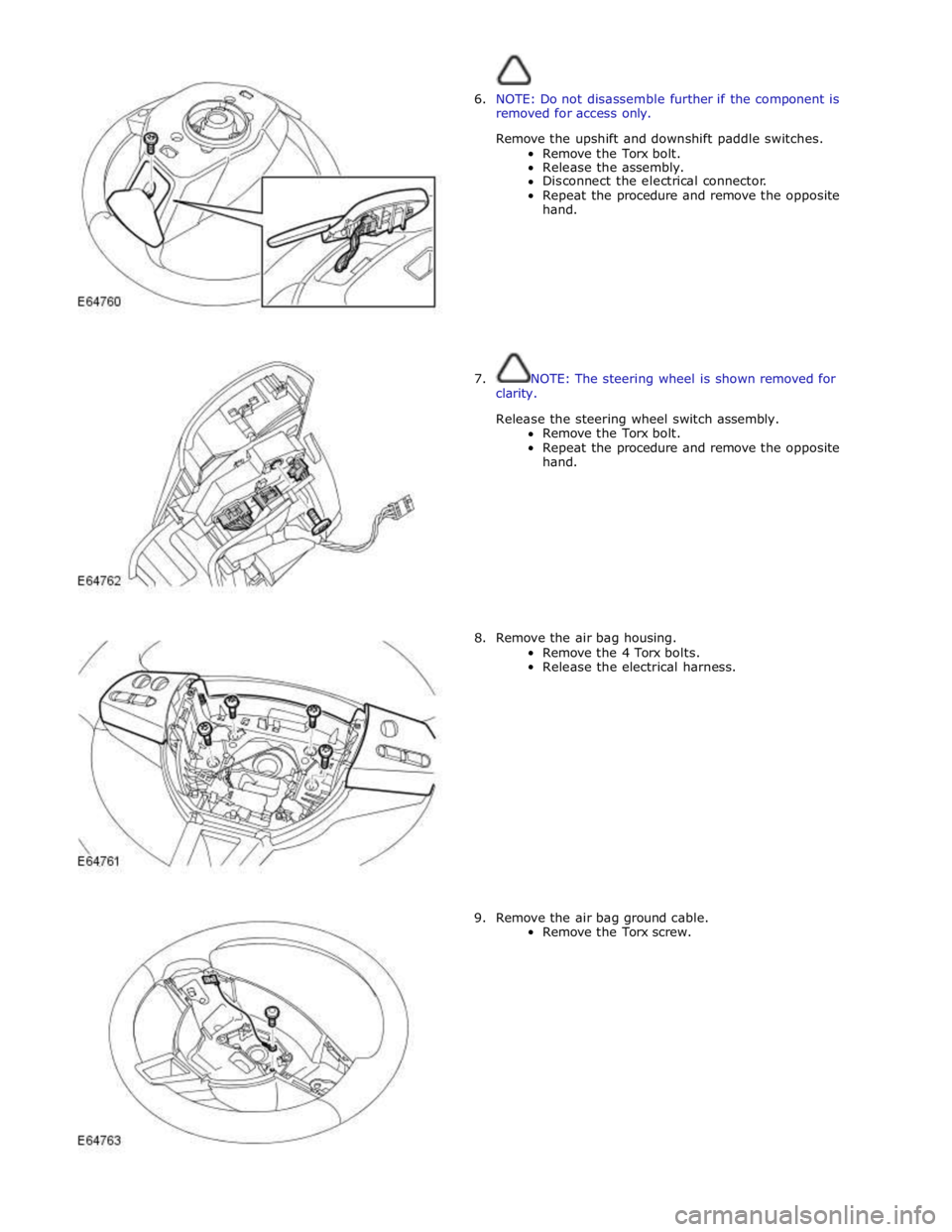
6. NOTE: Do not disassemble further if the component is
removed for access only.
Remove the upshift and downshift paddle switches.
Remove the Torx bolt.
Release the assembly.
Disconnect the electrical connector.
Repeat the procedure and remove the opposite
hand.
7. NOTE: The steering wheel is shown removed for
clarity.
Release the steering wheel switch assembly.
Remove the Torx bolt.
Repeat the procedure and remove the opposite
hand.
8. Remove the air bag housing.
Remove the 4 Torx bolts.
Release the electrical harness.
9. Remove the air bag ground cable.
Remove the Torx screw.
Page 813 of 3039
Component Tests
Engine Oil Leaks
NOTE: Before installing new gaskets or oil seals, make sure that the fault is clearly established.
If the oil leak cannot be identified clearly by a visual inspection, carry out an Ultraviolet test:
Fluorescent Oil Additive Method
1. Clean the engine with a suitable cleaning fluid (brake cleaner).
2. Drain the engine oil and refill with recommended oil, premixed with Diesel Engine Oil Dye or equivalent. Use a minimum
14.8 ml (0.5 ounce) to a maximum 29.6 ml (1 ounce) of fluorescent additive to all engines. If oil is not premixed,
fluorescent additive must first be added to the crankcase.
3. Run engine for 15 minutes. Stop the engine and inspect all seal and gasket areas for leaks using a 12 Volt Master UV
Diagnostic Inspection Kit or equivalent. A clear bright yellow or orange area will identify leak. For extremely small
leaks, several hours may be required for the leak to appear.
4. As necessary, pressurize the main oil gallery system to locate leaks due to incorrectly sealed, loose or cocked plugs. If
the flywheel bolts leak oil, look for sealer on the threads.
5. Repair all leaks as necessary.
Compression Test General Remarks
NOTES:
Removing fuses and disconnecting electrical components may cause the Engine Control Module (ECM) to log Diagnostic
Trouble Codes (DTCs). After the measurements have been carried out, DTCs should be cleared from memory by connecting to
the Manufacturer Approved Diagnostic System.
Only check the compression pressure with the valves set to the prescribed clearance (if this can be adjusted).
The compression pressure should be checked with the engine at normal operating temperature.
Check the Compression Pressure
WARNING: Move gear selector lever to 'P' position. Failure to follow this instruction may result in personal injury.
1. Remove the fuel pump relay.
2. Start the engine - the engine will start, run for a few seconds then stall.
3. Remove the spark plugs.
4. Install the compression tester.
5. Install an auxiliary starter switch in the starting circuit. With the ignition switch OFF, using the auxiliary starter switch,
crank the engine a minimum of five compression strokes and record the highest reading. Note the approximate number
of compression strokes required to obtain the highest reading.
6. Repeat the test on each cylinder, cranking the engine approximately the same number of compression strokes.
7. Install the removed components in reverse order, observing the specified tightening torques.
8. Clear all DTCs from the ECM.
Interpretation of the Results
NOTE: Due to the possibility of loose carbon that has become trapped between the valve face and seat effecting the
pressure readings, when carrying out a compression test and cylinders are found to have low pressures, install the spark plugs,
road test the vehicle and re-test the suspect cylinders. If the correct pressures are restored, no further action is required.
The indicated compression pressures are considered within specification if the lowest reading cylinder is within 75% of the
highest reading.
If the cylinder pressures are found to be low, carry out a leakdown test to determine the location of the fault (if any leakback
can be heard through the engine breather system suspect the piston rings, if any leakback can be heard through the inlet
system suspect the inlet valve or seat, if any leakback can be heard through the exhaust manifold suspect the exhaust valve
or seat. If the measurements for two cylinders next to each other are both too low then it is very likely that the cylinder head
gasket between them is burnt through. This can also be recognized by traces of engine oil in the coolant and/or coolant in the
Page 1423 of 3039
The TCM can be reprogrammed using a Jaguar approved diagnostic system using a flash code. The TCM processor has a 440 kb internal flash memory. Of this capacity, approximately 370 kb are used by the basic transmission program. The remainder,
approximately 70 kb is used to store vehicle-specific application data.
Engine Stall
If the vehicle stalls it will coast down in gear, with the transmission providing drive to the engine. A restart can be attempted
at this point and the engine may start and the driver can continue.
If the coast down speed reduces such that the speed of the engine is less than 600 rev/min, the transmission will go to
neutral, D illumination will flash in the instrument cluster. The driver needs to select neutral or park and then press the brake
pedal to restart the engine.
If the start/stop button is pressed when driving, the message ENGINE STOP BUTTON PRESSED is displayed in the message
center but there will be no change to the ignition state. If the driver requires to switch off the engine, the start/stop button
must be pressed for a second time. The engine will be stopped and will be back driven by the transmission as the vehicle
coasts down. When the engine speed is less than 600 rev/min the transmission engages neutral (flashing D illumination in the
instrument cluster). When vehicle speed is less than 2 km/h (1.2 mph) Park is engaged. The JaguarDrive selector automatically
rotates back to its lowered P position and the vehicle ignition is switched off.
The park engagement is prevented in a stall case as the ignition power is on and D was the last selected gear. The park
engagement speed at ignition off is from the least value of the wheel speeds (CAN signal) and transmission output speed (internal signal).
TRANSMISSION Component Description
The transmission comprises the main casing which houses all of the transmission components. The main casing also
incorporates an integral bell housing.
A fluid pan is attached to the lower face of the main casing and is secured with bolts. The fluid pan is sealed to the main
casing with a gasket. Removal of the fluid pan allows access to the Mechatronic valve block. The fluid pan has a magnet
located around the drain plug which collects any metallic particles present in the transmission fluid.
A fluid filter is located inside the fluid pan. If the transmission fluid becomes contaminated or after any service work, the fluid
pan with integral filter must be replaced.
The integral bell housing provides protection for the torque converter assembly and also provides the attachment for the
gearbox to the engine cylinder block. The torque converter is a non-serviceable assembly which also contains the lock-up clutch
mechanism. The torque converter drives a crescent type pump via drive tangs. The fluid pump is located in the main casing,
behind the torque converter.
The main casing contains the following major components:
Input shaft
Output shaft
Mechatronic valve block which contains the solenoids, speed sensors and the TCM Three rotating multiplate drive clutches
Two fixed multiplate brake clutches
A single planetary gear train and a double planetary gear train.
Page 1526 of 3039
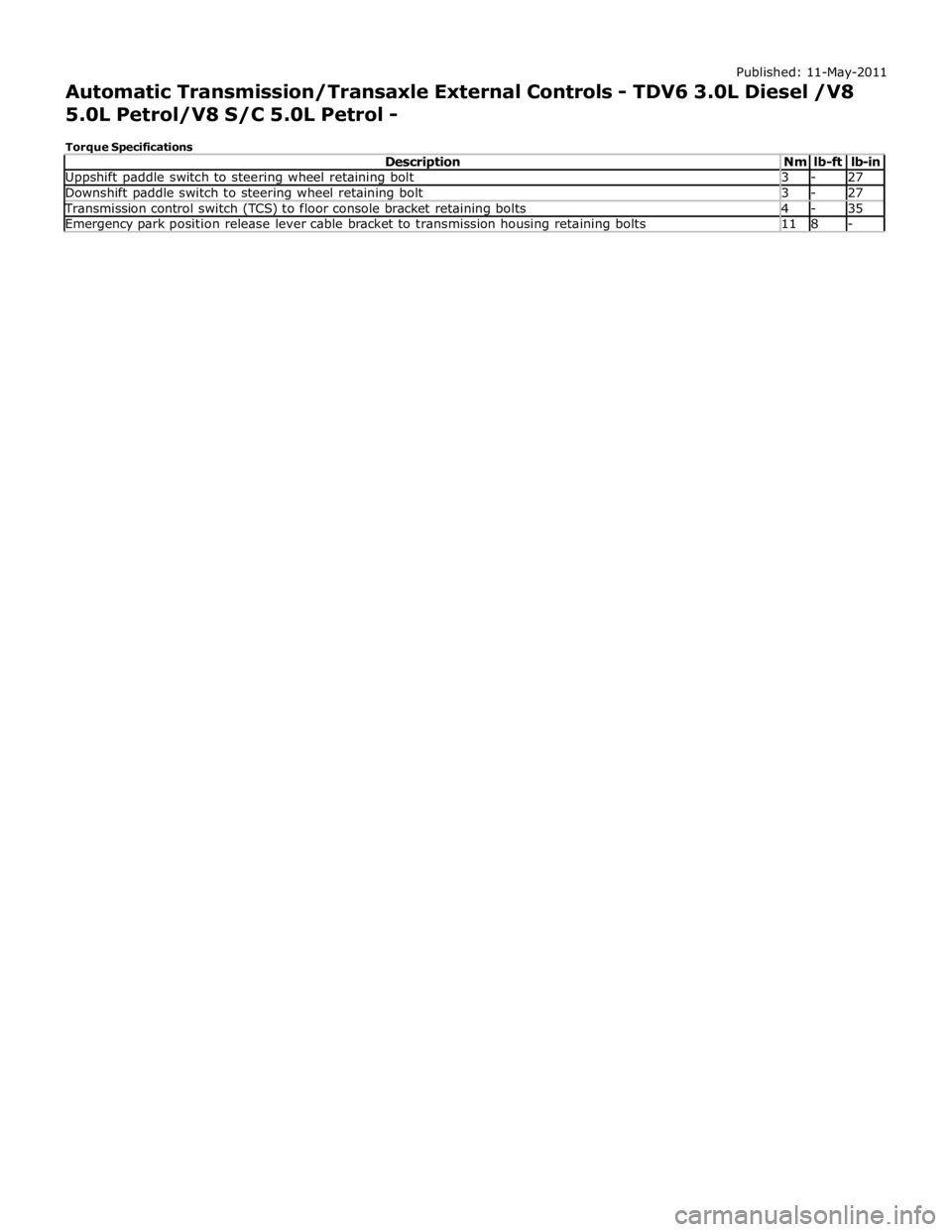
Uppshift paddle switch to steering wheel retaining bolt 3 - 27 Downshift paddle switch to steering wheel retaining bolt 3 - 27 Transmission control switch (TCS) to floor console bracket retaining bolts 4 - 35 Emergency park position release lever cable bracket to transmission housing retaining bolts 11 8 -
Page 1942 of 3039

lb-ft lb-in Audio antenna unit to "D" pillar retaining bolts 9 - 80 Digital Radio antenna pod retaining nuts 5 - 48 Amplifier retaining nuts 7 - 62 Information and entertainment display retaining bolts 2 - 17 Information and entertainment display mounting bracket to Information and entertainment display retaining bolts 3 - 26 Information and entertainment module retaining bolts 3 - 26 Instrument panel speaker retaining screws 2 - 18 Steering wheel audio control switch retaining screws 3 - 26 Subwoofer amplifier retaining nuts 7 - 62 Subwoofer speaker retaining bolts 6 - 53
Page 2030 of 3039
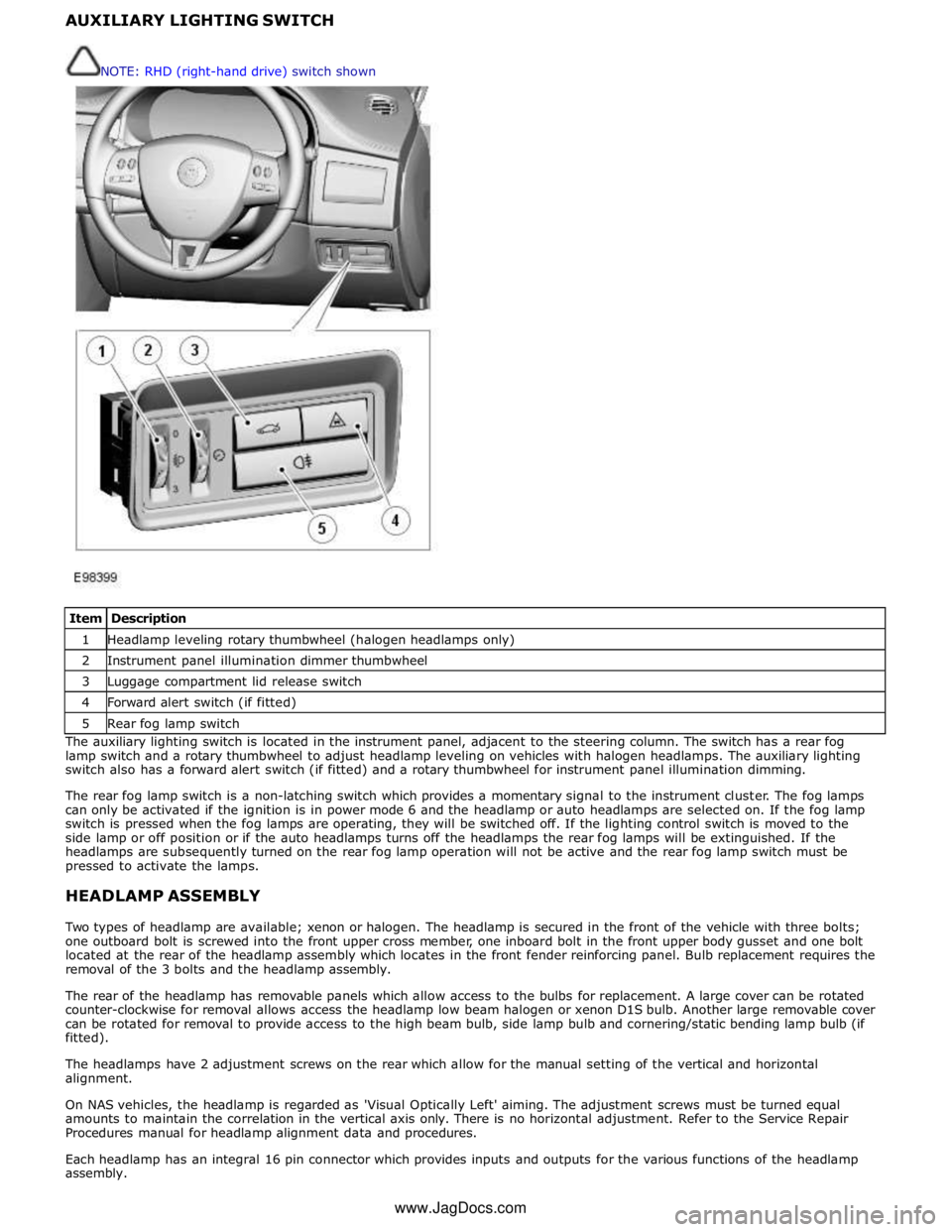
1 Headlamp leveling rotary thumbwheel (halogen headlamps only) 2 Instrument panel illumination dimmer thumbwheel 3 Luggage compartment lid release switch 4 Forward alert switch (if fitted) 5 Rear fog lamp switch The auxiliary lighting switch is located in the instrument panel, adjacent to the steering column. The switch has a rear fog
lamp switch and a rotary thumbwheel to adjust headlamp leveling on vehicles with halogen headlamps. The auxiliary lighting
switch also has a forward alert switch (if fitted) and a rotary thumbwheel for instrument panel illumination dimming.
The rear fog lamp switch is a non-latching switch which provides a momentary signal to the instrument cluster. The fog lamps
can only be activated if the ignition is in power mode 6 and the headlamp or auto headlamps are selected on. If the fog lamp
switch is pressed when the fog lamps are operating, they will be switched off. If the lighting control switch is moved to the
side lamp or off position or if the auto headlamps turns off the headlamps the rear fog lamps will be extinguished. If the
headlamps are subsequently turned on the rear fog lamp operation will not be active and the rear fog lamp switch must be
pressed to activate the lamps.
HEADLAMP ASSEMBLY
Two types of headlamp are available; xenon or halogen. The headlamp is secured in the front of the vehicle with three bolts;
one outboard bolt is screwed into the front upper cross member, one inboard bolt in the front upper body gusset and one bolt
located at the rear of the headlamp assembly which locates in the front fender reinforcing panel. Bulb replacement requires the
removal of the 3 bolts and the headlamp assembly.
The rear of the headlamp has removable panels which allow access to the bulbs for replacement. A large cover can be rotated
counter-clockwise for removal allows access the headlamp low beam halogen or xenon D1S bulb. Another large removable cover
can be rotated for removal to provide access to the high beam bulb, side lamp bulb and cornering/static bending lamp bulb (if
fitted).
The headlamps have 2 adjustment screws on the rear which allow for the manual setting of the vertical and horizontal
alignment.
On NAS vehicles, the headlamp is regarded as 'Visual Optically Left' aiming. The adjustment screws must be turned equal
amounts to maintain the correlation in the vertical axis only. There is no horizontal adjustment. Refer to the Service Repair
Procedures manual for headlamp alignment data and procedures.
Each headlamp has an integral 16 pin connector which provides inputs and outputs for the various functions of the headlamp
assembly. NOTE: RHD (right-hand drive) switch shown
www.JagDocs.com