radio JEEP CHEROKEE 2014 KL / 5.G User Guide
[x] Cancel search | Manufacturer: JEEP, Model Year: 2014, Model line: CHEROKEE, Model: JEEP CHEROKEE 2014 KL / 5.GPages: 690, PDF Size: 4.74 MB
Page 161 of 690
Recliner Adjustment
The rear seatback also reclines for additional passenger
comfort. Pull on the pull strap while sitting in the rear
seat to recline the seatback.
WARNING!
Do not ride with the seatback reclined so that the
shoulder belt is no longer resting against your chest.
In a collision you could slide under the seat belt,
which could result in serious injury or death.
DRIVER MEMORY SEAT — IF EQUIPPED
This feature allows the driver to store up to two different
memory profiles, for easy recall through a memory
switch. Each memory profile contains desired position
settings for the driver seat and side mirrors and a set of
desired radio station presets.
Rear Seat Recliner Pull Strap
3
UNDERSTANDING THE FEATURES OF YOUR VEHICLE 159
Page 162 of 690
The memory switch is located on the driver’s side door
panel. The switch contains 3 buttons, a S (SET) button to
activate the memory save function, the number (1)
memory button and the number (2) memory button. The
memory switch allows the driver to recall either of the
two pre-programmed memory profiles by pressing the
appropriate number button on the switch.Programming The Memory Feature
To create a new memory profile, perform the following:
NOTE:Saving a new memory profile will erase an
existing profile from memory.
1. Turn the ignition ON.
2. Adjust all memory profile settings to desired prefer- ences (i.e., seat, side mirror and radio station presets).
3. Press and release the SET button on the memory switch, then press the number (1) button within five
seconds. The Electronic Vehicle Information Center
(EVIC), if equipped, will display which memory po-
sition is being set.
Driver Memory Switch
160 UNDERSTANDING THE FEATURES OF YOUR VEHICLE
Page 163 of 690
If desired, a second memory profile can be stored into
memory as follows:
1. Turn the ignition ON.
2. Adjust all memory profile settings to desired prefer-ences (i.e., seat, side mirror and radio station presets).
3. Press and release the SET button on the memory switch, then press the number (2) button within five
seconds. The EVIC, if equipped, will display which
memory position is being set.
NOTE:
• For vehicles equipped with an automatic transmission,
memory profiles can be set without the vehicle in
PARK, but the vehicle must be in PARK to recall a
memory profile. •
For vehicles equipped with a manual transmission, the
vehicle speed must be at 0 mph (0 km/h) to recall a
memory profile.
• The Recall Memory with Remote Key Unlock feature
can be turned on and off through the EVIC, if
equipped. If the Recall Memory with Remote Key
Unlock is not turned on in (EVIC)/Customer-
Programmable Features then the Linking and Unlink-
ing the Remote Keyless Entry Transmitter to Memory
will not be successful. Refer to “Electronic Vehicle
Information Center (EVIC)/Customer-Programmable
Features” in “Understanding Your Instrument Panel”
for further information.
3
UNDERSTANDING THE FEATURES OF YOUR VEHICLE 161
Page 177 of 690
Ambient Light Control — If Equipped
Rotate the ambient dimmer control upward or down-
ward to increase or decrease the brightness of the ambi-
ent light located in the overhead console, door handle
lights, under I/P lights, door map pocket lights, and
cubby bin lights.
Dome Light Position
Rotate the instrument panel dimmer control completely
upward to the second detent to turn on the interior lights.
The interior lights will remain on when the instrument
panel dimmer control is in this position.
Interior Light Defeat (OFF)
Rotate the instrument panel dimmer control to the ex-
treme bottom OFF position. The interior lights will
remain off when the doors are open.
Parade Mode (Daytime Brightness Feature)
Rotate the instrument panel dimmer control upward to
the first detent. This feature brightens all text displays
such as the odometer, EVIC (if equipped), and radio
when the position lights or headlights are on.
Ambient Light/Door Handle Light Dimmer
3
UNDERSTANDING THE FEATURES OF YOUR VEHICLE 175
Page 239 of 690
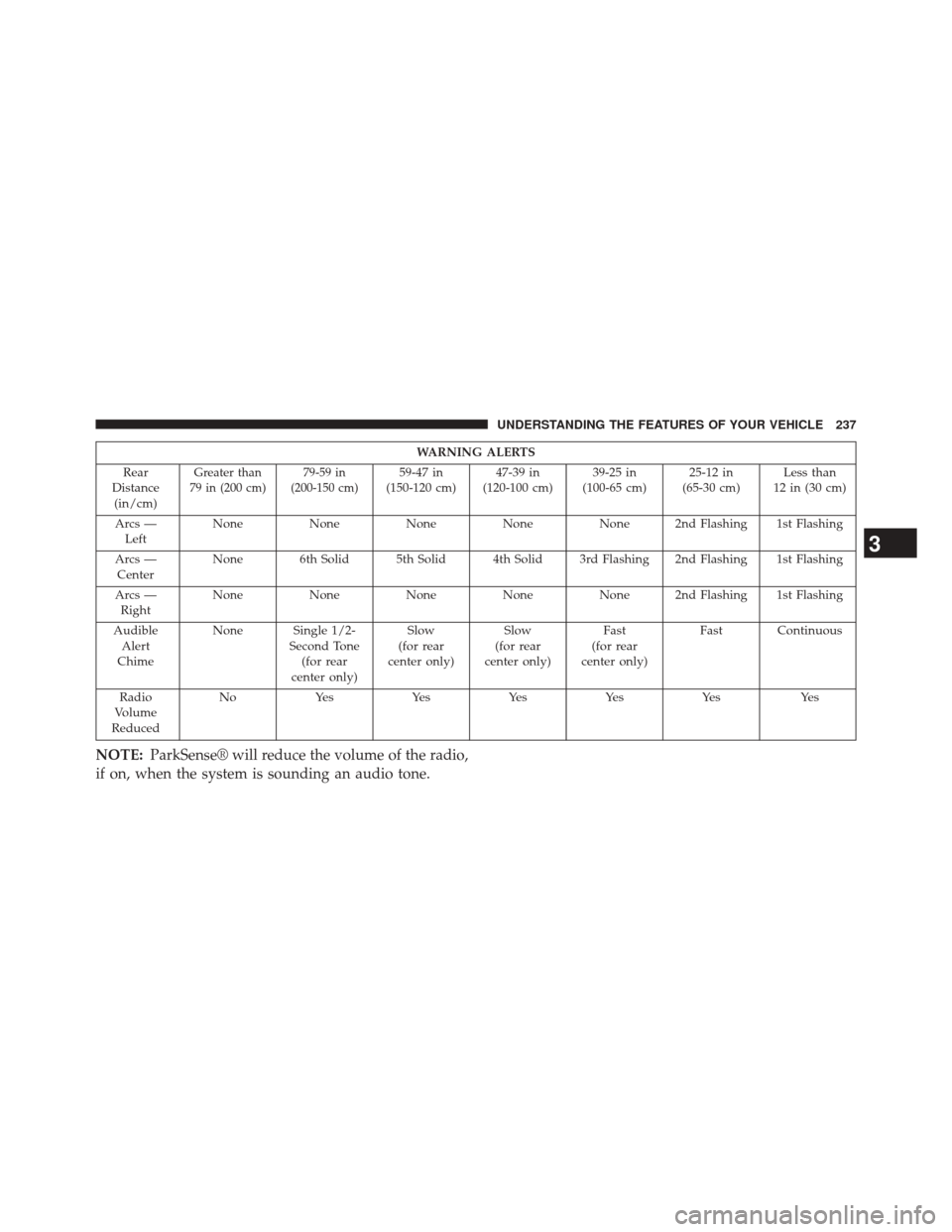
WARNING ALERTS
Rear
Distance (in/cm)
Greater than
79 in (200 cm) 79-59 in
(200-150 cm)59-47 in
(150-120 cm) 47-39 in
(120-100 cm) 39-25 in
(100-65 cm) 25-12 in
(65-30 cm) Less than
12 in (30 cm)
Arcs — Left None
NoneNoneNoneNone 2nd Flashing 1st Flashing
Arcs — Center None 6th Solid 5th Solid 4th Solid 3rd Flashing 2nd Flashing 1st Flashing
Arcs — Right None
NoneNoneNoneNone 2nd Flashing 1st Flashing
Audible Alert
Chime None Single 1/2-
Second Tone(for rear
center only) Slow
(for rear
center only) Slow
(for rear
center only) Fast
(for rear
center only) Fast Continuous
Radio
Volume
Reduced N o
Ye s Ye sYe sYe sYe s Ye s
NOTE:ParkSense® will reduce the volume of the radio,
if on, when the system is sounding an audio tone.
3
UNDERSTANDING THE FEATURES OF YOUR VEHICLE 237
Page 242 of 690
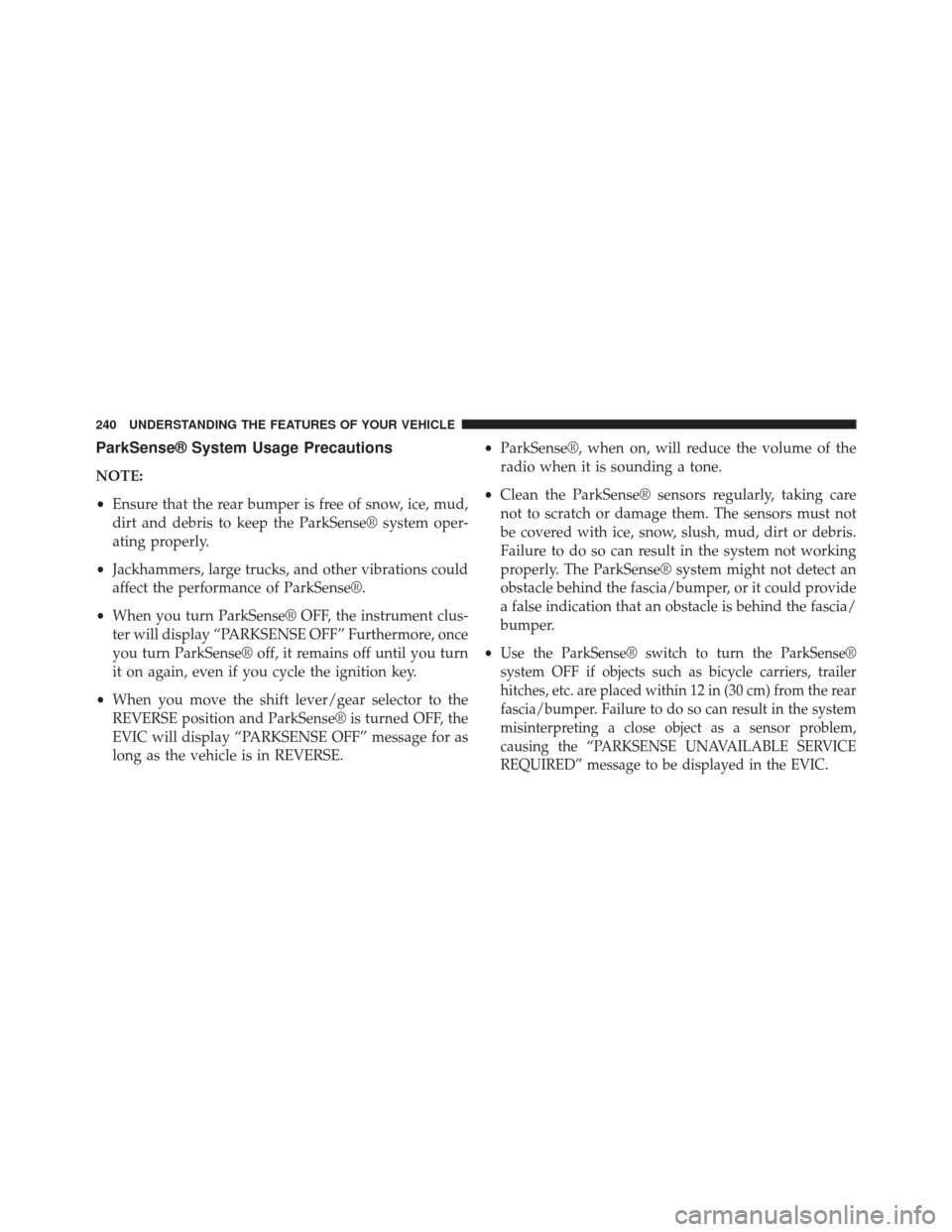
ParkSense® System Usage Precautions
NOTE:
•Ensure that the rear bumper is free of snow, ice, mud,
dirt and debris to keep the ParkSense® system oper-
ating properly.
• Jackhammers, large trucks, and other vibrations could
affect the performance of ParkSense®.
• When you turn ParkSense® OFF, the instrument clus-
ter will display “PARKSENSE OFF” Furthermore, once
you turn ParkSense® off, it remains off until you turn
it on again, even if you cycle the ignition key.
• When you move the shift lever/gear selector to the
REVERSE position and ParkSense® is turned OFF, the
EVIC will display “PARKSENSE OFF” message for as
long as the vehicle is in REVERSE. •
ParkSense®, when on, will reduce the volume of the
radio when it is sounding a tone.
• Clean the ParkSense® sensors regularly, taking care
not to scratch or damage them. The sensors must not
be covered with ice, snow, slush, mud, dirt or debris.
Failure to do so can result in the system not working
properly. The ParkSense® system might not detect an
obstacle behind the fascia/bumper, or it could provide
a false indication that an obstacle is behind the fascia/
bumper.
•
Use the ParkSense® switch to turn the ParkSense®
system OFF if objects such as bicycle carriers, trailer
hitches, etc. are placed within 12 in (30 cm) from the rear
fascia/bumper. Failure to do so can result in the system
misinterpreting a close object as a sensor problem,
causing the “PARKSENSE UNAVAILABLE SERVICE
REQUIRED” message to be displayed in the EVIC.
240 UNDERSTANDING THE FEATURES OF YOUR VEHICLE
Page 251 of 690
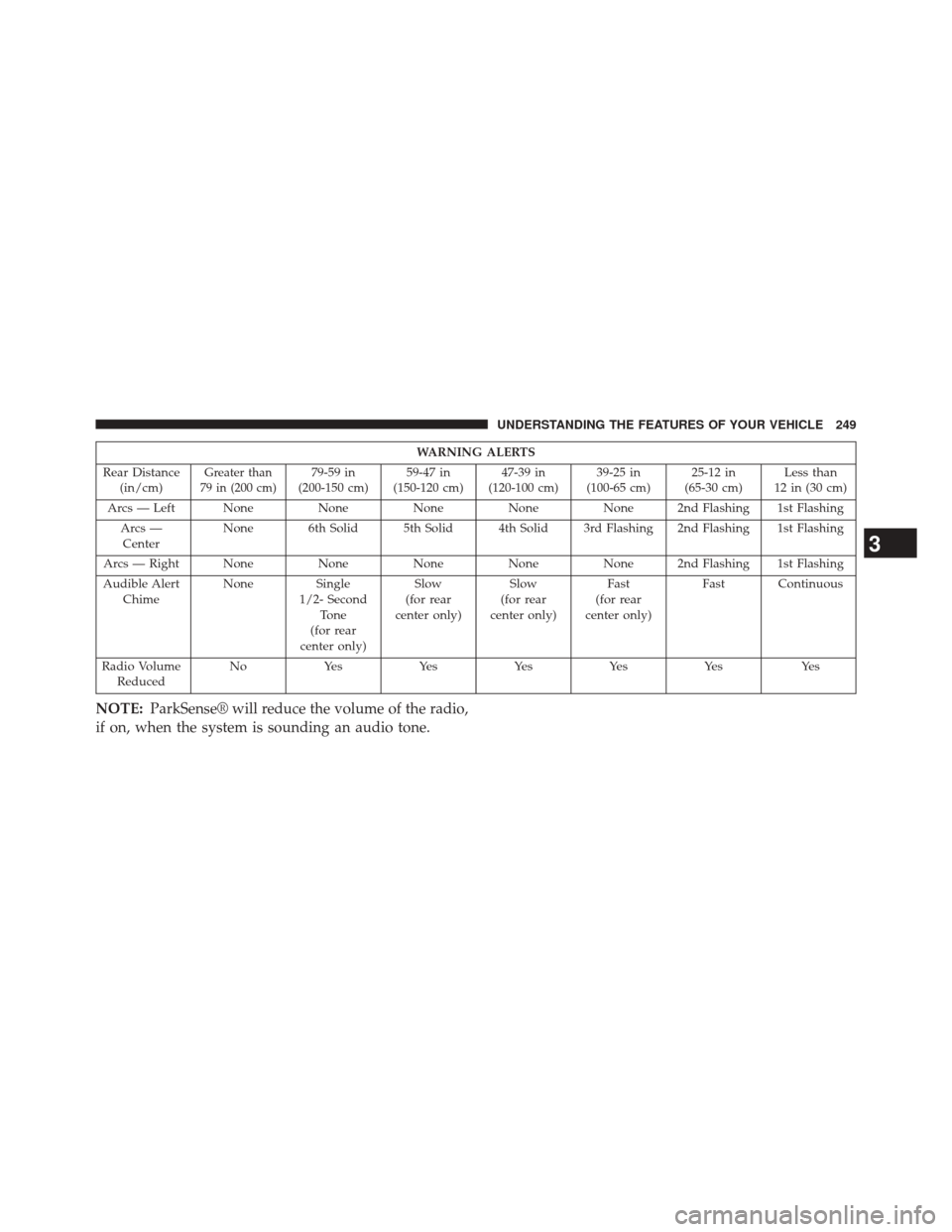
WARNING ALERTS
Rear Distance (in/cm)
Greater than
79 in (200 cm)79-59 in
(200-150 cm) 59-47 in
(150-120 cm) 47-39 in
(120-100 cm) 39-25 in
(100-65 cm) 25-12 in
(65-30 cm) Less than
12 in (30 cm)
Arcs — Left None NoneNoneNoneNone 2nd Flashing 1st Flashing
Arcs — Center None 6th Solid 5th Solid 4th Solid 3rd Flashing 2nd Flashing 1st Flashing
Arcs — Right None NoneNoneNoneNone 2nd Flashing 1st Flashing
Audible Alert Chime None
Single
1/2- Second Tone
(for rear
center only) Slow
(for rear
center only) Slow
(for rear
center only) Fast
(for rear
center only) Fast Continuous
Radio Volume Reduced N o
Ye s Ye sYe sYe sYe s Ye s
NOTE:ParkSense® will reduce the volume of the radio,
if on, when the system is sounding an audio tone.
3
UNDERSTANDING THE FEATURES OF YOUR VEHICLE 249
Page 255 of 690
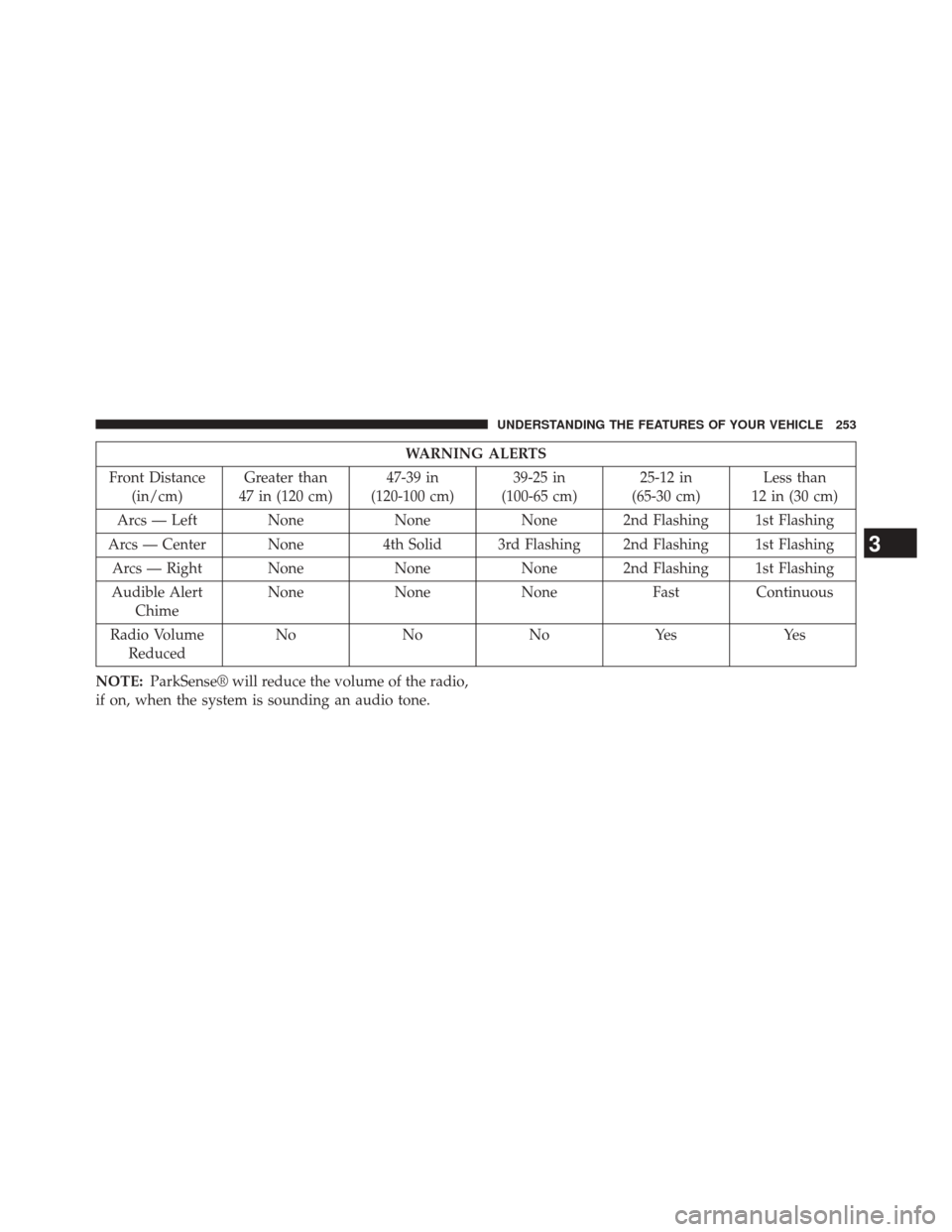
WARNING ALERTS
Front Distance (in/cm) Greater than
47 in (120 cm) 47-39 in
(120-100 cm) 39-25 in
(100-65 cm) 25-12 in
(65-30 cm) Less than
12 in (30 cm)
Arcs — Left None NoneNone 2nd Flashing 1st Flashing
Arcs — Center None 4th Solid 3rd Flashing 2nd Flashing 1st Flashing
Arcs — Right None NoneNone 2nd Flashing 1st Flashing
Audible Alert Chime None
NoneNone FastContinuous
Radio Volume Reduced No
NoNoYes Yes
NOTE: ParkSense® will reduce the volume of the radio,
if on, when the system is sounding an audio tone.
3
UNDERSTANDING THE FEATURES OF YOUR VEHICLE 253
Page 259 of 690
•When you move the shift lever to the REVERSE
position and ParkSense® is turned off, the instrument
cluster will display “PARKSENSE OFF” for as long as
the vehicle is in REVERSE.
• ParkSense®, when on, will reduce the volume of the
radio when it is sounding a tone.
• Clean the ParkSense® sensors regularly, taking care
not to scratch or damage them. The sensors must not
be covered with ice, snow, slush, mud, dirt or debris.
Failure to do so can result in the system not working
properly. The ParkSense® system might not detect an
obstacle behind or in front of the fascia/bumper, or it
could provide a false indication that an obstacle is
behind or in front of the fascia/bumper. •
Use the ParkSense® switch to turn the ParkSense®
system off if objects such as bicycle carriers, trailer
hitches, etc. are placed within 12 in (30 cm) from the
rear fascia/bumper. Failure to do so can result in the
system misinterpreting a close object as a sensor
problem, causing the “PARKSENSE UNAVAILABLE
SERVICE REQUIRED” message to be displayed in the
instrument cluster.
• ParkSense® should be disabled when the liftgate is in
the open position. An opened liftgate could provide a
false indication that an obstacle is behind the vehicle.
• There may be a delay in the object detection rate if the
object is moving. This will cause the automatic braking
application to be delayed.
3
UNDERSTANDING THE FEATURES OF YOUR VEHICLE 257
Page 289 of 690
Before You Begin Programming HomeLink®
Be sure that your vehicle is parked outside of the garage
before you begin programming.
For more efficient programming and accurate transmis-
sion of the radio-frequency signal it is recommended that
a new battery be placed in the hand-held transmitter of
the device that is being programmed to the HomeLink®
system.
Erase all channels before you begin programming. To
erase the channels place the ignition in the ON/RUN
position and press and hold the two outside HomeLink®
buttons (I and III) for up 20 seconds or until the red
indicator flashes.NOTE:
•
Erasing all channels should only be performed when
programming HomeLink® for the first time. Do not
erase channels when programming additional buttons.
• If you have any problems, or require assistance, please
call toll-free 1-800-355-3515 or, on the Internet at
www.HomeLink.com for information or assistance.
Programming A Rolling Code
For programming garage door openers that were manu-
factured after 1995. These garage door openers can be
identified by the “LEARN” or “TRAIN” button located
where the hanging antenna is attached to the garage door
opener. It is NOT the button that is normally used to
open and close the door. The name and color of the
button may vary by manufacturer.
3
UNDERSTANDING THE FEATURES OF YOUR VEHICLE 287