Headlight JEEP CHEROKEE 2015 KL / 5.G Owner's Manual
[x] Cancel search | Manufacturer: JEEP, Model Year: 2015, Model line: CHEROKEE, Model: JEEP CHEROKEE 2015 KL / 5.GPages: 772, PDF Size: 18.21 MB
Page 405 of 772
•Display Brightness With Headlights ON
When in this display, you may select the brightness with
the headlights on. Adjust the brightness with the “+” and
“–” setting buttons on the touchscreen or by selecting any
point on the scale between the “+” and “–” buttons on the
touchscreen. Then press the arrow back button on the
touchscreen.
NOTE:To make changes to the#Display Brightness with
Headlights ON#setting, the headlights must be on and
the interior dimmer switch must not be in the#party#or
#parade#positions.
•Display Brightness With Headlights OFF
When in this display, you may select the brightness with
the headlights off. Adjust the brightness with the “+” and
“–”setting buttons on the touchscreen or by selecting any
point on the scale between the “+” and “–” buttons on the
touchscreen. Then press the arrow back button on the
touchscreen.
NOTE:To make changes to the#Display Brightness with
Headlights OFF#setting, the headlights must be off and
the interior dimmer switch must not be in the#party#or
#parade#positions.
•Set Theme
This feature will allow you to choose a background
theme for the display screen. The theme will change the
background color, highlight color, and button color of the
display screen.
4
UNDERSTANDING YOUR INSTRUMENT PANEL 403
Page 413 of 772
had been selected. Press the back arrow button on the
touchscreen to return to the previous menu.
•Hill Start Assist — If Equipped
When this feature is selected, the Hill Start Assist (HSA)
system is active. Refer to “Electronic Brake Control
System” in “Starting And Operating” for system function
and operating information. To make your selection, press
the “Hill Start Assist” button on the touchscreen, until a
check-mark appears next to setting, indicating that the
setting had been selected. Press the back arrow button on
the touchscreen to return to the previous menu.
Lights
After pressing the Lights button on the touchscreen the
following settings will be available.
•Headlight Off Delay
When this feature is selected, it allows adjustment of the
amount of time the headlights remain on after the engine
is shut off. To change the Headlights Off Delay setting,
press the “+” or “-” button on the touchscreen to select
your desired time interval, and choose either 0 sec, 30 sec,
60 sec or 90 seconds. Press the back arrow button on the
touchscreen to return to the previous menu, or push the
back button on the faceplate.
•Headlight Illumination On Approach
When this feature is selected, the headlights will activate
and remain on for 0, 30, 60, or 90 seconds when the doors
are unlocked with the Remote Keyless Entry (RKE)
transmitter. To change the Illuminated Approach status,
press the “+” or “–” button on the touchscreen to select
your desired time interval. Press the back arrow button
on the touchscreen to return to the previous menu, or
push the back button on the faceplate.
4
UNDERSTANDING YOUR INSTRUMENT PANEL 411
Page 414 of 772
•Headlights With Wipers — If Equipped
When this feature is selected, and the headlight switch is
in the AUTO position, the headlights will turn on ap-
proximately 10 seconds after the wipers are turned on.
The headlights will also turn off when the wipers are
turned off if they were turned on by this feature. To make
your selection, press the Headlights With Wipers button
on the touchscreen, until a check-mark appears next to
setting, showing that setting has been selected. Press the
back arrow button on the touchscreen to return to the
previous menu, or push the back button on the faceplate.
•Auto Dim High Beams — If Equipped
When this feature is selected, the high beam headlights
will deactivate automatically under certain conditions. To
make your selection, press the “Auto High Beams”
button on the touchscreen, until a check-mark appears
next to setting, showing that setting has been selected.
Press the back arrow button on the touchscreen to return
to the previous menu, or push the back button on the
faceplate. Refer to “Lights/Automatic High Beam — If
Equipped” in “Understanding The Features Of Your
Vehicle” for further information.
•Daytime Running Lights — If Equipped
When this feature is selected, the headlights will turn on
whenever the vehicle is set in motion. To make your
selection, press the “Daytime Running Lights” button on
the touchscreen, until a check-mark appears next to
setting, showing that setting has been selected. Press the
back arrow button on the touchscreen to return to the
previous menu, or push the back button on the faceplate.
•Flash Lights With Lock
When this feature is selected, the exterior lights will flash
when the doors are locked or unlocked with the Remote
Keyless Entry (RKE) transmitter. This feature may be
selected with or without the sound horn on lock feature
selected. To make your selection, press the “Flash Lights
412 UNDERSTANDING YOUR INSTRUMENT PANEL
Page 419 of 772
•Easy Exit Seat — If Equipped
This feature provides automatic driver seat positioning to
enhance driver mobility when entering and exiting the
vehicle. To make your selection, press the “Easy Exit
Seat” button on the touchscreen until a check-mark
appears next to setting, showing that setting has been
selected. Press the back arrow button on the touchscreen
to return to the previous menu.
•Engine Off Power Delay
When this feature is selected, the power window
switches, radio, Uconnect® phone system (if equipped),
DVD video system (if equipped), power sunroof (if
equipped), and power outlets will remain active for up to
10 minutes after the ignition is cycled to OFF. Opening
either front door will cancel this feature. To change the
Engine Off Power Delay status press the press the “+” or
“-” button to choose from “0 seconds,” “45 seconds,” “5
minutes,” or “10 minutes.” Press the back arrow button
on the touchscreen to return to the previous menu.
•Headlight Off Delay
When this feature is selected, the driver can choose to
have the headlights remain on for 0, 30, 60, or 90 seconds
when exiting the vehicle. To change the Headlight Off
Delay status press the “+” or “-” button on the touch-
screen to select your desired time interval. Press the back
arrow button on the touchscreen to return to the previous
menu.
Audio
After pressing the “Audio” button on the touchscreen the
following settings will be available.
•Balance/Fade
This feature allows you to adjust the Balance and Fade
settings. Press and drag the speaker icon, use the arrows
4
UNDERSTANDING YOUR INSTRUMENT PANEL 417
Page 643 of 772
WARNING!
Do not attempt jump-starting if the battery is frozen.
It could rupture or explode and cause personal injury.
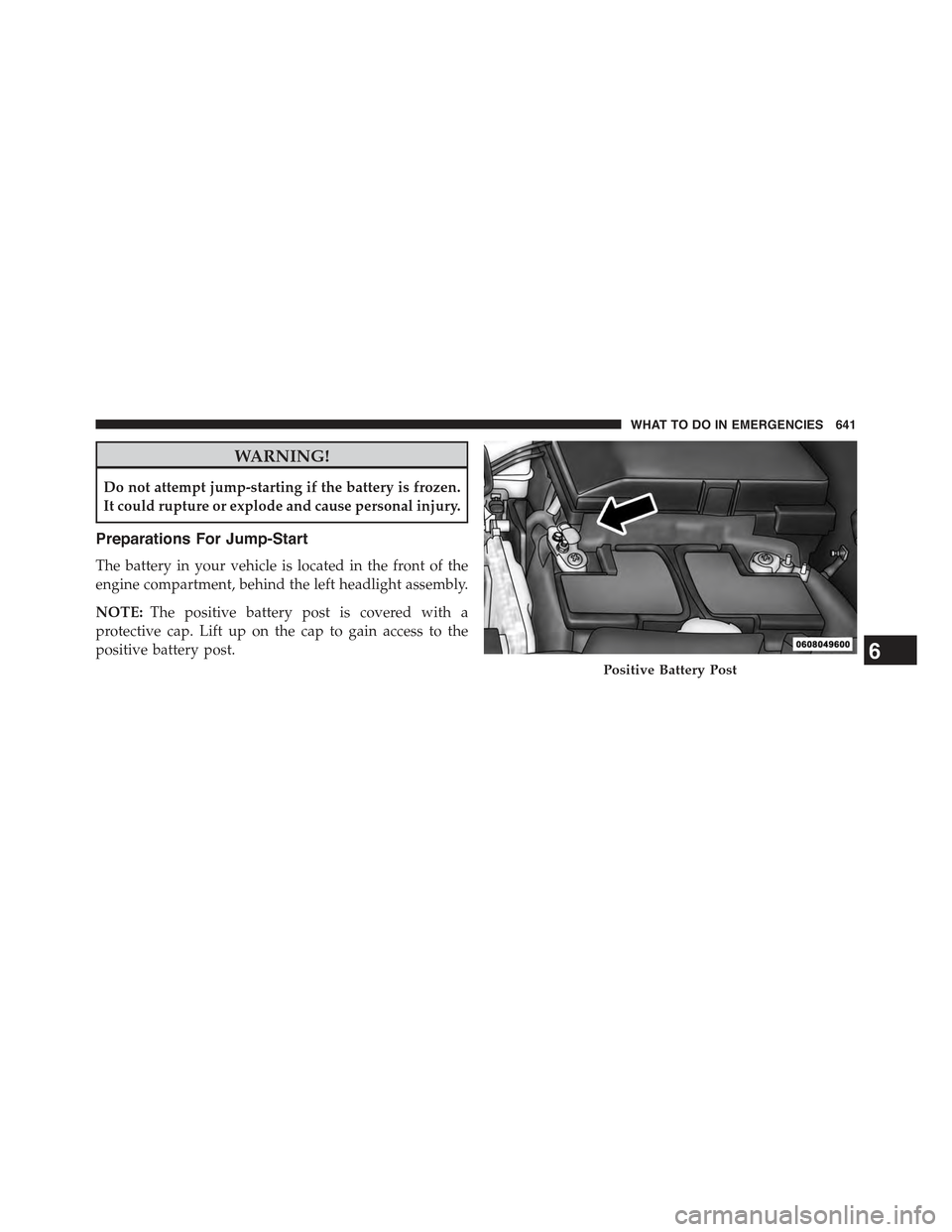
Preparations For Jump-Start
The battery in your vehicle is located in the front of the
engine compartment, behind the left headlight assembly.
NOTE:The positive battery post is covered with a
protective cap. Lift up on the cap to gain access to the
positive battery post.
Positive Battery Post6
WHAT TO DO IN EMERGENCIES 641
Page 705 of 772
solvents, detergents, or ammonia-based cleaners to clean
leather upholstery. Application of a leather conditioner is
not required to maintain the original condition.
WARNING!
Do not use volatile solvents for cleaning purposes.
Many are potentially flammable, and if used in
closed areas they may cause respiratory harm.
Cleaning Headlights
Your vehicle is equipped with plastic headlights and fog
lights that are lighter and less susceptible to stone break-
age than glass headlights.
Plastic is not as scratch resistant as glass and therefore
different lens cleaning procedures must be followed.
To minimize the possibility of scratching the lenses and
reducing light output, avoid wiping with a dry cloth. To
remove road dirt, wash with a mild soap solution fol-
lowed by rinsing.
Do not use abrasive cleaning components, solvents, steel
wool or other aggressive material to clean the lenses.
Glass Surfaces
All glass surfaces should be cleaned on a regular basis
with MOPAR® Glass Cleaner, or any commercial
household-type glass cleaner. Never use an abrasive type
cleaner. Use caution when cleaning the inside rear win-
dow equipped with electric defrosters or the right rear
quarter window equipped with the radio antenna. Do
not use scrapers or other sharp instrument that may
scratch the elements.
7
MAINTAINING YOUR VEHICLE 703
Page 751 of 772
Alarm
Arm The System........................19
Alarm, Panic.............................25
Alarm (Security Alarm)......................19
Alarm System (Security Alarm)................19
All Wheel Drive (AWD).....................494
Alterations/Modifications, Vehicle...............8
Antifreeze (Engine Coolant)..................688
Disposal..............................691
Anti-Lock Brake System (ABS)................519
Anti-Lock Warning Light....................333
Appearance Care.........................698
Arming System (Security Alarm)...............19
Assist, Hill Start..........................523
Auto Down Power Windows..................45
Automatic Door Locks......................36
Automatic Headlights......................169
Automatic High Beams.....................170
Automatic Temperature Control (ATC)..........426
Automatic Transaxle.......................481
Automatic Transmission....................484
Adding Fluid..........................696
Fluid and Filter Changes..................696
Fluid Change..........................696
Fluid Level Check.......................694
Fluid Type............................694
Special Additives.......................695
Torque Converter.......................493
Auto Unlock, Doors........................36
Auto Up Power Windows....................45
Auxiliary Electrical Outlet (Power Outlet)........302
Auxiliary Power Outlet.....................302
Axle Fluid..............................730
Axle Lubrication..........................730
Battery.................................669
Keyless Transmitter Replacement (RKE)........26
Belts, Seat...............................11810
INDEX 749
Page 754 of 772
Selection of Coolant (Antifreeze).............688
Corrosion Protection.......................698
Cruise Control (Speed Control)................191
Cupholders..............................311
Customer Assistance.......................739
Data Recorder, Event.......................91
Daytime Brightness, Interior Lights.............177
Daytime Running Lights....................172
Dealer Service............................659
Defroster, Rear Window.....................321
Defroster, Windshield......................119
Diagnostic System, Onboard.................657
Dimmer Switch, Headlight...................174
Dipsticks
Oil (Engine)...........................661
Disabled Vehicle Towing....................648
Disposal
Antifreeze (Engine Coolant)................691
Door Locks
Door Locks............................34
Key Fob . . . . . . . . . . . . . . . . . . . . . . . . . . . . . . .34
Remote...............................34
Remote Keyless Entry (RKE)................34
Door Locks, Automatic......................36
Door Opener, Garage.......................288
Driver Information Display
DID . . . . . . . . . . . . . . . . . . . . . . . . . . . . . . . ..380
Instrument Cluster Display................380
Driver Information Display (DID)
Instrument Cluster......................374
Oil Change............................374
Driver’s Seat Back Tilt......................153
Driving................................505
E-85 Fuel...............................584
Economy (Fuel) Mode......................484
Electrical Outlet, Auxiliary (Power Outlet)........302
752 INDEX
Page 758 of 772
GVWR.................................591
Hazard Warning Flasher....................615
Headlights
Automatic............................169
Bulb Replacement.......................723
Cleaning.............................703
Delay................................169
High Beam/Low Beam Select Switch.........174
Lights On Reminder.....................172
On With Wipers........................169
Passing..............................174
Replacing.............................722
Switch...............................168
Time Delay............................169
Head Restraints..........................157
Head Rests..............................157
Heated Mirrors...........................140
Heater.................................426
Heater, Engine Block.......................480
High Beam Indicator.......................331
High Beam/Low Beam Select (Dimmer) Switch . . . .174
Hill Descent Control.......................346
Hill Descent Control Indicator................526
Hill Start Assist...........................523
Hitches
Trailer Towing.........................597
Holder, Coin.............................313
Holder, Cup.............................311
HomeLink® (Garage Door Opener)............288
Hood Release............................166
Ignition
Key . . . . . . . . . . . . . . . . . . . . . . . . . . . . . . . . . .12
Illuminated Entry..........................22
Immobilizer (Sentry Key)....................16
Inside Rearview Mirror.....................130
Instrument Cluster........................329
756 INDEX
Page 760 of 772
Lead Free Gasoline........................579
Leaks, Fluid.............................121
Life of Tires.............................562
Liftgate.................................47
Liftgate Window Wiper/Washer...............320
Light Bulbs..............................120
Lights.................................120
Airbag................................87
Anti-Lock.............................333
Automatic Headlights....................169
Back-Up..............................725
Battery Saver..........................178
Brake Assist Warning....................538
Brake Warning.........................331
Bulb Replacement.......................721
Daytime Running.......................172
Dimmer Switch, Headlight.................173
Exterior..............................120
Fog . . . . . . . . . . . . . . . . . . . . . . . . . . . . . . . ..172
Hazard Warning Flasher..................615
Headlights............................168
Headlights On Reminder..................172
Headlights On With Wipers................169
Headlight Switch.......................168
High Beam............................174
High Beam Indicator.....................331
High Beam/Low Beam Select...............174
Hill Descent Control Indicator..............526
Illuminated Entry........................22
Instrument Cluster......................168
Intensity Control........................176
Interior..............................176
License..............................726
Lights On Reminder.....................172
Malfunction Indicator (Check Engine).........339
Parade Mode (Daytime Brightness)...........177
Passing..............................174
RearServicing.........................725
758 INDEX