light JEEP CHEROKEE 2015 KL / 5.G Owner's Manual
[x] Cancel search | Manufacturer: JEEP, Model Year: 2015, Model line: CHEROKEE, Model: JEEP CHEROKEE 2015 KL / 5.GPages: 772, PDF Size: 18.21 MB
Page 91 of 772
WARNING!
Ignoring the Air Bag Warning Light in your instru-
ment panel could mean you won’t have the air bags
to protect you in a collision. If the light does not come
on as a bulb check when the ignition is first turned
on, stays on after you start the vehicle, or if it comes
on as you drive, have an authorized dealer service the
air bag system immediately.
Redundant Air Bag Warning Light
If a fault with the Air Bag Warning Light is
detected, which could affect the Supplemental
Restraint System (“SRS”), the Redundant
Warning Light will illuminate on the instru-
ment panel.
The Redundant Warning Light will stay on until the fault
is cleared. In addition, a single chime will sound to alert
you that the Redundant Warning Light has come on and
a fault has been detected. If the Redundant Warning
Light comes on intermittently or remains on while driv-
ing have an authorized dealer service the vehicle imme-
diately.
For additional information regarding the Redundant
Warning Light refer to the “Instrument Panel” section of
this manual.
2
THINGS TO KNOW BEFORE STARTING YOUR VEHICLE 89
Page 120 of 772
WARNING!(Continued)
•If it is necessary to sit in a parked vehicle with the
engine running, adjust your heating or cooling
controls to force outside air into the vehicle. Set the
blower at high speed.
The best protection against carbon monoxide entry into
the vehicle body is a properly maintained engine exhaust
system.
Whenever a change is noticed in the sound of the exhaust
system, when exhaust fumes can be detected inside the
vehicle, or when the underside or rear of the vehicle is
damaged, have a competent mechanic inspect the com-
plete exhaust system and adjacent body areas for broken,
damaged, deteriorated, or mispositioned parts. Open
seams or loose connections could permit exhaust fumes
to seep into the passenger compartment. In addition,
inspect the exhaust system each time the vehicle is raised
for lubrication or oil change. Replace as required.
Safety Checks You Should Make Inside The
Vehicle
Seat Belts
Inspect the seat belt system periodically, checking for
cuts, frays, and loose parts. Damaged parts must be
replaced immediately. Do not disassemble or modify the
system.
Front seat belt assemblies must be replaced after a
collision. Rear seat belt assemblies must be replaced after
a collision if they have been damaged (i.e., bent retractor,
torn webbing, etc.). If there is any question regarding seat
belt or retractor condition, replace the seat belt.
Air Bag Warning Light
The light should come on and remain on for
four to eight seconds as a bulb check when the
ignition switch is first turned ON. If the light is
11 8 T H I N G S TO K N O W B E F O R E S TA R T I N G Y O U R V E H I C L E
Page 121 of 772
not lit during starting, see your authorized dealer. If the
light stays on, flickers, or comes on while driving, have
the system checked by an authorized dealer.
Defroster
Check operation by selecting the defrost mode and place
the blower control on high speed. You should be able to
feel the air directed against the windshield. See your
authorized dealer for service if your defroster is inoper-
able.
Floor Mat Safety Information
Always use floor mats designed to fit the footwell of your
vehicle. Use only floor mats that leave the pedal area
unobstructed and that are firmly secured so that they
cannot slip out of position and interfere with the pedals
or impair safe operation of your vehicle in other ways.
WARNING!
Pedals that cannot move freely can cause loss of
vehicle control and increase the risk of serious per-
sonal injury.
•Always make sure that floor mats are properly
attached to the floor mat fasteners.
•Never place or install floor mats or other floor
coverings in the vehicle that cannot be properly
secured to prevent them from moving and interfer-
ing with the pedals or the ability to control the
vehicle.
•Never put floor mats or other floor coverings on top
of already installed floor mats. Additional floor
mats and other coverings will reduce the size of the
pedal area and interfere with the pedals.
(Continued)
2
THINGS TO KNOW BEFORE STARTING YOUR VEHICLE 119
Page 122 of 772
WARNING!(Continued)
•Check mounting of mats on a regular basis. Always
properly reinstall and secure floor mats that have
been removed for cleaning.
•Always make sure that objects cannot fall into the
driver footwell while the vehicle is moving. Ob-
jects can become trapped under the brake pedal
and accelerator pedal causing a loss of vehicle
control.
•If required, mounting posts must be properly in-
stalled, if not equipped from the factory.
Failure to properly follow floor mat installation or
mounting can cause interference with the brake
pedal and accelerator pedal operation causing loss of
control of the vehicle.
Periodic Safety Checks You Should Make Outside
The Vehicle
Tires
Examine tires for excessive tread wear and uneven wear
patterns. Check for stones, nails, glass, or other objects
lodged in the tread or sidewall. Inspect the tread for cuts
and cracks. Inspect sidewalls for cuts, cracks and bulges.
Check the wheel nuts for tightness. Check the tires
(including spare) for proper cold inflation pressure.
Lights
Have someone observe the operation of brake lights and
exterior lights while you work the controls. Check turn
signal and high beam indicator lights on the instrument
panel.
120 THINGS TO KNOW BEFORE STARTING YOUR VEHICLE
Page 126 of 772
▫Front Heated Seats — If Equipped.........154
▫Front Ventilated Seats — If Equipped.......156
▫Head Restraints......................157
▫60/40 Split Folding Rear Seat With Fold-Flat
Feature............................159
!DRIVER MEMORY SEAT — IF EQUIPPED . . . .162
▫Programming The Memory Feature.........163
▫Linking And Unlinking The Remote Keyless Entry
Transmitter To Memory.................164
▫Memory Position Recall.................165
▫Easy Entry/Exit Seat...................165
!TO OPEN AND CLOSE THE HOOD.........166
!LIGHTS.............................168
▫Headlight Switch.....................168
▫Automatic Headlights — If Equipped.......169
▫Headlights On With Wipers (Available With
Automatic Headlights Only).............169
▫Headlight Time Delay..................169
▫Automatic High Beam Headlamp Control — If
Equipped...........................170
▫Daytime Running Lights (DRL) — If
Equipped...........................172
▫Lights-On Reminder...................172
▫Fog Lights — If Equipped...............172
▫Multifunction Lever...................173
▫Turn Signals.........................174
▫Lane Change Assist...................174
▫High/Low Beam Switch................174
124 UNDERSTANDING THE FEATURES OF YOUR VEHICLE
Page 127 of 772
▫Flash-To-Pass........................174
▫Front Map/Reading Lights...............175
▫Interior Lights.......................176
▫Battery Saver Feature..................178
!WINDSHIELD WIPERS AND WASHERS......178
▫Windshield Wiper Operation.............179
▫Intermittent Wiper System...............180
▫Windshield Washer Operation.............181
▫Mist...............................182
▫Windshield Wiper De-Icer — If Equipped . . . .183
▫Rain Sensing Wipers — If Equipped........183
!TILT/TELESCOPING STEERING COLUMN . . .185
!HEATED STEERING WHEEL — IF EQUIPPED . .186
!ELECTRONIC SPEED CONTROL — IF
EQUIPPED...........................187
▫To Activate..........................188
▫To Set A Desired Speed.................189
▫To Deactivate........................189
▫To Resume Speed.....................189
▫To Vary The Speed Setting...............189
▫To Accelerate For Passing................191
!ADAPTIVE CRUISE CONTROL (ACC) — IF
EQUIPPED...........................191
▫Adaptive Cruise Control (ACC) Operation . . . .194
▫Activating Adaptive Cruise Control (ACC) . . . .195
▫To Activate/Deactivate..................196
▫To Set A Desired ACC Speed.............197
3
UNDERSTANDING THE FEATURES OF YOUR VEHICLE 125
Page 132 of 772
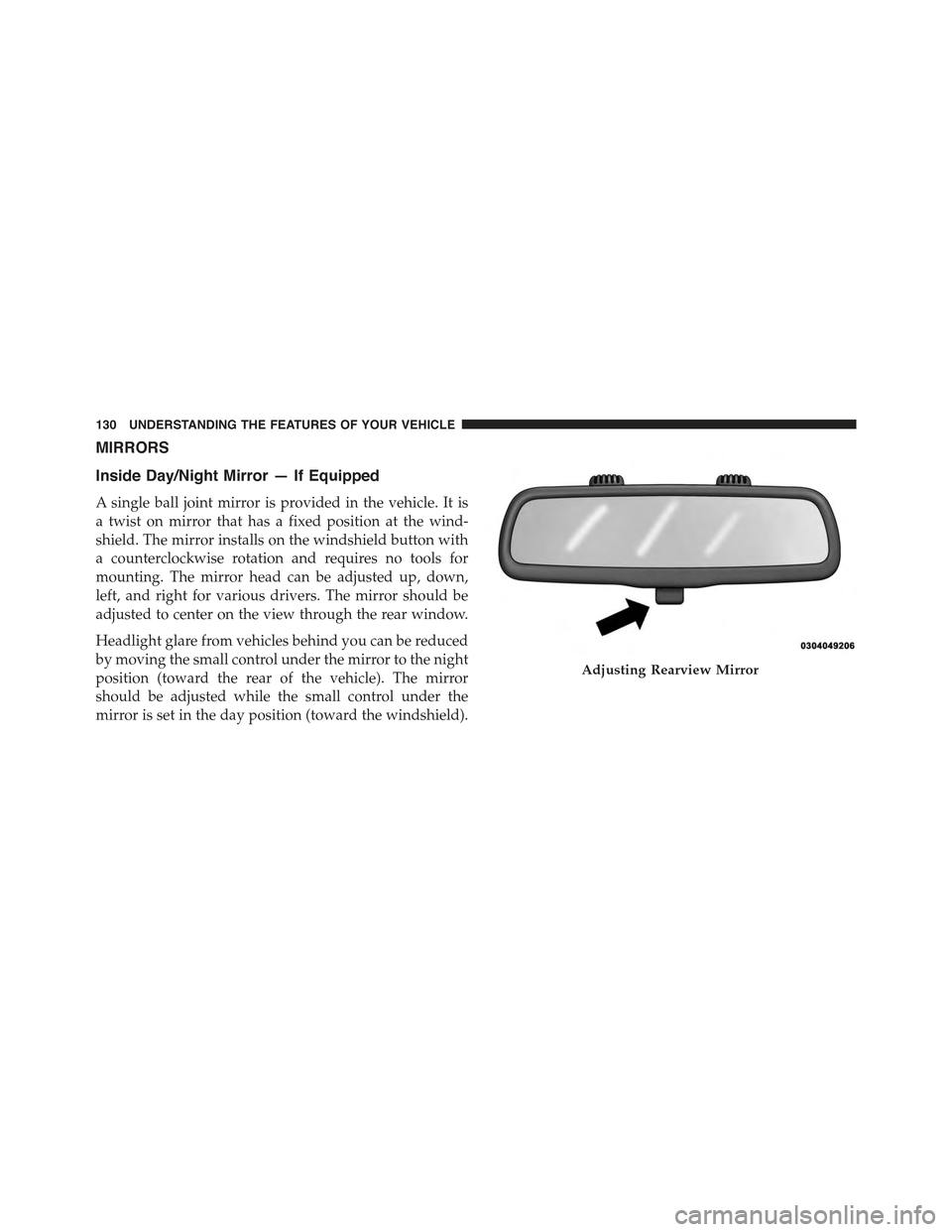
MIRRORS
Inside Day/Night Mirror — If Equipped
A single ball joint mirror is provided in the vehicle. It is
a twist on mirror that has a fixed position at the wind-
shield. The mirror installs on the windshield button with
a counterclockwise rotation and requires no tools for
mounting. The mirror head can be adjusted up, down,
left, and right for various drivers. The mirror should be
adjusted to center on the view through the rear window.
Headlight glare from vehicles behind you can be reduced
by moving the small control under the mirror to the night
position (toward the rear of the vehicle). The mirror
should be adjusted while the small control under the
mirror is set in the day position (toward the windshield).
Adjusting Rearview Mirror
130 UNDERSTANDING THE FEATURES OF YOUR VEHICLE
Page 134 of 772
NOTE:The ASSIST and 9–1–1 features operate through
the Uconnect® Access service. These buttons will only
operate as long as your Uconnect® Access service is
active. Refer to your “Uconnect® System supplement
manual” for further information.
ASSIST Call
The ASSIST Button is used to automatically connect you
to any one of the following support centers:
•Roadside Assistance – If you get a flat tire, or need a
tow, just press the Assist button and you’ll be con-
nected to someone who can help. Roadside Assistance
will know what vehicle you’re driving and its location.
Additional fees may apply for roadside Assistance.
•Uconnect® Access Customer Care – In-vehicle support
for Uconnect® Access and Uconnect® Access Via
Mobile features.
•Vehicle Customer Care – Total support for all other
vehicle issues.
9-1-1 Call
1. Press the 9-1-1 Call button on the Rearview Mirror.
NOTE:In case the 9-1-1 Call button is pushed in error,
there will be a 10 second delay before the 9-1-1 Call
system initiates a call to a 9-1-1 operator. To cancel the
9-1-1 Call connection, press the 9-1-1 Call button on the
Rearview Mirror or press the cancellation button on the
Phone Screen. Termination of the 9-1-1 Call will turn the
green LED light on the Rearview Mirror off.
2. The LED light located between the Assist and 9-1-1
buttons on the Rearview Mirror will turn green once a
connection to a 9-1-1 operator has been made.
132 UNDERSTANDING THE FEATURES OF YOUR VEHICLE
Page 137 of 772
WARNING!(Continued)
•Modifications to any part of the 9-1-1 Call system
could cause the air bag system to fail when you
need it. You could be injured if the air bag system
is not there to help protect you.
9-1-1 Call System Limitations
Vehicles sold in Canada and MexicoDO NOThave 9-1-1
Call system capabilities.
9-1-1 or other emergency line operators in Canada and
Mexico may not answer or respond to 9-1-1 system calls.
If the 9-1-1 Call system detects a malfunction, any of the
following may occur at the time the malfunction is
detected, and at the beginning of each ignition cycle:
•The Rearview Mirror light located between the Assist
and 9-1-1 buttons will continuously be illuminated
red.
•The Phone Screen will display the following message
“Vehicle phone requires service. Please contact your
dealer.”
•An In-Vehicle Audio message will state “Vehicle phone
requires service. Please contact your dealer.”
WARNING!
•Ignoring the Rearview Mirror light could mean you
will not have 9-1-1 Call services. If the Rearview
Mirror light is illuminated, have an authorized
dealer service the 9-1-1 Call system immediately.
•The Occupant Restraint Control module turns on
the air bag Warning Light on the instrument panel
if a malfunction in any part of the system is
detected. If the air bag Warning Light is illumi-
nated, have an authorized dealer service the ORC
system immediately.
3
UNDERSTANDING THE FEATURES OF YOUR VEHICLE 135
Page 139 of 772
CAUTION!
To avoid damage to the mirror during cleaning, never
spray any cleaning solution directly onto the mirror.
Apply the solution onto a clean cloth and wipe the
mirror clean.
Outside Mirrors
To receive maximum benefit, adjust the outside mirror(s)
to center on the adjacent lane of traffic and a slight
overlap of the view obtained from the inside mirror.
NOTE:The passenger side convex outside mirror will
give a much wider view to the rear, and especially of the
lane next to your vehicle.
WARNING!
Vehicles and other objects seen in the passenger side
convex mirror will look smaller and farther away
than they really are. Relying too much on your
passenger side convex mirror could cause you to
collide with another vehicle or other object. Use your
inside mirror when judging the size or distance of a
vehicle seen in the passenger side convex mirror.
3
UNDERSTANDING THE FEATURES OF YOUR VEHICLE 137