warning light JEEP CHEROKEE 2015 KL / 5.G Workshop Manual
[x] Cancel search | Manufacturer: JEEP, Model Year: 2015, Model line: CHEROKEE, Model: JEEP CHEROKEE 2015 KL / 5.GPages: 772, PDF Size: 18.21 MB
Page 380 of 772
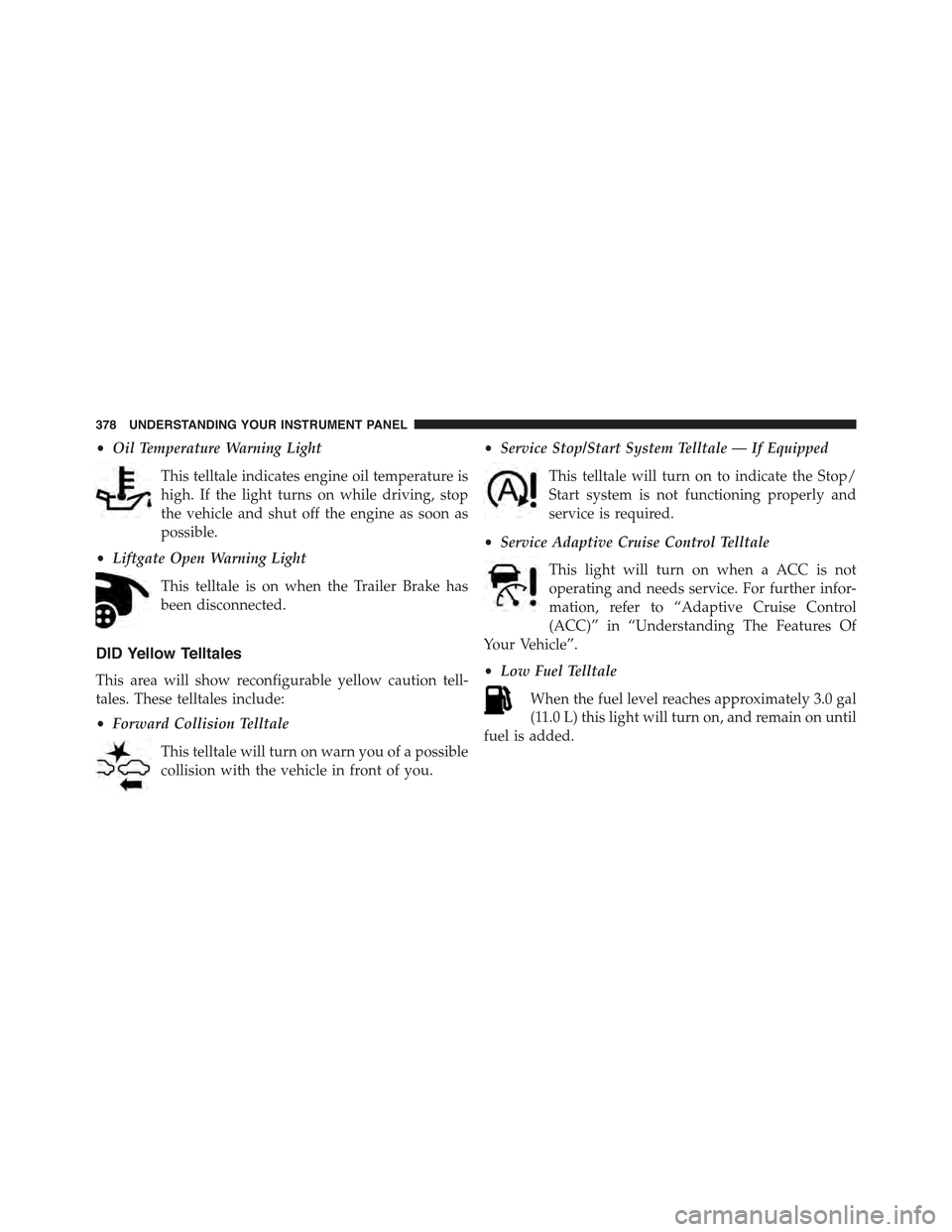
•Oil Temperature Warning Light
This telltale indicates engine oil temperature is
high. If the light turns on while driving, stop
the vehicle and shut off the engine as soon as
possible.
•Liftgate Open Warning Light
This telltale is on when the Trailer Brake has
been disconnected.
DID Yellow Telltales
This area will show reconfigurable yellow caution tell-
tales. These telltales include:
•Forward Collision Telltale
This telltale will turn on warn you of a possible
collision with the vehicle in front of you.
•Service Stop/Start System Telltale — If Equipped
This telltale will turn on to indicate the Stop/
Start system is not functioning properly and
service is required.
•Service Adaptive Cruise Control Telltale
This light will turn on when a ACC is not
operating and needs service. For further infor-
mation, refer to “Adaptive Cruise Control
(ACC)” in “Understanding The Features Of
Your Vehicle”.
•Low Fuel Telltale
When the fuel level reaches approximately 3.0 gal
(11.0 L) this light will turn on, and remain on until
fuel is added.
378 UNDERSTANDING YOUR INSTRUMENT PANEL
Page 386 of 772
Audio
Push and release the UP or DOWN arrow button until
the Audio Menu displays in the DID.
Stored Messages
Push and release the UP or DOWN arrow button until
the Messages Menu item is highlighted in the DID. This
feature shows the number of stored warning messages.
Pushing the RIGHT arrow button will allow you to see
what the stored messages are.
Screen Setup
Push and release the UP or DOWN arrow button until
the Screen Setup Menu displays in the DID. Push and
release the OK button to enter the sub-menus. The Screen
Setup feature allows you to change what information is
displayed in the instrument cluster as well as the location
that information is displayed.
Uconnect® SETTINGS
The Uconnect® system uses a combination of buttons on
the touchscreen and buttons on the faceplate located on
the center of the instrument panel that allow you to
access and change the customer programmable features.
Many features can vary by vehicle.
384 UNDERSTANDING YOUR INSTRUMENT PANEL
Page 493 of 772
If the transmission temperature exceeds normal operat-
ing limits, the transmission controller may modify the
transmission shift schedule, reduce engine torque,
and/or expand the range of torque converter clutch
engagement. This is done to prevent transmission dam-
age due to overheating.
If the transmission becomes extremely hot, the “Trans-
mission Temperature Warning Light” may illuminate and
the transmission may operate differently until the trans-
mission cools down.
During cold temperatures, transmission operation may
be modified depending on engine and transmission
temperature as well as vehicle speed. This feature im-
proves warm up time of the engine and transmission to
achieve maximum efficiency. Engagement of the torque
converter clutch, and shifts into 8th or 9th gear, are
inhibited until the transmission fluid is warm (refer to the
“Note” under “Torque Converter Clutch” in this section).
Normal operation will resume once the transmission
temperature has risen to a suitable level.
SPORT — IF EQUIPPED
This mode alters the transmission’s automatic shift
schedule for sportier driving. Upshift speeds are in-
creased to make full use of available engine power.
SPORT mode is activated using the rotary switch on the
center console. Refer to#Selec-Terrain#in this section for
further information.
Transmission Limp Home Mode
Transmission function is monitored electronically for
abnormal conditions. If a condition is detected that could
result in transmission damage, Transmission Limp Home
Mode is activated. In this mode, the transmission remains
in fourth gear regardless of which forward gear is
selected. PARK, REVERSE, and NEUTRAL will continue
5
STARTING AND OPERATING 491
Page 495 of 772
Moving the shift lever to the ERS position (beside
DRIVE) will activate ERS mode, display the current gear
in the instrument cluster, and maintain that gear as the
top available gear. Once in ERS mode, moving the shift
lever forward (-) or rearward (+) will change the top
available gear.
To exit ERS mode, simply return the shift lever to the
DRIVE position.
WARNING!
Do not downshift for additional engine braking on a
slippery surface. The drive wheels could lose their
grip and the vehicle could skid, causing a collision or
personal injury.
NOTE:To select the proper gear position for maximum
deceleration (engine braking), move the shift lever into
the ERS position, then simply press and hold it forward
(-). The transmission will shift to the range from which
the vehicle can best be slowed down.
Torque Converter Clutch
A feature designed to improve fuel economy has been
included in the automatic transmission on your vehicle.
A clutch within the torque converter engages automati-
cally at calibrated speeds. This may result in a slightly
different feeling or response during normal operation in
the upper gears. When the vehicle speed drops or during
some accelerations, the clutch automatically disengages.
5
STARTING AND OPERATING 493
Page 502 of 772
NEUTRAL Shift Procedure
WARNING!
You or others could be injured or killed if you leave
the vehicle unattended with the power transfer unit
in the NEUTRAL (N) position without first fully
engaging the parking brake. The NEUTRAL (N)
position disengages both the front and rear drive
shafts from the powertrain and will allow the vehicle
to roll, even if the transmission is in PARK. The
parking brake should always be applied when the
driver is not in the vehicle.
1. Bring the vehicle to a complete stop and shift the
transmission to PARK.
2. Turn the engine OFF.
3. Turn the ignition switch to the ON/RUN position, but
do not start the engine.
4. Press and hold the brake pedal.
5. Shift the transmission into NEUTRAL.
6. Using a ballpoint pen or similar object, press and hold
the recessed power transfer unit NEUTRAL (N) button
(located by the selector switch) for four seconds. The
light behind the NEUTRAL (N) symbol will blink,
indicating shift in progress. The light will stop blink-
ing (stay on solid) when the shift to NEUTRAL (N) is
complete.
500 STARTING AND OPERATING
Page 512 of 772
light efforts while parking and good feel while driving. If
the electric steering system experiences a fault that
reduces assist or prevents the vehicle from providing
assist, you will still have the ability to steer the vehicle
manually.
WARNING!
Continued operation with reduced assist could pose
a safety risk to yourself and others. Service should be
obtained as soon as possible.
If the “SERVICE POWER STEERING#OR
#POWER STEERING ASSIST OFF - SERVICE
SYSTEM” message and a steering wheel icon
are displayed on the EVIC/DID screen, it indi-
cates that the vehicle needs to be taken to the dealer for
service. It is likely the vehicle has lost power steering
assistance. Refer to “Electronic Vehicle Information
(EVIC) or#Driver Information Display (DID)” in “Under-
standing Your Instrument Panel” for further information.
If the “POWER STEERING SYSTEM HOT - PERFOR-
MANCE MAY BE LIMITED” message and an icon are
displayed on the EVIC/DID screen, it indicates that
extreme steering maneuvers may have occurred, which
caused an over temperature condition in the power
steering system. You will lose power steering assistance
momentarily until the over temperature condition no
longer exists. Once driving conditions are safe, then pull
over and let vehicle idle for a few moments until the light
turns off. Refer to “Electronic Vehicle Information
(EVIC)/Driver Information Display (DID)” in “Under-
standing Your Instrument Panel” for further information.
510 STARTING AND OPERATING
Page 514 of 772
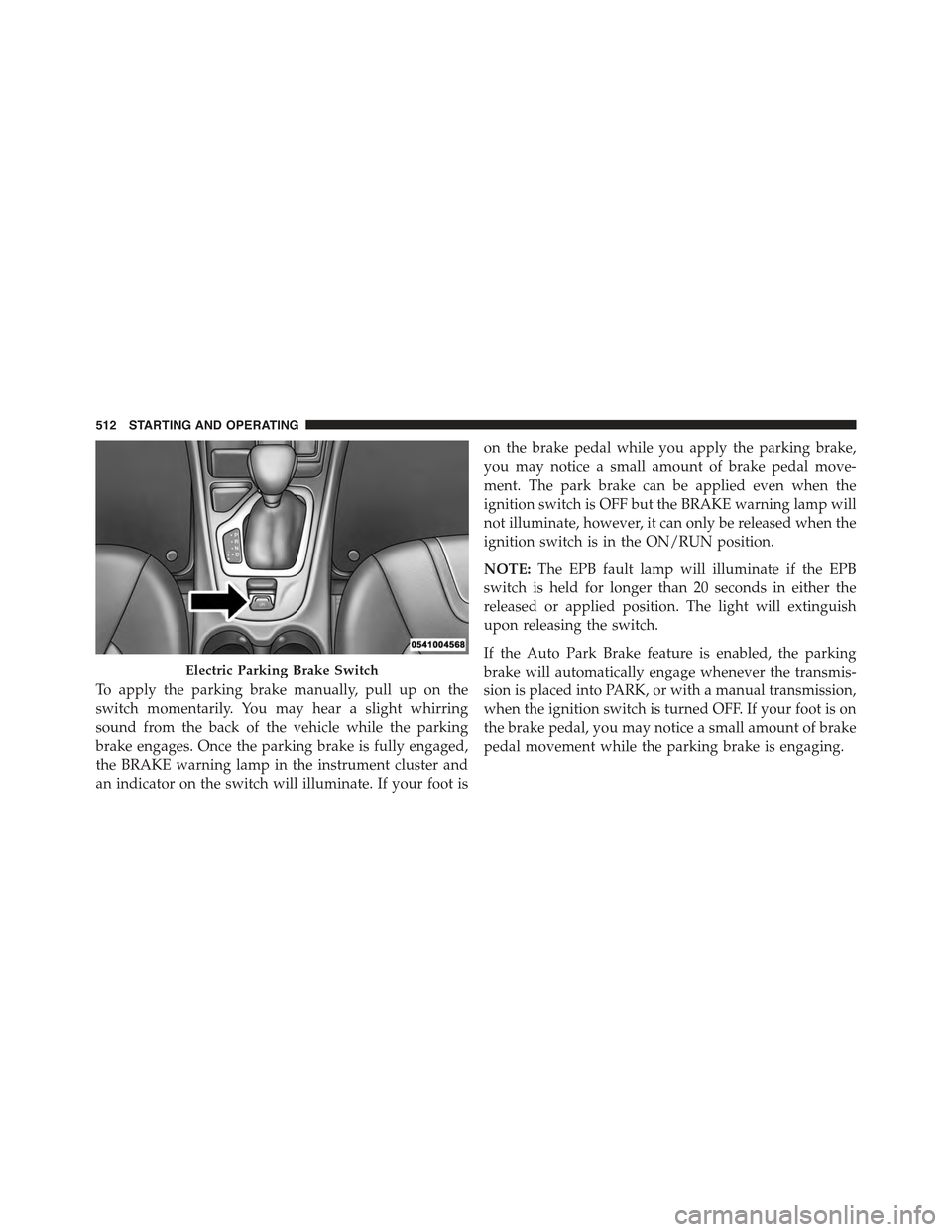
To apply the parking brake manually, pull up on the
switch momentarily. You may hear a slight whirring
sound from the back of the vehicle while the parking
brake engages. Once the parking brake is fully engaged,
the BRAKE warning lamp in the instrument cluster and
an indicator on the switch will illuminate. If your foot is
on the brake pedal while you apply the parking brake,
you may notice a small amount of brake pedal move-
ment. The park brake can be applied even when the
ignition switch is OFF but the BRAKE warning lamp will
not illuminate, however, it can only be released when the
ignition switch is in the ON/RUN position.
NOTE:The EPB fault lamp will illuminate if the EPB
switch is held for longer than 20 seconds in either the
released or applied position. The light will extinguish
upon releasing the switch.
If the Auto Park Brake feature is enabled, the parking
brake will automatically engage whenever the transmis-
sion is placed into PARK, or with a manual transmission,
when the ignition switch is turned OFF. If your foot is on
the brake pedal, you may notice a small amount of brake
pedal movement while the parking brake is engaging.
Electric Parking Brake Switch
512 STARTING AND OPERATING
Page 515 of 772
The parking brake will release automatically when the
ignition switch is ON, the transmission is in Drive or
Reverse, the driver seat belt is buckled, and an attempt is
made to drive away.
To release the park brake manually, the ignition switch
must be in the ON/RUN position. Put your foot on the
brake pedal, then push the parking brake switch down
momentarily. You may hear a slight whirring sound from
the back of the car while the parking brake disengages.
You may also notice a small amount of movement in the
brake pedal. Once the parking brake is fully disengaged,
The BRAKE warning lamp in the instrument cluster and
the LED indicator on the switch will extinguish.
NOTE:When parking on a hill, it is important to turn the
front wheels toward the curb on a downhill grade and
away from the curb on an uphill grade. Apply the
parking brake before placing the shift lever in PARK,
otherwise the load on the transmission locking mecha-
nism may make it difficult to move the shift lever out of
PARK. The parking brake should always be applied
whenever the driver is not in the vehicle.
WARNING!
•Never use the PARK position as a substitute for the
parking brake. Always apply the parking brake
fully when parked to guard against vehicle move-
ment and possible injury or damage.
•When leaving the vehicle, always remove the Key
Fob from the ignition and lock your vehicle.
(Continued)
5
STARTING AND OPERATING 513
Page 516 of 772
WARNING!(Continued)
•Never leave children alone in a vehicle, or with
access to an unlocked vehicle. Allowing children to
be in a vehicle unattended is dangerous for a
number of reasons. A child or others could be
seriously or fatally injured. Children should be
warned not to touch the parking brake, brake pedal
or the shift lever.
•Do not leave the Key Fob in or near the vehicle, or
in a location accessible to children, and do not
leave a vehicle equipped with Keyless Enter-N-
Go™ in the ACC or ON/RUN mode. A child could
operate power windows, other controls, or move
the vehicle.
•Be sure the parking brake is fully disengaged
before driving; failure to do so can lead to brake
failure and a collision.
(Continued)
WARNING!(Continued)
•Always fully apply the parking brake when leav-
ing your vehicle, or it may roll and cause damage or
injury. Also be certain to leave the transmission in
PARK. Failure to do so may allow the vehicle to roll
and cause damage or injury.
CAUTION!
If the Brake System Warning Light remains on with
the parking brake released, a brake system malfunc-
tion is indicated. Have the brake system serviced by
an authorized dealer immediately.
If exceptional circumstances should make it necessary to
engage the parking brake while the vehicle is in motion,
maintain upward pressure on the electric park brake
switch for as long as engagement is desired. The Brake
warning lamp will illuminate, and a continuous chime
514 STARTING AND OPERATING
Page 520 of 772
BRAKE SYSTEM
Your vehicle is equipped with dual hydraulic
brake systems. If either of the two hydraulic
systems loses normal capability, the remaining
system will still function. However, there will
be some loss of overall braking effectiveness. This will be
evident by increased pedal travel during application and
greater pedal force required to slow or stop the vehicle. In
addition, if the malfunction is caused by a leak in the
hydraulic system, the “Brake Warning Light” will turn on
as the brake fluid level drops in the master cylinder.
In the event power assist is lost for any reason (i.e.,
repeated brake applications with the engine OFF) the
brakes will still function. However, the effort required to
brake the vehicle will be much greater than that required
with the power system operating.
WARNING!
•Riding the brakes can lead to brake failure and
possibly a collision. Driving with your foot resting
or riding on the brake pedal can result in abnor-
mally high brake temperatures, excessive lining
wear, and possible brake damage. You would not
have your full braking capacity in an emergency.
•Driving a vehicle with the “Brake Warning Light”
on is dangerous. A significant decrease in braking
performance or vehicle stability during braking
may occur. It will take you longer to stop the
vehicle or will make your vehicle harder to control.
You could have a collision. Have the vehicle
checked immediately.
518 STARTING AND OPERATING